nodatachat-core
Health Pass
- License — License: Apache-2.0
- Description — Repository has a description
- Active repo — Last push 0 days ago
- Community trust — 13 GitHub stars
Code Fail
- process.env — Environment variable access in packages/cli/src/send.ts
- network request — Outbound network request in packages/cli/src/send.ts
- crypto private key — Private key handling in packages/core/examples/send-secret.ts
- Hardcoded secret — Potential hardcoded credential in packages/core/examples/send-secret.ts
Permissions Pass
- Permissions — No dangerous permissions requested
No AI report is available for this listing yet.
Open core of NoData — the Information Access Processor. Local AES-256-GCM secret encryption + a cryptographic proof chain. We compute access, not permissions.
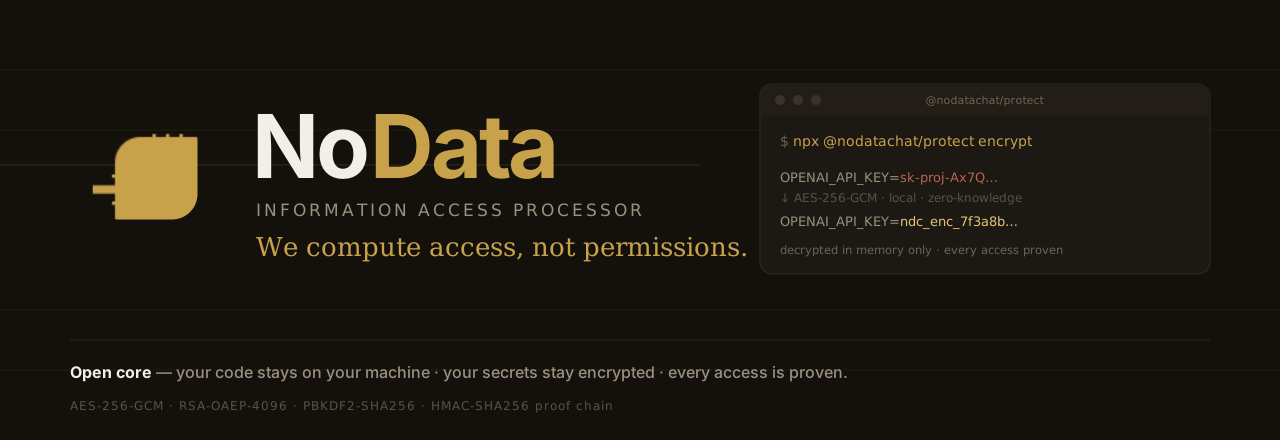
Your code stays on your machine. Your secrets stay encrypted. Every access is proven.
The open source core of the NoData Information Access Processor — the local node that encrypts your secrets and proves every access, with nothing ever leaving your machine in the clear.
We encourage you not to pay.
Developers — let's make a deal.
If you encrypt, you don't pay. Ever.
(We only block abusive bots and unfair automation — never you.)When you grow, you'll want Capsule — a personal vault, and a whole world of security, privacy, and ease of use.




The Problem
Your .env file contains your database password, your API keys, your cloud credentials — in plain text.
One poisoned VS Code extension. One npm package with a postinstall hook. One git push mistake. One stolen laptop. Game over.
OPENAI_API_KEY=sk-proj-Ax7Q...        ← anything on your machine can read this
DATABASE_URL=postgres://prod:pass@...  ← and this
STRIPE_KEY=sk_live_4eC39...            ← and this
This is exactly how GitHub itself was breached in 2024 — a poisoned editor extension read a developer's secrets straight off disk. No zero-day required.
The Fix: One Command
npx @nodatachat/protect encrypt
OPENAI_API_KEY=aes256gcm:v2:hUPNqLZ:Rgd1Dh...   ← useless if stolen
DATABASE_URL=aes256gcm:v2:8KmQ2cV:p0Ls9a...      ← useless if stolen
STRIPE_KEY=aes256gcm:v2:c3D9a0X:Fv7Kd2...        ← useless if stolen
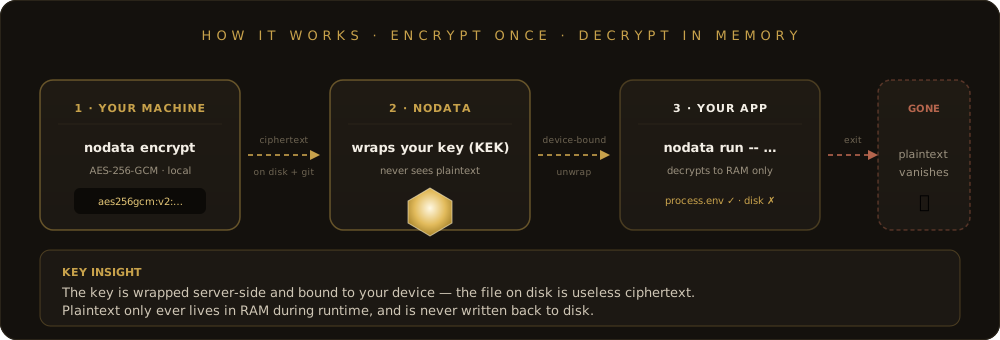
Your app still works. Secrets are decrypted in memory only at runtime:
npx @nodatachat/protect run -- npm start
# Secrets exist only in RAM. Never on disk.
Quick Start
# 1. Setup (creates free API key — no signup, no credit card)
npx @nodatachat/protect init

# 2. Encrypt all secrets in .env
npx @nodatachat/protect encrypt

# 3. Run your app with decrypted secrets (memory only)
npx @nodatachat/protect run -- npm run dev

# 4. Check status
npx @nodatachat/protect status
Works with any stack: Node.js, Python, Go, Ruby, Docker, docker-compose.
Seal Your Code, Too
A poisoned dependency or an over-eager AI doesn't just read secrets — it can silently edit your code. Sign your source as a Merkle tree, and any change is provable:
nodata sign --dir src/        # one signature over the whole tree
nodata verify --dir src/      # flags every added / removed / modified file
The bundled Claude Code Skill refuses to modify a signed region without first running verify and asking you — so a silent rewrite can't break your chain of custody.
Claude Code Skill
Install once — ask your AI to encrypt your secrets when you need it:
mkdir -p ~/.claude/skills/nodata-protect && \
curl -sL https://raw.githubusercontent.com/daviderez4/nodatachat-core/main/skill/nodata-protect/SKILL.md \
  -o ~/.claude/skills/nodata-protect/SKILL.md
What happens after install:
- Ask Claude to encrypt your
.env— it knows how - Encryption is local (AES-256-GCM, on your machine)
- Adds
dev:safetopackage.json - Verifies
.gitignorecovers sensitive files - Works with Claude Code, Cursor, Windsurf
The skill does NOT activate automatically. It only runs when you ask. You're in control — the AI executes.
Cryptographic Proof
Every encryption and decryption generates HMAC-SHA256 proof:
| What | Proof |
|---|---|
| Secret encrypted | Timestamp + device ID + field hash |
| Secret accessed | When, from where, which device |
| Secret destroyed | Proof of deletion with hash chain |
You don't trust your secrets are safe. You prove it.
Public Witness Feed — Trustless Proof Anchoring
Operator receipts issued by the NoData platform are sealed every UTC hour into a Merkle tree and published to a separate public repository: github.com/proofbydefault/witness-feed. Each file is commitment-only — root hashes, counts, timestamps, prev-epoch chain links. No proof refs, no receipt ids, no tenant ids, no payloads.
Receipt holders can verify their inclusion locally with the verifyInclusion() primitive in @nodatachat/core:
import { verifyInclusion } from '@nodatachat/core';

const ok = await verifyInclusion(
  myReceiptLeaf,           // from /verify/ref/<ref> on nodatacapsule.com
  inclusionProof,          // sibling chain from same page
  witnessRoot,             // from the public witness feed JSON
);
// → pure SHA-256 math, no network calls, no NoData servers in the path
Why the split: the platform code stays private, but every cryptographic claim NoData makes is independently re-derivable from a open source verifier (@nodatachat/core) plus a public, append-only data source (the witness feed). Even if NoData disappears, the proofs still verify.
See packages/core/src/README.md for the verification protocol.
Security Model
| State | Without NoData | With NoData |
|---|---|---|
| On disk (.env) | Plaintext | Encrypted (aes256gcm:v2:…) |
| In Git (accident) | Catastrophic | Harmless ciphertext |
| In CI/CD logs | Can leak | aes256gcm:v2:… only |
| In memory (runtime) | Plaintext | Plaintext (same) |
| Stolen by malware / extension | Full access | Nothing useful |
Design principles:
- 100% local encryption — AES-256-GCM runs on your machine. No secret value ever leaves your computer.
- Server-held KEK — your key is wrapped under a key-encryption-key on the server and bound to your device. The
.envfile alone is useless ciphertext. runis not a proxy — decrypts to process memory only. Values die with the process.- What IS sent: only metadata (field name + timestamp + hash). Never the actual value. Disconnect your internet and verify.
- Open source — read every line on GitHub, audit it, verify it before you run it.
- Audit-ready — cryptographic proof chain for compliance (SOC 2).
How We're Different
| NoData | HashiCorp Vault | AWS Secrets Manager | SOPS | GitGuardian | |
|---|---|---|---|---|---|
| Setup time | 10 seconds | Hours | 30 min | 15 min | 10 min |
| Free tier | Unlimited encrypt + decrypt, forever | Self-host | Paid | Self | Free (scan) |
| Access proof | HMAC-SHA256 receipts | Audit log | CloudTrail | No | No |
| Code-integrity signing | Yes (Merkle) | No | No | No | No |
| AI-native skill | Yes | No | No | No | No |
| Zero knowledge | Yes | No | No | Partially | No |
Packages
nodatachat-core/
  packages/
    crypto/      Low-level encryption (AES-256-GCM, RSA-OAEP, PBKDF2)
    core/        Identity, seed phrases, Merkle witness verification
    cli/         CLI tools — nodata-send, nodata-proof
    protect/     @nodatachat/protect — .env encryption + code signing
  skill/
    nodata-protect/   Claude Code Skill for .env protection
All packages here are Apache 2.0 — genuinely open source. Read it, audit it, fork it, ship it, build on it — no strings attached. This open core is what we give; the commercial NoData Platform (orchestration, policy engine, receipts, control plane) is what we sell — and the open core feeds it.
The Full Processor
This repo is the open source core — local encryption, code signing, proof primitives, CLI.
The full NoData Information Access Processor adds the governed side:
- Deep PII/secret scanning across your data sources
- Policy-based access computed per request, for people and AI
- Continuous monitoring + signed audit receipts
- Field-level encryption orchestration (the key never leaves you)
- Compliance proof packs
Links
- Website: nodatacapsule.com
- Protect page: nodatacapsule.com/protect
- npm: @nodatachat/protect
- LinkedIn: David Erez
- License: Apache 2.0
Open code builds trust. Closed logic builds advantage.
Your secrets encrypted. Your control. Your proof.
Get Started · npm · Docs · Examples
Reviews (0)
Sign in to leave a review.
Leave a reviewNo results found