PyWry
Health Warn
- License — License: Apache-2.0
- Description — Repository has a description
- Active repo — Last push 0 days ago
- Low visibility — Only 5 GitHub stars
Code Fail
- rm -rf — Recursive force deletion command in .github/workflows/publish-pywry.yml
Permissions Pass
- Permissions — No dangerous permissions requested
This tool is a cross-platform rendering engine and UI toolkit that allows developers to build native desktop, web, and Jupyter notebook applications using a single Python API. It leverages OS webviews and web technologies to display interactive interfaces.
Security Assessment
Overall Risk: Medium. The package does not request inherently dangerous permissions upon installation. However, an automated audit flagged a recursive force deletion command (`rm -rf`) inside a GitHub Actions workflow file (`publish-pywry.yml`). While this is a common pattern in CI/CD pipelines for cleaning up build environments rather than a malicious payload, its presence warrants a manual code review. Additionally, by design, the tool makes network requests (e.g., managing FastAPI servers, WebSocket connections, and various LLM providers) and handles sensitive data, particularly if you utilize its OAuth2, keyring, or chat provider integrations. No hardcoded secrets were detected.
Quality Assessment
The project is actively maintained, with its most recent code push occurring today. It uses the permissive and standard Apache-2.0 license and includes a comprehensive README. However, community visibility and trust are currently very low. The repository has only 5 GitHub stars, meaning the codebase has undergone minimal public scrutiny.
Verdict
Use with caution — the tool is active and licensed, but its low community adoption combined with sensitive capabilities like network communications and local CI cleanup commands means you should review the source code thoroughly before integrating it into trusted environments.
PyWry is a cross-platform app factory, rendering engine and UI toolkit for Python that produces native desktop, web, and notebook experiences from a single API.

PyWry is a cross-platform rendering engine and desktop UI toolkit for Python. One API, three output targets:
- Native window — OS webview via PyTauri. Not Qt, not Electron. Use unrestricted HTML/CSS/JS.
- Jupyter widget — anywidget + FastAPI + WebSocket, works in JupyterLab, VS Code, and Colab.
- Browser tab — FastAPI server with Redis state backend for horizontal scaling.
Build Once, Render Anywhere: Prototype interactive data apps in a Jupyter Notebook, easily deploy them as web apps, and seamlessly compile them into secure, lightweight standalone desktop executables via pywry[freeze].
Installation
Python 3.10–3.14, virtual environment recommended.
pip install pywry
Core extras:
| Extra | When to use |
|---|---|
pip install 'pywry[notebook]' |
Jupyter / anywidget integration |
pip install 'pywry[auth]' |
OAuth2 and keyring-backed auth support |
pip install 'pywry[freeze]' |
PyInstaller hook for standalone executables |
pip install 'pywry[mcp]' |
Model Context Protocol server support |
pip install 'pywry[sqlite]' |
Encrypted SQLite state backend (SQLCipher) |
pip install 'pywry[all]' |
Everything above |
Chat provider extras:
| Extra | When to use |
|---|---|
pip install 'pywry[openai]' |
OpenAIProvider (OpenAI SDK) |
pip install 'pywry[anthropic]' |
AnthropicProvider (Anthropic SDK) |
pip install 'pywry[magentic]' |
MagenticProvider (any magentic-supported LLM) |
pip install 'pywry[acp]' |
StdioProvider (Agent Client Protocol subprocess) |
pip install 'pywry[deepagent]' |
DeepagentProvider (LangChain Deep Agents — includes MCP adapters and ACP) |
The chat UI itself is included in the base package. Provider extras only install the matching third-party SDK.
Linux only — install system webview dependencies first:
sudo apt-get install libwebkit2gtk-4.1-dev libgtk-3-dev libglib2.0-dev \
    libxkbcommon-x11-0 libxcb-icccm4 libxcb-image0 libxcb-keysyms1 \
    libxcb-randr0 libxcb-render-util0 libxcb-xinerama0 libxcb-xfixes0 \
    libxcb-shape0 libgl1 libegl1
Quick Start
from pywry import PyWry

app = PyWry()
app.show("Hello World!")
app.block()
Toolbar + callbacks
from pywry import PyWry, Toolbar, Button

app = PyWry()

def on_click(data, event_type, label):
    app.emit("pywry:set-content", {"selector": "h1", "text": "Clicked!"}, label)

app.show(
    "<h1>Hello</h1>",
    toolbars=[Toolbar(position="top", items=[Button(label="Click me", event="app:click")])],
    callbacks={"app:click": on_click},
)
app.block()
Pandas DataFrame → AgGrid
from pywry import PyWry
import pandas as pd

app = PyWry()
df = pd.DataFrame({"name": ["Alice", "Bob", "Carol"], "age": [30, 25, 35]})

def on_select(data, event_type, label):
    names = ", ".join(row["name"] for row in data["rows"])
    app.emit("pywry:alert", {"message": f"Selected: {names}"}, label)

app.show_dataframe(df, callbacks={"grid:row-selected": on_select})
app.block()
Plotly chart
from pywry import PyWry
import plotly.express as px

app = PyWry(theme="light")
fig = px.scatter(px.data.iris(), x="sepal_width", y="sepal_length", color="species")
app.show_plotly(fig)
app.block()
Features
- Toolbar components —
Button,Select,MultiSelect,TextInput,SecretInput,SliderInput,RangeInput,Toggle,Checkbox,RadioGroup,TabGroup,Marquee,Modal, and more. All Pydantic models; position them around the content edges or inside the chart area. - Two-way events —
app.emit()andapp.on()bridge Python and JavaScript in both directions. Pre-wired Plotly and AgGrid events included. - Chat — streaming chat widget with threads, slash commands, artifacts, and pluggable providers:
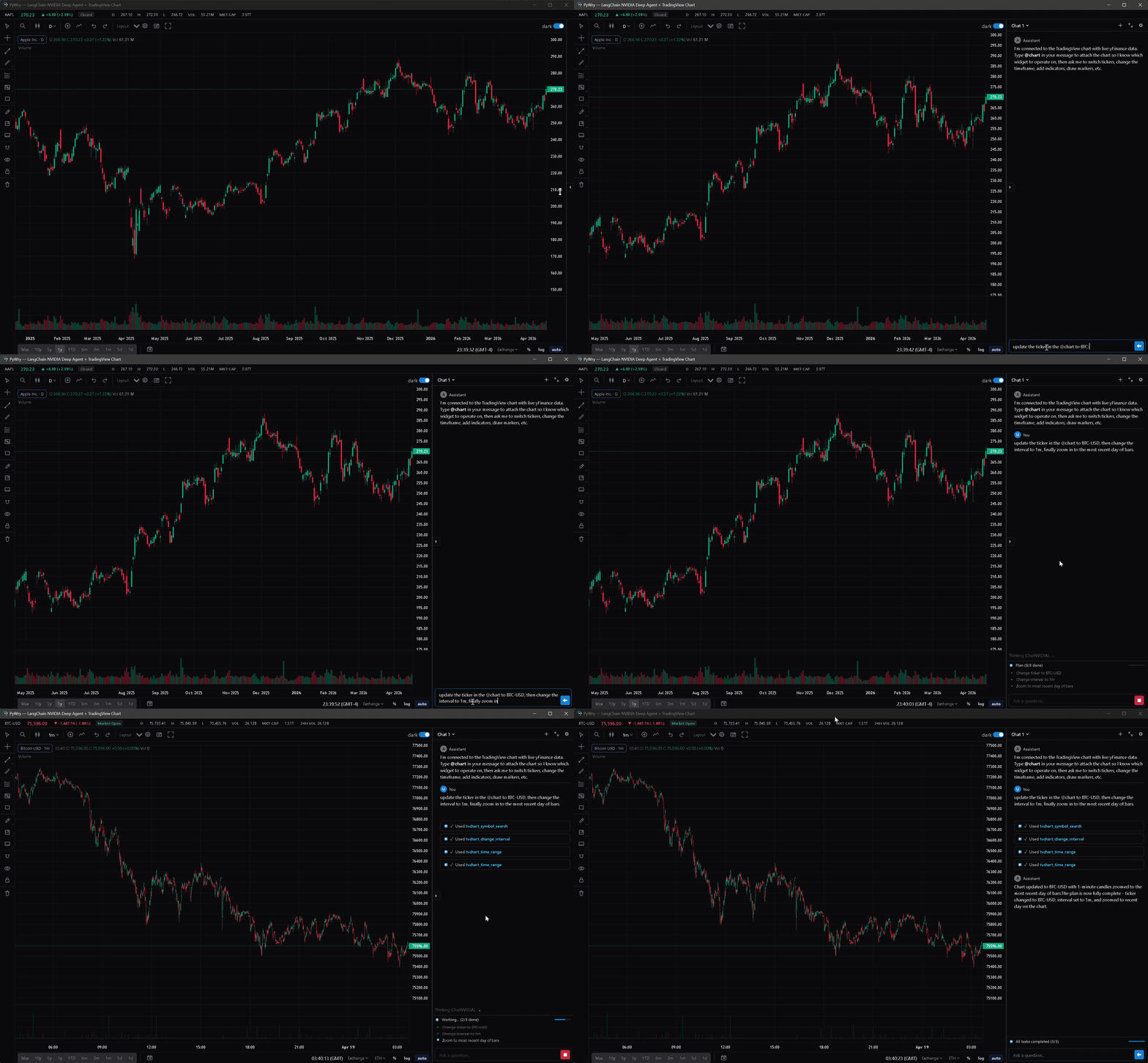
OpenAIProvider,AnthropicProvider,MagenticProvider,CallbackProvider,StdioProvider(ACP subprocess), andDeepagentProvider(LangChain Deep Agents). - TradingView charts — extended Lightweight Charts integration with a full drawing surface (trendlines, fib tools, text annotations, price notes, brushes), pluggable datafeed API, UDF adapter for external quote servers, streaming bar updates, compare overlays, compare-derivative indicators (Spread / Ratio / Sum / Product / Correlation), savable layouts, and a themeable settings panel.
- Theming — light / dark / system modes, themeable via
--pywry-*CSS variables, hot reload during development. - Security — token auth, CSP headers,
SecuritySettings.strict()/.permissive()/.localhost()presets.SecretInputstores values server-side, never in HTML. - State backends — in-memory (default), Redis (multi-worker), or SQLite with SQLCipher encryption at rest.
- Standalone executables — PyInstaller hook ships with
pywry[freeze]. No.specedits or--hidden-importflags required. - MCP server — drive widgets, charts, and dashboards from any Model Context Protocol client (Claude Desktop, Claude Code, Cursor, etc.).
MCP Server
pip install 'pywry[mcp]'
pywry mcp --transport stdio
Widget-creating tools — create_widget, show_plotly, show_dataframe, show_tvchart, create_chat_widget — return an AppArtifact: a self-contained HTML snapshot delivered as an MCP EmbeddedResource with mimeType: text/html and URI pywry-app://<widget_id>/<revision>. Clients that render HTML resources (Claude Desktop's artifact pane, mcp-ui clients, PyWry's own chat widget) show the app inline.
Each render bumps a per-widget revision. The latest revision keeps a live WebSocket bridge to Python; older revisions freeze at their last known state. Call get_widget_app(widget_id) to re-snapshot after a mutation.
See the MCP docs for tool reference and client setup.
Claude Code Plugin
Installable under claude/plugins/pywry/ as one /plugin install unit. Ships:
- MCP server — same 66 tools as above, auto-connected
pywry-orientationskill — teaches the agent when to reach for PyWry tools- Slash commands —
/pywry:doctor,/pywry:scaffold,/pywry:examples pywry-buildersubagent — for multi-step widget construction- Post-edit hook — runs
ruff formaton touched.pyfiles
Install:
/plugin marketplace add deeleeramone/PyWry --path claude/.claude-plugin/marketplace.json
/plugin install pywry@pywry
Prerequisite: pip install 'pywry[dev]' (or pywry[all]). Then /pywry:doctor to verify.
PyPI-bundled install (skips the GitHub round-trip once pywry is already installed):
pywry plugin-path # prints the bundled plugin root
/plugin marketplace add $(pywry plugin-path)
/plugin install pywry@pywry
See claude/README.md for the full install-path matrix, mono-repo layout, and versioning policy.
Standalone Executables
pip install 'pywry[freeze]'
pyinstaller --windowed --name MyApp my_app.py
The output in dist/MyApp/ is fully self-contained. Target machines need no Python installation — only the OS webview (WebView2 on Windows 10 1803+, WKWebView on macOS, libwebkit2gtk on Linux).
Documentation
- Getting Started — installation, quick start, rendering paths
- Concepts — events, configuration, state, hot reload, RBAC
- Components — live previews for all toolbar components
- API Reference — auto-generated docs for every class and function
- MCP Server — AI agent integration
CI and Release Policy
- Protected branches:
mainanddevelop. - Required PR checks:
CI RequiredandDocs Required. - Docs deployment: GitHub Pages redeploys only on post-merge pushes to
main. - SBOM policy:
sbom.xmlandsbom.jsonare produced during release workflows and bundled with release artifacts, not tracked at repository root.
License
Apache 2.0 — see LICENSE.
Reviews (0)
Sign in to leave a review.
Leave a reviewNo results found