herdr-agent-plans
Health Pass
- License — License: MIT
- Description — Repository has a description
- Active repo — Last push 0 days ago
- Community trust — 10 GitHub stars
Code Fail
- exec() — Shell command execution in mods/agent-plans/main.js
Permissions Pass
- Permissions — No dangerous permissions requested
No AI report is available for this listing yet.
Herdr mod: your coding agent's plan beside it — stages from Claude Code plan mode and Codex Plan Mode, one panel per space

Agent Plans for Herdr
Your coding agent's plan, right beside it.




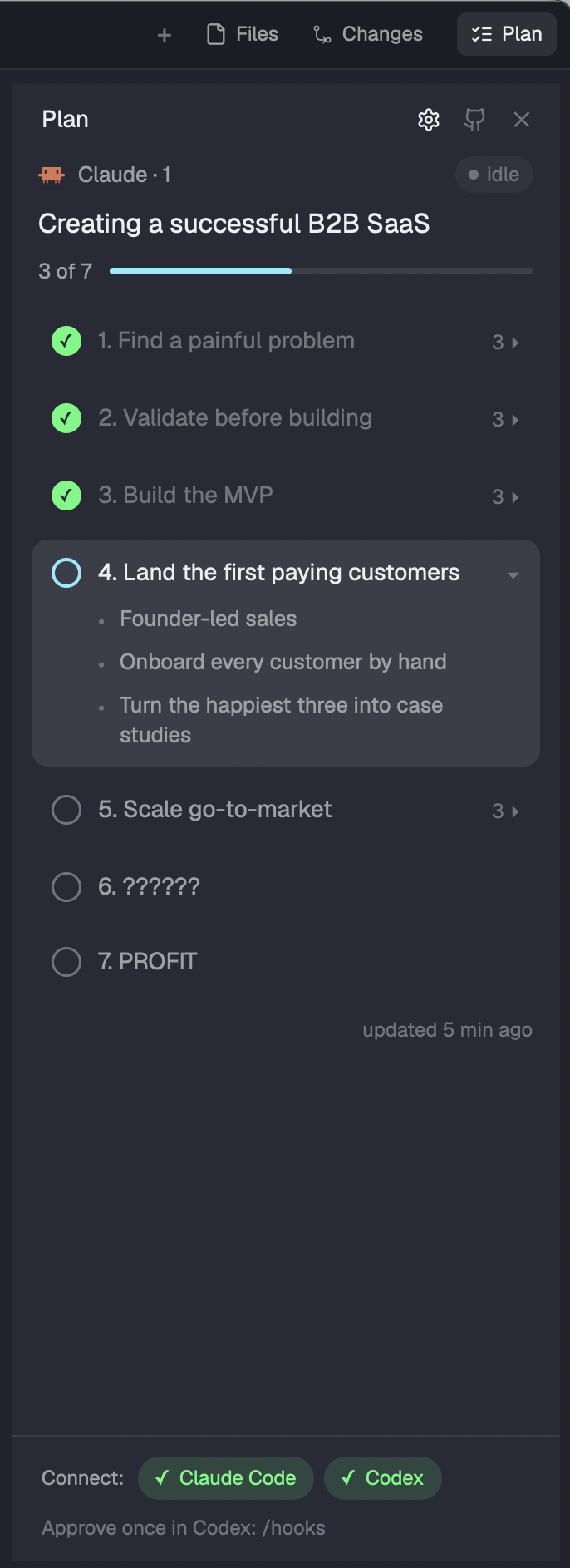
A mod for Herdr, the desktop app for running coding agents side by side. Approve a plan in Claude Code plan mode or Codex Plan Mode, and its stages show up in a Plan panel next to Files and Changes: what's done, what the agent is on now, what each stage contains. Each space keeps its own panel open or closed.
No daemon, no plan files in your repos — two small hooks and a panel.
How it works
| Plan comes from | Progress | |
|---|---|---|
| Claude Code | the plan you approve in plan mode (also TodoWrite, TaskCreate / TaskUpdate) |
Claude marks each stage done with plan.py next |
| Codex | the <proposed_plan> of Plan Mode (also update_plan) |
Codex marks stages with its update_plan tool |
Once per plan, the hooks show the agent the stages they found and how to mark them; if the split is off, the agent corrects it. Plans are tied to the agent's Herdr terminal, so several agents in one repo never mix up.
Install
Needs Herdr 0.1.13+, python3, and Claude Code and/or Codex.
1. Add the mod. Ask the agent running in Herdr:
Read ~/.config/herdr-app/AGENTS.md, then add this mod: https://github.com/dendenlarin/herdr-agent-plans
It copies the mod and adds the Plan button: to your own layout if you use one, otherwise as the included main-plans layout (Herdr's own layouts are read-only).
Copy mods/agent-plans/ to ~/.config/herdr-app/mods/. Then either use the included layout:
cp examples/main-plans.json ~/.config/herdr-app/layouts/
herdr-app do layout.switch '{"name":"main-plans"}'
or, in a layout of your own, wrap the tabs block in a row with the button:
{ "id": "tab-bar", "type": "row", "size": { "px": 42 }, "resizable": false, "children": [
  { "id": "tabs", "type": "block", "window_drag": true, "content": { "mod": "tabs" } },
  { "id": "plans-button", "type": "block", "size": { "px": 72 }, "window_drag": true,
    "content": { "mod": "agent-plans", "props": { "button": true } } } ] }
and add a third child to the panel-body stack:
{ "id": "plans", "type": "block", "content": { "mod": "agent-plans" } }
2. Connect your agents. Open the Plan panel and click Claude Code or Codex under Connect. That adds the hooks (a backup of the config is kept next to it); click again to remove them. In Codex, approve the new hooks once with /hooks. The ⚙ in the panel header brings the buttons back later.
The same command for every hook; it does nothing if the mod is removed:
P="${HERDR_APP_HOME:-$HOME/.config/herdr-app}/mods/agent-plans/hook/plan.py"; [ -f "$P" ] && python3 "$P" claude || true # codex for Codex
~/.claude/settings.json:PostToolUse(matcherExitPlanMode|TodoWrite|TaskCreate|TaskUpdate),TaskCreated,TaskCompleted.~/.codex/config.toml:Stop,UserPromptSubmit,PostToolUse(matcher^update_plan$), between# >>> agent-plansand# <<< agent-plans.
From a terminal: python3 ~/.config/herdr-app/mods/agent-plans/hook/plan.py connect claude (or disconnect, status).
What it touches
- Writes one file per agent terminal:
~/.config/herdr-app/data/agent-plans/<terminal>.json, deleted after a week without updates. Nothing in your repos. - Changes your agent configs only when you click Connect (see above).
- Reads the hook input from Claude Code and Codex, and asks
hcwhich terminal a Codex session runs in. - Tells the agent, once per plan, the stages it shows and how to mark or correct them.
- No network, no background process.
Uninstall
Click the connected agents in the panel to remove the hooks, then delete mods/agent-plans/, data/agent-plans/ and the layout (or its two blocks).
Good to know
- Only this computer's agents are shown.
- A stage is marked when the agent says so: if it forgets, the panel lags behind.
- Codex runs its hooks in a shared background server, so the hook finds the Codex terminal by its folder and, with several Codex in one folder, by the thread name in the terminal title. If it still can't tell, the plan isn't shown.
main-plansis a copy of Herdr'smain0.1.13 and doesn't pick up later changes tomain.
MIT License
Reviews (0)
Sign in to leave a review.
Leave a reviewNo results found