forgerun
Health Warn
- License — License: Apache-2.0
- Description — Repository has a description
- Active repo — Last push 0 days ago
- Low visibility — Only 7 GitHub stars
Code Fail
- network request — Outbound network request in images/agent-pi/package-lock.json
- rm -rf — Recursive force deletion command in install.sh
- network request — Outbound network request in web/src/api/client.ts
- network request — Outbound network request in web/src/api/queries.ts
Permissions Pass
- Permissions — No dangerous permissions requested
No AI report is available for this listing yet.
Open-source, self-hosted AI coding agent runner. Run Claude Code, Cursor CLI, OpenCode & Pi in isolated microVMs or gVisor sandboxes with 2.8s warm snapshots.
forgerun




Open-source, self-hosted AI coding agent runner. Run Claude Code, Cursor CLI, OpenCode, and Pi on your GitHub repositories — each conversation thread in its own isolated microVM (via microsandbox / libkrun) or gVisor sandbox, on your own Mac or Linux machine. Review the unified diff, then push a branch or pull request.
Quick Start · Live Demo · How It Works · Comparison · Architecture · Deploying · Benchmarks · FAQ
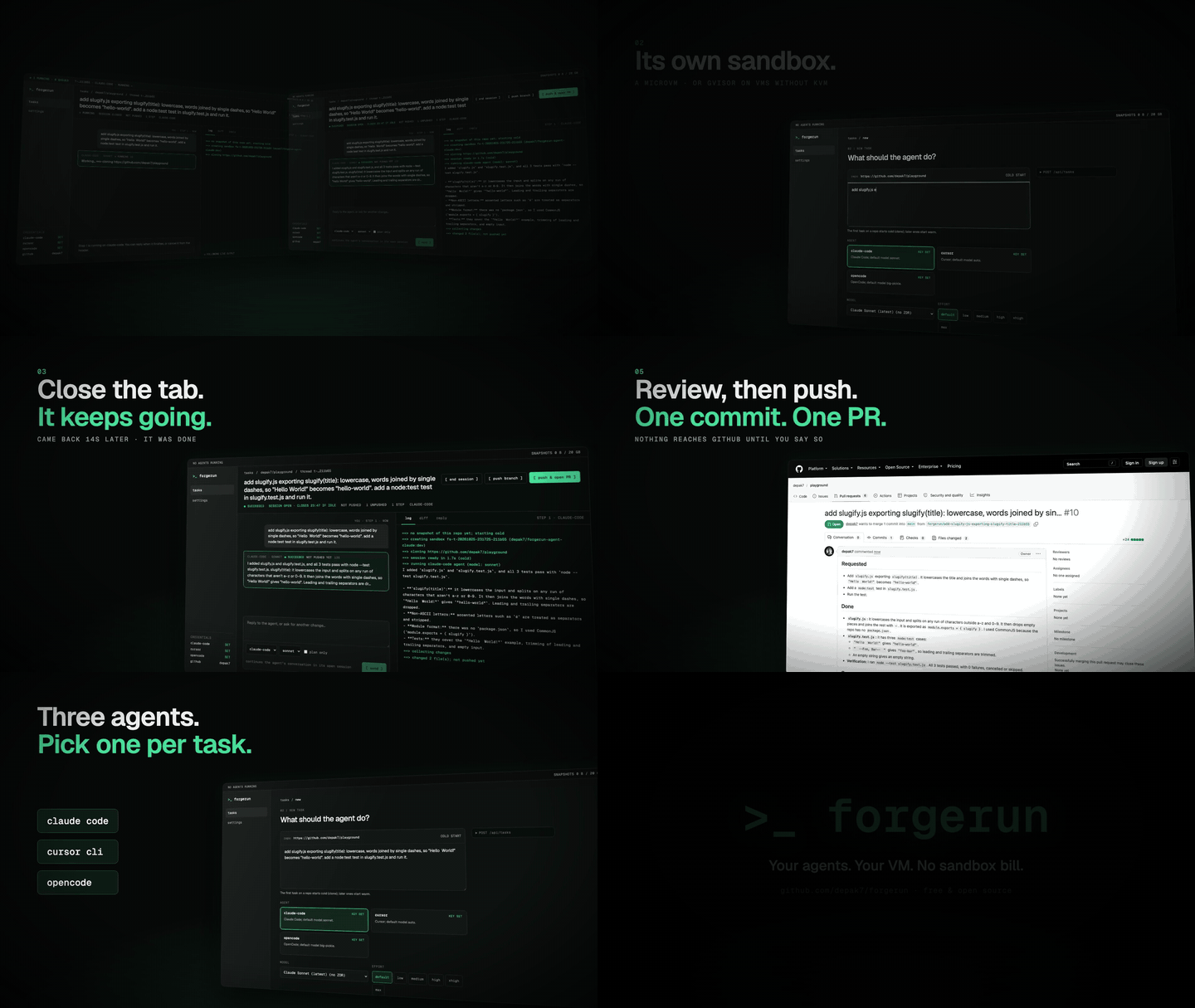
- 26.8 s → 2.8 s to start a task. A new thread starts from a disk snapshot of the repo
with its dependencies installed, instead of cloning and installing again (measured onexpressjs/express: docs/experiments.md). - Keys never enter the sandbox. It sees only placeholders; a proxy on the host swaps in
the real key, and only for the agent's own API. - Workers dial out over HTTPS only. Run the web UI on a small server and the VMs on
your own machine: nothing needs opening on it.
Quick start
You need a Mac with Apple Silicon, or Linux: with KVM (ls /dev/kvm) for microVMs, or any
Linux machine with gVisor, which the installer sets up. Then:
curl -fsSL https://raw.githubusercontent.com/depak7/forgerun/main/install.sh | sh
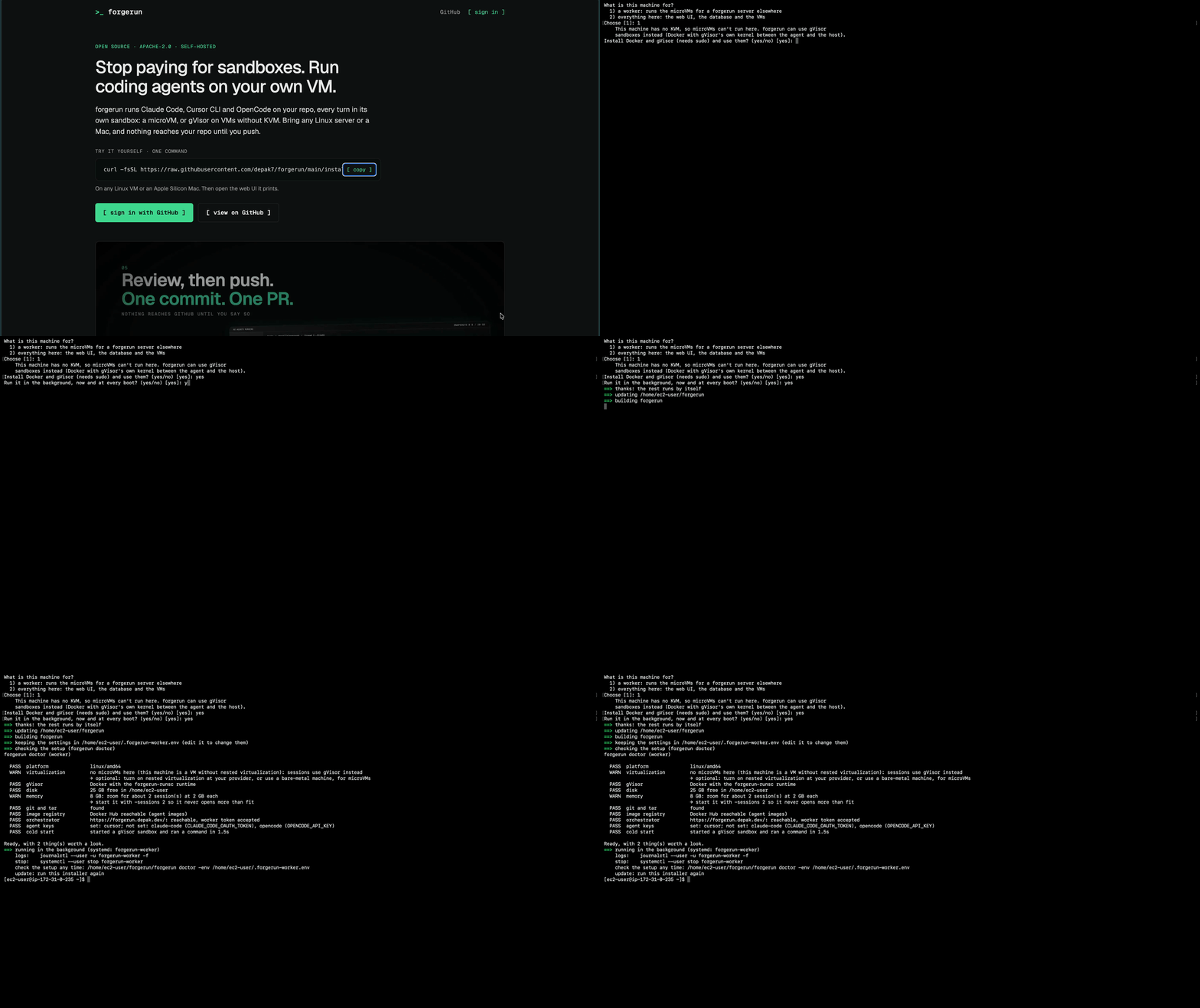
It asks what the machine is for (a worker for an orchestrator elsewhere, or
everything on this machine) and for any keys, then does the rest by itself: installs
what's missing (git, a C compiler, Go; Node for the web UI), builds forgerun into~/forgerun, checks the setup with forgerun doctor, and runs it in the background
(systemd on Linux, launchd on macOS), now and at every boot. Run it again to update.
forgerun doctor checks a machine's setup any time and says how to fix what's wrong:
virtualization (KVM, kvm group, a VM without nested virtualization) or Docker with gVisor,
the microsandbox runtime and its database, disk and memory, image downloads, the orchestrator and worker
token, Postgres, GITHUB_TOKEN and the sign-in settings. It boots one microVM to time a
cold start (-quick skips that).
~/forgerun/forgerun doctor -env ~/.forgerun-worker.env # a worker's settings
To set it up step by step instead, see By hand.
How it works
forgerun is a single Go binary with a web UI. Agents are pluggable adapters
(internal/agent).
- Isolated: every thread gets its own sandbox: a microVM where there's KVM or Apple
Silicon, otherwise a gVisor sandbox (a container run by gVisor's own user-space kernel,
so the agent never talks to the host's). The agent can install, build and test whatever
it needs. Pick one with-sandbox microsandbox|gvisor; the default (auto) uses
microVMs where they can run. - A live session per thread: the VM stays up between your messages, so the agent keeps
its own conversation and working tree. - Review, then push: each turn's changes are kept as a diff. Nothing reaches GitHub
until you press push — then it's one commit on a readableforgerun/…branch, with a
pull request if you want one. - Warm starts: when a session closes, its VM is saved as the repo's snapshot; the next
thread on that repo starts from it in seconds.
Built on microsandbox (libkrun
microVMs) and gVisor. forgerun isn't a sandbox provider: it's what
runs around the agents (sessions, review, pushing, workers, sign-in). With gVisor, which
has no key proxy of its own, forgerun's (internal/secretproxy) keeps keys out.
Status: early. It works end to end (sign-in with GitHub, per-user limits, workers on
other machines), and things still change quickly.
How it compares
When you want to run coding agents off your laptop, you have four ways to do it:
| Setup | Isolation per thread | API keys & GitHub tokens | Task start & workflow | Agents & cost |
|---|---|---|---|---|
| forgerun (on your Mac or Linux VM) | A microVM (libkrun) per thread, or a gVisor user-space kernel on Linux without KVM |
Never inside the sandbox: placeholders swapped by a host TLS proxy; host pushes only when you click push | 2.8 s from a rolling repo disk snapshot; review the diff in the web UI before pushing a branch or PR | claude-code (Pro/Max subscription), cursor, opencode (free or paid), pi, prime — switch agents mid-thread |
CLI on your laptop (claude, cursor, opencode) |
Shares your machine (or an OS-level shell sandbox); stops when you close the lid | Local keys, ~/.ssh, .env files, and git credentials live on the same machine |
Ties up your local working tree and branch | Your own subscriptions and keys, one terminal at a time |
CLI in tmux or plain Docker on a VPS |
Shared host kernel; tasks share a container or clone from scratch | Exported in the environment: readable by prompt injection or postinstall scripts |
Cold git clone + dependency install (~27 s) on every clean run; no built-in diff gate |
Your own keys; DIY scripts for logs, sessions, and PRs |
| Vendor-hosted cloud agents | Cloud VM on the vendor's infrastructure (shared host on self-hosted runners) | Managed on vendor cloud; env secrets are often readable by the agent or left to you on self-hosted runners | Runs in the vendor's cloud | Locked to a single vendor's agent and cloud compute billing |
Architecture
flowchart LR
    subgraph Browser
        UI["Web UI<br/>(React, embedded in the binary)"]
    end

    subgraph Host["forgerun serve (one Go binary)"]
        API["HTTP API<br/>/api/…"]
        Pool["Worker pool<br/>claims queued turns"]
        Runner["Runner<br/>runs a turn in the thread's session"]
        Sessions["Session registry<br/>open VMs · idle timeout · cap"]
        Snap["Snapshot manager<br/>warm starts · cleanup"]
        Pub["Publisher<br/>git push · pull requests"]
        Proxy["Secrets proxy<br/>(microsandbox's, or forgerun's for gVisor)"]
    end

    subgraph VM["microVM (or gVisor sandbox) per thread"]
        Agent["Agent CLI<br/>Cursor · Claude Code"]
        Repo["/work/repo<br/>one commit per turn"]
    end

    DB[("Postgres<br/>tasks · diffs · replies · snapshots")]
    GH["GitHub"]
    LLM["Agent APIs<br/>cursor.sh · anthropic.com"]

    UI <--> API
    API --> DB
    Pool --> DB
    Pool --> Runner
    Runner <--> Sessions
    Runner --> Snap
    Sessions --> VM
    Agent --> Repo
    Agent -- "placeholder key" --> Proxy -- "real key" --> LLM
    API -- "push" --> Pub --> GH
A thread, step by step
sequenceDiagram
    actor You
    participant UI as Web UI
    participant API
    participant W as Worker
    participant VM as Session VM
    participant GH as GitHub

    You->>UI: New task (repo, prompt, agent, model)
    UI->>API: POST /api/tasks
    W->>VM: open session (warm snapshot or clone)
    W->>VM: run agent, commit the turn
    W->>API: store diff + reply
    You->>UI: "Rename it to say_hello"
    W->>VM: same VM, agent continues its conversation
    You->>UI: push & open PR
    API->>VM: ask the agent for a summary
    API->>GH: one squashed commit on forgerun/…, open the PR
    Note over VM: after 30 idle minutes the VM is saved<br/>as the repo's snapshot and closed
- Tasks are turns. Every message in a thread is a task row: its prompt, the
agent's reply, its diff, and its log. - Sessions are in memory; work is in the database. If a session closes
(idle, server restart, crash), the next message reopens it: a new VM at the
thread's start commit, each earlier turn's diff re-applied, and the
conversation given to the agent as text. - Agents are adapters. An agent says which image it runs in, which
credential it needs and for which hosts, and how to run and continue its CLI
(internal/agent). Models are rows in the database.
By hand
You need: macOS on Apple Silicon or Linux with KVM (for microVMs), Go 1.26,
Node 22, Docker (for Postgres), and git.
git clone https://github.com/depak7/forgerun && cd forgerun
docker compose up -d                 # Postgres on 127.0.0.1:5433
cp .env.example .env                 # then fill it in (see below)
make build                           # builds the UI and ./forgerun
set -a && source .env && set +a && ./forgerun serve
Open http://localhost:8080. The microsandbox runtime installs itself on the
first start; the agent images are pulled the first time an agent runs.
Keys (.env)
| Variable | What for |
|---|---|
GITHUB_TOKEN |
Required. A fine-grained token with Contents and Pull requests read/write on the repos you'll use. |
CURSOR_API_KEY |
For the cursor agent. |
CLAUDE_CODE_OAUTH_TOKEN |
For claude-code; the output of claude setup-token (Pro/Max subscription). |
OPENCODE_API_KEY |
Optional, for opencode's paid models: a key from an OpenCode Console service account ("Inference only"). Its free models need no key. |
OPENROUTER_API_KEY, OPENAI_API_KEY, ANTHROPIC_API_KEY |
For pi and prime: the API key of each provider whose models you'll pick (an openrouter/… model needs OPENROUTER_API_KEY, and so on). Subscription logins can't be used. Each key is sent only to its provider's API. |
GEMINI_API_KEY, XAI_API_KEY, PRIME_API_KEY |
For prime only: Google Gemini, xAI, and Prime Inference. |
An agent without its key is still listed; only its tasks are refused, except on models that need no key.
Claude Code on your own subscription
claude-code runs on your Claude Pro or Max plan, so its turns count against your
subscription's limits instead of API billing.
- On any machine with Claude Code installed, run
claude setup-token. It opens your browser to sign in to your Claude account, then prints a token. - Paste it where the agents run:
- Installing: the installer asks for
CLAUDE_CODE_OAUTH_TOKEN; paste it there (it isn't shown as you type). - Already installed: add
CLAUDE_CODE_OAUTH_TOKEN=<the token>to the env file (~/.forgerun-worker.env
on a worker,~/forgerun/.envfor everything on one machine), then run the install command again: it keeps
your settings and restarts forgerun.
- Installing: the installer asks for
- Settings in the web UI now shows
claude-codeasSET.
The token never enters the sandbox: the agent sees a placeholder, and the proxy on the host adds the real token
only for Anthropic's API. It's your personal subscription, so use it for your own tasks, not as a shared key for
other people. If it leaks, revoke it from your Claude account and make a new one.
Sign-in (optional). Without these, forgerun runs in local mode: no accounts, everything
is yours. With them, people sign in with GitHub and see only their own threads.
| Variable | What for |
|---|---|
GITHUB_OAUTH_CLIENT_ID, GITHUB_OAUTH_CLIENT_SECRET |
a GitHub OAuth App (callback: <FORGERUN_PUBLIC_URL>/auth/github/callback) |
FORGERUN_PUBLIC_URL |
where browsers reach forgerun, e.g. https://forgerun.example.com |
FORGERUN_SECRET_KEY |
encrypts users' GitHub tokens at rest: openssl rand -hex 32 |
FORGERUN_ADMINS |
GitHub usernames that see everything and the settings |
FORGERUN_HIDE_SIGN_IN |
true keeps the sign-in buttons off the landing page; signing in still works at /auth/github/login |
FORGERUN_ANALYTICS_WEBSITE_ID |
a website ID for the analytics script at cloud.umami.is: the pages load it. Unset (the default), they load no analytics |
Useful serve flags
| Flag | Default | |
|---|---|---|
-workers |
2 |
turns that may run at once |
-session-idle |
30m |
close a session after this long without a message |
-sessions |
4 |
most open sessions; the least recently used idle one closes first |
-timeout |
2h |
max time per turn (a stuck agent is stopped sooner: -agent-idle) |
-agent-idle |
10m |
stop an agent that prints nothing and changes nothing |
-snapshot-budget |
20GB |
disk for warm-start snapshots |
-require-zdr |
off | offer only zero-data-retention models |
-sandbox |
auto |
microsandbox (microVMs), gvisor (Docker + gVisor), or auto: microVMs where they can run |
Run ./forgerun serve -h for all of them.
One machine, or orchestrator and workers apart
forgerun serve runs everything in one process: the web UI, the API and the VMs.
To run the VMs elsewhere (for example the orchestrator on a small VPS, the VMs on a
machine at home), use two roles of the same binary:
# the orchestrator: web UI, API, Postgres, sign-in, pushing. No virtualization needed.
FORGERUN_WORKER_TOKEN=… ./forgerun server

# a worker, on a Mac (Apple Silicon) or any Linux machine (KVM, or gVisor). It dials out over
# HTTPS, so nothing needs opening on its side. Agent keys live here, not on the server.
FORGERUN_WORKER_TOKEN=… CURSOR_API_KEY=… ./forgerun worker -server https://forgerun.example.com
flowchart LR
    subgraph O["forgerun server (any VPS)"]
        UI2["web UI · API"] --- Q[("Postgres queue")]
        Q --- P2["push to GitHub"]
    end
    subgraph W["forgerun worker (your machine)"]
        R2["runner · sessions"] --> V2["microVMs"]
    end
    W -- "claim turns · stream logs · heartbeat (HTTPS, outbound)" --> O
- Turns wait in the queue while no worker is connected, and start as soon as one is.
Run several workers; each takes turns from the same queue. - A thread sticks to the worker holding its VM. If that worker goes away, its running
turn fails after 30 seconds and the next message rebuilds the session on any worker. - Secrets: agent keys stay on the workers, users' GitHub tokens on the orchestrator.
For a private repo, the turn's token goes to the worker in memory, to fetch the code on
that host; it never enters a VM. - Each worker keeps its own warm-start snapshots (
~/.forgerun/worker), and removes VMs
a crashed run left behind when it starts. - Settings lists the connected workers.
To deploy it for other people (orchestrator on a server with HTTPS and sign-in, a worker on
your machine), see docs/deploying.md: a Dockerfile and a compose file
with automatic HTTPS are included (deploy/).
Hand off from a local agent
Partway through a task with an agent on your machine, you can send the rest to forgerun:forgerun mcp is an MCP server your local agent starts, with three tools.
| Tool | |
|---|---|
forgerun_handoff |
sends a copy of the folder and starts a thread whose first message is the agent's summary of the session (what you asked, what's done, what's left) |
forgerun_status |
how the thread is doing: running, finished, failed, or waiting for your answer |
forgerun_diff |
its changes as one patch, to git apply in your folder |
Add it to your agent, e.g. Claude Code:
claude mcp add forgerun --env FORGERUN_URL=https://forgerun.example.com --env FORGERUN_TOKEN=frt_… -- forgerun mcp
or in any MCP client's config:
{"mcpServers": {"forgerun": {"command": "forgerun", "args": ["mcp"],
  "env": {"FORGERUN_URL": "https://forgerun.example.com", "FORGERUN_TOKEN": "frt_…"}}}}
FORGERUN_URL defaults to http://localhost:8080. On a server with sign-in, create the token in
Settings → Personal tokens (one per tool; revoke it there). A server in local mode needs none.
Then ask your agent to "hand the rest off to forgerun".
What's sent. In a git repo, the repo's top folder: its files as they are now, uncommitted work
included, but not what .gitignore ignores, and only the current commit of its history, without its
remotes, credentials or hooks. Secret files git doesn't track (.env, .env.* but .example,
keys like *.pem or id_rsa, .npmrc, .netrc) never leave your machine. A plain folder is sent
whole but for those; a single file works too. Uploads are capped (serve -max-folder, 50 MiB
compressed by default). Your folder is never changed: apply the diff when you want it.
Pushing. When the folder is a GitHub repo and the commit it's on is on GitHub, its thread can
be pushed like any other: a new forgerun/… branch on that commit with your uncommitted work and
then the agent's, and a pull request to the branch you were on. Unpushed local commits can't be
built on: push them first, or take the diff.
API
The UI uses the same JSON API ({"success": true, "data": …}):
POST /api/tasks |
start a thread: {repo, prompt, agent?, model?, effort?}, or {folder, …} for an uploaded folder |
POST /api/folders?name=… |
upload a folder (a gzipped tar) to start threads on; &repo=…&base=…&branch=… for a GitHub repo's |
GET/POST /api/tokens, DELETE /api/tokens/{id} |
personal tokens (from a browser login); send one as Authorization: Bearer frt_… |
POST /api/tasks/{id}/followups |
the next message in a thread |
POST /api/tasks/{id}/cancel |
stop a queued or running turn |
GET /api/tasks/{id}/thread |
every turn of a thread |
GET /api/tasks/{id}/log, /diff |
a turn's live log (Range supported) and diff |
POST /api/threads/{id}/push |
push unpushed turns as one commit; {"pr": true} also opens a pull request |
GET /api/threads/{id}/session, POST …/end |
a thread's session, and closing it |
GET /api/threads, /api/agents, /api/models, /api/status, /api/snapshots, /api/repos, /api/workers |
lists for the UI |
/api/worker/… |
the worker protocol: claim, log, finish, heartbeat (worker token) |
Development
go vet ./... && go test ./...                    # Go (DB and VM tests skip)
FORGERUN_TEST_DATABASE_URL='postgres://forgerun:forgerun@localhost:5433/forgerun_test?sslmode=disable' \
  go test ./internal/store/...                   # against Postgres
FORGERUN_INTEGRATION=1 go test ./internal/snapshots/   # boots real microVMs
cd web && npm test && npx tsc --noEmit           # web UI
make dev-web                                     # UI with live reload on :5173
cmd/forgerun/       serve (everything), server (orchestrator only), worker, doctor, run (one task, no database)
install.sh          the one-step installer (worker or everything on one machine)
internal/doctor/    forgerun doctor's checks
internal/agent/     agent adapters: Cursor, Claude Code
internal/task/      the runner: sessions, turns, replay
internal/sandbox/   the sandbox backends: microsandbox (microVMs) and gVisor (Docker + runsc)
internal/secretproxy/ forgerun's key-swapping proxy, for gVisor sandboxes
internal/snapshots/ warm-start snapshots and their cleanup
internal/publish/   pushing branches and pull requests (host-side git)
internal/store/     Postgres (migrations) and an in-memory store for tests
internal/worker/    the worker pool
internal/remote/    workers on other machines: the orchestrator side and the worker side
internal/api/       HTTP handlers
web/                the React UI (embedded with -tags webui)
images/             agent VM images
docs/experiments.md what each experiment showed, and why things are the way they are
FAQ
What is forgerun?forgerun is an open-source (Apache-2.0), self-hosted coding agent runner packaged as a single Go binary with an embedded React web UI. It executes coding agents (claude-code, cursor, opencode, pi, prime) on your GitHub repositories inside hardware-isolated libkrun microVMs or gVisor user-space kernel sandboxes, keeps warm disk snapshots for 2.8-second task starts, and proxies API keys outside the sandbox.
Inside the microVM or gVisor container, credential environment variables hold only inert placeholders ($MSB_… or FORGERUN_PH_…). A TLS-intercepting proxy on the host swaps the placeholder for the real secret only on outbound HTTPS requests to the agent's official API host (api.anthropic.com, *.cursor.sh, opencode.ai, etc.). Sending the placeholder to any other domain is blocked. GitHub tokens never enter the VM at all: private repositories are fetched on the host and diffs are pushed from the host only when you click push.
Yes. When KVM (/dev/kvm) or Apple Silicon hypervisor support is present, forgerun defaults to microsandbox microVMs. On standard Linux cloud VMs without nested virtualization, the installer automatically sets up Docker with the gVisor (runsc) user-space kernel runtime (0.34s cold sandbox boot) and forgerun's built-in secret proxy. You can also run forgerun server (orchestrator + web UI) on a small 1 GB VPS and connect forgerun worker from your Mac or home Linux box over outbound HTTPS.
Yes. Run claude setup-token on any machine with Claude Code installed, then set CLAUDE_CODE_OAUTH_TOKEN on your forgerun worker or server. Tasks run against your Claude Pro or Max plan limits instead of pay-per-token API billing, and the OAuth token stays on the host behind the secret proxy.
Star history
License
Reviews (0)
Sign in to leave a review.
Leave a reviewNo results found