burn-o-meter
Health Warn
- License — License: MIT
- Description — Repository has a description
- Active repo — Last push 0 days ago
- Low visibility — Only 5 GitHub stars
Code Fail
- rm -rf — Recursive force deletion command in macos/make-app.sh
Permissions Pass
- Permissions — No dangerous permissions requested
No AI report is available for this listing yet.
See what your AI coding agents really cost — tokens, spend, cache efficiency and rate limits. Works with Claude Code and Codex, more coming. Runs entirely on your machine: no account, no telemetry, no network.
burn-o-meter (One meter for every agent in both GUI and CLI)
See what your AI coding agents really cost. Tokens, spend, cache efficiency
and rate limits — all read from files already on your machine. No account, no
telemetry, nothing sent anywhere.
Status: alpha (v0.5.0). The CLI and the macOS menu bar app both work end to
end for Claude Code and Codex. Tested on macOS 14+; the CLI is portable but
Windows and Linux are not yet verified.
burn-o-meter reads the logs your agents already write to disk and tells you what
they actually cost — tokens, dollars, cache efficiency, and how much of your rate
limit is gone — in your menu bar and on the command line.
$ burn-o-meter models --since 30d
Usage by model
  model             reqs      cost   share   cache hit   eff $/Mtok
  claude-opus-5      787  ~$129.33   56.4%       96.9%         1.01
  claude-opus-4-8    361   ~$63.27   36.7%       98.9%         0.71
  claude-fable-5      57   ~$11.88    6.9%       97.7%         2.03
                          ---------
  subtotal                ~$204.48   subscription — not billed per token
What it looks like
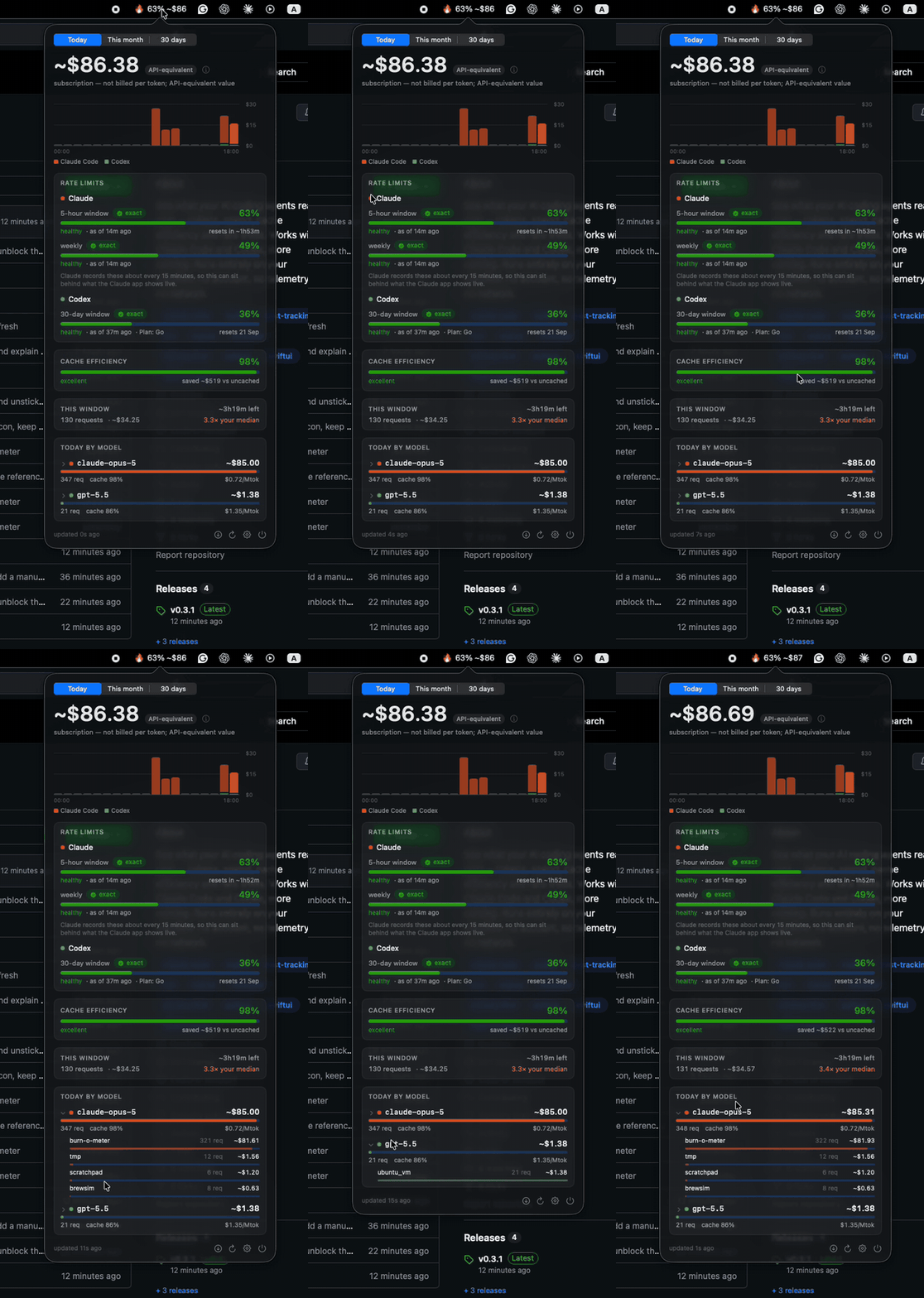
The menu bar shows the number that matters at a glance; the popover has the rest.
Every figure carries its provenance — ~ means API-equivalent rather than billed,exact means the provider reported it, and a model with no known price shows —
rather than $0.00.
The CLI reports the same numbers:
$ burn-o-meter today
Today
┏━━━━━━━━━━━━━━━┳━━━━━━┳━━━━━━━━━┳━━━━━━━┳━━━━━━━━┳━━━━━━━━━━━┳━━━━━━━━━━━━┓
┃ model         ┃ reqs ┃    cost ┃ share ┃ tokens ┃ cache hit ┃ eff $/Mtok ┃
┡━━━━━━━━━━━━━━━╇━━━━━━╇━━━━━━━━━╇━━━━━━━╇━━━━━━━━╇━━━━━━━━━━━╇━━━━━━━━━━━━┩
│ claude-opus-5 │  286 │ ~$68.88 │ 99.7% │  90.9M │     98.1% │       0.76 │
│ gpt-5.5       │    3 │  ~$0.17 │  0.3% │  56.4K │     55.9% │       3.09 │
└───────────────┴──────┴─────────┴───────┴────────┴───────────┴────────────┘

  ~$69.06 across 289 requests   subscription — not billed per token; this is
  API-equivalent value

  current 5h window  ~$18.14 over 69 requests · ~4h10m left
  1.8x your median window. Claude publishes no token limit for subscription
  plans and stores no quota locally, so this compares against your own history
  rather than inventing a percentage.

  codex primary  5% used of a 30-day window · plan go   exact (reported by Codex itself)
$ burn-o-meter blocks
5-hour usage windows
┏━━━━━━━━━━━━━━┳━━━━━━┳━━━━━━━━┳━━━━━━━━━┳━━━━━━━━━━━━━━━━┳━━━━━━━━┓
┃ window start ┃ reqs ┃ tokens ┃    cost ┃ vs your median ┃ state  ┃
┡━━━━━━━━━━━━━━╇━━━━━━╇━━━━━━━━╇━━━━━━━━━╇━━━━━━━━━━━━━━━━╇━━━━━━━━┩
│ 08-21 00:02  │  248 │  40.0M │ ~$33.92 │           3.3x │ closed │
│ 08-21 13:49  │   84 │  28.2M │ ~$28.04 │           2.7x │ closed │
│ 08-21 18:58  │   61 │  31.6M │ ~$19.85 │           1.9x │ closed │
└──────────────┴──────┴────────┴─────────┴────────────────┴────────┘
Why another usage tracker
One meter for every agent. Nobody runs just one — Claude Code here, Codex
there. Each vendor's dashboard sees only itself, so nothing answers "what is all of
this costing me?" burn-o-meter reads them into one ledger.
A menu bar app and a CLI, showing the same numbers. Glance at the menu bar for
spend and rate limits with their reset times, or run burn-o-meter today, models,daily in a terminal and pipe --json anywhere.
It measures the tool, not just the model. Two tools running the same model bill
differently, because they cache and resend context differently.
And it tells you the truth about what you owe. Claude Max and ChatGPT plans
aren't billed per token, so "you spent $204" would be a lie. Subscription figures
are labelled API-equivalent. A model we have no price for shows —, never $0.00.
The number that actually matters: at a 97% cache-hit rate, list prices tell you
very little. Opus 5 lists at $5/Mtok input and lands near $1/Mtok all-in, somodels reports that effective rate per model alongside the list one.
Everything stays on your machine. No account, no telemetry, and no network traffic
unless you ask for it.
Install
One command does everything — the CLI, the menu bar app, background scanning,
and the login item that brings the app back after a reboot:
git clone https://github.com/devopsinside/burn-o-meter
cd burn-o-meter && ./install.sh
Safe to re-run. ./uninstall.sh removes all of it (--purge deletes your data too);
your agents' own logs are never touched either way.
Installing the pieces separatelyThere is deliberately no
curl | shone-liner. That asks you to execute code you
have not read, from a host that could be impersonated, with your own privileges.
Cloning first meansinstall.shis on your disk and readable before it runs.
The CLI
Requires Python 3.11+. Not on PyPI yet.
# Homebrew — pours a prebuilt bottle, no compiler needed
brew tap devopsinside/burn-o-meter https://github.com/devopsinside/burn-o-meter
brew install devopsinside/burn-o-meter/burn-o-meter

# or pipx / uv
pipx install git+https://github.com/devopsinside/burn-o-meter
uv tool install git+https://github.com/devopsinside/burn-o-meter
⚠️ The menu bar app is NOT installed by any of those
brew, pipx and uv install the command line tool only. No app is created,
and nothing will appear in your menu bar until you build one. That is a separate,
optional step — an unsigned app cannot ship through Homebrew without every user
meeting a Gatekeeper warning.
git clone https://github.com/devopsinside/burn-o-meter
cd burn-o-meter
macos/make-app.sh --install             # builds, installs to /Applications
open /Applications/burn-o-meter.app     # the 🔥 icon appears now

# so it comes back by itself after a reboot
/Applications/burn-o-meter.app/Contents/MacOS/burn-o-meter --enable-login-item
Both of those last two lines matter. macOS will not register a login item for an
app outside /Applications, which is what --install is for; and until you register
one, nothing starts the app at login. Skip either and the app works until your next
reboot, after which the icon is gone and Spotlight is the only way back. The gear
menu's Launch at Login does the same as that final line.
macOS trusts an app you compiled yourself, which is why this is a build rather than
a download.
Then, from anywhere:
burn-o-meter scan      # read your logs (first run takes ~150ms)
burn-o-meter today     # what today cost, and where your limits stand
No developer tools at all? See docs/install.md, which also covers
Homebrew tap trust and uninstalling.
Usage
burn-o-meter today                # today's cost, current window, rate limits
burn-o-meter models --since 30d   # per-model cost, cache hit rate, $/Mtok
burn-o-meter daily --since 14d    # per-day
burn-o-meter projects             # per-project
burn-o-meter blocks               # rolling 5-hour windows
burn-o-meter doctor               # what was detected, stored, and where prices came from
Tip:
burnometeris installed as an alias for every command, soburnometer todayworks too if you would rather skip the hyphens.
--json works on any report and carries the same rules: subtotals keyed by cost
basis with no fused total, price_source on every row, unpriced models listed
explicitly.
Everything is optional to configure. If you pay per token against an API key,
set claude_code = "api" in ~/.burn-o-meter/config.toml so your spend is not
labelled API-equivalent — see docs/configuration.md for
that, project-path privacy, custom rates and retention.
Supported agents
| Agent | Tokens | Cost | Rate limits | Read from |
|---|---|---|---|---|
| Claude Code | ✅ | ✅ | via the row below | ~/.claude/projects/*/*.jsonl |
| Codex CLI | ✅ | ✅ | exact — with reset time | ~/.codex/sessions/**/rollout-*.jsonl |
| Claude plan usage | — | — | exact — 5-hour and weekly | ~/Library/Application Support/Claude/plan-usage-history.json |
| OpenCode | ✅ | ✅ | — | ~/.local/share/opencode/opencode.db |
Claude Code's own transcripts carry no quota, so the 5-hour and weekly figures
come from the Claude desktop app's records — which cover the whole account,
since the limit is shared with Claude chat. They are Anthropic's own
percentages, not something we derived — but the desktop app records them only
about every 15 minutes, so a reading can sit behind what that app shows live.
Each carries its age and the UI says so rather than presenting an old number as
current. The reset countdown is derived from the series and marked ~; none
is claimed for the weekly cap, where the evidence does not support one.
Agent data can be relocated (CLAUDE_CONFIG_DIR, CODEX_HOME), and Claude Code
writes to ~/.claude or ~/.config/claude depending on install. Both are
checked; burn-o-meter doctor names the variable when a location is missing.
OpenCode routes to any provider, so that one adapter also covers DeepSeek, Kimi,
GLM, Qwen and MiniMax — whatever you point it at is measured the same way, and its
own per-session totals serve as an integrity check the way Codex's running total
does. It is also the only route to local models: Ollama does not persist token
usage at all, so local inference is measurable only through a harness that records
it.
Also relocatable via OPENCODE_DATA.
On the roadmap, in order: Kimi Code, then Copilot CLI, then Amp, Droid, Goose
and Kilo.
Each adapter is verified against real output from the tool before it ships, never
from documentation alone — Codex's per-turn accounting trap looked entirely
reasonable on paper. The contract is thin on purpose:
docs/adding-an-agent.md.
Privacy and security
This tool reads conversation transcripts. It is built as though that matters.
- Your prompts and completions are never read. Adapters extract through a
strict allowlist of numeric and metadata fields; message content is unreachable
by construction. CI greps the entire output database, JSON and logs for planted
canary strings on every commit. - Credentials are never opened.
~/.codex/auth.jsonlives inside a directory
we scan. A filename deny-list, narrow globs, and symlink containment each
independently prevent it. - No network unless you ask. No telemetry, no analytics, no crash reporting,
and nothing on a timer or at launch. Two requests exist in the whole codebase and
both are manual:burn-o-meter pricing refresh, and Check for Updates… in the
menu. Neither sends anything about you. The engine's test suite blocks sockets, so
a green build is itself evidence. - No credentials, ever. We do not read your Claude or OpenAI login, and we
never will — Anthropic's terms prohibit automated access to their service using
subscription credentials, and the cost of breaking that would land on your
account, not ours. - Nothing leaves your machine. There is no server. There is no account.
Run burn-o-meter doctor --security to audit these rather than trust them. Full
threat model: SECURITY.md.
More
- FAQ and troubleshooting — including what the desktop apps do and do not report
- Installing in detail · Configuration
- Changelog · Roadmap · Adding an agent
- Contributing · Releasing
- Security — threat model, guarantees, and how to report privately
Development
python3 -m venv .venv
.venv/bin/pip install -e ".[dev]"
.venv/bin/pytest                  # the full suite, under a second
.venv/bin/ruff check src tests

swift build --package-path macos/burn-o-meter -c release
/Applications/burn-o-meter.app/Contents/MacOS/burn-o-meter --dump   # UI state as JSON
The --dump output must agree with burn-o-meter today --json; the app renders
numbers but never computes them, so a disagreement means something is wrong.
Roadmap
Built one at a time, each verified against real output before it ships.
Next up: other providers through the agents we already support, then
OpenCode — which reaches DeepSeek, Kimi, GLM, Qwen, MiniMax and local models in
a single adapter.
Full list, including what will not be built and why: ROADMAP.md
Who makes this
Built by DevOps Inside — more writing at
devopsinside.com.
License
MIT — see LICENSE. Bundled model pricing derives from
models.dev (MIT); see NOTICE.
No code is derived from other usage trackers. All log-format handling was written
from first-hand inspection of what Claude Code and the Codex CLI produce on disk.
Reviews (0)
Sign in to leave a review.
Leave a reviewNo results found