hermes-duet
Health Warn
- License — License: MIT
- Description — Repository has a description
- Active repo — Last push 0 days ago
- Low visibility — Only 5 GitHub stars
Code Fail
- process.env — Environment variable access in .github/scripts/detect-changes.mjs
- spawnSync — Synchronous process spawning in .github/scripts/run-test-shard.mjs
Permissions Pass
- Permissions — No dangerous permissions requested
No AI report is available for this listing yet.
A proactive phone assistant for your Hermes agent: one thread, a morning brief, approval cards, background tasks. Unofficial; inspired by Claude Duet.
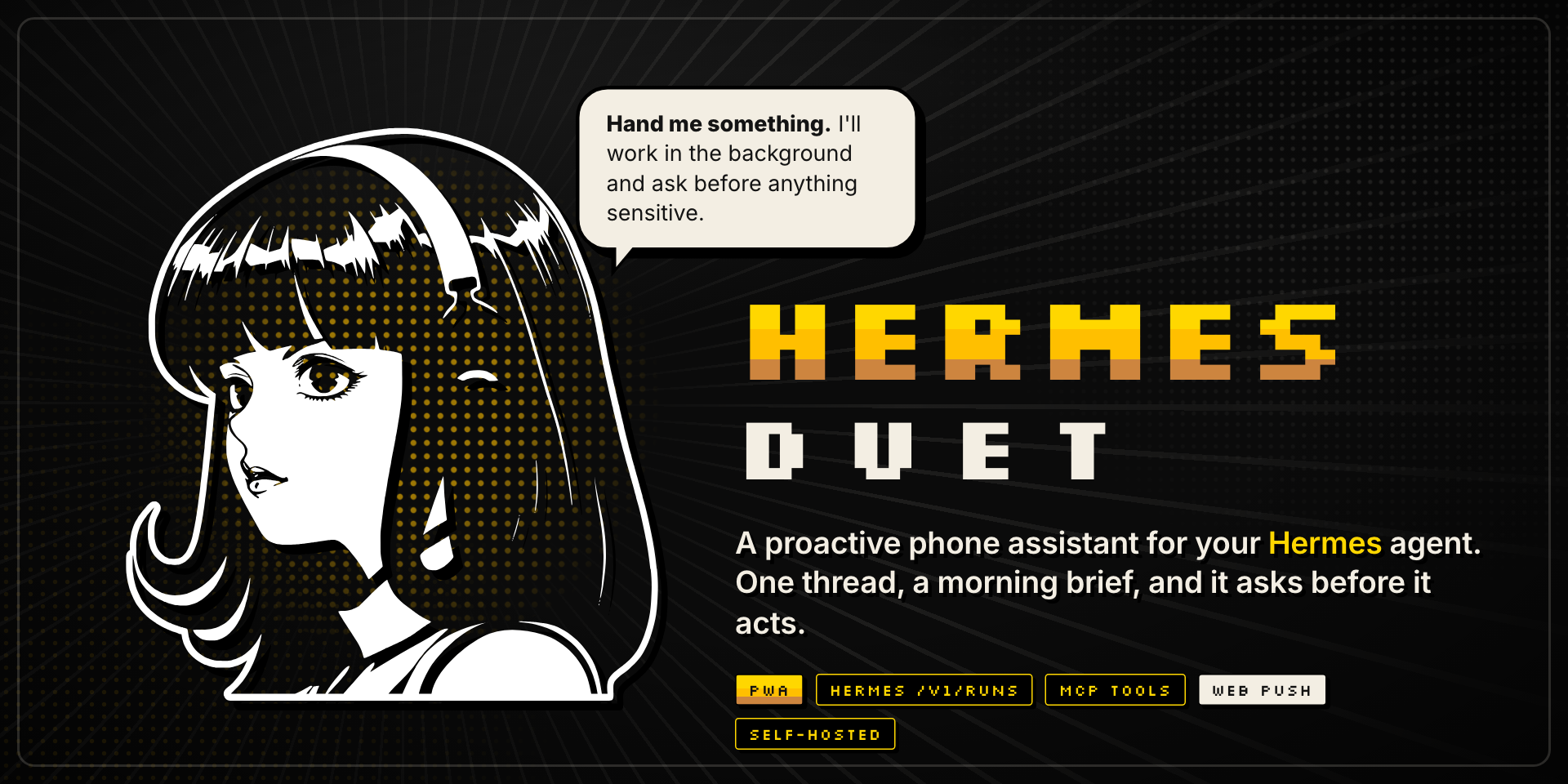
Hand work to your Hermes agent by message. It works on your machine, asks before anything sensitive, sends you a morning brief, and pings your phone when something needs you.



Unofficial community project, not affiliated with Nous Research or Anthropic. Inspired by Anthropic's Claude Duet;
the mascot art comes from NousResearch/hermes-agent (MIT). See NOTICE.md.
What it does
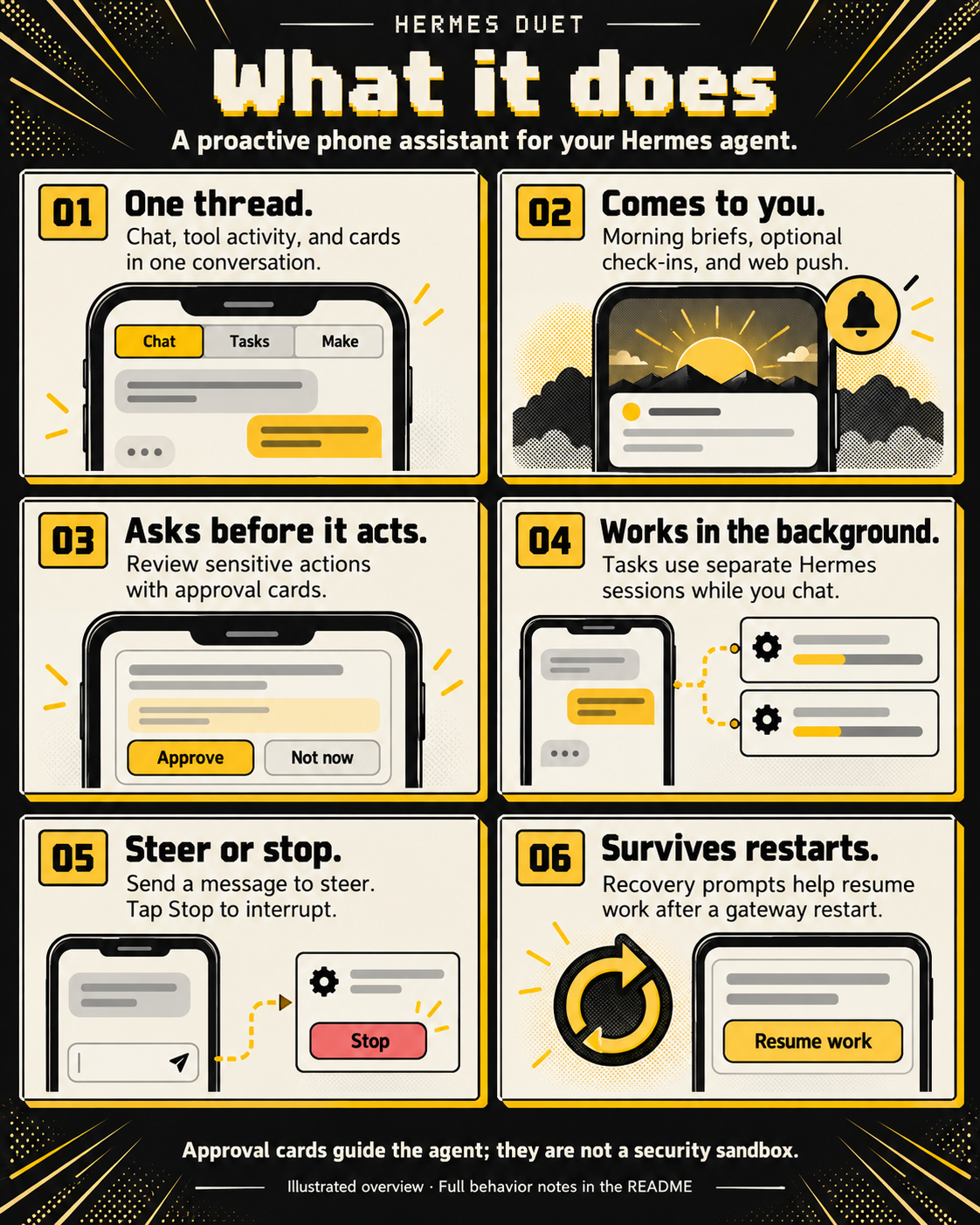
View the full-size infographic, or expand the details for quiet-hour exceptions, approval limits, and recovery behavior.
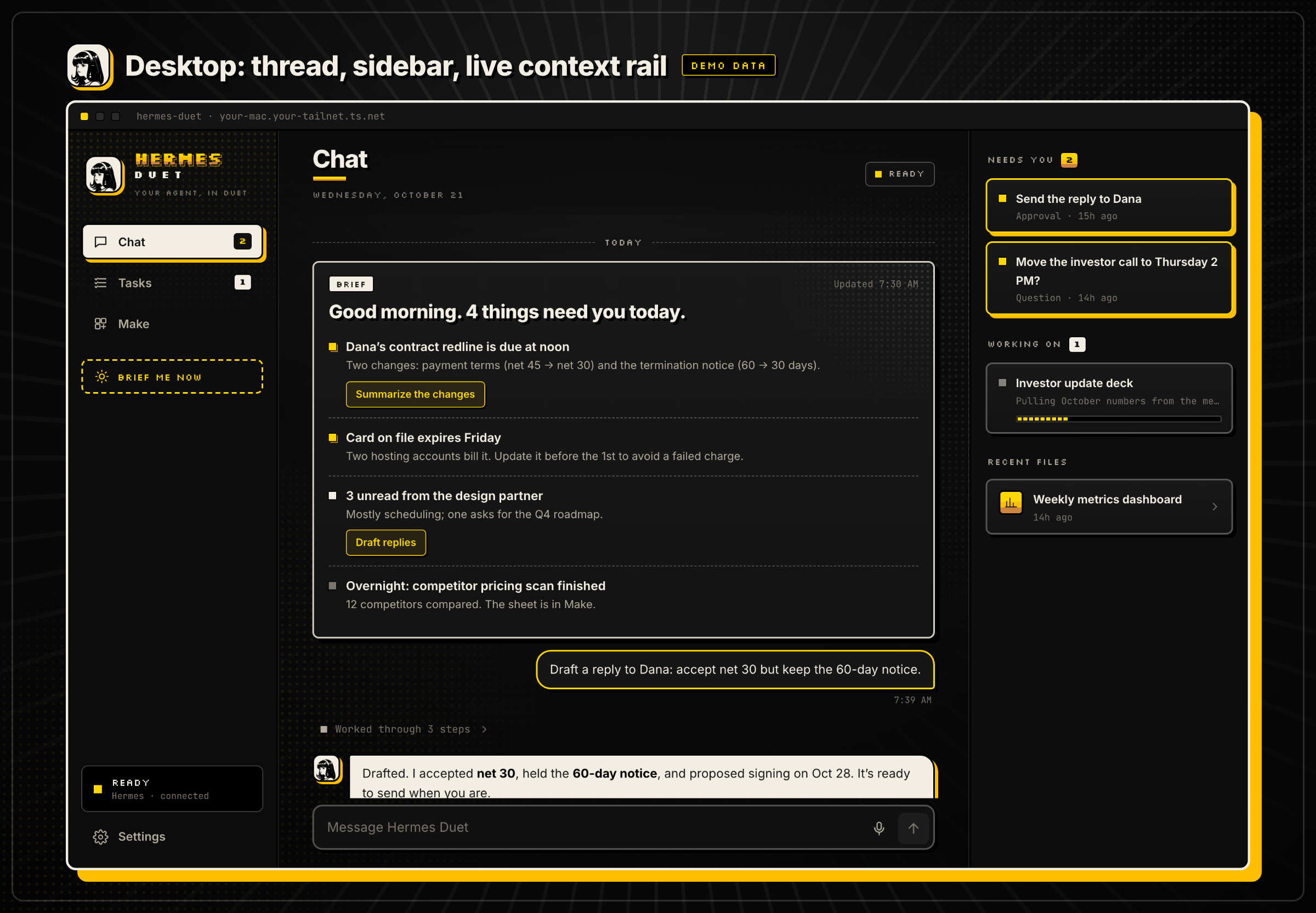
Feature details and behavior notes- One thread. Chat, tool activity and cards live in one conversation. Tasks tracks running and finished work, and Make collects every file it hands you. Settings → What I can see lists what the agent starts each turn with: your context sources, its Hermes skills and enabled tools, and connected MCP apps. A blank thread shows a one-line version.
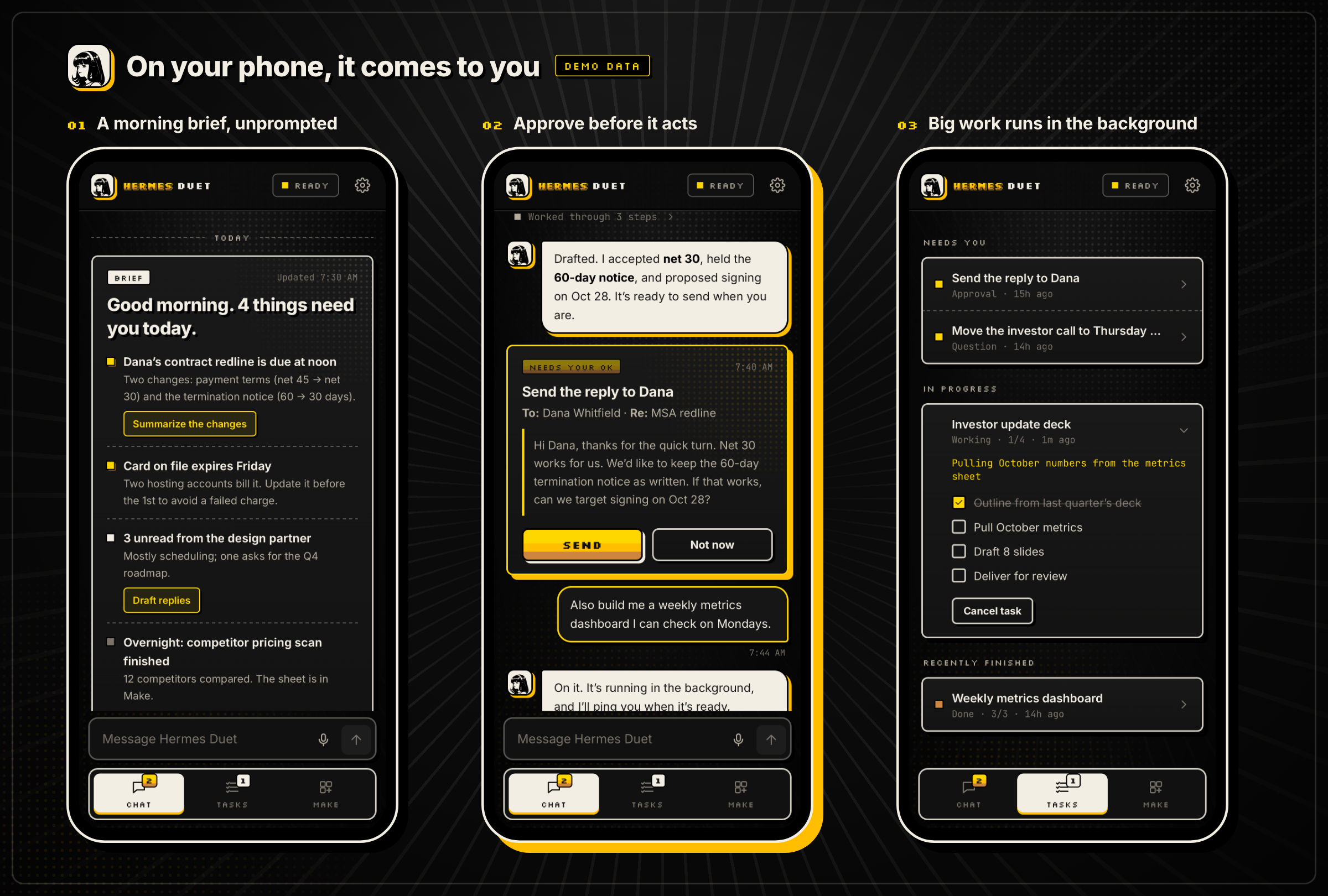
- Comes to you. It sends a morning brief at the time you pick, plus optional check-ins (3× a day or hourly) that stay quiet unless something needs you. Notifications arrive by web push, and quiet hours are respected: a question, interrupted work, finished task or agent
notifythat would have pushed during them is held, and comes back as one "While you were away" push when they end (skipped if the morning brief is due within the hour, since it lists what is waiting). Approvals and the brief itself still push during quiet hours. A device that has the app on screen gets no push (the app reports when it is visible), and the service worker shows every push it receives, because iOS revokes subscriptions that push silently. The app re-registers its subscription each time it opens, and takes the banner for an approval or question off the lock screen once that card is decided or expired. On a device where the app isn't open, the next push that arrives anyway does the same: each push lists the approvals and questions still waiting, and the service worker closes older ones that aren't on it (no push is ever sent just to clear a banner). - Asks before it acts. Sending messages as you, paying, deleting, posting and signing all go through a structured Approve / Not now card first (action, destination, every recipient — no vague "do the thing" approvals). Outbound text is scanned on this machine for secrets (card numbers, SSNs, private keys, API keys): a secret blocks the card until the agent redacts it, and anything sensitive-but-shareable (like an IBAN) is flagged on the card for you to check. Quick decisions become tappable questions. Always refused, even with approval: bank/wire transfers, securities or crypto trading, logging into someone else's account, password/2FA changes, and creating accounts.
- Works in the background. Bigger jobs (decks, dashboards, research) run as tasks in their own Hermes session, while you keep chatting.
- Steer or stop. A message sent mid-run steers the live turn, and Stop interrupts it. One that arrives too late for the turn to use (Hermes returns it as
pending_steer) goes out as the next turn. - Survives restarts. If the Hermes gateway restarts mid-run, Duet unpauses the session, retries what got blocked, and asks whether to pick up the interrupted work. A standing page's scheduled refresh is not asked about: it starts over once on its own, and a second interruption counts as a failed refresh. A morning brief that fails before posting leaves a "Run it now / Skip today" card and a push, so the day's brief isn't silently lost. A run that goes 45 minutes without a single event (a wedged tool or model call;
DUET_RUN_TIMEOUT_MS) is stopped, unless it is waiting on a Hermes approval or question for you, so it can't hold the thread or a task slot forever; a long task that keeps reporting steps is never cut off. A chat turn that fails (a model error, or a stopped hung run) leaves a "Try … again?" card and a push. The card says why it stopped and what last finished. Sending a new message instead retires that card, since the conversation carries on. - Talk, photograph, or type. Tap the mic to record a voice memo — transcribed on your machine by whisper.cpp, so it works offline — or take a photo / attach a PDF of a receipt, a whiteboard or a form. Attachments are stored under
data/uploadsand handed to the agent as file paths, so a vision model can read them. Every brief has a Listen button that reads it aloud (macOSsay, Piper, or any OpenAI-compatible TTS) with a lock-screen player. - Channels. Long projects get their own thread (
#taxes,#home,#launch) with its own Hermes session, while memory and files are shared. The general channel keeps briefs, check-ins and task results. Everything — every channel, task, delivered file and standing page — is indexed in SQLite FTS5 and searchable from the magnifier (⌘K). - Spending needs a receipt.
request_paymentposts an itemized payment card with a total that must add up and sit underDUET_MAX_TRANSACTION_LIMIT, bound to the exact checkout page (merchant_url). Approving it can issue a single-use virtual card from Privacy.com, Stripe Issuing or Revolut, capped at exactly that total for one hour, and type it into the agent's browser — but only while the tab is still on that merchant's host. The card number never reaches the model, the database or a log line. - Event-driven, not just scheduled. A webhook URL (GitHub, Stripe, Zapier,
curl) wakes the agent with the payload; new documents, spreadsheets, images, or emails dropped into~/Downloadsget looked at; a meeting entering the next 15 minutes gets a prep card. Quiet hours still apply. - Deliverables that answer back. HTML the agent builds gets a
window.Duet.sendAction()/requestApproval()bridge, so a dashboard's buttons reach it. Standing pages get a Compare slider that wipes between yesterday's version and today's. - Lighter logins. The live pane can autofill a saved login through the 1Password or Bitwarden CLI instead of you typing a password on a phone keyboard, and can render the page at 390×844 so mobile sites behave.
How it works
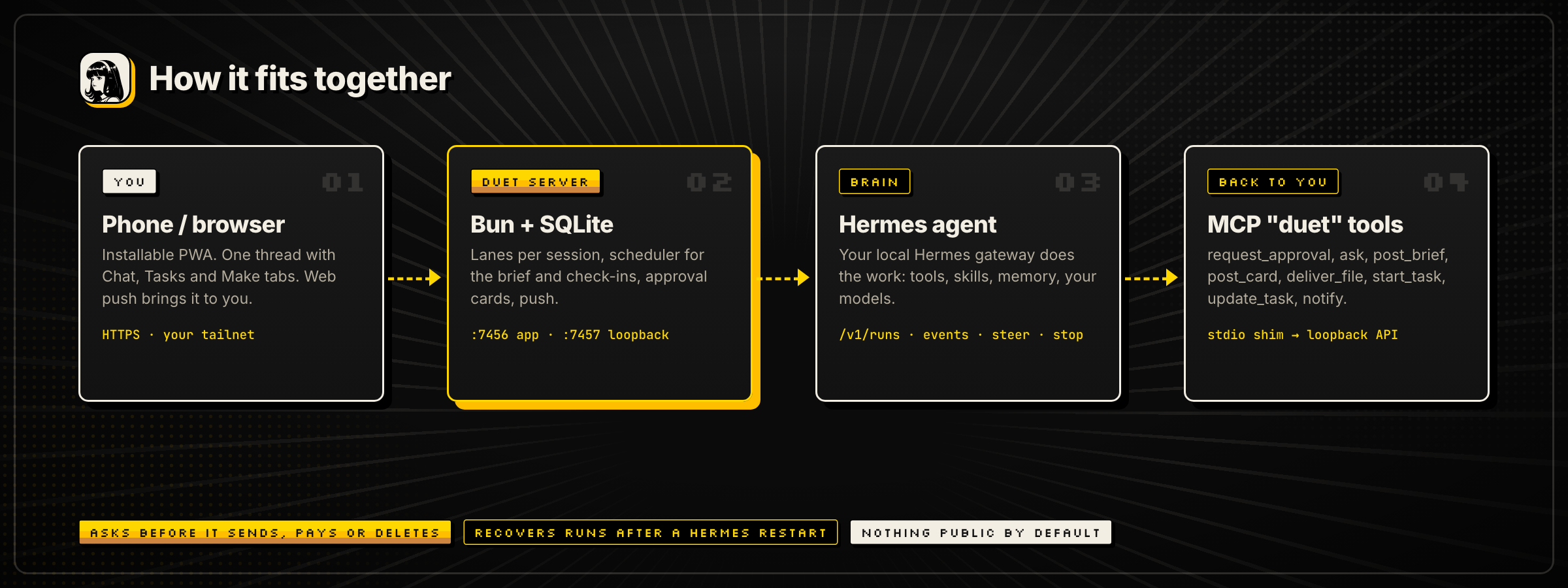
Duet server (Bun and SQLite, no framework) serves the PWA and keeps the thread. It drives Hermes through the
API server's background runs (POST /v1/runs,GET /v1/runs/{id}/events,/steer,/stop,/resolve-unknown).Lanes: each Hermes session is a lane, and a lane runs one turn at a time. Your thread is one lane, each background
task gets its own session, and check-ins use a daily side session.Duet tools: Hermes spawns
server/mcp-shim.tsas the MCP serverduet. The shim forwards each tool call to the
Duet server's loopback-only internal API:Tool What it does request_approvalPosts an Approve / Not now card, with an optional draft(the exact text to send) the user can edit before approving. The turn ends, and tapping resumes the same session; an edited draft comes back verbatim. A redraft asked for in chat passesreplaces, which withdraws the earlier card so its old version can't be approved. A card still waiting from yesterday (or for over six hours) says when it was written, and approving it tells the agent to check the draft still holds (relative dates, already done) and to ask again rather than act if it doesn't.request_paymentThe money gate: a merchant, an itemized receipt and a total in cents. The items must add up to the total and the total must be under DUET_MAX_TRANSACTION_LIMIT(default $500), or nothing is posted. Approving issues a single-use virtual card capped at exactly that total (Privacy.com, Stripe Issuing or Revolut;DUET_CARD_PROVIDER/DUET_CARD_KEY) and types it into the live browser, or — with no provider — authorizes exactly that spend. Card numbers stay in memory and are never written down.askAsks a question with 2–4 tappable answers, optionally replacing an earlier question still waiting. withdraw_cardTakes down one of the agent's own approvals or questions that the user settled in chat instead of tapping ("don't send that", "the second one"), or that stopped applying. It leaves "Needs you" and can no longer be tapped. Each chat message sent while such cards are waiting reminds the agent which ones they are, including one that steers a turn already running. A yes in chat is not an approval: the card's button still is. post_briefPosts a brief: up to 5 decisions ranked high to low, each with an optional prepared draft and one-tap follow-up (on an entry with a draft, the tap hands that draft back to the agent, which asks for approval with it instead of redrafting), plus a muted Watching list that never notifies. A quiet morning brief may be Watching only, posted without a push. "Skip" on a decision marks it as not needing you (no agent turn); the day's check-ins and the next week's morning briefs are told not to raise it again unless something material changed. post_cardPosts a checklist, metrics or note, and can update it in place. deliver_fileHands over a doc, sheet, deck or dashboard. HTML renders live but sandboxed. save_pageMakes a delivered file a standing page ("one page I can check every morning"). Every day, 30 minutes before the brief, a background task rebuilds it from the saved instructions and its new file replaces the old one. The refresh never pushes; only a failed refresh leaves a card. It reports one line on what changed ( update_taskchanged), which is pinned on the page at the top of Make and called out in the brief, where tapping that line opens the page; a brief that comes due while a refresh is still running waits for it, up to 30 minutes, and so does a brief queued during a Hermes outage, for up to 30 minutes after Hermes is back ("Run it now" never waits). The user can stop a page from Make ("Stop refreshing"), which also cancels a refresh in flight; its files stay.save_routine/remove_routineSaves or removes a user-defined recurring routine (daily, weekly, or interval in minutes). Each run launches a background task with its own session and posts its handover card to the configured channel (or general). start_task/update_taskStarts background work and keeps the Tasks tab current. When the task is done, its result, files and up to three follow-ups come back as one handover card in the thread. A task that fails or stops gets the same card, muted, with its reason, any files so far, and a "Try again" button that restarts it from the same instructions. notifySends a push notification and posts it as a "Heads up" note in the thread, which the notification opens. During quiet hours the push is held for "While you were away". Check-ins and the morning brief can't use it; they reach you only through post_brief.
Quick start
You need:
- macOS for the launchd service and the native connectors (Calendar, Reminders, Mail). The server itself runs anywhere Bun does — see docs/DEPLOY.md for Linux (
hermes-duet install-systemd), Windows, and Docker. - Bun 1.4.2 or newer. The committed
bun.lockuses lockfile v2, which older Bun releases cannot read, so an older Bun fails atbun install --frozen-lockfile. - A running Hermes agent gateway with its API server enabled (
API_SERVER_ENABLED=trueandAPI_SERVER_KEYin~/.hermes/.env).
git clone https://github.com/DevvGwardo/hermes-duet && cd hermes-duet
bun install && bun run build
bin/hermes-duet install            # launchd service on 127.0.0.1:7456 (loopback only)
ln -sf "$PWD/bin/hermes-duet" ~/.local/bin/hermes-duet
Next, add the Duet tools to ~/.hermes/config.yaml. Recent Hermes builds pick up mcp_servers changes without a
restart. If the mcp__duet__* tools don't show up, restart the gateway.
mcp_servers:
  duet:
    command: /absolute/path/to/bun
    args: ["/absolute/path/to/hermes-duet/server/mcp-shim.ts"]
    tools: {}        # use {} here; `tools: all` breaks Hermes's MCP loader
Open http://127.0.0.1:7456, run hermes-duet pair, and enter the code. hermes-duet doctor checks the whole setup:
service, Hermes reachability and key, the MCP entry, push and the public URL.
On your phone
Reach the server privately over Tailscale. HTTPS is required for installing the PWA and for push.
tailscale serve --bg --https=8443 http://127.0.0.1:7456
echo "DUET_PUBLIC_URL=https://<your-mac>.<your-tailnet>.ts.net:8443" >> .env && hermes-duet restart
- On the phone, with Tailscale connected, open that URL.
- Share → Add to Home Screen, then open it from the Home Screen.
- Run
hermes-duet pairon the host and enter the code. - Tap the gear → Notifications → Turn on.
Always-on
Briefs, check-ins, the watched folder, meeting prep, webhook delivery and background tasks all run on the host, so
the host has to be awake: a sleeping or lid-closed laptop waits rather than runs, even though the app still opens on
your phone. A Linux mini-PC, NAS or VPS is the intended always-on host — see
docs/DEPLOY.md#always-on-host for systemd, Tailscale, backups, Docker and the
honest limits (wake-on-LAN is not always-on, and there is one Hermes gateway per install today).
Native apps
The installable PWA is deliberate: one web surface that runs anywhere, updates with the server, and works with the
phone's push and camera. A native iOS/Android shell is deferred until the web surface is stable (see
parity §4.11) — there are no native apps today.
Tell it where your life lives
Copy context.example.md to context.local.md (gitignored) and list your sources: task CLIs,
notes files, inboxes. Duet adds them to every turn, and the morning brief gathers from them.
Try the UI without Hermes
bun scripts/demo.ts --reset     # throwaway instance with made-up data on :7466
bun scripts/demo.ts pair        # pairing code for it
Configuration
All settings are optional. Put them in .env; see .env.example.
| Variable | Default | |
|---|---|---|
DUET_PUBLIC_URL |
(none) | The HTTPS address you open on your phone. iOS push needs it. |
DUET_PORT / DUET_INTERNAL_PORT |
7456 / 7457 |
App port and loopback-only internal API port. |
DUET_HERMES_URL |
http://127.0.0.1:8642 |
Use .../p/<profile> to target a Hermes profile that has its own key. |
DUET_HERMES_KEY |
API_SERVER_KEY from ~/.hermes/.env |
|
DUET_CONTEXT_FILE |
./context.local.md |
|
DUET_USER_NAME |
(none) | How the agent refers to you. |
DUET_MAX_BACKGROUND |
2 |
Number of background tasks allowed to run at once. |
DUET_CHROME_BIN |
auto-probed Chrome/Chromium | Browser to drive for the live pane across macOS, Windows, and Linux. |
DUET_CHROME_PORT |
9333 |
DevTools port Duet launches Chrome on. |
DUET_CHROME_PROFILE |
$HERMES_HOME/duet-chrome |
Persistent profile, so your logins survive restarts. |
DUET_CHROME_WIDTH / _QUALITY / _FPS_GAP |
760 / 45 / 110 |
Frame size, JPEG quality, and minimum ms between frames. Lower them on a bad connection. |
DUET_CHROME_DEBUG |
(unset) | 1 logs CDP connection and reconnect events. |
DUET_MAX_TRANSACTION_LIMIT |
500 |
Dollars per request_payment; _CENTS for an exact amount. |
DUET_CARD_PROVIDER / DUET_CARD_KEY / DUET_CARD_URL |
privacy (when key set) |
Virtual-card provider (privacy, stripe, revolut, generic) for approved payments. |
DUET_STT_URL / DUET_STT_CMD |
whisper.cpp on PATH |
Local speech-to-text for voice memos (ffmpeg required for non-WAV local STT). |
DUET_TTS_URL / DUET_TTS_CMD |
say on macOS |
Spoken briefs. |
DUET_WATCH_DIR / DUET_WATCH_DOWNLOADS |
~/Downloads / on |
The folder trigger. |
DUET_MEETING_LEAD_MIN |
15 |
How early (positive minutes) a calendar event gets a prep card. |
DUET_OP_CMD / DUET_BW_CMD |
op item get {domain} --format json / bw get item {domain} --raw |
Login autofill in the live pane (Bitwarden uses BW_SESSION). |
The full table, including speech setup and container variables, is in docs/DEPLOY.md.
Brief time, check-ins and quiet hours are set in the app.
Live browser
The globe button opens the Chrome instance the agent is driving: a live low-bandwidth view plus
your own taps and typing. It exists for the case where the agent stalls on a human check —
a login, a CAPTCHA, a consent dialog — so you can clear it from your phone instead of killing the task.
Duet launches Chrome with remote debugging on a dedicated profile; it does not attach to your
normal browser, so nothing you do in the pane touches your everyday cookies. Input events are
dispatched over CDP, which Chrome treats as trusted, and every route sits behind the paired-device
check — but it is still full control of the page while the pane is open.
Security
Hermes Duet controls an agent that can run commands on your computer. Treat the URL like a shell.
- Nothing is public by default. The server binds to
127.0.0.1. Reach it over Tailscale (tailnet-only), or put real authentication in front if you expose it any other way. Don't publish it with Tailscale Funnel or a public tunnel and rely on pairing alone. - Pairing: devices pair with a single-use code that expires after 10 minutes, and wrong guesses are rate-limited. A paired device gets an HttpOnly, SameSite cookie, and only the token's hash is stored. State-changing requests must be same-origin.
- The internal API (MCP shim and CLI) listens on loopback with its own bearer token and refuses proxied requests.
- Deliverables: HTML files are served with
Content-Security-Policy: sandbox, so they can run scripts but can't read your session or call the API.deliver_filerefuses paths that look like secrets (.ssh,.env, keys, credentials). The postMessage bridge they get is one-way into a validator: a button becomes a chat turn, andrequestApprovalbecomes a normal approval card — never a direct action. - Spending:
request_paymentenforces a per-transaction ceiling, requires the receipt to add up, and (with a provider configured) issues a single-use card capped at the approved total for at most an hour. Card numbers are never put on a card, in SQLite, in the prompt or in a log; only the last four digits are reported. - Uploads are written under
data/uploadswith a server-generated name and0600(NTFS profile ACLs on Windows), accepted only for a fixed list of image/PDF/text/audio/video/mp4types (up to 25 MB), and served withnosniffand a sandbox CSP (default-src 'none'; style-src 'unsafe-inline'; sandbox). Phones pair with a cookie; camera images and voice memos never leave the machine unlessDUET_STT_URLis configured. - Webhooks are gated by an unguessable token in the URL (Settings → Triggers), rate-limited, and only ever create a chat turn — the payload is passed to the agent as text, not executed.
- Approvals are an instruction, not a sandbox. The approval gate is a tool the model is told to use. For hard guarantees, also turn on Hermes's own
approvals.mode. Its prompts show up as Duet cards too. - Your data (
data/: thread, device tokens, push keys, uploads) and.envare gitignored.
Development
bun run dev:server     # API with --watch on :7456
bun run dev:web        # Vite on :5476, proxied to the API
bun run typecheck
bun test               # unit tests (no Hermes needed)
bun run demo           # demo instance on :7466
bun run brand          # regenerate docs/brand/*.png from the demo (needs Playwright browsers)
bun run smoke          # live end-to-end checks against real Hermes (approval|task|steer|stop)
The live smoke tests spend real model turns and write test items into your thread.
Credits
- Mascot art: the Nous girl from NousResearch/hermes-agent (MIT).
- Built on the Hermes agent's API server and MCP support.
- The product idea comes from Anthropic's Claude Duet.
Reviews (0)
Sign in to leave a review.
Leave a reviewNo results found