teamclaude-rs
Health Pass
- License — License: NOASSERTION
- Description — Repository has a description
- Active repo — Last push 0 days ago
- Community trust — 15 GitHub stars
Code Fail
- rm -rf — Recursive force deletion command in .githooks/test-disclosure-scan.sh
- rm -rf — Recursive force deletion command in .githooks/test-working-notes-gate.sh
Permissions Pass
- Permissions — No dangerous permissions requested
No AI report is available for this listing yet.
Lean single-user rotating Anthropic proxy with a live TUI — Rust rewrite of teamclaude
teamclaude-rs (tcr)
A local proxy that runs Claude Code across multiple Claude accounts.
Point Claude Code (or any Anthropic API client) at it. For each request it picks an account by
looking at what every account has left in every quota window. It keeps a conversation on the
account whose prompt cache is already warm, and it shows you what the traffic would have cost.




Install · Usage · Compared with other tools · FAQ · Configuration · CLI · Security


TcrBar is a .dmg on the release page
Why tcr
- It chooses by quota, not by turn. It reads the five-hour, weekly and per-model weekly window
on every account, and spends first the quota that resets soonest, so less of it expires unused. - It keeps the prompt cache warm. A conversation that moves to another account starts cold, and
its next request pays at least 12.5 times as much for the cached prefix. So each conversation
stays on one account, and on subscriptions the cache is held for an hour instead of five minutes. Over 30 days of the
author's own traffic, ending 2026-10-13, 97.6% of prompt tokens were read from cache. - One proxy serves every session. Each Claude Code session on the machine gets its own pin, and
you can add, disable or remove accounts while it runs. - You can watch it. A macOS menu-bar app and a terminal dashboard show every window, every
session, and what the traffic would have cost at list price. - It stays on your machine. No telemetry and no crash reporting. Tokens, logs and pins are
files on your own disk.
Install
curl --proto '=https' --tlsv1.2 -LsSf https://raw.githubusercontent.com/dhkts1/teamclaude-rs/main/install.sh | sh
This installs the tcr CLI. On macOS it also installs TcrBar from the .dmg on the
release page; set TCR_SKIP_UI=1 to skip
that step. To install only the tcr CLI, on any platform, use the cargo-dist installer directly:
curl --proto '=https' --tlsv1.2 -LsSf https://github.com/dhkts1/teamclaude-rs/releases/latest/download/teamclaude-rs-installer.sh | sh
Or build from source with a Rust toolchain. Put the binary in place with the script and not withcp, because cp onto a running binary rewrites the same inode and macOS then kills it:
cargo build --release
scripts/install-cli.sh          # places `tcr` at ~/.local/bin/tcr by default
| Platform | tcr CLI |
TcrBar menu-bar app |
|---|---|---|
macOS, Apple silicon (aarch64-apple-darwin) |
prebuilt | yes |
macOS, Intel (x86_64-apple-darwin) |
prebuilt | yes |
Linux x86_64, musl (x86_64-unknown-linux-musl) |
prebuilt | no |
Linux aarch64, musl (aarch64-unknown-linux-musl) |
prebuilt | no |
| Anything else | build from source | no |
The Linux builds are static musl binaries, so they run on both Alpine and glibc systems. TcrBar andtcr ui are macOS-only.
Usage
tcr login          # PKCE browser flow, once per account you want in the pool
tcr                # start the proxy with the live TUI (q quits)
tcr run -- <args>  # launch Claude Code already pointed at the proxy
If you already use the claude CLI on this machine, you can skip tcr login on the first run.
When tcr status, tcr accounts or the server's own boot find no accounts configured, they import
that existing login, and tcr login --from-claude-code does the same import on request. A refresh
token works only once, so the first time tcr refreshes the imported credential, claude asks you
to log in through the browser once. tcr says so on every import, anddocs/cli.md has the details.
To point a client at the proxy yourself instead of using tcr run:
export ANTHROPIC_BASE_URL=http://127.0.0.1:3456   # base-URL mode
# or
export HTTPS_PROXY=http://127.0.0.1:3456          # forward-proxy mode
export NODE_EXTRA_CA_CERTS=<the CA path tcr logs at boot>
Forward-proxy mode decrypts TLS with a locally generated certificate, so the client has to trust
it; tcr prints the CA path to use when it starts. The config lives at~/.config/teamclaude.json, and name and accessToken are the only required keys. Every other
key, its default and the file's permissions are indocs/configuration.md.
Managing the fleet
These commands act on the running proxy when one is up, so changing the pool does not need a
restart. Every flag is in docs/cli.md.
| Command | What it does |
|---|---|
tcr accounts [--probe] |
List the pool. --probe refreshes quota live instead of reading the file. |
tcr status [--json] |
Probe every account and print the fleet. --json is what the panel and TUI read. |
tcr priority <account> [N | --first | --last] |
Set the rotation tier. |
tcr enable / tcr disable <account> |
Take an account in or out of rotation. |
tcr remove <account> |
Delete an account, disabling it live first. |
tcr control <account> [--clear | --show] |
Nominate the account that serves control-plane traffic. |
tcr group ls | add | rm | reserve | color |
Label accounts, and hold a labelled set back for traffic that asks for it. |
tcr run --group <name> |
Start a session that prefers one group. |
tcr sessions [--json] |
List the sessions the running proxy has seen in the last hour. The panel's Sessions and Tools tabs read the same feed. |
tcr wrap [--days N] |
A usage report off the on-disk ledger: cost, tokens and cache-hit ratio, broken down by model, account and day. Needs no running proxy. |
tcr token <account> |
Print an account's access token to stdout, for piping. |
tcr update |
Update tcr in place, from the checkout or the published installer. |
What it does
Every Claude account has several usage limits running at once: a rolling five-hour session window,
a weekly window, and a weekly window for a single model family. Each window tracks how much you
have used and when it resets, and different accounts reset at different times. tcr learns every
window on every account and schedules requests against them.
It does not round-robin. Within a priority tier it prefers the account whose quota window
resets soonest, because weekly quota you have not used is lost once that window resets. Ties go to
the account picked least recently, so requests still spread out instead of piling onto one
account. It skips an account that is disabled, erroring, on a rate-limit hold, too close to a
limit, held back for a group this request did not ask for, or out of the model-scoped window this
request needs. The full ordering is indocs/architecture.md. The reset-urgency rule, and how
to turn it off, is indocs/configuration.md.
The prompt cache is the expensive part. Anthropic keeps it per account, so moving a live
conversation to another account rebuilds its whole cached prefix. That is why each session is
pinned to one account and stays there. A single request that detours around a passing fault does
not move the pin; only a failure of the account itself does. Pins are saved to disk continuously
and restored at boot, so a restart does not cold-start every live conversation. Anthropic holds a
cached prefix for five minutes, or an hour if the client asks for it, and a session that asked for
the hour keeps its pin longer to match.
Outgoing traffic is paced per organization, because that is the unit Anthropic limits: two
accounts in one org share that org's single rate. A looser ceiling for the whole fleet sits behind
it. Quota probes are reads that spend nothing and keep an idle account's numbers current. Each
account runs them on its own random schedule, so the fleet never reaches Anthropic in one burst on
a fixed period, and a restart scatters them again instead of lining them up.
Everything is priced. Every request served goes into a local ledger at Anthropic's list prices,
per account and per model, split into input, output, cache reads and cache writes. The panel and
the terminal dashboard show today's spend, the burn rate over the last hour, the model mix and the
cache hit rate. The ledger reloads from disk at boot, so a restart does not reset the day. None of
this is a bill: these accounts are subscriptions, and list price is simply the one unit you can
compare across accounts, models and days. Traffic that could not be priced shows no figure rather
than a zero, an account that served nothing shows a real zero, and a window holding both reports
the priced part next to the count it could not price.
OAuth tokens refresh in the background, so accounts do not expire while you work. Accounts can
carry labels, and a labelled set can be reserved so only traffic that asks for it goes there. One
account can be named to serve the identity and control-plane calls a client makes alongside its
prompts; inference never picks that account, so it stays clean. You can add, enable, disable and
remove accounts while the proxy runs, which matters because a restart is what costs you warm pins.
There is a native macOS menu-bar app and a terminal dashboard. tcr also drops in for the Node
teamclaude proxy, with the same config, certs and port.
Watching it
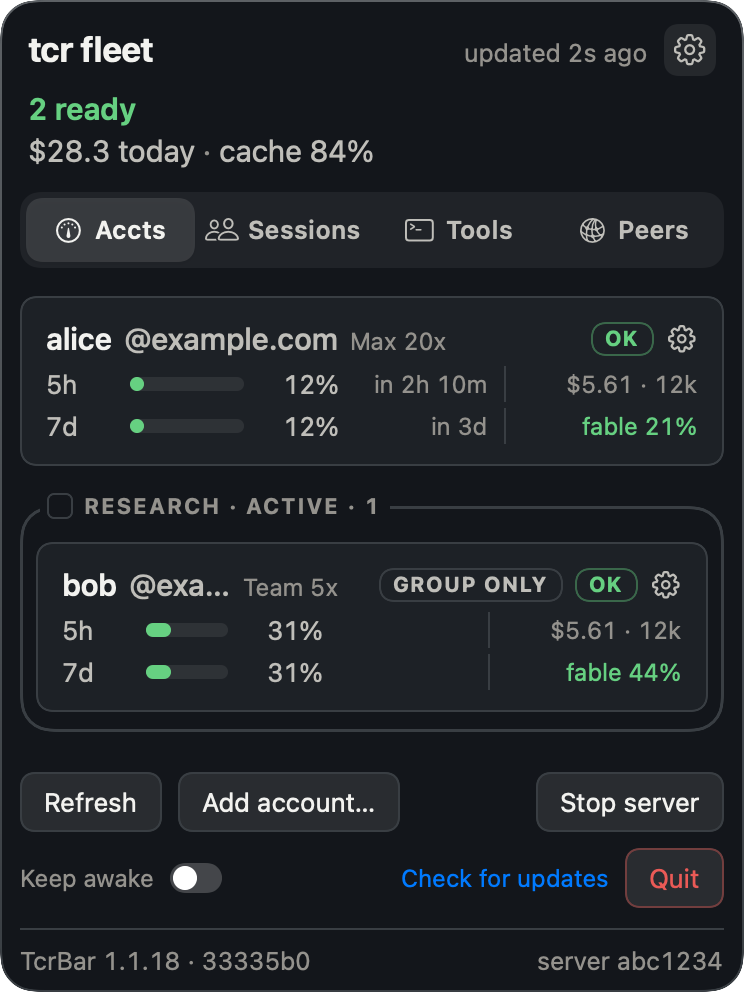
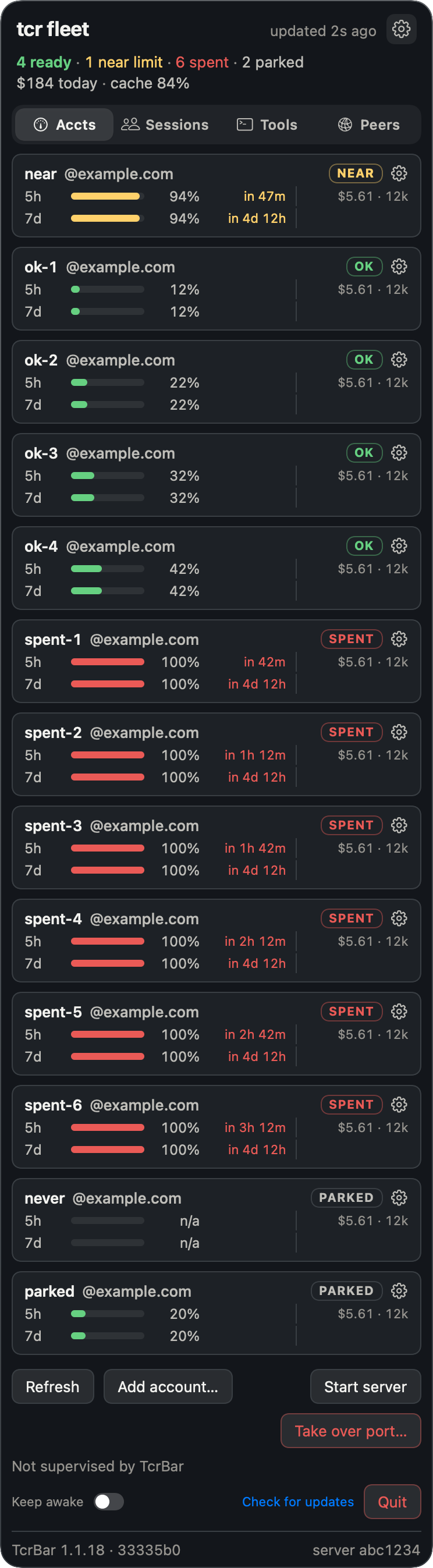
apps/macos holds TcrBar, a native front end over the same tcr status --json the TUI reads. The
menu-bar item is the whole app, with no Dock icon and no window. Its icon shows the capacity left
across the whole fleet rather than the worst account, because one used-up account in a rotating
pool is the rotation working, not an alarm.
The panel has four tabs. Accounts has one row per account, with a line for each quota window
showing a bar, a percentage and the countdown to that window's reset. Each row also shows probe
health and group tags, and its right-click menu runs tcr for you, so you can steer the fleet
from the panel. Sessions lists the proxy's live sessions by project, and each one names the
account it runs on. Tools shows what is running now, today's slowest calls and totals per tool.
Peers shows the other Macs tcr has found and what is lent (see Peers). Sessions and
Tools read from the running proxy and keep a copy of what they last saw, so after a proxy restart
they show their last known state instead of going blank.
Account rows also show the model-scoped weekly window (Fable's, on current plans) once the proxy has
learned that window for the account; until then the spot stays empty rather than showing a zero.
The proxy enforces that window as well as showing it: a request for that model skips an account
that has used it up, and requests for any other model ignore it. The header and each card show the
spend figures, and the footer holds a keep-awake switch, Check for updates and Quit. TcrBar can also run the proxy for
you, keep the Mac awake while it does, and update itself through
Sparkle.
Install it from the latest release, or runtcr ui. To build it from this repo, run apps/macos/scripts/install.sh. How releases are made is in docs/RELEASING.md.
The panel never shows a blank list. It tells apart four cases, because each needs a different
response: tcr is missing, a poll is failing, the fleet is empty, or the read is offline.
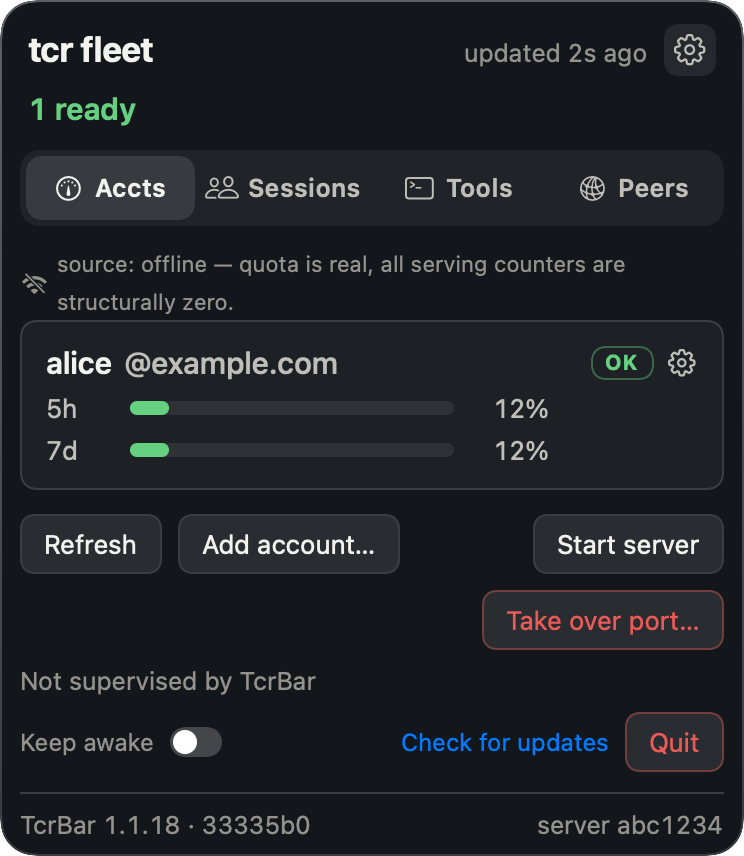
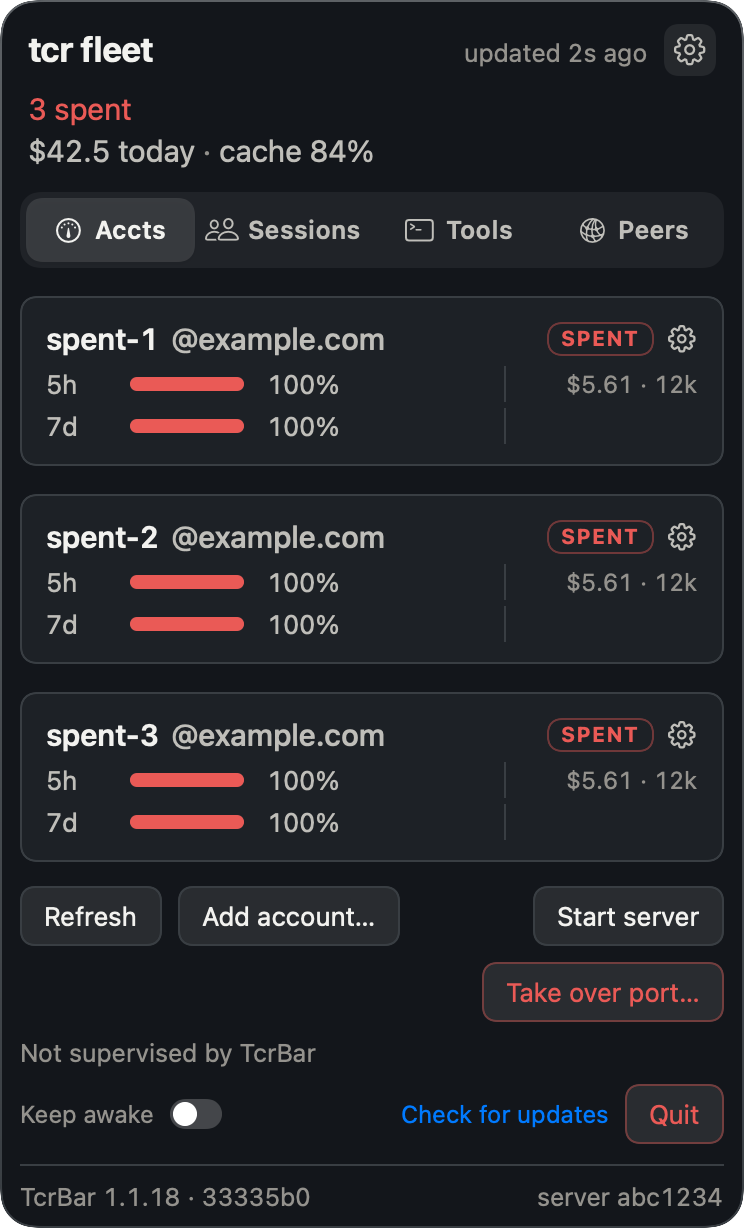
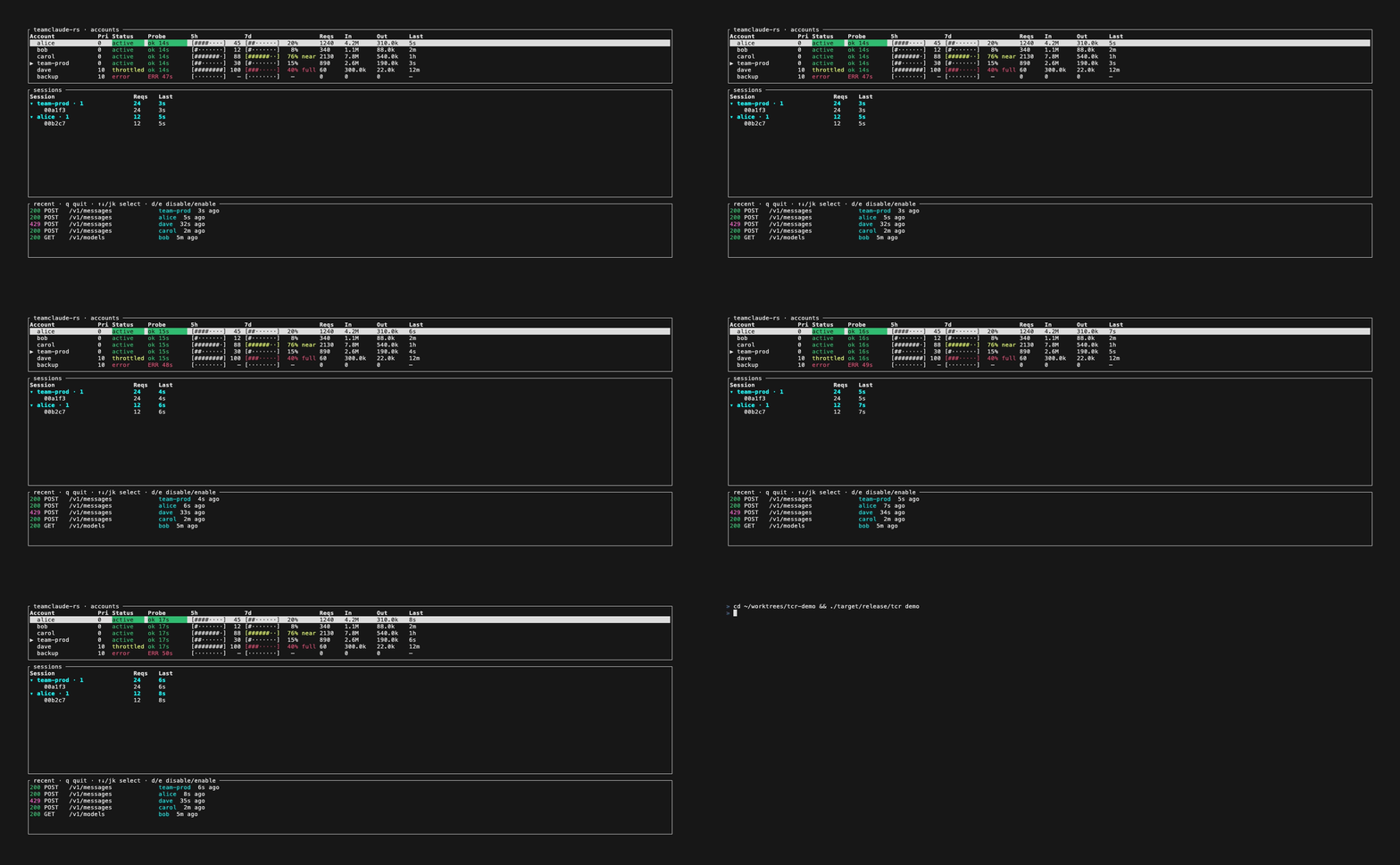
The TUI runs on both macOS and Linux and shows everything the panel does, plus the live session
tree: which conversation is pinned to which account, and which ones diverted.
tcr demo runs the real TUI against fake accounts, which is how these screenshots were made. It
needs no config and contacts nothing.
How it works
One TCP listener serves both modes. It peeks at the first eight bytes of each connection without
consuming them and decides from those. A CONNECT to an Anthropic API host has its TLS terminated
with a locally generated leaf certificate, any other CONNECT is copied through as raw bytes, and
plain HTTP is base-URL mode. Each request then runs a bounded rotation loop: pick an eligible
account, refresh its token if it is about to expire, swap the client's credentials for the pooled
one, send, and rotate to another account on a 401, 429, 529 or transport failure.
Quota numbers come from the response headers of traffic tcr already serves. Between requests, a
probe that spends nothing against Anthropic's OAuth usage endpoint keeps them fresh. The probe
never calls /v1/messages, so an idle account's bars stay accurate instead of freezing at their
last served value. A window that has passed its reset reads as fresh rather than full, worked out
against the clock at the moment it is read, so neither the display nor the scheduler can act on a
stale bar. The request-flow diagram, the selection order and the probe schedule are indocs/architecture.md.
Peers
tcr can find other Macs on your network that run tcr, trust them, and lend a trusted Mac part
of an account: 20 % of a group's weekly window, for example, or one account until 18:00. It is off
by default. Finding and sharing each have their own switch, and nothing is sent before you turn
one on.
The design rests on three rules. The announcement each Mac broadcasts carries a random id that
changes every boot and a port; it never carries a key, and carries a name only if you allow it.
Nobody is trusted until a person at each Mac has compared the same six digits on both screens and
pressed Trust. A borrowed request is served from the lender's own account, so the borrower's
credential never leaves the borrower's Mac and the lender never learns it.
Pairing and every peer stream run over the
Noise Protocol Framework. A first pairing uses XX (both
sides learn each other's key, and the six digits come from the handshake hash), a return visit to
a Mac you already trust uses IK, and IKpsk1 is for when a join key has been passed around.
WireGuard is built on the same handshake family, and if you want to understand how any
Diffie-Hellman based authentication works, that one spec is the best hour you can spend.docs/peers.md covers finding, trusting, lending and what each step sends.
Compared with other tools
Several tools let Claude Code use more than one account. They differ in where they sit: a proxy in
the request path chooses an account for every request, while a switcher changes which login Claude
Code itself holds.
| Tool | How it switches | How it picks an account | Keeps each conversation on one account | Runs on | License |
|---|---|---|---|---|---|
| tcr | Local proxy in the request path | Every request, by what is left in the five-hour, weekly and per-model weekly windows | Yes, always; moves only when that account cannot serve | macOS, Linux | PolyForm Noncommercial |
| claude-swap | Swaps Claude Code's stored login, for the whole machine or one terminal | By hand, next in turn, or automatically at a five-hour or seven-day threshold | Per terminal with cswap run; a switch moves the running session, which its README says rebuilds the cache |
macOS, Linux, Windows | MIT |
| teamclaude | Local proxy in the request path | Rotates when the five-hour or weekly window reaches a threshold, and tracks the per-model weekly cap | Opt-in with distributeSessions, off by default |
Node.js 20+ | MIT |
| ccs | Launches Claude Code with a chosen profile; account pools go through a local proxy | Profile chosen at launch; pools rotate round-robin by default, or fill-first | Not stated in its README | macOS, Linux, Windows | MIT |
| Quotio | macOS app that manages a local proxy (CLIProxyAPI) | Round-robin or fill-first | Not stated in its README | macOS app; CLI on macOS and Linux | MIT |
| cux | Swaps the login, restarts Claude Code and resumes the conversation | On a rate limit by default, with optional five-hour and seven-day thresholds | No: moving the conversation is how it works | Linux, macOS, Windows | GPL-3.0 |
| cc-account-switcher | Swaps the stored login while Claude Code is closed | By hand | Not stated in its README | macOS, Linux, WSL | MIT |
Each row comes from that project's own README and docs, read on 2026-10-13. "Not stated" means its
README does not say, not that the tool cannot.
Another tool fits better if you need Windows (claude-swap, ccs, cux), want Codex, Gemini or other
providers behind the same tool (teamclaude, ccs, Quotio), want no proxy in the request path
(claude-swap, cux, cc-account-switcher), or need an open-source license for commercial use (every
other row).
FAQ
How do I use Claude Code with more than one Claude account?
Install tcr, run tcr login once for each account, start the proxy with tcr (or let TcrBar run
it), and launch Claude Code with tcr run. Every request then goes through the proxy, which picks
an account from the pool. If you are already logged in to Claude Code, the first run imports that
login, so you only log in to the others.
Does switching accounts lose the prompt cache?
Yes. Anthropic keeps the prompt cache per account, so a conversation that moves arrives cold and
writes its whole cached prefix again. A cache write bills at 1.25 times the input price and a cache
read at a tenth of it or less, so the first request after a move pays at least 12.5 times as much
for that prefix (25 times on Opus 5.5), and on a long conversation the prefix is nearly all of the
request. That is why tcr keeps each
conversation on one account, even past the point where it would send new conversations elsewhere.
It moves only when that account cannot serve the request. Pins are saved to disk, so a restart
keeps them for conversations still within the cache lifetime.
How long does the cache stay warm?
Five minutes after its last use, unless the request asks for an hour. From 1.1.19, when every
account in the pool is a subscription, tcr rewrites every cache breakpoint to the hour, so a
conversation you come back to within the hour resumes warm instead of writing its prefix again. On
a subscription the hour costs the five-hour window what five minutes does (measured 2026-10-06). An
API key is billed twice the input price for an hour-long write, so with one in the pool tcr
forwards requests as sent. cacheTtlRewrite in docs/configuration.md
overrides either default.
What happens when an account runs out?
New conversations skip any account that is close to a limit, on a rate-limit hold, or out of the
model window a request needs, and go to the account the quota rules pick next. A conversation
already on that account moves once, and pays one cache rebuild.
Does it run on Linux, and with API keys?
The tcr CLI and terminal dashboard run on Linux as static builds for x86_64 and aarch64. TcrBar,
the menu-bar app, is macOS only. Accounts can be Claude subscriptions, logged in through the
browser, or Anthropic API keys.
How is this related to teamclaude?
tcr is a from-scratch Rust rewrite of the Node proxy
KarpelesLab/teamclaude and drops in for it: same
config file, certificates and port.
Documentation
| Document | What is in it |
|---|---|
docs/configuration.md |
Every config key, its type, default and source citation. |
docs/cli.md |
Every command and flag, exit codes, account resolution. |
docs/peers.md |
Finding, trusting and sharing accounts with other Macs on your network. |
docs/architecture.md |
Request flow, entry modes, account selection, quota probes. |
docs/troubleshooting.md |
Symptoms and what they mean. |
CONTRIBUTING.md |
Development setup, test and lint gates, what main requires. |
Security
Read this before you run it.
Listening only on localhost does not keep other programs out. tcr binds 127.0.0.1, but
every process and container on the host can reach loopback. The forwarding path does not ask
loopback callers for the API key, and nothing creates a proxy.apiKey for you, so on a default
install the only check is being on this host. Set a key if you want a tighter boundary than that.
The forward proxy is an open tunnel on purpose. Its allowlist of hosts it may decrypt has three entries:api.anthropic.com, console.anthropic.com and platform.anthropic.com. Every other CONNECT
target is copied through as raw bytes and is never decrypted or filtered, which makes tcr an
unrestricted forward proxy to any host for any local process. Claude Code needs it to work that
way, so treat it as a tunnel and not as a firewall. Which hosts are actually decrypted depends on
the leaf certificate in use, and MITM-DESIGN.md works through that.
Credentials. On the two inference paths, tcr drops the client's own authorization andx-api-key headers before adding the pooled Bearer token, so a client credential is never sent
alongside ours. Everything else a client sends under its own bearer (connector list, plugins,
settings, bootstrap) is relayed under that bearer unchanged, because those calls are about the
client's identity. The proxy checks that identity against controlAccount (see controlIdentity
in docs/configuration.md).
git config core.hooksPath .githooks turns on a pre-commit secret scan and the other gates
listed in CONTRIBUTING.md. Treat it as a backstop: it only sees what
you stage, and --no-verify exists.
Peers are opt-in twice and rate-limited. Nothing is announced until find is on, and nothing
is served until share is on. A Mac that wants to pair knocks with temporary keys only and waits
in a list until you accept it. Knocks are capped per address (one every 10 s, a burst of 3, two
unauthenticated sockets), and the list holds eight. An address you ignore is muted. One you block
is banned by address and, once its key is known, by key. A lender sees the plaintext of the
requests it serves, by design, and lends at most half of any window.docs/peers.md has the full table of what each step sends.
Found a security issue? Please report it privately through GitHub's security advisories rather
than in a public issue.
It does not phone home
tcr has no telemetry and no crash reporting. Your config, logs, session pins and OAuth tokens are
files on your own disk. It makes two kinds of outbound call: to Anthropic on your behalf, and to
GitHub to check for a newer version.
The cost falls on whoever hits a bug. There is no error stream to search and no session to replay,
so a good bug report is worth more here than in a project that watches its users. #323 was
diagnosed from a screenshot and four log lines someone pasted.
Instead of watching you, it signs things. The app is codesigned with a Developer ID certificate,
notarized by Apple and stapled, and every update is signed again with a Sparkle EdDSA key that your
installed copy checks before it runs anything. Counting them all, there are seven signing secrets
for the release, all deliberately removed from this repository on 2026-08-09 and now kept on one
Mac and in one 1Password item. On top of those come a local CA on your machine that mints a fresh
leaf certificate on every boot, your per-account OAuth tokens, and the proxy's own API key.
That is a lot of keys for a tool that rotates Claude accounts. The reasoning is in
docs/RELEASING.md: this repository is public, collaborators have push access,
and Sparkle's private key does more than protect a build artifact. It decides what every copy
already installed will run. A key that is not stored here cannot be stolen from here.
Credits and license
Licensed under PolyForm Noncommercial 1.0.0; see LICENSE. This is a from-scratch Rust
rewrite of the Node proxy KarpelesLab/teamclaude,
which is MIT licensed. The original's copyright and license notice are kept inNOTICE.
Reviews (0)
Sign in to leave a review.
Leave a reviewNo results found