sap-ui-mcp
Health Pass
- License — License: MIT
- Description — Repository has a description
- Active repo — Last push 0 days ago
- Community trust — 10 GitHub stars
Code Warn
- fs module — File system access in .github/workflows/ci.yml
Permissions Pass
- Permissions — No dangerous permissions requested
No AI report is available for this listing yet.
MCP server, CLI and SDK that let AI agents see and drive SAP GUI, Web GUI and Fiori screens. Each write waits for your yes.

SAP UI MCP
Let AI agents see and interact with SAP screens.
An MCP server, CLI and SDK for Claude Code, Codex, Cursor, Copilot or your own agent,
on SAP GUI for HTML (Web GUI), SAP Fiori and SAP GUI for Windows.


Docs ·
Quick start ·
Benchmark ·
Chrome extension ·
llms.txt
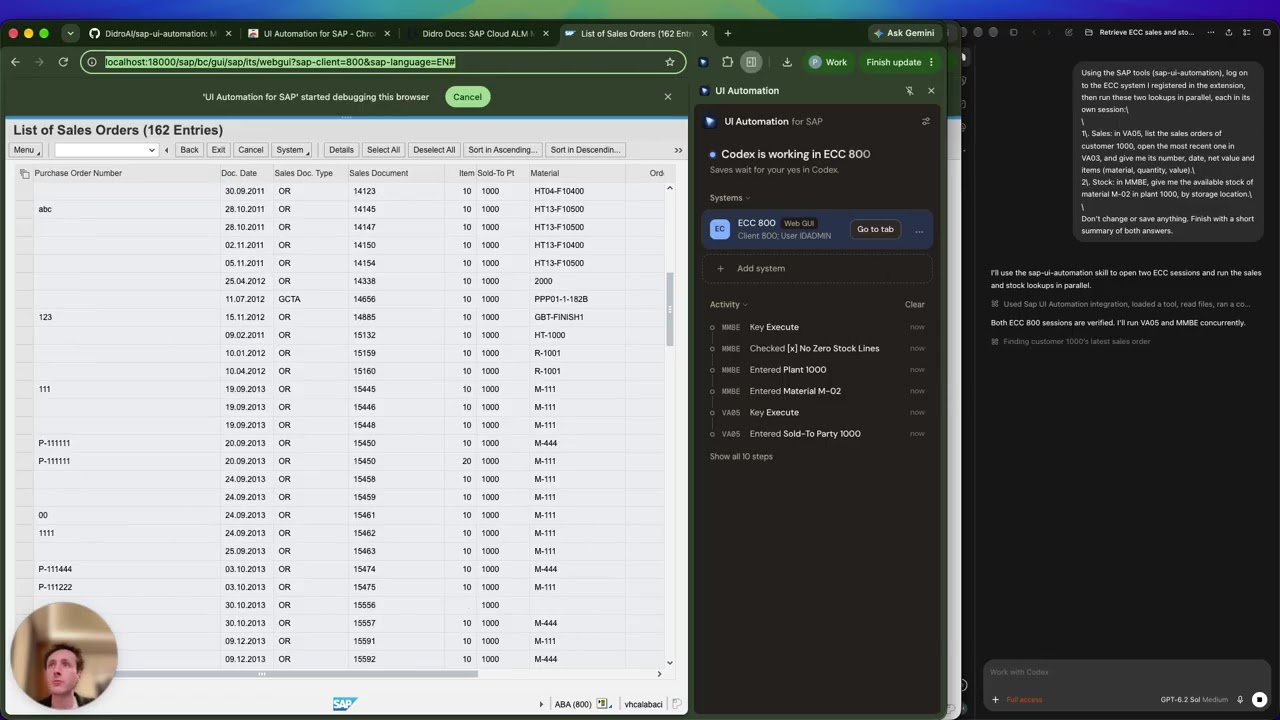
Watch the launch video (8 min): the Chrome extension, one setup command, and Codex working in two SAP sessions at once.
By 
Why
From a screenshot or a page's HTML, an agent has to guess which SAP field
is which. SAP UI Automation reads the screen the way SAP models it and
gives the agent one line per control, with SAP's own ids, labels, values
and whether each can be edited. After an action it sends only what
changed on the same screen.
TRANSACTION VA01  PROGRAM SAPMV45A  SCREEN 101  SYSTEM ABA (800)
WINDOW wnd[0]  "Create Sales Order: Initial Screen"
btn[8]  button  Create with Reference (F8)
ctxtVBAK-AUART  field  Order Type = "OR"  (edit)
ctxtVBAK-VKORG  field  Sales Organization = ""  (edit)
Use MCP for interactive work in coding agents. Across 104 matched Web GUI runs per
method in our Claude Code pilot, MCP averaged 22 seconds, $0.0053 and 208k tokens per run. The CLI
averaged 39 seconds, $0.0081 and 356k tokens. Counts include cache reads and writes. Use the CLI for shell scripts or an agent without MCP,
and the SDK for repeatable tests. Benchmark and limitations
Quick start
Add the UI Automation for SAP
extension to Chrome.Run one command (Node.js 22 or later):
npx -y sap-ui-automation setup --extensionIt finds the coding agents on your machine (Claude Code, Codex, Cursor,
VS Code and Copilot, Gemini CLI and more),
adds the MCP server and the skills to each, and installs the
extension's helper. Restart Chrome and your agents once.Click the extension's icon, then Pair, and add your SAP systems.
Then ask your agent: "Look at my SAP screen and tell me which fields are
required." For a repeatable workflow, ask the agent to record a display
transaction in a dedicated test session, assert a value on the result, stop
recording, then replay it. Example prompt
Set up sap-ui-automation for me (npm package sap-ui-automation, https://github.com/DidroAI/sap-ui-mcp). Say what each command does before you run it, and wait for me when I have to click something.
Rules: never type, ask for or store an SAP password, and never log on to SAP for me. Do not set or change SAP_WRITE. Do not save, post or change anything in SAP. Ask before you install software.
1. Check node -v is 22 or later; if not, tell me how to install it and stop.
2. Ask me to add the UI Automation for SAP extension to Chrome: https://chromewebstore.google.com/detail/ui-automation-for-sap/geglpbkaklfpmnbidfcpflegmdkjodkn and wait.
3. Run npx -y sap-ui-automation setup --extension --dry-run, show me the result, then run it without --dry-run. Tell me to restart Chrome once, then to click the extension's icon, click Pair and add my SAP systems, and wait.
4. From here on, run commands with the environment variable SAP_BROWSER=extension (in the syntax of my shell). Run npx -y sap-ui-automation doctor. For each ✗, tell me what to do (the → line says it), wait, and run it again.
5. Ask me to open an SAP screen, then run npx -y sap-ui-automation sessions. Verify the intended session with me if several match. Run npx -y sap-ui-automation look --session "<verified-id>" --print with its actual ID, and describe the screen in three lines.
6. Report in at most ten lines: the version, the agents setup changed, each doctor area (✓ or ✗) and what is left for me, whether I must restart an agent, and the effective write setting. Explain whether this client can display or automatically accept confirmation requests (including Codex Full Access).
The longer version, also for SAP GUI for Windows:
Set up with your agent.
| Client | |
|---|---|
| Claude Code | claude mcp add sap-ui-automation --scope user -- npx -y sap-ui-automation, or the plugin: /plugin marketplace add DidroAI/sap-ui-mcp, then /plugin install sap-ui-automation@sap-ui-automation |
| Codex | codex mcp add sap-ui-automation -- npx -y sap-ui-automation |
| Cursor |  |
| VS Code |  or code --add-mcp '{"name":"sap-ui-automation","type":"stdio","command":"npx","args":["-y","sap-ui-automation"]}' |
| Claude Desktop | open sap-ui-automation.mcpb from the latest release |
| Other MCP clients | a stdio server with the command npx -y sap-ui-automation |
These use a Chrome window the server opens. For your own Chrome with the
extension, add SAP_BROWSER=extension to the server's environment. Every
client and Windows notes: Install in your client.
Run npx -y sap-ui-automation setup, then turn scripting on in SAP GUI
(Options → Accessibility & Scripting → Scripting). The SAP system must
allow it (sapgui/user_scripting = TRUE). Where it does not, the
experimental network reader reads SAP
GUI's traffic through a local SAProuter.
Guide.
Benchmark
Our benchmark: six long SAP ECC processes (five of 10 to 15 screens, one of
7 screens and 24 steps), run
with Claude Haiku 5.5, Sonnet 5.5 and Opus 5.5, 443 runs in all. A run
passes when checks on the SAP database pass.
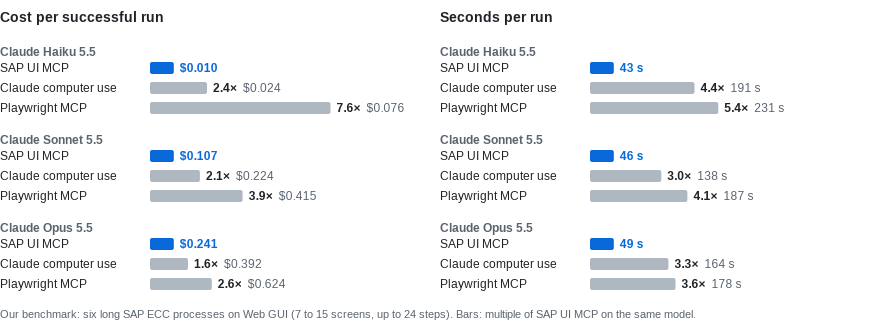
| On Web GUI, against SAP UI Automation | Haiku 5.5 | Sonnet 5.5 | Opus 5.5 |
|---|---|---|---|
| Playwright MCP: cost per success / time per run | 7.6× / 5.4× | 3.9× / 4.1× | 2.6× / 3.6× |
| Claude computer use: cost per success / time per run | 2.4× / 4.4× | 2.1× / 3.0× | 1.6× / 3.3× |
| SAP UI Automation: passed | 12/12 | 12/12 | 12/12 |
SAP UI Automation also passed 12/12 on every model through SAP GUI
scripting. On Haiku, a successful run cost $0.010 and took 43 s, against
$0.024 and 191 s for computer use and $0.076 and 231 s for Playwright MCP.
The other options passed most runs too; the difference is cost and time.
Method, all tables and caveats: Benchmarks. The
harness and raw results are not public yet.
Features
- Reads SAP's own screen model. Ids, labels, values and what is
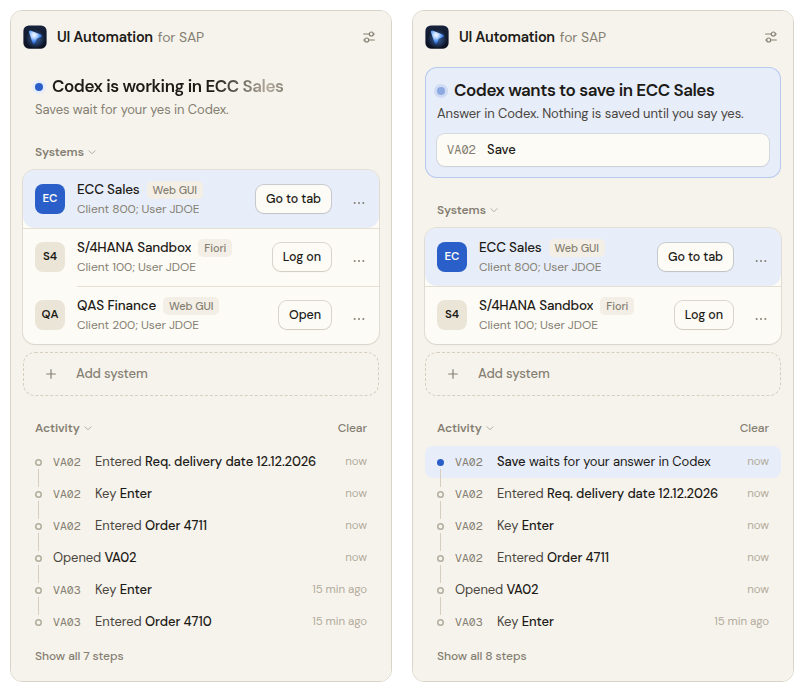
editable, then only what changed after each action. - Configurable write controls. Under
SAP_WRITE=confirm, flagged actions
require an affirmative MCP client response. Codex Full Access can accept
automatically. Useoffto refuse flagged writes.
Confirm mode - No credentials for the agent. Passwords stay in the OS keychain and
the extension logs on; the agent never sees one. - Parallel sessions across systems and users.
- A side panel shows each step the agent takes, and what waits for
you. - Record and replay. Record a run, replay it as a test with no model
(guide). - Any MCP client, plus a CLI for
agents without MCP and an SDK for tests. - SAP GUI for Windows by scripting, on par with Web GUI, and an
experimental network reader through a local SAProuter. - Runs locally. No telemetry, no hosted service
(security).
Where it runs
| Surface | Windows | macOS | Linux | How it is read |
|---|---|---|---|---|
| Web GUI | ✓ | ✓ | ✓ | Chrome, through the extension or a window the server opens |
| Fiori | ✓ | ✓ | ✓ | Chrome, the same ways |
| SAP GUI for Windows | ✓ | – | – | SAP GUI scripting; the network reader (experimental) where scripting is not allowed |
| SAP GUI for Java | – | – | – | not supported |
Version 0.5: it works on real ECC and S/4HANA systems, but parts are
young. Record and replay are checked live on Web GUI only. Not supported:
SAP GUI for Java, Firefox, Safari, SNC-encrypted connections with the
network reader.
Without MCP, and for tests
npm install -g sap-ui-automation
sap-gui look                              # the screen, written to a file
sap-gui act set ctxtVBAK-VBELN 4711       # one action

npm install --save-dev sap-ui-automation
npx sap-ui-automation init                # sap.config.ts, an example test, skills
npx sap-ui-automation test
Recordings export to Playwright, VBScript, Gherkin or SAP Cloud ALM.
Documentation
docs.didro.ai/sap-ui-automation,
with llms.txt for agents. The same pages
ship in the npm package under docs/, so an agent can
read them offline.
Getting started ·
Chrome: Web GUI and Fiori ·
SAP GUI for Windows ·
Confirm mode ·
MCP tools ·
Configuration ·
CLI ·
FAQ ·
Comparison
Help and contributing
- Setup does not work: run
npx -y sap-ui-automation doctor, read the
FAQ, then open a
setup problem. - Bugs and ideas: issues.
Leave real SAP data out. - Security issues: privately, as SECURITY.md says.
- Code: CONTRIBUTING.md. The tests run without an SAP
system.
Licence and trademarks
MIT, see LICENSE. Built by Didro.
Didro is a company building AI software that gives IT teams a living model of
their SAP systems and business processes. Teams can use it to see what a change
could affect, then design and run the tests needed to validate it.
Happy to chat to anyone interested in AI to improve SAP transformation: [email protected]
This project is not affiliated with, endorsed by or sponsored by SAP SE.
SAP, SAP GUI, SAP Fiori, SAPUI5, SAP S/4HANA, ABAP and other SAP products
and services mentioned here are trademarks or registered trademarks of SAP
SE (or an SAP affiliate company) in Germany and other countries. All other
names are the property of their owners.
Reviews (0)
Sign in to leave a review.
Leave a reviewNo results found