coldtrail
Health Warn
- License — License: MIT
- Description — Repository has a description
- Active repo — Last push 0 days ago
- Low visibility — Only 5 GitHub stars
Code Fail
- rm -rf — Recursive force deletion command in install.sh
- network request — Outbound network request in ui/app.js
Permissions Pass
- Permissions — No dangerous permissions requested
No AI report is available for this listing yet.
Discovery-first cold outreach for solo founders — find the companies other tools miss, draft each email in your voice, send from your own Gmail. Local, single Rust binary. Built on Canonical.
coldtrail
Discovery-first cold outreach for solo founders & one-person sales teams.
Find the companies other tools miss, draft each email in your own voice, send from your own
Gmail — all on your machine. Built on Canonical.
Most outreach tools start from a list you already have and optimize the sending. coldtrail
starts from the opposite end: discovery. You describe who you want to reach in plain English;
Canonical returns verified, long-tail companies the big databases miss; an agent enriches a
founder contact, writes a genuinely personalized email from your company profile, and (only if
you say so) sends it. No CRM to feed, no seat to buy, nothing leaves your laptop except the
emails you approve.
coldtrail is a single binary. Run it and it opens a local app in your browser — a chat that
drives an agent (Claude Code / Codex, or your own model) to source, enrich, and draft, plus a
pipeline dashboard, an editable company profile, and a drafts view.
Demo
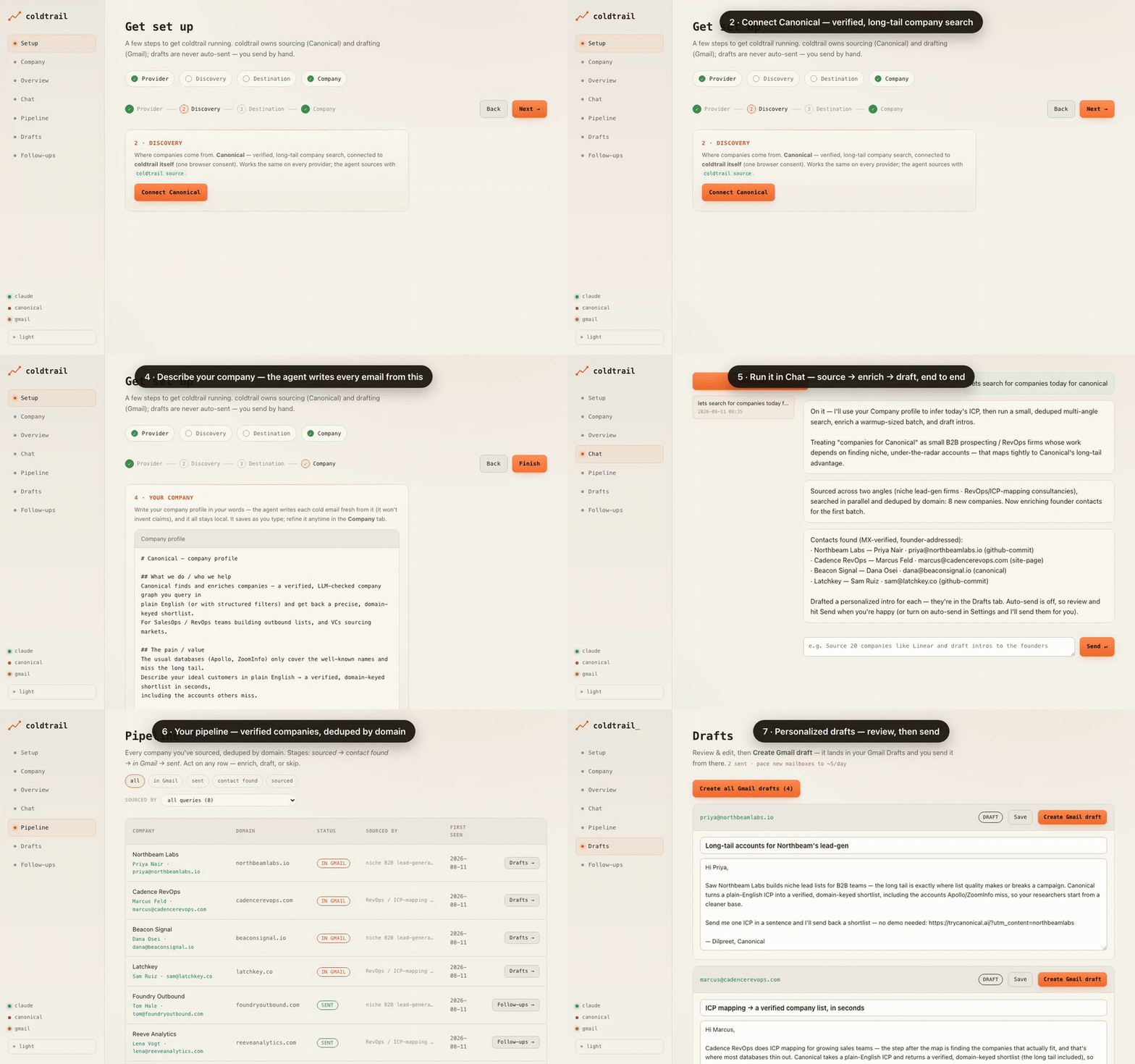
Your company profile → a run in Chat (source → enrich → draft) → the pipeline of
verified companies → a personalized draft ready to send. (higher-quality MP4)
Install
curl -fsSL https://raw.githubusercontent.com/dilpreet92/coldtrail/main/install.sh | bash
You need a provider (the brain): Claude Code (claude) or
Codex (codex) — which reuse your existing subscription — or
any OpenAI-compatible endpoint / local Ollama. The installer checks for one and tells you how
to get it if it's missing. Then:
coldtrail # opens the app at http://127.0.0.1:8787
coldtrail keeps itself current: on launch it checks for a newer release and updates in place
before starting (run coldtrail update to do it on demand, or COLDTRAIL_NO_UPDATE=1 coldtrail
to skip the check).
Getting set up (first run)
The browser opens to a short Setup wizard:
- Provider — pick Claude Code / Codex, or point at your own OpenAI-compatible/Ollama model.
- Discovery — Canonical (sourcing). Keyless: click Connect and approve in the browser.
- Destination — Gmail. Easiest is a Gmail app password (keyless, ~2 min): turn on
2-Step Verification, create an app password, enable IMAP. (Advanced: bring your own Google
OAuth client instead.) - Company — chat-free, just an editable profile. Describe what you sell, who it helps, your
offer, your link, your voice. The agent writes every email from this, in your words — it
never invents claims. Edit it anytime in the Company tab; it saves as you type.
Then use Chat to run the loop, Pipeline to watch companies move through statuses,
Drafts to review, and Follow-ups to track replies.
How a run works
In Chat, say something like "find companies for <my ICP> and draft intros." The agent
runs the whole loop:
- Source (Canonical). It plans several diverse search angles (expanding acronyms/regions into
real phrasings), searches them in parallel, and imports the union deduped by domain — so
you cover the long tail without double-contacting anyone. - Enrich. A founder contact per company, working down coldtrail's technique ladder (OSINT
tools, GitHub commit metadata, crt.sh, WHOIS, on-domain) — MX-verified, founder-addressed only. - Draft. A tailored subject + body per company, composed fresh from your Company profile and
what the company actually does. Nothing is sent verbatim. - Send — your call. By default drafts wait for you in the Drafts tab. If you've turned on
auto-send, the agent asks "send these now?" and, on your yes, sends them (under your daily
cap). It works in warmup-sized batches (~5 at a time) so you never outrun a healthy pace.
Canonical (sourcing)      ← plain-English ICP → verified companies the big DBs miss
        │
        ▼
local SQLite              ← deduped by domain, one status per company (no double-contact)
        │
        ▼
enrichment                ← founder email per company (OSINT ladder · your key · by hand)
        │
        ▼
draft (your voice)        ← personalized from your Company profile; never verbatim
        │
        ▼
send                      ← drafts by default; opt-in auto-send (capped) when you trust it
Sending: off by default, yours to turn on
The standing default is draft-only — a human reviews and sends every message. When you're
confident the drafts are good, flip on Auto-send in Settings → Destination (with a daily cap).
Then the Drafts screen sends for real on your click, and the agent can send within a run after you
confirm. Sending is gated two ways — it won't fire unless both auto-send is on and you say yes
— so nothing goes out by accident.
Guardrails baked in
- Dedupe by domain — you can't double-contact a company.
- MX-verified, founder-addressed only — generic (
info@/sales@) and placeholder addresses
are rejected, so guessed addresses don't bounce. - No fabrication — emails are written from your profile and real facts about the company.
- Draft-first, gated send — sending is off until you enable it, capped for warmup, and the
agent can only triggercoldtrail send(it never touches your credentials or mail APIs directly).
Everything stays local
State lives in ~/.coldtrail/ — the SQLite pipeline, your product.md profile, the agent brief
(CLAUDE.md), the enrichment playbook, and config. Credentials live outside the workspace
(in a sibling secrets dir), so the agent that runs shell commands can't read them. The app binds127.0.0.1 only, guarded by a one-time token in the URL. Nothing leaves your machine except the
emails you approve.
Command-line surface
Bare coldtrail serves the app; every step also runs headless for power users / CI:
coldtrail serve --port 9000 --no-open    # serve without opening a browser
coldtrail setup                          # terminal setup wizard (idempotent)
coldtrail agent                          # raw terminal agent in the workspace
| Command | What it does |
|---|---|
coldtrail source "<angle>" ["<angle>" …] |
source from Canonical across angles, deduped by domain |
coldtrail add-contact <domain> "<Name>" <email> [source] |
add a founder contact (MX-verified) |
coldtrail find-emails [max] |
best-effort OSINT founder-email finder |
coldtrail draft <domain> --subject "…" --body "…" |
store a personalized draft (never sends) |
coldtrail send <domain> |
send a reviewed draft (refuses unless auto-send is on) |
coldtrail followup <domain> --subject "…" --body "…" |
store a follow-up touch |
coldtrail mark <domain> <sent|replied|bounced> |
advance status |
coldtrail seed |
load already-contacted domains from contacted.toml |
Build from source
git clone https://github.com/dilpreet92/coldtrail && cd coldtrail
cargo build --release          # -> target/release/coldtrail
cargo test
Powered by Canonical
The sourcing engine is Canonical — verified, long-tail company search,
available as an MCP server and a ChatGPT app. Free
tier: 250 credits, no card.
License
MIT. Built in public by a solo maintainer — no roadmap or SLAs, but issues and PRs are welcome if
the bones are useful for your own outreach.
Reviews (0)
Sign in to leave a review.
Leave a reviewNo results found