sdp
Health Warn
- License — License: MIT
- Description — Repository has a description
- Active repo — Last push 0 days ago
- Low visibility — Only 5 GitHub stars
Code Fail
- rm -rf — Recursive force deletion command in laptop/push_daily.sh
Permissions Pass
- Permissions — No dangerous permissions requested
No AI report is available for this listing yet.
Nobody has the time - or the will - to sit down and write a post every day. Social Daily Poster does it for you, from what you actually did that day - your Claude Code sessions, screenshots and messages at the end of the day, etc. Kind of open-source alternative to Taplio
Social Daily Poster


Nobody has the time, or the will, to sit down and write a post every day.
Social Daily Poster does it for you, from what you actually did that day.
Social Daily Poster is the open-source alternative to Taplio: it writes your
LinkedIn posts from the work you already did, on your own machine, for the
price of the AI subscription you already pay for.
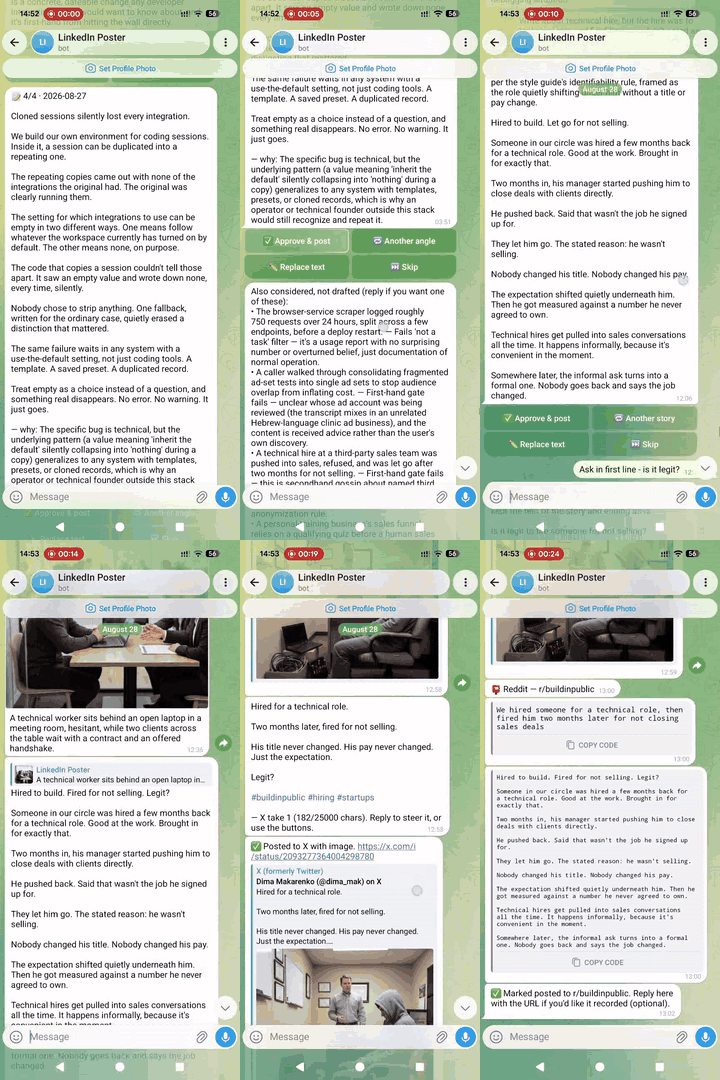
What it does
Every night, Social Daily Poster looks back at your day: your coding-agent
sessions (Claude Code or Codex/ChatGPT), screenshots, and optionally your
Telegram, Gmail, WhatsApp, and even a spoken debrief you record after a call.
It picks the single best story and drafts a post. That draft lands in a
private Telegram bot with Approve / Edit / Skip buttons. Approve also
draws an illustration and shows it to you before anything is public.
Nothing posts until a second tap.
Once that post is live on LinkedIn, Social Daily Poster can spin off the same
story for X (a real rewrite, not a truncation) and Reddit (a
prefilled link you submit yourself), each with its own approval step and its
own on/off switch.
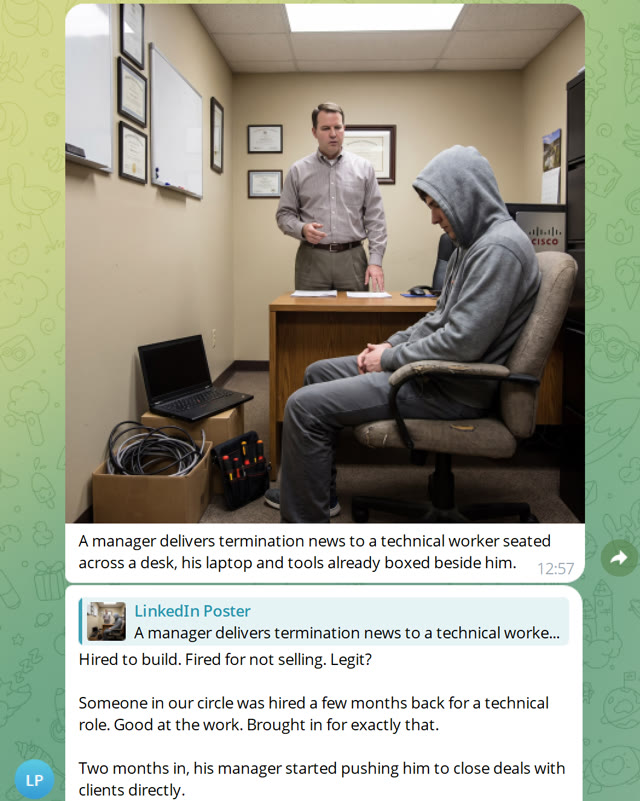 Confirm the illustration |
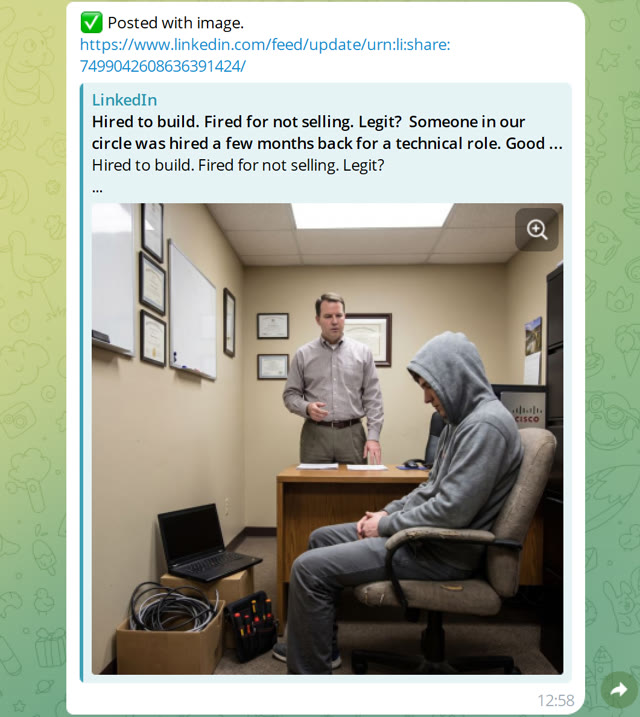 LinkedIn, published |
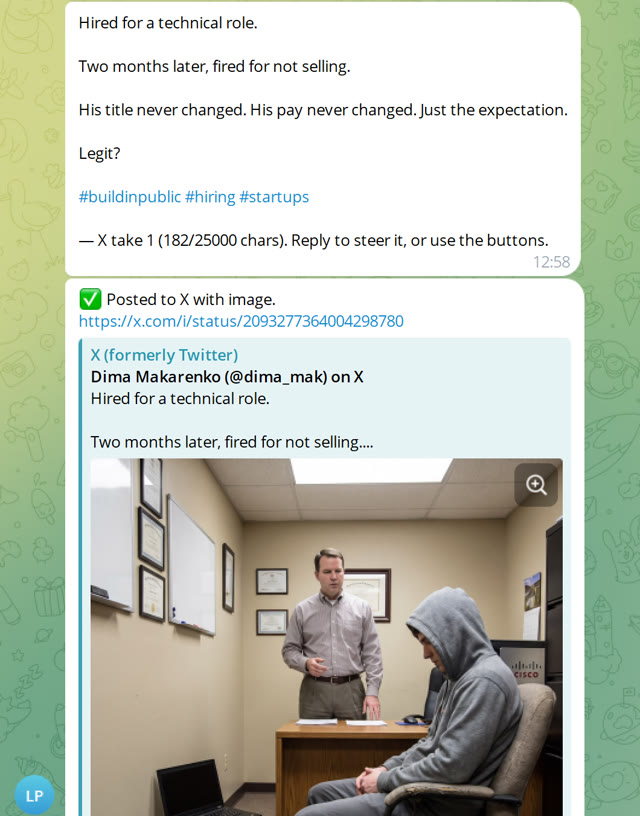 X, rewritten and posted |
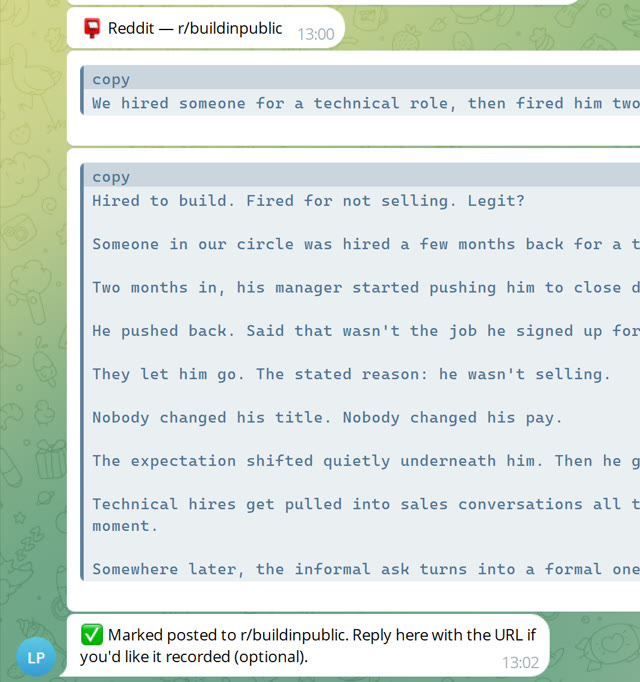 Reddit, prefilled for you to submit |
Runs on one laptop for one person, no server needed. That's how most people
use it. It can also run on a shared server for a few people.
Why it's good
- Posts come from what you actually did. They read like your week,
written in your voice. - Never auto-publishes, on any platform. Every channel needs an explicit
tap after you've seen the exact text (and, for LinkedIn, the exact image). - Runs on your own machine. In laptop mode nothing leaves it except what
you explicitly approve for posting. - Costs close to $0. Drafting rides on the Claude Code or ChatGPT
subscription you already pay for (see Cost). - Posts through real, official APIs: LinkedIn and X, not a workaround
that risks your account. Reddit has no workable automated-posting API for
a personal project right now, and this README says so plainly (see
What it posts to).
Quickstart
Fastest: hand it to a coding agent. If you already use a terminal-based
agent (Claude Code, Codex, etc.), open it in an empty folder and give it
this:
Clone https://github.com/dimamak/sdp and set it up locally for one person.
Before running the wizard, ask me which channels I want: Telegram and
LinkedIn are required, then check whether I also want Gmail, WhatsApp,
images, X, or Reddit, don't just leave them off by default. If I don't have
a LinkedIn Page, use https://www.linkedin.com/company/sdp-page/ as a
placeholder. Then walk me through the wizard with those answers.
The wizard is interactive by design: you'll still need to answer things
yourself, like pasting a Telegram bot token or approving a LinkedIn login in
your browser. But the agent can drive the whole install and relay each
question to you as it comes up.
Or run it yourself (works on Windows, macOS, Linux):
git clone https://github.com/dimamak/sdp.git && cd sdp
python3 -m venv .venv
.venv/bin/pip install -r requirements.txt        # Windows: .venv\Scripts\pip
.venv/bin/python -m setup.wizard                 # mode? -> laptop (the default)
The wizard walks through: which sessions to harvest, your Telegram bot, and
(all optional) Gmail/WhatsApp/LinkedIn/images/X/Reddit. Every step is
re-runnable on its own, e.g. python -m setup.wizard --source linkedin.
When it's done:
python -m server.pipeline.run_nightly --dry-run   # one harvest + digest, no posting
python -m server.bot.main                         # leave this running
That one process polls Telegram for your taps and schedules the nightly
draft itself: no cron, nothing else to install. python -m setup.wizard --doctor checks your setup any time.
Want a shared, always-on server for a few people instead of one laptop? See
Server mode.
What it captures
| Source | What it captures | Notes |
|---|---|---|
| Claude Code / Codex / ChatGPT sessions | Your coding-agent transcripts | Read locally; covers Claude Code, the Codex CLI, and the ChatGPT desktop app |
| Screenshots | Whatever you drop into a watched folder | Any OS |
| Telegram, Gmail, WhatsApp | Your own message/mail history | All optional, all off by default; WhatsApp capture is read-only |
| Call / office audio | Local speech-to-text on recordings you make, in whatever languages you actually speak | Off by default; recording and transcription both run on Windows, macOS and Linux |
| Screen activity | Which app and window was in the foreground, plus occasional screenshots — the non-coding half of the day | Off by default; not supported on Wayland (see Limitations) |
Every source is opt-in and walked through by the wizard. config.example.yaml
has the full field-by-field detail as inline comments.
What it posts to
- LinkedIn: the official
w_member_socialAPI. This is the core flow:
draft → approve → optional illustration → post. Creating the LinkedIn app
needs an associated LinkedIn Page; if you don't have one, use
linkedin.com/company/sdp-page,
a placeholder page for this project that anyone setting up their own
instance is welcome to use. It isn't tied to any real business and has
nothing to do with what actually gets posted. - X (optional,
x.enabled): once a post is live on LinkedIn, the same
day's story gets a genuine X-length rewrite (LinkedIn drafts run
1,100–1,600 characters; X's default cap is 280), with its own
Approve/Rewrite/Skip step. Uses X's official API. - Reddit (optional,
reddit.enabled): Reddit closed off practical API
access for a project like this. Social Daily Poster hands you a prefilled
submit link and ready-to-paste title and body, and you review it and tap
Submit yourself. Nothing is ever posted by code.
Skipping or failing a later step (X, Reddit) never touches a post already
made on an earlier one. See Cost for what each channel actually
costs to run.
Images
Approve doesn't publish right away. It first asks the same session that
wrote the post for an image brief, renders it, and sends it back with
Post with image · Regenerate · Post text-only · Cancel. Reply to steer it
("more abstract, no people") and each reply is a new take; regenerating never
touches LinkedIn, only the final tap does. Turn it off entirely withimage.enabled: false.
Privacy & safety
For a tool that reads your coding transcripts, this is the part that matters
most.
- Everything stays on the machine you configure. In laptop mode, nothing
ever leaves it except the exact text (and image) you tap to approve. - The drafting/rewrite step runs the LLM in a restricted mode with no
general file or tool access. - WhatsApp capture is read-only by design.
- Audio is transcribed locally, and the recording is deleted once the
transcript exists. The raw audio never persists. - Recording other people's conversations has privacy implications of its
own: don't quote anyone identifiably in a public post (the default style
guide already forbids it).
See CONTRIBUTING.md if you want the exact sandboxing
mechanics behind the Claude vs. Codex backends.
Cost
| Item | Marginal cost |
|---|---|
| Drafting, image briefs, X/Reddit rewrites, session summaries | ~$0; runs through your existing Claude Code or ChatGPT/Codex subscription's CLI (an API key also works if you'd rather pay per-token) |
| LinkedIn publishing | $0 (official API) |
| Post illustrations (optional) | ~$0.13–0.24/render; image.enabled: false skips this entirely |
| X posting (optional) | Pay-per-use, no free tier; well under $1/month at one post a day |
| Reddit (optional) | $0; no API or account, just a link you submit yourself |
At one post a day with images on, expect low-single-digit dollars a month.
Server mode / several people on one server
For an always-on shared box instead of a laptop, with a separate laptop
feeding it over SSH:
git clone https://github.com/dimamak/sdp.git && cd sdp
python3 -m venv .venv && .venv/bin/pip install -r requirements.txt
.venv/bin/python -m setup.wizard        # mode? -> server
.venv/bin/python -m setup.wizard --doctor
Each additional person gets their own instance: separate config, secrets,
store, Telegram bot, and LinkedIn token, via.venv/bin/python -m setup.wizard --instance alice. People can share one
LinkedIn or X App's credentials the same way a team shares any App: whoever
sets it up first pastes the client id/secret, everyone else just runs their
own login to get their own token (see the wizard's linkedin/x steps).
Full walkthrough (cron, systemd, Windows laptop push, CI auto-deploy) lives
in docs/self-hosting/ci-deploy.md and the
wizard's own prompts.
Limitations & non-goals
- Only local coding-agent history is read. Codex Cloud tasks and the
plain ChatGPT web/desktop chat tab aren't in the local session store, so
they aren't harvested. - WhatsApp carries real, if low, ToS/ban risk: it goes through an
unofficial client, not WhatsApp's Business API. Read-only by design. - Reddit is draft-assist only, never automated posting (see
What it posts to). - Audio and screen capture need the bot process to be running. In laptop
mode both recorders are threads inside it, so capture stops when it stops.
The wizard registers an OS-native autostart (systemd--user, launchd, or
a Task Scheduler logon task) so it comes back at login, and--doctor
fails if the bot hasn't checked in. - Screen activity capture doesn't work on Wayland. There's no
compositor-independent way to read the foreground window, or to grab the
screen without a portal prompt per shot. The recorder refuses to start
there rather than logging?all day; an X11 session works. On macOS,
window titles additionally need Accessibility permission — without it you
get app names only.
Contributing / Security / Licence
- Found a bug or want a feature? See CONTRIBUTING.md.
- Found a security issue? See SECURITY.md. Please don't open
a public issue for anything that touches credentials or account safety. - LICENSE: MIT.
Reviews (0)
Sign in to leave a review.
Leave a reviewNo results found