omabox
Health Warn
- License — License: MIT
- Description — Repository has a description
- Active repo — Last push 0 days ago
- Low visibility — Only 6 GitHub stars
Code Pass
- Code scan — Scanned 12 files during light audit, no dangerous patterns found
Permissions Pass
- Permissions — No dangerous permissions requested
No AI report is available for this listing yet.
A hidden Omarchy desktop for your AI agents: they launch, drive and screenshot apps and shell plugins there, never on yours.


omabox.app · an independent community project, not affiliated with or endorsed by
Omarchy
Your agents get desktops of their own. Yours stays untouched. omabox gives every AI agent a
whole Omarchy desktop, invisible and in parallel, to launch, click, type and screenshot apps and
shell plugins in. No windows popping up on your screen, no cursor jumps, no stolen focus or
workspace switches, no password or keyring prompts, no notifications or tray icons left behind.
A box is the real thing, not a mock: Omarchy's own Hyprland config, the Omarchy shell (bar, menu,
tray, notifications) and your theme, bar layout and terminal settings, on a private screen and a
private session bus. It starts in 3-4 s and uses about 500 MB. Each agent session gets its own box,
the way you give each agent a worktree. When you want to look, peek at a box live, or open one as a
window and use it yourself.
omabox keeps an agent's apps off your desktop; it is not a sandbox. To fence the agent itself in,
pair it with ai-jail.
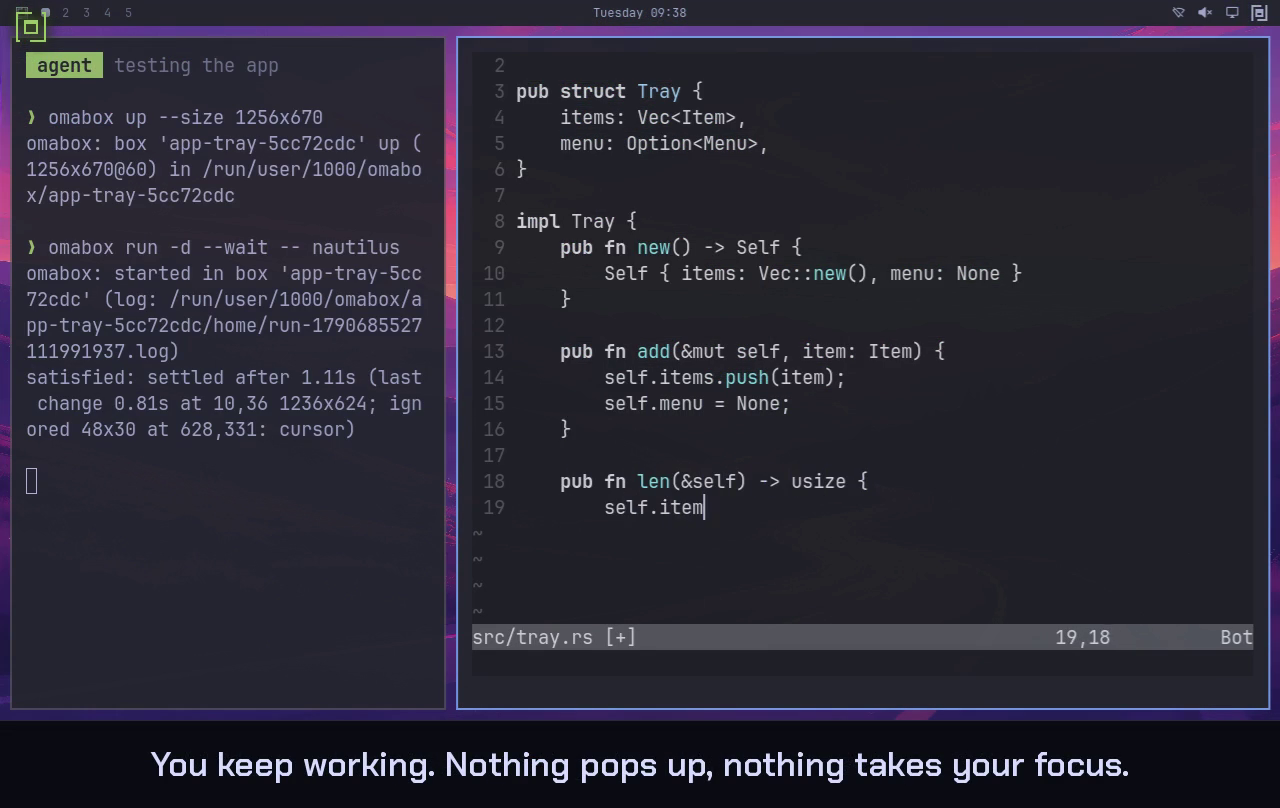
Watch omabox 0.2.0 in 43 seconds.
It was recorded inside omabox: a box played the desktop, with the agent's boxes inside it, so the
real desktop saw no window at all.
What you need
- Omarchy 4 on Arch, with Hyprland 0.56+ (the Lua config).
- A GPU render node (
/dev/dri/renderD*). Tested on AMD and Intel iGPUs, an NVIDIA RTX 4070
SUPER (driver 615.71.09) and an RTX 5070 Ti (610.57.04, open kernel module). A headless box takes
the first usable node (OMABOX_RENDER_NODEoverrides); an interactive box renders on the GPU your
desktop renders on. - For headless boxes on NVIDIA and for confirm-close: aquamarine's fix (Hyprland's backend library),
until a release ships PR #415. Everything else
runs on your system's aquamarine.install.shbuilds it privately intobuild/prefix
(omabox setup --aquamarine); your system's copy is not touched. That build also carries a fix
of omabox's for interactive boxes: a key held when the box's window loses focus is released.
Install
git clone https://github.com/diogochaves/omabox && cd omabox
./install.sh                            # packages (sudo only if some are missing), aquamarine's fix, tools, links
./install.sh --check                    # the same, then start a box, screenshot it, tear it down
install.sh then runs omabox setup, which links ~/.local/bin/omabox, the agent skill (wherever
Omarchy puts its own skills: ~/.agents, ~/.claude, ~/.codex, ~/.pi/agent, ~/.hermes) and
the bar widget, and asks whether to put the widget in your bar and to turn on the
agent guard (or: omarchy plugin enable chaves.omabox, omabox guard on). Update with git pull && ./install.sh;
run it after a Hyprland upgrade too: a private aquamarine whose soname Hyprland no longer links is
skipped for the system's (omabox --version says which one boxes use). From a checkout to the
package (once Omarchy's repository has it): omabox setup --remove in the checkout first; if you
forget, the package's omabox setup finds the checkout's ~/.local/bin/omabox and offers to remove
it. After an upgrade the bar runs the old widget until the shell restarts; its panel says so.
omabox down --all                          # every box
omabox setup --remove                      # guard and broker off, widget disabled, links removed
rm -rf ~/.config/omabox ~/.cache/omabox    # settings, and box HOMEs a crash left behind
rm -rf ~/.local/share/omabox               # saves, if you made any
omabox setup --remove turns the guard off (if on), the ai-jail broker off (its ~/.ai-jail lines
are yours to delete), disables the bar widget if it is on, and removes the links setup made (only
those that still point at this omabox) and a per-user aquamarine build; it keeps your settings and
saves. Run it before you delete omabox: once it is gone there is no guard off left to
run. A guard left behind applies nothing in Claude Code and says so; in Codex its values stay, and
its hook says which lines of ~/.codex/config.toml to delete.
Then delete the clone (its build/ holds the aquamarine build). omabox guard off leaves a.bak-<time> of ~/.claude/settings.json, ~/.codex/config.toml and ~/.codex/hooks.json next to
each, from every change it made. The packages install.sh added stay; it printed them as missing: if there were any
(labwc, passt and the build tools are the likely ones): sudo pacman -Rns those you do not use.
Using it
omabox up                              # headless box, 1920x1080; returns when the bar is drawn
omabox run -d -- ./build/src/myapp     # launch an app inside (detached; prints its log path)
omabox shot                            # screenshot; prints the PNG path (--fit 2000: scaled down)
omabox windows                         # the box's windows, where they are, what covers them
omabox shot --window myapp             # one window's own pixels, covered or on another workspace too
omabox keys super+space                # key combos reach Hyprland binds and the focused app
omabox keys -t 'hello world' Return    # type text, then press a key
omabox keys --wait super+space         # ...and return once the screen has settled (no sleeps)
omabox wait window myapp               # or: still, change, layer NAMESPACE, cmd -- CMD (--gone too)
omabox click 960 540 [right] [--double]
omabox click --window myapp 40 12      # window coordinates; --in SHOT X Y: that shot's pixels
omabox drag --window myapp 10 10 200 80   # press, move, release; --shot FILE while it is held
omabox hyprctl -j clients              # the box's Hyprland, never yours
omabox lua 'hl.get_active_window()'    # Lua in the box's Hyprland, and what it returns (JSON)
omabox run -- busctl --user list       # any command inside the box; exit code passes through
omabox log shell --grep qml -n 20      # the box's logs (Hyprland's by default; -f follows)
omabox events --since 30s --grep urgent   # Hyprland's events, stamped; --mark, --until RE, -f
omabox down                            # kill everything in the box
omabox ls                              # boxes, mode, size, state, plugins
- Names: a box is named after the current git repo. Inside a Claude Code or Codex session (or
an agent started withomabox guard exec) the name also gets the session's id,myrepo-5cc72cdc,
so two agents in one repo each get their own box, and it goes down when its agent exits (not while
you peek at it or anomabox runis going). An agent does not pick up a box you started yourself
unless told-b myrepo.-b NAMEorOMABOX=NAMEpicks a box;OMABOX_SESSION=(empty) turns
the per-session names off. Two repos with the same directory name need-b. - Screen:
--size 3440x1440,3440x1440@144, orhostfor your focused monitor;omabox modechanges it live. - Idle: a headless box goes down after 2 hours with no
omaboxcommand, peek oromabox run
against it (--idle 30m,--idle 0for never, orOMABOX_IDLE). Arun -djob does not count. - More:
--stock-bar(Omarchy's default bar instead of a copy of yours),--systemd(a real
systemd user manager, for plugins that manage a service or schedule alarms),--from SAVE(start
with a HOME kept byomabox save SAVE: an app already signed in or set up),--env KEY=VAL(for
the whole box session),--xwayland, andomabox gpu 10(GPU time of one box's processes, where
the driver reports per-process counters).omabox helplists every flag,omabox help CMD(oromabox CMD --help) one command's.
Tests that touch the desktop
omabox run -- ctest --test-dir build --output-on-failure
With no box up, run starts a throwaway box, mounts the current repo as a discarded overlay
(the tests can write build/Testing/, your checkout never changes), runs the command and tears the
box down. Notification tests register with the box's bar instead of piling up in yours; tray tests
need a tray in it (--stock-bar if your bar omits one). up's options apply:omabox run --net isolated --allow 8081 -- ctest ... keeps tests away from your real local services.
With -b NAME the box must be up. With a box already up, run uses it, and the repo is read-only
there: for tests that write into the tree, omabox down first. The command gets the box's
environment, not your shell's; --pass NAME hands it one of your variables, a password too, through
a pipe, never on a command line, and --env-file dev.env a whole file of them.
Shell plugins
omabox up --plugin ~/code/myplugin          # or an id from ~/.config/omarchy/plugins
omabox restart-shell                          # after editing the plugin
The plugin is mounted read-only and turned on in the box's shell.json where its manifest says.
The box's bar has the built-in widgets plus the plugins you mount, nothing else. When that leaves it
with no workspace numbers, it gets Omarchy's: where your plugin's were, or after the menu.
When the shell does not load a plugin (a manifest it refuses, a QML error), up and restart-shell
say why, with Omarchy's plugin validator's message when it has one; the box comes up anyway.
A Hyprland change
omabox up patched --hyprland ~/code/Hyprland/build/Hyprland   # your build, never installed
omabox up stock                                               # the installed one, to compare
The box runs your build instead of /usr/bin/Hyprland (its folder mounted read-only), with the
rest of the box as usual: the Omarchy shell, your bar, hyprctl and hyprpm from your system (a
warning when their version is not the build's). The build must link a libaquamarine soname the
box has (your system's, or omabox's private build); up refuses one that does not, or a file that is not an executable
ELF, before the box starts. omabox ls and omabox windows name the build, so a box on it is never
taken for a stock one. A box runs the compositor's logic for real (layouts, focus, input routing, the
Lua config, IPC, protocols) on a virtual output with virtual input devices; the DRM/KMS backend
(modesetting, real monitors, HDR/VRR, multi-GPU), libinput with real devices and the
session/suspend/lock paths never run in one.
An Omarchy change
omabox up dev --omarchy ~/src/omarchy # your Omarchy checkout instead of /usr/share/omarchy
The box runs that tree as omarchy dev link would, without touching your system: its Hyprland
config, its shell (bar), its bin/ first on the box's PATH (binds, menus, omabox run), andOMARCHY_PATH in a terminal's bash. The tree is mounted read-only at its own path, so an edit shows
after omabox restart-shell (the shell) or omabox hyprctl reload (the config). It must havebin/, default/hypr/bootstrap.lua and shell/shell.qml. Files Omarchy installs outside its tree
(/etc, systemd units, /etc/skel) stay the installed ones. A box never follows your ownomarchy dev link: without --omarchy it runs the packaged Omarchy.
Seeing a box yourself
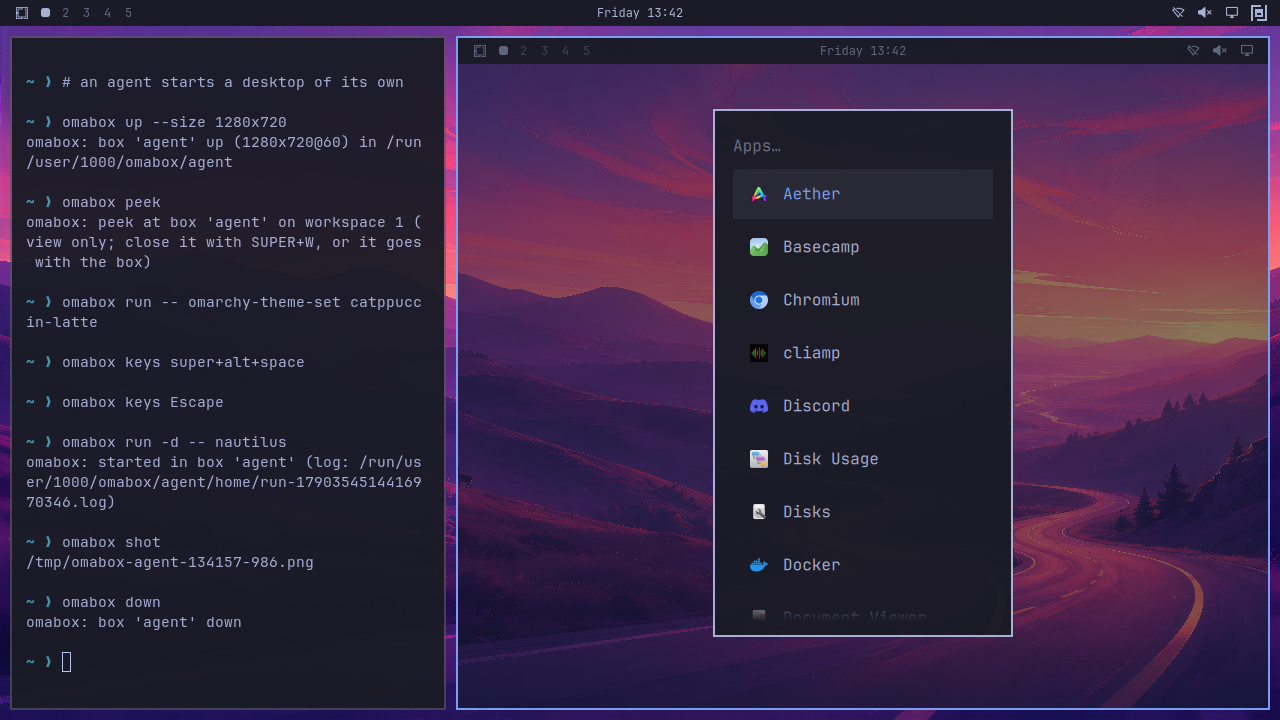
omabox peek -b NAME: a live, view-only window of any box on workspace 9, opened without
focus. It only copies frames out, so the agent never notices, and closes with SUPER+W or when the
box goes down. For a few seconds it shows what the agent does: a ring where it points and clicks,
and the keys it types (a--passpassword as*), never in the box's own screen or screenshots.omabox up --interactive: the box is a real window on workspace 9 that you drive with your
own keyboard and mouse. SUPER+ALT+ESCAPE sends SUPER keys to the box instead of your desktop,
once;omabox keys-to-box -b NAME on(or the keyboard button in the widget) sends them
whenever the box's window has focus and the pointer is over it. While they go to a box, its border turns the theme's red and
the widget's icon lights up. The box follows the window's size; closing the window ends it.omabox clip: your clipboard's item (text, or an image by its type) into an interactive box,
once;clip --from-boxhands the box's back. With no-bit is the box whose window has focus
(else the only interactive one), so a key binding pastes into the box you are in. None is
installed; for SUPER+ALT+V, add to~/.config/hypr/bindings.lua:o.bind("SUPER + ALT + V", "Clipboard into the box", "omabox clip")(not while
SUPER keys go to the box: after SUPER+ALT+ESCAPE, or with keys-to-box on and the box focused). Nothing keeps watching either clipboard. It is
never for agents: refused in their sessions, under the agent guard and in ai-jail (headless boxes
are refused too). A password manager's "sensitive" mark goes along, so clipboard histories leave
the secret out; what you hand to a box can still be read there by whatever runs in it, an agent
driving that box included.- The bar widget (
chaves.omabox): the omabox mark in your bar lists every box, with Peek
(or Show, for an interactive one), Screenshot and Down, Paste your clipboard into the
box and Copy the box's clipboard out on an interactive one, and New interactive box.
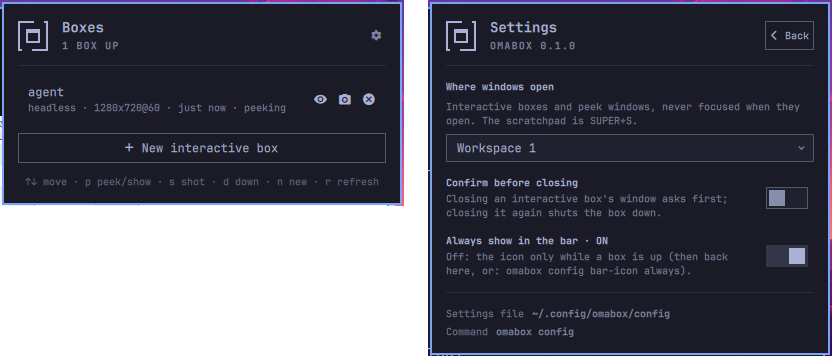
Settings live in ~/.config/omabox/config: omabox config lists them, the widget's gear changes
them, and omabox config KEY default puts one back.
workspace WS: where interactive and peek windows open, always without focus:1-99,special(Omarchy's scratchpad: SUPER+S shows and hides it) orspecial:NAME(bind a key to it
yourself). Per box:up --interactive --workspace WS,peek --workspace WS. The default is 9.confirm-close on: closing an interactive box's window asks first. The box opens a new window
where you are, with Omarchy's menu ("Shut down" / "Keep it running"); closing that window too is a
yes. It applies to running boxes as well. Per box:--confirm-closeor--no-confirm-closeonup. It needs aquamarine's fix (omabox setup --aquamarine): without it, boxes leave it off and
the bar widget greys its switch out.bar-icon:always(the default) keeps the widget's icon in the bar with no box up, dimmed, so
its settings are a click away;autoshows it only while boxes exist.
Passthrough (SUPER+ALT+ESCAPE) turns itself off when focus leaves the box, or on the first key you
press with the pointer outside it. With keys-to-box on (per box, off by default, until the box
goes down) focus and the pointer decide, with no key to press: while the box's window has focus and
the pointer is over it, SUPER is the box's; move the pointer off it (onto your bar, an empty part of
the workspace, another monitor) or focus elsewhere, and SUPER is yours again, keys-to-box still on;
the pointer back over the box, SUPER is the box's again. The first key you press with the pointer
off the box is already yours (SUPER+1 switches your workspace at once). omabox keys-to-box -b NAME
says whether it is on, on/off changes it, and omabox ls shows it. SUPER+ALT+ESCAPE over the
box gives the keys back until the box loses focus and gets it again. Either way, while keys go to a
box its window's border takes the theme's red (the colour the bar uses for what calls for
attention) and the widget's icon is lit in it.
The widget's panel shows each box's mode, size, age, plugins, whether it is being peeked at and
where its keys go, and a count in the bar when there are several. Keys: arrows or j/k, Enter or p
peek/show, s shot, v paste your clipboard in and c copy the box's out, f keys-to-box on or off
(these three on an interactive box), d down (twice within 3 s;
Enter on a dead box arms it), n new, r refresh. New interactive box starts one under a free name (omabox up --interactive --new:
box-1, box-2, ...) and brings its window forward. If omabox ls fails, the panel says so. The
widget only displays omabox ls --json and runs omabox; the CLI owns every rule.
Agents
install.sh installs the omabox skill wherever Omarchy installs its own agent skills, so Claude
Code, Codex, OpenCode, pi and Hermes load it when a task involves a GUI app, a screenshot, a shell
plugin or desktop-touching tests. Projects need no changes: when a project's own instructions say
"run the app", "screenshot with grim", "use hyprctl" or "run ctest", the skill has the agent do
exactly that in a box.
To make it a rule rather than the agent's judgement, add a line to your agent's global instructions
(~/.claude/CLAUDE.md, ~/.codex/AGENTS.md, ~/.config/opencode/AGENTS.md, ...):
Never launch, screenshot or drive GUI apps on my desktop, and never run tests that touch the desktop
session there. Use omabox (see the omabox skill).
The agent guard
The skill is advice: an agent that does not think of ./build/tests/tst_x as GUI work still opens
its windows on your desktop, because its shell holds your real display. The guard (opt-in; Claude
Code and Codex, or any agent through guard exec) makes that fail instead: agents' shells get a
display that does not exist, so a stray window, hyprctl, grim or omarchy-theme-set fails with
an error the skill explains, and a link an agent opens is refused instead of landing in your
browser. install.sh asks (yes by default); it never turns the guard on by itself.
omabox guard on               # every installed agent (or: on claude | on codex); a backup next to each file
omabox guard off              # take it out again (each file as it was)
omabox guard                  # is it on, per agent; what it does
omabox host -- CMD            # from a guarded shell: one command on your real desktop, when you asked for it
omabox guard exec -- AGENT    # any other agent: start it under the guard
Agents' shell commands get WAYLAND_DISPLAY=omabox-guard, HYPRLAND_INSTANCE_SIGNATURE=omabox-guard,
an empty DISPLAY, an empty QT_QPA_PLATFORMTHEME (Omarchy's gtk3 would make even an offscreen Qt
test start GTK, which needs a display, so ctest with QT_QPA_PLATFORM=offscreen keeps working) andQT_FORCE_STDERR_LOGGING=1 (a Qt program with no display aborts; this way the agent reads why).
A browser already running on your desktop takes a URL over its own socket, not the display, and withmisc:focus_on_activate takes focus too. So BROWSER and GH_BROWSER name omabox'sshare/guard/xdg-open, which fails with a note to give you the link instead, and Claude Code andguard exec also put it first on PATH as xdg-open. Inside a box, links open as usual.
- Claude Code: one
SessionStarthook in~/.claude/settings.json(merged with yours). Every
shell command of the session gets the variables, subagents' too, plus a core limit of 1 byte, so a
Qt program's abort never becomes a "Process crashed" notification on your desktop. It also tells
the agent in one line what the error means and whenomabox hostis allowed. Claude Code's own
process is not changed (clipboard paste, opening the browser); your!commands most likely are
not either (not checked). If omabox is gone (deleted withoutguard off), the hook applies nothing
and says so in one line. - Codex:
[shell_environment_policy.set]in a marked block of~/.codex/config.toml(a config
whose ownsettable would clash is refused, untouched, with the lines to add by hand), and aSessionStarthook in~/.codex/hooks.jsonthat gives the agent the same note. Codex runs that
hook only after you trust it once (/hooksin Codex). No core limit. The block's values are fixed,
so they stay if omabox is gone: the hook then tells the agent how to take them out. The variables
were checked throughcodex sandbox, the hook only by what Codex's hooks.json takes, not in a
logged-in session. - Anything else:
omabox guard exec -- AGENTstarts the agent itself under the guard. Its own
process loses the display too (clipboard, opening a browser to log in;xdg-openrefuses). It also
gets a session of its own (OMABOX_SESSION), so its default box is its own, as in Claude Code and
Codex.
omabox keeps working under the guard: boxes have their own display, and up --interactive, peek
and --size host find your session by themselves. Work you ask for on your real desktop ("switch my
theme", hyprctl reload after editing your config) goes through omabox host -- CMD: your session's
display, DISPLAY and Qt theme for that one command, which it names on stderr, so it stays on the
record.
It stops accidents. It does not stop:
- an agent that sets the variables back, or runs
omabox hostunasked, on purpose; - processes the agent starts itself rather than through its shell (MCP servers: a headed browser
MCP opens on your desktop); - file writes: your shell watches
~/.config/omarchy/shell.jsonand~/.config/omarchy/plugins/,
so an agent editing them (or runningomarchy plugin addon the host) changes your real bar at
once; the skill sends those writes to the box's HOME; - anything over the session bus or the user manager (notifications, the keyring, apps started over
D-Bus,uwsm-appandsystemd-run --user, which run in your session's environment); - links opened by other routes: a browser started directly with a URL (it hands the URL to the one
already running),gio open(it starts your URL handler itself), npm'sopen(it runs its own
copy of xdg-open), or, under Codex, a plainxdg-open(Codex getsBROWSERandGH_BROWSERbut
not the PATH entry). Python'swebbrowserstops at omabox'sxdg-open(it counts one that has
started as a success), except underguard execfrom an omabox at a path with a space: there it
tries the next browser when that one fails.
For a fence, run the agent in a sandbox that blocks Unix sockets (Claude Code's sandbox: it also
blocks the network and every other socket, omabox's included), or see
ai-jail.
What a box can and cannot touch
- Your files: the repo you run
omabox upfrom, read-only at the same path, plus the dirs
in~/.config/omabox/ro-bind(one per line) or--ro-bind; mise's toolchains (soomabox run
finds node, python, uv as on the host), the--plugindirs, and your gituser.nameanduser.email. Nothing else of your HOME. Refused whatever you pass: anything that is or contains
HOME,~/.config/omarchyor/tmp, the secret stores (~/.ssh,~/.gnupg, keyrings,~/.password-store,~/.aws,~/.kube,~/.docker,~/.netrc), your runtime dir,/run,/dev,/proc,/sys. - Its HOME is fake, seeded with your theme and shell settings and nothing secret (no API keys,
keyrings or tokens), andomabox downdeletes it with whatever a plugin or app changed there. - Its session: a private session bus and a throwaway keyring (secrets stored and read without
prompts), no system bus, no real input devices, no audio, no Xwayland unless--xwayland./usr,/etcand/sysare read-only, with nosudo, pacman or polkit, so nothing in a box can
install packages, system config or rules. Your host's processes are not visible from it. - Your seat: a box never gets
/dev/dri/card*,/dev/input, seatd, the system bus or your real$XDG_RUNTIME_DIR: that is what keeps its Hyprland off your real screens. An interactive box
holds one already-open connection to your compositor, never its socket, so nothing inside can open
windows on your desktop. Keys go the other way: what you type into its window, the box reads. - The network: every box has one of its own. By default (
--net connected) it reaches the
internet, your LAN and your host's servers, and you reach its servers; with--net isolatedit has
only a loopback and the host ports you--allow(omabox up --net isolated --allow 8081,8082).
What reaches outside (API calls, uploads, changes to a server) is real, anddowndoes not undo it. - Not a security boundary: a box shares your kernel and GPU (a runaway app can load or hang it)
and, by default, your network. Commands you run on the host, a project'ssudo ./setuporomabox host -- CMD, are not boxed. For code you do not trust, use--net isolatedat least,
ai-jail, or a VM. SECURITY.md lists each rule that keeps a box
off your desktop, where it is enforced and the test that proves it.
- Across the box boundary, use
127.0.0.1:PORT, with a server that listens on IPv4 (127.0.0.1,0.0.0.0or::).localhostworks from your host into a box, but from a box it is reset when
the server listens on IPv4 only, as most dev servers do, and from one box to another it never
works. A server in a box that listens on::1only cannot be reached from outside it. - A box's ports are forwarded to your host's
127.0.0.1only (never your LAN address), usually
within a second of its server listening, the ephemeral range included; other boxes reach them
there too. A TCP port there also takes the UDP port of the same number. So while a connected box
runs a server on a port, your own server cannot start on it; an isolated box's ports stay its own
(two isolated boxes can use the same port). - Inside a box, your machine's LAN address is the box itself. A connected box started inside
another box has no network. - Every box needs
passt(whichinstall.shinstalls), and a connected one/dev/net/tun. Its own
network also keeps what runs in it from reaching or taking your host's abstract sockets (a box's
X11 display used to catch X11 apps started on the host). --ro-bind DIR:DESTmounts a dir somewhere else (--ro-bind ~/nas:/mnt/nas, to test path
mapping); DEST cannot be/, a system dir,/run,/tmpitself,/opt/omabox, the box HOME, or
a dir above those. A plugin dir inside~/.config/omarchy/pluginsis fine. A throwawayrun
outside a repo mounts nothing of the current dir.
Some things still need your real machine: your real data and services, desktop integration outside a
session (.desktop files, URL handlers, autostart; systemd user units only in a --systemd box, and
never with journald or logind), real monitors (scaling, multi-monitor), lock/idle/suspend, and final
release acceptance.
Related projects
omabox does one thing: keep agents off your desktop while they test on a desktop of their own.
These projects are good at what it does not do.
ai-jail (aijail.io), by Fabio
Akita, fences the agent in: bubblewrap, Landlock and seccomp on Linux,sandbox-execon macOS, so
your home, keys and cloud credentials are out of reach. ai-jail answers what the agent can touch,
omabox where it draws, and they stack. To run a build you do not trust yet with the box's screen as
its only display (tested with ai-jail 2.6.2 and omabox 0.4.4):omabox up eval "$(omabox env)" # Wayland clients now draw in the box ai-jail --gpu --rw-map "$WAYLAND_DISPLAY" --env WAYLAND_DISPLAY -- ./build/appAn agent inside ai-jail can drive boxes of its own through omabox's broker
(#16), with no change to ai-jail. The jail
cannot enter a box itself (its seccomp filter refuses new namespaces), so itsomaboxhands each
command to the broker outside:omabox broker on # a systemd user socket; prints the lines to add to ~/.ai-jailAdd those lines (they map omabox, its relay, the skill and the broker's socket into the jail,
read-only), then runai-jail claudeas usual:omabox up,shot,keys,clickand the rest
work inside the jail as outside. The broker keeps a jail's boxes to what the jail has: no network
when the jail has none (--net isolated), only the jail's own project mounted, and only the boxes
that jail started (never yours, nor another jail's), which go down when the jail exits. Driving a
box is running code in it, so that is what stops a box from being a way out of the jail. Not for a
jailed agent:omabox host,peek, interactive boxes,guard,configchanges. A shot is
written into the jail by its ownomabox; the broker never opens a path the jail names.omabox broker offturns it off. Checked with ai-jail 2.2.1 and 2.6.2.omarchy-in-omarchy is a disposable Omarchy
in QEMU/KVM (8 GB of RAM by default, minutes on its first start): for what needs a whole machine,
an installer or anomarchy-updatemigration, system services, audio, suspend, a reboot, where a
box has no system bus. Boxes while developing, a VM before a release.Cua (cua.ai) is for the opposite: agents
that use your own desktop and apps, across macOS, Windows, Linux and Android.
Checked on 2026-10-01 against each project's own pages; they move on their own, so check theirs.
The longer comparison is on omabox.app.
How it works
[pasta]                        boxes behind pasta: connected (default), or isolated (--allow ports)
└ bwrap (pid/ipc/uts namespaces, fake HOME, private /run/user/$UID and /tmp)
  └ share/session.sh           the session: private bus (dbus-daemon), keyring, PATH, env
    ├ [systemd --user]         --systemd only (in its own delegated cgroup scope)
    └ labwc, headless          invisible parent compositor
      └ Hyprland, nested       Omarchy's default config; screen = a headless output of any size
        ├ quickshell           the Omarchy shell (not with --no-shell)
        └ your app             via `omabox run` (nsenter into the box)
In interactive mode, labwc is left out: Hyprland runs inside your Hyprland through a single
Wayland connection.
| Path | What |
|---|---|
bin/omabox |
the CLI (bash) |
share/ |
runs inside the box: session, Hyprland config, shell launcher |
tools/pointer, tools/keyboard |
virtual pointer and keyboard; wtype sends the wrong keys under Hyprland |
tools/wlfd |
hands an interactive box its one connection to your compositor |
tools/peek |
the live view-only window (omabox peek) |
tools/still |
waits in a box until its screen holds still or changes (omabox wait, --wait) |
tools/events |
records a box's Hyprland events, stamped, from its start (omabox events) |
tools/relay |
carries an omabox command from inside ai-jail to the broker outside (omabox broker) |
skill/ |
the agent skill (Claude Code, Codex, OpenCode, pi, Hermes) that sends agents here |
plugin/ |
the bar widget |
test/run.sh |
the regression suite: real boxes, never the real desktop (test/run.sh unit is fast) |
NOTES.md |
design notes: architecture, findings (cited in the code as "finding N"), dead ends |
spike/ |
the original proof of concept |
Boxes live in $XDG_RUNTIME_DIR/omabox/<name>/ (omabox path): box.json (its options),info.json (bwrap's pids; pid and pasta.pid for a box behind pasta), run/ (the box's runtime
dir), used (idle clock), events.marks (omabox events --mark), reap.log, box.log. The box's HOME (home/, on disk in~/.cache/omabox/<name>/home, removed on down) and logs are readable from the host.
Known limitations
- Other NVIDIA models and drivers are untested. Of the agents the skill is installed for, Claude
Code and OpenCode were checked end to end; Codex, pi and Hermes find the skill, but no run of
theirs reached a model here. - Headless boxes on NVIDIA and confirm-close need aquamarine's fix (PR #415, built into
build/prefixbyinstall.sh,omabox setup --aquamarine) until a release ships it; without ituprefuses them, saying what to run. What omabox carries until upstream releases land, and what
to drop then:UPSTREAM.md. - A hidden interactive box draws at the host's
misc.render_unfocused_fps(15 by default), soomabox shotworks with its window off screen, just at that rate. Not after you closed its window
and kept the box running (confirm-close): the new window is only drawn while it is on screen. - The file chooser portal was checked (xdg-desktop-portal-gtk); other portals are untested.
- Apps that need system services over the system bus (GNOME Disks/udisks, NetworkManager, bluetooth,
power) open with errors or not at all: a box has no system bus, by design. - Omarchy's app launching goes through a stand-in for
uwsm-appin every box,--systemdor not
(apps start as plain processes, not units); their output lands in the box'shome/apps.log.
Logging out of the box ends it. Without--systemd,systemd-run --user(the browser bind) runs
its command directly too, timers excepted, andsystemd-catwrites to~/IDENTIFIER.log, soomarchy restart shellworks in a box. - A
run -djob does not count as use for idle expiry: a server the agent only polls over HTTP needs--idle 0(or a longer one). Nor does it keep an agent session's box once the agent exits. omabox gpushows no per-process figures on NVIDIA 615.71.09, which does not report them. Tools
that sum GPU time by process name add a box's Hyprland to yours: use--size hostandomabox gpu
to see what an animation costs.
Contributing
Contributions are welcome, and so are people trying it on other NVIDIA models, other GPUs,
multi-monitor desks, or a fresh Omarchy install. Bug reports, fixes, tests and ideas all help;
CONTRIBUTING.md says how, and what a report needs. What changed in each version:
CHANGELOG.md.
License
MIT: see LICENSE.
Reviews (0)
Sign in to leave a review.
Leave a reviewNo results found