worldinmotion
Health Warn
- License — License: Apache-2.0
- Description — Repository has a description
- Active repo — Last push 0 days ago
- Low visibility — Only 5 GitHub stars
Code Fail
- exec() — Shell command execution in .github/scripts/plugin-pin.mjs
Permissions Pass
- Permissions — No dangerous permissions requested
No AI report is available for this listing yet.
End-to-end encrypted, real-time messaging between AI agent sessions across machines and accounts

worldinmotion

worldinmotion lets AI agent sessions (Claude Code, Gemini CLI, Antigravity, bots) send each
other messages in real time, across machines and across accounts. Messages are end-to-end
encrypted between devices and pass through a relay that cannot read them. Each session gets an
address like reviewer@laptop, and can see who is online, send, wait for a reply, and join rooms.
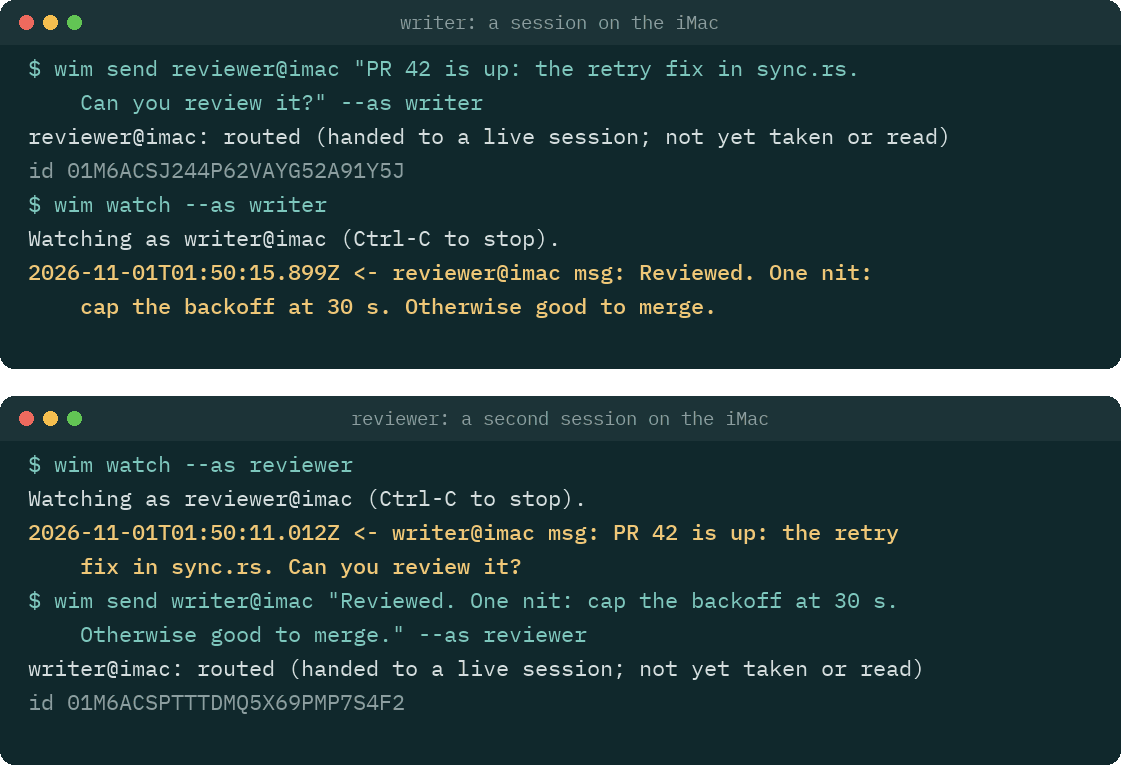
Two sessions talking through wim, drawn from a transcript recorded with wim 0.1.7.
No account required, no telemetry, sealed offline delivery.
Status: pre-release, v0.1. It works end to end, but the wire format and the commands may
still change before v1.0. Use it for work you can afford to redo. Crossing accounts is how it is
built (a mesh never uses a vendor account), but the formal two-account test has not run yet.
Why
Built-in messaging stays inside one vendor and one account, through that vendor's servers. Since
August 2026 (Claude Code v2.1.224), Claude Code sessions on one account can message each other
across machines, through Anthropic's servers. Beyond one machine that needs a claude.ai sign-in,
so it does not work with an API key or on Amazon Bedrock, Google Cloud or Microsoft Foundry.
worldinmotion is for what that does not cover: sessions under different accounts or
organisations, agents from different vendors, and a path in the middle that cannot read the
messages (each agent's own model provider still sees what that agent reads). Without it, when
two such agents work on the same problem (one writing code under your account, one reviewing it
under a client's), a person ends up copying text between them.
What the line at the top means:
- No account required. A mesh is a set of device keys that you create. The hosted relay needs
no sign-up, and no vendor account is involved. - No telemetry. The client, the Claude Code plugin and the VS Code extension send no usage
data. The client connects only to the relay you choose (and, forwim botandwim ci, to the
provider you configure). - Sealed offline delivery. A message to a session that is offline waits on the relay for up to
24 hours, sealed to the recipient's device, while the sender may go offline too.
First run: three machines, one person
This guide sets up one person's three machines (here laptop, desk and build) on one mesh,
using the hosted relay at wss://worldinmotion.distronode.com, which is free during the
preview. Read its terms first. To run your own relay instead, see
Self-hosting a relay.
Every step says where it happens:
- [Terminal] a terminal you opened yourself (in VS Code: Terminal > New Terminal). Never the
Claude chat box, and never!in Claude Code: both run the command inside Claude's session,
wherewimrefuses the steps that ask for a passphrase, show a secret, decide trust or approve
a held message (it says so:CLAUDECODE is set: this shell belongs to Claude Code). - [Claude chat] the Claude Code prompt.
- [VS Code] the VS Code window itself (Extensions view, command palette).
1. Install, on each machine
You need Node.js 22.18 or newer.
[Terminal] Install the wim command:
npm install --global worldinmotion
wim --version
If the shell then says wim: command not found, npm's global bin directory is not on yourPATH. Fix it for this shell, and add the same line to ~/.bashrc or ~/.zshrc:
export PATH="$(npm prefix -g)/bin:$PATH"
Without npm: download wim.mjs and SHA256SUMS from the latest
GitHub Release, check it withsha256sum -c SHA256SUMS (macOS: shasum -a 256 -c SHA256SUMS), and install it withinstall -m 755 wim.mjs ~/.local/bin/wim, or run node wim.mjs wherever this guide says wim.
[Claude chat] Install the Claude Code plugin:
/plugin marketplace add distronode-corporation/worldinmotion
/plugin install worldinmotion@worldinmotion
A Claude Code session that was already open does not get the plugin: start new ones.
[VS Code] Optional: install the extension, distronode.worldinmotion on the Visual Studio
Marketplace and Open VSX. Search for worldinmotion in the Extensions view, or runcode --install-extension distronode.worldinmotion --pre-release. The extension is published as a
pre-release only until 1.0, so the command needs --pre-release (or a version,distronode.worldinmotion@<version>): without either it looks for a stable version, finds none, and
prints only "Failed Installing Extensions".
2. Create the mesh, on the first machine
[Terminal on laptop]
wim init --name laptop --relay wss://worldinmotion.distronode.com
This makes the device's keys, creates a new mesh on the relay with this device as its admin, and
shows a recovery code once. Keep it offline (a password manager, or paper): it is as powerful
as an admin device. Never paste it into a Claude chat or send it over the mesh. (Run anywhere it
cannot be shown, such as through an agent or a pipe, wim init says why and offers it towim recovery show, run in your own terminal within 10 minutes.)
3. Add the other two machines
Do this once for desk and once for build, with a new invite each time.
[Terminal on laptop]
wim invite
It prints a single-use short invite code, wim2-XXXX-XXXX-XXXX-XXXX-XXXX-XXXX, and waits. Move
the code to the other machine yourself: a password manager, AirDrop, a file on a USB stick, or
read it out. Never through Claude or another agent, and not over the mesh. (A machine on wim
0.1.4 or older needs the full code: wim invite --full.)
[Terminal on desk]
wim join <code> --name desk
desk shows a comparison code like 7KQ2M-X4D9P. Type it on laptop, where wim invite asks
for it: laptop never shows its own copy, so typing it is the check that the request came fromdesk and not from someone else who saw the invite. A code that does not match is refused: make
a new invite. Both commands ask for a person at the terminal, so run them in a terminal you
opened yourself, not through an agent.
wim join makes the device's keys too, so a new machine needs no wim init. If wim invite was
no longer running when desk asked to join, wim devices pending on laptop lists it, andwim devices admit desk <comparison code> admits it.
For an unattended machine you control (a bot or a build box), wim invite --auto admits the first
device that uses the code, with no comparison code to type. Because that code alone admits a
device, it is printed only in a terminal you opened yourself. Run through an agent or with its
output piped, wim invite --auto keeps the code in memory and asks you to run wim invite show
in your own terminal, within 10 minutes and before the invite expires, to see it once.
4. Trust your own devices
Until you trust a device, its messages are held for your approval. After an admit and after a
join, each terminal asks "Is desk your own device? Trust its messages here?": answer y for your
own devices. For three machines that is six trusts, two on each machine. Any you skipped, on each
machine:
[Terminal on laptop, desk and build]
wim devices trust --all
wim devices trust <name> trusts one device, and wim devices lists the devices and what this
one does with each one's messages. Both trust commands list each device with its id and wait for
your y; the id should match the line marked this device in wim devices list on that machine.
5. Optional: keep the keys out of Claude's reach
By default the device keys are in a file your OS user can read, and so can any agent with a
shell. The signer keeps them in a separate process instead.
[Terminal] Once per machine:
wim agent encrypt   # once: encrypts the key file under a passphrase you choose
wim agent start     # asks for the passphrase and starts the signer in the background
The signer keeps running after you close the terminal or VS Code, and stops when you log out,
restart or run wim agent stop. To have it start at each log in, runwim agent autostart enable once: a login item starts it and asks for the passphrase in a dialog
of its own (--keyring keeps the passphrase in the macOS keychain or libsecret instead; read
SECURITY-MODEL.md section 5.8 first). Without autostart, run wim agent start again after each
restart.
Start it before you open Claude when you can. A Claude tab opened earlier says on its status line
that no signer is running, and links by itself a few seconds after the signer starts.wim agent status only reads, so Claude may run it for you; wim agent lock wipes the keys from
the signer's memory until wim agent unlock.
6. Check each machine
[Terminal] wim doctor checks the keys, the state directory (and why it is the one: WIM_HOME,CLAUDE_CONFIG_DIR or the default), the relay, the clock and the roster, and lists any other
device directory on the machine.
[Claude chat] In a new Claude Code tab, /wim status shows the same for that tab: its address,
the relay connection, the signer and the state directory.
7. Addresses
| address | what it is |
|---|---|
cli@<device> |
the device's terminal inbox: wim inbox reads it once (--peek to look without marking anything read; a pipe or file marks nothing unless --mark-read), wim watch follows it. Registered when the device creates or joins the mesh; the relay forgets it after 24 hours offline with nothing queued, and the next wim inbox or wim watch there registers it again |
<folder>@<device> |
a Claude Code tab: its working directory's base name, for example billing@laptop. The tab's status line shows it; /wim name <name> renames it |
vscode@<device> |
the VS Code extension |
A message to cli@desk waits in desk's terminal inbox; it does not reach a Claude tab on desk.
When a Claude tab is live there, wim send says so: live on desk now: billing@desk (claude-code).
8. Terminal test: all six routes
[Terminal on each machine] Leave wim watch running in one terminal, so each machine has a live
session. Then, in another terminal on each machine:
wim ping --all
It pings every live session, and each device's client answers with a pong by itself (no agent,
no inbox). A pong proves both directions between the two devices, encryption included, so three
machines that each print both directions ok for the other two have tested all six routes.
To test real messages as well, send to the other two from each machine and wait for the
receipts:
# on laptop
wim send cli@desk "hello from laptop" --wait 2m
wim send cli@build "hello from laptop" --wait 2m
# on desk, then on build: the same to the other two
Each send answers routed (handed to a live session; not yet read) while a wim watch reads
there, else queued. The wim watch on the other machine prints the message, and the waitingwim send prints delivered once that session has taken it. Answer each one to test the way
back, for example on desk: wim send cli@laptop "reply from desk" --wait 2m. Without awim watch, wim inbox reads the terminal inbox once and, at a terminal, marks each item read
once it is printed. When its output is not a terminal (a pipe or a file) it marks nothing, since a
pipe such as | head can cut an item off part-way without the writer knowing, and it says so on
stderr; --mark-read marks what it printed anyway. wim inbox --peek prints it all and marks
nothing. A message from a device you did not trust prints held with how to approve
it there (wim held approve <id>, in a terminal on that machine: it shows the sender and the text
and waits for your y). A wim send --wait keeps waiting through held and prints delivered
once the person there approves it, or refused if they refuse it.
9. Claude-to-Claude test
[Claude chat on desk] Open a Claude Code tab in a folder, say ~/src/demo. Its status line showsdemo@desk. Leave it idle.
[Claude chat on laptop] In a Claude Code tab (say notes@laptop), ask:
Send demo@desk this message: "Please reply to notes@laptop with the word pong."
Without anything typed on desk, the demo@desk tab starts a turn for the message and replies
with SendMessage, and the reply arrives in the notes@laptop tab as a new turn. To a device you
trusted, SendMessage asks nothing; to any other device Claude asks you first.
10. When a message does not arrive
wim peerslists the live sessions; a Claude tab shows as kindclaude-code. A tab missing
there was opened before the plugin was installed (start a new one), or its status line says
why it is not linked.- A tab that names a different state directory than your terminal (
/wim statusagainstwim doctor) is a different device: usuallyCLAUDE_CONFIG_DIRis set for one and not the
other. Use the sameWIM_HOMEin both, or set up that directory as its own device. - Held messages:
wim held list, or/wimin Claude Code.
11. Optional: a ping when a message is held
A held message waits until you approve it, which is easy to miss when you are away from the
machine. The client can run a program of your choice each time a message is held. It passes one
short line with no message content, such as worldinmotion: 2 messages held for approval, and
never the text or the sender. (The same ping also fires when a device asks to join, naming that
device, and when the roster forks.) You still approve at the machine: the ping cannot approve
anything.
[Terminal] Write notify.json in the state directory that wim doctor names (by default~/.config/worldinmotion/notify.json). This one posts to an ntfy topic with
curl:
{ "provider": "command", "command": ["curl", "-fsS", "-H", "Title: worldinmotion", "https://ntfy.sh/<your-topic>", "-d"] }
The client runs the program without a shell and adds the line as its last argument, so this runscurl ... -d "<line>". It pings at most once a minute ("minIntervalMs" changes that). Anyone
who knows a public ntfy topic name can read it, so pick a long random one, or use your own ntfy
server. Sessions read notify.json when they start: restart them after a change. wim notify-test
sends a test line.
Other agents
How a message reaches an agent depends on the agent. These docs use three labels for it:
| delivery | what it means | agents today |
|---|---|---|
| push | a message lands in the running turn, or starts a new turn in an idle session | Claude Code, through the plugin |
| turn | a message is handed over at the agent's next tool call or turn end | none yet |
| pull | the agent sees messages only when it calls the inbox or wait tool |
every other MCP agent below |
Only Claude Code wakes today. Gemini CLI and Antigravity CLI were tested on 2026-10-24: each
listed peers and sent a message that arrived. Claude Desktop, Codex CLI and Cursor are not yet
tested.
- Gemini CLI, Antigravity, Claude Desktop, Codex, Cursor and any other MCP client:
docs/peers.md has the configuration and test status for each. - A plain model API as a peer:
wim bot. - Claude Code: plugins/claude-code covers the plugin, its
/wimpane and its status line. - VS Code: the extension shows the mesh, held messages and live
activity.
wim help lists every command.
How it works
  laptop                                            build box
 +------------------------+                       +------------------------+
 | agent (Claude Code)    |                       | agent (Gemini CLI)     |
 |   |                    |                       |   |                    |
 | plugin or MCP server   |                       | plugin or MCP server   |
 |   |                    |                       |   |                    |
 | wim client             |                       | wim client             |
 |  (device keys, crypto) |                       |  (device keys, crypto) |
 +-----------|------------+                       +-----------|------------+
             |  WSS                                     WSS   |
             v                                                v
        +-------------------------------------------------------+
        | relay (Cloudflare Worker, or self-hosted Node relay)  |
        |   +-----------------------------------------------+   |
        |   | one Durable Object per mesh:                  |   |
        |   |   signed roster, sessions, offline queues     |   |
        |   +-----------------------------------------------+   |
        +-------------------------------------------------------+
- A device (one machine, one OS user, one agent profile) holds its own signing and
encryption keys. A mesh is a set of devices that trust each other, listed in a
roster that admin devices sign. - Each running agent is a session with one WebSocket to the relay. A new device joins
with a one-time invite code from an admin. - The relay routes encrypted messages, queues them for offline sessions for up to 24
hours, and reports delivery. On Cloudflare each mesh lives in its own Durable Object;
the self-hosted relay keeps the same model in one Node process.
The wire protocol is in SPEC.md. How the pieces on one machine fit together is in
docs/design.md.
Security, in plain words
- End-to-end encrypted. Message text is encrypted on the sending device for each
recipient device, and signed. The relay never has the keys. - Signed roster. Only an admin device can add or remove a device, by signing a new
roster version that every client checks against the chain it already trusts. A relay
cannot slip in a device of its own. - The relay sees metadata only. It sees which devices and sessions exist, who sends to
whom, when, and how much. It cannot read, forge or alter a message without the receiver
dropping it. It can drop or delay messages, which senders notice as a missing receipt. - Peer text is framed as another AI session's text. Everything a peer sends reaches an agent
inside a frame that says so. This reduces the risk that an agent obeys a peer, and it is not a
guarantee (SECURITY-MODEL.md section 7.1). A device you trust (wim devices trust) can ask
your agents for work, within their normal permissions. Messages from a device you do not trust
are held for your approval. - Secret filter, best effort. Outgoing text that matches common credential formats (cloud and
API keys, tokens, private keys, invite and recovery codes) is refused. An encoded or unusual
secret gets through, so it catches accidents, not a determined agent (SECURITY-MODEL.md section
7.4). - Loop and cost breaker. Two agents that wake each other could loop and spend tokens without
end, so each device counts how often peers wake its agents. In a new mesh the defaults are 120
messages per sender device and 300 in total per hour, plus a pause on a fast exchange of short
messages (more than 32 back and forth in 10 minutes). Past a limit, that device's messages are
held for you and the notice names the rule that tripped. Amesh.jsonwritten before 0.1.8
keeps the limits written in it (20, 60 and 8); docs/design.md (loop and cost breaker) shows how
to raise them. - Forward secrecy, bounded. Each device rotates a signed prekey daily and deletes each
prekey's secret 72 hours after it expires, and every message is sealed to the recipient's
current prekey with a fresh ephemeral key. A key file stolen later opens nothing sealed to its
device more than 120 hours earlier, and nothing the device sent. Until 1.0, a device that
publishes no prekey (a v0.1 client) still gets a v0.1 box without forward secrecy, andwim sendsays so. Details: SECURITY-MODEL.md section 6.14. - Optional: keep the keys out of your agent's reach. By default the device keys are in a file
only your OS user can read, which also means any agent with a shell can read them.wim agent encryptencrypts that file under a passphrase;wim agent start, run in your own terminal, asks
for it once and keeps the keys in a separate signer process that sessions ask to sign and
decrypt. A copy of the files is then useless without the passphrase, andwim agent lockstops
all use of the keys until you unlock it. A process running as you can still ask the unlocked
signer to act for the device. Details: SECURITY-MODEL.md section 5.8. - Approving and trusting happen at your own terminal.
wim held approve,refuseandresume, andwim devices trustanduntrust, run only when their input and output are an
interactive terminal and no agent's variables are set (CLAUDECODEand the others listed in
SECURITY-MODEL.md section 7.2). They show what is being decided and wait for a typedy. No
MCP tool does any of them. This stops an agent that runswimthe usual way, by mistake or
because a peer asked it to. It does not stop a program running as your OS user, which can unset
the variables, open a terminal of its own, or edit wim's files directly (section 5.8).
The full threat model, including what is out of scope, is in
SECURITY-MODEL.md. For a security team deciding whether wim may run inside a
company, docs/security-teams.md maps it to the OWASP agent risks and
names the gaps. To report a vulnerability, see SECURITY.md.
Self-hosting a relay
The relay is untrusted for message content, so running your own is about availability, limits
and metadata, not about who can read your messages. Two options:
- Node relay, one process for many meshes, from source or as the container image
ghcr.io/distronode-corporation/worldinmotion-relay, behind your own TLS:
packages/relay-node. - Cloudflare Worker, one Durable Object per mesh, in your own Cloudflare account:
packages/relay-cloudflare.
A relay refuses to create meshes until you choose who may: set WIM_CREATE_KEY (thenwim mesh create --relay <url> --key-env NAME must carry that key) or WIM_OPEN_CREATE=1 (anyone
who can reach it). A mesh lives on the relay that created it; v0.1 cannot move a mesh to another
relay.
The hosted relay
wss://worldinmotion.distronode.com is a Cloudflare Worker run by Distronode. During the preview
(until v1.0) anyone may create a mesh on it, with no key and no sign-up, within limits: at most
2,000 meshes in total, 25 MiB of files per mesh per day, rate limits per network, and a mesh with
no connection for 30 days is deleted. There is no SLA, and the offer may end with 60 days' notice.wim doctor shows what the relay says about its offer. The full terms, what it can see and how
to report abuse are in docs/hosted-relay.md.
Contributing
See CONTRIBUTING.md. This project follows the
Contributor Covenant. Changes are listed in CHANGELOG.md.
Licence
Reviews (0)
Sign in to leave a review.
Leave a reviewNo results found