grok-mcp-server
Health Pass
- License — License: MIT
- Description — Repository has a description
- Active repo — Last push 0 days ago
- Community trust — 11 GitHub stars
Code Pass
- Code scan — Scanned 12 files during light audit, no dangerous patterns found
Permissions Pass
- Permissions — No dangerous permissions requested
No AI report is available for this listing yet.
Local-first Grok MCP server & gateway. One shared Grok agent for Cursor, Claude Code, VS Code, Codex & Desktop. xAI API + CLI planes, Control Center.
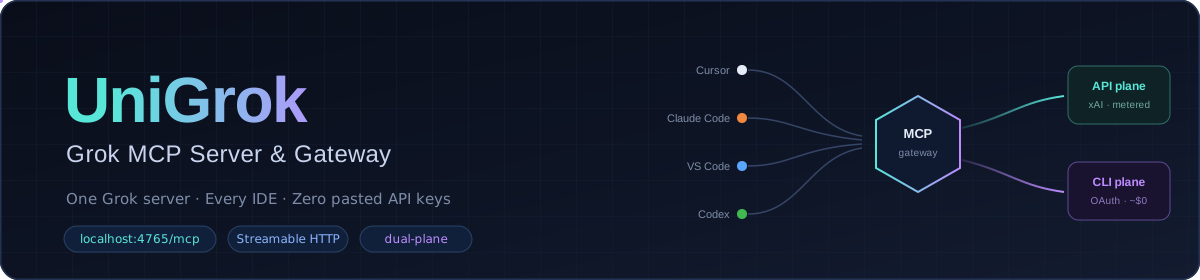






UniGrok · one Grok gateway for every coding agent
Run Grok once on your machine. Point every IDE agent at it. Keep the xAI
credential on the server — never in each editor.
UniGrok is a local-first MCP gateway for
xAI Grok. Cursor, Claude, VS Code, Codex, Antigravity, and
other MCP clients share one Streamable HTTP endpoint:
http://localhost:4765/mcp
It routes across the xAI developer API (metered) and the SuperGrok CLI
subscription (when authenticated), and returns the answer under response
with route / plane / cost metadata.
Current release: v0.6.0.
1. What you get
- Shared
@grok/agenttool for every IDE on your laptop - Server-side credentials (API key and/or CLI OAuth)
- Optional local Core UI for status:
http://localhost:4765/ui/ - A habit you can opt into: critique Implementation Plans with Grok before the
user sees them
Your other projects do not need UniGrok repo folders, contributor trees, or
special mounts.
2. Prerequisites
- Git
uv- An MCP-capable IDE
- At least one Grok credential path:
- xAI API key from console.x.ai, or
- SuperGrok / Grok CLI device login (subscription)
Docker Desktop is the current packaging path for the shared service. Treat it as
how UniGrok runs on your machine — not as “you are a Docker developer.”
3. Run the gateway (one path)
[!WARNING]
UniGrok is not published on PyPI.pip install mcp-grokinstalls an unrelated project; use this GitHub checkout.
There is no realnpx unigrokserver yet — Docker (oruv+ compose) is the install.
Fast path (copy/paste):
git clone https://github.com/djtelicloud/grok-mcp-server.git && cd grok-mcp-server
uv run python main.py init
docker compose up --build -d
init creates .env if missing and prints IDE MCP snippets forhttp://localhost:4765/mcp. After the service is healthy, you can close this
repo and work in any project with @grok.
Before checking readiness, complete one credential path:
- xAI API: set the developer key in server
.envbefore starting Compose
(or rerundocker compose up -dafter editing it). - CLI subscription: after the image is up, run:
docker compose run --rm grok-cli-auth
Then verify the usable plane:
curl --fail -s http://localhost:4765/readyz
You are ready when /readyz reports "status":"ready". /healthz only proves
the process is up; CLI-only installs must authenticate before this readiness
check.
4. Connect your IDE (paste this to your agent)
Copy the block for your IDE from the init output, or paste this prompt to your
local coding agent:
Configure UniGrok MCP for this machine:
- Streamable HTTP URL: http://localhost:4765/mcp
- Send a stable X-Client-ID header for this IDE (e.g. cursor, claude-code, vscode, codex)
- Never put XAI_API_KEY in IDE MCP settings; credentials stay in UniGrok's server .env
- After connecting, call tools/list and grok_mcp_discover_self
- Prefer the UniGrok agent tool when I say @grok or want a second opinion
- When I ask for a multi-step Implementation Plan, get a UniGrok second opinion
  (agent mode thinking or reasoning) and improve the plan before showing it —
  only if I want that habit; do not silently spend metered API credits
- Do not invent a second MCP port, Forge, or land workflow for ordinary use
Detailed multi-IDE notes: docs/ide-setup.md (public path
only; contributor dual-runtime detail lives in CONTRIBUTING).
5. Prove it in 60 seconds
- Restart the IDE MCP client.
- Ask: “Call UniGrok discover_self and tell me which credential planes are ready.”
- Ask for a small plan, then: “Get a UniGrok second opinion on that plan before
you show me the Implementation Plan.”
Optional status UI (this machine only): open
http://localhost:4765/ui/.
6. Security (short)
- Keep
XAI_API_KEYand CLI OAuth on the UniGrok service — never in IDE configs. - API plane is metered; CLI subscription cost is not exposed by the provider —
UniGrok only tracks local CLI activity. - Stable UniGrok does not browse your project unless you pass
workspace_context. - Loopback Core UI is for the machine owner; it is not a public multi-user
console. - Do not paste secrets into chat.
7. Project site (optional)
The public site at https://grokmcp.org is bound to the
existing project repository. It is not an idless installer template. For the
optional contributor control surface, GitHub App OAuth establishes identity
and each privileged request performs a fresh installation-token lookup of
repo role; a Sites rollback fallback remains only for the legacy identity
binding path. That control plane does not replace local UniGrok MCP onlocalhost:4765, and it never holds your xAI key.
8. Where docs live
| You are… | Use |
|---|---|
| Installing / connecting an IDE | This README |
| An agent needing schemas and operations | OKF knowledge bundle (also via discover_self and local /docs/okf/) |
| Public “smarter defaults” recipes | docs/public-intelligence/ |
| Changing UniGrok itself | CONTRIBUTING.md |
Source of truth: this repo’s docs/okf/ + the site OKF.
GitHub Wiki (optional): human-friendly mirror only, generated from OKF
(see docs/wiki-okf-mirror.md). Do not hand-edit the
wiki as product docs. Empty or stale wiki is not an outage — use OKF.
9. Next steps
| I want… | Go here |
|---|---|
| More IDE examples | docs/ide-setup.md |
| Agent knowledge (OKF) | https://grokmcp.org/docs/okf/index.md |
| Architecture | architecture.md |
| Security reporting | SECURITY.md |
| Contribute to UniGrok itself | CONTRIBUTING.md |
| Project site | https://grokmcp.org |
Contributors and admins: dual-runtime Forge, landing, Swarm, and insider Console
behavior are documented only in CONTRIBUTING.md — not required
for ordinary use.
License
Reviews (0)
Sign in to leave a review.
Leave a reviewNo results found