agent-station
Health Warn
- License — License: MIT
- Description — Repository has a description
- Active repo — Last push 0 days ago
- Low visibility — Only 5 GitHub stars
Code Fail
- network request — Outbound network request in demo/data.js
- exec() — Shell command execution in plugin/hooks/dispatcher.ts
- exec() — Shell command execution in plugin/hooks/station.ts
Permissions Pass
- Permissions — No dangerous permissions requested
No AI report is available for this listing yet.
Lets Claude Code agents in different repos work together: each knows the others, proposes work to them and gets their answers back, with your approval for every step
Agent Station
Lets Claude Code agents in different repos work together, with you approving every step.
Every agent gets a map of the station: the other agents, the repo each one works in and what each
one does. So it knows it is not alone, knows where it is, and knows who to ask for what. When the
agent in your app repo needs an endpoint from the API repo, it proposes the work to the API's agent
itself; the answer comes back to the very session that asked, and the two can go back and forth,
or bring a third agent in. Nothing moves between agents until you approve it, or edit it first,
on one page that also shows what every session is doing.
That ends copying prompts and context from one session to another. It suits projects whose repos
depend on each other (an app, its API, the website, the docs), and small teams or solo founders who
run several agents at once.
The page draws each repo as a room and each session as a robot, so the state of every agent reads
at a glance: at its desk while it works, raising its arm when it needs you, idle when it is done.
The station is a claude.ai artifact with its own database, and a Claude Code
plugin reports every session to it. Nothing runs on a server of yours.
Try the live demo: the real station
page with sample data, nothing to install (in Spanish).
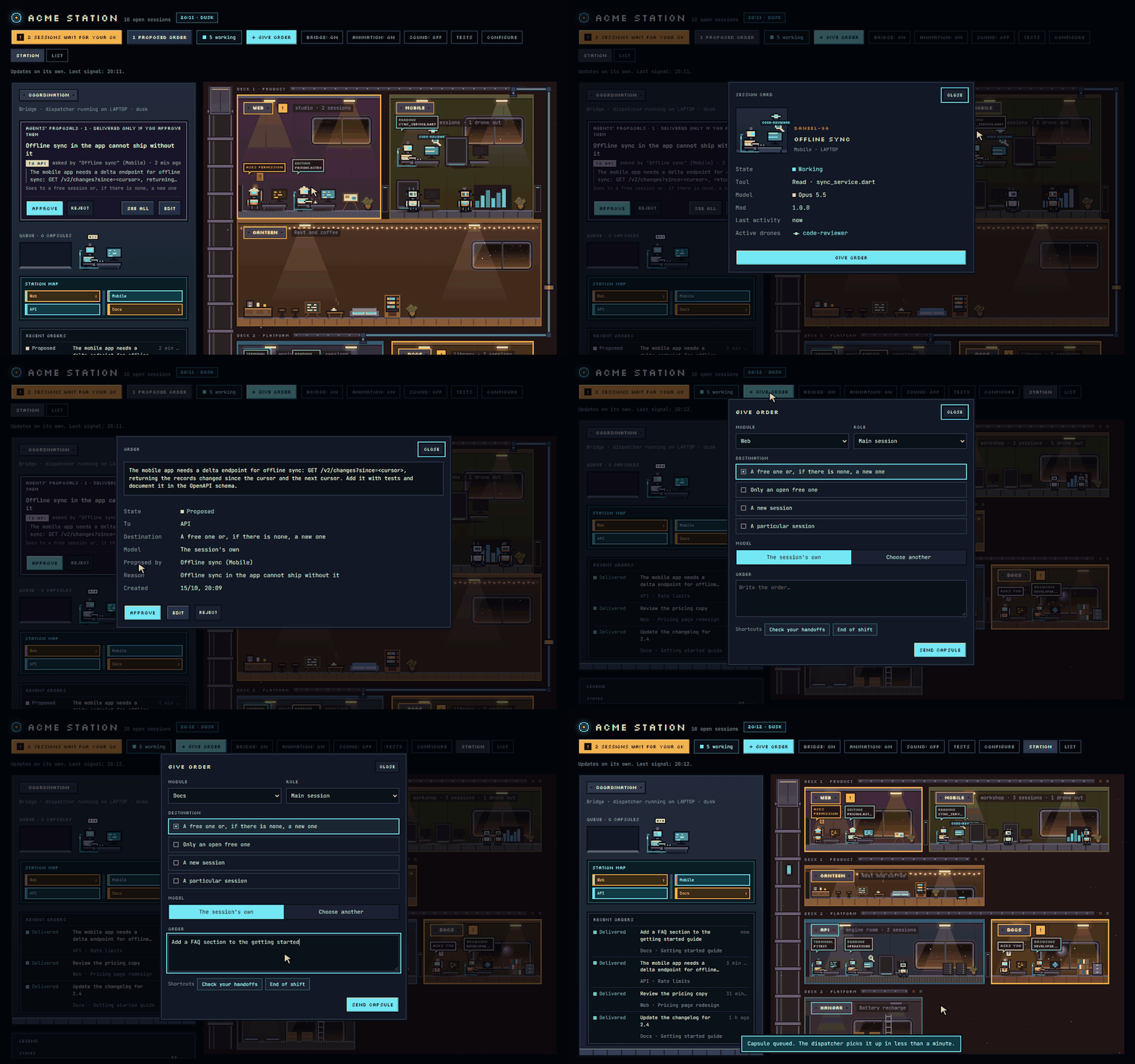
What you get
- Agents that know each other. With its first message, every session gets the station's map:
the rooms, the repo of each, what each room's agent does, and which room it is in itself. - Work between agents, both ways, with your approval. An agent asks another repo's agent for
something with thepropose_ordertool, and the answer goes back to the session that asked, so
agents can hold a conversation across repos. Sessions of the same room ask each other the same
way. Every request waits on the page until you approve
it, and you can edit it first. Agents never message each other behind your back. - Rooms with or without a repo. A room is a repo by its origin remote, or a folder with no
repo at all, known by a mark the station writes in it. Either can live anywhere on a computer:
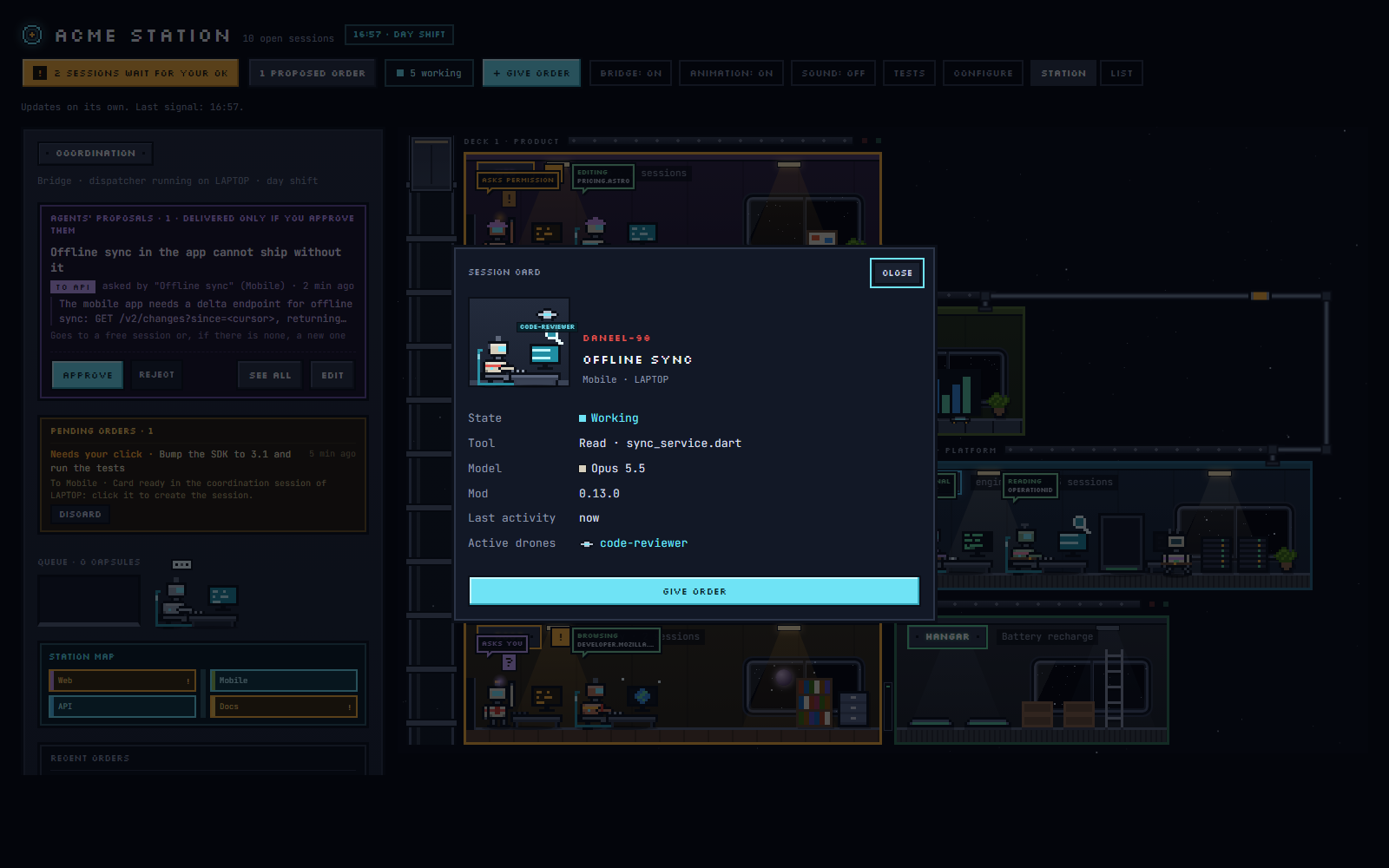
next to the coordination repo, or wherever you tell each computer to look. - Every session at a glance. Working, waiting for your permission or your answer, idle,
without signal or closed, in the room of its repo. A session's card shows its tool, its model,
its subagents, and a link that opens it. - Orders from one place. Send work to a repo yourself: to a free session, a particular one, or
a new one, with the model you choose. One session per machine, the coordination session,
delivers every approved order. - Each room's pending work. The open issues of every room's repo, on GitHub or GitLab, are
counted on its board as handoffs. One click turns a handoff into an order for that room, and every agent
knows the command that opens an issue in another room's repo. - A station you shape. Rooms, decks, colours, furniture, robot silhouettes and accessories are
set in the page's configuration panel. The station speaks English or Spanish, and its scenery
is a theme you can swap for one of your own.
 |
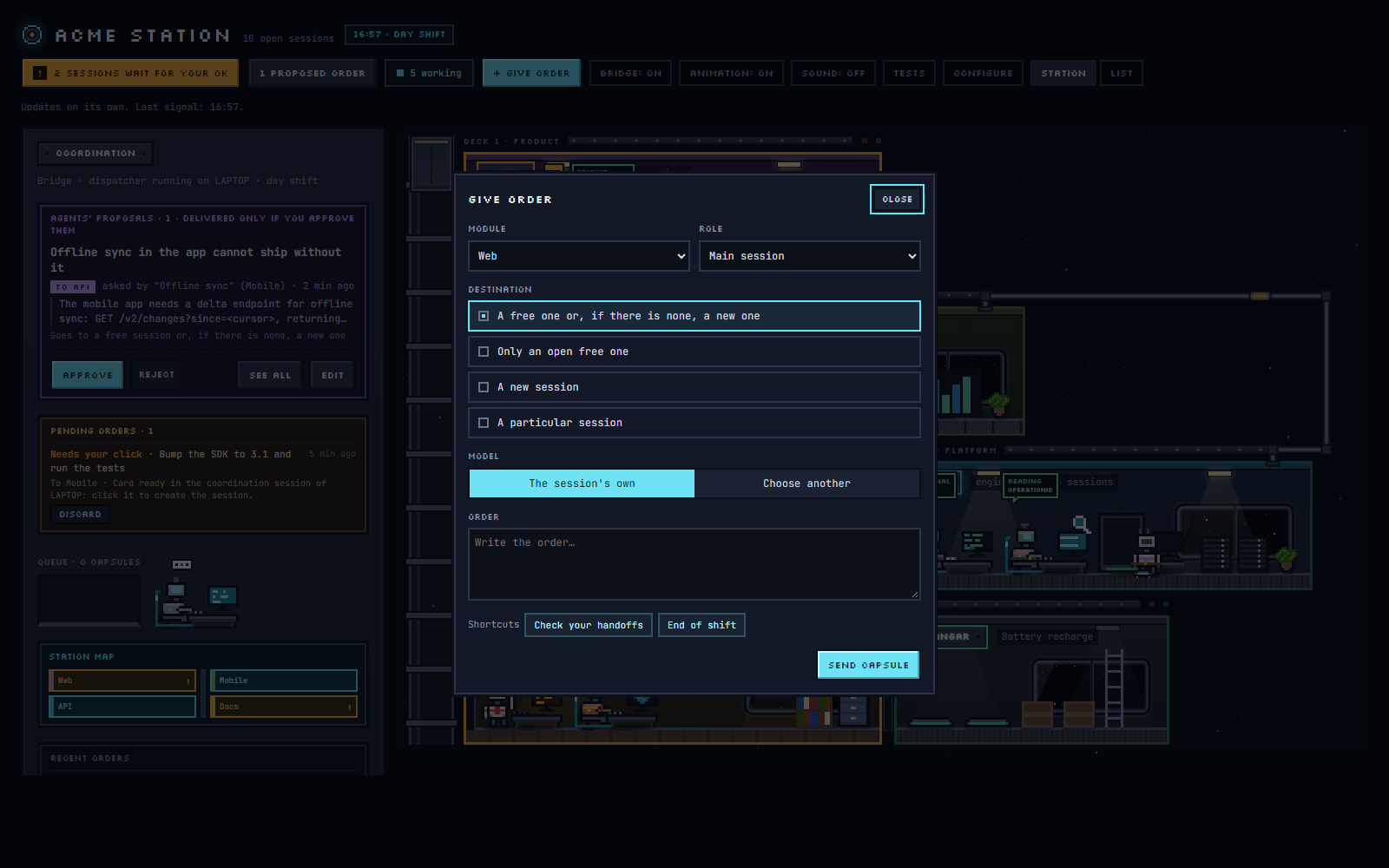 |
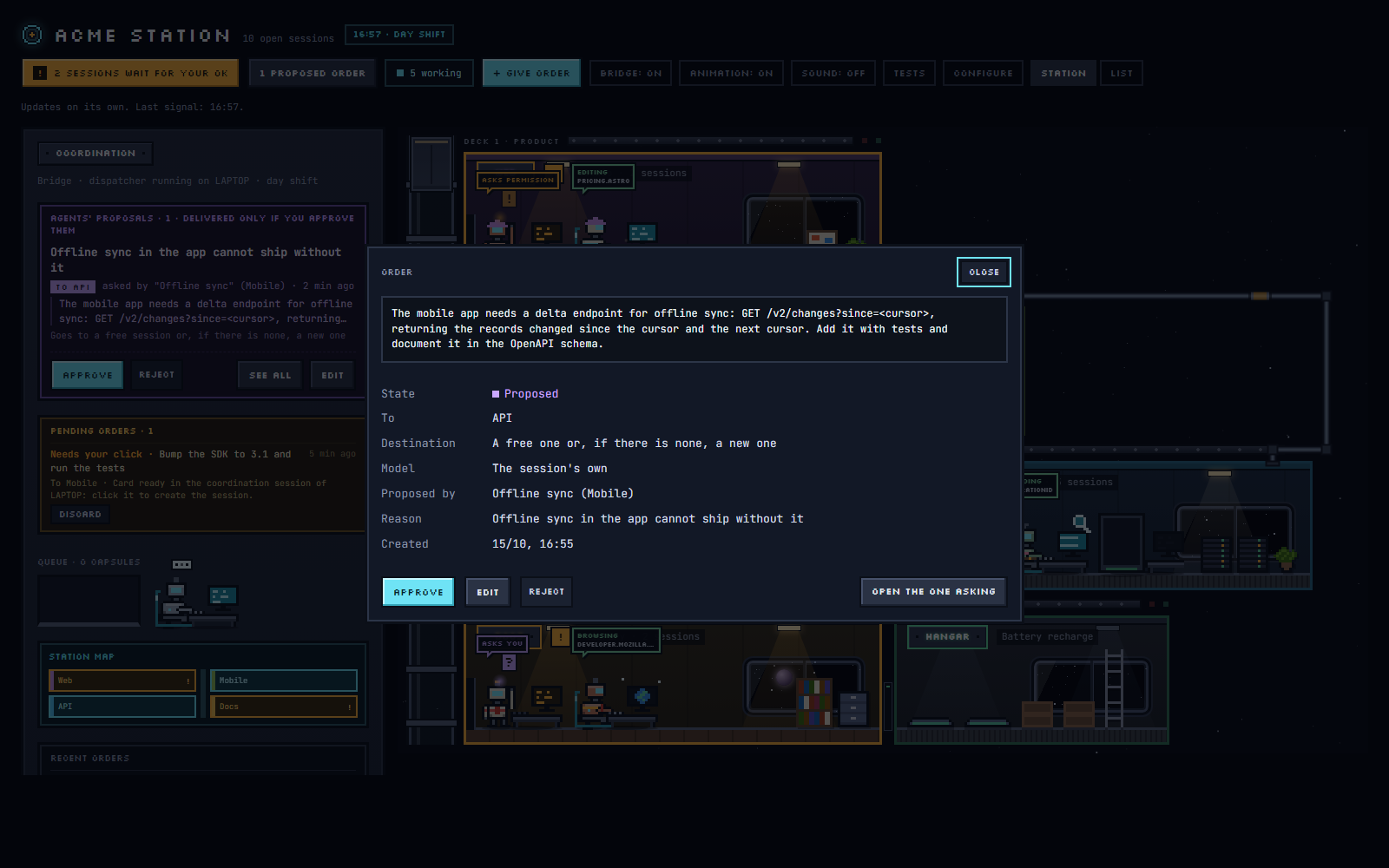
| A proposal from one room to another, which you approve, edit or reject. | The order form: the room, the agent, where it goes and the model. |
 |
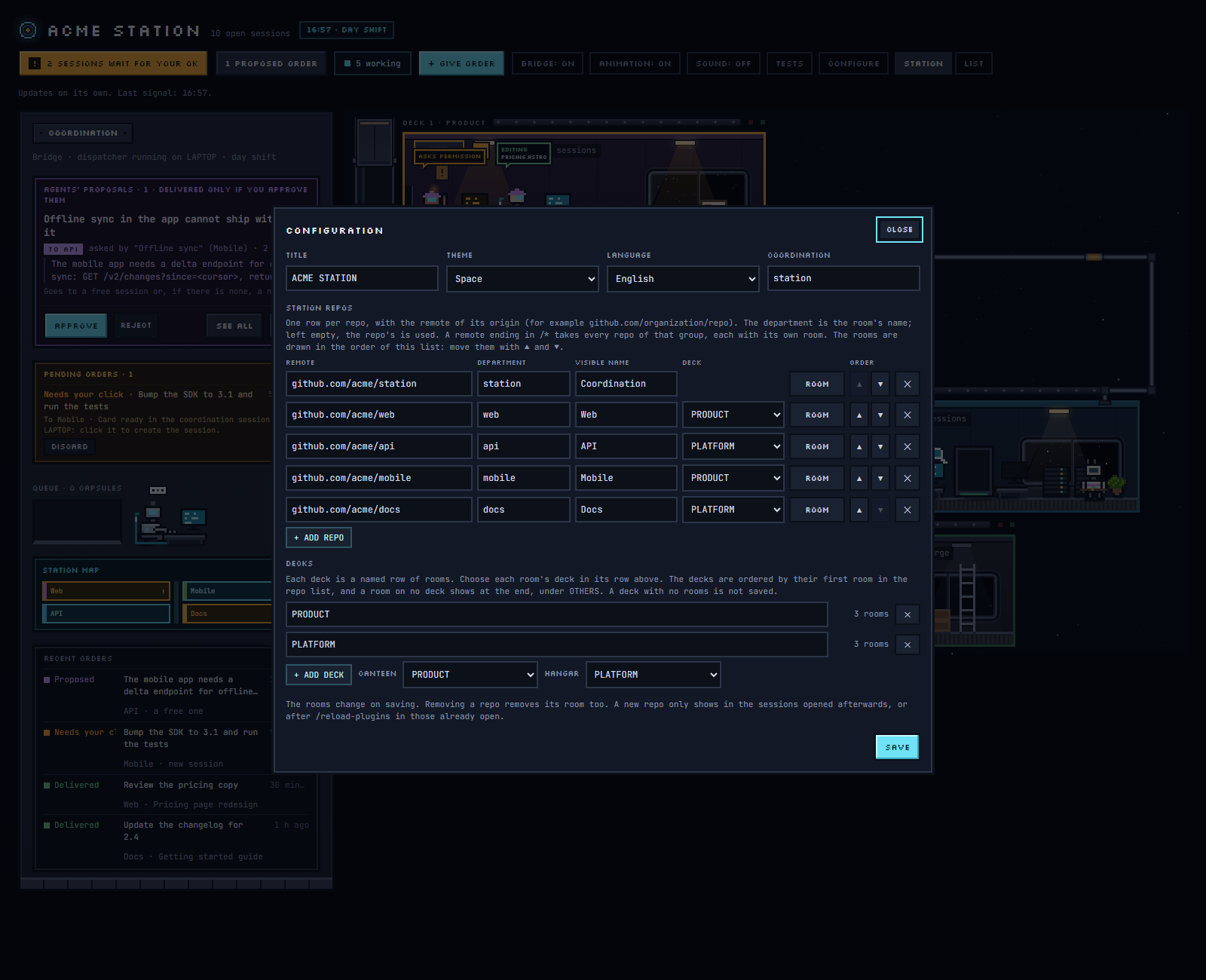 |
| A robot's card, with its session's state, tool, model and subagents. | The configuration panel: repos, rooms and decks. |
How it works
Three pieces, and none of them names a station, a company or a repo:
| Piece | What it does |
|---|---|
The page, page/office.html |
The station. You publish it as a claude.ai artifact with a database; the configuration lives in that database. Its scenery comes from a theme, page/themes/space.js by default, published next to it. |
The plugin, plugin/ |
Installed in Claude Code. In each session of a station's repos it writes that session's state to the station, gives the agent the station's map and the propose_order tool, and guards the station against agents writing to it. |
| The coordination session | Any session opened in the repo you name as coordination. It runs the dispatcher, which delivers the approved orders on its machine and keeps the station's catalogs (subagents, open issues, models) up to date. |
A session belongs to a station when the origin remote of its repo is one of the station's repos,
or, in a folder with no remote, when the folder carries the mark of one of the station's folder
rooms. Sessions anywhere else are ignored. The plugin writes nothing in your folders but that mark,
and only in a folder you set for a folder room (see Folder rooms and places).
Requirements
- The Claude desktop app, on Windows or macOS, with Claude Code. The coordination session must run
in the app, not inclaudein a terminal: the dispatcher delivers orders through the app's own
session tools. For the same reason, on Linux sessions report and propose orders but nothing can
deliver them. - A version of the app the station supports: checked up to the Claude desktop app 4.23118, with
Claude Code 2.1.317. Older apps that leave task cards for new sessions (spawn_task) keep that
card; from 4.16336 on, the app has no cards, and a new session opens from the order's OPEN NEW
SESSION button or from the coordination session. A later app may change the session tools the
dispatcher uses: if orders for a new session stop working after an update, check the issues of
this repo before reporting it. - A claude.ai account that can publish artifacts with a database.
- The coordination session with permissions bypassed (
bypassPermissions), if you can: that is the
mode in which every feature works. See Permission modes below. - Your repos cloned side by side, in one folder: the dispatcher finds a station's repos next to
the coordination repo. - Optionally, for handoffs (the open issues of each room's repo, which the station shows as the
room's pending work; ISSUES in CONFIGURE turns them off for a repo), the command
line tool of the host of each repo, installed and logged in on every machine with a coordination
session or with agents that open handoffs: the GitHub CLI (gh, thengh auth login) for repos
on GitHub, and the GitLab CLI (glab, thenglab auth login, or aGITLAB_TOKENvariable with
theapiscope) for repos on GitLab, gitlab.com or one of your own. The station works out each
repo's host from its remote, so a station can mix both, and there is nothing to configure. Without
the tool, or without a login, orders still work: the coordination session shows a notice when it
starts, the room's board says what is missing on which machine, and the agents ask for work with
orders instead. A repo on any other host takes only orders. After installing a tool or logging
in, reload the coordination session (/reload-plugins), which checks again; a tool installed
while the app was open is only found after restarting the app.
Quick start
Before you start, set up the coordination repo. A station needs one: it is the repo whose
Claude Code session delivers the orders you approve, and without an open session in it approved
orders wait. It has no room on the station. Any repo of the station can be it, but the recommended
one is a clone of this repo (or of your fork, if you want to version your own template or theme):
it holds the page and the theme its session publishes, a git pull brings each new version, and
its session does nothing but run the station. Clone it next to your other repos, since the
coordination session looks for the station's repos in the folders beside it:
git clone https://github.com/dlportel/agent-station.git
The marketplace's own copy, which Claude Code keeps under ~/.claude/plugins/, is not beside your
repos, so it cannot be the coordination.
Install the plugin from this repo's marketplace:
claude plugin marketplace add dlportel/agent-station
claude plugin install agent-station@agent-station --scope user
Set up the station. Open a Claude Code session in your clone and run
/agent-station:setup.
If you installed the plugin from Claude Code's plugin directory (/plugin, Discover) and have
no clone yet, run it in any of your repos instead: it finds a clone ofagent-stationnext to
them, or offers to make one, and uses it. Claude asks for the station's name and language, publishes the station page as a claude.ai
artifact with its database, records its alias, adds its URL to the plugin'sstationsoption
and opens it. Then run/reload-pluginsin the sessions you have open. To do these steps by
hand, see Manual setup.Configure it. Open the station. A station with no repos opens its configuration panel
(CONFIGURE, or CONFIGURAR in Spanish). Add your repos by their origin remote, the coordination
repo among them. A clone ofagent-stationis chosen as COORDINATION by itself; for any
other repo, choose it there. Its row then shows COORDINATION instead of a deck. Choose the
language and save.Start the coordination session. The session in your clone, where you ran the setup, is the
coordination session: after/reload-plugins, send it any message. That starts the dispatcher,
and the station's bridge shows "dispatcher running on" your machine. Keep that session open. Claude Code starts a session's plugins only
when the session itself starts, so after you restart Claude Code, or reopen that session, send
it a message again; until then the bridge says that orders wait. The app also stops a session's
process after a while without activity, the coordination session's included, and with it the
dispatcher; the header then shows NO DISPATCHER as soon as an approved order waits. To avoid
it, turn on KEEP AWAKE in CONFIGURE: the coordination session keeps a command running in the
background, which costs no tokens, so the app leaves it running. While it runs, the app may count
the session as busy, and then its setting to keep the computer awake while Claude works keeps
the computer from going to sleep on its own.Open sessions in your other repos. Each one appears as a robot in its room once it starts,
and gets the station's map with its first message.
Using the station
Orders. + GIVE ORDER, or a robot's card, opens the order form: the room, the agent (the
main session or one of the room's subagents), where it goes (a free session, only an open one, a
new session, or a particular session) and the model. An open session gets the order as a message,
even while it works (it waits for the end of its turn). The dispatcher cannot start a new session
by itself, so that order waits for you. OPEN NEW SESSION on its detail fills in the app's
new-session screen for you to send. To open them all at once, tell the coordination session, in
the desktop app, to open the pending orders. On an app that still has task cards, the order leaves
a card in the coordination session instead.
Proposals. An agent that needs another room's work proposes an order with propose_order. The
proposal shows on the bridge with why it is asked, who asks and where it would go; you approve it,
reject it, or open it with SEE AND EDIT, which shows its text ready to change before you approve it,
with its starting branch and its destination (folded on one line until you change it): as it was
proposed, or any other, a particular session included. When a room answers an order it received, its answer goes back
to the very session that asked. A session that needs another session of its own room proposes the
order to its own folder: it goes to another session of the room, never back to the one that asked. The coordination session only hands orders out: agents never ask
it to forward anything.
Handoffs. The dispatcher reads the open issues of each room's repo every fifteen minutes and
the room's board shows how many there are; a click on it opens them. ASSIGN TO AN AGENT, on a handoff, opens the order form filled in
to handle that issue: the agent first marks it Doing on the issue (the command for its host comes
in the order), so it shows so on GitHub or GitLab too. A repo whose issues you do not want on the station is set to NO under ISSUES
in CONFIGURE. When a room's issues cannot be read (no gh or glab, or no login), its board says
why and on which machine. The bridge lists the five newest of each room; SEE THEM ALL, or a room's
board, opens every open handoff with a text search, a filter by room and pages of fifteen.
The dispatcher reads the 100 newest open issues of each repo; a room that reaches that shows 100+.
Each handoff shows its state, which is its label, one at most. To Do while nobody is on it, as a
new issue starts. Doing when someone or a session works on it: when its issue has that label (or
a name teams give it, such as in progress or wip), when it is assigned to someone, or when the
station gave an order for it that is on its way or delivered; its tooltip and its detail say which.
Once its work is done the agent removes Doing and finishes it as the project's own instructions
say: with a label of the team's own (such as Pending production), which the station shows as one
more label, or by closing the issue. The full list filters by state too. On GitHub the dispatcher
creates To Do and Doing in a repo that lacks them, and never changes one that exists; GitLab
creates them when they are first used.
↻ UPDATE, in OPEN HANDOFFS and in the full list, asks the dispatcher to read them now instead of
waiting for its fifteen minutes; it does within a minute, and the button's tooltip says when they
were last read.
Folder rooms and places. A room whose agents work in a folder with no git repo is added in
CONFIGURE, FOLDERS with + ADD FOLDER ROOM. It has no issues, so no handoffs; it takes orders
like any room. The folder becomes the room by a mark, the file .agent-station inside it, with the
room's random id: no folder is a room by its name. Under each folder room's row, set the folder's
full path on each computer (empty when it sits next to the coordination repo); on SAVE, that
computer's dispatcher writes the mark in it and the row says what it found. A folder that is a git
repo with a remote, or that carries another room's mark, is never marked. Repos that do not sit
next to the coordination repo are found the same way: in CONFIGURE, REPOS, under each computer,
list the folders where its dispatcher also looks (a folder, or a parent ending in \* for every
folder inside). Paths belong to their computer: the station's configuration never holds one, and
each dispatcher reads only its own. A path only says where to look; each folder is still known by
its remote or its mark, and network paths are refused.
All orders. RECENT ORDERS on the bridge shows the last six, and folds (▾) down to SEE ALL alone; SEE ALL opens every order the
station keeps (the last 30 days), newest first, with a text search over the order, its reason, its
room and the session that got it, a filter by state and pages of fifteen. An order opened from the
list has a way back to the same page.
Resending. An order waiting for your click, not delivered, or delivered can be sent again from
its detail, as it was or to another destination. A delivered one asks first, naming the session
that got it, since the work may already be done.
Branches. Every order starts from a branch of its room's repo: the one it names, or else the
branch that repo is on when the order is delivered. A new session the app opens for an order works
in a worktree on a branch of its own, so its message starts by giving it that branch and its
commit, and by telling it to create its work branch from the local branch when it started
anywhere else. An open session gets the same note, or, if it works in the repo's own folder on
another branch, a warning to check with you. See
The branch an order starts from.
Limits. An order's text takes up to 20,000 characters and its reason up to 1,000. A longer one
is refused whole, with its length, never cut.
When the configuration changes. A session reads the station's configuration when it starts,
or after /reload-plugins. A room added or renamed later reaches the sessions already open only
after /reload-plugins and a message.
The coordination command. /coordinator <message> (/coordinador in Spanish) sends a note
about a problem with the station to the coordination session on the same machine.
Configuration
The station's configuration is one document in its database, config/departments, edited from the
configuration panel:
| Field | What it is |
|---|---|
title |
The station's name. |
language |
en (the default) or es: the language of the page, of the map each session gets, of the orders delivered and of the dispatcher's notes. What you write in the configuration (room names, places, deck labels, descriptions) is shown as written. |
theme |
The scenery: space, the default, or a theme of your own (see Themes). |
coordination |
The repo whose sessions coordinate the station. |
keepAwake |
true keeps the coordination session from being stopped while it is idle, so orders are delivered at any hour (KEEP AWAKE in the panel). Off by default. It works only with the coordination session in bypass-permissions mode; the station says so when it is in another. |
repos |
The station's repos by origin remote: { "remote": "github.com/org/repo", "folder": "room" }, or a remote ending in /* for every repo of a group. "issues": false leaves a repo's (or a group's) issues off the station. A folder room is an entry with no remote: { "folder": "room", "local": "<id>" }. |
departments |
Each room: name, description (what its agent does, which the other agents read), place, accent, wall, floor, furniture, accessory, body, antenna, weight. |
layout |
The decks: { "label": "DECK", "items": ["room", "#canteen", "#hangar"] }. #canteen and #hangar are shared rooms where idle robots rest and recharge; one on no deck shows after the decks. |
offStation |
Shared rooms taken off the station, such as ["#canteen"]. Every station has both unless this lists them. Their deck, and their name, the line under it, their colours and floor (SETTINGS), are set from their rows under SHARED ROOMS in DECKS (departments["#canteen"] and departments["#hangar"]). |
aliases |
Other URLs of the same artifact. |
Each computer's paths, kept apart since they belong to it, are in config/places: byMachine
(where its dispatcher also looks) and folderRooms (each folder room's folder on it).
The panel has five tabs. GENERAL, REPOS, FOLDERS (rooms whose agents work in a folder with no repo) and DECKS edit the station; VIEW sets how this browser draws
it (the station's, the bridge's and the dialogs' sizes, the light, the legend), kept in this browser alone; the station's automatic size is the largest that fits the window, from 50% to 150%. They edit all of it: the title, the theme, the language and the coordination; one row per
repo with its room's name and deck; each room's look in a side panel with a live preview; and the
decks themselves. The page reads a malformed configuration without breaking, so the panel is also
the way to repair one. When a seed.json is published next to the page, an empty station can start
from it, and repos missing from the station can be added from it.
Languages
The station currently speaks two languages, English (the default) and Spanish, chosen per station
in the configuration panel. Everything is written in English, and the Spanish lives in two
dictionaries keyed by the English text: ES in the page, read through tr(), andplugin/hooks/locale-es.ts in the plugin, read through tx(). A text missing from a dictionary is
shown in English. Adding a language means adding its dictionaries and its entry in the page'sLANGUAGES.
Themes
The page draws the station itself: the lift shaft, the beams, the hull, the window frames, the
rooms and the robots. A theme draws what lies around it. Every theme is a script that callsregisterTheme(name, spec), and the configuration panel offers each one registered. The page
loads two scripts from next to itself: themes/space.js, the default theme (a starfield and
windows to space with drifting planets), and then theme.js, where a station adds its own themes.
A missing file is skipped, and with no theme at all the station is drawn on a plain background.
page/themes/space.js is the reference for writing a theme: copy it as your theme.js, give it a
new name, and change what it draws. Its header lists the whole contract.
Field of spec |
What it is |
|---|---|
label |
The theme's name in the panel, in English (its Spanish goes in es). |
css |
The theme's styles, every rule under body[data-theme="<name>"]. |
backdrop() |
Returns the node drawn behind the decks. |
window(folder) |
Returns a room's window; keeping the classes porthole and mullion gives it the station's frame. |
ambient |
Overrides for the shared rooms (#canteen, #hangar): name, sub, wall, lights, items. The hangar's first items must stay its pads. |
furniture |
Extra furniture, by key: { rows, pal, label }. |
es |
The Spanish of the theme's texts, keyed by their English. |
The file runs as a classic script on the page and can use its helpers (el, spr, starsSvg,hashOf, dayPhase, INK).
Security and privacy
The station's database rules are owner-only, and claude.ai enforces them: only the artifact's owner,
and the sessions running under that same account, can read or write it.
The plugin reports as little as it can. A session's state is its title, its folder, its model, its
machine's name and what its current tool touches, kept small on purpose: a file's name without its
folder, a search pattern, a command's program and its first plain word (never its flags, paths,
quotes or values), a site's host.
Outside the station's database, the plugin writes one thing: a folder room's mark, .agent-station
(the station's URL and the room's id), in the folder you set for that room on that computer, and
never in a folder that is a git repo with a remote or that carries another room's mark. Paths that
point to a network share are refused, so no dispatcher reaches another server with your
credentials.
Agents can read the station but never write it. Their writes to a station are refused, except the
coordination session's writes to orders and to the configuration, and its republishing of its own
station page, which ask you first. Proposing an order goes through propose_order, and nothing
proposed is delivered until you approve it. An agent that tries to write straight to another
Claude Code session, around the station, is stopped by a permission prompt.
Development
The plugin's tests run with Claude Code's own test runner:
claude plugin validate plugin
claude plugin test plugin
Keep the version in plugin/.claude-plugin/plugin.json and plugin/hooks/version.ts equal; the
station shows each session's version, so a session running an old copy stands out. After a change
to the page or the space theme, republish the page to each station with page/themes/space.js
as themes/space.js, passing the station's current title again: the page has no <title> of its
own, so a publish without one renames the artifact.
The live demo loads page/office.html and
its theme straight from this repo, so it shows every change to main on its own. Onlydemo/data.js, which stands in for the station's database, is separate: after changing how the
page reads or writes its data, open the demo locally (serve the repo, for example withpython -m http.server, and open /demo/) and try what changed.
Permission modes
The plugin approves its own calls, its writes to the station and the background command of KEEP
AWAKE, so they never ask you. On an account of a Team or Enterprise organization, and on a machine
with managed settings, Claude Code's built-in security plugin answers permission decisions and the
plugin's other built-in hooks first, and the plugin's are skipped; the app says so with a notice
such as "its classic.PreToolUse hook was skipped". What that means for the station depends on the
session's mode:
| Mode | What works |
|---|---|
| Bypass permissions | Everything. This is the mode the coordination session should run in. |
| Auto | Orders, reports, proposals and the dispatcher, but not KEEP AWAKE. The plugin's own calls go to the auto-mode classifier, which refuses calls no request asked for: KEEP AWAKE cannot start its command, and now and then a report to the station is refused and sent again later. The rule "ArtifactData" in permissions.allow of ~/.claude/settings.json lets the reports through, but it also lets any agent write to any artifact's database without asking (the plugin still refuses agents' writes to a station). There is no safe rule for KEEP AWAKE's command. |
| Default | The same, but every call of the plugin asks you, so it is not practical for a station session. |
Where the built-in plugin goes first, the plugin notices that its hooks are skipped and works
around what it can. Its extra confirmations (an agent writing to another session directly, the
coordination session writing to the station or republishing its page) come as a question with
Allow and Deny instead of inside the permission dialog. A robot waiting for your permission is
marked from the session's own permission rules in the default, accept-edits and plan modes; in auto
mode it shows as working. An input dialog an MCP server opens shows as working in every mode.
A coordination session that starts in another mode than bypass says so once, in a notice.
Known limitations
- Changes reach a session only when it loads its plugins again. After installing or updating
the plugin, changing itsstationsoption, or adding, removing or renaming repos in CONFIGURE,
run/reload-pluginsin the sessions you have open (or restart the Claude app) and send each a
message. Until then a session keeps the station as it found it when it started: a session opened
before its repo was in the station stays out of it, and its map lacks the new rooms. - After restarting the Claude app, send the coordination session a message. Restored sessions
start their plugins only then, so until you do, no dispatcher runs and orders wait; the bridge
says so. - The app turns
@into@in messages between sessions. An order delivered to an open
session arrives with every at sign replaced by the full-width one (U+FF20), so that it never
attaches a file; the order says so when its text has one, so that the agent writes the ordinary
one in code, SQL, email addresses and paths. A new session's first message keeps it. - One copy of the plugin per computer. Two installed plugins named
agent-station, from
different marketplaces, do not work side by side. To report to several stations, list them all in
one copy'sstationsoption.
Further reading
docs/reference.md explains the station in detail: what the page draws,
every field of the configuration, what each agent is told, who may read and write what, how the
guard works and how orders travel.
Questions and bug reports
Open an issue for a bug, a question or
an idea. A security problem is reported privately instead, as SECURITY.md explains.
License
Reviews (0)
Sign in to leave a review.
Leave a reviewNo results found