claude-code-stats
skill
Fail
Health Warn
- License — License: MIT
- No description — Repository has no description
- Active repo — Last push 0 days ago
- Community trust — 11 GitHub stars
Code Fail
- rm -rf — Recursive force deletion command in scripts/brew-install.sh
- rm -rf — Recursive force deletion command in scripts/dev-install.sh
Permissions Pass
- Permissions — No dangerous permissions requested
Purpose
This is a native macOS menu bar application built with SwiftUI that displays your Claude Code usage limits and session data in real-time.
Security Assessment
The application accesses highly sensitive data: it reads your OAuth credentials directly from `~/.claude/.credentials.json` or the macOS Keychain to authenticate with Anthropic's servers. It makes regular network requests to Anthropic for usage data, status.claude.com for service health, and GitHub to check for version updates. No hardcoded secrets were found, and it does not request dangerous system permissions. However, the codebase contains `rm -rf` commands in two installation scripts (`brew-install.sh` and `dev-install.sh`). While often used for cleanup during setup, recursive force deletion is a risky pattern that could lead to accidental data loss if the path variables are ever empty or misconfigured. Overall risk is rated as Medium due to the combination of sensitive credential access and risky shell commands.
Quality Assessment
The project is actively maintained, with the most recent push occurring today. It uses the permissive MIT license and has garnered 11 GitHub stars, indicating a small but growing community of users. A minor quality issue is the missing repository description, which slightly hinders discoverability but does not impact functionality. The provided README is comprehensive, well-documented, and clearly lists project requirements.
Verdict
Use with caution — the utility is actively maintained and legitimately useful, but users should be aware it directly accesses OAuth credentials and the installation scripts contain potentially destructive `rm -rf` commands that warrant manual review before execution.
This is a native macOS menu bar application built with SwiftUI that displays your Claude Code usage limits and session data in real-time.
Security Assessment
The application accesses highly sensitive data: it reads your OAuth credentials directly from `~/.claude/.credentials.json` or the macOS Keychain to authenticate with Anthropic's servers. It makes regular network requests to Anthropic for usage data, status.claude.com for service health, and GitHub to check for version updates. No hardcoded secrets were found, and it does not request dangerous system permissions. However, the codebase contains `rm -rf` commands in two installation scripts (`brew-install.sh` and `dev-install.sh`). While often used for cleanup during setup, recursive force deletion is a risky pattern that could lead to accidental data loss if the path variables are ever empty or misconfigured. Overall risk is rated as Medium due to the combination of sensitive credential access and risky shell commands.
Quality Assessment
The project is actively maintained, with the most recent push occurring today. It uses the permissive MIT license and has garnered 11 GitHub stars, indicating a small but growing community of users. A minor quality issue is the missing repository description, which slightly hinders discoverability but does not impact functionality. The provided README is comprehensive, well-documented, and clearly lists project requirements.
Verdict
Use with caution — the utility is actively maintained and legitimately useful, but users should be aware it directly accesses OAuth credentials and the installation scripts contain potentially destructive `rm -rf` commands that warrant manual review before execution.
README.md
Claude Code Stats
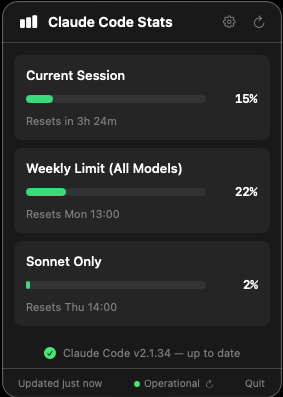
A native macOS menu bar app that displays your Claude Code usage limits in real-time.
Features
- Real-time usage data - Shows your actual usage from Anthropic's servers
- Current Session - 5-hour rolling window usage with reset countdown
- Weekly Limits - All models combined usage with reset time
- Auto-refresh - Updates every 5 minutes automatically
- Claude service status - Live status from status.claude.com shown in the footer (Operational, Degraded, Outage, Critical)
- Version update detection - Checks for new Claude Code releases hourly via GitHub; shows a red dot badge on the menu bar icon and a banner when an update is available, with a link to the changelog
- Native macOS app - Built with SwiftUI, lightweight and fast
- Light/dark theme - Adapts to macOS appearance
Requirements
- macOS 14.0 (Sonoma) or later
- Active Claude Pro/Max subscription
- Claude Code installed and logged in
Installation
Option 1: Homebrew (Recommended)
brew tap dmelo/tap
brew install --cask claude-code-stats
Option 2: Download Release
Download the latest .app from the Releases page and drag it to your Applications folder.
Option 3: Build from Source
Clone the repository:
git clone https://github.com/dmelo/claude-code-stats.git
cd claude-code-stats
Open in Xcode:
open ClaudeCodeStats/ClaudeCodeStats.xcodeprojBuild and run (⌘R)
Setup
- Make sure Claude Code is installed and you're logged in (
claudein your terminal) - Launch the app - a chart icon will appear in your menu bar
- Click the icon to see your usage data
The app reads your OAuth credentials from ~/.claude/.credentials.json or the macOS Keychain (created automatically when you log in to Claude Code). No manual configuration needed.
Usage
Click the menu bar icon to see your current usage:
| Metric | Description |
|---|---|
| Current Session | Usage in the current 5-hour window |
| Weekly Limit | Combined usage across all models (resets weekly) |
The progress bars change color based on usage:
- 🟢 Green: 0-50%
- 🟡 Yellow: 50-75%
- 🔴 Red: 75-100%
Start at Login
To launch automatically when you log in:
- Open System Settings → General → Login Items
- Click + and add ClaudeCodeStats
Building
cd ClaudeCodeStats
xcodebuild -project ClaudeCodeStats.xcodeproj -scheme ClaudeCodeStats -configuration Release build
The built app will be in ~/Library/Developer/Xcode/DerivedData/ClaudeCodeStats-*/Build/Products/Release/
Project Structure
ClaudeCodeStats/
├── ClaudeCodeStats.xcodeproj
└── ClaudeCodeStats/
    ├── ClaudeCodeStatsApp.swift    # App entry point
    ├── ContentView.swift            # Main popover view
    ├── Services/
    │   ├── OAuthUsageService.swift  # Anthropic API usage via OAuth
    │   ├── StatusService.swift      # Claude service health status
    │   └── VersionService.swift     # Claude Code version update checker
    └── Views/
        ├── UsageCardView.swift      # Usage card component
        ├── ProgressBarView.swift    # Progress bar component
        └── SettingsView.swift       # Settings screen
Privacy
- The app reads OAuth credentials from
~/.claude/.credentials.jsonor the macOS Keychain (no secrets are stored by the app itself) - The app communicates with the Anthropic API to fetch usage data, status.claude.com for service health, and the GitHub API for version checks
- No data is sent to any third parties
License
MIT License - see LICENSE for details
Acknowledgments
- Built for use with Claude Code by Anthropic
- Inspired by the Warp terminal menu bar design
Reviews (0)
Sign in to leave a review.
Leave a reviewNo results found