melisai
Health Pass
- License — License: Apache-2.0
- Description — Repository has a description
- Active repo — Last push 0 days ago
- Community trust — 13 GitHub stars
Code Pass
- Code scan — Scanned 11 files during light audit, no dangerous patterns found
Permissions Pass
- Permissions — No dangerous permissions requested
This is a single-binary Linux performance diagnostics tool built with Go and eBPF/BCC. It analyzes system metrics and outputs structured health reports, featuring a built-in MCP server that allows AI agents to interactively diagnose remote servers.
Security Assessment
Overall risk: Medium. The tool inherently accesses highly sensitive system data, utilizing eBPF and reading from procfs to gather deep performance metrics. The provided MCP configuration requires deploying the tool as root and routing access through SSH. While the static code scan found no hardcoded secrets, malicious patterns, or unauthorized network requests, granting AI agents root-level diagnostic capabilities over SSH carries inherent risks. The tool is completely dependent on the security of your underlying SSH configuration and server access controls.
Quality Assessment
The project is actively maintained, featuring a very recent last push and a solid standard open-source license (Apache-2.0). A light code audit of 11 files found no dangerous patterns, and the repository has accumulated 13 GitHub stars, indicating a small but growing level of community trust. The documentation is highly detailed and provides clear setup instructions.
Verdict
Use with caution. The codebase itself is clean and safe, but allowing an AI agent to interactively run root-level system diagnostics over SSH requires strict network isolation and a highly controlled environment.
Single-binary Linux performance diagnostics via eBPF/BCC, built for humans and AI agents (MCP)
melisai
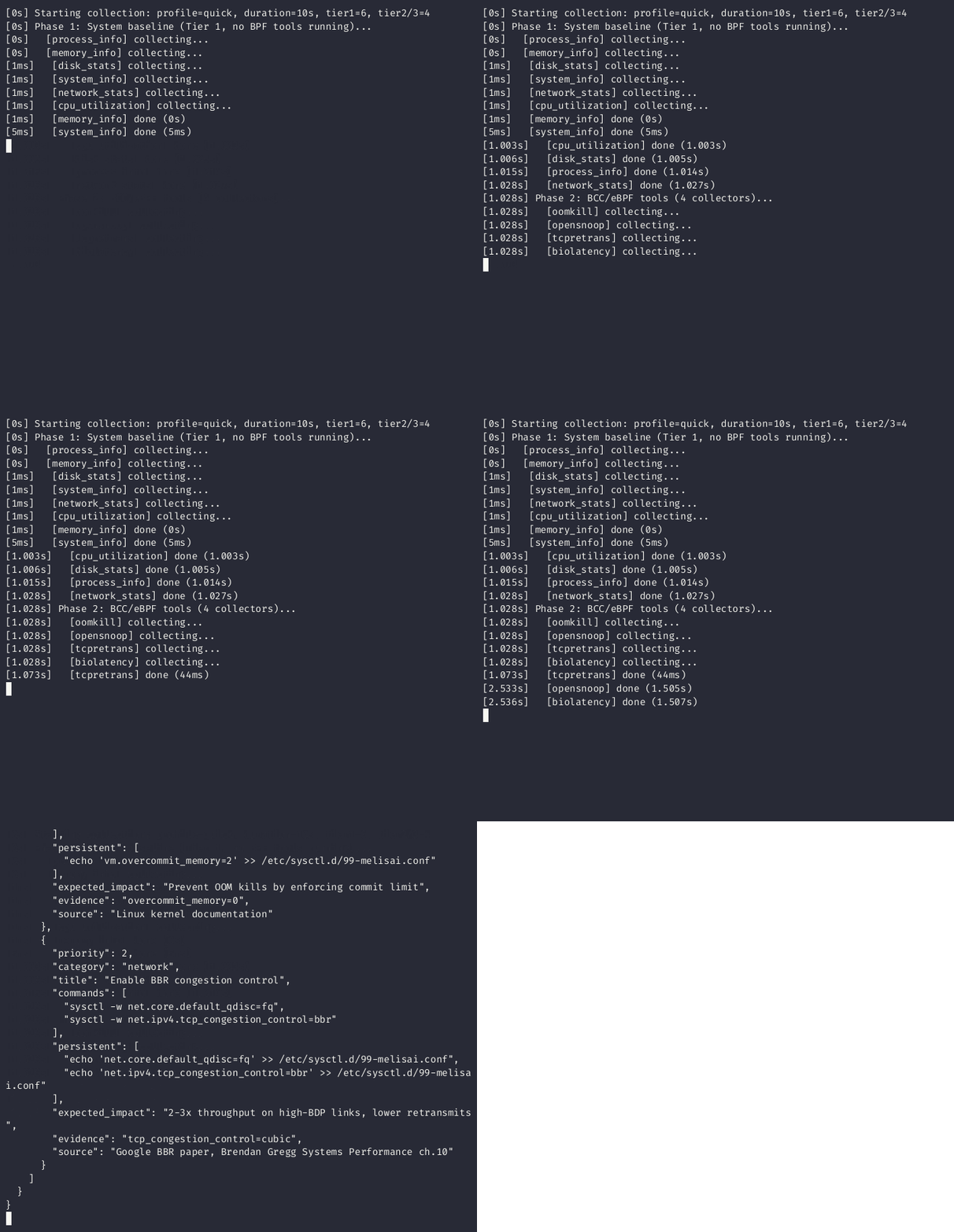
Linux performance diagnostics for AI agents. Single Go binary. Collects 67 BCC/eBPF tools + procfs metrics. Outputs structured JSON with health score, anomalies, and recommendations. Ships with an MCP server for interactive use from Claude Desktop, Cursor, or any MCP-compatible client.



$ sudo melisai collect --profile quick -o report.json

  melisai v0.1.1 | profile=quick | duration=10s

  Tier 1 (procfs)  ████████████████████████████████████████ 7/7   2.1s
  Tier 2 (BCC)     ████████████████████████████████████████ 4/4  10.3s

  Health Score:  68 / 100  ⚠️
  Anomalies:     cpu_utilization CRITICAL (98.7%)
                 load_average WARNING (3.2x CPUs)
  Recommendations: 2

  Report saved to report.json
Why melisai?
Most performance tools give you raw numbers. melisai gives you a diagnosis.
- Runs Brendan Gregg's USE Method automatically
- Flags anomalies with severity (warning/critical) using field-tested thresholds
- Computes a single health score (0-100) so an AI agent can decide what to do next
- Generates a context-aware AI prompt with 27 known anti-patterns
- Works over MCP (Model Context Protocol) so Claude/Cursor can diagnose a server interactively
Quick Start
# 1. Build (requires Go 1.23+, cross-compile from macOS/Linux)
GOOS=linux GOARCH=amd64 CGO_ENABLED=0 go build -o melisai ./cmd/melisai/

# 2. Deploy
scp melisai root@server:/usr/local/bin/

# 3. Install BCC tools on the server (first time only)
ssh root@server "melisai install"

# 4. Run
ssh root@server "melisai collect --profile quick -o /tmp/report.json"
MCP Server
melisai includes a built-in Model Context Protocol server. AI agents connect over stdio and interactively diagnose system performance -- no file juggling required.
melisai mcp # starts stdio JSON-RPC server
Claude Desktop / Cursor config (claude_desktop_config.json):
{
  "mcpServers": {
    "melisai": {
      "command": "ssh",
      "args": ["root@your-server", "/usr/local/bin/melisai", "mcp"]
    }
  }
}
Tools
| Tool | What it does | Time |
|---|---|---|
get_health |
Quick 0-100 score + anomalies. Tier 1 only, no root needed | ~1s |
collect_metrics |
Full profile with all BCC/eBPF tools. Args: profile, focus, pid |
10s-60s |
explain_anomaly |
Root causes + recommendations for a specific anomaly ID | instant |
list_anomalies |
All 29 detectable anomaly metric IDs with descriptions | instant |
Typical workflow
Agent                              melisai
  │                                   │
  ├── get_health ──────────────────►  │  "score: 68, cpu_utilization CRITICAL"
  │                                   │
  ├── explain_anomaly ─────────────►  │  "High CPU: root causes, what to check..."
  │   anomaly_id: cpu_utilization     │
  │                                   │
  ├── collect_metrics ─────────────►  │  Full JSON report with 67 BCC tools,
  │   profile: standard               │  histograms, events, stack traces,
  │   focus: stacks                   │  AI prompt included
  │                                   │
  └── (agent analyzes & recommends)   │
How It Works
melisai collects metrics at three tiers with automatic fallback:
Tier 1: /proc, /sys, ss, ethtool, dmesg  ← always works, no root
        Includes deep network diagnostics: conntrack, softnet,
        IRQ distribution, NIC hardware, TCP extended stats
Tier 2: 67 BCC tools (runqlat, bio...)   ← root + bcc-tools
Tier 3: native eBPF (cilium/ebpf)       ← root + kernel ≥ 5.8 + BTF
Collection runs in two phases to eliminate observer effect:
- Phase 1 -- Tier 1 collectors capture clean baselines (CPU, memory, disk, network)
- Phase 2 -- BCC/eBPF tools run without contaminating the baselines
The report includes:
| Section | Content |
|---|---|
summary.health_score |
Weighted 0-100 score (CPU 1.5x, Memory 1.5x, Disk 1.0x, Network 1.0x) |
summary.anomalies[] |
Detected issues with severity, metric, value, threshold |
summary.resources |
USE metrics per resource (utilization, saturation, errors) |
summary.recommendations[] |
Copy-paste sysctl commands with citations |
categories.* |
Raw data: histograms, events, stack traces per subsystem |
ai_context.prompt |
Dynamic prompt with system context and 27 anti-patterns |
Collection Profiles
| Profile | Duration | What runs | Best for |
|---|---|---|---|
| quick | 10s | Tier 1 + biolatency, tcpretrans, opensnoop, oomkill | Health checks, CI gates |
| standard | 30s | All Tier 1 + all 67 BCC tools | Regular diagnostics |
| deep | 60s | Everything + memleak, biostacks, wakeuptime, biotop | Root cause analysis |
# Quick health check
sudo melisai collect --profile quick -o report.json

# Full analysis
sudo melisai collect --profile standard --ai-prompt -o report.json

# Deep dive focused on disk
sudo melisai collect --profile deep --focus disk -o report.json

# Profile a specific process (24 BCC tools filter to this PID)
sudo melisai collect --profile standard --pid 12345 -o app.json

# Profile a container
sudo melisai collect --profile standard --cgroup /sys/fs/cgroup/system.slice/nginx.service -o nginx.json

# Compare before/after
melisai diff baseline.json current.json -o diff.json
Output Example
See doc/example_report.md for a full production example -- a server scoring 32/100 where a message broker fsync storm on HDD cascades into I/O starvation across all containers.
Abbreviated JSON:
{
  "metadata": {
    "tool": "melisai", "schema_version": "1.0.0",
    "hostname": "prod-web-01", "kernel_version": "6.8.0-90-generic",
    "cpus": 20, "memory_gb": 62, "profile": "standard", "duration": "30s"
  },
  "categories": {
    "cpu": [
      {"collector": "cpu_utilization", "tier": 1, "data": {"user_pct": 12.5, "iowait_pct": 0.3, "idle_pct": 85.2}},
      {"collector": "runqlat", "tier": 2, "histograms": [{"name": "runqlat", "unit": "us", "p50": 4, "p99": 64}]}
    ],
    "disk": [ ... ], "memory": [ ... ], "network": [ ... ],
    "process": [ ... ], "stacktrace": [ ... ], "container": [ ... ]
  },
  "summary": {
    "health_score": 85,
    "anomalies": [{"severity": "warning", "metric": "cpu_psi_pressure", "message": "CPU PSI: 12.5%"}],
    "resources": {"cpu": {"utilization_pct": 14.8, "saturation_pct": 0.4, "errors": 0}},
    "recommendations": [{"title": "Enable BBR", "commands": ["sysctl -w net.ipv4.tcp_congestion_control=bbr"]}]
  },
  "ai_context": {"prompt": "You are a Linux performance engineer. Analyze this report..."}
}
BCC Tools (67)
~84% coverage of Brendan Gregg's BPF observability diagram.
| Subsystem | Tools |
|---|---|
| CPU (10) | runqlat, runqlen, cpudist, hardirqs, softirqs, runqslower, cpufreq, cpuunclaimed, llcstat, funccount |
| Disk (20) | biolatency, biosnoop, biotop, bitesize, ext4slower, ext4dist, fileslower, filelife, mountsnoop, btrfsslower, btrfsdist, xfsslower, xfsdist, nfsslower, nfsdist, zfsslower, zfsdist, mdflush, scsilatency, nvmelatency, vfsstat |
| Memory (7) | cachestat, oomkill, drsnoop, shmsnoop, numamove, memleak, slabratetop |
| Network (14) | tcpconnlat, tcpretrans, tcprtt, tcpdrop, tcpstates, tcpconnect, tcpaccept, tcplife, udpconnect, sofdsnoop, sockstat, skbdrop, tcpsynbl, gethostlatency |
| Process (9) | execsnoop, opensnoop, killsnoop, threadsnoop, syncsnoop, exitsnoop, statsnoop, capable, syscount |
| Stacks (6) | profile, offcputime, wakeuptime, offwaketime, biostacks, stackcount |
24 of these tools support --pid filtering for per-process analysis.
Anomaly Detection
29 threshold rules based on Gregg's recommended values:
| Metric | Warning | Critical | Source |
|---|---|---|---|
| cpu_utilization | 80% | 95% | /proc/stat |
| cpu_iowait | 10% | 30% | /proc/stat |
| load_average | 2x CPUs | 4x CPUs | /proc/loadavg |
| memory_utilization | 85% | 95% | /proc/meminfo |
| swap_usage | 10% | 50% | /proc/meminfo |
| disk_utilization | 70% | 90% | /proc/diskstats |
| disk_avg_latency | 5ms | 50ms | /proc/diskstats |
| tcp_retransmits | 10/s | 50/s | /proc/net/snmp |
| tcp_timewait | 5k | 20k | ss |
| runqlat_p99 | 10ms | 50ms | BCC histogram |
| biolatency_p99_ssd | 5ms | 25ms | BCC histogram |
| biolatency_p99_hdd | 50ms | 200ms | BCC histogram |
| cpu_throttling | 100 | 1000 periods | cgroup cpu.stat |
| conntrack_usage_pct | 70% | 90% | /proc/sys/net/netfilter/ |
| softnet_dropped | 1 | 10 | /proc/net/softnet_stat |
| listen_overflows | 1 | 100 | /proc/net/netstat |
| nic_rx_discards | 100 | 10000 | ethtool -S |
| tcp_close_wait | 1 | 100 | ss |
| softnet_time_squeeze | 1 | 100 | /proc/net/softnet_stat |
| tcp_abort_on_memory | 1 | 10 | /proc/net/netstat |
| irq_imbalance | 5x ratio | 20x ratio | /proc/softirqs |
| udp_rcvbuf_errors | 1 | 100 | /proc/net/snmp |
| ... and 7 more (PSI, cache miss, DNS, container memory, network errors) |
Manual Usage (without AI)
melisai works perfectly as a standalone CLI tool — no AI agent required.
Getting Help
# General help — all commands and capabilities
melisai --help

# Detailed help for collect (profiles, flags, examples)
melisai collect --help

# Help for other commands
melisai diff --help
melisai install --help
melisai mcp --help
melisai capabilities --help
Typical Manual Workflow
# 1. Quick health check — see if something is obviously wrong
sudo melisai collect --profile quick -o quick.json

# 2. Read the summary
cat quick.json | python3 -m json.tool | head -30
# or use jq:
jq '.summary' quick.json

# 3. Check health score and anomalies
jq '.summary.health_score' quick.json                     # 0-100
jq '.summary.anomalies[]' quick.json                      # what's wrong
jq '.summary.recommendations[].title' quick.json          # what to fix

# 4. Deep dive into network
sudo melisai collect --profile standard --focus network -o net.json
jq '.categories.network[0].data.conntrack' net.json       # conntrack usage
jq '.categories.network[0].data.softnet_stats' net.json   # per-CPU drops
jq '.categories.network[0].data.listen_overflows' net.json # accept queue

# 5. Profile a specific process
sudo melisai collect --profile standard --pid $(pgrep nginx) -o nginx.json

# 6. Compare before/after a change
sudo melisai collect --profile quick -o before.json
# ... apply your fix ...
sudo melisai collect --profile quick -o after.json
melisai diff before.json after.json                        # human-readable
melisai diff before.json after.json -o diff.json           # JSON diff

# 7. Check what tools are available
melisai capabilities
Interpreting the Report
The JSON report has four main sections:
| Section | How to read it |
|---|---|
summary.health_score |
90-100 = healthy, 70-89 = some issues, <70 = needs attention |
summary.anomalies |
Each has severity (warning/critical), metric, message |
summary.recommendations |
Copy-paste the commands field to fix issues |
categories.network[0].data |
Raw metrics in sub-structs: .sysctls, .tcp_ext, .softnet, .udp, .socket_mem |
Network Deep Diagnostics — Manual Inspection
# Conntrack table usage
jq '.categories.network[0].data.conntrack' report.json

# Softnet drops (per-CPU) — any "dropped" > 0 is bad
jq '.categories.network[0].data.softnet.stats[] | select(.dropped > 0)' report.json

# Listen overflows (accept queue full) — rate-based
jq '.categories.network[0].data.tcp_ext | {listen_overflows, listen_drops, listen_overflow_rate}' report.json

# NIC ring buffer (is it maxed out?)
jq '.categories.network[0].data.interfaces[] | {name, driver, ring_rx_current, ring_rx_max, rx_discards}' report.json

# IRQ imbalance (check if one CPU handles all network interrupts)
jq '.categories.network[0].data.softnet.irq_distribution' report.json

# TCP memory pressure
jq '.categories.network[0].data.tcp_ext | {prune_called, tcp_abort_on_memory}' report.json

# All sysctls at a glance
jq '.categories.network[0].data.sysctls' report.json

# Socket memory and orphan sockets
jq '.categories.network[0].data.socket_mem' report.json
Useful jq One-Liners
# All critical anomalies
jq '.summary.anomalies[] | select(.severity == "critical")' report.json

# All recommendations with commands
jq '.summary.recommendations[] | {title, commands}' report.json

# USE metrics for all resources
jq '.summary.resources' report.json

# Top CPU-consuming processes
jq '.categories.process[0].data.top_by_cpu[:5]' report.json

# BCC histogram percentiles
jq '.categories.cpu[].histograms[]? | {name, p50, p99, max}' report.json
Architecture
cmd/melisai/           CLI (cobra) + MCP subcommand
internal/
  ├── collector/       7 Tier 1 collectors + BCC adapter
  ├── executor/        BCC runner, security, 67 parsers, registry
  ├── ebpf/            Native eBPF loader (cilium/ebpf, CO-RE)
  ├── mcp/             MCP server (4 tools, stdio JSON-RPC)
  ├── model/           Types, USE metrics, anomalies, health score
  ├── observer/        PID tracker, overhead measurement
  ├── orchestrator/    Two-phase execution, signal handling, profiles
  ├── output/          JSON, FlameGraph SVG, AI prompt generator
  ├── diff/            Report comparison engine
  └── installer/       Distro detection, package installation
Security: all BCC binaries are verified (root-owned, not world-writable, in allowed paths). No shell execution. Environment sanitized. Output capped at 50MB per tool.
Requirements
| Minimum | Notes | |
|---|---|---|
| Build | Go 1.23+ | Cross-compile: GOOS=linux GOARCH=amd64 |
| Tier 1 | Any Linux kernel | No root needed |
| Tier 2 | bcc-tools installed | sudo melisai install handles this |
| Tier 3 | Kernel ≥ 5.8 with BTF | Falls back to Tier 2 automatically |
Tested distros
| Distro | Verified |
|---|---|
| Ubuntu 24.04 | Full validation (20 CPUs, 62 GiB, 8 workload tests) |
| Ubuntu 22.04 | Docker integration test |
| Debian 12 | Docker integration test |
| Fedora 39 | Docker integration test |
| CentOS Stream 9 | Docker integration test |
Development
# Run all 258 tests
go test ./... -v

# With race detector
go test ./... -race

# Lint
make lint

# Cross-compile
make build    # or: GOOS=linux GOARCH=amd64 CGO_ENABLED=0 go build -o melisai ./cmd/melisai/

# Validation tests (Linux + root + stress-ng)
make test-validation
Troubleshooting
| Problem | Cause | Fix |
|---|---|---|
tool "X" not found in allowed paths |
BCC tool not installed | sudo melisai install |
binary "X" is not owned by root |
Permissions | chown root:root /usr/sbin/X-bpfcc |
| Empty histogram data | No events during collection window | Normal -- not an error |
exit status 1 from BCC tool |
Missing kernel support | Check dmesg for BPF errors |
License
Reviews (0)
Sign in to leave a review.
Leave a reviewNo results found