akb
Health Warn
- License — License: NOASSERTION
- Description — Repository has a description
- Active repo — Last push 0 days ago
- Low visibility — Only 7 GitHub stars
Code Pass
- Code scan — Scanned 12 files during light audit, no dangerous patterns found
Permissions Pass
- Permissions — No dangerous permissions requested
No AI report is available for this listing yet.
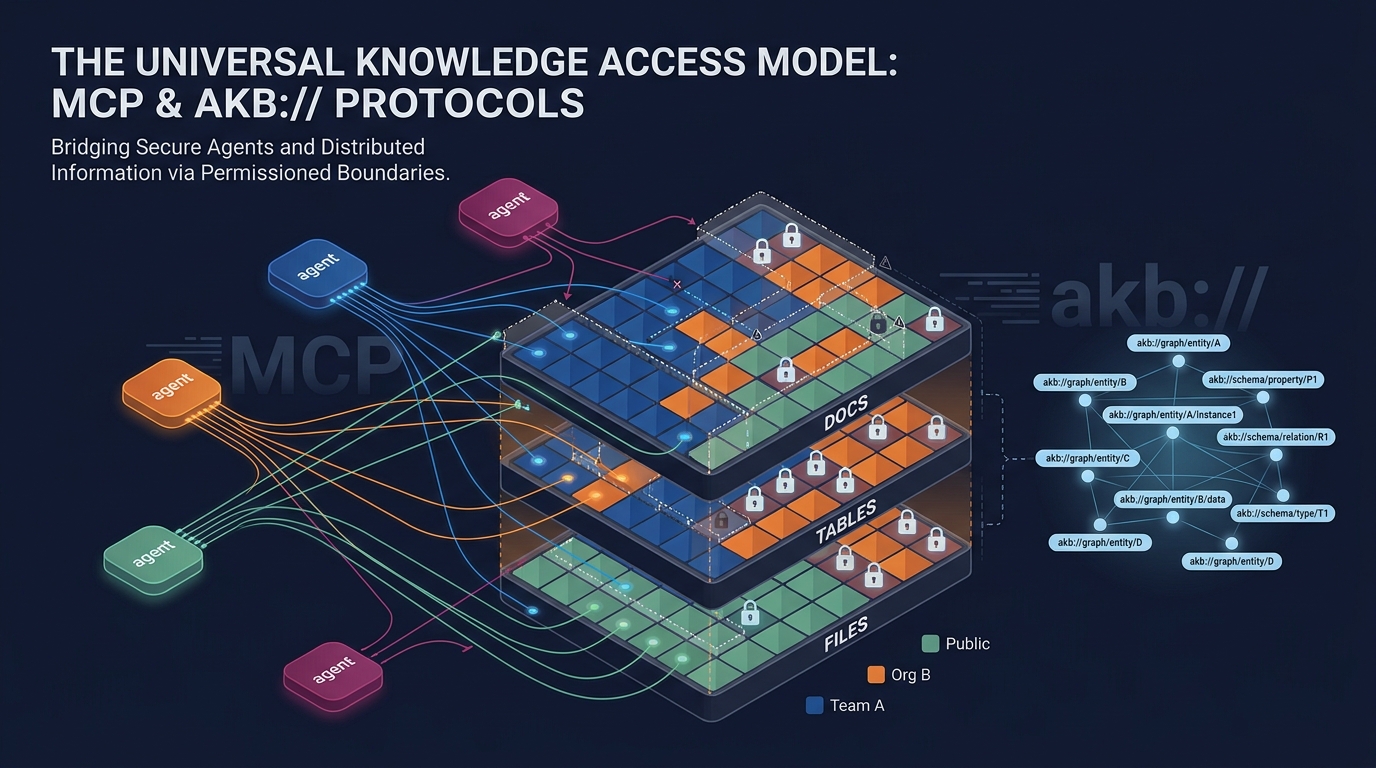
AKB — Agent Knowledgebase. Organizational memory for AI agents: vault-scoped docs / tables / files unified by URI graph, served over MCP.
AKB — Agent Knowledgebase
Organizational memory for AI agents. A Git-backed knowledge base where agents
store and retrieve knowledge directly — replacing SaaS tools like Confluence
or Notion for agent-driven workflows.

Why AKB
Most knowledge tools are built for humans clicking through a UI. Agents need a
different shape: structured documents, semantic + keyword search in one call,
explicit relations, and full version history. AKB gives agents a single set of
tools (akb_put, akb_search, akb_browse, akb_relations, …) over a
backing store of Git bare repos and a PostgreSQL hybrid index.
Architecture
┌──────────────────────────────────────────────────────────┐
│                  Access Layer                            │
│   MCP Server  │  REST API  │  Web UI                     │
├──────────────────────────────────────────────────────────┤
│                  Core Services                           │
│   Document (Put/Get)  │  Search (Hybrid: dense+BM25)     │
│   Relations (graph)   │  Session  │  Publications        │
├──────────────────────────────────────────────────────────┤
│                  Storage Layer                           │
│   Git bare repos       │  PostgreSQL 16 (text + meta SoT)│
│                        │  Vector store (driver):         │
│                        │    pgvector  (default, same PG) │
│                        │    qdrant    (optional)         │
│                        │    seahorse  (managed, optional)│
└──────────────────────────────────────────────────────────┘
PostgreSQL is the source of truth — chunk text + metadata + BM25 vocab.
The vector store is a driver-pluggable derived index holding dense
embeddings and corpus-side sparse vectors. Full vector-store loss is
recoverable from PG by setting chunks.vector_indexed_at = NULL and
letting the indexing worker re-populate.
Key Concepts
- Vault — A Git bare repo. The unit of access control and physical isolation.
- Collection — A directory inside a vault. Topical grouping of documents.
- Document — Markdown + YAML frontmatter, optimised for agent read/write.
- Hybrid Search — Dense (semantic) + BM25 (lexical) fused via RRF in one call.
- Relations —
depends_on,related_to,implementsin frontmatter form an explicit knowledge graph.
MCP Tools (selection)
| Tool | Description |
|---|---|
akb_list_vaults / akb_create_vault |
Vault management |
akb_put / akb_get / akb_update / akb_delete |
Document CRUD (Git commit + indexing) |
akb_put_file / akb_get_file / akb_delete_file |
File attachments — proxy-side (requires local filesystem) |
akb_create_table / akb_alter_table / akb_drop_table / akb_sql |
Tabular content — per-doc tables + SQL |
akb_browse |
Tree traversal (collection → docs) |
akb_search / akb_grep |
Hybrid search (dense + BM25) / literal grep |
akb_drill_down |
Section-level retrieval |
akb_relations / akb_link / akb_unlink / akb_graph |
Knowledge graph |
akb_edit / akb_diff / akb_history |
In-place edit, diff, Git history |
akb_grant / akb_revoke / akb_set_public |
Permission boundaries — per-user, per-org, public |
akb_remember / akb_recall / akb_forget |
Agent memory |
akb_session_start / akb_session_end |
Session lifecycle |
akb_publish / akb_unpublish |
Public publication |
The full tool catalogue is exposed via akb_help() from any MCP client.
Document Format
Documents are addressed by URI — akb://{vault}/{path} is the canonical
handle used by every tool and stored in relations.
---
title: "Payment API v2 migration plan"
type: plan              # note | report | decision | spec | plan | session | task | reference
status: active          # draft | active | archived | superseded
tags: [payments, api]
domain: engineering
summary: "REST → gRPC transition plan."
depends_on: ["akb://eng/specs/payment-api-v2"]
related_to: ["akb://eng/meetings/2026-05-01-payments"]
---

# Payment API v2 migration plan
...
Quick Start
AKB ships as a 3-container stack (PostgreSQL with pgvector + backend +
frontend). You bring an OpenAI-compatible embedding endpoint (OpenAI,
OpenRouter, self-hosted vLLM/TEI, etc.) — that's the only required external
dependency for core CRUD and search. Prefer running a separate Qdrant
cluster, or pointing at a managed Seahorse Cloud table? See Vector store
below.
# 1. Configure
cp config/app.yaml.example   config/app.yaml
cp config/secret.yaml.example config/secret.yaml
$EDITOR config/secret.yaml   # set embed_api_key (and jwt_secret for any non-local deploy)

# 2. Run
docker compose up -d

# 3. Open
open http://localhost:3000
config/app.yaml and config/secret.yaml are the single source of runtime
configuration — no environment variables are read by the backend. Mount theconfig/ directory at /etc/akb/ in any deployment.
Vector store (driver-pluggable)
Hybrid search (dense + BM25 sparse, RRF-fused) runs through a driver
interface. Three drivers ship; pick at config time:
pgvector(default) — uses the same Postgres container that holds
application data. The pgvector/pgvector image pre-installs the
extension; the driver creates a separatevector_indexschema, so the
mainchunkstable stays plain PostgreSQL. RRF fusion runs
application-side. No external service to operate.qdrant— runs a separate Qdrant container; native RRF via the
Query API. Useful when you already operate Qdrant or want to scale
the vector store independently of Postgres.seahorse— points at a managed Seahorse Cloud table over
its TABLE_V2 + BFF API (Bearer auth, per-table host). No
infrastructure to run on your side; you provision a table in the
Seahorse console (or let the driver auto-create one) and AKB stores
its chunks there. Native RRF, server-side BM25. Seedocs/vector-store-seahorse.md
for the end-to-end setup walkthrough (sign-up → token → schema →
config).
Switching drivers is a config edit (no schema migration on the main DB):
# Default flow targets pgvector.
docker compose up

# Qdrant:
docker compose -f docker-compose.yaml -f docker-compose.qdrant.yaml up
$EDITOR config/app.yaml     # vector_store_driver: qdrant
                            # vector_url: http://qdrant:6333

# Seahorse Cloud (managed; full guide in docs/vector-store-seahorse.md):
docker compose up           # no extra container needed
$EDITOR config/app.yaml     # vector_store_driver: seahorse
                            # seahorse_tenant_uuid: <your tenant>
                            # seahorse_table_name: <your table>
$EDITOR config/secret.yaml  # seahorse_token: shsk_<...>
Embedding model + dimensions are also fully pluggable viaembed_base_url / embed_model / embed_dimensions — the codebase has
no hard-coded model. For pgvector with HNSW, keep embed_dimensions ≤ 2000
(or 4000 with halfvec); larger models fall back to exact scan.
Qdrant/Seahorse have no such limit (Qdrant up to 65536, Seahorse up to
its table-defined dim).
LLM features (optional)
LLM is only used by the metadata_worker to auto-tag documents imported via
external git mirroring. Core CRUD/search works without it. To enable, setllm_base_url / llm_model in app.yaml and llm_api_key in secret.yaml.
Event fanout (optional)
The PG events outbox is always written. Set redis_url in app.yaml to
have the events_publisher worker drain the outbox to a Redis Stream
(akb:events) so external services can subscribe via XREAD / consumer
groups. Leave blank to disable; events still accumulate in PG and you can
build an SSE endpoint on top of the LISTEN/NOTIFY trigger without Redis.
Production deployment
For Kubernetes, see deploy/k8s/README.md. Thedeploy/k8s/ directory contains a generic kustomize base; provide your
own registry, hostname, and TLS issuer via the documented env vars or an
operator-private overlay under deploy/k8s/internal/.
Project Structure
akb/
├── backend/                  # Python 3.11 / FastAPI / asyncpg / GitPython
│   ├── app/
│   │   ├── api/routes/       # REST endpoints
│   │   ├── services/         # Business logic + workers
│   │   └── db/               # PostgreSQL schema + migrations
│   ├── mcp_server/           # Streamable HTTP MCP server
│   └── tests/                # E2E shell tests
├── frontend/                 # React 19 + TypeScript + Vite + Tailwind
├── packages/
│   └── akb-mcp-client/       # stdio ↔ HTTP MCP proxy (npm: akb-mcp)
├── agents/                   # Reference Python agent runtime (think/act loop over MCP)
├── templates/                # Doc templates (ADR, PRD, runbook, …) and vault profiles
├── design-system/            # Frontend design system docs
├── config/
│   ├── app.yaml.example      # Non-secret runtime settings
│   └── secret.yaml.example   # API keys, passwords (gitignored when not .example)
├── deploy/
│   └── k8s/                  # Generic kustomize base for Kubernetes
└── docker-compose.yaml       # 3-container local stack (postgres + backend + frontend)
Tech Stack
- Backend: Python 3.11, FastAPI, Uvicorn, asyncpg, GitPython, MCP SDK
- Database: PostgreSQL 16 (main DB needs no extension; the same
pgvector/pgvector image hosts the optional vector_index schema) - Vector store: driver-pluggable (pgvector default; Qdrant or
Seahorse Cloud optional — hybrid dense + BM25 sparse, RRF fusion) - Event stream (optional): PG
eventsoutbox + Redis Streams fanout - Frontend: React 19, TypeScript, Vite, Tailwind CSS v4, Radix UI
- Auth: JWT + Personal Access Tokens (PATs)
- MCP: Streamable HTTP (backend) + stdio proxy (
akb-mcpon npm)
Versioning
AKB follows SemVer. The product version lives inbackend/pyproject.toml ([project].version) and is mirrored tofrontend/package.json via scripts/bump-version.sh <x.y.z>. Eachdeploy/k8s/deploy.sh run tags the Docker images with both the explicit
version (:${VERSION}) and :latest, so historical builds remain
pullable for rollback.
packages/akb-mcp-client (the akb-mcp npm proxy) follows its own npm
semver lifecycle and is not tied to the product version.
License
PolyForm Noncommercial 1.0 — free for noncommercial use,
modification, and distribution. Attribution required.
For commercial licensing, contact [email protected].
Security
Found a vulnerability? See SECURITY.md — please report
privately, not via public issues.
Contributing
See CONTRIBUTING.md.
Reviews (0)
Sign in to leave a review.
Leave a reviewNo results found