CapRust
Health Warn
- License — License: MIT
- Description — Repository has a description
- Active repo — Last push 0 days ago
- Low visibility — Only 5 GitHub stars
Code Pass
- Code scan — Scanned 12 files during light audit, no dangerous patterns found
Permissions Pass
- Permissions — No dangerous permissions requested
No AI report is available for this listing yet.
Native Windows video editor for short-form creators. Built in Rust with egui + ffmpeg. AI captions, auto-reframe, all on-device.

CapRust
Social-first video editor in Rust. Native Windows .exe, built for short-form creators.


-purple.svg)


Not another Electron wrapper. Native binary, starts in under 500 ms. No cloud, no telemetry, MIT licensed.
I started building it in my free time with AI assistance while playing with AI-generated videos (Minimax H3) — I wanted an editor that's fully customizable and works my way. If you like it, enjoy and use it. :)
📖 Full documentation: full_readme.md with every feature, architecture, status table, testing and contributing.
Install
Windows 10 / 11, 64-bit. Grab the latest installer from the
Releases page:
- Run
CapRust-0.9.15-win64-setup.exe. - The wizard installs per-user by default (no UAC prompt). Pick
"Install for all users" if you prefer Program Files. - Launch CapRust from the Start Menu.
On first run CapRust offers to download a static FFmpeg build
(~110 MB) if neither ffmpeg nor ffprobe is on your PATH.
AI models (Whisper, Piper, ONNX) download on demand from
Settings → AI Models.
What is CapRust?
A modern video editor focused on short-form social content (9:16, Reels, Shorts, TikTok). Rust + egui UI, ffmpeg under the hood, local AI (Whisper captions, Piper narration, face detection, background removal). Preview and export share the same filtergraph, so what you see is what renders.
Highlights
- 🆓 No watermarks. No payments. MIT licensed, no telemetry, no account.
- 📴 Local-first, works offline. AI runs on your machine, cloud sync is just a folder.
- 🗨️ Auto-captions. Local Whisper (tiny→medium), styled + progressive-reveal captions, SRT export.
- 🎙️ Text-to-speech. Free local Piper voices, straight onto the timeline.
- 🪄 Background removal. One click per clip, cached masks, preview = export.
- 🎬 49 transitions, 32 effects, blend modes, film LUTs. Live preview, same graph renders export.
- ⚡ Cut fast. Split, trim, ripple, freeze frame, 0.1x–10x speed ramps, magnetic timeline, auto-cut to beats.
- 🎛️ Multi-track audio. Volume keyframes, auto-ducking, beat detection, one-switch cleanup (denoise/boost/normalize) + voice FX.
- 🎨 Fully customizable UI. Window colors, accents, UI + font size, fonts, layouts, clip borders, waveform and overlap colors, plus dark/light/custom themes.
- ✍️ Titles. 15 text styles, stroke, shadow, boxes, captions translation.
- 🚀 Export. H.264, HEVC, AV1 (CPU or hardware: NVENC/AMF). Up to 4K 60.
- 🦀 Native Rust engine. Sub-500 ms startup, ffmpeg subprocess (never linked), full undo/redo.
- 🧠 Scriptable. MCP server (JSON-RPC over stdio), so AI agents can drive the editor.
- 💻 Windows + Linux. 5 UI languages. EN, HR, ES, IT, DE with runtime switching, no restart.
Screenshots
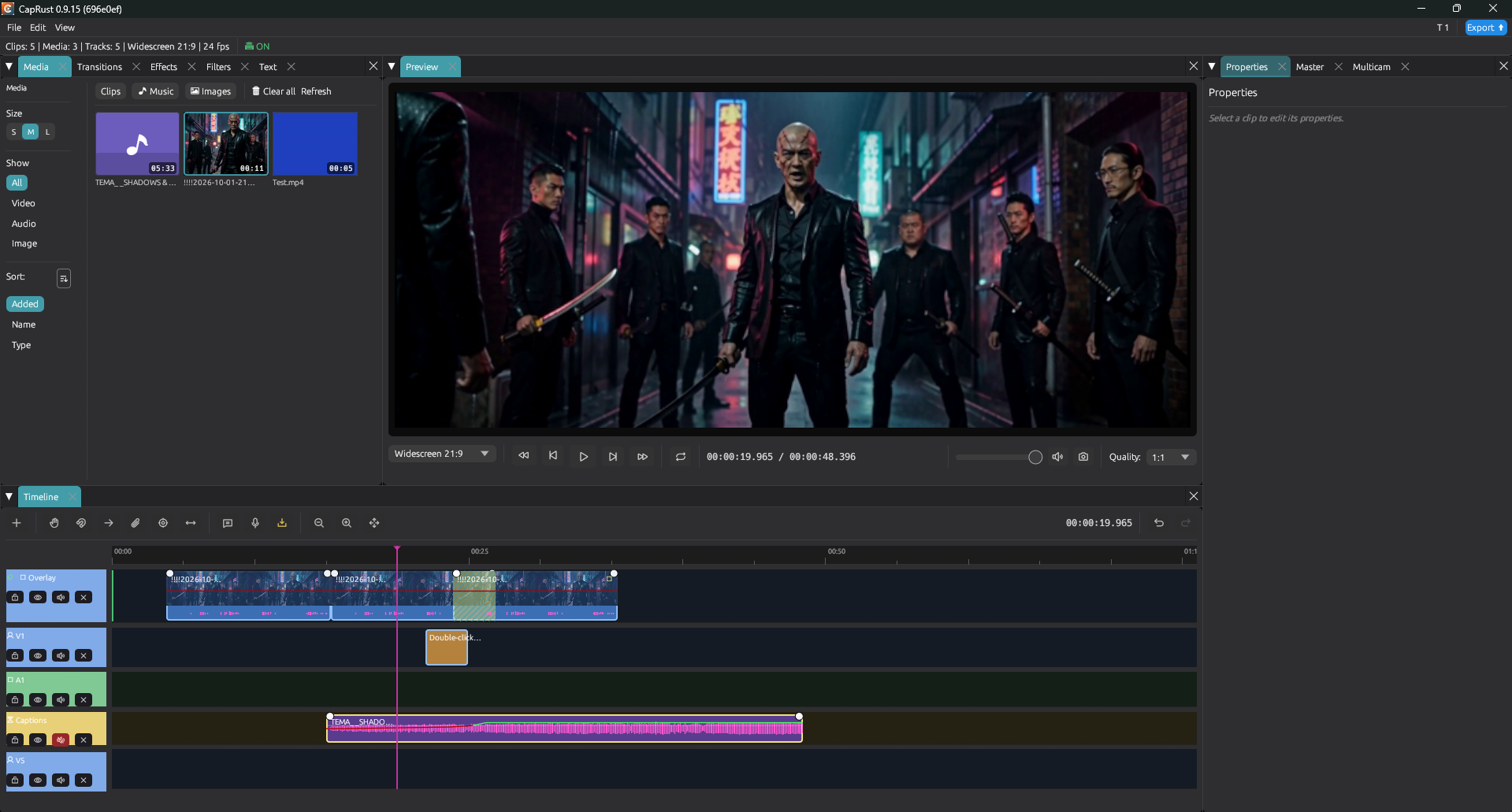
Editor: media bin, preview, magnetic timeline, clip properties.


Features
- Magnetic multi-track timeline: V1/V2, audio, text, overlay, captions; snap, ripple, trim, split, auto-cut to beats
- 45+ transitions, 30+ effects, 16 filters, 15 text styles, plus blend modes and per-clip color LUTs (
.cubeupload) - Local AI: Whisper captions + SRT, Piper narration, auto-reframe, background removal
- Pro audio: volume automation, auto-ducking, beat detection, fade handles, CLAP plugins
- Chroma key, multicam with audio sync, screen recording, hardware encode (NVENC/AMF)
- Fully customizable UI (window colors, accents, UI + font size, fonts, layouts, clip borders, waveform and overlap colors)
[!NOTE]
🌍 Want CapRust in your language? See TRANSLATING.md: copyen.ftl, translate the values, open a PR. Untranslated keys render as raw keys, so even partial translations help.
Quick Start
Build from source
Prerequisites: Rust 1.91+, FFmpeg 5.1+ in PATH, Visual Studio Build Tools (Windows) / GTK+X11+ALSA (Linux).
git clone https://github.com/Domica/CapRust
cd CapRust
cargo build --release -p caprust-app --no-default-features
./target/release/caprust-app
FFmpeg is called as a subprocess, never linked. See full_readme.md for architecture, testing (cargo nextest), and contributing (read DIRECTIVES.md first).
Version History
See CHANGELOG.md for full per-release notes.
| Version | Date | Highlights |
|---|---|---|
| 0.9.15 | 2026-10-11 | Timeline templates (bundled + save/import/apply), theme save/load files, export 32K command-line fix, preview A/V restart on seek. |
| 0.9.14 | 2026-10-10 | Spanish, Italian, German UI; slim README + full_readme; landing screenshot carousel; LUT + CLAP folder pickers in Settings; models rescan fix. |
| 0.9.13 | 2026-10-09 | Text effects, blend modes, clip rename, refresh imports, split display, border options. |
| 0.9.12 | 2026-10-09 | Save Frame fix, 27 transitions, 10 effects, LUT pipeline, beat snap + auto-cut. |
| 0.9.11 | 2026-10-08 | Three-color waveform, media bin sidebar, 8 text styles, waveform pickers. |
License
MIT - see LICENSE. Icons: Phosphor. ONNX: tract. Face: YuNet. BG removal: u2netp. CLAP: clack-host.
Made with Rust + AI assistance.
Reviews (0)
Sign in to leave a review.
Leave a reviewNo results found