claude-statusline
Health Warn
- License — License: MIT
- Description — Repository has a description
- Active repo — Last push 0 days ago
- Low visibility — Only 5 GitHub stars
Code Fail
- rm -rf — Recursive force deletion command in test/run.sh
Permissions Pass
- Permissions — No dangerous permissions requested
No AI report is available for this listing yet.
A compact, zero-config status line for Claude Code: model, Headroom/proxy health, git, cost, context, and 5h/7d usage coloured by projected use.
claude-statusline
A compact status line for Claude Code: one bash script, no configuration.
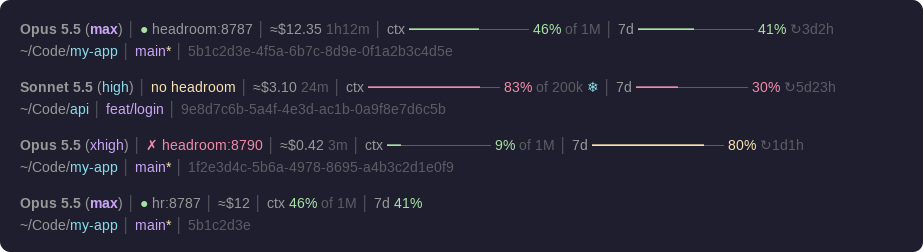
What it shows
Two lines: the state of the session, then where it runs.
| Segment | Meaning |
|---|---|
Opus 5.5 (max) |
Model and effort level. ⚡fast when fast mode is on. |
● headroom:8787 |
The session's API calls go through a local proxy on that port. Green ●: Headroom is ready. Yellow !: Headroom is running but not ready, because it is starting up or one of its checks fails, such as reaching the API. Red ✗: nothing answers, so the calls will fail. Dim proxy:PORT: a local proxy that is not Headroom. Yellow no headroom: Headroom is installed but this session bypasses it. Hidden if you use neither. |
≈$12.35 1h12m |
Estimated session cost at API list prices, and session time. |
ctx 46% of 1M |
Context window used, and the size of that window for the model in use (200k, 1M). Green below 60%, yellow up to 79%, red from 80%. |
❄ |
The prompt cache has expired: your next message re-sends the whole context at full price. |
7d 41% ↻3d2h |
Subscription usage over 7 days, and the time left until it resets. A 5h window is shown the same way when Claude Code sends one. |
━━━━━───── |
A bar next to each percentage, in the same colour, when the terminal is wide enough. |
~/Code/my-app |
The folder Claude Code is working in, with ~ for your home folder. |
main* |
Git branch. * means uncommitted changes. |
5b1c2d3e-4f5a-… |
Session id. Pass it to claude --resume to reopen the session. |
The colour of a usage window looks ahead: it shows where you will be at the end of the window if you keep the current pace. Green below 85%, yellow up to 99%, red when you would run out before the reset. So 41% with six days still to go is red, while 41% with one day left is green.
On a narrow terminal each line shrinks step by step. On the first, the bars get shorter, from 10 cells down to 4, and then disappear. After that it loses the cents (and headroom becomes hr), then the session time, then the reset countdowns, then the context size. The second cuts the session id to its first 8 characters, then shortens the path from the left (…/Code/my-app).
Install
You need Claude Code, bash 3.2 or later and jq. git and curl are optional. Works on macOS and Linux.
git clone https://github.com/domvsca/claude-statusline.git
cd claude-statusline
./install.sh
The installer links statusline.sh into ~/.claude/ and sets statusLine in ~/.claude/settings.json. Everything else in that file stays as it is, and the old file is kept as a backup. To update later, run git pull in the folder.
./install.sh --copycopies the script instead of linking it, so you can delete the folder.CLAUDE_CONFIG_DIRis honoured../uninstall.shremoves it again.
To install by hand, copy statusline.sh to ~/.claude/ and add this to ~/.claude/settings.json:
"statusLine": { "type": "command", "command": "bash ~/.claude/statusline.sh" }
Tips
- Countdowns and session time change when Claude Code refreshes the status line, which happens after each message. To keep them ticking while you are idle, add
"refreshInterval": 60to thestatusLineblock. - A refresh takes about 10 ms, and about 50 ms when it has to ask git and the proxy again: one jq call, git status cached for 5 seconds per folder, the proxy checked at most every 15 seconds. That check waits half a second at most.
- Claude Code draws the status line in grey, and the colours come from your terminal's palette, so the line follows a light or a dark theme.
Development
bash test/run.sh
The tests feed sample payloads to the script in a clean environment. CI runs them on macOS and Linux.
License
Reviews (0)
Sign in to leave a review.
Leave a reviewNo results found