Intent
Health Pass
- License — License: MIT
- Description — Repository has a description
- Active repo — Last push 0 days ago
- Community trust — 14 GitHub stars
Code Pass
- Code scan — Scanned 12 files during light audit, no dangerous patterns found
Permissions Pass
- Permissions — No dangerous permissions requested
No AI report is available for this listing yet.
Semantic history for agent-driven development: preserve goals, snapshots, and decisions above Git.
Intent
中文 | English


Your coding agent forgets where you left off. Intent keeps the goal, the latest verified checkpoint and the standing decisions in your project, so the next session continues the work instead of rediscovering it.
Git records how code changed. Intent records why, what is verified, and what comes next.
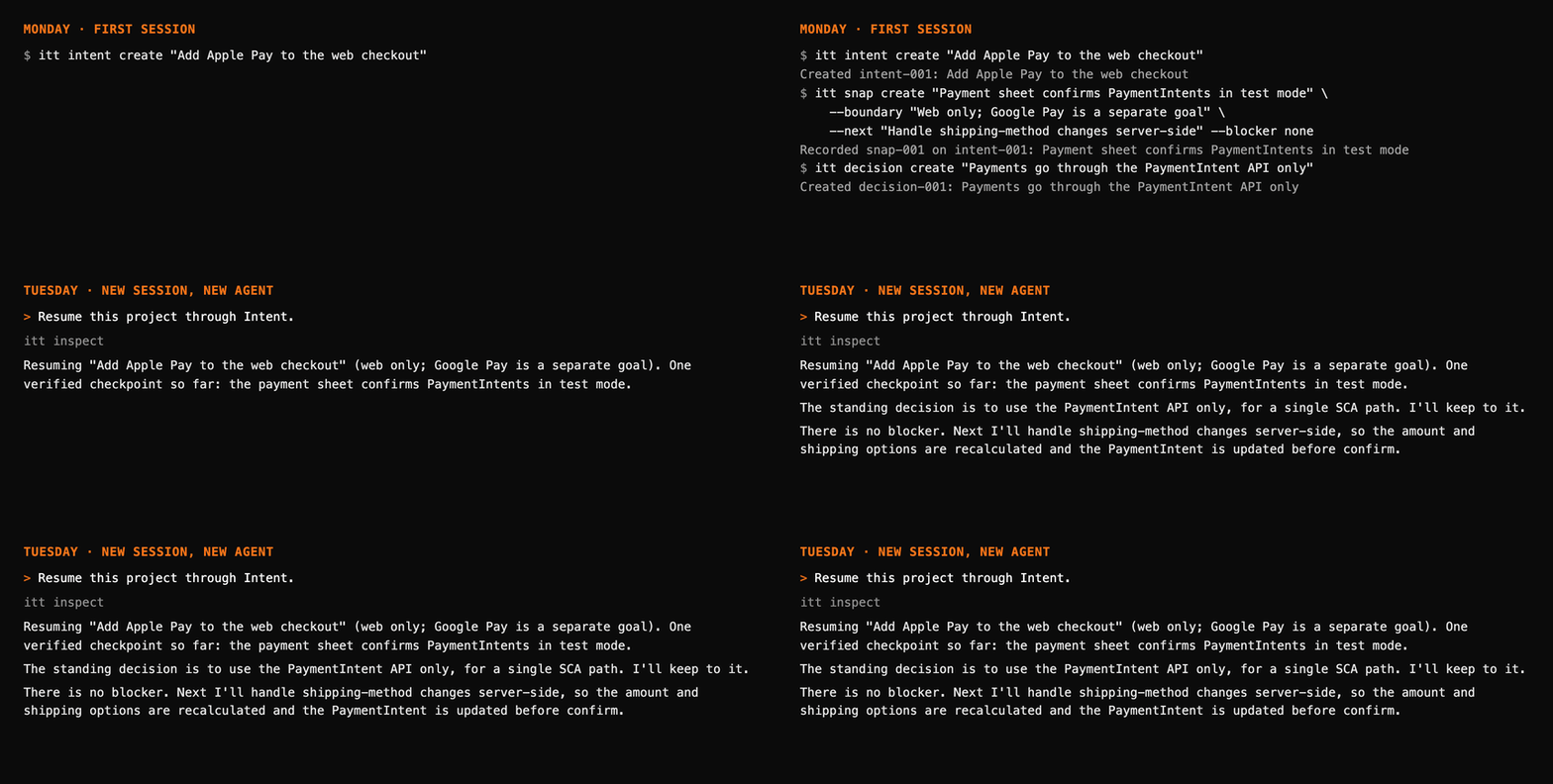
See it on a real project: browse Intent's own history on IntHub. It holds the goals, checkpoints and decisions behind this repository, and it needs no sign-in.
The idea
You now shape code through agents. The code lands in Git, but the reasoning stays in a chat that ends with the session, so the next agent starts blind and you explain everything again.
Intent adds a small layer of semantic history next to your code, built around one deliberate imbalance:
- Recording stays light. The agent saves a checkpoint only when something meaningful is verified. A quiet turn writes nothing.
- Resuming is complete. One command gives the next session the goal, what is verified, the boundary, the next step and the rules that still apply.
The history is plain JSON in .intent/, so any agent can read it, and so can you. Nothing leaves your machine unless you choose to share it.
Quick start
# 1. Install the CLI (macOS / Linux). Re-run any time to upgrade.
curl -fsSL https://raw.githubusercontent.com/dozybot001/Intent/main/scripts/install.sh | bash

# 2. Add the agent skill (needs Node.js; -a cursor and others also work)
npx skills add dozybot001/Intent -g -a claude-code -a codex -y

# 3. Turn it on in a project (Git is optional)
cd your-project
itt init
Trust the project hooks once: in Claude Code, trust the folder and confirm both hooks in /hooks; in Codex, open /hooks. Then work as usual. To pick up later, in any session, say:
Resume this project through Intent.
Windows (PowerShell): irm https://raw.githubusercontent.com/dozybot001/Intent/main/scripts/install.ps1 | iex.
With pipx or uv: pipx install "intent-history @ git+https://github.com/dozybot001/[email protected]" (or uv tool install …). Requires Python 3.9+ and Git.
The names, in one line: Intent is the project, itt is the command, intent-history is the package, and IntHub is the optional web app.
Try it by hand
itt init
itt intent create "Add Apple Pay to the web checkout" --why "Apple Pay users convert 2x on mobile Safari"
itt snap create "Payment sheet confirms PaymentIntents in test mode" \
  --next "Handle shipping-method changes server-side" --blocker none
itt decision create "Payments go through the PaymentIntent API only" --why "One SCA path"
itt inspect
Active
  intent-001  Add Apple Pay to the web checkout
              Next         Handle shipping-method changes server-side
              Blocker      none
              Verified     Payment sheet confirms PaymentIntents in test mode
              snap-001 · 2026-10-30 00:25 · 1 snap

Decisions
  decision-001  Payments go through the PaymentIntent API only
This is what a new session reads. itt log lists checkpoints like git log, and itt show ID shows one object with its relations. In a terminal itt prints text; agents and scripts get JSON.
Why not just AGENTS.md or agent memory?
| You may already use | It holds | Intent adds |
|---|---|---|
AGENTS.md, CLAUDE.md, Cursor rules |
How to work in this repository | Where the work stands: current goal, verified state, next step, blocker |
| Built-in agent memory | Per-tool, opaque notes | Plain JSON in your project that any agent (and you) can read |
| Issues, PRs, ADRs | Team plans and reviews | Checkpoints captured during the work, plus decisions that attach to new goals automatically |
| Git history | What changed in the code | The reasoning, and the boundary of what is actually done |
What it records
Three kinds of objects, all append-only:
| Object | Captures |
|---|---|
| Intent | One goal and why it matters |
| Snap | A verified checkpoint: what is verified, the boundary, the next step, any blocker |
| Decision | A durable rule that binds future goals, such as "payments go through PaymentIntents only" |
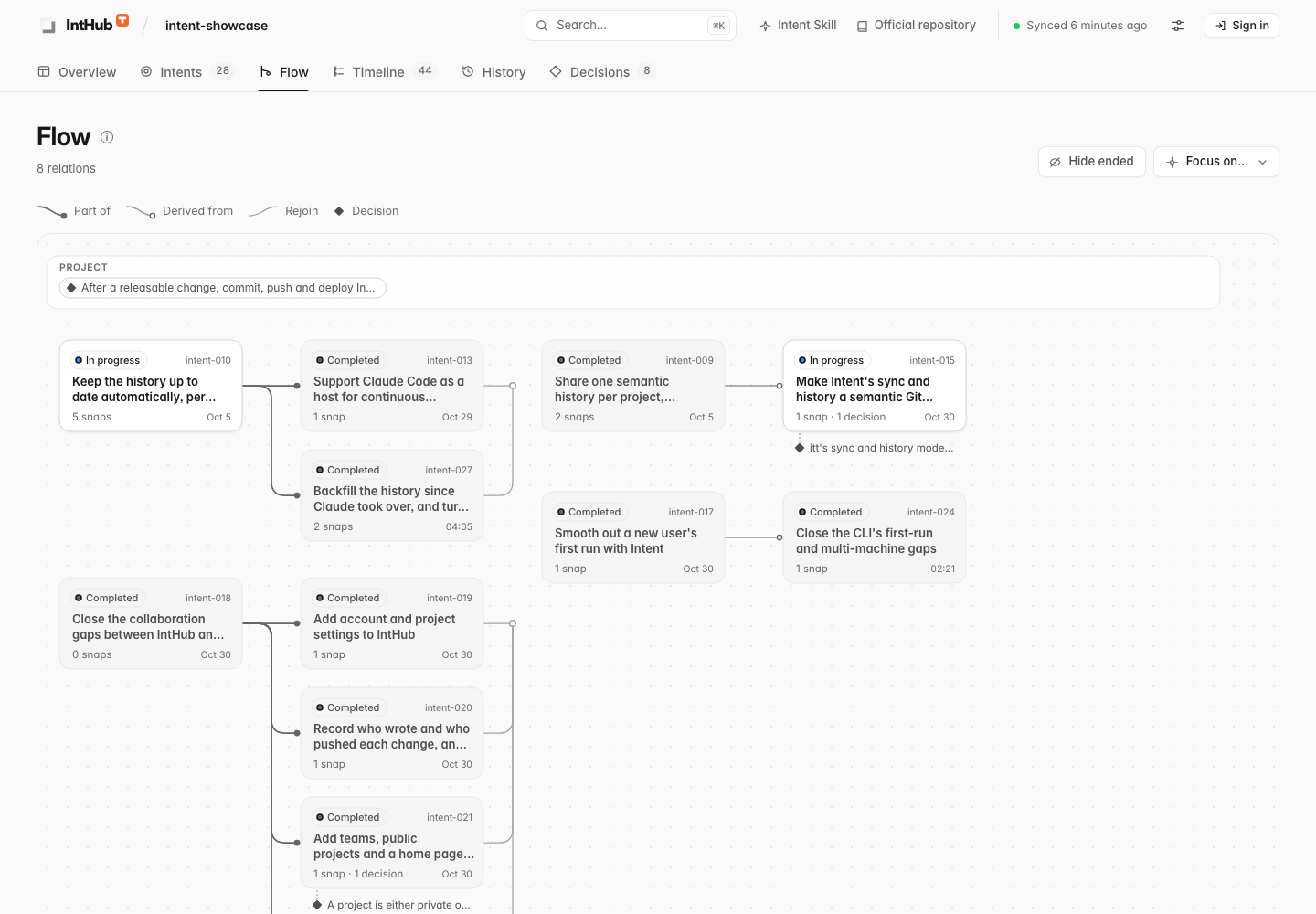
Intents can be related: part of, derived from, succeeds, depends on, conflicts with. IntHub's Flow page draws how goals branch, continue and converge (Intent flow).
Works with
| Host | Support |
|---|---|
| Claude Code | Skill (or plugin: /plugin marketplace add dozybot001/Intent, then /plugin install intent-cli@intent) plus project hooks: itt init --host claude-code. See setup and limits. |
| Codex | Skill plus project hooks: itt init --host codex. See setup and limits. |
| Cursor and other agents | Skill instructions only, best effort |
Hooks open each turn with the current state and check at the end that the turn was closed. They are written to project-local files and never enable other projects. itt maintenance off turns recording off for one project.
What stays on your machine
.intent/holds plain JSON.itt initexcludes it from Git in this clone only, because it may contain internal reasoning. Commit it deliberately if your team wants it in Git.- Each hooked turn adds a compact opening context with a hard size cap, and one
itt maintenance closecall. itttouches the network only when you runpush,pullorauth.
Share with IntHub (optional)
- Locally:
itt hub start, thenitt remote add origin http://127.0.0.1:7210 --project NAMEanditt push. - Hosted: inthub.tenon.asia, operated by 榫卯 Tenon AI. Run
itt auth login, approve the code in the browser, thenitt push. Each account and team can keep 100 projects and 1 GB of history. Projects are private by default, can be shared with a team (--project TEAM/NAME), and can be made public in their settings. See teams and sharing and the privacy notice. - Restore elsewhere:
itt init,itt remote add origin URL --project NAME,itt pull.
Today a project has one shared history, and push and pull fast-forward. If two copies record in parallel, itt status reports diverged and neither side changes until you run itt pull --rebase. Git-style branches and merges are the next milestone (design).
Status
Intent is beta (7.x). Within a major version the .intent/ format and the JSON output stay compatible; breaking changes come with a new major version and a migration. Recording and continuation flows are covered by tests on Python 3.9 to 3.14. Whether Intent measurably reduces re-explaining in real work is still being tested with natural continuation cases.
FAQ
Does it replace Git, issues or docs? No. It records the reasoning and the state of work that those tools don't.
What if the agent records noise? Zero writes is a valid outcome. The skill records only verified milestones, never per command or per file. Objects are append-only, so corrections are new Snaps.
Is pip install intent-cli this project? No, that PyPI name belongs to an unrelated tool.
Windows? The CLI and installer support Windows. Claude Code hooks need Git Bash.
How do I remove it? In each project run itt maintenance off --remove-hooks, and rm -rf .intent if you also want its history gone. Then run rm -rf ~/.local/share/intent ~/.local/bin/itt and npx skills remove intent-cli -g. An IntHub token stays valid until it expires; revoke it under Settings.
Docs
- Vision: why semantic history matters
- Continuation case: from interruption to resumption, step by step
- CLI reference: commands, objects and the JSON contract
- Intent flow: relations between Intents and the Flow page
- Teams and sharing: accounts, visibility and roles on IntHub
- Semantic Git: the Intent 8 design for branches and merges
Contributing · Code of conduct · Security · MIT License
Reviews (0)
Sign in to leave a review.
Leave a reviewNo results found