betterlgtm
Health Pass
- License — License: MIT
- Description — Repository has a description
- Active repo — Last push 0 days ago
- Community trust — 12 GitHub stars
Code Fail
- rm -rf — Recursive force deletion command in scripts/macos-signing-secrets.sh
Permissions Pass
- Permissions — No dangerous permissions requested
No AI report is available for this listing yet.
Review GitHub pull requests with Claude Code, from your desktop

BetterLGTM
Mean it when you say lgtm.
A desktop app for reviewing GitHub pull requests with Claude Code, Codex or Gemini CLI.
Website · Download · Build from source · Contribute
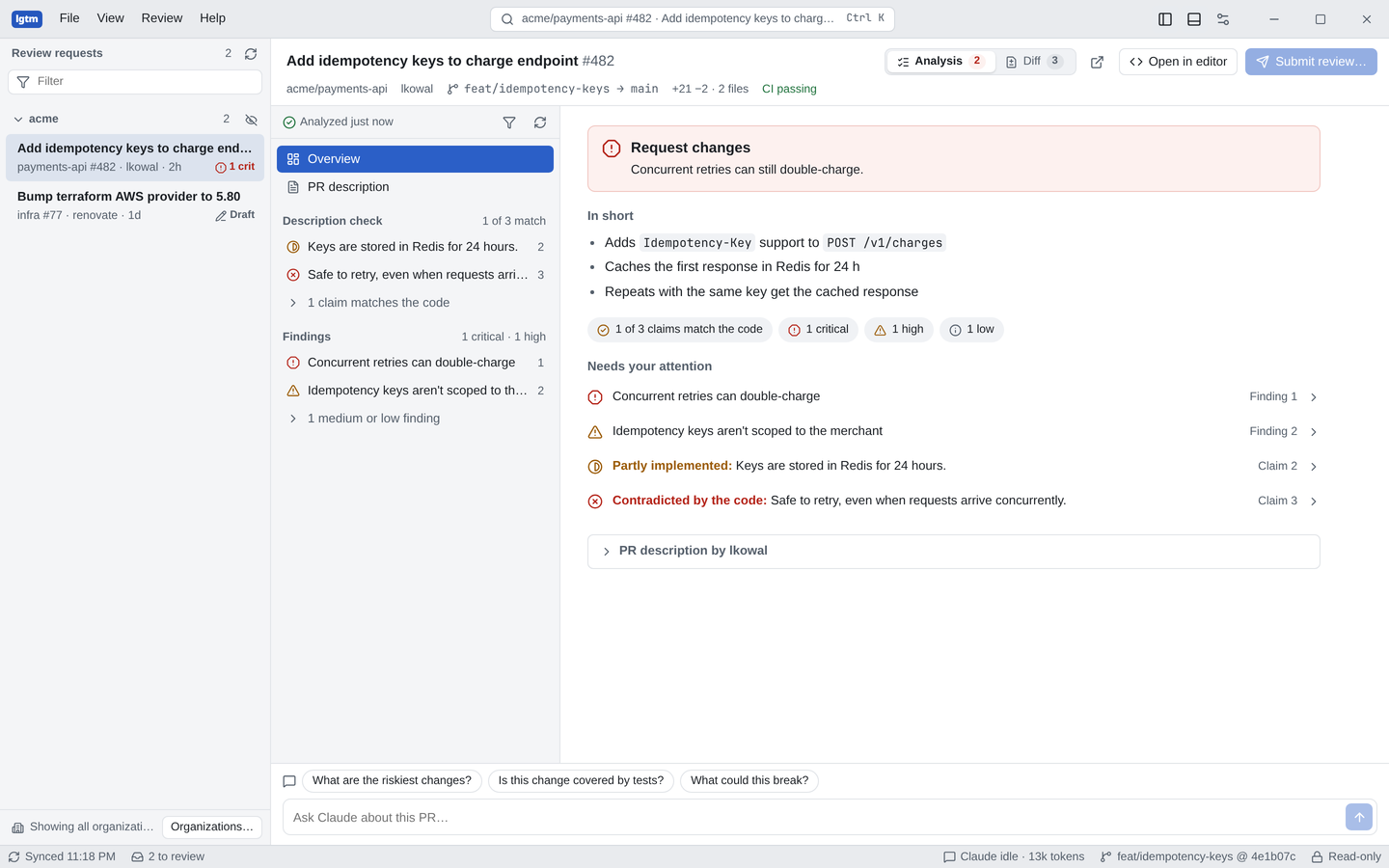
BetterLGTM lists the pull requests waiting for your review, checks each one out in its own git worktree, and has your coding agent (Claude Code, Codex or Gemini CLI) compare the description with the code. You get a verdict, a short summary, and the findings that need your attention, each linked to the lines it's about. A second pass double-checks each finding against the code, and then it walks you through the change section by section.
It runs on your machine with the gh and agent command-line tools you already have. There's no account and no server.
Features
- Your choice of agent. Run reviews with Claude Code, Codex or Gemini CLI (experimental). Pick one during setup or in Settings › Agent; each runs read-only.
- Guided setup. The first run checks
gh, your agent andgit, shows the command that fixes anything missing or signed out, and lets you choose what the inbox shows. Try a sample pull request shows a finished review without any of them. - Review inbox. Pull requests where your review is requested, directly or through a team, grouped by organization and refreshed on a timer. Switch to Mine for your own open pull requests. Each row shows CI, review state, size and a risk estimate, and Sort and filter sorts by risk, waiting time, size or last update, filters by CI, risk, review decision and analysis, and picks which organizations and repositories to show. Your choices are kept. A desktop notification and a count on the app icon tell you when a review is requested or requested again. Hide the organizations you don't care about.
- A worktree per PR. Each pull request is checked out next to a shared clone, so the agent reads real files, not just the diff, and your own working copy is never touched.
- Auto-analyze (optional). New review requests can be analyzed in the background, so results are waiting when you open them. A spending limit ($5 by default, Claude Code only) stops any that run long.
- Description check. Each claim in the PR description is marked as matching, partly implemented, or contradicted by the code.
- Findings. Bugs, risks and gaps, ranked by severity and linked to the exact diff lines. Resolve or dismiss them, and post fixes as suggestions the author can apply. Each finding is checked again in a fresh session: confirmed ones are marked Double-checked, and ones it disproves are set aside where you can still see them.
- Risk and tests. The risk level and its reasons, the sensitive areas touched, and whether each change is tested.
- Context. The issues the PR closes and the conversations already on it, so findings don't repeat what reviewers said, along with what your last review found and what you dismissed in the same repository.
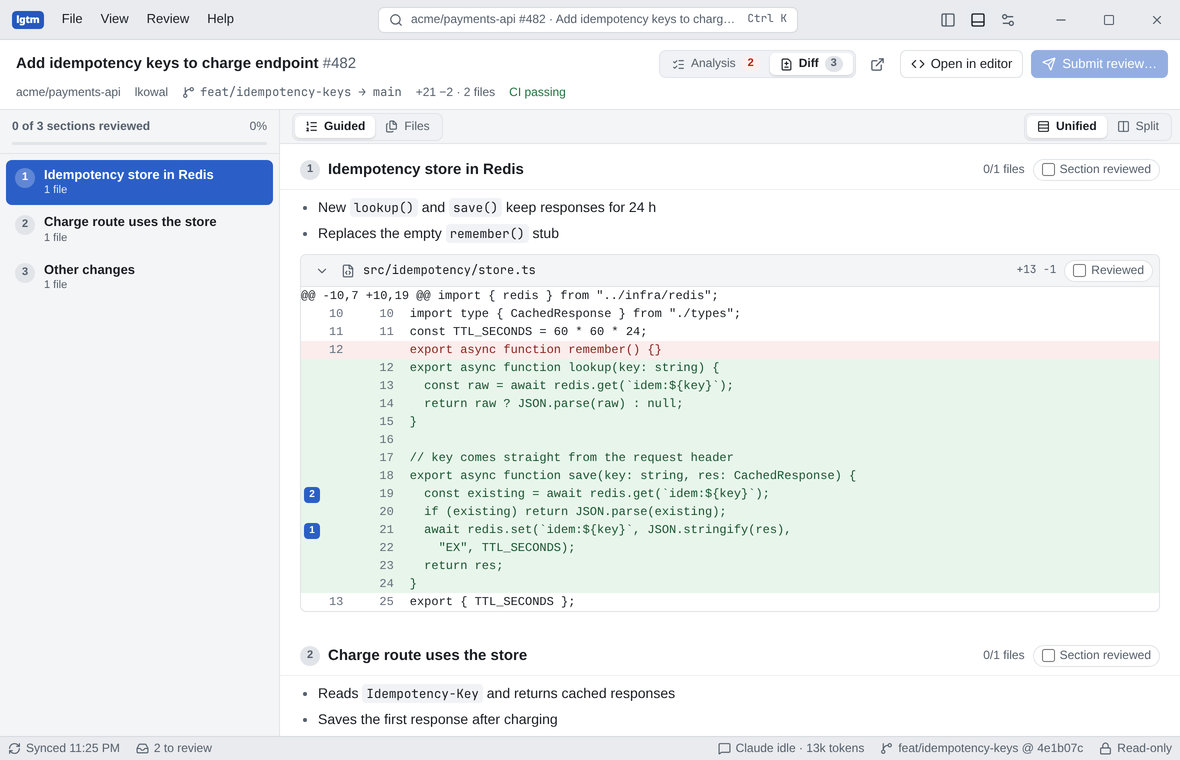
- Guided review. Related edits grouped into sections with a line on what each does, in one continuous scroll. Mark a change, a file or a whole section as reviewed and see your progress.
- Since your last review. When new commits land after you reviewed, see just those changes and analyze only them.
- Re-check findings. After the author pushes, the agent checks which findings are fixed and which are still open.
- Diff view. File-by-file unified or split diff with syntax highlighting, hidden lines on demand, whitespace hiding, regex search across the diff and the repository, line comments, and generated files folded away until you open them.
- Your own PRs. See what's blocking merge, self-review before asking for reviews, have the agent write the description, and reply to feedback.
- Chat. Ask follow-up questions; the agent knows which finding, section or file you're looking at.
- Submit review. Post your review to GitHub with the findings you pick as comments on their lines. Edit each comment, add a summary, and choose Comment, Approve or Request changes.
- Desktop ergonomics. Menu bar, command palette, keyboard shortcuts, light and dark themes, and layouts that work in narrow windows.
Install
Download the installer for your platform from Releases.
| Platform | File |
|---|---|
| macOS, Apple silicon | BetterLGTM_0.5.0_aarch64.dmg |
| macOS, Intel | BetterLGTM_0.5.0_x64.dmg |
| Windows | BetterLGTM_0.5.0_x64-setup.exe or .msi |
| Linux | .AppImage, .deb or .rpm |
On macOS you can also install it with Homebrew:
brew install --cask drmas/tap/betterlgtm
The macOS app is signed with a Developer ID and notarized by Apple, so it opens like any other Mac app. Windows builds aren't signed yet: if SmartScreen warns about an unknown publisher, choose More info › Run anyway.
From version 0.2.1 the app updates itself: when a new release is out, choose Install update in the status bar.
Requirements
- GitHub CLI, signed in:
gh auth login - One coding agent, signed in:
- Claude Code:
claude auth login - Codex:
codex login - Gemini CLI (experimental): run
geminionce and choose how to sign in
- Claude Code:
git- Linux: WebKitGTK 4.1 (
webkit2gtk-4.1)
The app checks these on first run and shows how to fix anything missing. If it can't find gh or your agent (common when it's started from a launcher instead of a terminal), set their full paths in Settings › Tools & storage or Settings › Agent.
Using it
- Open the app. On first run, follow the three setup steps, or try the sample pull request. The inbox on the left lists the PRs waiting for your review.
- Pick one and choose Start review. BetterLGTM prepares a worktree and runs your agent on it; results stream in as they're found, then each finding is double-checked.
- Read the Analysis tab: the verdict, "In short", and "Needs your attention".
- Switch to Diff for the guided review, and tick sections off as you go.
- Ask questions in the agent's panel at the bottom.
- Choose Submit review…. Findings you added with Add to review (or, if you added none, the critical and high ones) become line comments you can edit before posting.
| Shortcut | Action |
|---|---|
| Ctrl K | Go to a pull request, finding, section, file or command |
| Ctrl 1 / Ctrl 2 | Analysis / Diff |
| Ctrl L | Ask the agent |
| Ctrl Shift Enter | Submit review |
| Ctrl B / Ctrl J | Show or hide the inbox / agent panel |
| F5 | Refresh review requests |
| Ctrl , | Settings |
| Ctrl / | All shortcuts |
On macOS, use Cmd in place of Ctrl.
Vim-style keys work whenever no text field has focus: h / l move between the inbox, the list and the content, j / k move inside a pane, gg / G jump to the top or bottom, n / N step through findings, x marks the current file or section reviewed, and S submits the review. Press ? for the full list, or turn them off in Settings › General.
Privacy and safety
- Local only. GitHub is reached through your
ghand the model through your own agent CLI. BetterLGTM has no backend and never sees your tokens. - Anonymous usage stats. Release builds send counts of app opens, analyses, submitted reviews and a few other actions to PostHog, with the app version, operating system and a random ID made on your computer. They never include code, findings, chat, PR descriptions, or repository, organization, PR or account names. Turn it off in Settings › General › Share anonymous usage stats. Builds from source send nothing. The full list of events is in
src/telemetry.ts. - Read-only agents. Claude Code runs with only these tools allowed:
Read,Grep,Glob,LS, andgit log,git show,git diff,git blame,git merge-baseandrgthrough Bash. Codex runs in its read-only sandbox, and may search the web. Gemini CLI runs in its read-only plan mode. None of them can edit files or post anything to GitHub. Reviews are posted by the app, through yourgh, only when you press the submit button. - Costs. Analyses use your agent's plan or API usage. The status bar shows the tokens used per PR.
Where things are stored
| What | Where |
|---|---|
| Clones | ~/.betterlgtm/clones/<owner>/<repo> (blobless) |
| Worktrees | ~/.betterlgtm/worktrees/<owner>/<repo>/pr-<n> |
| Analyses and chat history | sessions/ in the app's data folder, one file per PR |
| Settings and the anonymous install ID | The app's local storage |
You can change the data folder in Settings and clear everything from there.
Build from source
You need Rust (stable), Node.js 22+, and the Tauri prerequisites for your platform.
git clone https://github.com/drmas/betterlgtm.git
cd betterlgtm
npm install
npm run tauri dev
npm run dev on its own opens the UI in a browser with sample data instead of gh and an agent, which is handy for UI work. npm run tauri build makes installers for your platform.
See CONTRIBUTING.md for the project layout and how releases are made, and docs/ARCHITECTURE.md for how the pieces fit together.
Contributing
Bug reports, ideas and pull requests are welcome. Start with CONTRIBUTING.md, and see the roadmap for what is planned. Please report security problems privately as described in SECURITY.md.
License
MIT. BetterLGTM is not affiliated with GitHub, Anthropic, OpenAI or Google.
Reviews (0)
Sign in to leave a review.
Leave a reviewNo results found