hey-my-buddy
Health Warn
- License — License: MIT
- Description — Repository has a description
- Active repo — Last push 0 days ago
- Low visibility — Only 7 GitHub stars
Code Warn
- network request — Outbound network request in apps/console/browser/alias-persistence.check.ts
- network request — Outbound network request in apps/console/browser/alias-sentences.check.ts
- network request — Outbound network request in apps/console/browser/aliases.check.ts
- network request — Outbound network request in apps/console/browser/axes-measurement-r6.check.ts
Permissions Pass
- Permissions — No dangerous permissions requested
No AI report is available for this listing yet.
Your coding agent becomes a Host buddy: it delegates bounded micro tasks to Worker buddies in other local harnesses through a shared blackboard, and accepts every result itself.
English · 简体中文
Delegate the work. Keep the responsibility.
The coding agent you work with hands bounded tasks to other coding agents on your machine,
and checks every result before accepting it.
How it works · Install · First steps · Status · Docs
What is hey-my-buddy
hey-my-buddy lets the coding agent you already work with hand parts of its work to other coding agents on your machine, and check each result before it lands.
- Your agent stays in charge. The coding agent you work with is the Host buddy: it splits the work, hands bounded parts to other agents and decides what is accepted. Any agent that can run the hey-my-buddy command can be the Host.
- Other agents do the parts. A Worker buddy is a coding agent in the CLI of DeepSeek Harness, ZCode, Codex or Claude Code, with the models and efforts you enabled. hey-my-buddy picks one for each part, or the Host names it.
- Nothing is accepted unchecked. In a Git repository each Worker works in its own checkout, and the Host reviews the result and runs the checks before anything reaches your branch. A Worker can also work directly in a folder you name, which suits an answer or a document; what it writes there is not sealed, so the Host checks the folder itself.
- Work outlives your session. A closed terminal, a lost connection or a service restart never cancels work; pick it up again by its id.
- See who is doing what. A private local console shows each piece of work as a timeline, every buddy's load and your settings.
- Your harnesses, as you set them up. Workers run in your own harnesses with your settings, providers, sign-in, skills, MCP servers and hooks; hey-my-buddy changes none of them and never keeps or forwards your credentials. See accounts and terms.
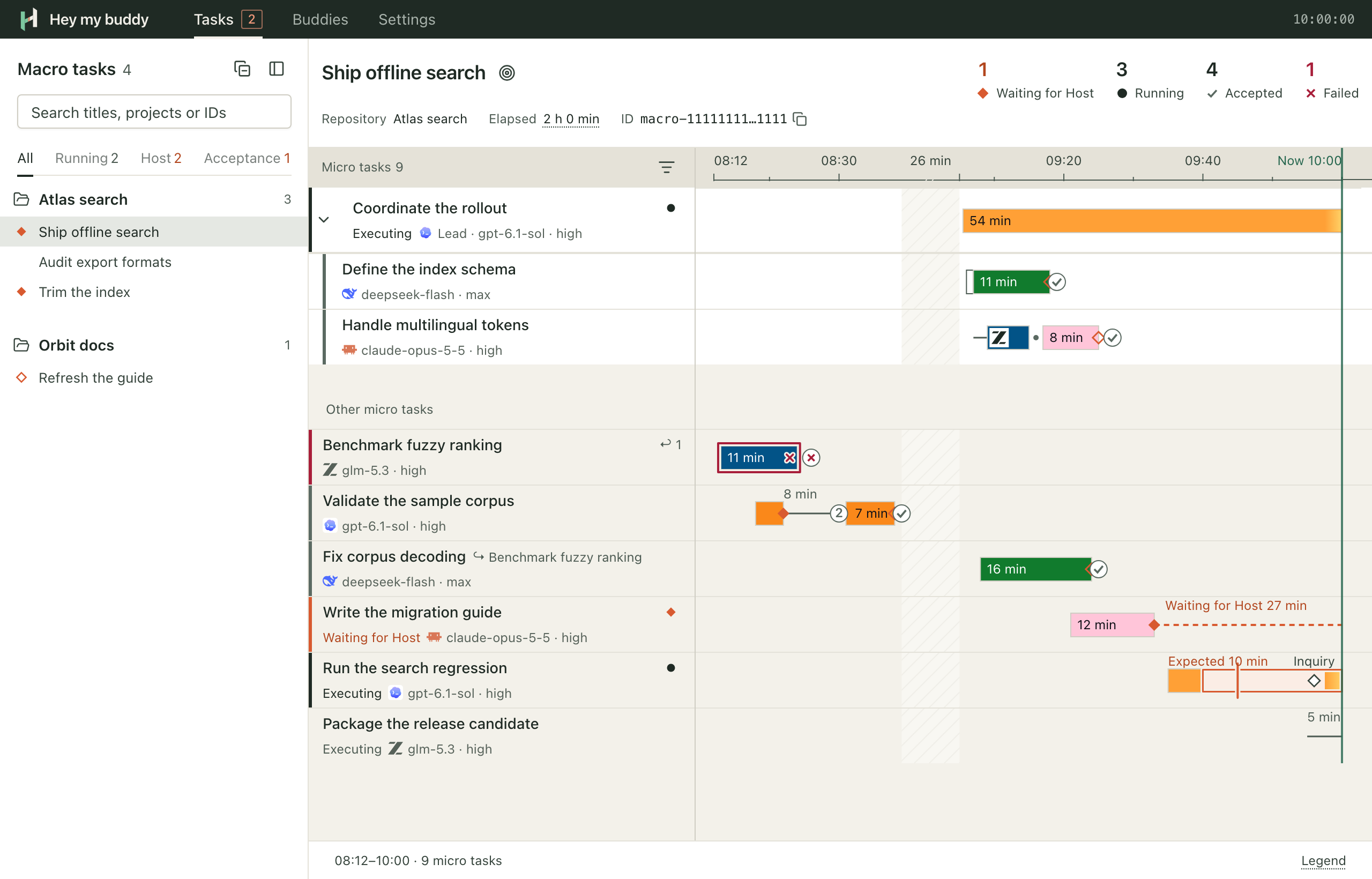
How it works
- Delegate. The Host writes a micro task: what to do, which files it may change and how to check it. It hands the micro task to the blackboard, a local service that keeps every step.
- Run. The blackboard picks a Worker: the only one that fits, or a Router buddy's choice among several, unless the Host names one. The Worker works in its own checkout, or directly in the folder the Host names. The Host can ask the running turn a question; when the Worker needs a decision, it stops and asks.
- Seal. When the turn ends, the blackboard seals the checkout as it stood, so the result cannot change afterwards. For work done directly in a folder it fixes the Worker's result instead; the folder itself is not sealed.
- Review. The Host checks the result against the micro task and runs the checks. If it is not right, the Host sends it back for another turn, to the same Worker unless it names another.
- Accept. The Host integrates the sealed result into your repository and accepts it; only accepted work lands there. A result from work done directly in a folder is accepted without integration.
Related micro tasks form a macro task. The whole loop, with routing, inquiry, sending back and a Lead buddy that delegates on the Host's behalf:
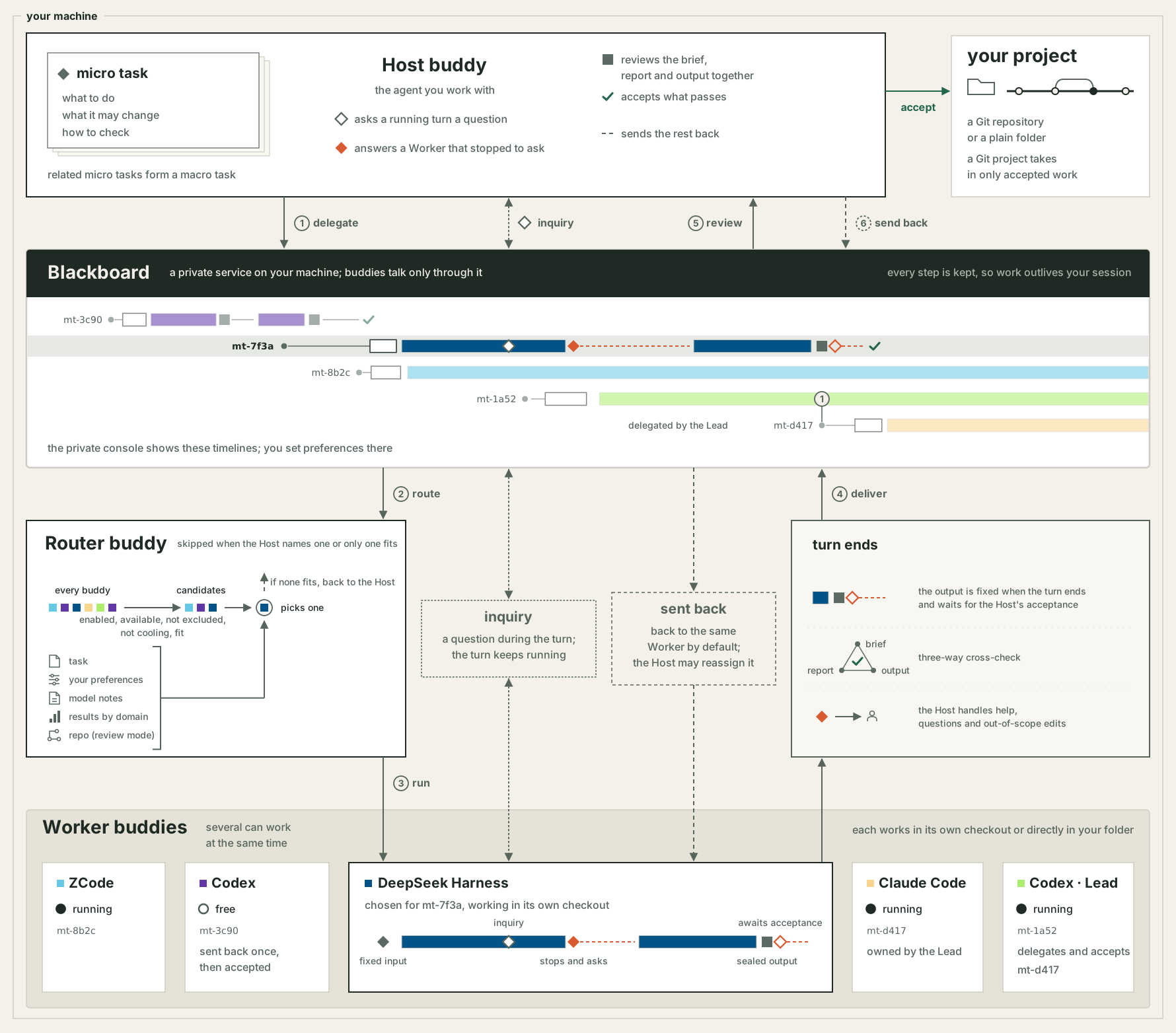
The details are in workflow and architecture.
Install
It needs uv, and Git 2.40 or later for work in a Git repository.
uvx [email protected] install
This installs one agent skill at ~/.agents/skills/hey-my-buddy, which carries its own launcher, and a private service under ~/.local/share/hey-my-buddy (%LOCALAPPDATA%\hey-my-buddy on Windows). Where Claude Code or Antigravity is installed, it also links the skill where that harness looks for skills: ~/.claude/skills/hey-my-buddy and ~/.gemini/config/skills/hey-my-buddy. It never changes your PATH, shell or agent settings.
To install from a checkout of this repository instead, build the wheel and install it:
uv build --wheel --out-dir dist
uvx --from "$PWD/dist/hey_my_buddy-0.69.11-py3-none-any.whl" hey-my-buddy install
Install hey-my-buddy on this machine for me.

1. Use the version I name, or the wheel I give you.
2. Run the install outside your sandbox through your own permission mechanism, without sudo.
3. Before it writes anything, list every path it will create or replace.
4. Report the skill version and place, the harness links, the service action and whether a backup was taken.
5. Verify with ~/.agents/skills/hey-my-buddy/scripts/hey-my-buddy health.
6. On LAUNCH_ACCESS_DENIED, allow that exact launcher command and retry. On UPGRADE_NOT_IDLE, report the listed work and wait; never cancel work to force an upgrade.
Upgrading runs the same command with the newer version. An upgrade that changes the contract refuses while work is running and takes a verified backup before it switches. Operations has the details, error codes and recovery.
First steps
Ask your Host buddy in plain words, for example:
Use hey-my-buddy to have a buddy check the links in this README and report the broken ones.
The skill tells the Host the rest. To look around yourself:
~/.agents/skills/hey-my-buddy/scripts/hey-my-buddy health    # routing and capacity
~/.agents/skills/hey-my-buddy/scripts/hey-my-buddy console   # open the private console
In the console, enable the buddies you want to work with and set how many may run at once. Usage walks from install to a reviewed result; the CLI reference covers every command.
Status and limits
- 0.x. While the version is 0.x the contract can change between middle versions; such an upgrade converts your board in one explicit, backed-up step.
- Platforms. macOS, Linux and Windows 11 (x64 and ARM64).
- Harnesses. Workers run in the CLI of DeepSeek Harness, ZCode, Codex or Claude Code. What each supports, and how far it is verified on each platform, is in harnesses.
- Accounts and terms. hey-my-buddy works with your own harness accounts and plans. What it does with them, where your task text goes and which terms apply are in accounts and terms.
Documentation
- Documentation index
- Operations: install, upgrade, storage, error codes and recovery
- Usage and CLI
- Console and harnesses
- Architecture and decisions
Development
npm --prefix apps/console ci
uv run --frozen python -m hey_my_buddy.cli.checks
npm --prefix apps/console test
AGENTS.md covers the repository's invariants, layout and checks. Report problems in GitHub issues.
Acknowledgements
Thanks to the LINUX DO community for providing an open space for technical discussion and open-source sharing.
License
Reviews (0)
Sign in to leave a review.
Leave a reviewNo results found