agent-dashboard
Health Warn
- License — License: Apache-2.0
- Description — Repository has a description
- Active repo — Last push 0 days ago
- Low visibility — Only 8 GitHub stars
Code Pass
- Code scan — Scanned 12 files during light audit, no dangerous patterns found
Permissions Pass
- Permissions — No dangerous permissions requested
This tool is a web-based orchestration platform that allows developers to spawn, monitor, and interact with multiple AI coding agent sessions (like Claude Code and Gemini CLI) across various remote machines from a single centralized interface.
Security Assessment
The application functions by executing shell commands and managing remote processes via pseudo-terminals (PTYs). It relies on network requests, specifically using Socket.IO to relay I/O between the host daemons and the central hub. The light code scan did not find any hardcoded secrets or dangerous code patterns, and the tool does not request inherently dangerous permissions. While the overall risk is rated as Medium due to the inherent dangers of remote code execution and terminal access, the architecture thoughtfully mitigates these risks by utilizing rootless Podman containers for deployment.
Quality Assessment
The project is licensed under the standard and permissive Apache-2.0 license. It appears to be actively maintained, with its most recent push occurring today. However, the tool currently has low community visibility with only 8 GitHub stars, meaning it has not yet been widely vetted by a large user base or extensive peer review.
Verdict
Use with caution — the code appears clean and actively maintained, but the low community adoption and high-privilege remote execution capabilities warrant careful network isolation and restricted access controls during deployment.
Real-time dashboard for spawning and controlling AI coding agents across multiple hosts. Streams live terminals via PTY, tracks token usage with OpenTelemetry, and deploys with rootless Podman containers. Built with FastAPI + React/TypeScript.
Agent Dashboard
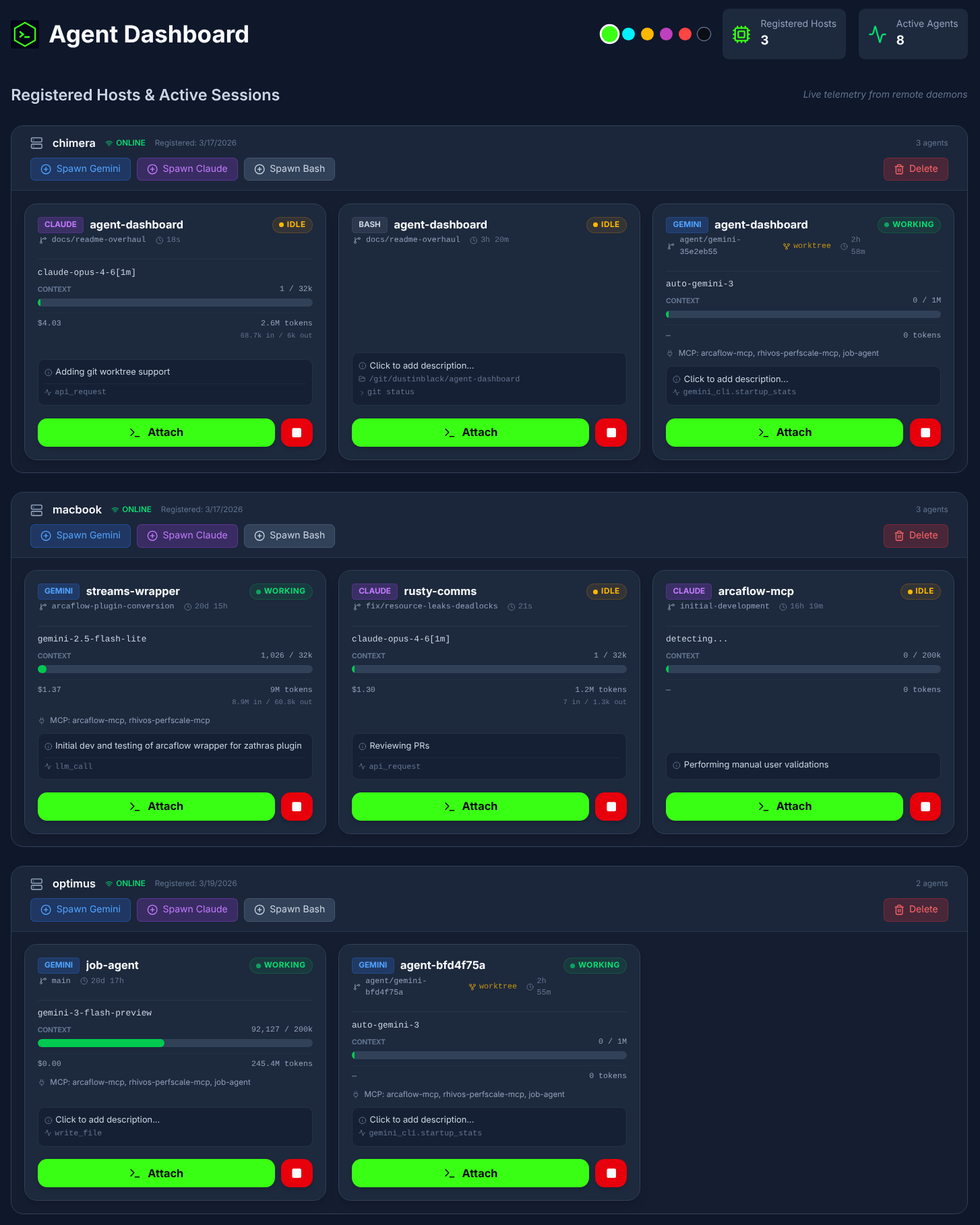
An AI Coding Agent Dashboard designed for the Gemini CLI and Claude Code, allowing centralized orchestration and remote interaction with multiple AI agent sessions across different machines.
Overview
Agent Dashboard is a multi-host orchestration platform for
AI coding agents. It remotely spawns, monitors, and provides
interactive terminal access to Gemini CLI and Claude Code
sessions running across multiple development machines — all
from a single web interface.
The platform consists of three layers: a React frontend
served by Nginx, a FastAPI + Socket.IO backend hub that
coordinates sessions, and containerized host daemons deployed
on each development machine. The daemons spawn agent processes
in pseudo-terminals, relay I/O over Socket.IO, and collect
OpenTelemetry telemetry including token usage, model info, and
session cost.
Features
Core Architecture
- Multi-host orchestration — Deploy containerized daemons on
any number of development machines. Spawn and manage Gemini,
Claude, and Bash sessions across all hosts from a single
dashboard. - Remote PTY terminals — Full
xterm-256colorterminal
emulation via pseudo-terminals, not a log viewer or chat
interface. Supports cursor movement, line-erase sequences,
spinners, progress bars, and streaming LLM output. - Live telemetry (OpenTelemetry) — Each host daemon runs a
local OTLP receiver that captures model names, token usage
(input/output/cache breakdown), and session cost directly from
agent CLI tools — no screen-scraping or terminal interference. - Cost tracking — Real session cost from Claude Code's OTLP
metrics; estimated cost for Gemini from built-in pricing
tables. Displayed per-session on each agent card.
Agent Management
- Project selection — Daemons scan
PROJECTS_ROOTfor git
repositories (configurable depth); select a project directory
from the dropdown when spawning an agent. - Session resume — Agents can resume their latest session on
spawn, preserving conversation context across daemon restarts. - Git worktree isolation — Optionally spawn agents in
isolated git worktrees so multiple agents can work on the
same repository without conflicts. Smart defaults enable
isolation when another agent is already active on the project. - Companion sessions — Open a Bash shell alongside a Claude
or Gemini session in the same project directory. Companions
inherit the parent's working context (worktree or original). - Host management — Register, monitor, and delete hosts with
cascading cleanup of associated sessions.
Terminal UX
- Detached terminal windows — Attach to any session in a
standalone browser popup for side-by-side multitasking. - Session history replay — Close and re-attach to a terminal
window; recent output is automatically replayed. - Dynamic resizing — Terminals scale to match the browser
viewport in real-time, relaying geometry changes to the
remote PTY. - Smooth rendering — Output is coalesced at the PTY level
and batched per animation frame on the frontend. Resize events
are debounced and deferred during active streaming. - UTF-8 & multi-byte safety — A byte buffer ensures
multi-byte characters (box-drawing, emoji) are never split
across reads. - Touch scrolling — Native vertical touch scrolling in
terminal viewports.
Telemetry & Monitoring
- Token breakdown — Per-session tracking of input, output,
cache read, and cache creation tokens with compact display. - Context window bar — Live visualization of current context
window usage with dynamic scaling per model. - Bash session telemetry — Current working directory, last
command, and exit code displayed on bash cards viaPROMPT_COMMANDsidecar injection. - Agent status — Working, idle, and permission-waiting states
derived from OTLP activity and terminal output patterns. - MCP server detection — Detects configured MCP servers from
.mcp.json,~/.claude.json, or~/.gemini/settings.json.
Similar Tools
The following projects offer alternative approaches to AI agent orchestration:
Agent Dashboard (This project)
- A web-based platform that provides multi-host orchestration and remote pseudo-terminal (PTY) access to AI agent sessions with live OpenTelemetry metrics. Supports optional git worktree isolation for running multiple agents on the same repository, real-time cost tracking, and companion session chaining.
- Ideal for: Remote, web-based interaction with isolated AI agent sessions across multiple host machines via full PTY emulation.
- Not ideal for: Users who prefer to work exclusively within a local, native terminal multiplexer.
- Restrictions: Designed specifically to orchestrate supported CLI agents (currently Gemini CLI, Claude Code, and Bash) rather than general-purpose GUI agents or arbitrary scripts.
-
- A terminal-native orchestration tool built on
tmuxthat manages local and remote AI agent sessions via live streaming and terminal-based approvals. - Ideal for: Terminal-native users who want to orchestrate multi-host AI agent sessions directly from the command line.
- Not ideal for: Users seeking a graphical web dashboard or those unfamiliar with terminal multiplexers.
- Restrictions: Heavily dependent on
tmuxand operates strictly within the constraints of terminal-based user interfaces.
- A terminal-native orchestration tool built on
-
- An open-source orchestration layer (by Composio) for fleets of parallel AI coding agents (Claude Code, Aider, Codex). It uses a dual-layer design with a Planner to decompose backlog issues (GitHub/Linear/Jira) and an Executor to handle technical interactions in isolated git worktrees.
- Ideal for: Automating a full "Agent Ops" lifecycle, including autonomous CI healing (detecting and fixing breaking code), review handling (routing comments back to agents), and parallel PR management.
- Not ideal for: One-off interactive chat sessions or developers who prefer a strictly local, dependency-free setup.
- Restrictions: Its integration layer (tools, trackers, and notifications) is powered by the Composio API, typically requiring an API key and tying it to the Composio ecosystem. It is heavily optimized for CI-centric workflows.
-
- A "batteries-included" CLI tool that treats an AI coding team and its processes as a version-controlled Git repository. It functions as an orchestrator (using the Ralph orchestrator) to provision specialized agents following specific organizational "profiles."
- Ideal for: Teams wanting to standardize AI workflows across an entire organization with version-controlled coding standards, documentation rules, and architectural patterns.
- Not ideal for: Simple, one-off tasks or users who prefer a graphical dashboard over a CLI-first, configuration-as-code approach.
- Restrictions: Currently in Pre-Alpha and heavily optimized for the Claude Code ecosystem, with deep integrations for GitHub repos and boards. Its profiles are currently primarily designed for Claude.
-
- A command-line multiplexer for running multiple AI coding assistants simultaneously, utilizing
git worktreeto isolate concurrent tasks into separate branches. - Ideal for: Multiplexing multiple AI coding assistants simultaneously in isolated local environments from the command line.
- Not ideal for: Managing remote agent sessions across different physical machines or needing a web-based UI.
- Restrictions: Relies on local
git worktreeisolation and is primarily focused on a specific set of supported CLI assistants (Claude, Gemini, Aider) rather than arbitrary commands.
- A command-line multiplexer for running multiple AI coding assistants simultaneously, utilizing
-
- A persistent background daemon and Terminal User Interface (TUI) multiplexer designed specifically for AI coding agents.
- Ideal for: Running AI coding agents as persistent background daemons and seamlessly switching between them using a TUI.
- Not ideal for: Web-based multi-machine orchestration or graphical monitoring of token/cost telemetry.
- Restrictions: Local-only execution with no built-in mechanism for multi-host remote orchestration or advanced visual telemetry.
Architecture
graph LR
    subgraph Hub Server
        FE["Frontend<br/>(React + xterm.js)"]
        BE["Backend<br/>(FastAPI + Socket.IO)"]
        DB[(SQLite)]
    end

    subgraph Host Machine 1
        HD1["Host Daemon"]
        OTLP1["OTLP Receiver<br/>:4318"]
        subgraph PTY Sessions
            A1["Claude<br/>(PTY)"]
            A2["Gemini<br/>(PTY)"]
        end
    end

    subgraph Host Machine N
        HDN["Host Daemon"]
    end

    FE <-->|"Socket.IO"| BE
    FE -->|"REST API"| BE
    BE <--> DB
    BE <-->|"Socket.IO"| HD1
    BE <-->|"Socket.IO"| HDN
    HD1 <-->|"PTY I/O"| A1
    HD1 <-->|"PTY I/O"| A2
    A1 -.->|"OTel metrics,<br/>traces, logs"| OTLP1
    A2 -.->|"OTel metrics,<br/>traces, logs"| OTLP1
    OTLP1 -->|"Telemetry<br/>via Socket.IO"| BE

    style FE fill:#1e3a5f,color:#fff
    style BE fill:#1e3a5f,color:#fff
    style DB fill:#374151,color:#fff
    style HD1 fill:#1a3326,color:#fff
    style HDN fill:#1a3326,color:#fff
    style OTLP1 fill:#3b2e1a,color:#fff
    style A1 fill:#2d1f4e,color:#fff
    style A2 fill:#1e3a5f,color:#fff
Agent Spawn Flow
When a user clicks "Spawn" in the UI, the request passes through
three services before an agent process starts:
sequenceDiagram
    actor User
    participant FE as Frontend
    participant API as Backend API
    participant DB as SQLite
    participant SIO as Socket.IO Hub
    participant HD as Host Daemon
    participant PTY as Agent (PTY)

    User->>FE: Click "Spawn Claude"
    FE->>API: POST /agents/spawn<br/>{host_id, tool, project_dir,<br/>cols, rows}
    API->>DB: INSERT agent record
    API->>SIO: emit("spawn_agent", {...})
    SIO->>HD: relay to host room

    HD->>PTY: pty.fork() + execvpe()
    HD->>PTY: ioctl(TIOCSWINSZ)<br/>set initial cols/rows
    API-->>FE: return agent record

    FE->>SIO: emit("join_room", agent_id)
    SIO->>HD: emit("request_history")
    HD-->>SIO: emit("terminal_output") x N
    SIO-->>FE: relay history chunks
    HD-->>SIO: emit("history_complete")
    SIO-->>FE: relay completion

    loop Live Session
        PTY-->>HD: os.read(fd) + UTF-8 buffer
        HD-->>SIO: emit("terminal_output")
        SIO-->>FE: relay to agent room
        FE->>FE: batch via rAF,<br/>term.write()
        User->>FE: Type input
        FE->>SIO: emit("terminal_input")
        SIO->>HD: relay to host
        HD->>PTY: os.write(fd)
    end

    loop OTel Telemetry
        PTY-->>HD: OTLP HTTP POST<br/>(:4318)
        HD-->>SIO: emit("agent_telemetry")
        SIO-->>FE: relay to UI
    end
Quick Start
Get the hub running locally with a single compose command:
# Clone the repository
git clone https://github.com/dustinblack/agent-dashboard.git
cd agent-dashboard

# Build and start the hub (backend + frontend)
podman-compose build && podman-compose up -d
# or with Docker Compose:
# docker compose build && docker compose up -d
- UI:
http://localhost:8080 - API:
http://localhost:8000
[!TIP]
Use--no-cacheon subsequent builds after code changes to ensure
the latest version is built:podman-compose build --no-cache && podman-compose up -d
Deployment
Prerequisites
You need a container runtime and a compose tool installed on the hub
server.
[!TIP]
Distro-specific install examples:
Distro Command Fedora / RHEL 9+ sudo dnf install podman podman-composeDebian / Ubuntu sudo apt install podman podman-composeor install Docker EnginemacOS brew install podman podman-composeor install Docker Desktop
1. Build and Start the Hub
podman-compose build --no-cache && podman-compose up -d
# or with Docker Compose:
# docker compose build --no-cache && docker compose up -d
The compose file starts two services:
- backend on port
8000(FastAPI + Socket.IO) - frontend on port
8080(React served by Nginx)
2. Network Configuration
By default the frontend connects to the backend on localhost. To
allow other machines on your network to access the dashboard, setVITE_API_URL before building.
Create a .env file in the project root:
# Replace with the actual IP or hostname of your hub server
VITE_API_URL=http://your-server-ip:8000
Then rebuild the frontend:
podman-compose build --no-cache && podman-compose up -d
The compose.yml already passes VITE_API_URL as a build arg to the
frontend container.
[!NOTE]
Firewall (firewalld-based systems):sudo firewall-cmd --permanent --add-port=8080/tcp sudo firewall-cmd --permanent --add-port=8000/tcp sudo firewall-cmd --reload
[!NOTE]
If you are deploying for an internal, private lab network, you can
simplify the deployment by keepingBYPASS_AUTH=truein yourcompose.ymlto skip OIDC authentication.
3. Register a Host
Register each development machine with the hub to obtain aHOST_TOKEN:
curl -X POST http://your-server-ip:8000/hosts \
  -H "Content-Type: application/json" \
  -d '{"name": "my-dev-workstation", "host_token": "secret-token-123"}'
4. Build and Run the Host Daemon
Build the daemon container image on each host machine:
cd agent/
podman build -t agent-dashboard-daemon -f Containerfile .
# or: docker build -t agent-dashboard-daemon -f Containerfile .
Run the daemon:
podman run -d --name host-daemon --network=host \
  --privileged \
  -e DASHBOARD_URL="http://your-server-ip:8000" \
  -e HOST_TOKEN="secret-token-123" \
  -e PROJECTS_ROOT="/git" \
  -e OTLP_PORT="4318" \
  -e GEMINI_API_KEY="your-key-here" \
  -e CLAUDE_CODE_USE_VERTEX=1 \
  -e CLOUD_ML_REGION="us-east5" \
  -e ANTHROPIC_VERTEX_PROJECT_ID="your-gcp-project-id" \
  -v /path/to/your/git:/git \
  -v $HOME/.ssh:/root/.ssh:ro \
  -v $HOME/.gitconfig:/root/.gitconfig:ro \
  -v $HOME/.gemini/:/root/.gemini \
  -v $HOME/.claude/:/root/.claude \
  -v $HOME/.config/gcloud:/root/.config/gcloud:ro \
  -v $HOME/.config/gh:/root/.config/gh:ro \
  -v $HOME/.config/glab-cli:/root/.config/glab-cli:ro \
  localhost/agent-dashboard-daemon:latest
[!WARNING]
--privilegedis required for container-in-container support
(e.g., agents building and running containers during development
sessions). This also implicitly disables SELinux label confinement.
Environment Variables
| Variable | Description | Default |
|---|---|---|
DASHBOARD_URL |
URL of the hub backend | (required) |
HOST_TOKEN |
Token from the host registration step | (required) |
PROJECTS_ROOT |
Root directory for project scanning | (required) |
OTLP_PORT |
OTLP telemetry receiver port | 4318 |
PROJECTS_DEPTH |
Max scan depth below PROJECTS_ROOT |
6 |
GEMINI_API_KEY |
API key for Gemini CLI | — |
CLAUDE_CODE_USE_VERTEX |
Set to 1 to use Vertex AI for Claude |
— |
CLOUD_ML_REGION |
GCP region (e.g., us-east5) |
— |
ANTHROPIC_VERTEX_PROJECT_ID |
GCP project ID for Vertex AI | — |
GH_TOKEN |
GitHub CLI personal access token | — |
GITLAB_TOKEN |
GitLab CLI personal access token | — |
Volume Mounts
| Host Path | Container Path | Mode | Purpose |
|---|---|---|---|
/path/to/your/git |
/git |
rw | Project source code |
~/.ssh |
/root/.ssh |
ro | SSH keys for git operations |
~/.gitconfig |
/root/.gitconfig |
ro | Git configuration |
~/.gemini/ |
/root/.gemini |
rw | Gemini CLI settings |
~/.claude/ |
/root/.claude |
rw | Claude Code settings |
~/.config/gcloud |
/root/.config/gcloud |
ro | GCP credentials |
~/.config/gh |
/root/.config/gh |
ro | GitHub CLI config |
~/.config/glab-cli |
/root/.config/glab-cli |
ro | GitLab CLI config |
GitHub CLI Authentication
[!IMPORTANT]
The container includes the GitHub CLI (gh). Mounting~/.config/ghalone is usually not sufficient becausegh auth loginstores tokens in your system keyring (GNOME Keyring, KDE
Wallet, etc.), which is not accessible from inside the container.Export your token and pass it as an environment variable instead:
# Get your current token from the host keyring
gh auth token

# Pass it to the container
-e GH_TOKEN="ghp_your-token-here"           # podman/docker run
Environment=GH_TOKEN=ghp_your-token-here    # quadlet
The
GH_TOKENenvironment variable is recognized bygh
automatically and takes precedence over stored credentials.
GitLab CLI Authentication
[!IMPORTANT]
The container includes the GitLab CLI (glab). Similar togh,
mounting~/.config/glab-clialone may not be sufficient if your
token is stored in the system keyring.Pass your token as an environment variable instead:
# Pass it to the container
-e GITLAB_TOKEN="glpat_your-token-here"       # podman/docker run
Environment=GITLAB_TOKEN=glpat_your-token-here # quadlet
The
GITLAB_TOKENenvironment variable is recognized byglab
automatically and takes precedence over stored credentials.
Claude Code (Vertex AI)
[!NOTE]
If you use Claude Code via Google Cloud Vertex AI, the daemon
container includes thegcloudCLI and supports passing GCP
credentials through. Configure GCP authentication on the host
machine before starting the daemon — the~/.config/gcloud
volume mount passes your credentials into the container.Required environment variables for Vertex AI:
CLAUDE_CODE_USE_VERTEX=1CLOUD_ML_REGION— your GCP region (e.g.,us-east5)ANTHROPIC_VERTEX_PROJECT_ID— your GCP project ID
5. Use the Dashboard
- Open the UI at
http://your-server-ip:8080. - Your registered hosts appear on the dashboard.
- Click "Spawn Gemini", "Spawn Claude", or "Spawn Bash"
to start a remote agent session. - Select a project directory from the dropdown — the daemon scans
PROJECTS_ROOTin the background every 60 seconds (you can also
force a refresh). - Click on a running session to attach in a detached terminal window.
- Delete offline or retired hosts via the trash can icon; associated
sessions and logs are cascaded.
Running as a System Service
For production deployments, use systemd quadlets so that containers
start automatically on boot without relying on the source directory orcompose.yml.
Hub Services (Quadlets)
Create the following files in /etc/containers/systemd/:
/etc/containers/systemd/agent-dashboard-data.volume
[Volume]
VolumeName=dashboard_data
/etc/containers/systemd/agent-dashboard-backend.container
[Unit]
Description=Agent Dashboard Backend
After=network-online.target

[Container]
Image=localhost/agent-dashboard_backend:latest
PublishPort=8000:8000
Volume=agent-dashboard-data.volume:/app/data
Environment=DATABASE_URL=sqlite:////app/data/agent_dashboard.db
Environment=BYPASS_AUTH=true

[Install]
WantedBy=multi-user.target
/etc/containers/systemd/agent-dashboard-frontend.container
[Unit]
Description=Agent Dashboard Frontend
After=network-online.target agent-dashboard-backend.service

[Container]
Image=localhost/agent-dashboard_frontend:latest
PublishPort=8080:80

[Install]
WantedBy=multi-user.target
Reload and start:
sudo systemctl daemon-reload
sudo systemctl start agent-dashboard-backend.service
sudo systemctl start agent-dashboard-frontend.service
Host Daemon (Rootless Quadlet)
For the host daemon, use a rootless quadlet so agents run as your
user and file permissions are preserved. Create~/.config/containers/systemd/agent-dashboard-daemon.container:
[Unit]
Description=Agent Dashboard Host Daemon
After=network-online.target

[Container]
Image=localhost/agent-dashboard-daemon:latest
Network=host
PodmanArgs=--privileged

# Environment Variables
Environment=DASHBOARD_URL=http://your-server-ip:8000
Environment=HOST_TOKEN=secret-token-123
Environment=PROJECTS_ROOT=/git
# OTLP telemetry receiver port (default 4318; change when
# running multiple daemons on the same host)
Environment=OTLP_PORT=4318
Environment=GEMINI_API_KEY=your-key-here
Environment=GH_TOKEN=ghp_your-token-here
Environment=GITLAB_TOKEN=glpat_your-token-here
Environment=CLAUDE_CODE_USE_VERTEX=1
Environment=CLOUD_ML_REGION=us-east5
Environment=ANTHROPIC_VERTEX_PROJECT_ID=your-gcp-project-id

# Volume Mounts (using %h for your home directory)
Volume=%h/path/to/your/git:/git
Volume=%h/.ssh:/root/.ssh:ro
Volume=%h/.gitconfig:/root/.gitconfig:ro
Volume=%h/.gemini/:/root/.gemini
Volume=%h/.claude/:/root/.claude
Volume=%h/.config/gcloud:/root/.config/gcloud:ro
Volume=%h/.config/gh:/root/.config/gh:ro
Volume=%h/.config/glab-cli:/root/.config/glab-cli:ro

[Install]
WantedBy=default.target
Reload and start:
systemctl --user daemon-reload
systemctl --user start agent-dashboard-daemon.service
[!IMPORTANT]
Lingering: By default, most Linux distributions kill user
processes on logout. For rootless services to start at boot and
persist after logout, enable lingering:sudo loginctl enable-linger $USER
Persistence
- The SQLite database is stored in the
dashboard_datanamed volume,
which survives container updates and reboots. - The database path inside the container is
/app/data/agent_dashboard.db.
Development
Prerequisites
- Python 3.9+
- Node.js 20+
pipandnpm
Setup
# Install Python dev dependencies
pip install -r backend/requirements.txt \
            -r agent/requirements.txt \
            -r requirements-dev.txt

# Install frontend dependencies
cd frontend && npm install && cd ..

# Install the pre-commit hook
./scripts/install-hooks.sh
[!IMPORTANT]
AI agent development: If you are using an AI coding agent
(Claude Code, Gemini CLI, etc.) to develop on this project, always
install the pre-commit hook first. AI agents can introduce
formatting, linting, and type errors that slip past review. The
hook runs format, lint, typecheck, and secret detection checks
automatically on every commit, catching these issues before they
reach the repository.
Running Checks
Use scripts/check.sh to run checks by category:
./scripts/check.sh <category>
| Category | What it runs |
|---|---|
format |
black (Python), prettier (frontend) |
lint |
flake8 + pylint (Python), eslint (frontend) |
typecheck |
TypeScript type checking (tsc) |
build |
Frontend production build |
test |
Backend unit tests with coverage |
e2e |
End-to-end tests |
security |
bandit (Python), npm audit (frontend) |
secrets |
Secret detection (gitleaks) |
containers |
Build all container images |
precommit |
format + lint + typecheck + secrets (fast) |
ci |
format + lint + typecheck + build + test + security + secrets |
all |
ci + e2e + containers |
Code Coverage
Backend unit test coverage reports are generated atcoverage/backend/index.html.
CI Pipeline
GitHub Actions runs on all PRs and pushes to main. The pipeline
includes:
- Python checks: formatting, linting, security scan (bandit),
unit tests with coverage - Frontend checks: formatting, linting, type checking, build,
security audit (npm audit) - Secret detection: gitleaks
- E2E tests: end-to-end Socket.IO integration tests
- Container builds: verifies all three Containerfiles build
successfully
See .github/workflows/ci.yml for
details.
Reviews (0)
Sign in to leave a review.
Leave a reviewNo results found