tin-collar
Health Warn
- License — License: MIT
- Description — Repository has a description
- Active repo — Last push 0 days ago
- Low visibility — Only 5 GitHub stars
Code Pass
- Code scan — Scanned 9 files during light audit, no dangerous patterns found
Permissions Pass
- Permissions — No dangerous permissions requested
No AI report is available for this listing yet.
A pixel-art office for Claude Code, staffed by robots: every agent is a 3D-printed robot doing its real work
Tin Collar
A pixel-art office for Claude Code, staffed by robots.
Every agent in your session is a robot at a desk, doing its real work.
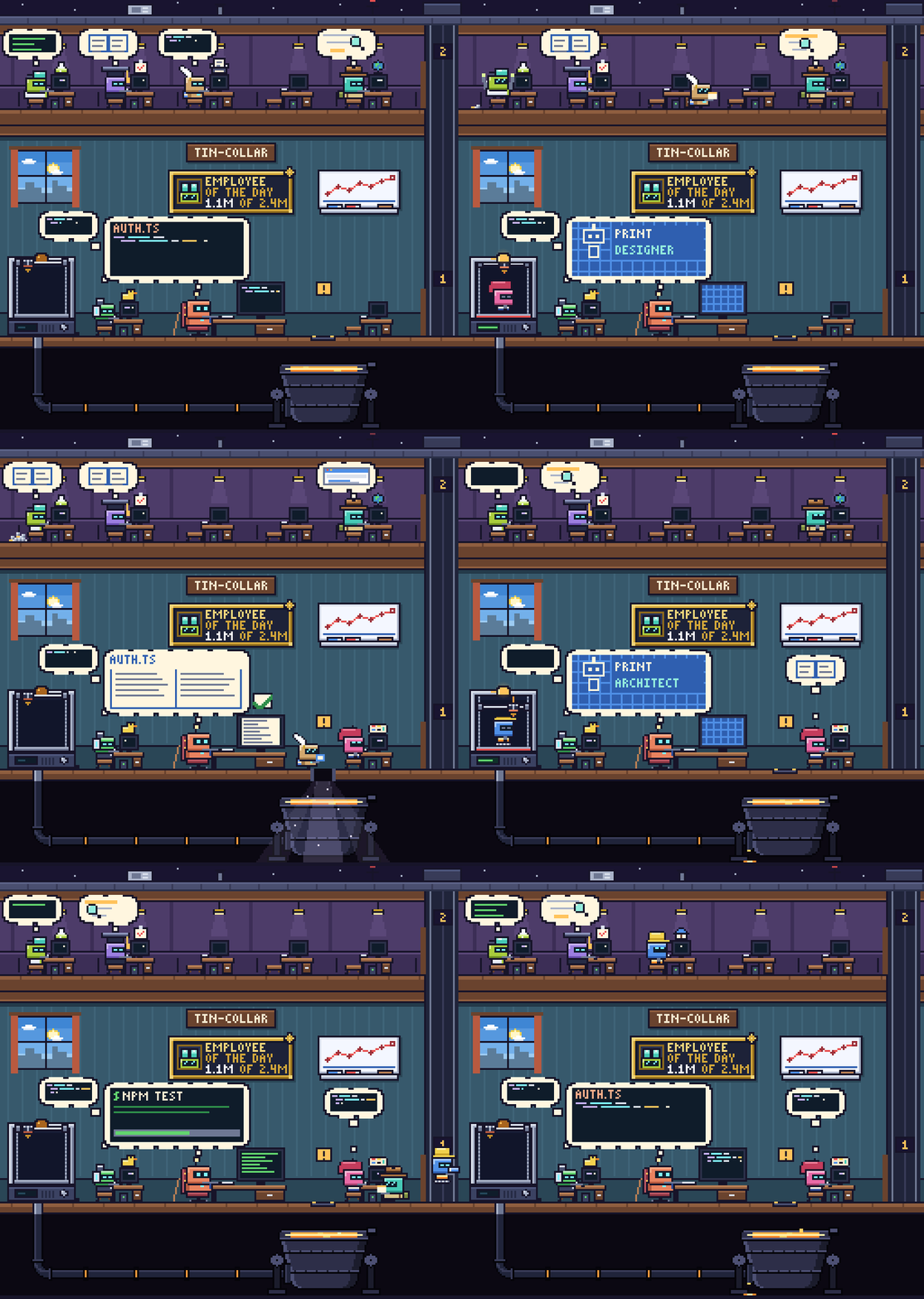
A designer is printed and briefed. The tester's context is compacted: it hops, shedding bolts into a small pile.
The writer hands in its report and takes the hatch; the metal comes back out of the printer as an architect.
What it does
Tin Collar is a mod for Claude Code. It opens an Office pane beside the conversation and draws the session as a small building:
- The main agent runs the office from a leather chair at the ground-floor desk. The bubble over its head shows what it is doing right now: the file it reads, the command it runs, the helper it is sending for. With nothing to type, it taps its stick on the desk.
- Subagents are 3D-printed. When Claude starts a subagent, the printer in the corner builds a robot, the main agent hands it a blueprint, and the robot walks to a free desk or takes the lift to an upper floor. Robots ordered together are printed one after another, and the printer shows how many are waiting.
- Finished robots are recycled. A robot that is done carries its report to the main desk, then jumps through the hatch into a ladle of molten metal in the dark cellar. Daylight follows it down, the splash leaves the pipe's joint weeping for a moment, and the pipe takes the metal back to the printer, where it becomes the next robot.
- More robots, more floors. Two desks on the ground floor, five on each floor above it, up to four upper floors: 22 robots at once.
- Robots carry their context. A robot gets visibly rounder as its context window fills up, at 40k, 80k and 150k tokens. While Claude compacts it, the robot is up from its seat and hops, and with every hop bolts fly out of it into a small pile at its feet. When the compaction is over it sits down slimmer, and the pile is cleared away. The main agent does the same.
- The room reacts. A
NEEDS YOUsign flashes when an agent is waiting for your answer. While its helpers work, an idle main agent takes a coffee break; in an empty office it dozes off and the lights go down. The window shows the sky for the hour on your computer's clock.
Dressed for the job
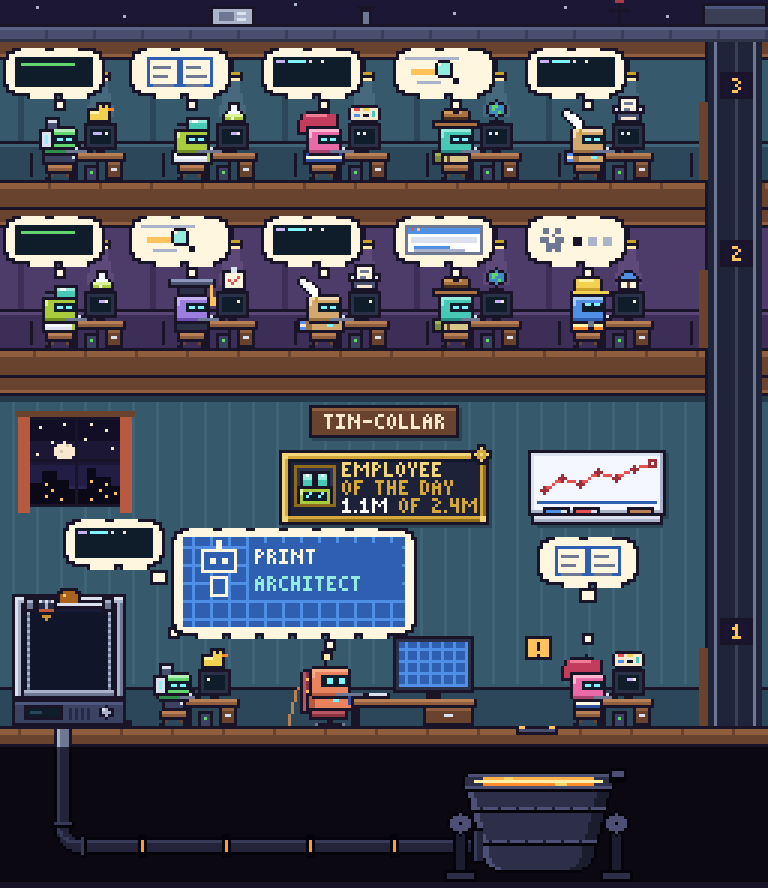
Each robot is painted and dressed for its role, keeps a thing of its own on its monitor, and carries another whenever it has a hand free. The role comes from the task the subagent was given ("review the auth module", "design the icons"), and from its agent type when the task does not say.
 Main agent antenna, tie a stick and a boss's chair |
 Coder headset, hoodie a smoothie, on a monowheel |
 Designer beret, striped shirt palette and brush |
 Architect hard hat, hi-vis vest a folding rule, on tracks |
 Tester goggles, lab coat a fly swatter for the bugs |
 Reviewer mortarboard, gown a magnifying glass |
 Explorer fedora, backpack a burning torch |
 Writer quill, scarf its nose in a book |
 Helper cap, tool belt a wrench |
On the wall
- The sign carries the name of the folder the session works in.
- Employee of the Day is a gilt frame with the portrait of the robot that has used the most tokens today, and its share of the day's total.
- The whiteboard charts tokens per day for the last seven days, across all your chats.
Under the picture
Below the office is a task list with one card per agent: its portrait, what it is doing, a progress bar and how much context it carries. The bar follows the agent's own plan when it keeps one.
Click a card to open the agent's trace: its plan, its recent steps, its latest change and its last message. In the desktop app you can also click the robot itself. Agent rows in the chat get the robot's portrait too, and opening an agent from Claude Code's own task list opens its card here.
In a terminal there are no pictures; you get the task list and the traces.
Install
At the prompt of a Claude Code terminal session:
/plugin install tin-collar --marketplace dzmitrybykau/tin-collar
Answer y to add the marketplace, then choose a scope. The user scope turns the office on for every session.
From a shell:
claude plugin install tin-collar --marketplace dzmitrybykau/tin-collar
In the desktop app, where /plugin does not run: click + next to the prompt box, then Plugins, Add marketplace with dzmitrybykau/tin-collar, then Add plugin. A mod installed from a terminal at the user scope also loads in the desktop app's local sessions.
Built and tested on Claude Code 2.1.321.
Use
The Office pane opens beside the chat by itself. If you close it, /office brings it back.
There is nothing to configure. Start a few subagents and watch the printer.
Update or remove
claude plugin marketplace update tin-collar
claude plugin update tin-collar@tin-collar
claude plugin uninstall tin-collar@tin-collar
Privacy
Tin Collar makes no network requests, reads no files and starts no processes. It draws from what Claude Code already gives a mod about the session: tool calls, subagents starting and stopping, token usage, and an agent's latest message for its trace. It keeps one thing between sessions: the number of tokens used per day, in Claude Code's own plugin store on your computer.
Development
git clone https://github.com/dzmitrybykau/tin-collar
claude --plugin-dir tin-collar
claude plugin validate tin-collar
claude plugin test tin-collar
| File | What it holds |
|---|---|
hooks/register.tsx |
The hooks: turns session events into the state of the office, draws the pane and the task cards |
hooks/scene.ts |
The pixel renderer: the robots and what they wear, the building, and every robot's timeline |
hooks/tally.ts |
Token counts per robot and per day |
hooks/hit.tsx |
The click layer over the picture |
types/index.d.ts |
The type contract for the mod's state |
tests/office.test.tsx |
Tests for the behaviour described above |
The picture is drawn into a small pixel framebuffer, converted to SVG paths and animated with SMIL. It is laid in layers. The room is one layer: everything that stays in its place. Each journey a robot makes (being printed and walking to its desk, or carrying its report and dropping into the vat) is a layer of its own, laid once and left alone until the journey is over. So whatever the agents do meanwhile, a robot on its way is never moved, and however many helpers are ordered at once, each one's journey plays from start to end. That is why nothing jumps and nothing flickers.
License
Reviews (0)
Sign in to leave a review.
Leave a reviewNo results found