wingman
skill
Warn
Health Warn
- License — License: MIT
- Description — Repository has a description
- Active repo — Last push 0 days ago
- Low visibility — Only 7 GitHub stars
Code Pass
- Code scan — Scanned 12 files during light audit, no dangerous patterns found
Permissions Pass
- Permissions — No dangerous permissions requested
Purpose
This command-line tool generates visual SVG stat cards and YAML resumes by analyzing your local AI coding assistant usage history. It parses local log and database files from various AI agents (like Claude Code, Gemini, and GitHub Copilot) to calculate statistics.
Security Assessment
Overall Risk: Medium. The primary security consideration is that the tool requires read access to potentially sensitive local files. Specifically, it scans application data directories (such as `~/.claude/`, `~/.local/share/`, and `~/.gemini/`) which contain your AI conversation histories. Exposing or uploading these logs could leak proprietary source code or personal data. The automated code scan found no dangerous code patterns, no hardcoded secrets, and no dangerous permission requests. Additionally, the tool appears to operate entirely offline with no indications of making external network requests.
Quality Assessment
The project is in its early stages, which is reflected by a very low community footprint of only 7 GitHub stars. However, the codebase is actively maintained, with recent pushes, and it uses the standard, permissive MIT license. The automated checks confirm a clean bill of health regarding dangerous coding patterns.
Verdict
Use with caution: The code itself is safe and locally contained, but users should be aware that it reads potentially sensitive conversation logs from their disk.
This command-line tool generates visual SVG stat cards and YAML resumes by analyzing your local AI coding assistant usage history. It parses local log and database files from various AI agents (like Claude Code, Gemini, and GitHub Copilot) to calculate statistics.
Security Assessment
Overall Risk: Medium. The primary security consideration is that the tool requires read access to potentially sensitive local files. Specifically, it scans application data directories (such as `~/.claude/`, `~/.local/share/`, and `~/.gemini/`) which contain your AI conversation histories. Exposing or uploading these logs could leak proprietary source code or personal data. The automated code scan found no dangerous code patterns, no hardcoded secrets, and no dangerous permission requests. Additionally, the tool appears to operate entirely offline with no indications of making external network requests.
Quality Assessment
The project is in its early stages, which is reflected by a very low community footprint of only 7 GitHub stars. However, the codebase is actively maintained, with recent pushes, and it uses the standard, permissive MIT license. The automated checks confirm a clean bill of health regarding dangerous coding patterns.
Verdict
Use with caution: The code itself is safe and locally contained, but users should be aware that it reads potentially sensitive conversation logs from their disk.
Showcase your AI pair usage — SVG cards, resumes, and more.
README.md
Wingman


Showcase your AI pair usage — SVG cards, resumes, and more.
| SVG Card | Resume (PDF) |
|---|---|
npx @eat-pray-ai/wingman card |
npx @eat-pray-ai/wingman resume |
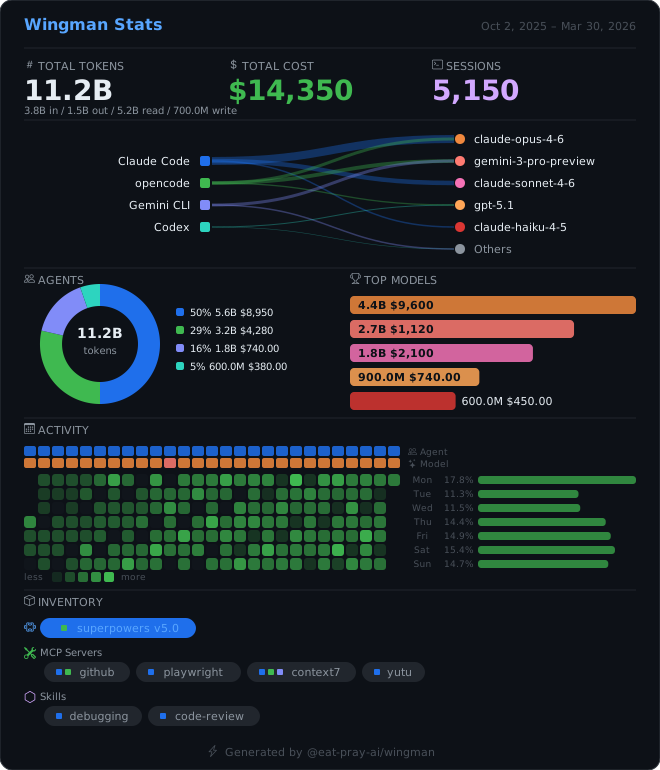 |
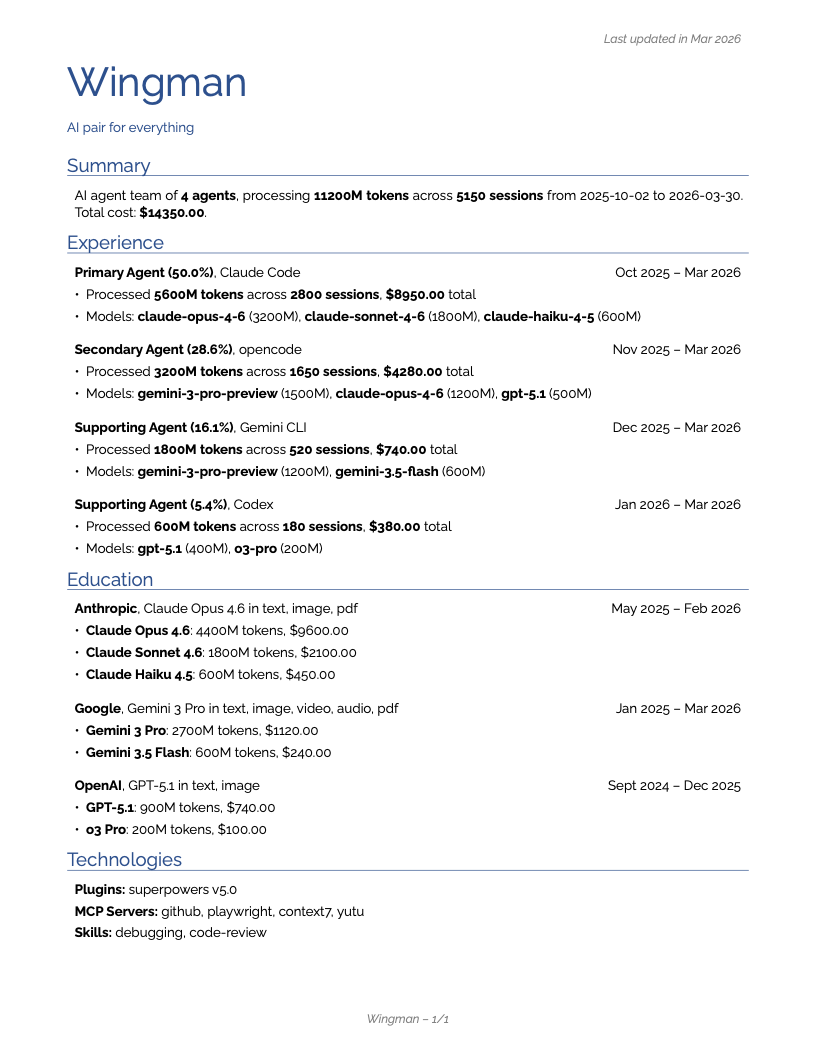 |
Supported Agents
| Agent | Data Source | Format |
|---|---|---|
| Claude Code | ~/.claude/projects/*/*.jsonl |
JSONL |
| opencode | ~/.local/share/opencode/opencode.db |
SQLite |
| Gemini CLI | ~/.gemini/tmp/*/chats/session-*.json |
JSON |
| Codex | ~/.codex/state_5.sqlite |
SQLite |
| GitHub Copilot | VS Code workspaceStorage/ + globalStorage/state.vscdb |
JSON + SQLite |
| MORE | Coming soon! | TBD |
Quick Start
# Generate an SVG stats card (last 90 days)
npx @eat-pray-ai/wingman card

# Generate a rendercv-compatible YAML resume (last 180 days)
npx @eat-pray-ai/wingman resume
Commands
card — SVG Stats Card
# All agents, last 90 days (default)
wingman card

# Specific agents, custom output
wingman card --agents claude-code,opencode -o my-stats.svg

# Date range
wingman card --since 2026-01-01 --until 2026-03-30

# Last 7 days with specific theme
wingman card --days 7 --theme github-dark
| Flag | Short | Default | Description |
|---|---|---|---|
--output |
-o |
wingman.svg |
Output file path |
--theme |
-t |
github-dark |
Theme name |
--agents |
all detected | Comma-separated agent filter | |
--since |
90 days ago | Start date (YYYY-MM-DD) | |
--until |
today | End date (YYYY-MM-DD) | |
--days |
90 |
Last N days shorthand | |
--sections |
all | Comma-separated sections to include |
The default github-dark theme renders:
- Header — title + date range
- Top Stats — tokens (input/output/cache breakdown), estimated cost, sessions
- Agent Legend — color-coded bars showing share per agent
- Charts — donut chart (token types) + sparkline (daily activity) + model breakdown bars
- Activity Heatmap — GitHub-style contribution grid for daily usage
- Inventory — plugins, MCP servers, and skills detected across agents
- Footer — branding
resume — rendercv YAML Resume
# All agents, last 180 days (default)
wingman resume

# Custom name and headline
wingman resume --name "My Team" --headline "AI Development"

# Specific output path
wingman resume -o my-resume.yaml
| Flag | Short | Default | Description |
|---|---|---|---|
--output |
-o |
resume.yaml |
Output file path |
--name |
Wingman |
Resume name | |
--headline |
AI pair for everything |
Resume headline | |
--agents |
all detected | Comma-separated agent filter | |
--since |
180 days ago | Start date (YYYY-MM-DD) | |
--until |
today | End date (YYYY-MM-DD) | |
--days |
180 |
Last N days shorthand |
The generated YAML follows the rendercv schema with sections:
- Summary — agent count, total tokens, sessions, cost
- Experience — one entry per agent (sorted by usage), with model breakdowns
- Education — models grouped by AI lab (Anthropic, Google, OpenAI, etc.)
- Technologies — plugins, MCP servers, skills inventory
Render your resume at rendercv.com.
How It Works
Agent Adapters → UsageRecord[] → Aggregator → ShowcaseData → Renderer → SVG / YAML
- Agent adapters read local data from each AI coding agent (JSONL, SQLite, JSON)
- Aggregator groups by agent, calculates totals, builds per-model and daily breakdowns
- Pricing engine fetches model costs from models.dev (24h disk cache) to estimate spend
- Renderers produce output:
- Theme renderer → self-contained SVG string (embeddable anywhere)
- Resume renderer → rendercv-compatible YAML
Development
npm install
npm run dev -- card --days 30        # run directly via tsx
npm run dev -- resume                # generate resume YAML
npm run build                        # bundle to dist/
npx tsc --noEmit                     # type-check
npm test                             # vitest
See AGENTS.md for code style and architecture details.
Extending
Add a new agent adapter
- Create
src/agents/my-agent.tsimplementingAgentAdapter - Register in
src/agents/registry.ts
Add a new theme
- Create
src/themes/my-theme/index.tsimplementingThemeRenderer - Register in
src/themes/registry.ts
License
MIT
Reviews (0)
Sign in to leave a review.
Leave a reviewNo results found