home-care-agent
Health Pass
- License — License: MIT
- Description — Repository has a description
- Active repo — Last push 0 days ago
- Community trust — 30 GitHub stars
Code Pass
- Code scan — Scanned 7 files during light audit, no dangerous patterns found
Permissions Pass
- Permissions — No dangerous permissions requested
No AI report is available for this listing yet.
Elder care safety net for an elderly parent living alone: five paste-ready Home Assistant automations (panic button, door watch, freeze/heat alerts, night path) plus an optional local AI agent for a daily family digest. Local-first, self-hosted, no cloud, no cameras — care, not surveillance.
Home Care Agent



A local-first Home Assistant care-safety package for an elderly family
member living independently — plus an optional AI-agent layer that turns the
system's events into a daily family digest and urgent alerts.
Five paste-ready YAML automations (health-panic button, Home/Away arming,
freeze/heat-failure + battery alerts, presence-driven night lighting,
armed-away door watch) and an install-day runbook, deliberately pre-built so
install day is pair-and-paste, not design.
Who this is for
This is for a family setting up elder care at home — an elderly parent,
grandparent, or spouse living alone — who wants aging in place to be
safer without wiring the house for surveillance. If you are a caregiver
who has been shopping for a medical alert system or senior monitoring
service and balked at the monthly fee, the vendor app, and the camera in the
bedroom, this repo is the self-hosted alternative: a panic button by the
favourite chair, a door watch armed by the resident, freeze and
heat-failure alerts in winter, a night path so a 3 a.m. trip to the
kitchen doesn't end in a fall, and a daily family digest written by an
optional local AI agent.
If you searched for any of these, you are in the right place: elderly parent
living alone, senior safety Home Assistant, aging in place automation,
caregiver alert system, elderly monitoring without cameras, local-first
elder care, Home Assistant panic button, Zigbee door sensor caregiver
alert, senior fall-risk night lighting, self-hosted medical alert
alternative.
It is deliberately not a medical device, not a monitored service, and not
a camera system — see What this is not.
Why this exists
Elder-care technology has a bad habit of arriving as surveillance: cameras
with cloud AI, vendor apps that phone home, presence data that becomes
telemetry somebody else owns. That trade is not required. You can build a
genuine safety net — one that saves lives in the plain way (a panic button
that actually reaches somebody) — where nothing about the person at home
ever leaves the house except over channels the family itself controls.
This repo is that pattern, open-sourced: the automations, the install
discipline, and the covenant that governs them. It is generic by design —
every name, chat id, and credential is a placeholder you fill in for your own
household.
What's in the repo
| Path | What it is |
|---|---|
automations/ |
The five paste-ready YAML automations (below) |
bom/ |
Hardware bill of materials in three tiers (Minimal / Standard / Comfort) + the anti-BOM — what we deliberately leave out (costs approximate; verify current pricing; bom.yaml is the machine-readable companion) |
skills/home-care-agent/ |
Drop-in Hermes skill family: proven operating procedures + HA API cheat sheet for an agent seat |
docs/PRIVACY-ONE-PAGER.md |
The covenant as a printable one-page letter to the cared-for person |
docs/CARE-NET-MODEL.md |
The event → meaning → response model, arming states, and the "silence is not data" rule |
EXAMPLES/ |
Fictional samples of the digest and urgent-alert voice |
CONTRIBUTING.md · SECURITY.md · CHANGELOG.md |
How to add automations safely (Privacy Impact Note + the T-test), the one-page threat model, and what actually changed, release by release |
.github/ |
Issue and PR templates |
Architecture
                 ┌─────────────────────────────────────────────┐
                 │              THE HOUSEHOLD                  │
                 │                                             │
  Zigbee (ZHA)   │  ┌──────────┐   ┌────────────────────────┐  │
 ────────────────┼─▶│ HAOS box │──▶│  automations/          │  │
  panic button   │  │  local,  │   │  panic · home/away ·   │  │
  door sensors   │  │  no cloud│   │  env · night path ·    │  │
  mmWave presence│  └────┬─────┘   │  door watch            │  │
  temp/humidity  │       │         └────────────────────────┘  │
  siren          │       │                                     │
                 └───────┼─────────────────────────────────────┘
                         │  REST / WebSocket API (LAN only)
                         ▼
              ┌─────────────────────┐        ┌──────────────────────┐
              │  notify services    │        │  Home Care Agent     │
              │  (family phone apps │───────▶│  (optional, local)   │
              │   / Telegram)       │        │  agent/SOUL.template │
              └─────────────────────┘        │  · daily digest      │
        alerts leave the house ONLY           │  · urgent passthrough│
        over channels the family owns         │  · never acts, only  │
                                            │    notifies          │
                                            └──────────────────────┘
- Local-first. HA runs on modest hardware (e.g. an RK3528 HAOS box) with
a Zigbee 3.0 coordinator (e.g. SONOFF MG24 dongle) under ZHA. No vendor
clouds, no proprietary app bridges. - Internet-optional. The safety logic works with the internet unplugged.
Alerts leave the house only via notify channels you configure. - The agent is optional. The automations stand alone. The agent adds
family-communication polish (digests, quiet escalation) — readagent/README.md.
The five automations (automations/)
| File | What it does |
|---|---|
health_panic.yaml |
The repo's reason for existing. One press of a wireless button by the usual chair drives the siren, turns on the lights, and pushes an immediate alert to the family's phones. |
home_away.yaml |
A door-side button cycles an armed Home/Away state that gates the other logic. The resident controls what is armed — simply, locally, with a physical button. |
env_alerts.yaml |
Freeze and heat-failure alerts (a heat failure in winter is a genuine health risk: pipes and people), a commented smoke-detector placeholder pending hardware, and once-only battery-low notices. |
night_path.yaml |
mmWave presence drives a low, warm night path so a 3 a.m. trip to the kitchen doesn't end in a fall. Plus a quiet two-hour idle check-in nudge — a care affordance, not a movement log. |
door_watch.yaml |
Door openings trigger siren + alert only when the resident has armed Away. Disarmed, it is deaf by design. |
Every file carries a CHANGE THESE BEFORE FIRST USE header listing the
placeholders (notify targets, entity ids) you substitute for your household.
Quickstart
- Home Assistant. Install HAOS, add ZHA with your Zigbee coordinator,
pair devices (siren first — it's a mains-powered router node). The
hardware cart→role map and pairing traps are indocs/how-to-install.md. - Secrets. Set up your notify services (mobile app and/or Telegram) and
copy.env.example→.envfor any local tooling. Real tokens live in a
credential file outside this repo, chmod 600 — never in the tree, never in
chat. - Automations. Replace the placeholder names in each file
(CARE_RECIPIENT,CARE_TEAM_NOTIFY, entity ids), paste into HA underautomation:config, run Check configuration, then test the panic
flow end-to-end with the resident and repeat until it's muscle memory. - Optional: the agent. Point a local-first AI agent at the HA API with a
read-only token usingagent/SOUL.template.md
as its persona andagent/README.mdas the wiring doc.
If your agent runs on Hermes, dropskills/home-care-agent/
into its skills directory for the operating procedures and API cheat sheet.
The covenant: care, not surveillance
This is stewardship, not telemetry harvesting. The rules are not marketing —
they're the design:
- Every automation is a safety affordance. Presence logic exists to light
a night path and to prompt a "just checking in" nudge — never to log,
export, or resell the resident's movements. - Local-first by construction. No vendor cloud, no camera AI, no third-
party SaaS ever touches presence, panic, or occupancy data. - No health inference. The system reacts only to the events the family
configured. It does not model, score, or guess anyone's health. - The person at home is a person, not a dashboard. The cared-for person's
consent is a precondition of the build, not a footnote — see the dignity
clauses inagent/SOUL.template.md. - Alerts leave the house only over family-controlled channels.
Outbound location or health-flavored data to third parties is forbidden by
the agent's hard rules, not merely discouraged.
If you adopt this project, adopt the covenant too. An elder care system built
without the resident's informed agreement is surveillance wearing a cardigan.
What this is not
Stated plainly, because elder care marketing blurs these lines:
- Not a medical device. No FDA clearance, no diagnosis, no treatment claim.
- Not a monitored service. Nobody is on the other end of a subscription —
the alert goes to your family's phones, and that is the point. - Not a camera system. No optics, no cloud video AI, no footage of the
resident anywhere. Presence is mmWave yes/no, consumed on the LAN. - Not fall detection. The night path and the idle check-in reduce fall
risk; they do not detect a fall. Don't build a plan that assumes they do. - Not a substitute for emergency services. The panic button's whole job is
to make sure a human finds out.
FAQ
Does this need the cloud? No. HA, ZHA, and all five automations run fully
offline. Only the notify hop (push/Telegram) wants internet, and you choose
that channel.
Does this need an AI agent? No, optional. The automations are complete on
their own. The agent adds a daily digest and alert relay for the family
channel — it runs locally with a read-only token and is contractually
forbidden from acting on devices.
Is this medical advice or a medical device? No. It's home automation with
a panic button. It reduces risk; it does not diagnose, treat, or replace
emergency services. The panic button's job is to make sure a human finds out.
Which hardware? Any ZHA-compatible Zigbee devices work; the reference
cart (button pushes, door/window sensors, mmWave presence, temp/humidity,
siren) is listed in docs/how-to-install.md. Smoke/CO detection is not in
this package's scope — pair real Zigbee smoke detectors and use the
commented placeholder in env_alerts.yaml.
Can I resell / fork / embed this? Yes — MIT. The covenant section is the
one thing we ask you not to strip from your fork's conscience.
Art
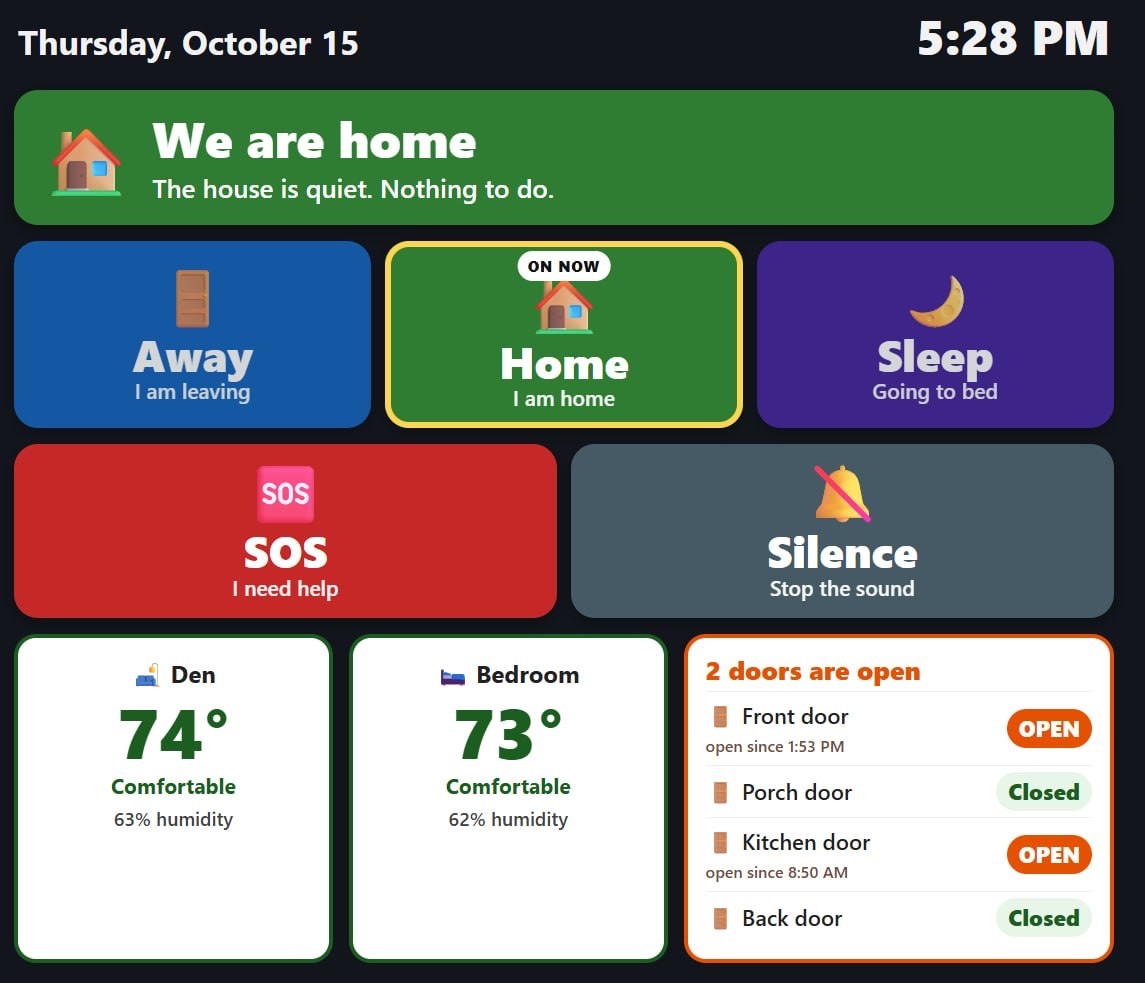
The banner above is the real deployed dashboard (an anonymized example — mode
buttons, SOS, room climate, door watch), re-encoded to strip camera metadata.
Generated illustrations were tried and dropped in favor of showing the actual
product.
License
MIT — see LICENSE.
Reviews (0)
Sign in to leave a review.
Leave a reviewNo results found