runcoach-ai
Health Warn
- License — License: MIT
- Description — Repository has a description
- Active repo — Last push 0 days ago
- Low visibility — Only 6 GitHub stars
Code Pass
- Code scan — Scanned 12 files during light audit, no dangerous patterns found
Permissions Pass
- Permissions — No dangerous permissions requested
No AI report is available for this listing yet.
Local-first AI running coach for Garmin data, powered by an existing Claude subscription instead of an API key. Deterministic readiness engine, allowlisted agent, prompts tested like code.
runcoach-ai


A local-first AI running coach for your Garmin data — powered by the Claude subscription you already have.
I came to running late, and for a long time my VO2max would not move. I had always trained a lot,
and it had never really shown up in that number — so I assumed more of the same would eventually
work. It did not. I was training wrong, in ways the watch on my wrist had the data to show me and
never did: Garmin collects everything and explains nothing.
That was the idea. The data is already there; let an AI read it and coach — with the training aimed
squarely at raising VO2max rather than at collecting kilometres, and with the decision rules written
down so the coach explains them instead of improvising. This repository started as that tool for one
athlete. It is now installable for anyone with a Garmin watch and a Claude subscription.
No cloud backend, no API key, no Docker. One Python package that syncs your Garmin data into a
SQLite file on your machine, shows it in a small web app, and lets Claude act as your coach —
with a deterministic readiness engine underneath, so the AI explains decisions instead of inventing them.
If you came for the engineering rather than the running, the five decisions this repository is
actually about — each with the measurement behind it — are in
Design decisions. The short version: the verdict is
pure code and only the explanation is AI · the agent runs on
an allowlist, not a denylist (--tools "", one MCP server, empty temp cwd) ·
prompts are regression-tested by an LLM-as-judge suite whose last run is
in the repo · quantities that exist in two languages are pinned by
executing the shipped JavaScript against the Python · and the
release gate scans binaries too, with a false-positive counter-case. CI runs lint,
957 tests, 76 frontend tests and that gate on three operating systems and two Python versions, with every
action pinned to a commit SHA — and a second job that builds the wheel, installs it as a user would and
drives the installed executable through this quick start on all three systems,
because the suite proves the code and only an install proves the package.
https://github.com/user-attachments/assets/81389835-8d7b-4c97-99d5-e23ac4540549
The 89-second demo, with voice-over: the synthetic demo athlete, rebuilt from this repo by scripts/video.py
(file). No player above? The GitHub mobile app shows no videos:
▶ play the demo in the browser.
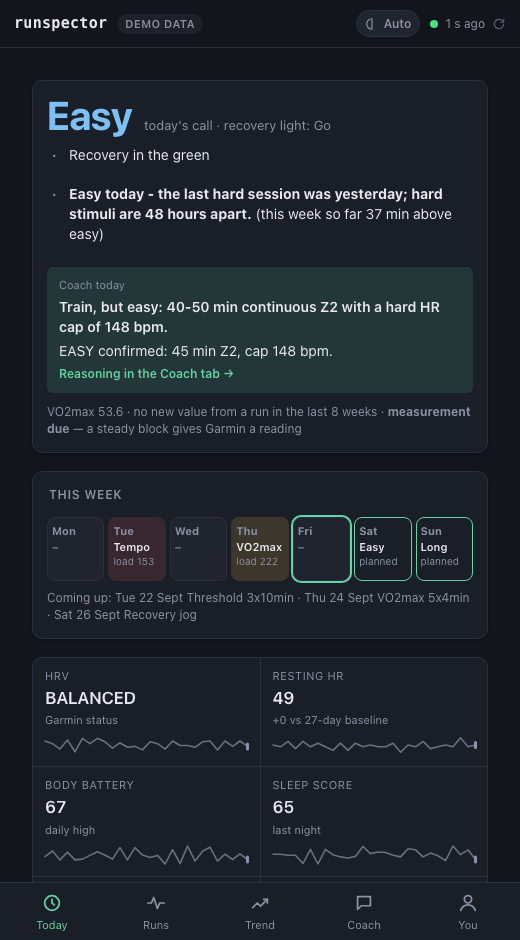
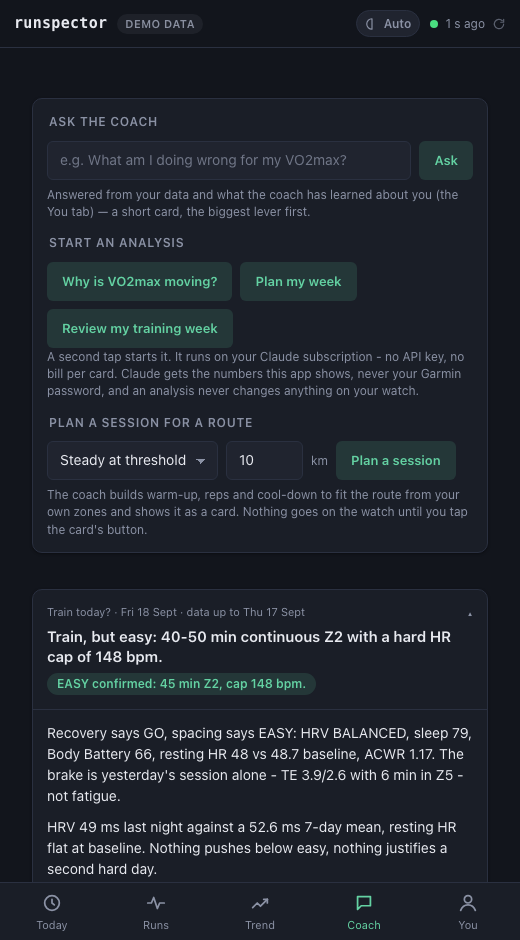
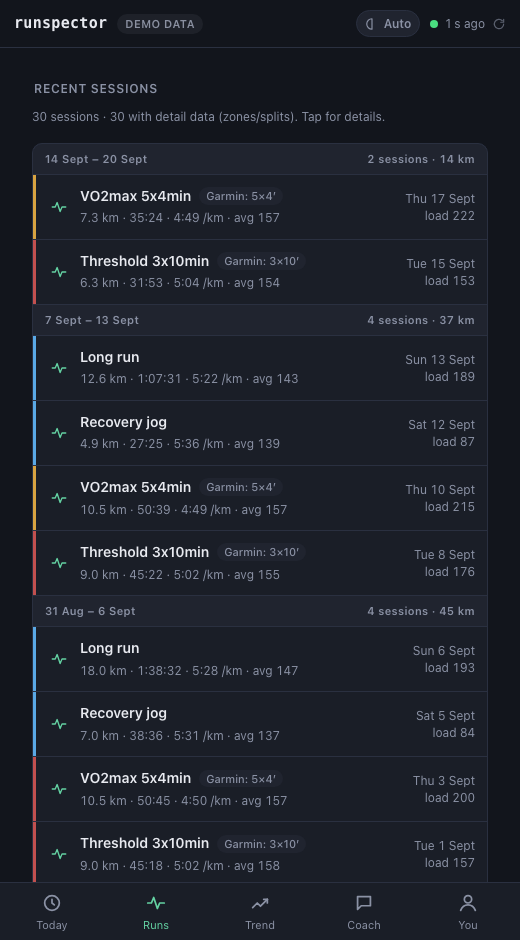
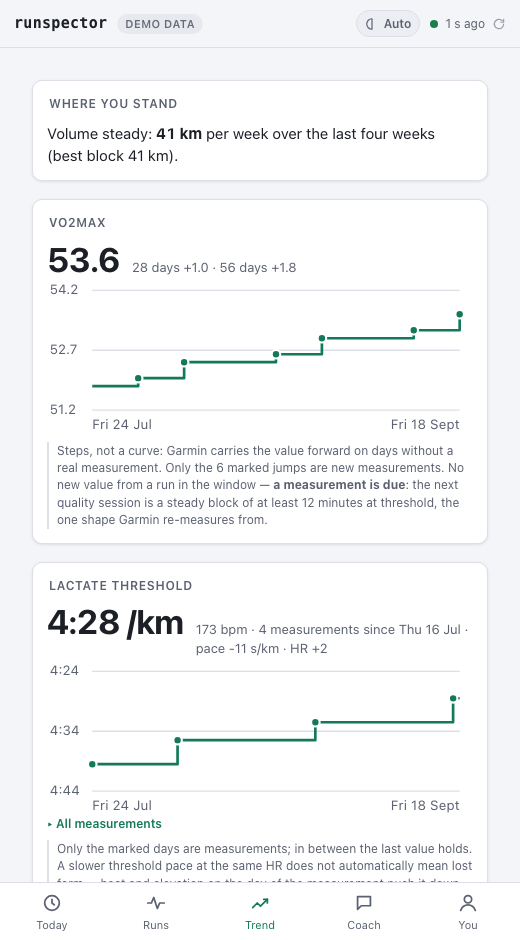
The built-in synthetic athlete (runcoach serve --demo). Every image is regenerated bypython scripts/screenshots.py, and the coach card is an unedited agent run against that same
demo database, kept in demo-card.json so the picture cannot
drift from the app — the numbers it cites (HRV balanced, Body Battery 66, resting HR 48, ACWR 1.17) are the
ones on the Today tab beside it. docs/screenshots/ has each of the five tabs full-length, in both
themes — e.g. today.png and
today-light.png.
Not affiliated with Garmin. Uses the unofficial
python-garminconnect library against your own account.
This is a training tool, not medical advice.
Quick start
# 1. install (needs uv: https://docs.astral.sh/uv/)
uv tool install git+https://github.com/edxleon/runcoach-ai

# 2. look around without any account
runcoach serve --demo

# 3. the real thing
runcoach serve        # first start: asks for the Garmin login (e-mail, password, MFA code -
                      # only session tokens are stored), checks Claude, then opens
                      # http://127.0.0.1:8765 and syncs the last 30 days in the background
The Claude subscription is not connected inside runcoach. Coach cards run on the
Claude Code CLI on your machine, signed in with your plan: install
it and run claude auth login once. runcoach serve checks that at start (and offers the login when
it is missing), the Coach tab says what is missing, and there is no API key anywhere. Garmin can be
signed into from the page itself (Setup → Sign in to Garmin, or Sign in again when the session has
expired) - e-mail, password and Garmin's code if your account uses one, and the sync starts right after.runcoach login does the same from any terminal, and a running app picks it up on ↻ - no restart.
runcoach doctor tells you what is missing — it checks the Garmin session by actually
using it, and reports the data age, because a token that quietly expired is how this kind of app dies.
Use runcoach doctor --offline to skip the Garmin call. Exit 1 means something needs fixing, soruncoach doctor || notify-me works in a cron; a missing Claude CLI is reported but does not set it,
since everything except the coach cards works without it.
Use the same data in Claude Code or Claude Desktop as an MCP server:
claude mcp add runcoach -- runcoach mcp
# then just ask: "should I train today?"
# or: "plan me an easy 40 minutes for tomorrow" - you see the session, and it goes
# on your watch only after you say yes ("take it back off" undoes it)
Keep it fresh without the app (cron / Task Scheduler): runcoach sync.
Later on:
uv tool upgrade runcoach-ai     # newer code; your data and Garmin session stay where they are
uv tool uninstall runcoach-ai   # removes the program only - delete ~/.runcoach yourself if you want the data gone
uv tool install takes whatever is on main; pin a release instead withuv tool install git+https://github.com/edxleon/[email protected].
Before you start: the usual worries
- Is my Garmin password stored? No. It goes to Garmin once, to sign in. Garmin answers with a
session token, and only that is kept, on your computer, in a folder only your user account can read.
The page's sign-in takes the password only on the computer runcoach runs on: opened from a phone,
the page is plain HTTP across your network, so there it points toruncoach logininstead. - Does it cost anything extra? runcoach is free (MIT). Coach cards use your Claude plan the way any
Claude Code use does, with no API key and no bill per card. Without Claude, everything except the
cards still works. - What does Claude see? The numbers this app shows (readiness, recent runs, zones, weekly load),
and only when you start a card or ask in Claude Code. It never sees your Garmin password, the
session token or any raw file. It reaches Claude through your own account, under your plan's terms. - Can it mess up my watch or my calendar? Reading is all it does on its own. Something goes to
Garmin only when you press "Put on watch" or say yes in Claude Code, and then only the session
shown to you. "Take off watch" removes it again. The coach's own card runs cannot write at all. - Can Garmin block my account? runcoach signs in through
python-garminconnect, a community library
that Garmin does not officially support. A daily sync makes about 25-40 requests and the first one
(a month of data) a few hundred. It pauses between workout downloads, never fetches more than 90 days,
and stops at the first rate-limit answer instead of retrying into it. That is no guarantee, but it
is not scraping either. - Is this medical advice? No. It is a training tool. Pain, dizziness or anything that feels wrong
goes to a doctor, and the coach says so instead of planning around it. - How do I remove everything? Delete
~/.runcoach(the app's footer shows the folder) and runuv tool uninstall runcoach-ai. To cut the token off at Garmin as well, change your Garmin password.
What you get
| Tab | What it answers |
|---|---|
| Today | GO / EASY / REST with the signals behind it, one decision sentence for today and, on a hard day, which hard session (VO2max intervals, threshold reps, or the steady block Garmin measures VO2max from), your VO2max with the days since it last really changed, this week planned vs. done, last night's sleep, your zone bounds with their origin |
| Runs | Every run with its intensity band, real interval structure (5×4′, not "5 minutes"), zones, weather, performance condition — and an Analyze this run button |
| Trend | VO2max as honest steps (and whether a measurement is due), lactate threshold history, weekly hard-minute share vs. an 80/20 target, aerobic efficiency (pace at a fixed heart rate) with spread and trend, volume, polarisation, ACWR, and Garmin's own load focus (its 4-week load per band against its target range) as a second opinion |
| Coach | Ask the coach anything in your own words (what am I doing wrong?) - a short card, the biggest lever first. One-tap analyses by Claude as short cards that remember the previous card of their kind, accept your 👍/👎, take follow-up questions and can be deleted. Two start here (Why is VO2max moving? · Review my week); the other two start where their subject is — Should I train today? on the Today tab, Analyze this run on a run |
| You | Your week, the foundation the planner goes by: runs per week, your days, long run, days you can't run, another sport - read from your history and kept up to date, and yours to change: what you set wins until you hand it back. For your coach: a note in your own words ("gym Mon, Wed, Fri", "less time until December") the coach reads before every answer. And what the coach has learned about you, each with its evidence: how consistent you are, your intensity pattern, the VO2max trend, Garmin's load focus, resting-HR baseline and zones - and since when, where something changed. Every card and the MCP tool get_athlete_profile read all three |
How it works
flowchart TD
    G[Garmin Connect] -- "token resume, read" --> S[sync.py]
    S --> DB[(SQLite<br/>~/.runcoach)]
    DB --> L[logic.py<br/>readiness · decision<br/>intervals · bands]
    L --> SNAP[snapshot.py]
    SNAP --> WEB[web app<br/>127.0.0.1:8765]
    L --> MCP[MCP server<br/>16 tools<br/>13 read-only · sync · apply · undo]
    WEB -- "spawn job" --> A["claude --print<br/>(your subscription)"]
    A -- "only mcp__runcoach__*" --> MCP
    A -- "JSON card" --> WEB
    MCP --- CC[Claude Code / Desktop]
Design decisions
The verdict is code, the explanation is AI. GO/EASY/REST, today's decision, interval detection and
intensity bands are pure functions in logic.py — unit-tested, no network, no
LLM. The facts and the decision are computed once there, and the agent is handed the finished
decision through get_training_readiness rather than left to derive its own: a coach card is a reading
of that decision, not a second, independently produced verdict. Claude may explain it, add the context a
rule cannot — or disagree, in which case it has to say which number it disagrees with. Claude's job is
the part rules are bad at: weighing a conflict, phrasing a plan, answering a follow-up.
Your subscription, not an API key. Coach jobs run claude --print as a subprocess. There is no key
to leak, no per-token bill, nothing to configure. If your quota is exhausted the job waits for the next
window instead of failing.
The agent gets an allowlist, not a denylist. Workout titles are attacker-controlled text that ends
up in a prompt. So the coach agent runs with --tools "" (no Bash, no file access, no web),--strict-mcp-config with exactly one server — this one — and only mcp__runcoach__* pre-approved, in an
empty temp directory. The card comes back as JSON and is validated and written by the app, not by the
agent — and an answer produced without a single tool round trip is discarded: a model that cannot reach
the data will otherwise invent it (this was measured, not assumed).
See web/agent.py.
What that does and does not buy, stated plainly: an injected workout title cannot reach anything but
this app's own tools — no shell, no filesystem, no network, no other MCP server, and no write path
from a card run: every tool is read-only except sync_garmin, which triggers authenticated requests to
your own Garmin account and so is worth a rate limit rather than nothing, and apply_workout, the one
tool that writes to Garmin — which the app's card runs cannot call at all (--disallowedTools, pinned
by a test), because applying a proposal is a human's click on the card or their word in a Claude Code
session, never a job's decision. What it can still do is influence
what a card says — and the card is the product. And cards are remembered: the previous card of the same
kind is fed back as context for the next one, so a bad card echoes forward until you delete it (the UI
has a delete button per card).
Aggregates for the model, series for the UI. MCP tools never return day-by-day rows for a period —
daily series bloat a context window and get misread. The agent sees summaries and weekly buckets; only
the frontend, which draws curves, gets points.
Honest numbers. A few examples of what that means in practice:
- Garmin carries VO2max forward on days without a measurement, so a change is only reported when the
value actually varied — never as a difference of window endpoints. - A self-computed ACWR needs ≥ 21 days and ≥ 8 workouts, is labelled
computed, and may dampen a
verdict to EASY but never drive REST. - A GO from fewer than two recovery signals is downgraded: thin data is not green.
- If the sync is stale, today's decision is
unknownrather than yesterday's verdict in today's clothes. - An incompletely fetched calendar month does not replace the local mirror ("nothing planned" would be
a lie from a degraded source). - Garmin's lactate-threshold pace field is off by a factor of ten; it is normalised, range-checked, and
loudly dropped if the unit ever changes. - A planned week lands on the athlete's own days: how many days, which weekdays and the long-run day
are read from the last eight weeks with running (looking back half a year, and before a pause while
coming back from one), and the quality sessions keep clear of a weekly other sport and the day after
it - a gym Tuesday leaves room for one quality session, not two. A rotating every-other-day rhythm
has no weekdays of its own and is planned in the default rhythm. Each value says where it came from:
"long run on sat - your longest run fell on sat in 8 of 8 weeks". - A planned week is sized from the athlete's own running weeks - rolling weeks ending on the day of
planning, never more than 10 % over the bigger of the last two - and then read against their
history, in code: the load ratio can hold or unload it, every fourth week is a down week, ten
days without a run make a return week of easy running only (half the weeks before after more
than three weeks off), and twenty-eight days without a new VO2max value put a steady block in
the threshold slot. A budget too small for the planned days plans a shorter week - one quality
session at three days, never a lone hard one - instead of inflating the sessions. A week with one
quality session takes the one that is due (VO2max until the zone-5 stimulus is set, then
threshold, or the measurement). Back from a pause the athlete rebuilds: the step grows from the
last seven days, not from a median that lags the climb, and there is no down week until the weeks
are back to 80 % of the level before the pause. A step is never smaller than the week planned
before it, and a week held or unloaded on the load ratio is never bigger: the median it holds
rises with every week run above plan, which is what raised the ratio. Each rule is a named
assumption on the proposal, none of them a prompt's discretion.
On a hard day the decision also says which hard session, from what the last seven days did
and did not contain; after a pause the day is easy instead. - Without a measured threshold pace, sessions are sized from Garmin's own 5 km and 10 km predictions
rather than from a 5:00/km default that fitted one athlete. - Those rules are run, not only unit-tested:
evals/sim.pyputs eight synthetic
athletes - one who follows the plan, one who skips 40 %, one who takes three weeks off, one who
falls ill, one who always runs harder - through sixteen weeks of the app, day by day against the
real tools, and checks what a runner would expect of a coach over the whole course. It found the
two planner bugs above. It cannot tell whether the training works - its body is a toy - and it
finds only what its data model knows, so the live test on a real account stays.
Prompts are tested like code. The coach's behaviour lives in two Markdown files
(skills/) with an LLM-as-judge regression suite (evals/):
32 cases such as "a run already happened today → no second hard session", "warning signs of low energy
availability are not explained away", "an instruction inside a workout name is not followed". They run
without Garmin data against the real CLI — though only over those two files, not over the other two
pieces of the shipped prompt (templates.json and the JSON-card frame in web/agent.py, whichtests/test_web.py covers deterministically instead), and under --safe-mode on whichever model the
suite is pointed at, neither of which production can use. The framing itself is imported from the app
rather than copied, so the suite cannot drift from what ships. --no-skills re-runs a case with the
skill files removed: a case that still passes is testing the model, not the prompt.
Boring technology. Python stdlib HTTP server, sqlite3, vanilla ES modules, inline SVG charts. No
framework, no build step, no ORM. ~40 SQL queries, all in store.py.
Runs on Windows, macOS and Linux (CI matrix).
More detail: docs/architecture.md.
Privacy
Everything stays in ~/.runcoach/ (override with RUNCOACH_HOME): the SQLite database, Garmin session
tokens, coach cards. Your password is never stored. On Linux and macOS the directory is created 0700,
so on a shared machine other local accounts cannot read those files; Windows inherits the user profile's
ACL instead. While runcoach serve runs, that no longer covers them: without a token any local account
or process can ask 127.0.0.1:8765 for your data, and since v0.2 apply or undo a proposal with your
Garmin session. On a machine you share, start it with RUNCOACH_TOKEN set - the server then wants the
token on loopback too, and prints the link to open once. The only outbound connections are to Garmin
(sync) and — when you trigger a coach card — to Claude through your own CLI session, carrying
aggregated training data. The server binds to 127.0.0.1; listening on the network requiresRUNCOACH_TOKEN and the server refuses to start without it. Note that --host 0.0.0.0 serves plain
HTTP with no TLS, so on that network the token and everything the app returns travel unencrypted and
readable by anyone who can see the traffic — it is meant for your own phone on your own LAN, not for a
network you do not control.
Configuration
| Variable | Default | Purpose |
|---|---|---|
RUNCOACH_HOME |
~/.runcoach |
data directory |
RUNCOACH_TZ |
system zone | IANA zone for "which day was this run" |
RUNCOACH_TOKEN |
– | required for --host 0.0.0.0 (phone in your home network) |
RUNCOACH_MODEL |
CLI default | model for coach cards |
RUNCOACH_GARMIN_TOKENS |
~/.runcoach/garmin |
reuse an existing python-garminconnect token dir |
RUNCOACH_AUTOSYNC_MIN |
30 |
in a Claude Code / Desktop chat, get_training_readiness syncs first when the last sync is older than this; 0 turns it off |
RUNCOACH_QUOTA_WAIT_S |
3600 |
how long a job waits for subscription quota |
RUNCOACH_JOB_TIMEOUT_S |
600 |
hard timeout for a single coach job |
RUNCOACH_ACTIVITY_BACKFILL_DAYS |
182 |
minimum window of the workout list a sync fetches (your habits look back 26 weeks; zone detail is fetched for the last 35 days) |
RUNCOACH_LT_HISTORY_DAYS |
180 |
how far back the lactate-threshold history is fetched |
RUNCOACH_LOG |
WARNING |
log level — set INFO or DEBUG to watch a sync. INFO and DEBUG also log every HTTP request of the web app |
Four more (RUNCOACH_DB, RUNCOACH_DEMO, RUNCOACH_CLAUDE_CMD, RUNCOACH_PII_EXTRA) exist for
internal plumbing and tests; they are not part of the supported surface.
Optional athlete profile: runcoach profile --max-hr 182 --goal "sub-50 10k". Your week - days
per week, your days, long run, days off, another sport - is set on the You tab (or with--days-per-week and --long-run-day); whatever you leave open the planner reads from your
history: the days you usually run, and the weekday your longest run falls on. A day off is never
planned on. The note to your coach is context for the coach, not a rule: the days are what the
planner itself keeps to.
Development
git clone https://github.com/edxleon/runcoach-ai && cd runcoach-ai
uv run pytest -q                   # no database server, no network, no Garmin account needed
node --test "web-tests/*.test.mjs" # frontend logic
uv run ruff check                  # lint — config is real and the backlog is zero
npx --yes @biomejs/[email protected] lint --error-on-warnings   # frontend lint (biome.jsonc)
uv run python evals/run_evals.py   # prompt regression (uses your Claude subscription)
uv run python scripts/pii_gate.py  # release gate
Status & roadmap
v0.1 was read-only towards Garmin. v0.2 adds the write path: propose_workout builds a session
for your route from your own zones and files it, propose_week files a polarised week as one package,
a proposal can replace the hard session the calendar had on a red day, and apply_workout uploads,
schedules, pushes to the watch and reads back to verify. The app's card runs cannot apply anything;
in the app a proposal is applied by a click on the card ("Put on watch", two taps), in Claude Code by
your answer — and taken back off the same way, because a write you cannot undo is a write nobody makes
the first time.
What has been run against a real account, not only the fake Garmin client the suite uses: on
2026-10-28, one easy session through runcoach mcp — proposed from the athlete's own zones, uploaded,
scheduled, pushed, seen on the watch, read back and verified, then undone — with every step
cross-checked by a second, independent Garmin client. The app's button calls the same plan.apply andplan.undo. Not yet run for real: propose_week as a package, and the red-day swap that unschedules a
calendar entry. One athlete, one account, one watch.
Roadmap
docs/roadmap.md is the backlog, ordered by what it would do for the runner: an
athlete's own check-in (ill, sore, how it felt), sessions with your own structure, the proposed
session matched against the run that followed, a runcoach today for the morning, deeper history,
body weight and Garmin's own readiness alongside the app's, and race preparation for those with a
date. v0.3 made the planner read the history for what comes next; the rest is there with the
reasoning and the order.
License
MIT
Reviews (0)
Sign in to leave a review.
Leave a reviewNo results found