openmelon
Health Warn
- License — License: Apache-2.0
- Description — Repository has a description
- Active repo — Last push 0 days ago
- Low visibility — Only 6 GitHub stars
Code Warn
- process.env — Environment variable access in npm/bin/openmelon.js
- process.env — Environment variable access in npm/install.js
Permissions Pass
- Permissions — No dangerous permissions requested
This tool is a content-creation agent that helps generate structured text and multimodal prompts via the terminal. It routes user intents through a prompt-enhancing pipeline before sending them to external LLM and image-generation APIs.
Security Assessment
Overall risk: Low. The tool does not request dangerous system permissions and relies on environment variables for API authentication. Two warnings were flagged for environment variable access in the Node.js installer and binary shim files, which is expected behavior given the need to provision API keys (Anthropic, OpenAI, OpenRouter). No hardcoded secrets were detected. The tool makes standard outbound network requests to user-configured AI providers. Users should be aware that the npm installer fetches a precompiled Go binary, though it does verify integrity against a SHA256 checksum file.
Quality Assessment
The project is actively maintained, with its most recent push occurring today. It uses a permissive, standard open-source license (Apache-2.0), which is excellent for adoption and contribution. However, community trust and visibility are currently very low, with only 6 GitHub stars. This indicates that while the authors are actively developing it, the broader developer community has not yet widely tested or audited the codebase.
Verdict
Use with caution — the code appears safe and well-intentioned, but its extremely low community adoption means it lacks the extensive peer review typically expected for production environments.
A content-creation agent runtime for reproducible multimodal production — projects, workflows, skills, provenance.

OpenMelon
A content-creation agent that runs in your terminal.
openmelon -p "Grab a bowl of beef noodles after work and write an authentic restaurant-visit post." \
  --skill skillplus:food-street-realism \
  --llm openrouter --llm-model openai/gpt-5.5 \
  --image-provider openrouter --image-model google/gemini-2.5-flash-image
→ generates a structured prompt with skillplus, routes it through the LLM you configured, generates an image, and writes everything to .openmelon/artifacts/ with a provenance JSONL line. Optionally publishes to V-Box via vbox-cli.
OpenMelon vs. direct image prompting
All images below are one-shot outputs from the same image model: google/gemini-2.5-flash-image. The only difference is the prompt path: direct prompting sends the original intent straight to the image model, while OpenMelon runs the same intent through the skillplus → LLM → image pipeline first, expanding it into a richer generation prompt before that single image-generation call.
| Intent | Direct prompt | With OpenMelon |
|---|---|---|
Grab a bowl of beef noodles after work and write an authentic restaurant-visit post. |
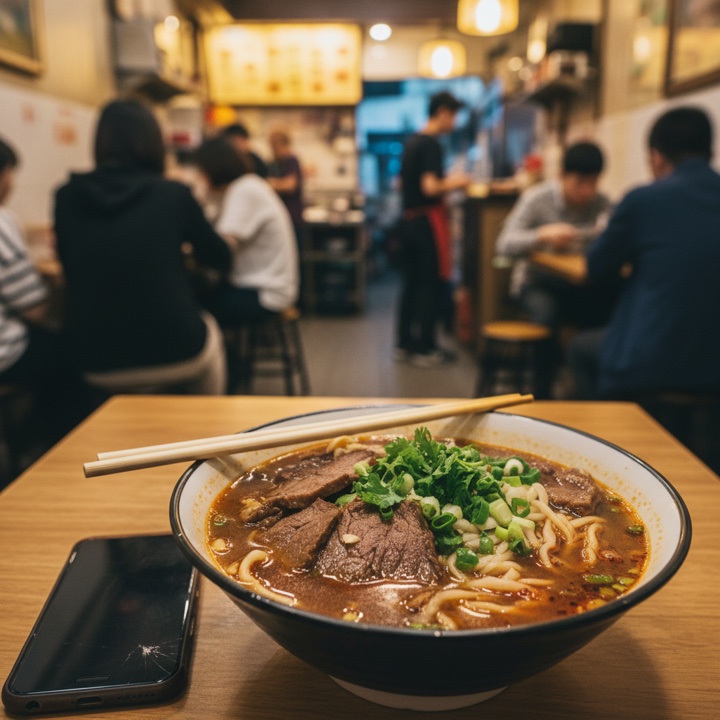 |
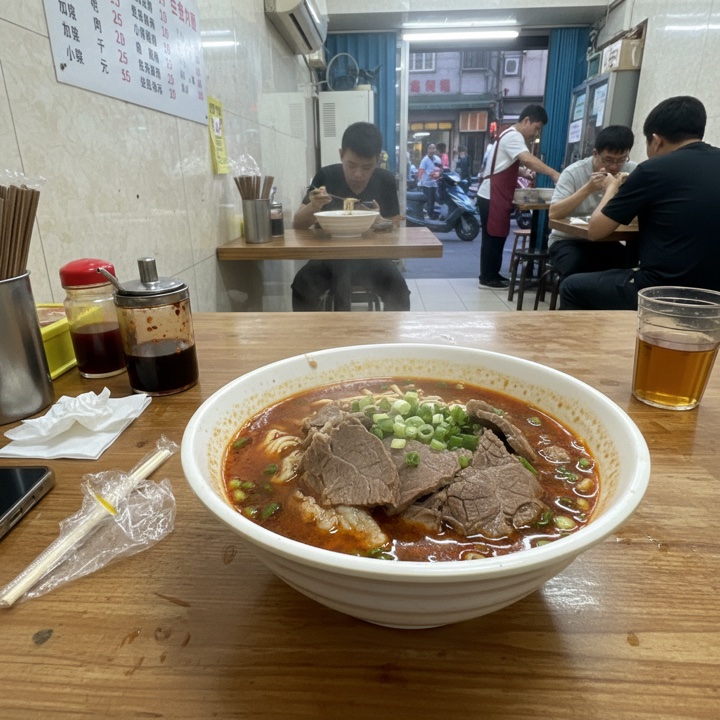 |
A cozy wooden cabin with warm lights, surrounded by a snowy pine forest at dusk. |
 |
 |
Install
npm install -g @e8s/openmelon @e8s/skillplus
@e8s/openmelon is a Node shim that fetches the matching Go binary from GitHub Releases on install (verified against SHASUMS256.txt). To build from source instead:
go install github.com/eight-acres-lab/openmelon/cmd/openmelon@latest
For --publish vbox, also:
npm install -g @e8s/vbox-cli
Authentication
Set whichever you have. --llm auto (default) picks based on what's set, preferring Anthropic.
| Variable | Purpose |
|---|---|
ANTHROPIC_API_KEY |
LLM via Anthropic |
OPENAI_API_KEY |
LLM and/or image generation via OpenAI |
OPENROUTER_API_KEY |
LLM and/or image generation via OpenRouter |
OPENAI_BASE_URL |
route OpenAI calls through a relay (LiteLLM, Helicone, etc.) |
VBOX_API_KEY |
required for --publish vbox |
Commands
openmelon -p "<intent>" --skill skillplus:<name> [flags]
openmelon --project <path>                         # legacy declarative workflow
openmelon                                           # help
Common flags
| Flag | Default | Notes |
|---|---|---|
-p |
— | one-shot intent. Triggers agent mode. |
--skill |
skillplus:food-street-realism |
skillplus:<name> / path:<dir> / <bare path> |
--llm |
auto |
auto / anthropic / openai / openrouter |
--llm-model |
— | required. e.g. openai/gpt-5.5, claude-sonnet-4-6, x-ai/grok-4 |
--image |
true |
set --image=false to skip image generation |
--image-provider |
openai |
openai / openrouter |
--image-model |
— | required when --image=true. e.g. gpt-image-1, google/gemini-2.5-flash-image |
--image-size |
vendor default | e.g. 1024x1024, 1792x1024 |
--locale |
zh-CN |
passed to the skill compiler |
--model-profile |
gpt-image-family |
per-skill prompt overlay |
--publish |
— | vbox to upload + post via vbox-cli |
--artifact-dir |
.openmelon/artifacts |
where images + provenance go |
--json |
false |
also print run summary as JSON to stdout |
openmelon --help for the full list.
How it works
intent + skill name
   ↓
skillplus compile  →  compiled prompt + output schema
   ↓
LLM (streamed)     →  structured JSON {generation_prompt, ...}
   ↓
image generator    →  PNG
   ↓
artifact + provenance JSONL
Skills are reusable "filters" — a skill package describes what to ask the LLM, not what to ask the image model. The LLM turns the skill contract plus your intent into a concrete generation prompt; the image model paints from that prompt. Every run records a JSONL line capturing skill version, model ids, intent, image SHA-256, and timing — re-runs are reproducible from the line alone.
Sub-agent integration
openmelon is invokable from any agent CLI that can run a shell command. Drop-in Skill files for Claude Code and Cursor are in examples/integrations/.
End-to-end testing
See docs/testing.md for the full recipe (direct CLI, --publish vbox, Claude Code Skill paths).
License
Friendly Links
- LINUX DO — This open-source project recognizes and links to the LINUX DO community.
Reviews (0)
Sign in to leave a review.
Leave a reviewNo results found