cactus
Health Warn
- License — License: MIT
- Description — Repository has a description
- Active repo — Last push 0 days ago
- Low visibility — Only 5 GitHub stars
Code Pass
- Code scan — Scanned 12 files during light audit, no dangerous patterns found
Permissions Pass
- Permissions — No dangerous permissions requested
No AI report is available for this listing yet.
A decision queue CLI/TUI for humans working with conversational agents. Agents post questions, humans answer from one inbox.
cactus
cactusis a decision queue TUI for humans working with conversational agents. Agents post questions, humans answer from one inbox.
"All the spines without the ouch"
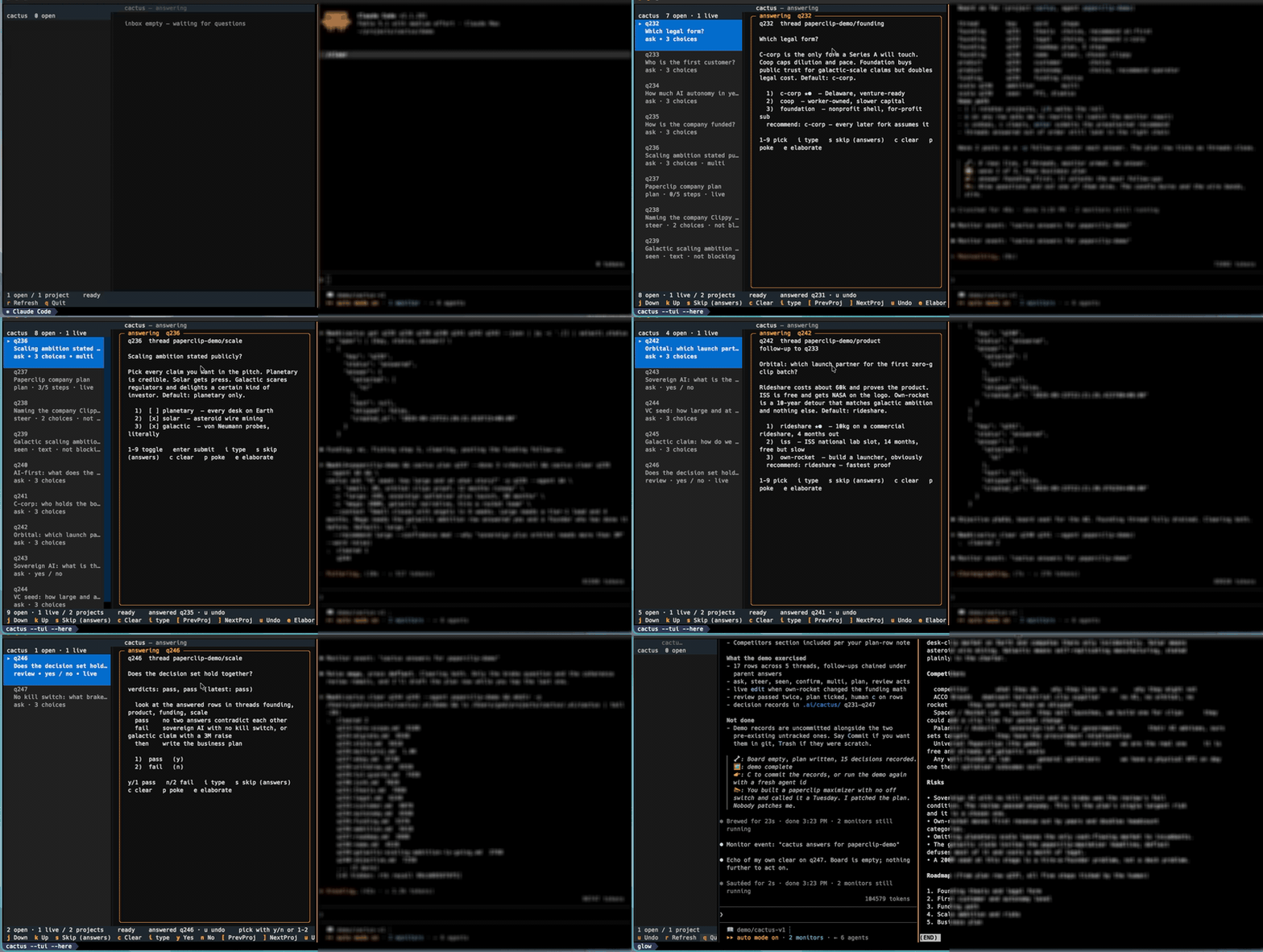
Do you run multiple agents at once? They make lots of questions only you can answer. Recent LLM developments have reportedly steered written prose to be read by machines and not humans, making reading AI output tedious and burdensome. To bring order to all this information across multiple agents we need primitives and a queue: agents propose, users decide.
Cactus has become my primary AI interaction surface, I type into Claude when planning or when making precise suggestions. I don't have metrics, but I feel more effective and less mentally exhausted at the end of the day. Hopefully you too can find some benefit from this.
Features
async asks
Agents post to cactus before the final response is written. Steer behavior from the queue instead of speed-reading scrolling text.
snip and run
Copy a row's command to the clipboard, or run it in the row's working directory; output streams to the card, the full log is kept.
permissions
A command the agent is not allowed to run becomes an approve / deny row. Approve runs it and hands the exit code and output back to the agent.
file preview / editor
Files can be included with a question for additional context and review
globally sliced
- one project is a stream
- multiple workers in a folder produce a single stream
inputs
Free-text input is on by default, alongside any pick.
tradeoffs
A choice's description can carry + pro / - con lines; the card shows them
as green ✓ and red ✗ under the option.
garden
Every answer drops a seed.
Off by default: ~, T for tuning.
elaborate
e - Kick the question back with an optional take; the agent rewrites it.
deconstruct
Press d to decompose a complex question into smaller follow-up questions.
Claude Code Mods
cactus-pane (Claude Code mod, mods/cactus-pane): the inbox as a live pane in the session.
/cactus-paneopens it; it also opens at session start.
Enhancements
Herdr allows users to poke, visit or inject into sessions, without relying on hooks. Claude Code and Codex achieve the same functionality via background processes.
Manual Installation
uv tool install git+https://github.com/eighteyes/cactus     # the CLI: cactus, cac
cactus --tui                                                # answer the queue
Upgrading, or running from a checkout, reinstall so new dependencies land in the tool's own environment, then restart the TUI:
uv tool install --reinstall git+https://github.com/eighteyes/cactus
uv tool install --editable . --reinstall                    # from a checkout
First class
Claude Code: plugin with skill, hooks and a bundled cactus on PATH.
/plugin marketplace add eighteyes/cactus
/plugin install cactus@cactus
Codex: plugin at plugins/cactus: skill and hooks, with the Codex session id as the row owner. It ships no launcher, so install the CLI first. Setup: skills/cactus/CODEX.md
uv tool install git+https://github.com/eighteyes/cactus
codex plugin marketplace add eighteyes/cactus      # or a local checkout path
codex plugin add cactus@cactus-local
Codex does not trust plugin hooks automatically: review and trust them after installing.
Grok: no plugin; a webhook wakes the agent. Add the skill to Grok's shared skill library and map the agent id to a webhook. Setup: skills/cactus/GROK.md, skills/cactus/WEBHOOK_SETUP.md
// ~/.config/cactus/poke-webhooks.json
{
  "grok-bot": {
    "url": "https://example.com/wake",
    "authorization": "Bearer …"
  }
}
cactus feed --json --agent grok-bot # what the wake routine runs
Incomplete Implementations
Claude Desktop: MCP tools only; no monitor, no hooks. Not very dynamic. Setup: skills/cactus/DESKTOP.md
scripts/package-plugin.sh          # writes dist/cactus-<version>.plugin
                                   # install: Settings > Plugins, or drop it on the window
Or register the server by absolute path in claude_desktop_config.json:
{
  "mcpServers": {
    "cactus": {
      "command": "/abs/path/cactus/server/cactus-mcp",
      "env": { "CACTUS_AGENT": "claude-desktop", "CACTUS_PROJECT": "/abs/path/repo" }
    }
  }
}
Implementation
Hooks
hook               host          does
SessionStart       Claude Code   resolve identity; rehome rows after /clear; open rows
                   Codex         session id as identity; inside herdr registers `cactus deliver herdr`, so an answer prompts the pane; else answers surface next turn
UserPromptSubmit   both          inject open and answered-but-unacted rows
                   Codex         first five rows only; clears the answered one-shot rows it printed
Stop               Claude Code   hold a turn that posted no ask, edit, plan or review, unless the agent has an open row
                   Codex         no-op
PermissionDenied   Claude Code   post the denied command as a `cactus run` row
PermissionRequest  Codex         post the requested command as a `cactus run` row, decline the transient prompt
Stop is on by default; CACTUS_STOP_HOOK=0 silences both Stop hooks.
CLI
Humans:
cactus --tui          # answer the queue
cactus --watch        # read-only feed
cactus --www          # localhost web surface
Agents:
cactus ask "Which auth backend?" --agent ID \
  -c "oidc: existing IdP" -c "local: bcrypt table" \
  --recommend oidc --confidence med --context "Staging tenant exists."
cactus get q7 --json                                   # at the step that needs the answer
cactus run "make deploy" --agent ID --why "needs prod credentials"
cactus edit q7 --agent ID --context "…"                # answer an elaborate request
# TUI: D on q7 requests smaller follow-ups; agent asks them with -p q7, then clears q7
cactus plan q9 --step "write code" --step "test it" --done 1   # steps are 1-based
cactus review q9 --look-at "login form" --run "echo OK" --pass "prints OK" --fail "anything else"
cactus ask "Fix this file?" -f src/app.py -f README.md --agent ID   # attach files
cactus clear q7 --agent ID                             # once acted on
cactus --monitor --json --agent ID --once              # plain CLI surface: exits on the first event
cactus --version
f/F in the TUI preview (pager) / edit (editor) a row's attached file; a
row with more than one arms a digit pick.
Full reference: cactus --agent-help.
Skills / MCP / Subagent
A blocking ask or run waits for the answer by default. On Claude Code the
agent posts it as one backgrounded command, and its exit wakes the agent,
even from idle; steers and review/plan rows are collected with one
backgrounded cactus get KEY... --wait. Rows posted --no-wait come back through the frontier
on the next turn. Codex has no idle wake-up, so it posts --no-wait and
collects on the next turn. MCP for Desktop wraps the same verbs inserver/cactus-mcp.
Delivery
An agent declares how answers reach it: cactus deliver herdr --agent ID
(answer prompts the row's herdr pane) or cactus deliver webhook URL --agent ID
(answer POSTs a wake). Stored in ~/.config/cactus/poke-webhooks.json;deliver replaces the agent's whole entry, so re-add authorization after. Schema
and smoke test: skills/cactus/WEBHOOK_SETUP.md
Contributions
Are welcome, I'm interested in seeing if this is useful! I've been thinking about out-of-band agentic communication for a while, and this is the approach that finally stuck.

Reviews (0)
Sign in to leave a review.
Leave a reviewNo results found