rbx-studio-mcp
Health Warn
- License — License: MIT
- Description — Repository has a description
- Active repo — Last push 0 days ago
- Low visibility — Only 5 GitHub stars
Code Fail
- spawnSync — Synchronous process spawning in scripts/check-plugin.mjs
- process.env — Environment variable access in scripts/install-plugin.mjs
- network request — Outbound network request in scripts/latency.mjs
- spawnSync — Synchronous process spawning in scripts/locate-luau.mjs
- process.env — Environment variable access in scripts/locate-luau.mjs
Permissions Pass
- Permissions — No dangerous permissions requested
No AI report is available for this listing yet.
Free, open-source MCP server for Roblox Studio. Push-based SSE transport, editor-safe script edits, 29 token-lean tools.
Roblox Studio MCP
Let an AI agent drive Roblox Studio: read your place, edit scripts, run playtests, take screenshots. 29 tools. MIT.
Install
1. The Studio plugin
npx -y @el4cteo/rbx-studio-mcp --install-plugin
Or download StudioMCP.rbxmx from Releases into your Studio plugins folder.
2. The server, in whichever client you use:
Claude Codeclaude mcp add roblox-studio -- npx -y @el4cteo/rbx-studio-mcp
codex mcp add roblox-studio -- npx -y @el4cteo/rbx-studio-mcp
~/.cursor/mcp.json or .cursor/mcp.json
{
  "mcpServers": {
    "roblox-studio": {
      "command": "npx",
      "args": ["-y", "@el4cteo/rbx-studio-mcp"]
    }
  }
}
claude_desktop_config.json
{
  "mcpServers": {
    "roblox-studio": {
      "command": "npx",
      "args": ["-y", "@el4cteo/rbx-studio-mcp"]
    }
  }
}
~/.gemini/settings.json
{
  "mcpServers": {
    "roblox-studio": {
      "command": "npx",
      "args": ["-y", "@el4cteo/rbx-studio-mcp"]
    }
  }
}
~/.codeium/windsurf/mcp_config.json
{
  "mcpServers": {
    "roblox-studio": {
      "command": "npx",
      "args": ["-y", "@el4cteo/rbx-studio-mcp"]
    }
  }
}
.vscode/mcp.json
{
  "servers": {
    "roblox-studio": {
      "type": "stdio",
      "command": "npx",
      "args": ["-y", "@el4cteo/rbx-studio-mcp"]
    }
  }
}
opencode.json
{
  "$schema": "https://opencode.ai/config.json",
  "mcp": {
    "roblox-studio": {
      "type": "local",
      "command": ["npx", "-y", "@el4cteo/rbx-studio-mcp"],
      "enabled": true
    }
  }
}
3. Open Studio and accept the 127.0.0.1 prompt — the plugin connects automatically. Verify with studio_status.
4. debug additionally needs Debugger Luau API in File → Beta Features, plus a Studio restart. Nothing else requires it.

Port defaults to 44755 — change with --port or ROBLOX_STUDIO_MCP_PORT, and match it in the plugin widget. Loopback only.
Multiple agents
Register the server in as many clients as you like. No extra configuration.
Each agent keeps its own target, so two agents can work on two open places. Subagents share their parent's target — give them an explicit studioId per call.
Tools
| Session | studio_status list_studios set_active_studio |
| Discover | tree inspect find api |
| Scripts | script_read script_edit script_grep script_create |
| Instances | create modify delete move |
| World | geometry assets collision undo |
| Run & debug | playtest execute_luau character input console debug performance |
| Look | screenshot viewport device |
Gotchas: during a playtest two sessions connect — pass studioId explicitly and use the edit session for anything that must persist. device emulation persists until device op="stop".
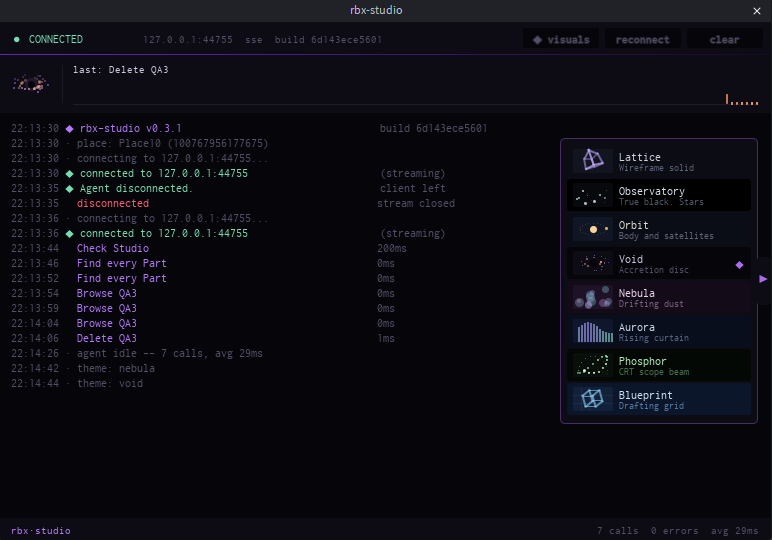
The console panel
Every call is logged with its latency, above a trace of the last forty.
Hover the tab on the right edge for eight themes — Lattice, Observatory, Orbit, Void, Nebula, Aurora, Phosphor, Blueprint. Each redraws the activity band, not just its colours. Your pick is remembered.
Batching
Every write tool takes an array — ten script edits is one call.
| tool | takes | cap |
|---|---|---|
create |
instances, each nesting children to any depth |
100 |
modify |
entries, each with an unlimited list of paths |
100 entries |
delete |
paths | 200 |
move |
moves | 200 |
script_edit |
edits, across any number of scripts | 50 |
script_create |
scripts | 50 |
inspect |
paths | 50 |
input |
input steps, delivered in order | 40 |
modify caps entries, not targets — one entry can anchor five hundred parts.
Each batch is one Ctrl+Z, and all-or-nothing: a failed match leaves the place untouched.
Why this one
- Push, not poll. 50 sequential round trips average 13.6 ms, against 25.8 ms polling — reproduce with
node scripts/latency.mjs --count 50 --compare. - Safe script edits. Writes go through
ScriptEditorService:UpdateSourceAsync, so your unsaved editor buffer survives. - One Ctrl+Z per call. Every batch is a single undo recording.
- Property names are checked against the running engine's API dump, so a typo comes back as
Anchorred→Anchoredinstead of a runtime error. - ~16k tokens of schema, cursor-paged and capped, with
detail: concise | standard | full.
Not built here: terrain, AI mesh and material generation.
Security
Loopback only. Requires a header a browser cannot set cross-origin, which closes the DNS-rebinding hole. Your experience's "Allow HTTP Requests" setting is untouched.
Development
npm install
npm run build          # TypeScript -> dist/
npm run build:plugin   # plugin/src -> build/StudioMCP.rbxmx
npm run install:plugin # build + copy into the Studio plugins folder
npm test               # plugin (Luau) + bridge (Node) tests
Needs luau, luau-compile and luau-analyze from the Luau releases on PATH or in tools/.
evals/ holds ten questions answerable only by driving a real Studio session — see evals/README.md.
Licence
MIT.
Reviews (0)
Sign in to leave a review.
Leave a reviewNo results found