hermes-classic-gold-pack
Health Warn
- License — License: MIT
- Description — Repository has a description
- Active repo — Last push 0 days ago
- Low visibility — Only 6 GitHub stars
Code Fail
- spawnSync — Synchronous process spawning in advanced/apply-common.mjs
Permissions Pass
- Permissions — No dangerous permissions requested
No AI report is available for this listing yet.
Classic Gold theme + Noir Neko pets + custom status bar for Hermes-Agent (Nous Research's desktop AI agent). One-prompt AI install.
🪙 Hermes-Agent Classic Gold Pack
A warm gold makeover for the Hermes-Agent desktop app — theme, pets, status bar, and background.




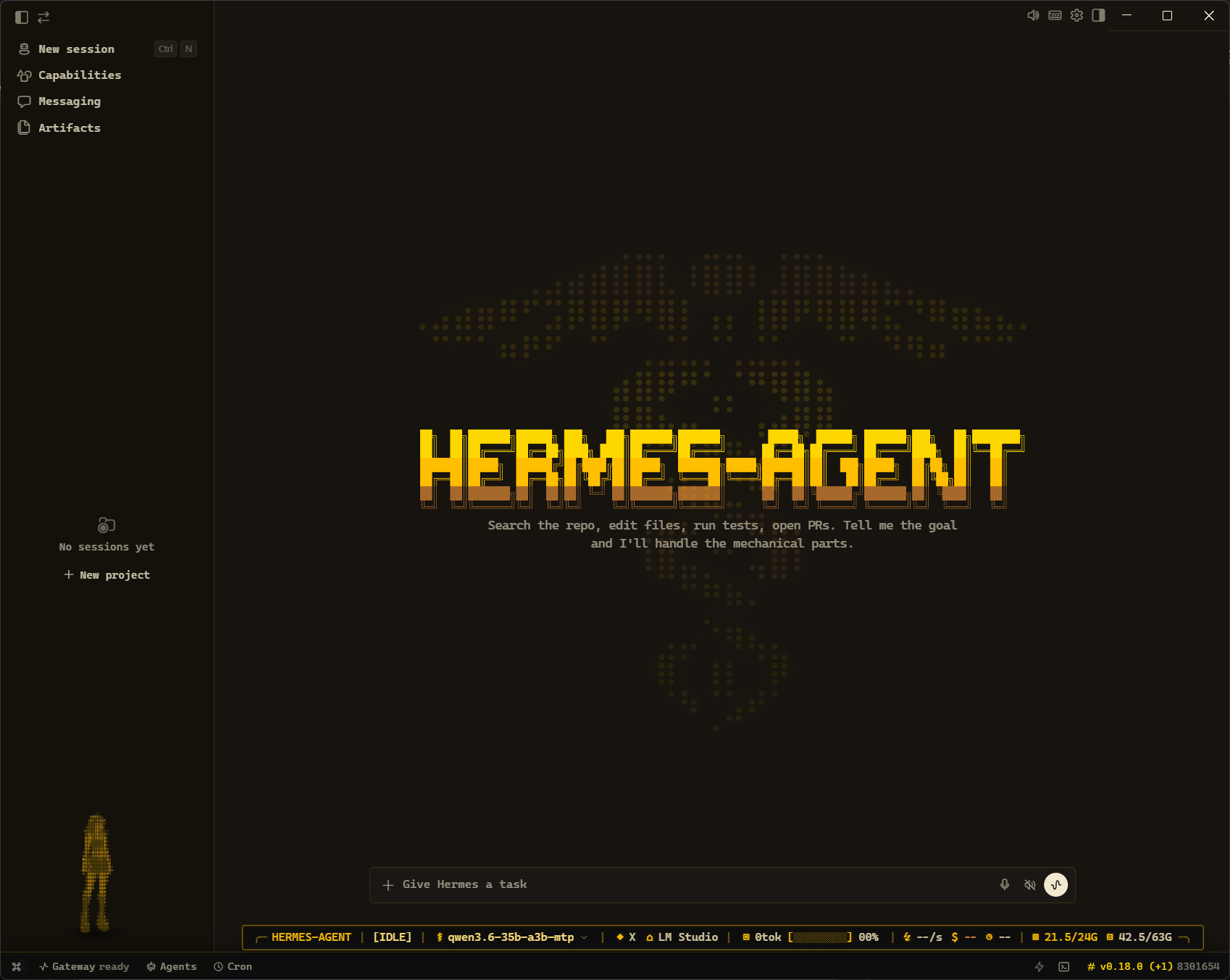
What is this? A cosmetic pack for Hermes-Agent Desktop: a gold theme, two animated
pets, an optional status bar, and an optional caduceus background. The
theme and pets take about 30 seconds; the status bar and background are optional extras.
⚡ Quick start
The easy way — paste the prompt below into an AI coding assistant that can run
commands on your computer (Claude Code, Cursor, or Codex CLI). It fetches
everything and installs it for you. Nothing else to download.
You have shell + file access. Install the Hermes-Agent "Classic Gold" pack: clone
https://github.com/Elevatormusic/hermes-classic-gold-pack, then open ai/install.md
inside it and follow those steps exactly.
That's it. The assistant installs the theme + pets, then asks if you also want the
status bar and background. Prefer to do it by hand? See Install below.
Cautious?
SECURITY.mdsummarizes exactly what each script
does — no telemetry or external network calls, every change backed up and
reversible. Only ever run code from this repo, never a "fix" someone attaches to
an issue.
🖼️ What's inside
The screenshot above is the real desktop with everything applied. Here's each
piece on its own.
🎨 Theme — gold & kawaii
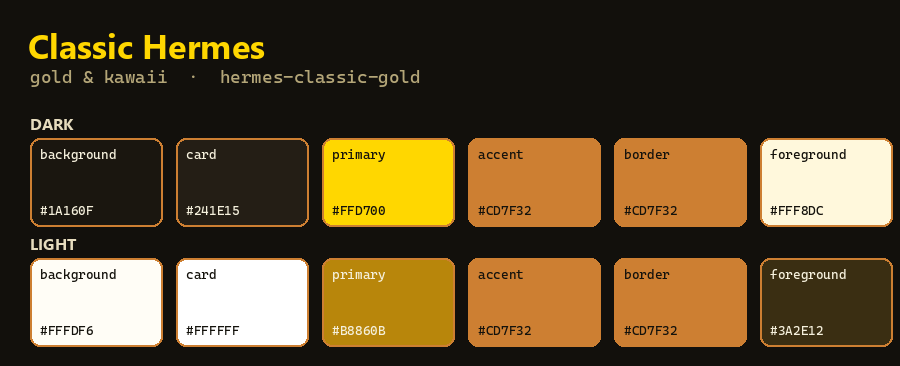
The hermes-classic-gold desktop theme — warm gold borders, cornsilk text, in
both light and dark. The AI installer sets it for you (node theme/apply-theme.mjs);
it lives in the app's localStorage, so it needs no rebuild and works on any
Hermes-Agent version.
📊 Status bar — TelemetryTape HUD

A compact heads-up display along the bottom edge. Left → right:
- workspace (
HERMES-AGENT) · agent state ([IDLE]) - active model (
qwen3.6-35b-a3b-mtp ⌄) · reasoning effort (◆) · provider (⌂ LM Studio) - tokens + context-usage bar (
0tok [▨▨] 00%) - throughput (
⚡ --/s) · cost ($ --) · turn timer (⊙ --) - live system resources — GPU VRAM (
21.5/24G) and system RAM (42.5/63G)
This is an advanced piece (a source patch + rebuild — see advanced/).
🌀 Background & loader — caduceus
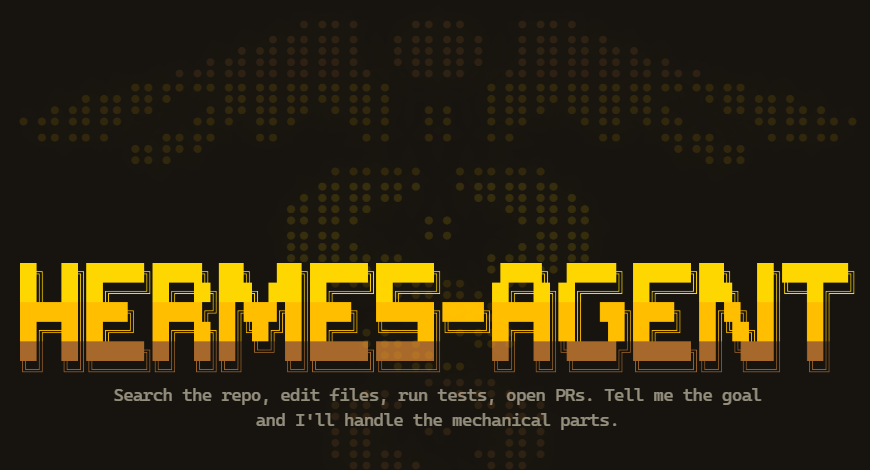
The optional caduceus extras: a dotted-caduceus backdrop filling the empty
state behind the gold "HERMES-AGENT" wordmark, plus a caduceus loader — two
entwined sine-snakes that animate as a gold particle trail while Hermes-Agent is working
(replacing the stock rose-curve spinner). Advanced piece.
🐾 Pets — Noir Neko


Left: Noir Neko. Right: Noir Neko ASCII Fine. (Idle animations, shown on the theme's dark background.) Installed by node install.mjs.
🔁 What survives a Hermes-Agent update?
When Hermes-Agent updates, it replaces the whole app with a fresh copy — so anything
built into the app is wiped, while your own settings and data stay put.
🔄 To update, just ask your AI assistant
Instead of the in-app Update button, paste this to your assistant (Claude,
ChatGPT, etc.) — it updates Hermes-Agent and re-applies your theme + status
bar, and fixes anything that breaks:Update my Hermes-Agent and re-apply my Classic Gold theme + status bar. Open github.com/Elevatormusic/hermes-classic-gold-pack, read ai/update.md, and follow it. Self-heal via ai/brokenupdatefix.md before asking me.No terminal needed on your end. See
ai/update.md.
(Comfortable in a terminal?node update-hermes.mjsdoes the same thing.)
| Piece | On a Hermes-Agent update |
|---|---|
| 🎨 Theme | ✅ stays put (saved in your settings) |
| 🐾 Pets | ✅ survive (saved in your Hermes-Agent folder) |
| 📊 Status bar | 🔁 rebuilt in — ask your assistant to update (or node update-hermes.mjs) |
| 🌀 Background & loader | 🔁 rebuilt in — ask your assistant to update (or node update-hermes.mjs) |
💡 Forgetful? On Windows you can register a one-time background reminder that
nudges you if an in-app update ever reverts the theme:powershell -ExecutionPolicy Bypass -File advanced/watcher/register-watcher.ps1
— it's read-only (just a notification). If an update ever leaves things broken,
seeai/brokenupdatefix.md.
📥 Install
AI-assisted (recommended) — use the Quick start prompt above. It installs
the theme + pets, then offers the advanced status bar and background.
git clone https://github.com/Elevatormusic/hermes-classic-gold-pack
cd hermes-classic-gold-pack
node install.mjs --activate noir-neko-ascii-fine
--activate <slug>sets that pet active (noir-nekoornoir-neko-ascii-fine).
Omit it to install both pets without changing your current pet.--home <path>points at a specificHERMES_HOME(the folder withconfig.yaml);
otherwise it's detected automatically.
Then the theme. Automatic (restarts Hermes-Agent once — run it last):
node theme/apply-theme.mjs
Or by hand: open Hermes-Agent Desktop → Ctrl/Cmd+Shift+I → Console tab → paste the
contents of theme/install-theme.js → Enter. Restart Hermes-Agent.
🗑️ Uninstall
Paste this into your AI assistant — it asks which parts to remove, then removes them:
You have shell + file access. Uninstall the Hermes-Agent "Classic Gold" pack: open
https://github.com/Elevatormusic/hermes-classic-gold-pack (clone it if needed),
read ai/uninstall.md, ask me which parts to remove, then follow it.
- Theme — open Hermes-Agent → Appearance → pick another theme, or in the DevTools
console:localStorage.setItem('hermes-desktop-theme-v2','nous');location.reload(). - Pets — delete
HERMES_HOME/pets/noir-nekoand.../noir-neko-ascii-fine.
Don't use the in-app "remove" on an adopted pet — just delete the folder. Restore
your previous pet fromconfig.yaml.bakif needed. - Status bar / background — restore the
*.origbackups the apply scripts made,
thencd apps/desktop && npm run pack(Hermes-Agent quit).
Full details: ai/uninstall.md.
🐞 Report a problem
Paste this into your AI assistant — it collects diagnostics and hands you a
ready-to-submit GitHub issue link (you review before sending):
You have shell + file access. Something in the Hermes-Agent "Classic Gold" pack isn't
working. In https://github.com/Elevatormusic/hermes-classic-gold-pack, read
ai/issuereport.md and follow it: gather diagnostics and give me a pre-filled
GitHub issue link to review before I submit.
Doing it yourself? Run node scripts/diagnostics.mjs --logs and open the link it
prints, or use Issues → New → "Install failure". The issue only includes your
OS, Node version, and Hermes-Agent commit.
🔧 Advanced — status bar & caduceus background
The status bar and background edit Hermes-Agent's source code and rebuild the app, so
they're a separate tier. The AI installer handles them for you; to do it by hand,
see advanced/README.md.
Reminder: a Hermes-Agent update reverts these two (they're built into the app, and updates rebuild it from a hard
git reset). The easy way to update: ask your AI assistant to "update my Hermes and re-apply Classic Gold" — it updates Hermes-Agent, re-applies the pack, and fixes anything that breaks, with no terminal on your end (seeai/update.md). Prefer this over the in-app Update button. (Comfortable in a terminal?node update-hermes.mjs, or--no-updateto just re-apply after an in-app update.) If anything fails, seeai/brokenupdatefix.md.
Heads-up (technical): the advanced pieces need a Hermes-Agent desktop dev
environment (apps/desktopwith dependencies installed), and Hermes-Agent must be
fully quit for the rebuild (on Windows the scripts detect a running Hermes-Agent and
refuse to build). Patches target theBASEcommit inadvanced/apply-common.mjs(currently4d7f8ade); on a
different version the AI reconciles them viaai/repair.md.
❓ Requirements & jargon
- Hermes-Agent installed. The pack finds your HERMES_HOME (the folder holding
config.yaml) automatically. - Node.js to run the installer — it ships with Hermes-Agent, so you already have it.
- "Agentic assistant" = an AI that can run commands and edit files on your
machine (Claude Code, Cursor, Codex CLI). A plain chatbot can't do the install. - "DevTools console" = the developer panel inside Hermes-Agent, opened with
Ctrl/Cmd+Shift+I→ Console tab. - Advanced tier only: a Hermes-Agent desktop dev environment + Git.
Scope: targets the Hermes-Agent desktop app. The installer is cross-platform
(Windows/macOS/Linux) but verified on Windows; other OSes are best-effort —
issues and PRs welcome.
📜 Credits & license
Theme, pets, and status bar by Shaya (Elevatormusic). Built for Hermes-Agent
by Nous Research. Released under the MIT License.
Reviews (0)
Sign in to leave a review.
Leave a reviewNo results found