leggen
mcp
Warn
Health Pass
- License — License: MIT
- Description — Repository has a description
- Active repo — Last push 0 days ago
- Community trust — 15 GitHub stars
Code Warn
- network request — Outbound network request in frontend/package.json
Permissions Pass
- Permissions — No dangerous permissions requested
No AI report is available for this listing yet.
💲 An Open Banking Dashboard and CLI
README.md
💲 leggen
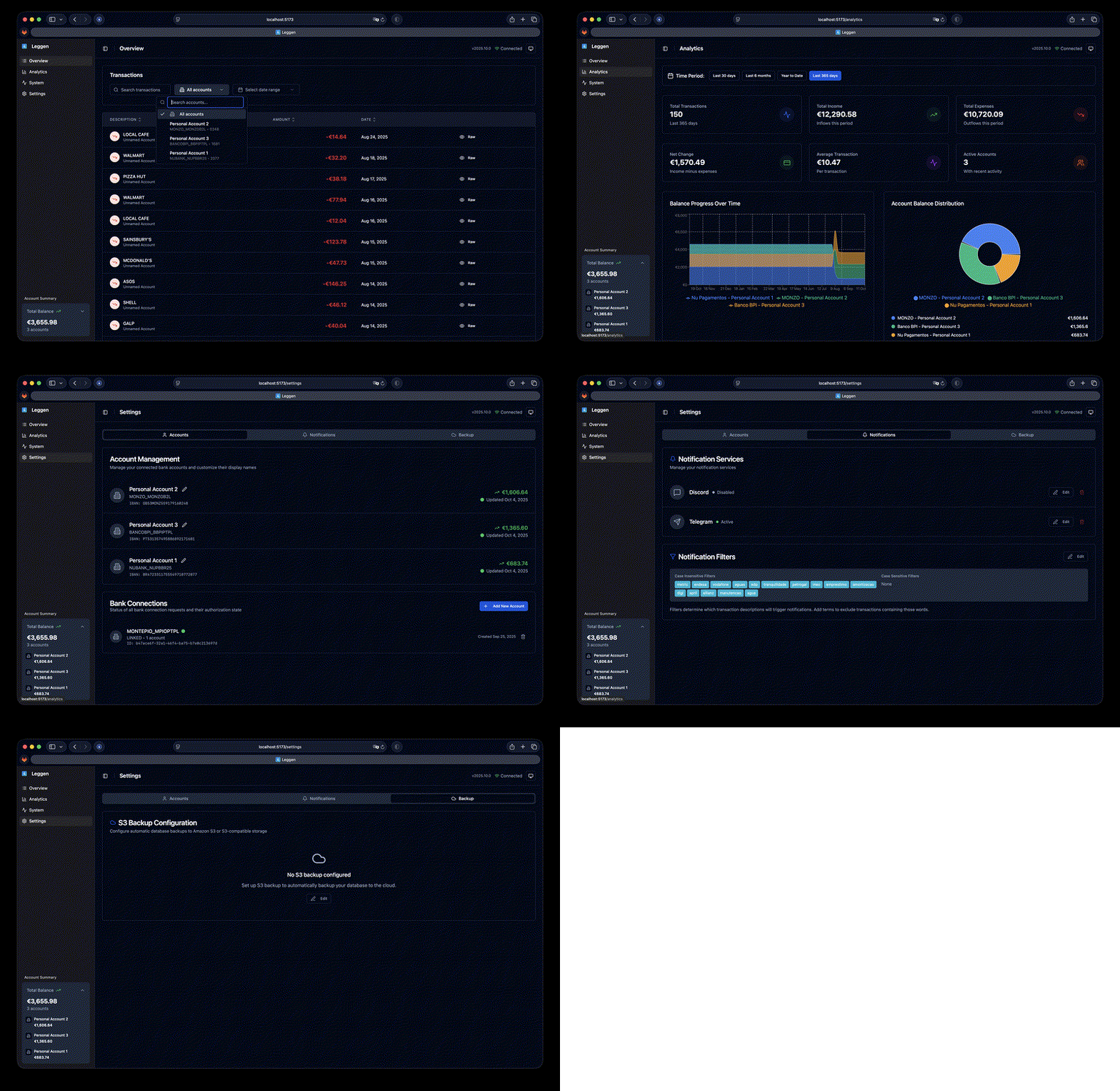
A self hosted Open Banking Dashboard, API and CLI for managing bank connections and transactions.
Having your bank data accessible through both CLI and REST API gives you the power to backup, analyze, create reports, and integrate with other applications.
🛠️ Technologies
Frontend
- React: Modern web interface with TypeScript
- Vite: Fast build tool and development server
- Tailwind CSS: Utility-first CSS framework
- shadcn/ui: Modern component system built on Radix UI
- TanStack Query: Powerful data synchronization for React
🔌 API & Backend
- FastAPI: High-performance async API backend (integrated into
leggen server) - EnableBanking: Open Banking data access for connecting to banks
- APScheduler: Background job scheduling with configurable cron
📦 Storage
- SQLite: for storing transactions, simple and easy to use
✨ Features
🎯 Core Banking Features
- Connect to banks using EnableBanking (30+ EU countries)
- List all connected banks and their connection statuses
- View balances of all connected accounts
- List and filter transactions across all accounts
🏷️ Categorization & Analytics
- Categorize transactions with custom categories
- Keyword-based learning: automatically categorizes future transactions matching the same description
- Bulk categorization and removal by transaction description
- Filter transactions by category (including uncategorized)
- Analytics dashboard with spending-by-category breakdown
exclude_from_statsflag for categories like inter-account transfers
🔄 Data Management
- Sync all transactions with SQLite database
- Background sync scheduling with configurable cron expressions
- Automatic database backups to S3-compatible storage, with restore via API
🔐 Authentication
- Single-user authentication with JWT tokens
- API key support for programmatic access
📡 API & Integration
- REST API: Complete FastAPI backend with comprehensive endpoints
- CLI Interface: Enhanced command-line tools with new options
🔔 Notifications & Monitoring
- Discord and Telegram notifications for filtered transactions
- Configurable transaction filters (case-sensitive/insensitive)
- Account expiry notifications and pre-expiry warnings
- Comprehensive logging and error handling
🚀 Quick Start
Prerequisites
- Create an Enable Banking account at https://enablebanking.com/
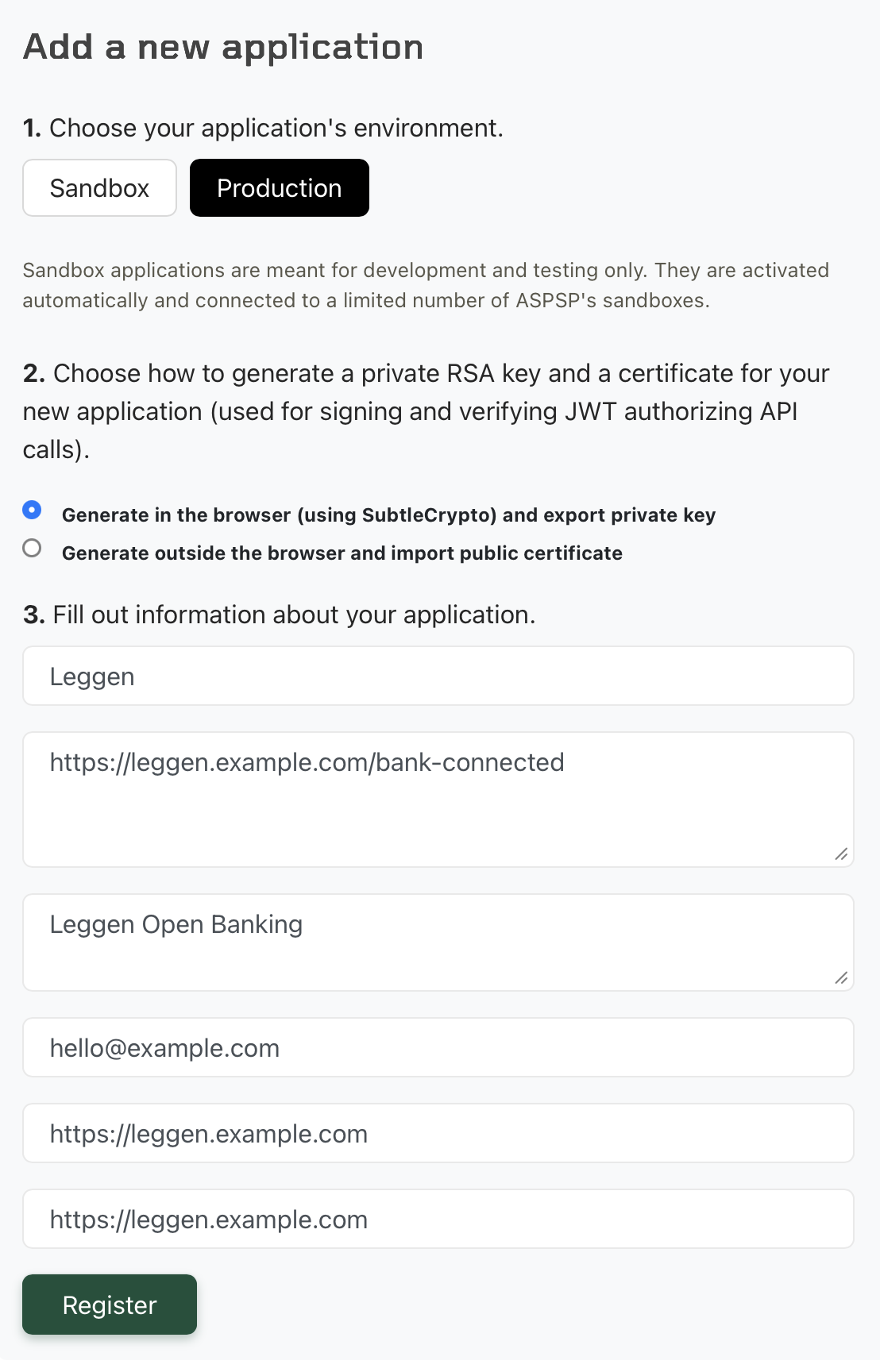
- Create an application in the Enable Banking Customer Portal as the image below. The redirect URL must use HTTPS and must end with
/bank-connected. Enable Banking does not support HTTP. - Set up your bank accounts following the Enable Banking Setup Guide
Installation
Docker Compose
# Clone the repository
git clone https://github.com/elisiariocouto/leggen.git
cd leggen

# Create your configuration
mkdir -p data && cp config.example.toml data/config.toml
# Edit data/config.toml with your EnableBanking credentials

# Generate the [auth] section for your config
docker compose run --rm leggen-server /app/.venv/bin/leggen generate-auth-config
# Copy the output into data/config.toml

# Start all services
docker compose up -d
Configuration
Create a configuration file at ./data/config.toml:
# Required: Authentication
# Generate with: leggen generate-auth-config
# Docker Compose: docker compose run --rm leggen-server /app/.venv/bin/leggen generate-auth-config
[auth]
username = "admin"
password_hash = "YOUR_BCRYPT_HASH"
api_key = "YOUR_API_KEY"
jwt_secret = "YOUR_JWT_SECRET"
jwt_expiry_minutes = 60

[enablebanking]
application_id = "your-application-id"
key_path = "/path/to/private-key.pem"
# url = "https://api.enablebanking.com"

# Optional: Background sync scheduling
[scheduler.sync]
enabled = true
hour = 3      # 3 AM
minute = 0
# cron = "0 3 * * *"  # Alternative: use cron expression

# Optional: Discord notifications
[notifications.discord]
webhook = "https://discord.com/api/webhooks/..."
enabled = true

# Optional: Telegram notifications
[notifications.telegram]
token = "your-bot-token"
chat_id = 12345
enabled = true

# Optional: Transaction filters for notifications
[filters]
case_insensitive = ["salary", "utility"]
case_sensitive = ["SpecificStore"]
📖 Usage
Web Interface
Access the React web interface at http://localhost:3000 after starting the services.
API Service
Visit http://localhost:3000/api/v1/docs for interactive API documentation.
CLI Commands
leggen status              # Check connection status
leggen bank add            # Connect to a new bank
leggen balances            # View account balances
leggen transactions        # List transactions
leggen sync                # Trigger accounts sync
For more options, run leggen --help or leggen <command> --help.
⚠️ Notes
- This project is in active development
Reviews (0)
Sign in to leave a review.
Leave a reviewNo results found