santi
Health Warn
- License — License: Apache-2.0
- Description — Repository has a description
- Active repo — Last push 0 days ago
- Low visibility — Only 5 GitHub stars
Code Pass
- Code scan — Scanned 12 files during light audit, no dangerous patterns found
Permissions Pass
- Permissions — No dangerous permissions requested
No AI report is available for this listing yet.
santi — free, open-source, self-hosted project management and issue tracker for agile teams. Scrum and Kanban boards, backlog, sprint planning, epics, drag and drop, CSV import, REST API, CLI and MCP server for AI agents (Claude, Cursor, VS Code). Built with Rust and React. Docker ready.
 santi
santi
santi is a free, open-source agile tracker you host yourself. Teams plan work on Scrum or Kanban
boards, groom a backlog, run sprints and track epics, all from a fast web UI backed by a
documented JSON API. The server is written in Rust (axum, PostgreSQL), the UI in React, and the
whole thing ships as one container image. No per-seat pricing, no telemetry.
Status: 0.1.0, the first release. It runs well on one machine for a team; public hosting
needs HTTPS in front of it (see Running on another host). The
HTTP API may still change before 1.0.
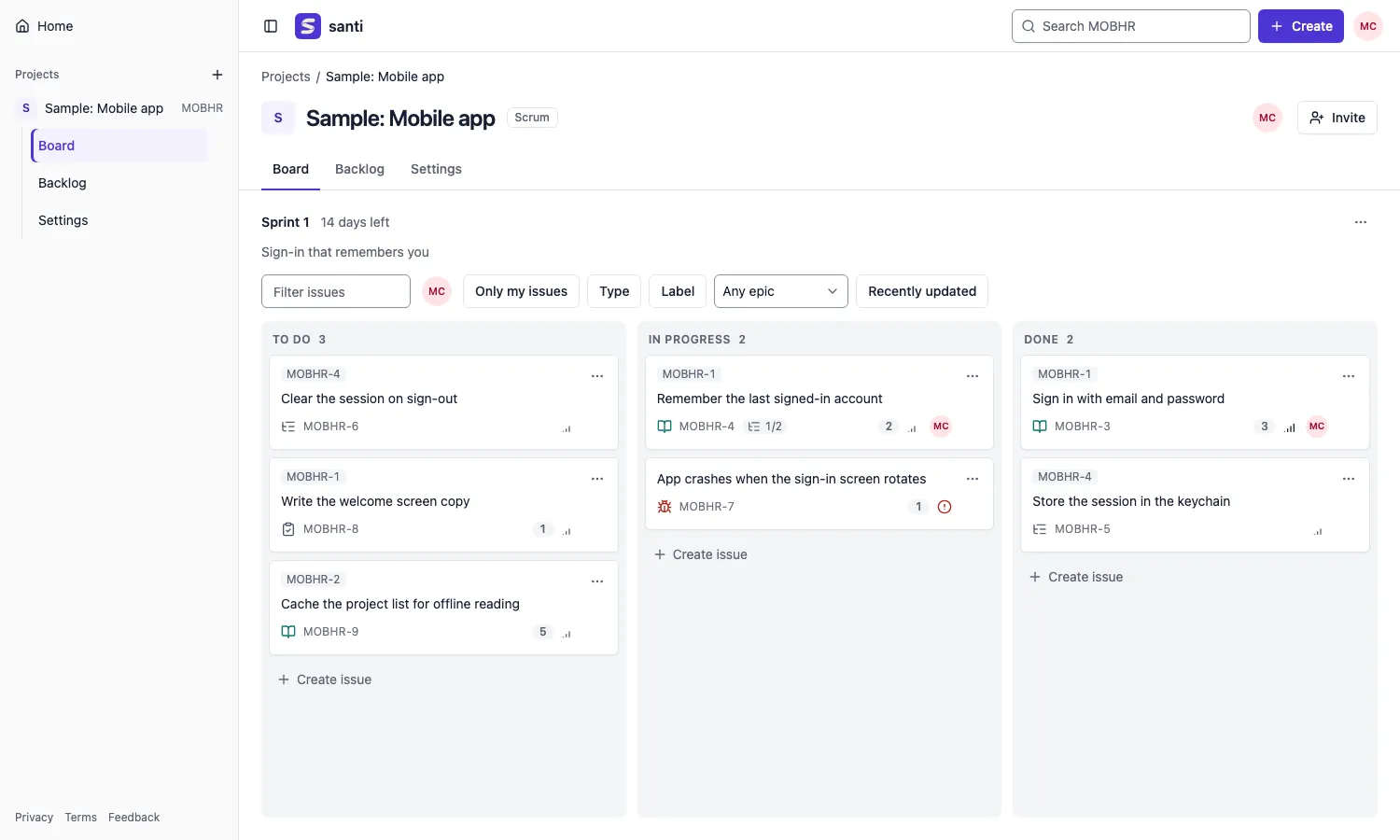
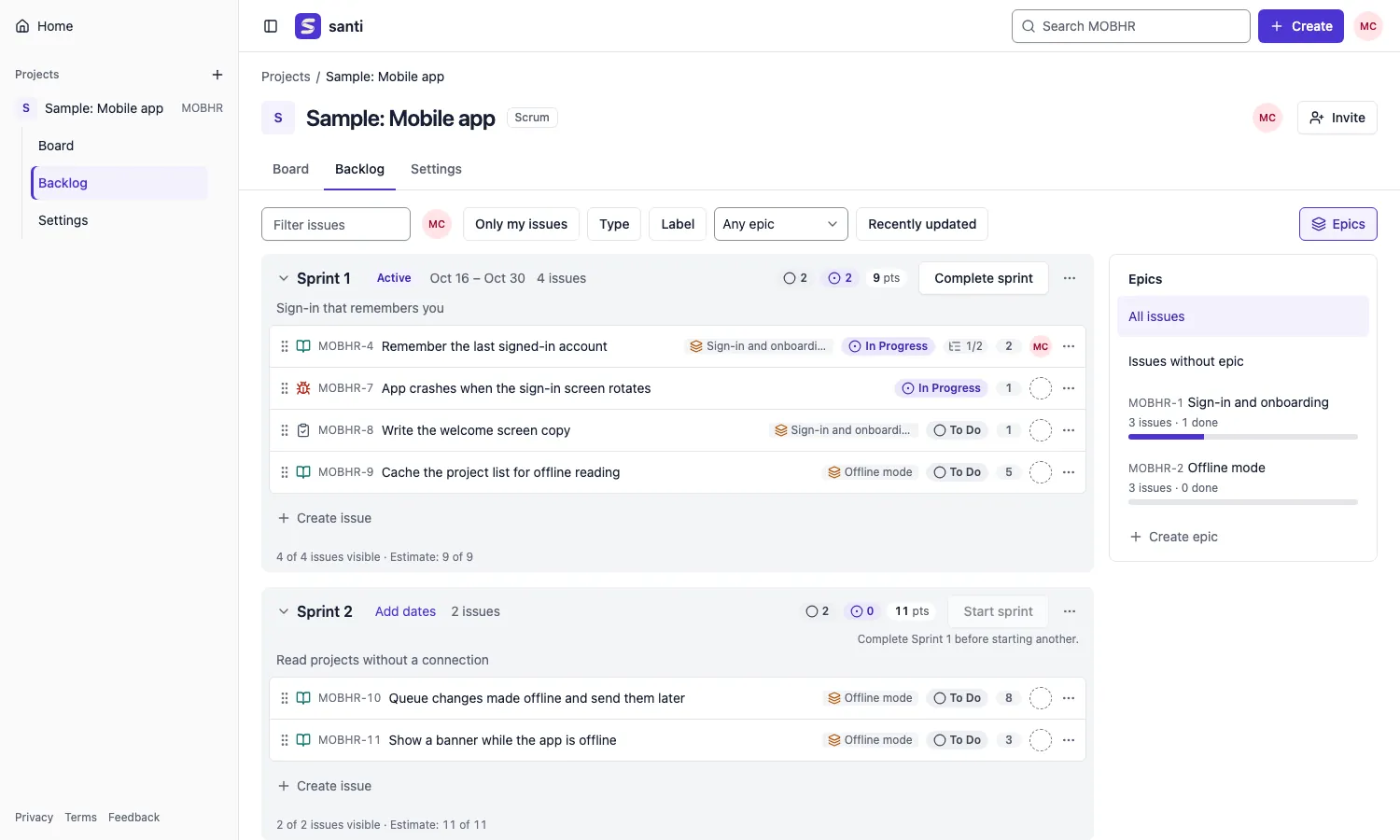
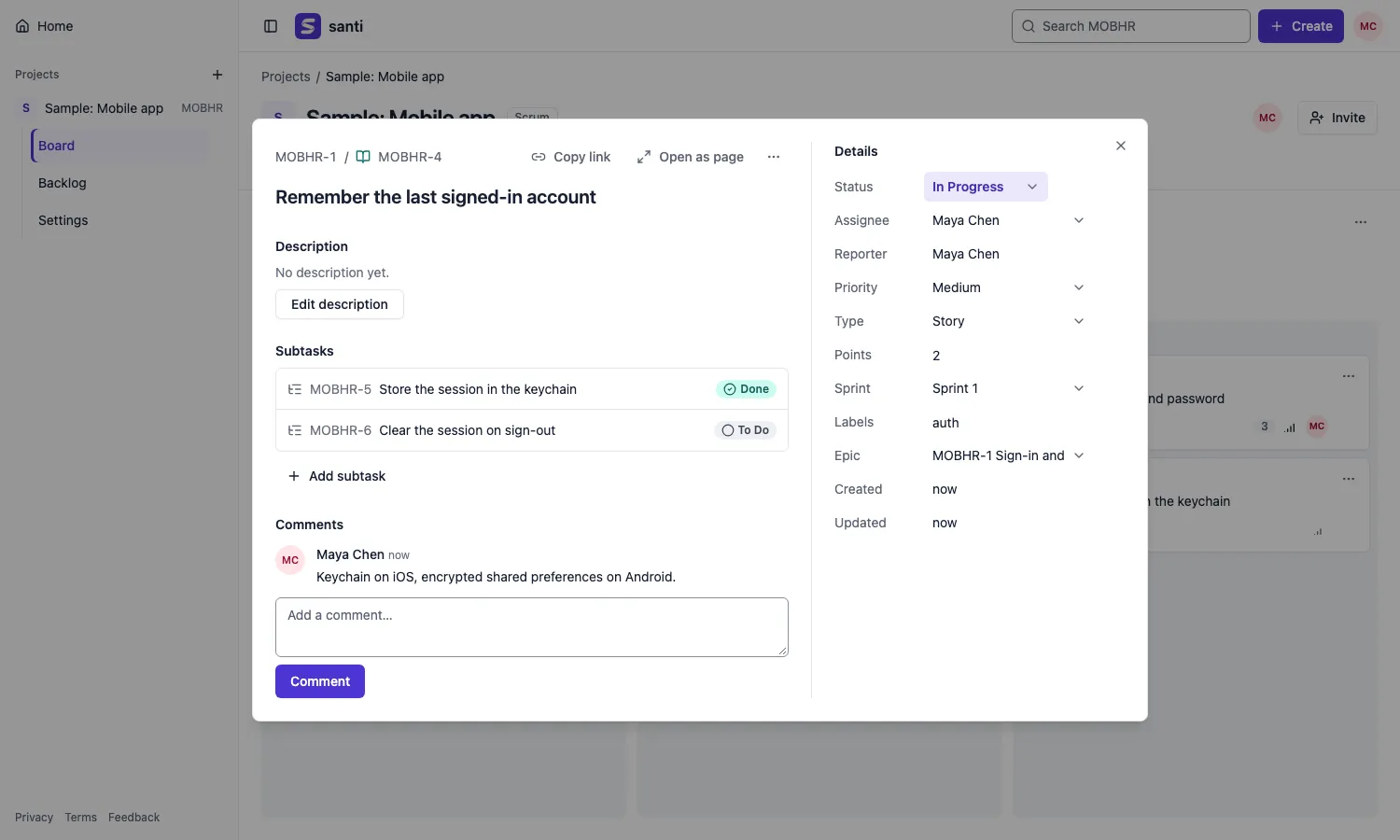
| Backlog with the epic panel | Issue dialog |
|---|---|
 |
 |
Features
- Boards: Scrum boards show the running sprint; Kanban boards show the flow and hide done work
after a set number of days. Columns hold one or more statuses, take WIP limits, and cards move
by drag and drop or by a keyboard "Move to…" menu. - Backlog and sprints: plan sprints by dragging issues between sections, edit rows in place,
start and complete sprints; open work at completion goes to the backlog, a future sprint or a
new one. - Issues: epics, stories, tasks, bugs and subtasks with status, assignee, priority, points,
labels, parent, comments and a full issue page; delete for admins and the reporter. - Epics: a panel on the backlog to create epics, assign issues to them and filter by them.
- Filters and search: assignee, "only my issues", recently updated, type, label, epic and
text, all kept in the URL; a project search page and a search field in the top bar. - Keyboard:
ccreates an issue,j/kmove between issues,oopens one,g b/g l
jump to the board or backlog,?lists the rest. - Projects and people: admin and member roles, invite links with a preview, a members page,
board settings for columns and statuses. - Phones: the UI works down to 375 px wide; the board shows one column at a time.
- API tokens for scripts, and an importer for CSV exports from other trackers.
- CLI and MCP: the
santicommand line andsanti mcp, an MCP server for AI agents.
Planned: multi-select on the backlog, email notifications.
Quick start
You need Docker with Compose (on macOS, OrbStack works well).
git clone https://github.com/emersonjds/santi.git
cd santi
docker compose up -d        # first run builds the image, a few minutes
Open http://localhost:8080, choose Create account, then New project. The database lives
in the santi-postgres volume; migrations run every time the server starts.
docker compose logs -f santi    # server logs
docker compose down             # stop (data kept)
docker compose down -v          # stop and delete the data
To host it for a team, see Deploy on Railway.
Change the ports with SANTI_PORT (default 8080) and SANTI_DB_PORT (default 5440, bound to
localhost only), e.g. SANTI_PORT=9000 docker compose up -d.
Browsers: the session cookie is Secure. Chrome, Edge and Firefox accept it onhttp://localhost; Safari does not, so on plain HTTP sign in with one of the others or put HTTPS
in front.
Running on another host
Any address other than localhost needs HTTPS, or the browser drops the session cookie. Put a
reverse proxy (Caddy, nginx, Traefik) in front of port 8080, terminate TLS there and forward the
original Host header (nginx: proxy_set_header Host $host;); santi compares it with Origin to
block cross-site writes. Back up the PostgreSQL volume (pg_dump) on a schedule; santi does not
do it for you.
Configuration
| Variable | Default | Meaning |
|---|---|---|
DATABASE_URL |
required | PostgreSQL 17 connection string |
SANTI_ADDR |
127.0.0.1:8080 (0.0.0.0:8080 in the image) |
address the server listens on |
SANTI_WEB_DIR |
web/dist (/srv/santi/web in the image) |
built web UI to serve at / |
SANTI_DB_POOL |
twice the cores, 10–50 | database connections |
Visitors without a session see the landing page at / (also at /about); signed-in users get the
app. Its canonical and social links, robots.txt and sitemap.xml use the public address set at
build time with VITE_SITE_URL (default http://localhost:8080), e.g.docker build --build-arg VITE_SITE_URL=https://santi.example.com ..
Importing from Jira or Linear
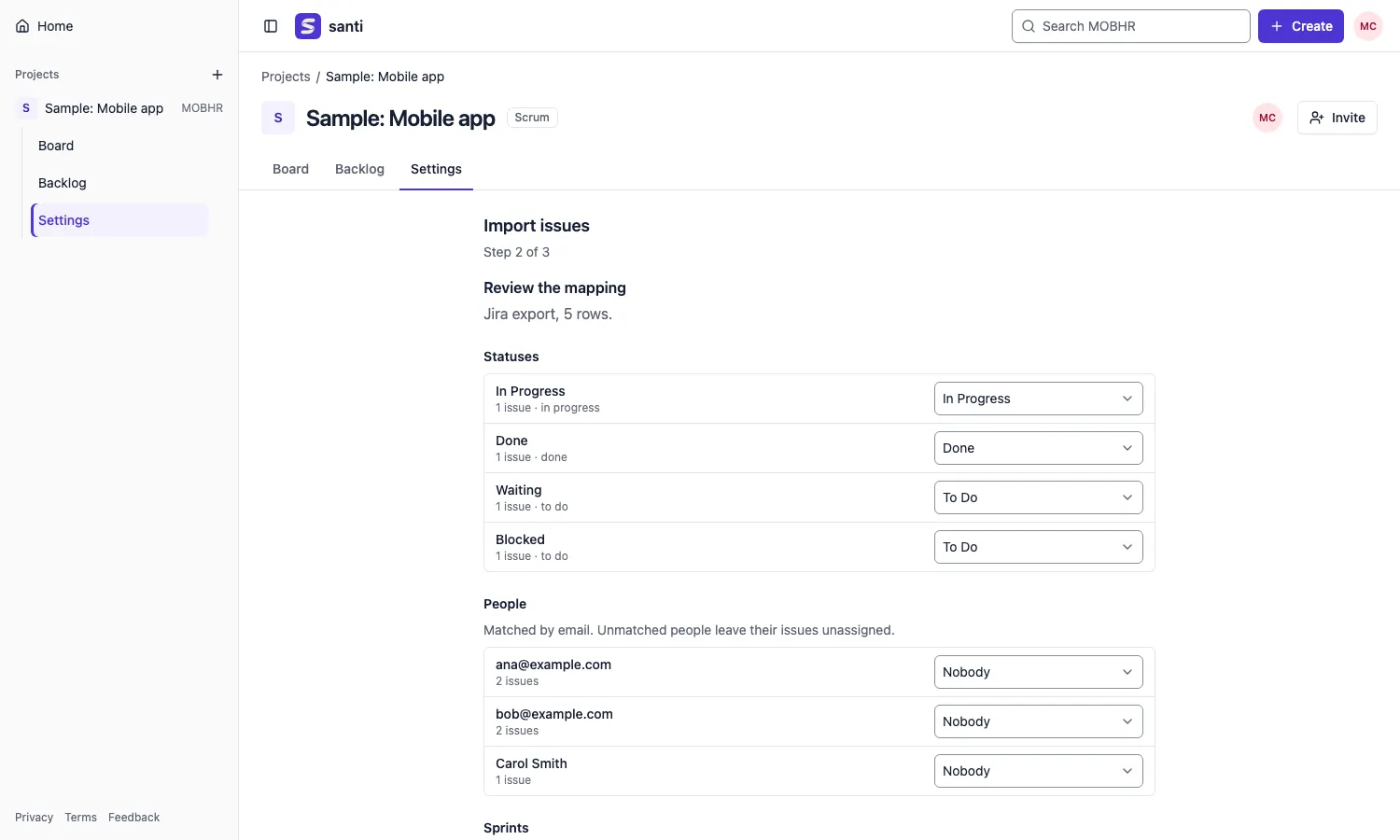
Project admins can bring existing work into a new or existing project from Settings → Import
issues. Export your issues as CSV from Jira Cloud ("CSV (all fields)") or Linear, upload the
file, then review the mapping: statuses to board statuses, people to members (matched by email),
sprints or cycles to future, closed or skipped, and issue types. One click imports it.
What comes across: summary, description, type, status, priority, assignee, reporter, created and
updated dates, labels, sprint, parent and epic, story points, and (from Jira) comments. Attachments,
history, components, versions and custom fields other than points stay behind. Running the same
file again skips the issues it already imported. Files are limited to 10 MB.
API
Everything the UI does goes through the JSON API, so scripts can do it too.
- Interactive docs: http://localhost:8080/docs; the OpenAPI 3.1 document is at
/openapi.json. - Errors are RFC 9457
application/problem+json; lists page withlimitandcursor. - API tokens: open the account menu → API tokens, create one and copy it (it is shown
once). Send it as a bearer token; it acts with your rights until you revoke it.
curl -H "Authorization: Bearer santi_…" http://localhost:8080/api/projects
CLI and MCP
The santi binary is a client of the same API, authenticated with an API token.
cargo install --path crates/santi-cli
santi login --url http://localhost:8080       # asks for the token, saves ~/.config/santi/config.toml (0600)
santi projects list
santi issues create WEB --summary "Fix login" --type bug
santi issues move WEB-12 --status "In Progress"
santi board WEB
santi sprints start WEB 3
santi search WEB "login" --status in_progress --json
Commands: login, whoami, projects list, issues list|show|create|edit|move|delete,board, backlog, sprints list|create|start|complete, plan <ISSUE> --sprint <ID>|--backlog,search, comment, import <PROJECT> <CSV> (preview, then confirm) and mcp; santi help <command>
has the flags. --json prints the API's JSON. URL and token come from --url/--token, thenSANTI_URL/SANTI_TOKEN, then the config file. Errors print the server's message; exit codes are
2 usage, 3 auth, 4 not found, 5 rejected input or conflict, 6 server unreachable, 10 confirmation
declined (stdout stays empty, so --json output is still valid JSON), 1 anything else.
santi mcp serves the same actions as MCP tools for agents, over stdio or Streamable HTTP
(santi mcp --http 127.0.0.1:8765). Setup for Claude Code, VS Code, Zed, Cursor, Windsurf,
JetBrains, Claude Desktop, Codex, Gemini CLI, Cline, Continue and remote connectors:
docs/mcp.md.
Performance
santi is built to stay fast on real backlogs. Budgets, measured with 5,000 issues, 50 users and
20 sprints on a laptop (release build, 10 concurrent connections):
- p95 under 30 ms and p99 under 60 ms for the board, backlog, issue, search and move endpoints.
- A fixed number of SQL statements per request (board and backlog 4, issue and search 2), checked
in CI so an N+1 query fails the build. - Under 170 KB of gzipped JavaScript on the first visit to any page; long lists virtualized.
Numbers, method and the load script: docs/perf.md.
Development
You need the latest stable Rust (1.97 or newer), Node 24+ with pnpm, and Docker (OrbStack) for PostgreSQL.
docker compose up -d postgres                      # PostgreSQL only, on localhost:5440
export DATABASE_URL=postgres://santi:santi@localhost:5440/santi
cargo run -p santi-server                          # API on http://127.0.0.1:8080, runs migrations
cd web && pnpm install && pnpm dev                 # UI on http://localhost:5173, proxies /api to 8080
SQL queries are checked at compile time. With DATABASE_URL set, cargo checks them against
your database, so after pulling new migrations either apply them first
(sqlx migrate run --source crates/santi-server/migrations) or build with SQLX_OFFLINE=true,
which uses the committed .sqlx/ query data instead.
CONTRIBUTING.md has the full setup, the quality gate and the workflow. Please
read the Code of Conduct; report vulnerabilities as described in
SECURITY.md. Changes are listed in CHANGELOG.md.
License
Licensed under either of Apache License 2.0 or MIT, at your
option. The web UI started from shadcn-admin (MIT);
its notice is in web/LICENSE-shadcn-admin.
Reviews (0)
Sign in to leave a review.
Leave a reviewNo results found