iotaudit
Health Warn
- License — License: MIT
- Description — Repository has a description
- Active repo — Last push 0 days ago
- Low visibility — Only 5 GitHub stars
Code Pass
- Code scan — Scanned 12 files during light audit, no dangerous patterns found
Permissions Pass
- Permissions — No dangerous permissions requested
No AI report is available for this listing yet.
One command to audit your own smart-home devices: who they phone home to, plaintext vs TLS, open ports, A-F grade and a local HTML/PDF report. CLI + MCP server, no cloud.
iotaudit



If you find this useful, you can support me by getting a SkinToScan pack, my other project. It's a one-time purchase that directly funds my open-source work.

pip install iotaudit
sudo iotaudit auto      # asks for consent, audits your own network, writes an HTML report
iotaudit analyze capture.pcap   # no root needed: analyse a pcap or PCAPdroid capture you already have
Quick links: sample report ·
what common devices send ·
Home Assistant ·
MCP server

Is your smart pet feeder, camera or plug safe? iotaudit watches what your own IoT devices
do on the network and gives each one an A-F grade, a one-line safety verdict, and a one-page HTML report. Everything
runs locally: no account, no telemetry, no cloud.
It answers the questions you actually have about a cheap smart device:
- What is the short version? A one-line verdict next to the grade. Open ports, public DNS
(including DNS-over-TLS and DNS-over-HTTPS), TLS or plaintext, and destination countries
are observed facts. Video, audio, and other traffic patterns stay indicators with a confidence. - Who does it talk to? Domains (DNS + TLS SNI + HTTP Host), IPs, country, organisation.
The report lists the destination countries for each device (observed fact). - What does the traffic look like? A separate per-device indicator for video, audio,
telemetry, or unknown, each with a low, medium, or high confidence. It is a pattern
match, not proof of what was sent. - Is it encrypted? Plaintext HTTP, unencrypted TCP, old TLS, or "custom" high-entropy protocols.
- What ports are open? Optional
nmapscan with risk notes (telnet, RTSP, UPnP, ADB, …). - Any known issue for this banner? A short offline hint when a version
string matches a curated CVE. It does not change the grade unless the
version match is exact and the entry is critical. - Is it reachable from the internet? Lists the port forwards your router opened via UPnP
and which device they point to (read-only, never changes the router). - Does it phone home while idle? Idle-upload check and a traffic timeline with bursts.
- Where did the video go? LAN peer (phone P2P) vs cloud vs STUN/TURN, and an honest note
when a stream was set up but never actually passed through your computer. - What changed since the last audit?
iotaudit diffcompares two saved JSON
results and exits 1 when a new destination, country, open port, worse grade,
unencrypted flow, UPnP forward, or device appeared.
Status: 0.1.20. Publish the Home Assistant grade summary over MQTT (
--ha-mqtt), with optional MQTT discovery so sensors appear without YAML. Detects DNS-over-TLS and DNS-over-HTTPS as well as classic public DNS that bypasses your router. CSV export viaiotaudit export --format csv; file-based Home Assistant summary via--ha-json.iotaudit autodiscovers devices, runs the safe checks, captures passively, and writes the report in one command. Hotspot + ARP capture, pcap and PCAPdroid analysis, IPv6/NDP, device-type
identification, UPnP port-forward audit, an opt-in default-password check, grading with a
one-line safety verdict, HTML and PDF reports, a diff between two audits, offline known-issue
hints, a local web UI and the MCP server work. A full vulnerability feed is still on the
roadmap.
Sample report
A report for a Tuya-associated pet feeder (anonymized). The one-line verdict sits beside the
grade: telnet open on the LAN, public DNS, TLS cloud traffic to the US, unverified custom
encryption, and a P2P video setup whose stream was not observed on this run. The longer summary
is still underneath. It also shows an odd special-use "LAN peer" that is not a real device:
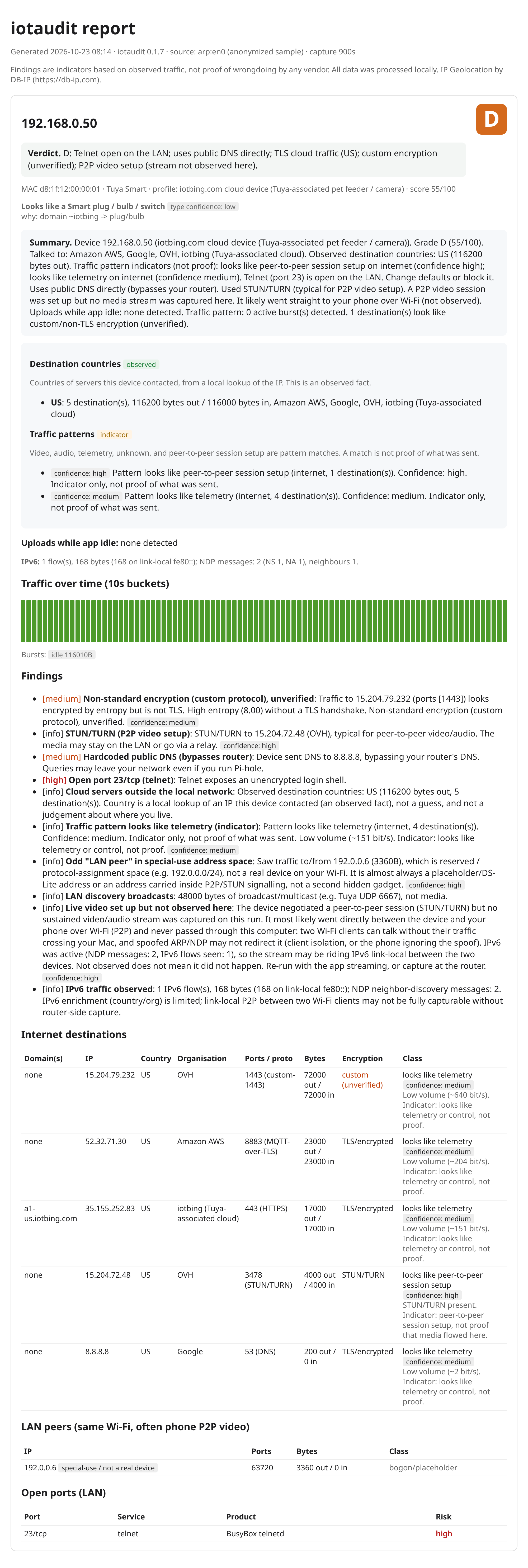
Open docs/sample-report.html in a browser for the full version.
Demo
A short walk-through of a capture, the UPnP port-forward check and the opt-in default-password
check (animated SVG, no audio, no tracking):
Install
pipx install iotaudit
# or with the MCP server extra, and PDF export:
pip install "iotaudit[mcp]"
pip install "iotaudit[pdf]"
# latest from source:
pipx install "git+https://github.com/emirmrkaljevic/iotaudit"
Capturing needs root (sudo). The optional port scan needs nmap.
Quick start
One command does the audit. It asks you to confirm this is your network, picks the active interface, finds devices, identifies them, scans ports, lists UPnP forwards (read-only), captures passively for 60 seconds, and writes the report.
sudo iotaudit auto
Each device is printed on one line, then the report path. Files land in ~/iotaudit/YYYY-MM-DD/ as HTML and JSON. A PDF is written next to them when iotaudit[pdf] is installed (pip install "iotaudit[pdf]"). If that folder already has a run from today, the new run is compared with the latest one.
Skip the typed confirmation with the existing ownership flag:
sudo iotaudit auto --i-own-this-network
A longer capture, or an explicit folder:
sudo iotaudit auto --i-own-this-network --duration 120 --out-dir ~/iotaudit
nmap and tcpdump are required. If either is missing, the command prints one install line and stops:
# macOS
brew install nmap tcpdump
# Debian or Ubuntu
sudo apt install nmap tcpdump
On macOS, Homebrew and a pipx install often sit outside sudo's PATH:
sudo env PATH="$PATH" "$(which iotaudit)" auto --i-own-this-network
Default passwords are not tested. That check stays opt-in, one device at a time (iotaudit credcheck, which is the only command with --yes).
auto does not ARP-spoof and does not start a hotspot. It records traffic that already passes this computer. To pull one device's traffic through this machine, use capture --mode arp below.
macOS
brew install nmap
pipx install iotaudit

# Just run it: pick your device from the list, then leave it alone (or use its app).
sudo "$(which iotaudit)" capture --mode arp --i-own-this-network
iotaudit scans your LAN, lists devices (IP, MAC, vendor; Tuya/Espressif flagged as likely IoT),
and lets you pick one. It then ARP-spoofs only that device so its traffic flows through your
Mac, captures for up to an hour (Ctrl+C stops early and still writes the report), and restores the
ARP tables and IP-forwarding on exit. With a device picked, --watch-lan (phone P2P) and the
IPv6/NDP filter are on by default.
Linux
sudo apt install nmap
pipx install iotaudit

# Same ARP flow as macOS:
sudo "$(which iotaudit)" capture --mode arp --i-own-this-network

# Or hotspot mode: your laptop becomes an AP; re-pair the device to it (needs NetworkManager).
sudo iotaudit capture --mode hotspot --iface wlan0 --ssid iotaudit --password 'choose-a-pass' \
     --device 10.42.0.50 --scan --out feeder.html
Analyse an existing capture
# from Wireshark, your router, or OpenWrt `tcpdump -w`
iotaudit analyze capture.pcap --device 192.168.1.50 --json results.json --out report.html
The report lands at ./iotaudit-report.html with a matching .json next to it.
Known-issue hints
iotaudit compares banners it already has with a small catalog shipped in the
package (src/iotaudit/data/known_issues.yaml). The facts it can use are:
- an open service from the port scan, plus the nmap product and version
- an HTTP
Serverheader from a response the device sent - a UPnP or SSDP header (including an InternetGatewayDevice advertisement)
- an RTSP response that did not ask for authentication, when that was already
in the capture or in the scan record
There is no lookup at runtime and no hints --update-from command. The file
changes only when you install a newer iotaudit.
Each hint is a possibility, not proof the firmware is vulnerable. The text
always includes: possible, based on version string; verify firmware. The
reference is the NVD page for that CVE.
Hints show in the HTML report, in the PDF (the PDF is the same HTML), in the
device JSON as known_issue_hints, and in the MCP analyze_pcap result.
Grade rule. A hint does not change the A-F grade unless both are true:
the observed version string equals a version the entry lists exactly, and the
entry severity is critical. That case subtracts 25 points, the same as one
high finding, and the subtraction is applied after the limited-data cap so it
still moves a thin capture. A version range, a product name without that
exact version, an open port on its own, or any severity other than critical
leaves the score unchanged. Telnet being open, an exposed UPnP IGD, or RTSP
with no authentication is not by itself a CVE. The catalog cites one only
when the banner or the service fact matches that entry.
Limits:
- The file is a short curated list (on the order of 10 to 20 issues), not the
NVD and not a firmware database. - A patched device can still show an old version string. An unpatched device
can hide the version. Either way the hint says to verify the firmware. - Banners are read from IPv4 packets and from the nmap record. IPv6 service
banners are not parsed. - RTSP with no authentication is recorded when a captured RTSP
200has noWWW-Authenticateheader, or when the scan extra info already says so. The
shipped list does not treat that fact alone as a CVE. It is mentioned on a
hint when a versioned RTSP entry also matches. - No network access is used to refresh the list.
PDF export
pip install "iotaudit[pdf]"

# Writes report.pdf next to report.html:
iotaudit analyze capture.pcap --device 192.168.1.50 --out report.html --pdf
sudo "$(which iotaudit)" capture --mode arp --i-own-this-network --pdf

# Convert a report you already saved (HTML, or the JSON list of devices):
iotaudit report --pdf report.html
iotaudit report --pdf results.json --out results.pdf
--pdf on analyze and capture writes a PDF next to the HTML. Print styles put the grade
and verdict at the top of each device (the first device shares page 1 with the title; every
later device starts on a new page), keep table rows in one piece, and repeat the table header.
The on-screen traffic chart is left out of the PDF.
The renderer is xhtml2pdf, a pure-Python extra (xhtml2pdf, pulled in by iotaudit[pdf]).
No Cairo or Pango install is required. If the extra is not installed, analyze and capture
still write the HTML and print one install line. iotaudit report --pdf prints that same line
and exits, because the PDF is its only output. The MCP tool analyze_pcap takes pdf=true
together with report_path and writes the PDF beside the HTML.
Compare two audits
iotaudit diff "$HOME/iotaudit/yesterday.json" "$HOME/iotaudit/today.json"
iotaudit diff "$HOME/iotaudit/yesterday.json" "$HOME/iotaudit/today.json" --json

# Same diff, printed after the HTML and JSON report:
iotaudit analyze capture.pcap --device 192.168.1.50 \
    --json "$HOME/iotaudit/today.json" --out "$HOME/iotaudit/today.html" \
    --compare "$HOME/iotaudit/yesterday.json"
Devices match by MAC. If either side has no MAC, they match by IP. A different MAC at
the same IP is one device gone and one device new. For each device the report lists new
and gone destination domains and IPs, new countries, new open ports, grade changes,
verdict changes, newly seen unencrypted traffic, and new UPnP forwards when the JSON
has them.
Exit code 1 when something security-relevant appeared: a device, a destination
domain or IP, a country, an open port, a worse grade, unencrypted traffic, or a UPnP
forward. Exit code 0 otherwise, including when the only changes are departures or
a better grade. A verdict change is printed either way and does not by itself exit 1.
Missing or unreadable input exits 2. With --compare, capture and analyze use
that same code after they write the report.
capture and analyze already write JSON (next to the HTML, or at --json). Keep
the previous file and pass it as --compare, or run diff on the two files later.--json on diff prints the machine-readable result. On capture and analyze,--json is still the path of the results file.
Cron stays quiet when nothing new showed up. This script prints the diff, and exits
1, only when something security-relevant appeared:
#!/bin/sh
# 15 6 * * 1-5 "$HOME/iotaudit/check.sh"
report=$(iotaudit diff "$HOME/iotaudit/yesterday.json" "$HOME/iotaudit/today.json") || {
    printf '%s\n' "$report"
    exit 1
}
exit 0
LAN peers are not compared. Open ports are the scanned open_ports, not the remote
port a destination was contacted on. UPnP is read from findings with category upnp,
or from a top-level upnp.mappings list joined on internal_client. An audit saved
without a UPnP check has no forwards, so the next audit's forwards show up as new.
Other findings are not listed one by one; a grade or verdict change still shows when
those findings moved the grade or the verdict.
IPv6, P2P video, and "not observed"
Live video from a camera or feeder often does not go to the cloud: it goes directly to your
phone over the local Wi-Fi (P2P), after a short STUN/TURN handshake. iotaudit tries hard to see
that stream (--watch-lan spoofs device↔phone, and the capture filter now includes IPv6 and NDP),
but two Wi-Fi clients can talk without their traffic ever passing through your computer.
because of Access-Point client isolation, a phone ignoring the spoof, or the stream riding IPv6
link-local (fe80::). When that happens the report says so honestly:
Live video set up but not observed here: the session was negotiated (STUN) but no sustained
stream was captured; it most likely went straight to your phone. Not observed ≠ not happening.
For ground truth, capture at the router instead. --ipv6-ndp (experimental) also NDP-spoofs IPv6
link-local pairs.
Default-password check (opt-in)
iotaudit credcheck 192.168.0.50                 # telnet by default
iotaudit credcheck 192.168.0.50 --service telnet --service http
The one active login iotaudit makes, and only when you ask for it. It tries a short list of
documented vendor default credentials (e.g. the root/xc3511 that the Mirai-era cameras
shipped with), never a password wordlist. You confirm the exact IP by typing a phrase, it only
targets a LAN address, it waits between attempts, stops at the first login that works, and reports
just "default login accepted" or "not accepted"; it never keeps or uses the session. Use
it on your own devices only.
Router port forwards (UPnP)
iotaudit upnp # or --json
Many devices quietly ask the router to open a public port to themselves. iotaudit upnp lists
every UPnP port forward and the LAN device it points to. It only sends the two read-only UPnP
queries, and only to a router on a private address. It also runs after each capture (skip with--no-upnp) and adds a finding when a forward points at the audited device. If nothing answers,
UPnP is off on your router, which is the safest setting.
Web UI and phones
iotaudit web                          # http://127.0.0.1:8765, token printed on start
sudo "$(which iotaudit)" web --lan    # also from a phone on the same Wi-Fi (token required)
View reports, upload a pcap (including PCAPdroid captures from Android) and run a one-click
scan & capture from the browser. Localhost by default; --lan is opt-in, token-protected and only
answers private-range clients. iPhones can use the web UI but cannot capture on their own; see
docs/phones.md for what works on Android and iOS and what does not.
Home Assistant
Write a small JSON summary that a Home Assistant sensor can read, or publish
the same summary to an MQTT broker you already run (Mosquitto is the usual
choice). MQTT is the easier path when iotaudit and Home Assistant are on
different machines; from 0.1.20, --ha-mqtt also writes MQTT discovery
configs so the sensors appear without YAML:
export IOTAUDIT_MQTT_PASSWORD='your-broker-password'
iotaudit export ~/iotaudit/2026-01-01/120000.json --compare earlier.json --ha-mqtt 192.168.1.2
sudo iotaudit auto --ha-json /path/to/homeassistant/config/iotaudit.json
iotaudit export ~/iotaudit/2026-01-01/120000.json --compare earlier.json --out iotaudit.json
Each device gets name, ip, grade, findings, and changed (null on the first run).
Ready-to-paste sensor YAML and MQTT details: Home Assistant guide.
For a spreadsheet, the same summary as CSV (one row per device):
iotaudit export audit.json --compare earlier.json --format csv --out devices.csv
Or as a Markdown table to paste into an issue or forum post: iotaudit export audit.json --format md. Add --redact to leave out IP addresses before you post it. To share a full report in one step: iotaudit report audit.json --redact writes audit.redacted.html with local IPs, MACs and hostnames replaced by labels like lan-1. Add --pdf for a PDF (needs pip install "iotaudit[pdf]"). Or keep the JSON copy with iotaudit redact audit.json.
MCP server
iotaudit-mcp # exposes audit tools to a local assistant ("audit my pet feeder")
diff_results compares two saved JSON audits the same way iotaudit diff does.
I also list the server on mcpservers.org and the official MCP Registry.
Consent & scope
iotaudit only audits your own network. It refuses non-private targets and requires--i-own-this-network (or an interactive I OWN THIS NETWORK confirmation). ARP/NDP spoofing on a
network you do not own may be illegal.
Findings are indicators based on observed traffic, not proof of wrongdoing by any vendor.
IP geolocation by DB-IP. MIT licensed.
Reviews (0)
Sign in to leave a review.
Leave a reviewNo results found