enowxcli
Health Pass
- License — License: Apache-2.0
- Description — Repository has a description
- Active repo — Last push 0 days ago
- Community trust — 68 GitHub stars
Code Fail
- rm -rf — Recursive force deletion command in scripts/install.sh
Permissions Pass
- Permissions — No dangerous permissions requested
No AI report is available for this listing yet.
An open-source AI coding agent for your terminal: specialist agents that plan, build, review and test, with built-in code search and any model provider. One binary.
enx
An open-source AI coding agent for your terminal.
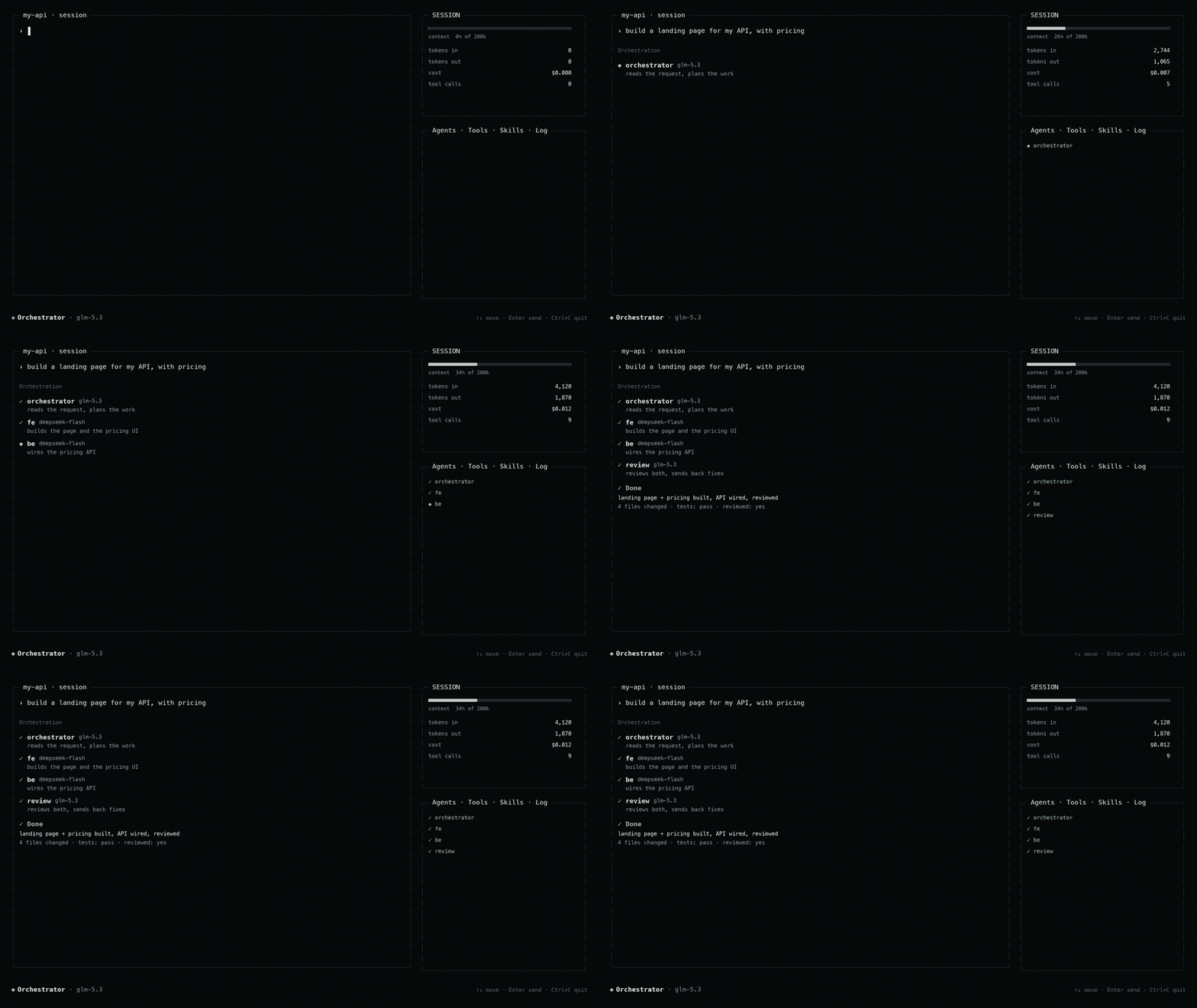
Specialist agents that plan, build, review and test each other's work, with
built-in code search and any model provider. One binary.




Website · Docs · Changelog · Discord
curl -fsSL https://enowx.ai/install.sh | sh     # macOS / Linux
irm https://enowx.ai/install.ps1 | iex          # Windows (PowerShell)
Then run enx.
Why enx
Most coding agents are one model editing your files, locked to one vendor. enx
is different:
- A team, not one model. It splits a task across specialist agents (plan,
build, review, test) that message each other and review each other's work
before it reports back. - Any provider, no lock-in. Bring any OpenAI-compatible endpoint, including
local or cheaper models (DeepSeek and others). Give each agent its own model. - It finds things. Built-in code search (RAG) over your project, cut along
the code's syntax, so a function is never split in half. - It is honest. It reports what it changed and how it checked it, and says
plainly when something was not tested. - One binary. Written in Rust, no runtime to install. Runs on macOS, Linux
and Windows, on Intel and ARM.
Early release. It runs and is used daily, but the surface is still
moving. Bug reports, ideas and PRs are welcome.
enx                          # open the terminal interface (default)
enx auth login deepseek      # store a provider's API key (typed, not echoed)
enx config set model.default deepseek/deepseek-flash   # pin the model to start on
enx models list              # the connected providers and their models
Install
Early release. v0.1.0 is the first public build; expect bugs and please
report them.
Prebuilt binaries are published on the releases page
for macOS, Linux and Windows, on Intel/AMD (x86_64) and ARM (aarch64). The
installers are served from enowx.ai and download the
binary from those releases. The binary is enx.
macOS (Apple Silicon and Intel)
curl -fsSL https://enowx.ai/install.sh | sh
The script picks the right build, checks its SHA-256, installs to~/.local/bin/enx, signs it ad hoc so Gatekeeper lets it run, and adds~/.local/bin to PATH in your shell's rc file (.zshrc, .bash_profile,
fish's config.fish, or .profile). Open a new terminal and run enx.
Linux (x86_64 and ARM64)
The same script. The Linux builds are static (musl), so they run on any
distribution, including Alpine, without extra libraries.
curl -fsSL https://enowx.ai/install.sh | sh
Windows (x64 and ARM64)
In PowerShell:
irm https://enowx.ai/install.ps1 | iex
It installs to %LOCALAPPDATA%\Programs\enx\enx.exe and adds that folder to
your user PATH; open a new terminal afterwards. The bash tool runs commands
with the sh from Git for Windows when it
is installed, and with PowerShell otherwise. Windows Terminal renders the
interface best.
Options and manual install
Both scripts read ENX_VERSION (a release tag such as v0.1.0; default the
latest) and ENX_INSTALL_DIR. ENX_NO_MODIFY_PATH=1 stops install.sh from
touching your shell config:
curl -fsSL https://enowx.ai/install.sh | ENX_VERSION=v0.1.0 ENX_INSTALL_DIR=/usr/local/bin sh
To install by hand, download the archive for your platform from the releases
page, check it against its .sha256 file, and put enx (enx.exe) on yourPATH:
| Platform | Archive |
|---|---|
| macOS, Apple Silicon | enx-aarch64-apple-darwin.tar.gz |
| macOS, Intel | enx-x86_64-apple-darwin.tar.gz |
| Linux, x86_64 | enx-x86_64-unknown-linux-musl.tar.gz |
| Linux, ARM64 | enx-aarch64-unknown-linux-musl.tar.gz |
| Windows, x64 | enx-x86_64-pc-windows-msvc.zip |
| Windows, ARM64 | enx-aarch64-pc-windows-msvc.zip |
Updating
enx update            # install the latest release in place of this one
enx update --check    # only say whether there is one
The interface also looks for a new release when it starts and says so in
the status bar; /update installs it. Settings > Updates turns the check
off, or has it install updates by itself ([update] in config.toml,
or ENX_NO_UPDATE_CHECK=1).
From source
With a Rust toolchain:
cargo install --git https://github.com/enowdev/enowxcli enowx-cli
Or build it yourself (see Build). Check the install withenx --version.
enowxcli opens on a home screen: the wordmark, enow in pixel letters with the
mark (an X of lit cells, its centre in orange) as the X, and the composer under
it. Until a provider and a model are set, the line under the composer says
which one is missing. Open /provider, choose a provider, then enter only its
API key. Built-in providers: enxapi, OpenAI, OpenRouter, Groq, and DeepSeek;
"Add a custom provider" takes any OpenAI-compatible endpoint. Any number of
providers stay connected side by side, each with its own key.
What is inside
| Piece | Notes |
|---|---|
| Agent loop, tools, sessions | Streaming model calls, paired tool results, JSONL sessions |
| Terminal interface | Framed layout, thought/tool cards, paged right sidebar, theme picker |
| Roles | Three shipped: Orchestrator, Writer, Researcher |
| Specialists | A roster the orchestrator delegates to, including an authorized-assessment security team |
The binary opens the terminal interface, with five selectable palettes.
Roles
| Role | Tools | Purpose |
|---|---|---|
| Orchestrator | read, write, edit, glob, grep, bash, fetch, todo | Owns a task end to end, then verifies it |
| Writer | read, write, edit, glob, grep, todo | Documentation and prose. No shell |
| Researcher | read, glob, grep, fetch, todo | Read-only investigation |
Role filtering runs twice: unavailable tools are never advertised to the model,
and a call that arrives anyway is refused before dispatch.
Specialists
The orchestrator hands work to a roster of specialists, grouped in the sidebar:
- LEAD:
orchestrator(the default: answers quick questions, delegates the
rest, never edits files) andmaestro, an all-rounder with every tool that
both builds and delegates, for a job that mixes doing and handing out. Pick
it with/agent maestro. - BUILD:
fe(frontend/interface),motion,canvas(standalone
single-file HTML pages and tools),be(backend),db,devops,mobile,systems. - SECURITY:
security, the lead of an authorized security assessment, and
its team. - SUPPORT:
research,review,test,docs,perf,librarian,general.
The security assessment team
security is the single security role a user selects. It leads an authorized
penetration test: it confirms the scope and written authorization first, then
delegates recon and each testing area to a specialist, consolidates the
findings, and finds the chains an individual surface cannot see. Its thirteen
specialists are reachable only through it (a Lead delegation, so an ordinary
request never lands one directly):
| Agent | Tests |
|---|---|
sec-recon |
Maps the target: hosts, services, versions, stack, input surface |
sec-osint |
Passive intelligence, no active touch on the target |
sec-webapp |
Web application against the OWASP categories |
sec-api |
REST/GraphQL/gRPC: authorization, injection, mass assignment, tokens |
sec-cloud |
AWS/Azure/GCP/Kubernetes posture |
sec-internal |
Authorized internal hosts, post-foothold |
sec-mobile |
Android/iOS applications and their backend |
sec-intercept |
Proxy-driven request tampering |
sec-reverse |
Binary and firmware analysis |
sec-threat-model |
Attack surface and trust boundaries |
sec-ir |
Incident triage and response |
sec-vibecoder |
Scores how likely a site was AI/boilerplate generated, and reports the gaps it left |
sec-report |
The write-up |
Active testing of a domain requires verifiable authorization, not a claim in
the chat. authorize_target checks that a connected Cloudflare account controls
the domain's DNS zone, which proves control of the domain, and records the
domain, its subdomains and the addresses it resolves to as the scope the team
may test. A domain the account does not control is refused. Connect the account with enx auth login cloudflare: it asks which scope
(minimal Zone:Read, medium, or full, all read-only), opens the Cloudflare
token page with that template pre-filled, verifies the token you paste reads
zones, and saves it. For the longest-lived token leave its validity
as no expiry (the default, and longer than any end date). The token is read from auth.json or CLOUDFLARE_API_TOKEN.
Every role tests only authorized targets, reads over writes, proves a finding
with a benign payload (never a destructive one), and never prints a real
secret. Each confirmed issue is recorded with the report_finding tool, which
shapes it the same way every time: severity, location, reproduction, impact and
fix. The distinct security audit remains as the security skill family, which
reads code rather than testing a running target. This is for assessing systems
you are authorized to test, such as your own project before release.
Built-in MCP servers
enx ships four MCP servers of its own, served by the enx binary (no Node
or Python needed). All four are always listed in /mcp, off by default.
Turn one on with Tab; a server with no credentials opens its config form
instead, which you also reach with c. Changes take effect in the running
session, no restart.
| Server | Gives agents |
|---|---|
coolify |
Applications, servers, databases, services and projects; deploy, start, stop, restart; logs; deployments; env var names |
dokploy |
Projects with their applications, compose stacks and databases; deploy, redeploy, start, stop; logs; deployments; servers; containers |
vps |
Your VPSes over SSH: run a command, or a read-only status (load, disk, memory, Docker) |
rag |
Code search over the workspace: index, search, status, forget (set up in Settings > RAG, see below) |
Fill a server in from the TUI (c on its row), or from the CLI, which an
agent can run for you: enx reloads MCP the moment the credentials land, so you
never restart the session.
enx mcp set coolify --url https://coolify.example.com --token <token>
enx mcp set dokploy --url https://dokploy.example.com --token <token>
enx vps add prod --host 203.0.113.5 --user root --key ~/.ssh/id_ed25519
enx vps add db --host 203.0.113.6 --user root --password <password>
enx vps add lab                     # an alias from ~/.ssh/config, keys or ssh-agent
enx mcp list
enx vps list
enx vps remove db
enx mcp clear dokploy        # forget its setup and turn it off
A VPS signs in the way ssh would, trying in turn: the key file you gave
it (OpenSSH, PEM or PuTTY .ppk; an encrypted one with its passphrase,
asked for or given with --passphrase), the keys in ssh-agent (Pageant or
the OpenSSH agent on Windows), the IdentityFiles from ~/.ssh/config or
else the default ~/.ssh/id_* keys, the password, and keyboard-interactive
answered with that password. --host may be an alias from ~/.ssh/config,
whose HostName, User and Port are used; --user defaults to the
config's. A server that asks for a one-time code is reported, not answered:
use a key there. In the TUI, c on the vps row has the same fields.
URLs, hosts and users are kept in ~/.enx/builtin-mcp.json; tokens and VPS
passwords and key passphrases in ~/.enx/auth.json (readable by you alone), never in the
transcript. Ask the agent to set one up ("connect my Coolify at … with this
token") and it runs enx mcp set for you, then the server is live without a
restart. Secret-looking fields and environment variable values are
redacted from what the tools return. A VPS's host key is recorded on the
first connection (~/.enx/vps_known_hosts) and a different key later is
refused before any password is sent. A server you declared yourself under
the same name (for example in ~/.claude/mcp.json) keeps the name.
Other MCP clients can run them too: the command is enx mcp serve coolify
(or dokploy, vps, rag) over stdio.
Code search (rag)
rag indexes the workspace into Postgres with the pgvector extension and
lets agents search it by meaning. It has a section of its own in Settings
(Ctrl+P, then RAG, or /rag):
| Field | Choices |
|---|---|
| Code search (RAG) | on or off (off by default) |
| Database | a Postgres with pgvector, local (postgres://localhost/enx) or cloud (Neon, Supabase, RDS, with ?sslmode=require) |
| Embedding provider | Voyage AI, OpenAI, or Custom: any OpenAI-compatible /embeddings endpoint (Ollama, LM Studio, Jina, Mistral, a gateway) |
| API key | the provider's; optional for a local endpoint |
| Embedding model | picked from the provider's (voyage-code-3, voyage-3.5, text-embedding-3-small, ...), typed for a custom endpoint |
| Dimension | picked from the widths the model offers, typed for a custom endpoint |
| Reranker | rerank-2.5, rerank-2.5-lite or off for Voyage; for a custom endpoint, a model its /rerank serves, or blank for none |
| Index automatically | on (the default): the workspace is indexed when a session starts, a file an agent writes or edits is indexed at once, other changes every half minute, and everything before each search |
The same from the CLI, which an agent can run for you:
enx mcp set rag --dsn postgres://localhost/enx --token <voyage key>
enx mcp set rag --provider openai --model text-embedding-3-large --dimension 1024 --token <key>
enx mcp set rag --provider custom --url http://localhost:11434/v1 --model nomic-embed-text --dimension 768
Files are cut along their syntax (tree-sitter for Rust, TypeScript,
JavaScript, Python, Go, JSON and CSS): a function, a type, a class method or
a config key is one chunk with the comments above it, small neighbours are
merged, and only an item larger than about 4,000 characters is split, along
its own body (the methods of a class, the statements of a function). Markdown
is cut at its headings, other text at its paragraphs; nothing is cut
mid-line. Each chunk records where it sits (in impl Store, in Install > macOS) and what it defines, and a search shows both. Code that only moved
keeps its embedding and gets its new line numbers.
Indexing runs at low priority (nice 10 on Linux and macOS, below normal on
Windows) and holds its full scan of the workspace while a turn is running;
the files the turn edits are still indexed at once.
Chunks go to a table per width (enx_rag_chunks_1024, ...) and record the
model that embedded them: after a change of model or width, the next index
embeds the project again instead of mixing vectors, and a search only
compares vectors of the model in use. A search fuses vector and keyword
matches, then reranks them when a reranker is set. Indexing is incremental
(only changed chunks are embedded again), honours .gitignore, and never
reads .env files, keys or lockfiles. Each checkout is its own project.
The rag skill, which tells agents when to index and how to search,
reaches them only while the server is on.
Agents working together
Off by default; turn it on in Settings > Team (or /team). Each part can
then be turned off on its own:
- Messages. Agents at work at the same time (parallel delegations, the
lead that delegated to them) can message each other withmessage_agent:
ask a question, agree on an interface, or point out a mistake in another
agent's part. A message reaches its agent at its next step. - Shared board.
team_boardholds what one run decided (an endpoint's
shape, a token's name, a file that moved): agents post to it and read it
before work that touches another agent's part. - Cross-review. When a delegate's work changed files, a reviewer (the
reviewagent unless you pick another) checks it against the task. Its
corrections go back to the delegate, in the same session, and the work is
checked again, until it passes or the correction rounds (1 to 5, 2 by
default) are spent. The caller's report ends with the outcome:CROSS-REVIEW by review: PASS after 1 correction round(s), or the
corrections still open.
The same settings live in config.toml under [agent.comms]: enabled,messages, board, review, review_rounds, reviewer.
Terminal commands
/help /new /resume /agent /model /effort /provider /attach/theme /typesafe /skills /mcp /compact /handoff /sidebar /reasoning/tools /preview /rag /team /update /status /clear /stop /retry /commands /quit
/handoff carries the conversation on in a fresh session: its history is
folded into a summary, the last few turns are kept as they were, and the same
agent holds it, so the context is light again. It asks first whether to keep
the old session's history (it stays in /resume) or delete it, with its
delegations' transcripts and the size it takes on disk.
The SESSION card in the sidebar shows what the session costs the machine,
read every two seconds: the memory of enx and the processes it started (MCP
servers, language servers, the preview browser), their CPU, and the history
on disk with its delegations.
A sub-agent at work can be stopped with a right-click on it in the
sidebar's Agents tab. The agent that delegated it is told it was stopped,
with what it had changed, and can read its whole transcript withdelegation_log before it briefs the next one.
/agent lists the roster with the model each agent runs on under it (its
own, or the shared default marked · default). Enter switches to the
selected agent, m gives it a model of its own from the model list (saved
as agent.models.<agent>), and d puts it back on the default model.
/effort chooses how hard the model thinks, from the levels models.dev lists
for it (/effort high picks one directly). The level shows beside the model,
under the composer and in the status bar, or effort default while the model
runs on its provider's default.
The transcript hangs each step's tool calls on a ├─ / └─ rail under the
request. Calls that only look around (read, grep, glob, fetch, skill reads)
fold into one explored row, and skill bindings into one bound row; click a
row to open it. While a turn runs, a line under the composer shows the mark's
middle row turning, what the turn is doing, and how long it has taken.
When the provider is down (502, 503, 429, a dropped connection), each call is
retried for about three and a half minutes. A reply the provider breaks off
mid-stream, or a stream that comes back empty, is asked for again up to three
times; one that still breaks tells the agent to send less at once (one file
per step, long files in parts), and the turn carries on. A turn that still fails continues
from where it stopped by itself, up to three times a minute apart; /retry
continues at once and Esc cancels the wait.
Two tabs sit at the top right: Chat and Settings. Settings takes the main
column in place of the chat, with its sections listed on the left (Models,
General, Models, Providers, Agents, Team, MCP, RAG, Skills, TypeSafe,
Sessions, Display, Theme, Updates) and the chosen one beside
them. Ctrl+P switches between Chat and Settings. Settings opens with the
section list focused: Up/Down pick a section, shown beside the list, andEnter goes into it. Esc steps back one level: from a form to its list,
from a section to the section list, and from the section list to the chat
(Left also steps out of a section). With the mouse, a click on a section
picks it and a click inside it goes in. /commands opens a searchable list of every command, and typing /
lists them above the composer.
Keys work the same on Linux, macOS and Windows. Where a terminal or the OS
takes a shortcut for itself, a second form does the same thing:
| Key | Does |
|---|---|
Enter |
Send (queues while a turn runs) |
Shift+Enter, Alt+Enter |
Newline (Ctrl+J too, when idle) |
Ctrl+Enter, Ctrl+S |
Send now, while a turn runs |
Ctrl+Backspace, Alt+Backspace |
Erase a word |
Esc |
Back one level in Settings, stop a turn, or clear the composer |
Ctrl+C |
Stop a turn, clear the composer, or ask to quit |
Ctrl+D |
Quit, from an empty composer |
Ctrl+P |
Switch between Chat and Settings |
Ctrl+R / Ctrl+O |
Show reasoning / tool output |
Ctrl+T |
Next sidebar tab (Alt+1 to Alt+4 pick one) |
Alt+Left/Alt+Right, Alt+B/Alt+F |
Sidebar pages |
Ctrl+G / Ctrl+X |
Log filter / log detail |
Ctrl+B |
Show or hide the sidebar |
Ctrl+Up, Alt+Up |
Edit, resend or copy your last message |
Ctrl+V, Alt+V |
Attach an image from the clipboard |
PgUp / PgDn |
Scroll the chat |
Ctrl+Enter and Shift+Enter are told apart from Enter only by terminals
that speak the kitty keyboard protocol (kitty, WezTerm, foot, Ghostty,
Alacritty, iTerm2) and by Windows Terminal; enx turns it on where it is
offered. Elsewhere (Terminal.app, GNOME Terminal, tmux) use Ctrl+S andAlt+Enter. AltGr characters type normally on Windows, and a multi-line
paste there arrives as one paste. Shortcuts are Ctrl and Alt
combinations rather than function keys, which not every terminal passes
through.
While a turn runs you can keep typing: Enter puts the message in a queue
shown above the composer, and queued messages go one at a time as each turn
ends. Ctrl+S (or Ctrl+Enter, or the [send now] button) stops the turn
and sends at once: what is typed, or else the first queued message. ↑ in an
empty composer takes the last queued message back to edit or delete. Stopping
a turn with Esc or Ctrl+C pauses the queue until you send again.
Ctrl+B shows or hides the sidebar; on narrow terminals it opens over the
transcript while leaving the composer accessible.
Themes are changed only through /theme: arrow keys preview, Enter saves,Esc cancels. Palettes: Obsidian Ice, Neo Acid, Chrome Void, OLED Stealth, and
Classic Amber. NO_COLOR is respected; unset it to see palette colours.
Mouse: drag over the transcript copies text to the clipboard on release,
click on a rendered file path opens it with the OS default application, and
the scroll wheel scrolls whatever is under the pointer a row a step: the
transcript, the side card, or an open window's list, whose selection the
wheel leaves where it is (the keys move it).
/provider lists every provider with whether it is connected and whether the
model in use is on it. Enter on a built-in provider asks for its key; a custom
one opens its name, base URL, key and model-list URL. d removes a
provider's stored key, and a second d removes a custom provider.
/model lists the models of every connected provider in one place, the
favourites and recent picks first. Type to search, Enter to use a model,Ctrl+F to mark a favourite, Ctrl+N to add a model by hand, Ctrl+E to edit
a model's context window, thinking effort, vision and prices, Ctrl+R to ask
the providers for their lists again. A model is always named with its provider,deepseek/deepseek-flash, and a pick is remembered in ~/.enx/model.json
rather than written to config.toml. /model <provider/model> does the same
from the composer.
Configuration
Three files under ~/.enx (or ENX_HOME), each with one job:
| File | Holds |
|---|---|
config.toml |
Custom providers, a pinned start model, and every other setting. No keys |
auth.json |
One API key per provider, readable by the user alone. enx auth login/logout edits it |
| Cloudflare token | In auth.json under cloudflare (or CLOUDFLARE_API_TOKEN); proves domain control for a security assessment |
model.json |
The recent and favourite models picked in /model |
At start the model in use is the first that can run of: ENX_MODEL, a pinnedmodel.default, then the recent picks. A provider's key also comes from its
own environment variable (DEEPSEEK_API_KEY, OPENAI_API_KEY,OPENROUTER_API_KEY, GROQ_API_KEY). ENX_BASE_URL, ENX_API_KEY andENX_MODEL describe an endpoint for one process, for a container, and are
never written. A configuration from before this layout is moved on first load,
with the old file kept as config.toml.before-providers.bak.
| Key | Meaning |
|---|---|
model.default |
Model to start on, as provider/model; empty uses the latest pick |
model.active |
Read only: the model in use |
provider.<id>.base_url |
A custom provider's OpenAI-compatible endpoint |
provider.<id>.models_url |
Where its model list is read |
provider.<id>.name |
Its name in the interface |
provider.<id>.models.<model>.context_window |
A window for one model, over what the provider or catalogue says |
agent.models.<agent> |
A model of its own for one agent, on any connected provider (or m on the agent in /agent) |
agent.max_steps |
Hard cap on model calls per turn |
agent.workspace |
Directory the file and shell tools are rooted in |
agent.shell_timeout_secs |
Kill a shell command after this long |
agent.lsp |
Check written files with the project's language servers (default on) |
agent.preview |
Let agents look at pages in headless Chrome (default on; /preview toggles it) |
agent.background_delegation |
The orchestrator's delegations run on after its turn and their reports wake it (default on) |
agent.auto_compact_at |
Fraction of the context window that triggers auto-compact |
agent.compact_keep_last |
Turns kept verbatim during compact |
ui.theme |
obsidian_ice, neo_acid, chrome_void, oled_stealth, or classic |
ui.currency |
Display currency for cost readouts (USD, IDR, JPY, …) |
ui.currency_rate |
Multiplier applied to USD prices for the display currency |
Sessions are stored as JSONL under ~/.enx/sessions, one file per session,
including tool calls and results for replay. Interrupted calls without a
recorded result are marked unavailable rather than executed again
automatically. A session records the workspace it was created in and refuses to
resume against a different one.
Skills, MCP servers, and per-project agent instructions are discovered from.agents/, .enx/, .claude/, .cursor/, .gemini/, and the standard~/.config locations. Skills ship inside enx for interface work (ui,ui-layout, ui-audit, one ui-page-* per kind of page and one ui-part-*
per part), for server work (backend, one backend-* per part such as the
API, auth, data, jobs and tests, and one backend-stack-* per stack: Next.js,
Node, Python, Go, Rust, Laravel, Java, .NET, Rails, plus caching, real-time,
files, search and GraphQL), for motion (motion*), the engineering behind an
interface (frontend*: state, data, forms, accessibility, performance,
testing, SEO, security, errors), databases (database*), infrastructure
(devops*), mobile apps (mobile*), low-level work (systems*), tests
(testing*), documentation (docs*), security audits (security*),
authorized assessment (pentest*), performance (performance*), reviewing (review*), research (research*),
gathering (librarian) and running large tasks (orchestration), pluscode, writing, i18n and brainstorm (agreeing a design, then the
plan documents the user chooses: PRD, DESIGN, ARCHITECTURE, ERD, API, PLAN,
written by the orchestrator with plan_write), each carried by the agents
whose work needs it and read only when the work does. A project or user skill of the same
name replaces one. A skill installed in the project or ~/ goes to every
agent until the orchestrator binds it, with skill_bind (every binding in one
call), to the agents whose work it serves; bindings are kept in ~/.enx/skill-bindings.json, and the
Skills tab shows who has each one. /skills and /mcp open their Settings sections to toggle
or add entries; /compact folds older turns into a summary; auto-compact fires
when the context window nears its cap.
After write, edit and multi_edit, the file goes to its language server
(rust-analyzer with clippy, typescript-language-server, pyright and ruff,
gopls) and the errors and warnings come back with the result, so an agent
fixes a type error before it builds anything on top of it. An edit waits only
for the server's first answer; the diagnostics tool waits for the full
check. A server that is not installed is named once, with its install
command. agent.lsp = false turns this off.
Every change an agent makes goes through three checks before it lands:
- Rules. Markdown rules (a pattern, the files it applies to, and what to
do instead) are checked on the code the change adds.blockrefuses the
change and returns the rule;remindlets it through with the rule
attached. enx ships rules for secrets in code,any, empty catches, index
keys,Box::leak, deprecated Go and Python APIs,transition: alland
removed focus outlines; add or override them in~/.enx/rules/or the
project's.enx/rules/(severity: offturns one off). A line withenx-allow: <rule>passes a blocking rule. - Syntax. Rust, TypeScript, TSX, JavaScript, Python, Go, JSON and CSS
files are parsed before and after the change. When a change breaks a file
that parsed, a quick model call mends the changed region; when that fails,
an edit is refused with the error's line. - Language server, as above.
read shows each line with an anchor (12#a3f:text), and edit_lines
changes whole lines by those anchors, so an agent never has to repeat the
old text exactly, and an edit against a stale read is caught. lsp asks
the language server for a definition, references, a symbol's type, a file's
symbols, or a rename across every file.
Calls in one step that only look (read, glob, grep, fetch,diagnostics, ui_check, and at most one bash beside them) run at the
same time; writes and everything else keep their order. A picture that is
already in the conversation is not sent to the model again.
The orchestrator does not wait on its specialists: a wave it delegates runs
in the background, its turn ends, and the status bar says how many agents
are working. When the whole wave has finished, their reports start its next
turn on their own. Tests and review run only when the user chose them at
the start.
preview shares one headless Chrome across every look, each in a throwaway
browser context, two at a time; the browser closes after 90 seconds without
a look and never outlives enx. Looking again at a page with no file changed
returns the last result instead of opening a browser.
File tools reject paths and symlinks outside the workspace. bash runs with
the user's OS permissions and is not a sandbox; use only with trusted tasks
and providers.
Build
cargo build --release
cargo test --workspace
Install the binary (cargo emits it as enx, per [[bin]] incrates/enowx-cli/Cargo.toml):
which -a enx                                     # expect no output before installing
install -m 755 target/release/enx ~/.local/bin/enx
Releasing
Pushing a v* tag runs .github/workflows/release.yml: it builds enx for
the six platforms above and publishes the archives and their checksums as a
GitHub release. Running the workflow by hand builds without publishing.
git tag v0.1.0 && git push origin v0.1.0
Live reload while developing
enx dev                     # rebuild and relaunch the interface on every source change
enx dev --session <id>      # pin one conversation across reloads
enx tui --session <id>      # resume a session directly
Run enx dev from this checkout. It watches crates/ and Cargo.toml,
keeps the interface in the foreground, and on each save rebuilds and relaunches
it while resuming the newest session in this workspace.
Licence
Apache License 2.0. See LICENSE and NOTICE.
Reviews (0)
Sign in to leave a review.
Leave a reviewNo results found