webbrain
Health Pass
- License — License: MIT
- Description — Repository has a description
- Active repo — Last push 0 days ago
- Community trust — 25 GitHub stars
Code Fail
- rm -rf — Recursive force deletion command in lmstudio-plugin/package.json
- exec() — Shell command execution in lmstudio-plugin/src/tools/researchUrl.ts
- network request — Outbound network request in lmstudio-plugin/src/util/safeFetch.ts
Permissions Pass
- Permissions — No dangerous permissions requested
This tool is an open-source browser extension that acts as an AI agent, allowing users to chat with web pages and automate multi-step browsing tasks using various local or cloud-based Large Language Models.
Security Assessment
Risk Rating: High. The extension inherently processes sensitive data by reading your browser activity, webpage content, and LLM prompts. The automated audit uncovered critical security vulnerabilities, specifically dynamic code execution via the Function constructor and shell command execution capabilities. Malicious web pages or compromised LLM outputs could potentially trigger these execution flaws to run unauthorized commands on your machine. Additionally, the tool makes multiple outbound network requests to handle tool operations, fetch images, and communicate with external LLM providers. While no hardcoded secrets or dangerous baseline system permissions were found, the combination of broad webpage access, dynamic code execution, and network activity presents a severe attack surface.
Quality Assessment
The project uses the permissive MIT license, meaning it is entirely open-source and legally safe to modify. The repository is very new and actively maintained, with the most recent code push occurring today. However, it currently has extremely low community visibility and adoption, boasting only 5 GitHub stars. Because of this minimal public scrutiny, critical security flaws and edge cases are highly likely to go unnoticed by the broader developer community.
Verdict
Not recommended for daily use until the dynamic code execution and shell access vulnerabilities are thoroughly explained by the author or patched out.
Open-source AI browser agent for Chrome and Firefox (monorepo) 🧠
WebBrain


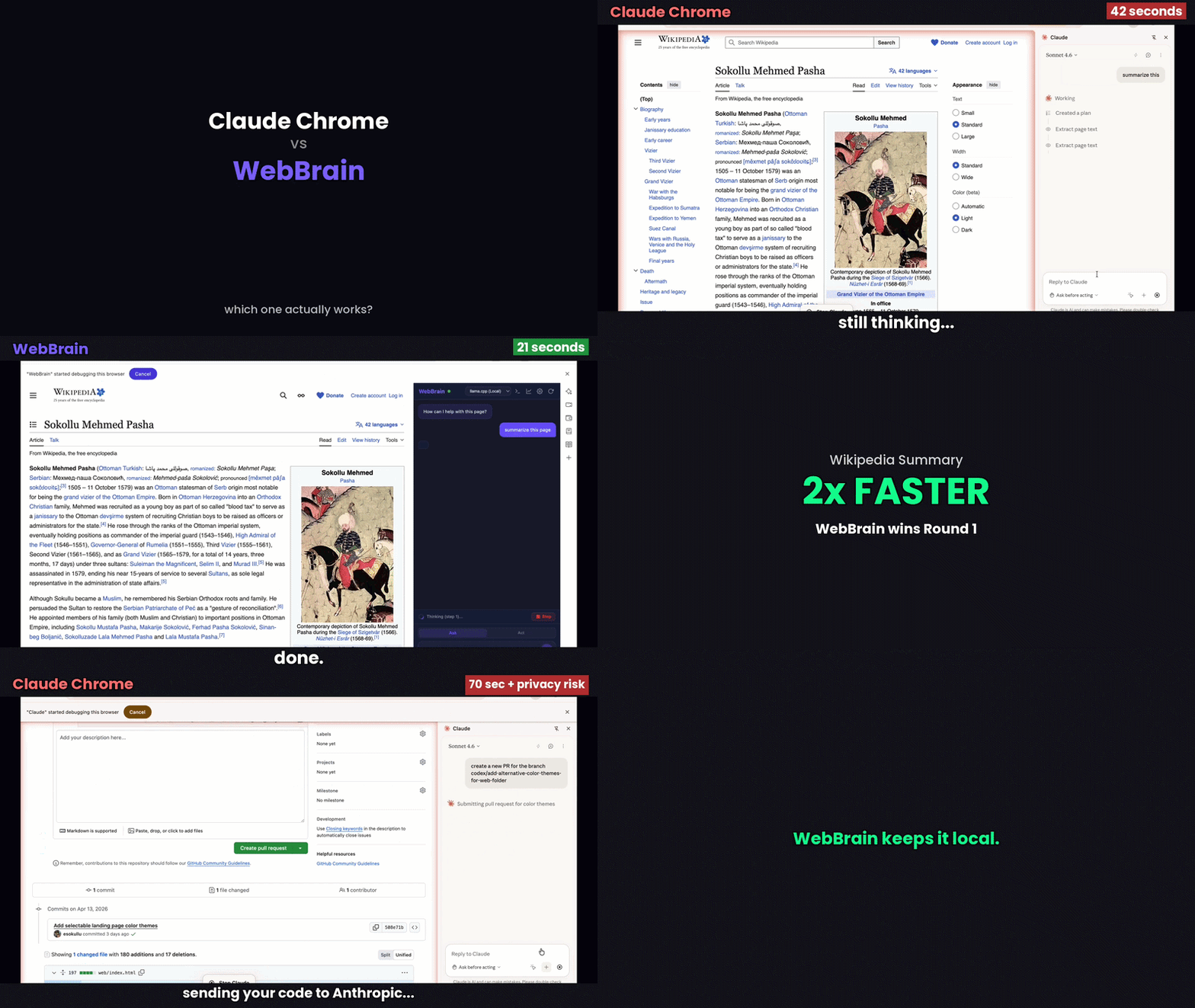
Open-source AI browser agent for Chrome and Firefox. Chat with any web page, automate browser tasks, and run multi-step agent workflows — powered by your choice of LLM.
Features
- Page Reading — Extracts text, links, forms, tables, and interactive elements from any page
- Browser Actions — Click, type, scroll, navigate, and interact with page elements
- Ask / Act Modes — Read-only mode by default, full agent mode with confirmation
- Multi-Step Agent — Autonomous task execution with tool-use loops (configurable, default 130 steps)
- Continue from Limit — When the agent hits the step limit, click Continue to keep going
- Multi-Provider LLM — Supports local and cloud models:
- llama.cpp (local, default) — No API key needed. Also Ollama and LM Studio
- OpenAI (GPT-5.5, etc.)
- Anthropic Claude (native API)
- Google Gemini, Mistral AI, DeepSeek, xAI Grok, Groq
- MiniMax, Alibaba Cloud (Qwen)
- Nvidia NIM
- OpenRouter (default model:
stepfun/step-3.7-flash; access 100+ models)
- Onboarding Wizard — First-launch walkthrough covering Act mode safety and provider setup
- Side Panel UI — Clean chat interface that lives alongside your browsing
- Per-Tab Conversations — Each tab has its own chat history
- Streaming — Real-time token streaming from all providers
- Smart Context — Token-aware auto-compaction (summarizes older turns once the conversation nears the model's context window, with a visible "Context automatically compacted" notice), tool result limits, and emergency overflow recovery
- Copy Support — Copy buttons on code blocks and full messages
- Page Inspection Banner — Visual indicator when the agent is interacting with the page
- Stop Button — Abort the agent mid-execution at any time
- Deterministic Act Mode — Act mode uses temperature
0.15for browser-control decisions; Ask mode uses0.3, and dedicated vision screenshot descriptions use0
Quick Start
Chrome
git clone https://github.com/esokullu/webbrain.git
- Open Chrome →
chrome://extensions/ - Enable Developer mode (top right)
- Click Load unpacked → select the
webbrainfolder
Firefox
git clone https://github.com/esokullu/webbrain.git
- Open Firefox →
about:debugging#/runtime/this-firefox - Click Load Temporary Add-on
- Navigate to
src/firefox/and selectmanifest.json
Note: Temporary add-ons are removed when Firefox restarts. For permanent installation, the extension needs to be signed via addons.mozilla.org.
Start a local LLM (default)
# Using llama.cpp
llama-server -m your-model.gguf --port 8080

# Or using Ollama (OpenAI-compatible)
ollama serve
# Then set base URL to http://localhost:11434/v1 in settings
Context window: For reliable agent runs, load a local model with at least a 16k-token context window (the usable minimum). 8k can work with Compact mode enabled (Settings → per-provider checkbox); 4k is too small to hold the system prompt + tool schemas. WebBrain auto-compacts the conversation as it nears the window — it assumes 16k for local models unless you set an explicit context size, so give the model server (e.g.
llama-server -c 16384) enough room.
Use it
Click the WebBrain icon → the side panel opens. Type a message like:
- "Summarize this page"
- "Find all links about pricing"
- "Fill in the search box with 'AI agents' and click Search"
- "Navigate to github.com and find trending repositories"
Configuration
Click the gear icon or go to the extension's Options page to configure:
Display Settings:
- Verbose Mode — Show full tool call JSON (off by default)
- Screenshot Fallback — Use screenshots when DOM reading fails
- Max Agent Steps — Configurable step limit (5-200, default 60)
Providers:
| Provider | Base URL | API Key | Default Model |
|---|---|---|---|
| llama.cpp | http://localhost:8080 |
Not needed | (your loaded model) |
| Ollama | http://localhost:11434/v1 |
Not needed | (your loaded model) |
| LM Studio | http://localhost:1234/v1 |
Not needed | (your loaded model) |
| OpenAI | https://api.openai.com/v1 |
Required | gpt-5.5 |
| Anthropic Claude | https://api.anthropic.com |
Required | claude-sonnet-4-6 |
| Google Gemini | https://generativelanguage.googleapis.com/v1beta/openai |
Required | gemini-3.1-flash |
| Mistral AI | https://api.mistral.ai/v1 |
Required | mistral-large-latest |
| DeepSeek | https://api.deepseek.com/v1 |
Required | deepseek-v4-flash |
| xAI Grok | https://api.x.ai/v1 |
Required | grok-4.3 |
| Nvidia NIM | https://integrate.api.nvidia.com/v1 |
Required | meta/llama-3.1-8b-instruct |
| Groq | https://api.groq.com/openai/v1 |
Required | llama-3.3-70b-versatile |
| MiniMax | https://api.minimax.chat/v1 |
Required | minimax-m2.7 |
| Alibaba Cloud (Qwen) | https://dashscope.aliyuncs.com/compatible-mode/v1 |
Required | qwen-max |
| OpenRouter | https://openrouter.ai/api/v1 |
Required | stepfun/step-3.7-flash |
Architecture
src/chrome/                        src/firefox/
├── manifest.json (MV3)            ├── manifest.json (MV2)
├── src/                           ├── src/
│   ├── background.js              │   ├── background.js (+ background.html)
│   ├── agent/                     │   ├── agent/
│   ├── content/                   │   ├── content/
│   ├── providers/                 │   ├── providers/
│   ├── network/                   │   ├── network/
│   ├── trace/                     │   ├── trace/
│   ├── ui/                        │   └── ui/
│   └── offscreen/                 ├── styles/
├── styles/                        ├── icons/
└── icons/                         └── LICENSE

web/
├── index.html
├── privacy.html
└── vercel.json
Key difference: Chrome uses Manifest V3 (service worker, chrome.scripting, sidePanel API), Firefox uses Manifest V2 (background page, browser.tabs.executeScript, sidebar_action).
Deeper docs live in docs/: architecture, site adapters, providers and models, security model, prompt-injection defense, privacy and data flow, accessibility tree and refs, localization, adding a tool, and test scenarios.
Agent Tools
| Tool | Ask | Act | Compact | Description |
|---|---|---|---|---|
get_accessibility_tree |
Yes | Yes | Yes | Flat indented text of the page's accessibility tree with persistent ref_ids |
read_page |
Yes | Yes | Yes | Extract page text, links, forms (legacy prose fallback) |
read_pdf |
Yes | Yes | -- | Extract text from PDF documents via vendored pdfjs-dist |
screenshot |
Yes | Yes | Yes | Capture visible tab (with optional save:true to Downloads) |
full_page_screenshot |
Yes | Yes | -- | Capture full scrollable page (Chrome only) |
get_interactive_elements |
Yes | Yes | -- | List all clickable/interactive elements (legacy, pierces shadow DOM) |
get_frames |
Yes | Yes | -- | List all iframes on the page |
get_shadow_dom |
Yes | Yes | -- | Read shadow DOM trees |
scroll |
Yes | Yes | Yes | Scroll the page |
extract_data |
Yes | Yes | Yes | Extract tables, headings, images |
get_selection |
Yes | Yes | Yes | Get highlighted text |
click_ax |
-- | Yes | Yes | Click an element by accessibility tree ref_id (preferred) |
type_ax |
-- | Yes | Yes | Type into a field by ref_id. Supports lang: "tr-deasciify" |
set_field |
-- | Yes | Yes | One-shot focus + clear + type + verify by ref_id. Supports lang: "tr-deasciify" |
click |
-- | Yes | Yes | Click elements by selector, index, or coordinates (legacy fallback) |
type_text |
-- | Yes | Yes | Type into input fields. Supports lang: "tr-deasciify" |
press_keys |
-- | Yes | Yes | Press Escape, Tab, or Enter |
hover |
-- | Yes | -- | CDP-trusted hover for reveal-on-hover menus (Chrome only) |
drag_drop |
-- | Yes | -- | Drag-and-drop via CDP pointer events (Chrome only) |
navigate |
-- | Yes | Yes | Go to a URL |
new_tab |
-- | Yes | Yes | Open a new tab |
wait_for_element |
-- | Yes | Yes | Wait for a selector to appear |
wait_for_stable |
-- | Yes | -- | Wait until page is idle (no DOM mutations + no network) |
upload_file |
-- | Yes | -- | Upload a file to a file input (Chrome only) |
execute_js |
-- | Yes | -- | Run custom JavaScript (Firefox only — blocked by MV3 CSP on Chrome) |
fetch_url |
Yes | Yes | Yes | Fetch a URL from the background with the user's cookies |
research_url |
Yes | Yes | -- | Open a URL in a hidden tab, wait for JS rendering, return content |
download_files |
-- | Yes | -- | Download one or more files (single url or array, max 3 concurrent) |
download_resource_from_page |
-- | Yes | -- | Download an <img>/<video>/blob URL from the current page |
download_social_media |
-- | Yes | Yes | One-shot social media download; DOM/CDN first, optional visible-media vision crop fallback |
list_downloads |
Yes | Yes | -- | List recent downloads with status and source URLs |
read_downloaded_file |
-- | Yes | -- | Re-fetch a downloaded file's content (text or base64) |
iframe_read / iframe_click / iframe_type |
-- | Yes | -- | Read/click/type inside cross-origin iframes |
record_tab / stop_recording |
-- | Yes | -- | Record tab video+audio into .webm with optional Whisper transcription (Chrome only) |
scratchpad_write |
Yes | Yes | Yes | Pin a note in context that survives summarization |
clarify |
Yes | Yes | Yes | Pause and ask the user a question |
verify_form |
-- | Yes | -- | Verify form fields before submitting |
solve_captcha |
-- | Yes | Yes | Solve CAPTCHAs via CapSolver API (optional, requires API key) |
done |
Yes | Yes | Yes | Signal task completion |
Compact mode is a reduced tool set + shorter system prompt designed for small local models (2B-8B). In both Chrome and Firefox builds, it cuts the Act-mode schema from 40+ tools to about 20, reducing decision surface and hallucination. Enable it per-provider in Settings (checkbox on llama.cpp, Ollama, LM Studio; off by default).
Shadow DOM note: The accessibility tree only traverses light DOM. On Web Component-heavy pages (Stripe, Salesforce, Shopify), use
get_interactive_elements(pierces open shadow roots) orget_shadow_dom/shadow_dom_queryfor targeted reads.
LM Studio plugin
The fetch_url and research_url tools also ship as a standalone
LM Studio plugin atwebbrain/web-tools, for
users who want web-fetching tool-use inside LM Studio chats without
running the full browser extension. Pure Node, no headless browser.
lms clone webbrain/web-tools
Source: lmstudio-plugin/.
Slash Commands
WebBrain accepts slash commands as the first thing on a line in the input box. Type /help to see the list inside the panel.
| Command | What it does |
|---|---|
/help |
Show the list of available commands |
/allow-api |
Per-conversation API mutation override. Lifts the UI-first restriction so the agent may use POST/PUT/PATCH/DELETE via fetch_url when UI is failing. Badge appears while active; clears on /reset. |
/compact |
Toggle verbose/compact tool display (same as the toolbar button) |
/reset |
Clear the conversation and all per-conversation flags |
/screenshot |
Capture the visible tab and display the image inline in chat |
/export |
Download the current conversation as a Markdown file |
/profile |
Toggle profile auto-fill on/off without opening Settings |
/vision |
Toggle vision mode (screenshot understanding) on the active provider |
The default UI-first rule exists because API actions are invisible (you don't see what's being sent), often require separate auth tokens you may not have configured, and can have a much larger blast radius than a visible mis-click. Only use /allow-api when you've decided you want that tradeoff for a specific job.
Known Issues
- Firefox is meaningfully weaker than Chrome. Firefox has no equivalent to Chrome DevTools Protocol via
chrome.debugger, so several Chrome-only features are missing in the Firefox build:- Click/type goes through the content-script path (
document.querySelector+el.click()) instead of CDPInput.dispatchMouseEvent. This means no shadow-DOM piercing, no real trusted mouse events (some React/Vue handlers won't fire), no closed-shadow-root traversal, and noresolveSelectorretry budget. - No SPA-navigation-aware retry extension.
- No conversation persistence across background restarts.
- No CDP screenshots. Auto-screenshot uses
tabs.captureVisibleTabinstead, which works for active tabs only and at slightly lower quality. - No closed shadow root support for read/extract tools.
- Site adapters, vision detection, loop detection, the auto-screenshot loop, and the opt-in compact prompt/tool set are mirrored to Firefox.
- Click/type goes through the content-script path (
- SPA navigation detection in Firefox. Some single-page applications may not trigger content-script re-injection after client-side navigation.
- Firefox temporary add-on — Firefox requires the extension to be loaded as a temporary add-on during development, which is removed on restart.
What's New
See CHANGELOG.md for the full version history. Recent highlights: native PDF reading with Claude passthrough (8.x), 65+ bug fixes in 8.5.0, compact mode going fully opt-in (8.3.0), Turkish deasciification (8.2.x), on-page agent indicator and tab-group-scoped side panel (6.0.x).
Roadmap
- Conversation export/import — Save and load chat histories
- Custom tool definitions — User-defined tools via settings
- Keyboard shortcuts — Hotkeys for opening panel, sending messages, switching modes
- Context menu integration — Right-click → "Ask WebBrain about this"
- Screenshot/vision tool — Send screenshots to multimodal models for visual understanding
- Chrome Web Store / Firefox AMO — Official store listings
Adding a New Provider
- Create a new class extending
BaseLLMProviderinsrc/providers/ - Implement
chat()and optionallychatStream() - Register it in
src/providers/manager.js
All providers normalize to a common response format:
{ content: string, toolCalls: Array|null, usage: Object|null }
License
MIT — built by Emre Sokullu
Reviews (0)
Sign in to leave a review.
Leave a reviewNo results found