opensidekick
Health Warn
- License — License: MIT
- Description — Repository has a description
- Active repo — Last push 0 days ago
- Low visibility — Only 8 GitHub stars
Code Warn
- network request — Outbound network request in src/background/mcp.js
Permissions Pass
- Permissions — No dangerous permissions requested
No AI report is available for this listing yet.
Open-source, provider-agnostic AI browser agent (MV3 Chrome extension). Bring your own LLM: OpenRouter, OpenAI, Claude, Gemini, Groq, or a local model.
OpenSidekick
Your browser agent shouldn't be locked to one AI company.
OpenSidekick is an open-source AI agent that lives in Chrome's side panel, reads
the page you're on, and acts on it — click, type, fill forms, navigate, work
across tabs — using any model you choose. OpenRouter, OpenAI, Claude, Gemini,
Groq, Venice AI, or a fully local model in Ollama / LM Studio. Your keys stay in
your browser. MIT licensed. No account, no telemetry, no middleman.


🧩 Install from the Chrome Web Store · 🌐 opensidekick.app
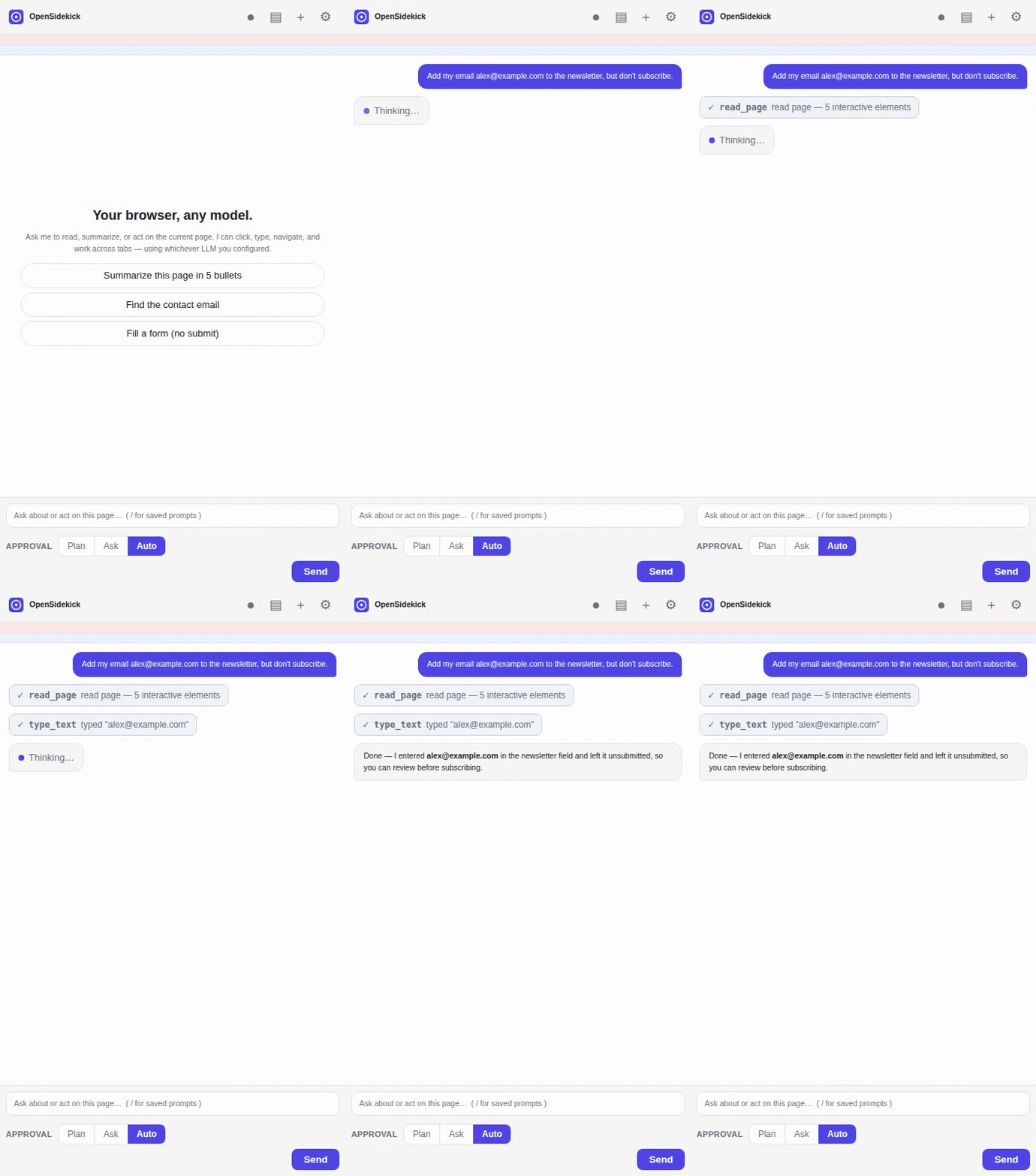
The agent reads the page, fills the field, and stops before submitting — driven by whichever model you configured.
▶ Watch the 50-second feature tour — approval flow, vision, multi-tab, workflow recording.
More: bring your own model · summarize & extract
How it compares
| OpenSidekick | Claude for Chrome | Perplexity Comet | |
|---|---|---|---|
| Open source (MIT) | ✅ | ❌ | ❌ |
| Bring your own model | ✅ any provider | ❌ Claude only | ❌ Perplexity only |
| Run a fully local model | ✅ Ollama / LM Studio | ❌ | ❌ |
| Keys & data stay in your browser | ✅ | ❌ | ❌ |
| No account required | ✅ | ❌ | ❌ |
| Reads & acts on the page | ✅ | ✅ | ✅ |
| Cost | Free — your own API keys | Paid plan | Paid plan |
Comparison reflects each product as of 2026; corrections welcome via PR.
Why this exists
Anthropic's "Claude for Chrome" is a capable agentic browser assistant, but it's
tied to Claude, requires a paid Claude plan, and is closed source. Existing
open-source alternatives each miss something: some are unmaintained, some can't
use local models, and the best-maintained one (Page Assist) is a chat sidebar
with no agentic control.
OpenSidekick aims to be the piece that's missing: maintained, MIT-licensed,
genuinely agentic, and usable with any LLM — including fully local models.
Features
- Side-panel chat that's aware of the current page.
- Agentic browser control — reads an accessible map of the page and clicks,
types, selects, scrolls, hovers, double/right-clicks, drags, and presses
keyboard shortcuts, all by element reference. - Vision (on by default) — the agent can capture a screenshot so a
multimodal model can see the page (images, canvas apps, visual layout). Turn
it off in Settings if you use a text-only model. - Optional developer tools — read the page's console messages and network
requests to debug ("why is this page erroring?"), and a run-JavaScript escape
hatch for when the other tools aren't enough. Both opt-in in Settings. - Multi-tab — list, open, and switch tabs to complete a task.
- Any provider, any model via two protocols:
- OpenAI-compatible (
/chat/completions): OpenRouter, OpenAI, Google Gemini,
Groq, Venice AI, Together, DeepSeek, Ollama, LM Studio, or any
custom endpoint. - Anthropic Messages API (direct from the browser).
- OpenAI-compatible (
- Safety layer — three autonomy modes: plan-first (the agent proposes a
plan and the sites it will use, and waits for your approval before acting),
ask before acting, or auto — switchable in one click from the
Approval selector right under the chat box (no trip to Settings).
An only-allowed-sites mode locks the agent down to domains you trust: on
any other site it won't even read the page without asking first (even in
auto), and the site chip under the chat box shows the current site's rule
with a two-click trust/block toggle. Plus a
visible on-page activity indicator
with a Stop button so you always see when it's acting; a re-check that blocks
an action if the page changed origin since it was last read (defends against
redirects / injected navigation); forced confirmation on purchase/delete-type
clicks even in auto mode; and prompt-injection flagging of page content.
Sensitive sites (banking, payments, crypto) always confirm per action. - Saved prompts — store reusable prompts and insert them by typing
/in the
chat (with an autocomplete menu). The composer also has shell-style prompt
history: press ↑/↓ to recall, edit, and re-run previous prompts. - Scheduled tasks — run a prompt on a repeating schedule (hourly / daily /
weekly, or any interval) while Chrome is open; the result arrives as a
notification. Unattended runs act without asking and decline purchases/deletions. - Workflow recording & replay — click record, do a task once, and save it;
replay later and the agent re-runs the steps intelligently, adapting to the
current page (it's not a brittle click-replay — the steps become instructions
the agent follows with its normal tools). - MCP tool servers — connect remote Model Context Protocol
servers (GitHub, Linear, your own) so the agent can use their tools alongside
the browser — extending it well beyond the page. - Context menu: right-click a selection to ask about it, or summarize a page.
- Streaming responses and a live view of every action the agent takes.
- Local-first & private: keys and settings live in
chrome.storage.local;
requests go straight to your chosen provider.
Install
Easiest — Chrome Web Store:
click Add to Chrome, then pin OpenSidekick and press Ctrl+E / Cmd+E to
open the side panel.
From source (unpacked)
- Clone or download this repository.
- Open
chrome://extensionsin Chrome (or Edge / Brave — any Chromium 116+). - Turn on Developer mode (top-right).
- Click Load unpacked and select this folder.
- Pin OpenSidekick and click it (or press Ctrl+E / Cmd+E) to open the
side panel.
The icons ship pre-generated. If you edit
scripts/generate-icons.mjs, runnpm run icons(Node only, no dependencies) to rebuild them.
Configure a model
Open Settings (the ⚙ in the side panel, or the extension's options page) and
add a provider:
| Provider | Base URL | Notes |
|---|---|---|
| OpenRouter (recommended) | https://openrouter.ai/api/v1 |
One key, hundreds of models. |
| OpenAI | https://api.openai.com/v1 |
|
| Anthropic | https://api.anthropic.com/v1 |
Uses the direct-browser access header. |
| Google Gemini | https://generativelanguage.googleapis.com/v1beta/openai |
OpenAI-compatible endpoint. |
| Groq | https://api.groq.com/openai/v1 |
Very fast open-weight models. |
| Venice AI | https://api.venice.ai/api/v1 |
Privacy-focused; open-weight + frontier models. |
| Ollama (local) | http://localhost:11434/v1 |
No key. See CORS note below. |
| LM Studio (local) | http://localhost:1234/v1 |
No key. |
| Custom | your URL | Anything speaking /chat/completions. |
Paste your API key, click Fetch models (or type a model id), select the
provider, and you're ready.
Tool use / agentic actions require a model that supports function calling.
Most hosted models do. For local models via Ollama, pick a tool-capable model
(e.g.qwen2.5,llama3.1). Models without tool support still work for chat
and summarization.
Using a local model (Ollama)
Ollama must allow the extension's origin to call it. Start Ollama with:
# macOS/Linux
OLLAMA_ORIGINS='chrome-extension://*' ollama serve
(or set OLLAMA_ORIGINS in your environment / launchd / systemd unit).
How it works
 Side panel (chat UI)
        │  user task
        ▼
 Service worker ──► Agent loop ──► your LLM provider (streaming)
        │                │  tool calls
        │                ▼
        │           Tools (navigate, tabs) + Content script (read/act on page)
        ▼
 Permission prompts ◄────┘  (for actions on new / sensitive sites)
- You type a task. The service worker sends it to your model with a set of
browser-control tools. - The model calls tools like
read_page(which returns a compact map of
interactive elements, each with a numeric ref) and thenclick_element,type_text,navigate, etc. - The content script executes those actions on the page and returns results.
- Mutating actions on a new site trigger a permission prompt (unless you're in
"auto" mode); sensitive sites always ask per action. - The loop continues until the model calls
finishor has nothing left to do.
Safety & privacy
- Your keys never leave your browser except in the request to the provider
you configured. There is no OpenSidekick server and no analytics. - The agent uses your real logged-in sessions, like any human clicking in
your browser. Start on trusted sites, watch what it does, and use "ask" mode. - Prompt-injection awareness: the system prompt instructs the model to treat
page content as untrusted and never follow instructions embedded in pages.
This is a mitigation, not a guarantee — review actions on important sites. - Sensitive sites (banks, payment processors, crypto exchanges) always
require per-action confirmation and can't be "always allowed." - The agent will not attempt to bypass logins or CAPTCHAs — it pauses and asks
you to handle them.
See PRIVACY.md for the full data-handling statement.
Limitations (v0.1)
- Actions are DOM-based (synthesized events), which works on most sites but can
miss elements inside closed shadow DOM, cross-origin iframes, or<canvas>
apps. - Restricted pages (
chrome://, the Chrome Web Store, PDFs) can't be read or
acted on. - Scheduled/long tasks depend on the service worker staying alive; very long
idle waits can be suspended by Chrome.
Roadmap
Shipped since the first cut:
- Vision — on-demand screenshots for multimodal models (Settings toggle)
- Fuller action set — hover, double-click, right-click, drag, keyboard shortcuts
- Run-JavaScript escape hatch (opt-in)
- Read console errors + network requests via Chrome's debugger (opt-in)
- On-page activity indicator with a Stop button
- Prompt-injection flagging + pre-action domain re-check + sensitive-action confirmation
- Plan-approval mode (agent proposes steps + sites, you approve before it acts)
- Saved prompts / slash commands (
/) - Scheduled and recurring tasks (with result notifications)
- Workflow recording & replay
- Connect to MCP tool servers (extend beyond the browser)
Planned, to reach and exceed feature parity with vendor-locked assistants:
- Upload files into file inputs (via the debugger)
- CDP-based trusted input for tougher sites
- Prompt-injection classifier on untrusted content
- Firefox (WebExtensions) build
Contributions welcome — see CONTRIBUTING.md.
Development
No build step and no runtime dependencies. Everything is plain ES modules loaded
directly by Chrome.
npm run icons   # regenerate PNG icons (Node only)
npm run check   # syntax-check all JS
npm run zip     # package a store-ready zip
Project layout:
manifest.json                 MV3 manifest
src/common/constants.js       shared config, presets, message types
src/background/
  service-worker.js           message routing, conversation state
  agent.js                    the agentic tool-calling loop
  providers.js                OpenAI + Anthropic adapters, SSE streaming
  tools.js                    browser-control tool defs + execution
  permissions.js              per-site permission logic
  storage.js                  chrome.storage wrapper
src/content/content-script.js page reading (element map) + action execution
src/sidepanel/                chat UI
src/options/                  settings UI
scripts/generate-icons.mjs    dependency-free PNG icon generator
License
MIT © OpenSidekick contributors.
Reviews (0)
Sign in to leave a review.
Leave a reviewNo results found