devproof
Health Warn
- License — License: Apache-2.0
- Description — Repository has a description
- Active repo — Last push 0 days ago
- Low visibility — Only 5 GitHub stars
Code Fail
- Hardcoded secret — Potential hardcoded credential in apps/agent-runtime/src/browser-tool-catalog.executor.spec.ts
Permissions Pass
- Permissions — No dangerous permissions requested
No AI report is available for this listing yet.
Free, open-source platform for AI-driven test execution, browser verification, and evidence collection.
DevProof
English | 简体中文
DevProof is a free, self-hosted AI test execution and verification platform. It turns testing goals submitted by Codex, Claude, or any other agent into schedulable, recoverable, and auditable tasks, while managing test specifications, execution environments, human intervention, evidence, and final verdicts in one place.
DevProof itself is free. Model usage, compute, object storage, and third-party service costs are paid by the operator.
What problem does DevProof solve?
AI agents can generate test steps and operate a browser, but reliable test execution involves much more than model reasoning: tasks must be queued and retried, execution environments must be selected, authenticated state must be isolated, interrupted work must recover safely, human help must be requested at the right time, and every conclusion must be backed by evidence.
When every agent implements these capabilities independently, the same problems tend to reappear:
- Test entry points and result formats differ, making execution difficult to reuse across agents.
- Long-running tasks lack leases, timeouts, cancellation, retries, and disconnection recovery.
- Login, CAPTCHA, and MFA flows cannot be handed to a human safely and then resumed.
- Screenshots, DOM snapshots, console logs, network traces, and video end up scattered across tools, making conclusions hard to audit or reproduce.
- Browser, HTTP, shell, and container environments become tightly coupled to individual agents and are difficult to scale or replace independently.
- Context from issues and pull requests has no stable snapshot, so the inputs may change between runs.
DevProof brings these concerns into a single control plane. Callers describe the goal, acceptance criteria, and required capabilities; DevProof turns them into a complete task lifecycle and returns a structured verdict with its supporting evidence.
Architecture
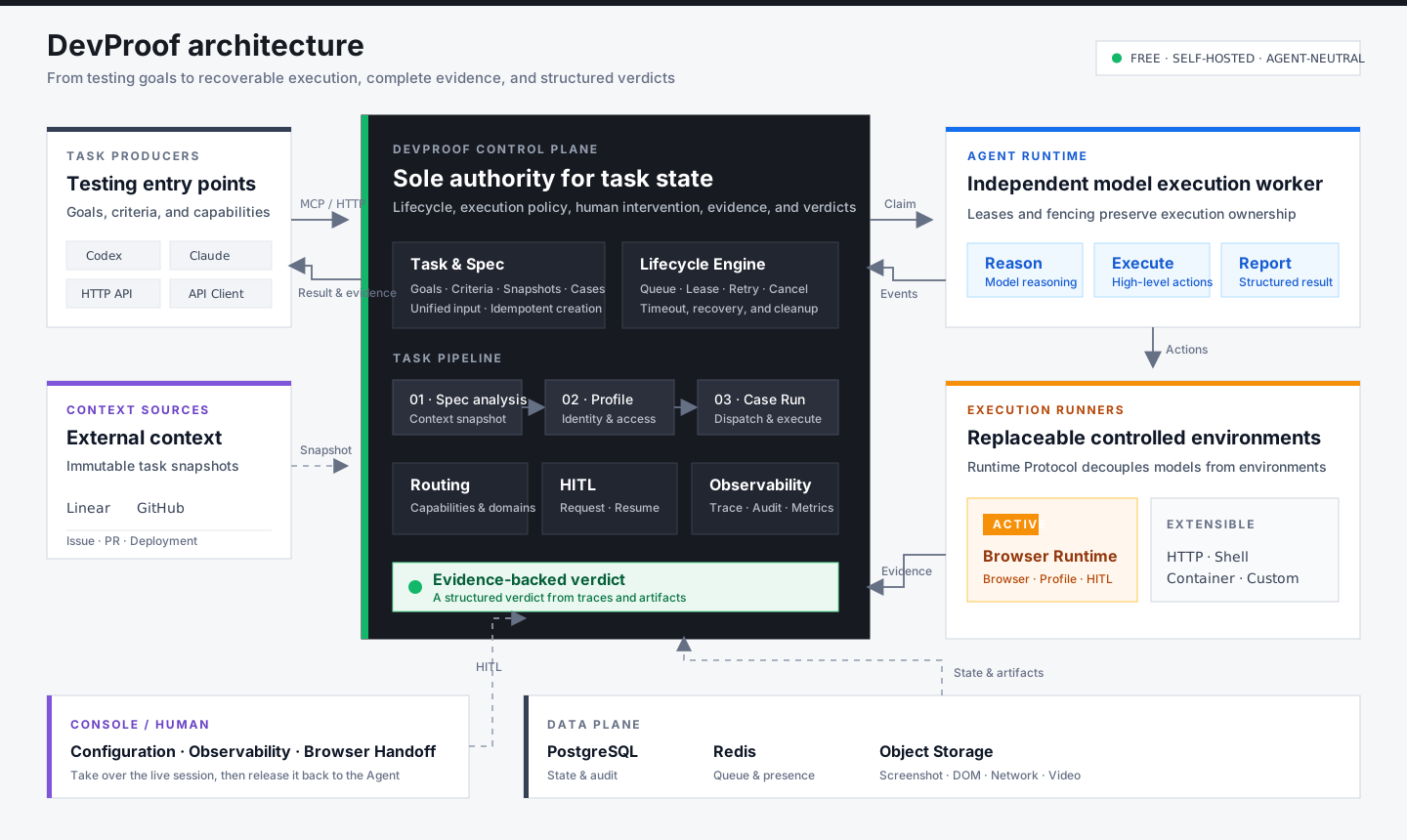
The system is organized into four layers:
- Task Producer: Codex, Claude, or another client creates tasks and reads results through MCP or HTTP without managing browser sessions or low-level execution lifecycles.
- Control Plane: the DevProof API is the sole authority for task state. It owns specification analysis, Case/Run orchestration, leases, retries, cancellation, HITL, cleanup, and aggregate verdicts.
- Agent Runtime: a lightweight, independently deployable worker claims Runs, invokes a model for reasoning, and sends high-level actions to an Execution Runner.
- Execution Runner: a controlled environment in which actions actually run. Browser Runtime is the first Runner; the protocol boundary is designed to support HTTP, shell, and container Runners as well.
Screenshots, DOM snapshots, console logs, network traces, video, and structured events flow back into the control plane, creating an evidence chain from task input through execution trajectory to final verdict. The Console uses the same control plane for configuration, task execution details, and human handoff.
Browser Runtime is the first Execution Runner, not the platform boundary. The user-facing TaskExecution is the aggregate root. Issue tasks always contain three stages—Spec Analysis, Profile Resolution, and Spec Execution—while the original ExecutionRun remains the Case-level carrier for actual execution and evidence.
Technology baseline
- Web: Next.js 16, React 19, and Tailwind CSS 4
- API: NestJS 11 and Fastify
- Data: PostgreSQL 17 and Prisma 7
- Contracts: Zod 4
- UI: local shadcn/ui components on Tailwind CSS 4, with a role-aware Console shell and a single light visual theme
- Runtime: an independent Node.js daemon registered with a one-time token; long-lived credentials remain on the runtime host
Local Console role
The Console uses the member view by default. It shows every team Task and only the Browser login flow needed by those Tasks. For development or demos, use the “Member / Admin” switcher in the top navigation to change views without reloading the page.
This flag controls presentation in the current browser only; it is not an authorization boundary. Production admin authorization must still be enforced by the backend.
Core roles
- DevProof API: the sole control plane for Tasks, Stages, Spec Snapshots, Cases, Runs, retries, cancellation, HITL, cleanup, and aggregate verdicts
- Agent Runtime: a stateless lease worker responsible for model reasoning and the high-level Browser Verification Executor
- Task Producer: Codex, Claude, or any other caller that creates tasks
- Execution Runner: a concrete controlled environment such as Browser, HTTP, shell, or container
Current scope
- Feishu Web SSO
tenant_keyenforcement that limits an instance to one configured Feishu tenant- A single Team scope in which team members share configuration and business data
- Team-level machine credentials scoped for reading, creating, and cancelling verification tasks
- Agent-neutral Run v2 with goals, acceptance criteria, agent provenance, capabilities, evidence, and HITL policies
- The
/v2/tasksuser task API, Case-level/v2/runsAPI, and high-level Task MCP tools - Browser Runtime as an
ExecutionRunneradapter, including capability discovery, automatic evidence association, and terminal cleanup - Event-driven HITL coordination, timeout policies, and a durable Feishu notification outbox
- A unified task flow: Issue → Task → AI Spec Analysis → Profile Resolution → Spec Execution; direct tasks skip the first two stages
- Linear and GitHub context resolution; immutable task-level Spec Snapshots; deterministic Cases; and dispatch retries
- Team-level Browser Runtime, Profile, and HITL settings
- Runtime routing policies based on exact domains or
*.wildcard domains - One-time Browser Runtime pairing, outbound WebSocket connections, protocol negotiation, online-state detection, and credential revocation
- Remote browser sessions, concurrency slots, leases, and fencing tokens
- Browser command responses, timeouts, cancellation, disconnection reconciliation, and restart recovery
- Per-step screenshots, automatically composed WebM video, DOM capture including open Shadow DOM, console and network artifacts in dedicated object storage; exact URL filtering, length limits, and redaction for JSON response bodies
- AI accessibility snapshots, strict browser commands, and direct MCP image/text artifact reads
- An outbound SSRF proxy for Browser Runtime, navigation-origin policy, and an exact private-network allowlist
- Structured criterion/evidence constraints in the Run v2 Browser Executor, business-source evidence, and deterministic network fault injection
- Durable Run v2
HITL requested/resolvedoutbox events and signed resume webhooks for external agents - Persistent and ephemeral Profiles with human takeover
- User-level Browser Profiles with exact authorization, FIFO exclusivity across Tasks, Runtime affinity, and protocol v1.10 lifecycle cleanup after 30 days of inactivity
- Team configuration audit logs
- Test Projects, Environments, and fixed Case DSL v1
- Immutable Case Versions, replayable Run Snapshots, and idempotent creation
- Append-only Traces, object artifact references, and HITL Checkpoint foundations
- W3C Trace/Request correlation, MCP/HTTP tool invocation auditing, and agent model/tool trajectories
- Real readiness checks, Prometheus metrics, worker heartbeats, alert rules, and authenticated monitoring APIs
- Policy-driven event and artifact retention with object-storage cleanup
- A single Run v2 control plane and three state axes:
lifecycle,executionDisposition, andverdict - Agent Runtime claim, heartbeat, fencing, event, and idempotent outcome protocols
- API-hosted BrowserExecution, cancellation/timeout cleanup, and database-backed HITL resume
/v2/tasks is the current user-facing task entry point. POST /v2/runs remains compatible by creating a DIRECT_RUN Task and returning its child Run; the remaining /v2/runs endpoints provide access to concrete execution resources. Legacy /v2/specifications endpoints retain only list and detail reads, while writes return 410 Gone, and the Console no longer exposes a standalone Spec panel. Legacy /v1/verifications exists only for stored-record compatibility and migration drain-down. DevProof API is the only component allowed to advance Task/Run state, schedule retries, or perform execution cleanup.
The Case Rerun action creates a new task containing only that Case, reusing its specification and current deployment targets with a fresh deadline and newly resolved browser identity. Original tasks, executions and evidence remain available, with links between the tasks. Expired tasks are supported; active executions, explicit Case dependencies and unresolved business writes prevent a rerun with an explanation.
Use POST /v2/tasks/:id/cases/:caseId/rerun-task with {"idempotencyKey":"<unique rerun request key>"} and run:write scope. Reuse the key after a request timeout. The console exposes the corresponding session-authenticated route under /console/api/tasks. Case reruns do not publish a full-task GitHub PR verdict, and rerunning the new task preserves its single-Case scope.
Local development
Requirements: Node.js 24, pnpm 10, and Docker.
Copy
.env.exampleto.env, then configure a Feishu application and the allowedtenant_key.Generate a 32-byte encryption key:
openssl rand -base64 32Start PostgreSQL, Redis, and object storage:
docker compose up -dInstall dependencies, deploy the database schema, and start the application:
pnpm install
pnpm prisma:deploy
pnpm dev
In Console → Access → Agent Models, configure independent ordered model lists for the
SPEC_ANALYSISandBROWSER_EXECUTIONpools. Provision one credential per deployment withpnpm --filter @devproof/api runtime:provision -- --team default --pool <POOL>. Localpnpm devreadsDEVPROOF_SPEC_ANALYSIS_RUNTIME_TOKENandDEVPROOF_BROWSER_EXECUTION_RUNTIME_TOKEN; standalone deployments useDEVPROOF_AGENT_RUNTIME_TOKENand may assertDEVPROOF_AGENT_RUNTIME_POOL. If omitted, the Runtime binds to its credential's pool on registration; a mismatch is rejected. Browser worker concurrency follows the online Browser nodes' Console-managed capacity. Approve private or HTTP model gateways withDEVPROOF_AGENT_MODEL_HOST_ALLOWLIST.
Agent models must support the OpenAI-compatible Chat Completions API: Runtime appends /chat/completions to the configured Base URL (usually ending in /v1). Both pools use tool_choice: auto and require tool-based completion; reasoning fields are preserved in memory between tool turns.
- Spec analysis for Issue Tasks is executed by Agent Runtime. The Agent reads the Issue, linked PR metadata, diffs, and code pinned to the PR head SHA through credential-isolated read-only control-plane tools, then submits an immutable source-cited Spec. Protocol v2.17 uses a compact Case draft and persists
agent-spec-v3with explicit requirement coverage; older workers retainagent-spec-v2. See the protocol notes. ConfigureSPEC_ANALYSIS_MODE=AGENT; useSHADOWto record a comparison with the legacy deterministic generator orDETERMINISTICfor rollback. Linear prefers the official GraphQL API throughLINEAR_API_TOKEN, withLINEAR_MCP_BEARER_TOKENas a fallback. Configure encrypted GitHub PAT entries in Console → Access. Every model turn, structured analysis summary, tool call, validation correction, and final Spec is recorded in the Task trajectory; raw hidden chain-of-thought and credentials are never recorded.
The security migration revokes Runtime Tokens previously issued through Console; provision a replacement with the operator command above. Legacy Runtime Token variable names, Worker ID, polling interval, and tool-limit environment variable names remain readable during migration. Provider API Keys and Base URLs are managed only in Console; new Runtime settings should use the DEVPROOF_AGENT_* names in .env.example.
Web listens on http://localhost:3344 and API on http://localhost:4433 by default. Docker maps PostgreSQL, Redis, and the MinIO API to host ports 55432, 56379, and 59000 to avoid conflicts with local services.
Production deployments can replace local object storage with Cloudflare R2 through its S3-compatible endpoint. Set OBJECT_STORAGE_REGION=auto, use a pre-created OBJECT_STORAGE_BUCKET, provide an R2 Access Key and Secret, and keep OBJECT_STORAGE_FORCE_PATH_STYLE=true. Step screenshots and final WebM videos use the same upload path.
For the current Task/Run smoke and real-model comparisons of context and tool-surface modes, see Local browser comparison.
The local DATABASE_URL should use port 55432 shown above. If you intentionally use an existing host PostgreSQL instance, do not also treat the Docker database as the active data source, and ensure the PostgreSQL session timezone is UTC. Use pnpm prisma:migrate only to create a new development migration; after pulling existing migrations, use pnpm prisma:deploy.
Observability
The API exposes /live, /ready, and a Bearer-protected /metrics endpoint. Web readiness reflects the API's real dependencies. System monitoring is outside the user-facing Console. Authenticated monitoring APIs retain dependency, worker, backlog, tool-invocation, and audit data for operations. A separate public status page is planned for a future release. Production requires OBSERVABILITY_METRICS_TOKEN.
Prometheus scraping, alerts, the Grafana dashboard, log fields, data retention, and alert runbooks are documented in docs/observability.md.
Feishu SSO configuration
Create a custom application in the Feishu developer console and add FEISHU_REDIRECT_URI to its redirect URL allowlist. The default local callback is:
http://localhost:3344/auth/feishu/callback
Web proxies /auth requests to API on the same origin. The API exchanges the OAuth v2 code for a user_access_token, reads tenant_key from user_info, and creates a User, Team Membership, and Session only when it exactly matches FEISHU_ALLOWED_TENANT_KEY. Email domains are not used as a tenant identity boundary.
Official Feishu references:
- https://open.feishu.cn/document/common-capabilities/sso/api/obtain-oauth-code
- https://open.feishu.cn/document/authentication-management/access-token/get-user-access-token
- https://open.feishu.cn/document/server-docs/authentication-management/login-state-management/get
Registering Browser Runtime
Browser Runtime is installed directly from checksummed GitHub Release assets; the
Runtime host does not need a DevProof repository checkout, Node.js, or pnpm.
Run this as the regular Linux user that will own the Runtime:
curl -4 -fsSL https://github.com/ethanyu-dev/devproof/releases/latest/download/install.sh | bash
The bootstrap downloads the latest Runtime package, package installer, andSHA256SUMS from GitHub Releases, verifies both files, installs user-local
Node.js 24, Chromium, and a systemd user service, then leaves a new service
ready to pair. Initial Ubuntu/Debian installation requires passwordless sudo
for Chromium system dependencies and systemd linger.
After installation, open Console → Access Configuration → Browser Execution Nodes, select Register,
and run the generated one-time pairing command on the same host. The command
pairs the device and starts its service. Generate the token only after the
initial installation because it expires after ten minutes.
By default, the daemon writes its long-lived credential to .devproof-browser-runtime/runtime.json under the user's home directory with mode 0600. Set DEVPROOF_RUNTIME_HOME to change the location.
The daemon connects to Runtime Gateway over an outbound WebSocket and supports protocol negotiation, session leases, browser commands, HITL, reconnect reconciliation, and artifact uploads. It also owns on-disk cleanup for user Profiles: it scans at startup and hourly, atomically tombstones and deletes Profiles that have been unused for strictly more than 30 days and are not currently open, and leaves unmarked historical directories untouched.
One-command Browser Runtime installation and upgrades
Upgrade each Runtime host with the same command used for installation:
curl -4 -fsSL https://github.com/ethanyu-dev/devproof/releases/latest/download/install.sh | bash
Existing hosts preserve runtime.json, Browser Profiles, and systemd
configuration. The installer downloads and warms the new package and browser
while the old service remains online, verifies that no Browser Session is
active before switching, upgrades in place, restarts the service, and confirms
that Runtime reconnects. Use --version to pin a release or --force-active
only when interruption risk is explicitly accepted:
curl -4 -fsSL https://github.com/ethanyu-dev/devproof/releases/latest/download/install.sh | \
  bash -s -- --version 0.2.16
A Runtime host must be able to use its systemd user manager and reach GitHub
Releases, the Node.js download source, npm registry, Playwright CDN, DevProof
API, and Runtime Gateway. An upgrade is rejected when active sessions are
detected unless --force-active is supplied.
Before pairing, configure DEVPROOF_RUNTIME_NAME, DEVPROOF_MAX_CONCURRENCY, and DEVPROOF_HEADLESS in ~/.config/devproof/browser-runtime.env; restart the service after later changes. DEVPROOF_MAX_CONCURRENCY is used only as the host's initial capacity during first registration. Every successful installation records the package hash and timestamp in ~/.devproof-browser-runtime/install.json. After the node is bound, use Console → Access → Runtime Access and Capacity to set the authoritative concurrency and allowed private-network hosts for each Runtime. The default block policy remains active when the allowlist is empty.
With multiple Runtimes registered, configure target domains under Console → Access Configuration → Browser Execution Nodes → Domain Routing Policies. DevProof matches execution.targetUrl, with inputs.targetUrl retained for compatibility, against exact domains or *.example.com rules. Overlapping rules are ordered by priority, exactness, and match length. A matching rule restricts execution to its selected Runtimes and chooses whether to wait or fail immediately. Without a match, DevProof selects randomly from online, capability-compatible Runtimes.
Agent integration
Generate a dvp_sk_... token under Console → Access → MCP Integration. HTTP requests use:
Authorization: Bearer dvp_sk_...
The MCP endpoint is http://localhost:4433/mcp and uses the same Bearer token. Streamable HTTP MCP is recommended for Agent Runtime; HTTP API remains available as a compatibility entry point. Runtime stores credentials safely, invokes the model, resumes waiting states, and submits final results.
MCP exposes only the unified Task control plane: get_integration_status, create_task, get_task, list_tasks, set_task_deployment_target, retry_task_stage, and cancel_task. Use get_run, resolve_run_intervention, and read_run_evidence only when drilling down into Case-level Runtime details. Legacy Spec, Verification, browser command, Profile cleanup, and compatible create_run tools are no longer published. Callers do not receive Browser Sessions and do not call low-level command, complete, or release lifecycle tools. The read-only discovery resource is devproof://task-tools.
Create tasks through HTTP or MCP and inspect execution in Console. Issue mode creates a Task, then background workers resolve context into an immutable task-level Spec Snapshot, resolve the EPHEMERAL, REQUESTER, ISSUE_ASSIGNEE, or EXPLICIT_PROFILE strategy, and idempotently create a Run v2 for each Case. Direct mode creates a Task and skips analysis and Profile resolution. A user Profile may be used only for trigger sources and target domains authorized by its owner, and Tasks using the same Profile execute with FIFO exclusivity. Case dispatch uses database claims, stable idempotency keys, and background compensation; the Task Execution detail page presents stages, Cases, and recent errors together.
When an Agent requests HITL on a still-live Browser Session, the Task Execution detail page presents Browser Human Handoff. A human takes control of the Agent's original page to complete login, CAPTCHA, or MFA. Releasing control writes a structured response back to the same Runtime Task, which resumes under a new fencing lease. Live JPEG frames and mouse/keyboard input travel only over an ephemeral lease-protected channel and are not written to prompts, traces, the database, or object storage. The full browser data plane, SSRF protection, and fault injection require Browser Runtime protocol v1.2; physical control-plane cleanup requires v1.6; enhanced evidence capture requires v1.7; 30-day user Profile cleanup and lifecycle reporting require v1.8; per-step screenshots and action video require v1.10; structured locator recovery diagnostics require v1.11; and acknowledged, bounded video-finalization diagnostics require v1.12. Rebuild and restart Runtime after upgrading the code.
User-level Browser Profiles
When a Task requires authenticated user state but has no suitable Profile, the control plane creates a logical Profile from the target URL, environment, role, and trigger source. In Console → Browser Identities, the user only completes remote login and confirms entry authorization; they do not enter domains, URL patterns, or selectors. Cookies, local storage, and browser directories remain only on the selected Browser Runtime. The control plane stores a random logical key, status, grants, and usage audit, and never returns the underlying key to Console, Feishu, or an Agent.
Issue Tasks support four strategies: EPHEMERAL by default; REQUESTER uses the Profile of the Console or Feishu requester; ISSUE_ASSIGNEE maps the owner through a Linear workspace and stable user ID; and EXPLICIT_PROFILE allows a signed-in user to select only their own Profile. When a Profile is unavailable, the Task may wait, fail, or explicitly fall back to an ephemeral session. The full model, state machine, cleanup, and rollout plan are documented in docs/user-browser-profiles.md.
Feishu group bot
After enabling FEISHU_BOT_ENABLED, configure the bot's stable FEISHU_BOT_OPEN_ID. In the Feishu developer console, set the encrypted event subscription callback to /integrations/feishu/events, subscribe to im.message.receive_v1, and grant the permissions required to read group messages, read user identity, and reply. The server validates the raw request signature, time window, verification token, app ID, tenant key, and mentioned bot open_id, stores the event idempotently by event ID, and creates the Task asynchronously. Use @DevProof ENG-123 https://preview.example.com in a group. The requester Profile is used by default; add --owner for the issue owner or --ephemeral for a temporary session. A user must sign in through Feishu SSO once to establish the stable identity mapping.
A Task started from Feishu replies with one concise interactive card. Task creation, human-assistance states, and the final verdict update that same card, with a button leading to the Console for action or full results. When the Task reaches a terminal state, the control plane updates the card through a durable outbox (an installation configured only with a group bot webhook sends a standalone card) and idempotently writes the same summary to the linked GitHub PR. Redelivery updates the existing marked task comment instead of creating duplicates. The result link includes per-step screenshots and the action video stored in R2. The matching Console-managed GitHub PAT needs permission to write Issue/PR comments in the target repository.
Feishu HITL notifications use a custom group bot:
FEISHU_NOTIFICATION_WEBHOOK_URL=https://open.feishu.cn/open-apis/bot/v2/hook/...
FEISHU_NOTIFICATION_WEBHOOK_SECRET=...
Railway deployment
The repository root provides Railway Config as Code files. Keep each service's Root Directory set to /, then configure these file paths in Railway Service Settings:
- API:
/railway.api.json - Web:
/railway.web.json - Spec Analysis Runtime:
/railway.agent-runtime.json - Browser Execution Runtime:
/railway.agent-runtime.json - Post-run Analysis Runtime:
/railway.agent-runtime.json
API, Web, and Agent Runtime use their respective Dockerfiles. Before each API deployment starts, Railway runs pnpm prisma:deploy; a failed migration stops the release. Create three Railway services from the Agent Runtime config and give each its pool-specific token. The Browser Execution service automatically reconciles its worker lanes to the sum of online Browser node capacities (for example, node A 4 plus node B 8 gives a schedulable pool of 12). Domain-routed work waits only in its target node queue; unmatched work uses the flexible queue and prefers idle compatible nodes.
The API Service requires at least PostgreSQL, Redis, object storage, Feishu, CREDENTIAL_ENCRYPTION_KEY, API_PUBLIC_URL, WEB_ORIGIN, and RUNTIME_GATEWAY_WS_URL. Configure Linear and GitHub credentials only when their Issue-resolution features are needed. The Web Service needs API_BASE_URL at runtime, preferably the private HTTP address of the Railway API Service, and NEXT_PUBLIC_RUNTIME_API_URL at build time for external Runtimes. Public production URLs must use HTTPS and Runtime Gateway must use WSS.
Railway injects PORT. API and Web prefer their explicit service port variables and fall back to Railway's PORT when unset. Browser Runtime is not deployed to Railway; it remains a daemon on the target execution host and connects to API over outbound WSS.
Engineering commands
pnpm typecheck
pnpm test
pnpm build
pnpm format:check
Security constraints
CREDENTIAL_ENCRYPTION_KEYmust be a 32-byte base64 value; credentials use AES-256-GCM envelope encryption.- OAuth state uses a ten-minute, HttpOnly, SameSite=Lax cookie.
- Session Tokens and Runtime Tokens are stored in the database only as SHA-256 hashes.
- Console mutation requests must originate from
WEB_ORIGIN. - MCP uses a Bearer machine identity and validates Host/Origin to prevent DNS rebinding.
- Verification input, external events, and HITL context/response reject credential-shaped fields.
- Pairing Tokens expire after ten minutes and may be consumed atomically only once.
- Production cookies are always Secure.
See the documentation index for architecture, upgrades, operations, Browser Profiles, the Runtime protocol, and versioning. Existing installations should read the upgrade guide before deploying a new release. Contributions follow CONTRIBUTING.md, and vulnerabilities should be reported privately according to SECURITY.md.
License
DevProof is available under the Apache License 2.0.
Reviews (0)
Sign in to leave a review.
Leave a reviewNo results found