Hostwatch
Health Pass
- License — License: NOASSERTION
- Description — Repository has a description
- Active repo — Last push 0 days ago
- Community trust — 11 GitHub stars
Code Fail
- rm -rf — Recursive force deletion command in scripts/build-app.sh
Permissions Pass
- Permissions — No dangerous permissions requested
No AI report is available for this listing yet.
Behavior-based intrusion detection for macOS
Hostwatch
Behavior-based intrusion detection for macOS.
Learns what's normal on your Mac, flags what isn't, connects small signs into a story,
and can stop unknown connections and risky Claude Code commands.






Website · Install · What's new · Features · Privacy · Docs · Changelog
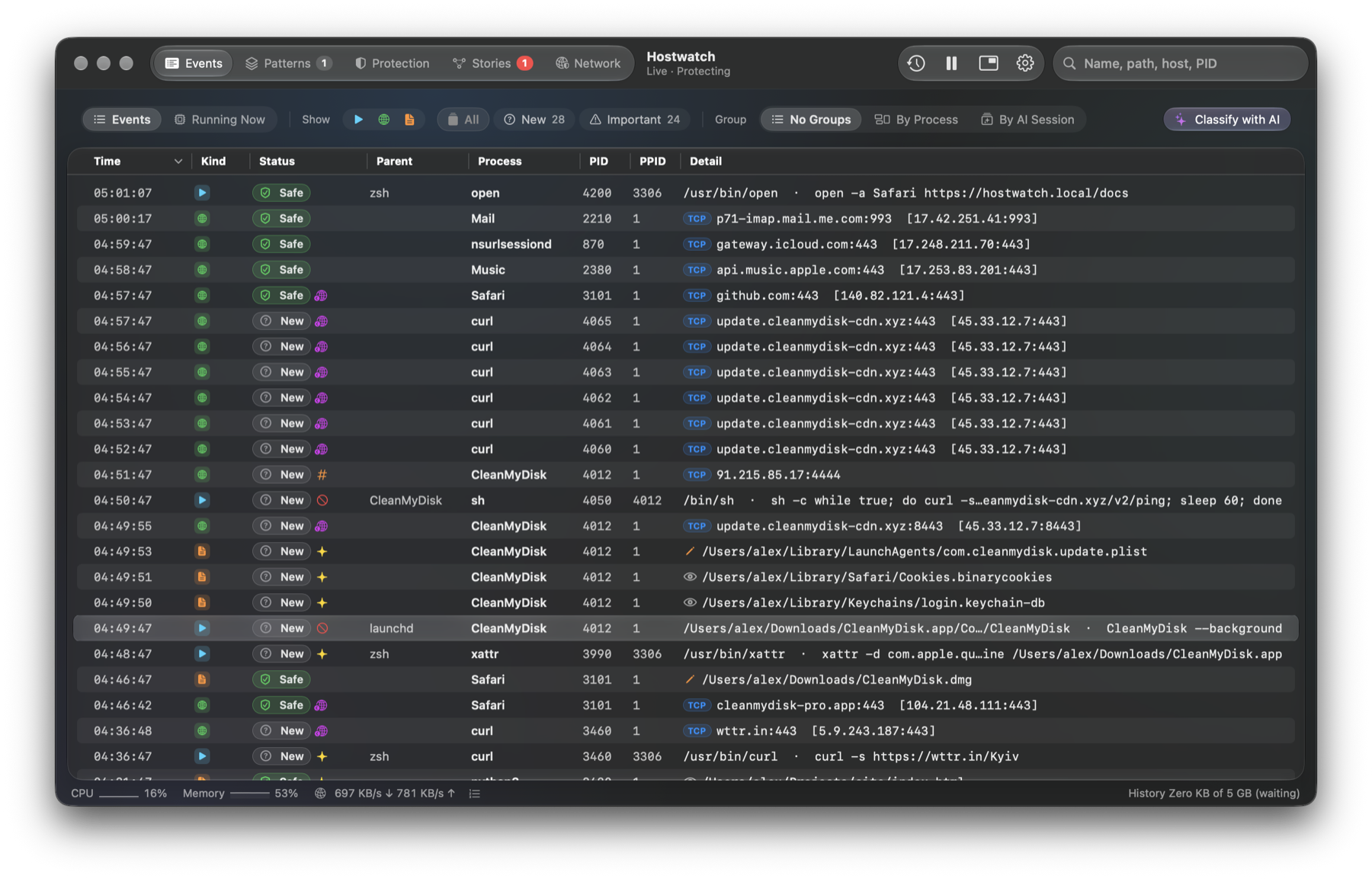
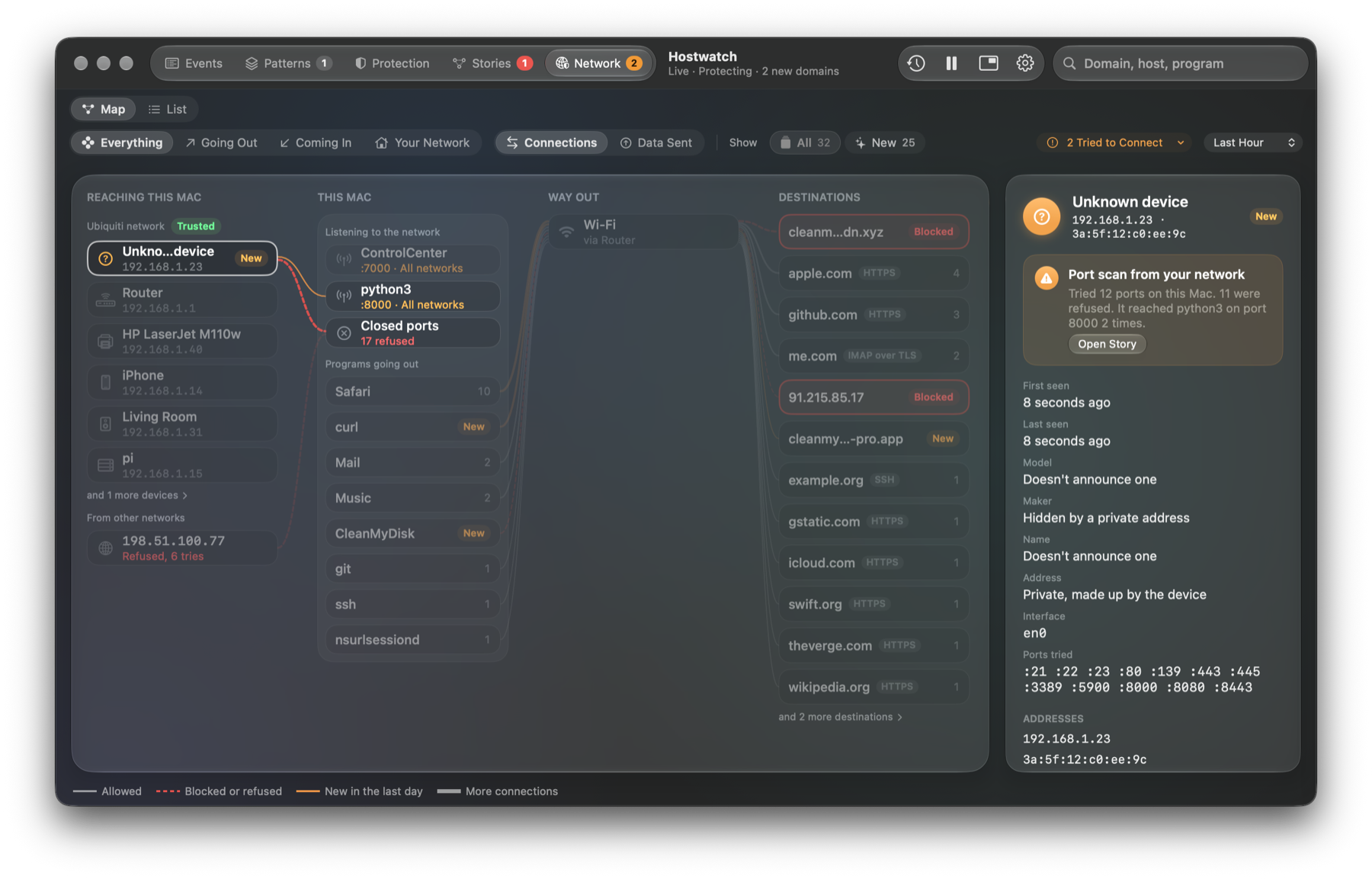
Screenshots show made-up demo data.
Why
One machine was enough. In 2026, GitHub
lost about 3,800 internal repositories to a poisoned editor extension on one employee's device.
Grafana Labs
had its codebase taken through a compromised npm package. Binance
lost $6.3 billion to a coding task from a fake job interview. Each was code someone trusted and ran.
Meanwhile new CVEs grew +49.5% in the first half of 2026 (Jerry Gamblin),
and new macOS backdoor variants +67% in 2025 (Moonlock).
Hostwatch watches what runs on your Mac, what it touches and where it connects, and links small signs into the story
of what happened. Its firewall and Claude Code guard can stop what you didn't allow. It never deletes anything.
What's new
0.24.0 (0.24.1: smoother Needs You and Rules)
- 🙋 Fewer questions – Needs You down by a third: true reasons, your builds grouped per project, Homebrew tools
checked at the source. What starts a tool and where it connects stay yours. - 🧮 Fewer patterns – calm command lines are one per shape (
kubectl get …), local ports one per program. - 📡 Port scans from this Mac – a program sweeping your network's ports is a story.
- 🪟 One design system – capsule buttons everywhere, window titles over a soft blur.
0.23.0
- 📦 Package guard – your projects checked against the malicious-package lists for npm, PyPI, Go, crates.io and
more. Listed packages are stopped before their install scripts run, Claude Code included. - 🧱 Install scripts contained – no reading your keys, no startup files, no AI assistants, registries only.
- 🔤 Lookalike names flagged –
expresssandreqeustsare a story. Optional check for brand-new packages. - 🧯 The firewall stays on through sleep and network changes. Fewer false stories.
0.22.0 (0.22.1: easier to read tables)
- 🚨 Alerts when protection stops – a notification, a red dot and a banner if the collector or network filter stops.
- 💬 Questions show why – the command behind a connection, such as
git clone. - 🪟 Events and Patterns redesigned – glass cards, details beside the list.
0.21.0
- 🧩 Rules for each app – give one app its own firewall and file rules. They win over the global ones.
- 🧭 Clearer Protection pages – Files and Network Firewall show their state, activity and what they found most.
- ⚡ A faster Found page – grouped by program, with filters, search and Decide All.
0.20.0
- 🕵️ Who did it – a tool's pattern names the app or AI agent behind it, proven from the kernel:
node via Cursor
andbash via Claude Codeare decided apart. - 🌍 Everywhere – block all of one program's traffic, or let only the programs you choose connect at all.
- 🪟 Liquid Glass – Ask AI, a story's chain, a domain's details, the launch chain and the Events list.
Earlier versions: see the changelog.
What it does
👀 See what happens
- Live HUD – new processes, connections and file opens as they happen.
- Running Now – every running process with CPU, CPU time, memory and uptime. Jump to the moment it was spawned.
- Time Travel – scrub back through recorded activity, resources and heavy processes.
- Heavy processes – programs you started that keep eating CPU or memory stand out (and miners score).
🧠 Learn what's normal
- A learning day – for its first day Hostwatch learns what's typical on your Mac. Shells, your secrets and
anything unsigned are never learned. - Patterns – events grouped by behaviour and by program. Ordinary ones are decided automatically, so few need
you. Needs You lists what's left, Rules what decides automatically, Decisions who decided what.
🚨 Spot what's wrong
- Stories – related suspicious steps become one story you can open event by event.
- Network tab – a map of who reaches this Mac and where it connects, with bytes sent, devices named by maker and
model, and networks you trust or not. The list shows hostnames, first-seen domains, beaconing, raw-IP connections and
the firewall's verdict for each. - Known threats – daily public threat lists matched on your Mac, plus exploited macOS flaws vs. your updates.
🛡️ Stop what you didn't allow (off until you turn it on)
- Firewall – each app's new connections checked before they're made: allowed ones pass, unknown ones wait
while a window asks Allow / Block (Ask), or are refused (Strict). Watch only shows what it would do.
Containers and VMs are judged per destination. - Claude Code guard – Claude Code's commands checked before they run: the dangerous blocked, the risky
need your OK.
✨ Ask AI (Claude or Apple's on-device model, your choice)
- AI suggests, you decide – it never trusts high-risk code, python or bash on its own.
- Ask about anything – an event, a domain, a firewall question: what it is, the risks, what to do.
- Watch Closely – a recording of what one process really does, explained.
- MCP – let Claude Code investigate your history (read-only).
Install
- Download
Hostwatch-<version>-macOS-universal.zipfrom
Releases, unzip, moveHostwatch.appto/Applications. - Open it. It's signed and notarized by Apple, so macOS opens it without a warning. A short setup window helps you
turn on Full Disk Access. - Enter your administrator password once: it registers the collector as a background service, which macOS
starts at boot from then on. Done.
Requirements: macOS 26+. Optional: Apple Intelligence (on-device AI),
Claude Code (Claude AI and MCP).
How it works
Two parts, one app. The collector runs as root and only watches. Hostwatch.app is where everything is decided and
shown. They talk over one Unix socket that accepts nothing but Hostwatch's own signed code.
┌──────────────────────────────────┐                    ┌───────────────────────────────────────┐
│  Collector  (root, background)   │                    │  Hostwatch.app  (you)                 │
│                                  │                    │                                       │
│  eslogger      processes, files  │  activity ───────► │  learns patterns, keeps the baseline, │
│  tcpdump       DNS answers       │                    │  connects stories, records history    │
│  NetworkStats  every connection  │                    │                                       │
│                                  │                    │  HUD · window · Time Travel           │
│  firewall relay (pf)             │ ◄─── allow / block │  Ask AI · MCP for Claude Code         │
│                                  │                    │                                       │
│  Watch Closely recorder          │  profile ────────► │  Watch Closely window                 │
└──────────────────────────────────┘                    └───────────────────────────────────────┘
                              one Unix socket, Hostwatch's own code only
- Activity flows one way: what started, what was opened, who connected to what. The app turns it into patterns
and stories and writes the history. - Allow / block flows back only when the firewall is on: the collector then relays your apps' new connections
through itself (macOS's own pf, no extension or paid entitlement) and asks the app what to do. - Watch Closely is a second, deeper recording of one process, on request.
Privacy
- Everything stays on your Mac, encrypted on disk, in
~/Library/Application Support/Hostwatchand~/Library/Logs/Hostwatch. Only what you send to an AI you chose, a daily update check, the daily threat-list
downloads and, while the firewall is on, a check that it still lets connections through leave it. - Passwords and tokens are masked before they're recorded, and again before anything goes to an AI.
- The firewall reads only which server an app asks for. It never decrypts traffic.
- Watch Closely records only the process you pick, only while it runs, and keeps it on your Mac until you ask AI.
- Apple On-Device AI keeps everything on the Mac. Claude is used only if you choose it.
- The MCP server needs your permission and a token, and can't change anything.
- Settings ▸ General ▸ Reset Hostwatch… erases it all.
Limitations
A working prototype, not a commercial product. It uses Apple's eslogger (a prototyping tool), and the optional
process hold is best effort. The firewall covers your own apps, not programs running as root or macOS's own DNS
lookups. Containers are judged by destination (which program inside made a connection can't be seen). VMs with
bridged networking aren't covered.
Development
To build Hostwatch from source or run its tests, see For developers. To send
a fix or a feature, read the contribution rules first. Every feature, rule and setting is in the
reference, changes in the changelog.
License
Free for everyone, at home and at work. Hostwatch is source available under the
PolyForm Shield License 1.0.0: use it, change it, fork it and share it, personally or in your company, at
no cost. The one thing the licence doesn't allow is using the code to make a product or service that competes with
Hostwatch, such as your own server or cloud edition of it.
Companies that want the centralised versions, a server that watches a whole fleet of Macs from one place or a hosted
cloud (SaaS), will get them as paid editions. Write to
[email protected].
Versions up to 0.11.1 were released under the MIT license and stay under it.
Reviews (0)
Sign in to leave a review.
Leave a reviewNo results found