markmv
Health Warn
- License — License: MIT
- Description — Repository has a description
- Active repo — Last push 0 days ago
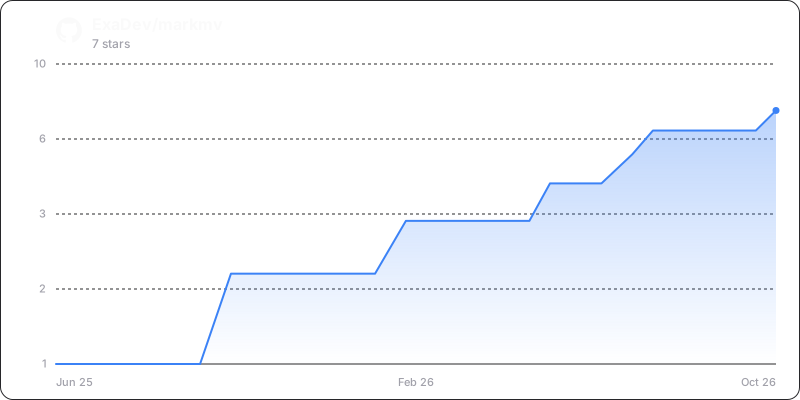
- Low visibility — Only 7 GitHub stars
Code Fail
- spawnSync — Synchronous process spawning in .github/scripts/audit-autofix.ts
- process.env — Environment variable access in .github/scripts/audit-autofix.ts
- network request — Outbound network request in examples/api-usage.ts
Permissions Pass
- Permissions — No dangerous permissions requested
No AI report is available for this listing yet.
A TypeScript command-line tool, library, REST API and MCP server that moves, splits, joins and merges markdown files and rewrites the links between them.
markmv ✏️
npx markmv --help




TypeScript CLI for markdown file operations with intelligent link refactoring
markmv revolutionises how you manage markdown documentation by providing intelligent file operations that automatically maintain link integrity across your entire project. Whether you're reorganising documentation, splitting large files, or combining related content, markmv ensures your links never break.
✨ Key Features
- 🚀 Move files/directories with automatic link updates
- ✂️ Split large files by headers, size, or manual markers
- 🔗 Join multiple files with conflict resolution
- 🧠 Merge content with interactive conflict handling
- 📚 Generate indexes for documentation organization
- 🌐 Multiple access methods: CLI, REST API, MCP, and programmatic
📦 Installation
# Use directly with npx (recommended)
npx markmv --help

# Install globally
npm install -g markmv

# Install as library
npm install markmv
Requirements: Node.js >= 18.0.0
🚀 Quick Start
# Move a file and update all references
npx markmv move old-doc.md new-location/renamed-doc.md

# Split a large file by headers
npx markmv split large-guide.md --strategy headers --header-level 2

# Join multiple files
npx markmv join intro.md setup.md usage.md --output complete-guide.md

# Generate documentation index
npx markmv index --type links --strategy directory
🌐 Access Methods
markmv provides multiple interfaces for different use cases:
CLI Tool
npx markmv move old.md new.md --json # JSON output for scripting
REST API Server
npx markmv api # Start HTTP server on port 3000 (--port to change it)
MCP Server (AI Integration)
npx markmv mcp # Model Context Protocol server
Programmatic API
import { moveFile } from "markmv";
const result = await moveFile("old.md", "new.md");
🤖 MCP Setup (AI Integration)
The markmv MCP server enables AI agents (like Claude) to use markmv functionality directly. Here's how to set it up:
Claude Desktop Configuration
Add markmv to your Claude Desktop configuration:
macOS: ~/Library/Application Support/Claude/claude_desktop_config.json
Windows: %APPDATA%/Claude/claude_desktop_config.json
{
  "mcpServers": {
    "markmv": {
      "command": "npx",
      "args": ["markmv", "mcp"],
      "env": {
        "NODE_OPTIONS": "--no-warnings"
      }
    }
  }
}
Available MCP Tools
Once configured, Claude can use these markmv tools:
move_file- Move/rename files with link updatesmove_files- Move multiple files in batchvalidate_operation- Check for broken links
Note: Additional tools (split, join, merge, convert, index) will be added in future releases.
Example Usage with Claude
After setup, you can ask Claude to:
"Use markmv to move
docs/old-guide.mdtoguides/new-guide.mdand update all references"
"Move multiple files from the
drafts/folder topublished/and update all links"
"Validate my recent file moves to check for any broken links"
Verification
Restart Claude Desktop and look for the 🔧 MCP icon in the chat. If configured correctly, you'll see "markmv" listed in the connected MCP servers.
📖 Documentation
The API reference is generated from the TypeScript sources on every release: commands, core classes, the join, merge and split strategies, and the exported types. See the changelog for what changed in each release.
🛠️ Development
git clone https://github.com/ExaDev/markmv.git
cd markmv
pnpm install
pnpm run build
pnpm test
📄 License
MIT - see the LICENSE file for details.
Reviews (0)
Sign in to leave a review.
Leave a reviewNo results found