bagel
Health Pass
- License — License: Apache-2.0
- Description — Repository has a description
- Active repo — Last push 0 days ago
- Community trust — 398 GitHub stars
Code Warn
- network request — Outbound network request in .github/workflows/claude-review.yaml
Permissions Pass
- Permissions — No dangerous permissions requested
No AI report is available for this listing yet.
Query robotics, drone, and IoT data in plain English through an MCP server, with an intelligent edge data reduction pipeline that keeps only the data that matters.

Bits to atoms.
Atoms to bits.
If you still have a script called parse_bag_final_v7.py, we need to talk.






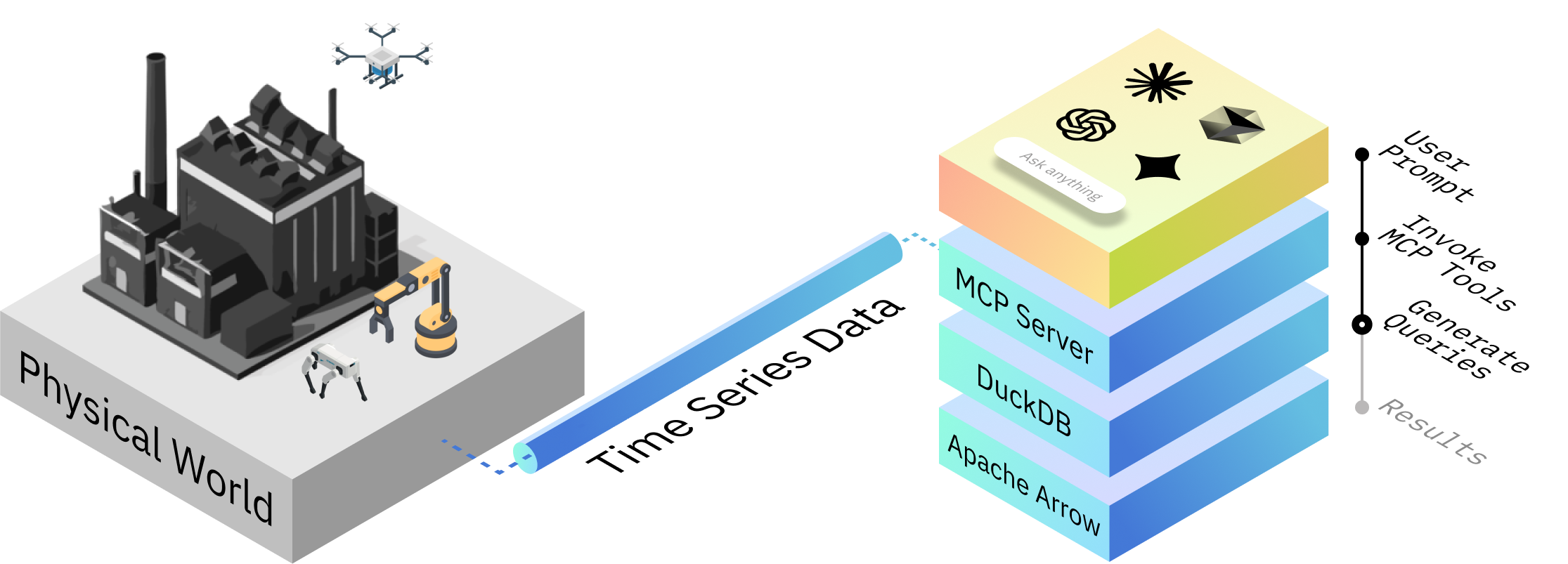
Bagel by Extelligence lets you ask questions about robotics, drone, and IoT data in plain English.
Every calculation over your message data is DuckDB SQL, not model guesswork, and
Bagel shows you the query so you can audit it.
Is my IMU sensor overheating?
Bagel also has an intelligent edge data reduction pipeline: describe an event and
Bagel runs the detection on the robot, keeping the windows that matter and dropping
the rest. An MCP server puts all of it in your LLM's hands: Claude Code, Gemini,
Cursor, or a fully local model.
Bagel was the first MCP server to ship a real analysis toolkit for robotics data,
and it keeps the LLM where it belongs: in front of your logs, never in your robot's
control loop.
📦 Install
Bagel is on PyPI as bagel-mcp. No Docker
and no ROS install needed for recorded data.
Claude Code, one line (needs uv):
claude mcp add bagel -- uvx --from "bagel-mcp[ros]" bagel-mcp --transport stdio
pip, into any Python 3.10 to 3.12 environment:
pip install "bagel-mcp[ros]"
Then point your MCP client at the bagel-mcp command it installed (setup for
Claude Desktop, Cursor and Codex is in the Quickstart).
Open your agent and ask:
Summarize the bag "~/logs/run_42.mcap".
The ros extra reads ROS 1 and ROS 2 bags. Flight logs, CAN / MDF4, live MQTT
and the rest are extras too. Live ROS
robots (rosbridge) and fleet/edge pipelines run in Docker.
🥯 Key Features
- Ask in plain language: No deep domain expertise needed.
- Transparent calculations: Deterministic SQL queries. No black-box LLM math.
- Natural-language pipelines: "Keep 10s around every hard brake, drop the rest":
one sentence becomes an auditable pipeline: previewed
before a byte is written, then run once, across a fleet, or standing at the edge. - Broad LLM support: Claude Code, Gemini, Cursor, Codex, and more.
- Installs your way:
pip/uvxfor recorded data, Docker images for live robots and the edge. - Extensible capabilities: Bagel can learn new tricks.
- Wide format coverage: Missing your data format? Open a ticket.
🥯 Try it in 60 seconds
No MCP client, no LLM, no config: run the same deterministic checks against a
bundled sample log and get a robot-health report card straight to your
terminal.
docker run -it --rm ghcr.io/extelligence-ai/bagel/px4:latest demo
sample.ulg - 41.5s, 2018 messages, 77 topics

Power      ⚠️  min 21.07V, largest drop 2.37V at ~t=+4.8s, end 23.45V (battery_status_0)
IMU        ✅  accel_z stddev 1.6x the log baseline at ~t=+36.8s (sensor_combined_0)
GPS        —  skipped: no GPS topic
Data gaps  ✅  no gap > 1.05x median interval (checked battery_status_0, sensor_combined_0)
...
The ROS2 images (ros2-kilted, ros2-jazzy, ros2-iron, ros2-humble) rundemo the same way, against a lighter bundled sample (px4 is the one that
ships with a flight log rich enough to show every check). Point it at your
own log with demo /path/to/log (mount it with -v first), or keep reading
for the full MCP setup below.
⚡️ Quickstart
Two ways to run Bagel. Pick by data:
| You have | Run Bagel with |
|---|---|
Recorded data: ROS 1 .bag and ROS 2 .db3 / .mcap bags, flight logs (PX4, ArduPilot, Betaflight), CAN / MDF4, CSV / JSON / Parquet, ROS text logs; live MQTT robots |
uvx or pip, below: no Docker, no ROS install |
| Live ROS robots (rosbridge), fleet and edge deployments | Docker, further down: the images carry the ROS stacks and the standing-pipeline runtime |
🐍 Install with uvx or pip (no Docker)
Your MCP client launches the server itself over stdio, so there is nothing to
start or keep running. Pick uvx (nothing to manage: it fetches and caches
Bagel on first use) or pip (a normal install you control).
With uvx. Install uv
(curl -LsSf https://astral.sh/uv/install.sh | sh on macOS and Linux), then:
Claude Code:
claude mcp add bagel -- uvx --from "bagel-mcp[ros]" bagel-mcp --transport stdio
Any client that takes a JSON MCP config (Claude Desktop, Cursor, Codex, ...):
{
  "mcpServers": {
    "bagel": {
      "command": "uvx",
      "args": ["--from", "bagel-mcp[ros]", "bagel-mcp", "--transport", "stdio"]
    }
  }
}
With pip. Python 3.10 to 3.12; a virtual environment keeps it tidy:
python3 -m venv ~/.bagel-venv
~/.bagel-venv/bin/pip install "bagel-mcp[ros]"
claude mcp add bagel -- ~/.bagel-venv/bin/bagel-mcp --transport stdio
For a JSON config, use the full path as the command:"command": "/Users/you/.bagel-venv/bin/bagel-mcp", "args": ["--transport", "stdio"].
Format support comes as extras, so that a PX4 user never downloads the
automotive parsers. List the ones you need, comma-separated:uvx --from "bagel-mcp[ros,px4,automotive]" bagel-mcp --transport stdio, orpip install "bagel-mcp[ros,px4,automotive]". If you ask about a format whose
extra is missing, Bagel's error names the exact command to add it.
| Extra | Adds |
|---|---|
ros |
ROS 1 .bag and ROS 2 .db3 bags (reading, and the reduce / snippet writers), in pure Python |
px4 |
PX4 .ulg |
ardupilot |
ArduPilot .bin |
betaflight |
Betaflight .bbl / .bfl |
automotive |
CAN captures (.blf, .asc + DBC) and ASAM MDF4 |
iot |
Live MQTT (incl. Sparkplug B) and InfluxDB sources |
viz |
Rerun export |
upload |
GCS and Azure Blob upload tasks |
cloudini |
Cloudini point-cloud tasks |
MCAP, CSV / JSON / Parquet, ROS text logs, PlotJuggler / Lichtblick / LeRobot
exports and S3 upload need no extra.
To upgrade, repeat the extras you installed with, so their dependencies
update too. uvx picks up new releases on its own (force it withuvx --refresh --from "bagel-mcp[ros,px4]" bagel-mcp --help); with pip, runpip install -U "bagel-mcp[ros,px4]", using your own list of extras.
Then prompt, pointing at your own file:
Summarize the metadata of the MCAP bag "~/logs/run_42.mcap".
[!NOTE]
No ROS installation is needed for bag files: therosextra reads and writes
them with the pure-Python rosbags library
(sqlite3 and MCAP storage, zstd / bz2 / lz4 compression, message types from the
bag itself or from the bundled interface definitions of every distro from Humble
on). Live ROS topics (rosbridge) and the fleet/edge runtime stay with Docker.
🐳 Run with Docker (live robots, fleet and edge, distro-specific ROS)
[!TIP]
Already have Claude Code? Just paste the link to this repo and tell Claude
what environment you want:Set up https://github.com/Extelligence-ai/bagel for ROS2 Kilted.
Claude will clone the repo, start Docker, and wire up the MCP connection for you.
📋 Prerequisites
Install Docker Desktop and
Claude Code (or another MCP-enabled LLM).
[!NOTE]
arm64 hosts (Apple Silicon, Raspberry Pi, Jetson, Graviton):ros2-kilted
— the default service, and the oneserver.jsonpins — ships as a multi-arch
image, so Docker pulls a native arm64 build. No extra setup.The other services are published for amd64 only. Docker Desktop emulates
them automatically, so they run on Apple Silicon (slower, but they work). On
arm64 Linux with plain Docker Engine there is no emulation by default and
they fail immediately withexec format error— install QEMU/binfmt first:docker run --privileged --rm tonistiigi/binfmt --install amd64
1. Clone and start Bagel
git clone https://github.com/Extelligence-ai/bagel.git && cd bagel
docker compose run --service-ports ros2-kilted
[!TIP]
Port 8000 already in use? SetMCP_SERVER_PORTto something else, for exampleMCP_SERVER_PORT=8100 docker compose run --service-ports ros2-kilted, and use
that port in step 2.
Pick the service that matches your environment:
| Service | Use case |
|---|---|
ros2-kilted |
ROS2 Kilted (latest) |
ros2-jazzy |
ROS2 Jazzy |
ros2-jazzy-jev |
ROS2 Jazzy + on-robot decision model (GPU, beta) |
ros2-iron |
ROS2 Iron |
ros2-humble |
ROS2 Humble |
ros1-noetic |
ROS1 Noetic |
ros1-noetic-cv |
ROS1 Noetic + CV |
px4 |
PX4 flight logs |
ardupilot |
ArduPilot flight logs |
betaflight |
Betaflight flight logs |
iot |
IoT / MQTT (live) |
The -jev image (beta) adds PyTorch for running a decision model on the robot
(backend: local in the anomaly gate). Build any
other service the same way with --build-arg JEV_MODE=true. CPU-only robots don't need
it: the hosted Jev backend works in every image.
[!TIP]
To give Bagel access to your local files, editcompose.yamlbefore starting Docker:
uncomment and update thevolumessection under your chosen service.
Wait for this output:
INFO: Uvicorn running on http://0.0.0.0:8000 (Press CTRL+C to quit)
2. Connect Claude Code
In a new terminal:
claude mcp add --transport sse bagel http://localhost:8000/sse
[!NOTE]
The MCP endpoint is bound tolocalhostonly (not exposed to the LAN) for security.
To share it with other machines, drop the127.0.0.1prefix incompose.yamland
put an authenticated proxy in front: see SECURITY.md.
3. Prompt
claude
Summarize the metadata of the ROS2 bag "./data/sample/ros2/mcap".
That’s it: you’re chatting with your data.
🔒 Prefer fully offline?
Swap step 2 for a local model: your data and your LLM stay on the machine:
brew install ollama && ollama serve &                                  # or ollama.com
ollama pull qwen3:8b
uvx ollmcp --mcp-server-url http://localhost:8000/sse --model qwen3:8b
Model picks, expectations, and troubleshooting: Local LLMs guide.
📚 Using a different LLM?Bagel works with any MCP-enabled LLM. Setup runbooks for tested alternatives:
- Claude Code (detailed guide)
- Gemini CLI
- Codex
- Cursor
- Copilot
Can’t find your LLM? Open a ticket.
🔌 Agent plugins (Claude Code and Codex)
Bagel ships an agent plugin: four skills that teach the agent when and how
to drive the server (log triage, pipeline authoring, live sinks, visualization
export) plus the MCP connection, wired automatically. The same plugin/
directory serves both Claude Code and OpenAI Codex.
/plugin marketplace add Extelligence-ai/bagel
/plugin install bagel@bagel
Codex and ChatGPT users: install bagel from the
OpenAI Plugins Directory
(one click), or clone the repo and add it as a plugin marketplace (the repo
carries .agents/plugins/marketplace.json). Directory installs bundle the
skills only (the directory accepts only public HTTPS MCP servers, and
Bagel's runs on your machine), so also connect the server once withcodex mcp add bagel --url http://localhost:8000/mcp, or in~/.codex/config.toml:
[mcp_servers.bagel]
url = "http://localhost:8000/mcp"
Repo-marketplace and Claude Code installs wire this connection automatically.
Maintainers build the directory ZIP withuv run python scripts/package_codex_directory.py.
Then start the container for your data format (see Quickstart): the plugin
connects to http://localhost:8000/mcp by default. Any other MCP client can
discover the same workflows server-side via the list_agent_capabilities tool.
Keep what matters, drop the rest
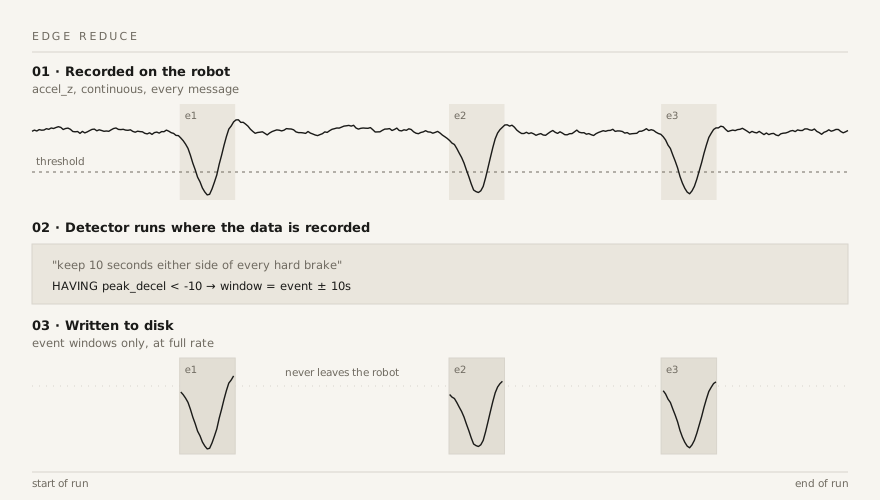
A robot records more data than you can afford to move. Bagel turns a question into
a detector, runs it where the data is recorded, and ships only the windows around
real events.
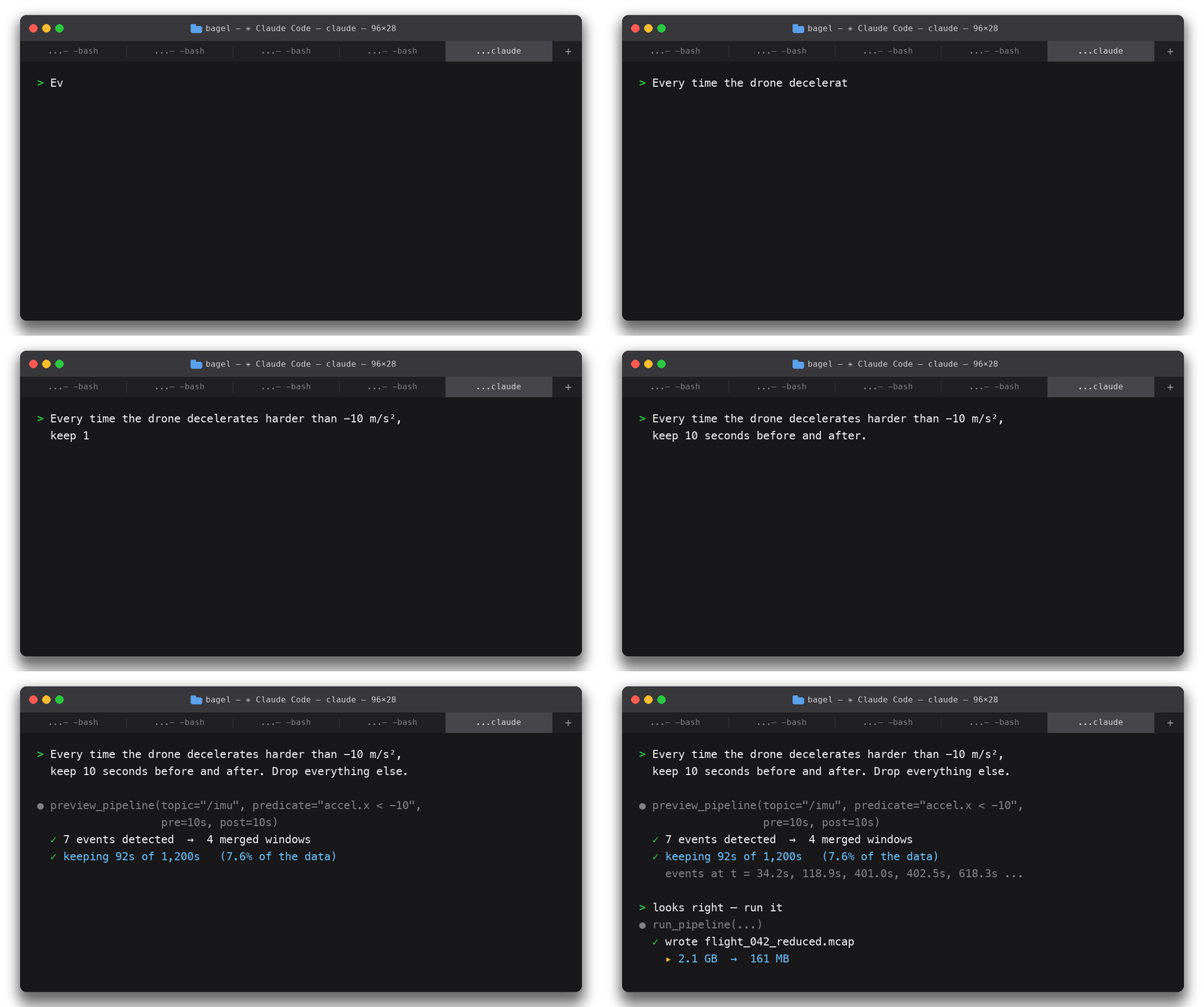
Here it is in one conversation:
Don't know the event in advance? The anomaly gate
(beta) learns what normal looks like on the robot, asks
Jev to name whatever isn't, and keeps only those
slices, each with a JSON label, for any bucket: S3, GCS, Azure, MinIO or R2.
The session above: a 20-minute (1,200 s) recording and the prompt "keep 10 seconds
before and after every deceleration harder than −10 m/s²". The preview detects
7 events, merges them into 4 windows, and keeps 92 s of the 1,200 (7.6%); the run
writes a 2.1 GB bag down to 161 MB. These figures are illustrative demo output, not
a measured benchmark: the ratio is event-window duration over total duration, so it
depends entirely on your workload.
✅ Supported Data Formats
| Industry | Formats |
|---|---|
| Robotics | ROS1, ROS2, MCAP (any profile), Copper (via MCAP export), ROS text logs (~/.ros/log) |
| Robot learning | Gantry Bench evidence bundles — a dataset verdict's working (per-clip signal checks, robot-test ladder, findings) as queryable tables |
| Drones | PX4, ArduPilot, Betaflight |
| Automotive | ASAM MDF4 (.mf4), CAN captures (.blf/.asc + DBC) · beta |
| IoT | MQTT (live, Sparkplug B), PostgreSQL / TimescaleDB, InfluxDB 3 |
| Hardware state | WaffleForm snapshots (.waffleform.yaml), auto-detected via waffle-iron · beta |
🆚 Bagel vs. the Tools You Already Use
You already have ros2 *, PlotJuggler, and grep. Bagel doesn't replace them: it
answers the questions they make you work for, then hands off to them:
| You do this today | Ask Bagel instead |
|---|---|
ros2 bag info for metadata |
"Summarize this bag": same prompt works on PX4, ArduPilot, MCAP, MQTT, Postgres |
ros2 topic echo /imu and eyeball raw values |
"What's the peak z-deceleration in /imu? Running average over 5 s?" · real SQL underneath: peaks, running averages, percentiles, cross-topic correlations |
| Scrub PlotJuggler timelines hunting for the event | "Find every deceleration under −10 m/s² and cut ±30 s snippets": then open the result in PlotJuggler with a pre-framed layout |
rqt_console, or grep ~/.ros/log |
"Read the ERRORs from ~/.ros/log and tell me what went wrong": tracebacks included, no bag needed |
| Echo two topics in two terminals, correlate in a spreadsheet | "What's the correlation between current and voltage?": topics live in one SQL relation, so joins and corr() are one question |
ros2 bag record -a and babysit the disk |
A standing edge pipeline: record continuously, keep only event windows, drop the rest |
| A bash loop over 200 bags | "Run this pipeline on every bag in the folder": one pipeline, whole fleet, with a combined report |
scp/aws s3 sync scripts to ship data off the robot |
Upload to S3, GCS, or Azure as a pipeline step, checksum-skipping files already there |
| A different viewer per format: FlightPlot for PX4, MAVExplorer for ArduPilot, Blackbox Explorer for Betaflight | The same conversation for all of them, and ROS, MCAP, MQTT, Postgres, InfluxDB |
| Write a one-off pandas script per question | Ask the question; Bagel writes and runs the query |
One sentence of plain language, one answer, instead of a pipeline of commands and
a script you'll delete tomorrow.
💬 What Can I Prompt?
You can ask Bagel almost anything. For example:
What’s the correlation between current and voltage in the
/spot/status/battery_statestopic?
I think the robot hit a pothole. Can you check for sudden deceleration on the z-axis to confirm?
Every time the drone decelerates harder than -10 m/s², keep 10 seconds before and after. Drop everything else.
Did anything change on this robot since last week?
Time to put Bagel to the test: can it catch a drone doing barrel rolls? Spoiler: 🎉 It totally can.

💡 How Bagel Works
When you ask a question, Bagel analyzes your data source’s metadata and topics to
build a high-level understanding.

Based on your prompt, if further inspection is needed, Bagel identifies the most relevant topics
and interprets their meaning and structure. Bagel then writes the relevant topic messages
to an Apache Arrow file and uses DuckDB to generate and execute queries against it.
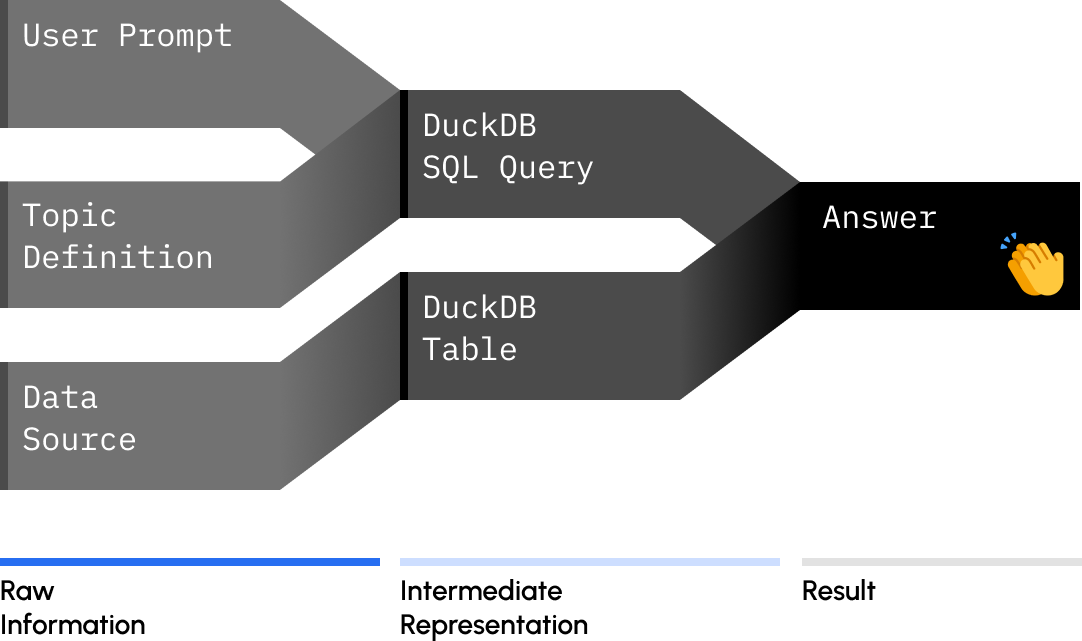
This process is repeated as needed, running new queries until Bagel finds the best answer
to your question.
LLMs excel at language but struggle with math. Bagel overcomes this by generating deterministic
DuckDB SQL queries. These queries are displayed for you to audit, and you can guide Bagel to
correct any errors.
🐶 Teach Bagel a New Trick
Bagel learns new capabilities through POML
files: a structured set of instructions that describe a “trick,”
such as computing latency statistics.
✍️ Create a .poml file
For example, let’s define ./bagel_mcp/agent/examples/woof.poml.
<poml>
    <task>
        Count the topics in the data source.
        If the count is odd, say "woof", else say "meow".
    </task>

    <output-format>
        Return the sound, the topic count, and a few cute emojis. Nothing else.
    </output-format>
</poml>
🗣️ Use the capability
Prompt Bagel:
Run the POML capability "./bagel_mcp/agent/examples/woof.poml" on the ROS2 bag "./data/sample/ros2/mcap".
Result:
meow 🐱 4 topics 🐱💤🎯
Teach it your own tricks (no rebuild)
Bagel discovers your own capabilities from ~/.bagel/capabilities/:
- In conversation: do a workflow once, then say "save that as a
capability called battery-triage" — Claude callssave_agent_capability
and it's reusable in any future session. - As a file: drop a markdown file with your steps (or a
POML file, if you want parameterized
templates — seebagel_mcp/agent/compose/pipeline.pomlfor the house style)
into~/.bagel/capabilities/.
Either way it shows up in list_agent_capabilities as user/<name> and runs
with run_poml_capability — from Claude Code, Claude Desktop, or any MCP
client. Teams: keep the directory in your own git repo and sync it to every
robot; it's just files. On Linux, run mkdir -p ~/.bagel/capabilities once
before starting the container so the mount is owned by you, not root.
📚 Guides
- Natural-language pipelines · the model: a cadence, gates,
and tasks; preview → run → save → batch → standing at the edge - Event-driven data reduction · detect events, keep
windows around them (snippets or one reduced bag), batch across fleets, upload to the cloud - Anomaly detection with Jev (beta) · learn normal on
the robot, ask Jev to label what isn't, upload only those slices with a JSON label;preview_anomaliesdry-runs the screen first - Live ROS2 robots over rosbridge · a step-by-step tutorial
- ROS text logs · inspect
~/.ros/logerrors and warnings without opening a bag - MQTT · live IoT topics, Sparkplug B, edge recording
- PostgreSQL / TimescaleDB · every table is a topic
- InfluxDB 3 · every measurement is a topic
- Automotive MDF4 & CAN (beta) · channel groups and DBC messages are topics; units ride along
- Local LLMs · fully offline with Ollama: your data and your model never leave the machine
📦 Integrations
- Rerun · "show me that event in Rerun": any time window as a ready-to-open recording
- Lichtblick / Foxglove · event windows as MCAP + pre-framed layouts for either viewer
- PlotJuggler · open Bagel's MCAP outputs directly; one-sentence pre-framed sessions, flattened CSV/Parquet exports
- Cloudini · decode cloudini-compressed pointclouds, or compress a bag's PointCloud2 topics into CompressedPointCloud2
- Slack · pipelines post to your ops channel when they fire: "🚨 hard brake on {asset}"
- LeRobot (beta) · detected events become training episodes: a LeRobotDataset v3.0
🚧 Limitations
Rough edges we know about, so you don't find them the hard way:
- Two formats are beta. The automotive MDF4/CAN readers are verified against
files we generate with the same libraries that read them (asammdf,python-can);
real CANape/INCA/Vector-produced captures haven't crossed our test bench yet.
LeRobot exports load-test clean with the reallerobotpackage, but no policy
has been trained from a Bagel export yet. - The Jev integration is beta, and stays beta while we learn from real
deployments. That covers theanomalyanddecidegates (recorded logs and live
subscriptions),preview_anomalies, the on-robotlocalbackend and theros2-jazzy-jevimage. Its Jev backend has been run against live Jev through Vercel
AI Gateway on a real drive, a synthetic fault log and a live MQTT stream; a direct
TypeSafe key is not yet exercised, and detection quality has not been measured on
logs with known incidents. On a live subscription the flagged window is kept as
Parquet (write_topics_to_file); MCAP/rosbag snippets need a recorded log and are
refused there. The baseline is learned per run and restarts with the
process, so in screen mode the first minutes of each run are never flagged. Labels,
settings and defaults may change between releases. - Reduction ratios are workload-dependent, and unbenchmarked. The ratio is
event-window duration over total duration: quiet recordings reduce dramatically,
eventful ones much less. The figures in this README are illustrative demo output,
not a measured benchmark. - No authentication on the MCP endpoint. By design it binds to localhost only;
treat it like a database socket and see SECURITY.md before
sharing it beyond your machine. - Small local models struggle with multi-step pipelines. A 4-8B model handles
tool selection and simple SQL; event-windowed reduction and multi-topic joins
want a bigger model. See the Local LLMs guide. - Live-database end-to-end tests run outside CI. The InfluxDB and Postgres
suites' pure tests run in CI; their live end-to-end cases only execute against
an instance you point them at. Everything else, including the ROS bag write
paths, runs in CI.
🫶 Contributing
We’d love your help! The easiest way to support the project is by giving it a ⭐ on GitHub.
Other great ways to contribute:
- Request new features
- Report bugs
- Improve documentation
- Add new capabilities
Before contributing, please review the guidelines.
Join the conversation in our Discord server.
We hang out there regularly.
📄 License
Bagel is open source under the Apache License 2.0.
Agent discovery and reproducible workflows
For maintainers: discovery audits and evaluation,
listing maintenance, and
reproducible user reports.
Reviews (0)
Sign in to leave a review.
Leave a reviewNo results found