open-deep-research-with-web-ui
Health Pass
- License — License: NOASSERTION
- Description — Repository has a description
- Active repo — Last push 0 days ago
- Community trust — 24 GitHub stars
Code Pass
- Code scan — Scanned 12 files during light audit, no dangerous patterns found
Permissions Pass
- Permissions — No dangerous permissions requested
No AI report is available for this listing yet.
🔍 AI-powered deep research agent with Web UI. Built on smolagents, featuring process-based architecture, MetaSo/DuckDuckGo search, and Docker deployment. Apache 2.0 licensed.
Open Deep Research



Read this in other languages: 🇨🇳 中文 · 🇫🇷 Français · 🇪🇸 Español
An open replication of OpenAI's Deep Research with a modern web UI — adapted from HuggingFace smolagents with simplified configuration for easy self-hosting.
Read more about the original implementation in the HuggingFace blog post.
This agent achieves 55% pass@1 on the GAIA validation set, compared to 67% for OpenAI's Deep Research.
Features
- Parallel background research — fire off multiple research tasks simultaneously, monitor them independently, and come back to results later — even after closing the browser
- Multi-agent research pipeline — Manager + search sub-agents with real-time streaming output
- Modern Web UI — Preact-based SPA with collapsible sections, model selector, and copy support
- Flexible model support — OpenAI, Anthropic, DeepSeek, Ollama, and any OpenAI-compatible provider
- Multiple search engines — DuckDuckGo (free), SerpAPI, MetaSo with automatic fallback
- Session history — SQLite-backed session storage with replay support
- Three run modes — Live (real-time), Background (persistent), Auto-kill (one-shot)
- Model auto-discovery — Detects available models from configured providers
- Vision & media tools — Image QA, PDF analysis, audio transcription, YouTube transcripts
- Production-ready — Docker, Gunicorn, multi-worker, health checks, configurable via JSON
Screenshots:
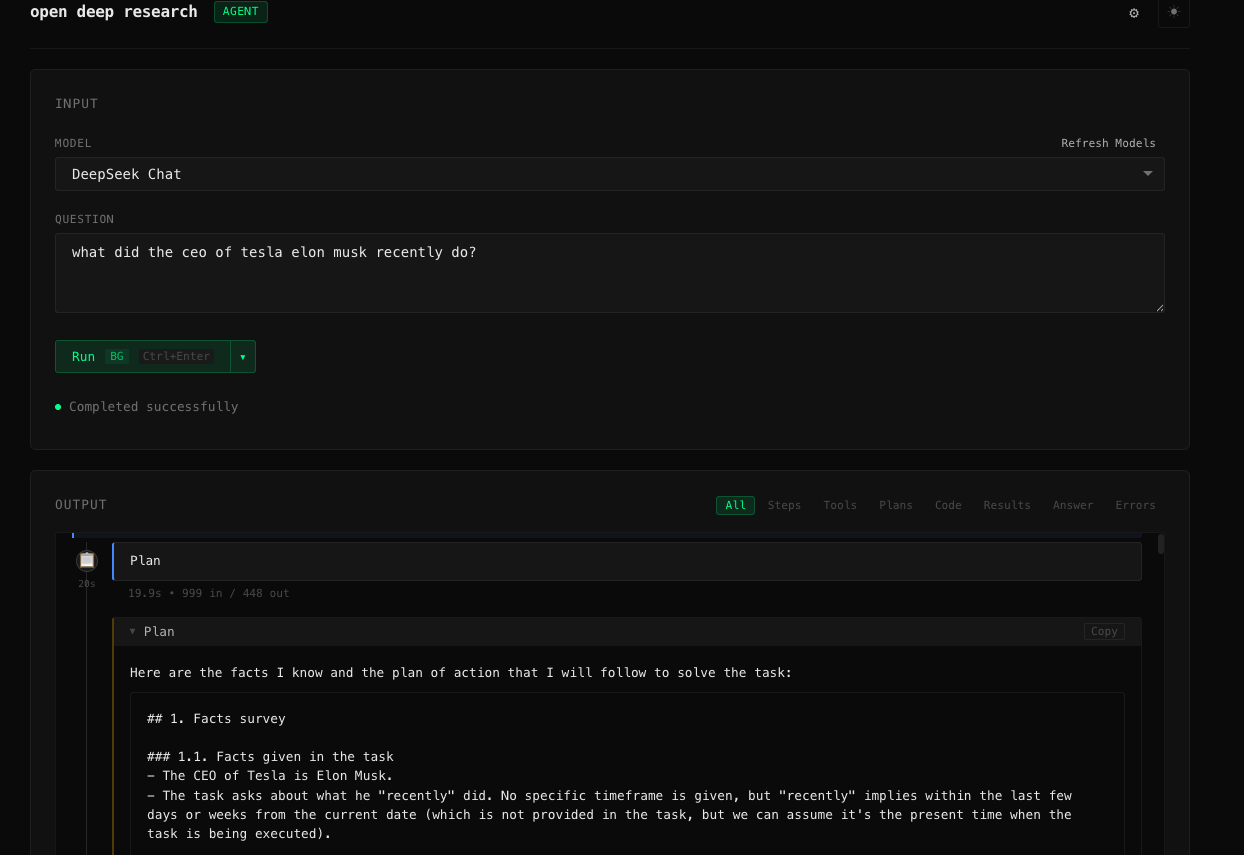
Clean input interface with model selection
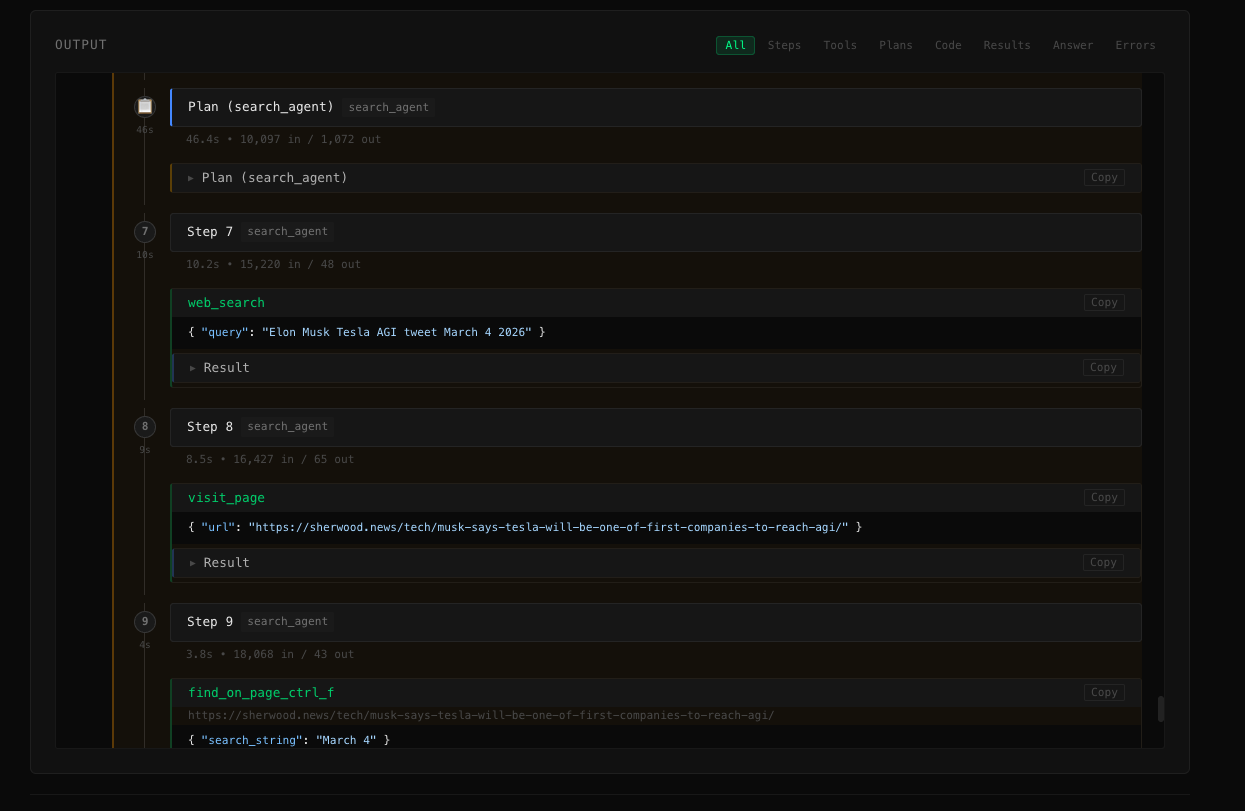
Real-time display of agent reasoning, tool calls, and observations
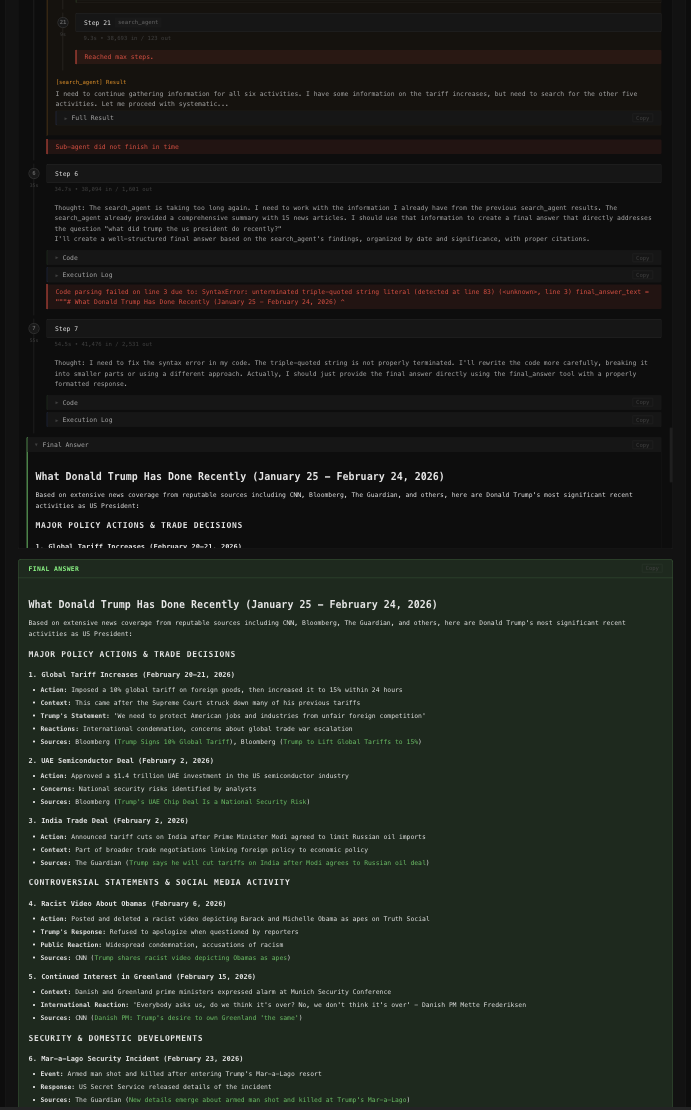
Highlighted final answer with collapsible sections
Parallel Background Research
Deep research tasks are slow — a single run can take 10–30 minutes. Most tools block the UI until the task completes, forcing you to wait.
This project takes a different approach: fire off as many research tasks as you want and let them run in the background — simultaneously.
┌─────────────────────────────────────────────────────┐
│  Question A: "What are the latest advances in LLMs?" │  ← running
│  Question B: "Compare top vector databases in 2025"  │  ← running
│  Question C: "EU AI Act compliance checklist"        │  ← completed ✓
└─────────────────────────────────────────────────────┘
        All visible in the sidebar. Click any to inspect.
How it works:
- Select Background or Auto-kill run mode (the default)
- Submit your first research question — the agent starts immediately in a subprocess
- The UI is not locked — submit a second question, a third, as many as you need
- Each agent runs independently, persisting all its reasoning steps and results to SQLite
- Use the sidebar to switch between running sessions in real-time
- Close the browser — in Background mode, agents keep running on the server
- Return later and click any session to replay the full research trace
Run mode comparison:
| Mode | Multiple at once | Survives browser close | UI locked |
|---|---|---|---|
| Background | ✅ | ✅ | ✗ |
| Auto-kill | ✅ | ✗ (killed on tab close) | ✗ |
| Live | ✗ | ✗ | ✅ |
This is particularly useful for:
- Batch research workflows where you queue several related questions and review results together
- Long-running queries where you don't want to keep a tab open
- Teams sharing a self-hosted instance with multiple concurrent users
Why This Project?
There are several open-source Deep Research alternatives. Here's how this project compares:
| Feature | This project | nickscamara/open-deep-research | gpt-researcher | langchain/open_deep_research | smolagents |
|---|---|---|---|---|---|
| Docker / one-command deploy | ✅ Pre-built image on GHCR | ✅ Dockerfile | ✅ Docker Compose | ❌ Manual | ❌ Library only |
| No-build frontend | ✅ Preact + htm (no build step) | ❌ Next.js build required | ❌ Next.js build required | ❌ LangGraph Studio | — |
| Free search out of the box | ✅ DuckDuckGo (no key needed) | ❌ Firecrawl API required | ⚠️ Key recommended | ⚠️ Configurable | ✅ |
| Model agnostic | ✅ OpenAI, Anthropic, DeepSeek, Ollama | ✅ AI SDK providers | ✅ Multiple providers | ✅ Configurable | ✅ |
| Local model support | ✅ Ollama, LM Studio | ⚠️ Limited | ✅ Ollama/Groq | ✅ | ✅ |
| Parallel background tasks | ✅ Multiple simultaneous runs | ❌ | ❌ | ❌ | ❌ |
| Session history / replay | ✅ SQLite-backed | ❌ | ❌ | ❌ | ❌ |
| Streaming UI | ✅ SSE, 3 run modes | ✅ Real-time activity | ✅ WebSocket | ✅ Type-safe stream | ❌ |
| Vision / image analysis | ✅ PDF screenshots, visual QA | ❌ | ⚠️ Limited | ❌ | ⚠️ |
| Audio / YouTube | ✅ Transcription, speech | ❌ | ❌ | ❌ | ❌ |
| GAIA benchmark score | 55% pass@1 | — | — | — | 55% (original) |
Key advantages of this project
- Parallel background research — the most unique feature in this space. Start multiple deep research tasks at the same time — each runs as an independent subprocess, persists all events to SQLite, and can be monitored or replayed independently. Close the browser, come back hours later, and your results are waiting. No other open-source deep research tool supports this workflow.
- Single
docker rundeployment — pre-built image on GHCR works on any platform with Docker: Linux, macOS, Windows, ARM, cloud VMs, Raspberry Pi. - No build step — the frontend uses Preact with
htmtemplate literals. No Node.js, nonpm install, no webpack. Just open the browser. - Free by default — DuckDuckGo search requires no API key, so the agent works immediately after adding just one model API key.
- Broader media support — handles PDFs, images, audio files, and YouTube transcripts that other projects leave to the user.
Quick Start
1. Clone the repository
git clone https://github.com/S2thend/open-deep-research-with-ui.git
cd open-deep-research-with-ui
2. Install system dependencies
The project requires FFmpeg for audio processing.
- macOS:
brew install ffmpeg - Linux:
sudo apt-get install ffmpeg - Windows:
choco install ffmpegor download from ffmpeg.org
Verify: ffmpeg -version
3. Install Python dependencies
python3 -m venv venv
source venv/bin/activate  # On Windows: venv\Scripts\activate
pip install -e .
4. Configure
Copy the example config and add your API keys:
cp odr-config.example.json odr-config.json
Edit odr-config.json to set your model provider and API keys (see Configuration below).
5. Run
# Web UI (recommended)
python web_app.py
# Open http://localhost:5080

# CLI
python run.py --model-id "gpt-4o" "Your research question here"
Configuration
Configuration is managed via odr-config.json (preferred) or environment variables.
odr-config.json
Copy odr-config.example.json to odr-config.json and customize:
{
  "model": {
    "providers": [
      {
        "name": "openai",
        "api_key": "sk-...",
        "models": ["gpt-4o", "o1", "o3-mini"]
      }
    ],
    "default": "gpt-4o"
  },
  "search": {
    "providers": [
      { "name": "DDGS" },
      { "name": "META_SOTA", "api_key": "your_key" }
    ]
  }
}
The UI includes a built-in settings panel for client-side configuration. Server-side config is optionally protected by an admin password.
Environment variables
For Docker or environments where a config file isn't convenient, you can use .env:
cp .env.example .env
| Variable | Description |
|---|---|
ENABLE_CONFIG_UI |
Enable admin config UI via web (false by default) |
CONFIG_ADMIN_PASSWORD |
Password for server-side config changes |
META_SOTA_API_KEY |
API key for MetaSo search |
SERPAPI_API_KEY |
API key for SerpAPI search |
DEBUG |
Enable debug logging (False by default) |
LOG_LEVEL |
Log verbosity (INFO by default) |
[!NOTE]
API keys set inodr-config.jsontake precedence over environment variables.
Supported Models
Supports OpenAI, Anthropic, DeepSeek, Ollama, and any OpenAI-compatible provider. Model routing is automatic based on model name prefix. Examples:
python run.py --model-id "gpt-4o" "Your question"
python run.py --model-id "o1" "Your question"
python run.py --model-id "claude-sonnet-4-6" "Your question"
python run.py --model-id "deepseek/deepseek-chat" "Your question"
python run.py --model-id "ollama/mistral" "Your question"  # local model
[!WARNING]
Theo1model requires OpenAI tier-3 API access: https://help.openai.com/en/articles/10362446-api-access-to-o1-and-o3-mini
Search Engines
| Engine | Key Required | Notes |
|---|---|---|
DDGS |
No | Default, free DuckDuckGo |
META_SOTA |
Yes | MetaSo, often better for Chinese queries |
SERPAPI |
Yes | Google via SerpAPI |
Multiple engines can be configured with automatic fallback — the agent tries them in order.
Usage
Web UI
python web_app.py
# or with custom host/port:
python web_app.py --port 8000 --host 0.0.0.0
Open http://localhost:5080 in your browser.
Run modes (available via the split-button in the UI):
| Mode | Behavior |
|---|---|
| Live | Stream output in real-time; session ends on disconnect |
| Background | Agent runs persistently; reconnect anytime to view results |
| Auto-kill | Agent runs, session is cleaned up after completion |
CLI
python run.py --model-id "gpt-4o" "What are the latest advances in quantum computing?"
GAIA Benchmark
# Requires HF_TOKEN for dataset download
python run_gaia.py --model-id "o1" --run-name my-run
Deployment
Docker (Recommended)
Pre-built images are available on GitHub Container Registry:
docker pull ghcr.io/s2thend/open-deep-research-with-ui:latest

docker run -d \
  --env-file .env \
  -v ./odr-config.json:/app/odr-config.json \
  -p 5080:5080 \
  --name open-deep-research \
  ghcr.io/s2thend/open-deep-research-with-ui:latest
Docker Compose (includes volume for downloaded files):
cp .env.example .env        # configure API keys
cp odr-config.example.json odr-config.json  # configure models
docker-compose up -d
docker-compose logs -f      # follow logs
docker-compose down         # stop
Build your own image:
docker build -t open-deep-research .
docker run -d --env-file .env -p 5080:5080 open-deep-research
[!WARNING]
Never commit.envorodr-config.jsonwith real API keys to git. Always pass secrets at runtime.
Gunicorn (Production)
pip install -e .
gunicorn -c gunicorn.conf.py web_app:app
The included gunicorn.conf.py is pre-configured with:
- Multi-worker process management
- 300s timeout for long-running agent tasks
- Proper logging and error handling
Architecture
Agent Pipeline
User Question
    │
    ▼
Manager Agent (CodeAgent / ToolCallingAgent)
    │  Plans multi-step research strategy
    ├──▶ Search Sub-Agent × N
    │       │  Web search → browse → extract
    │       └──▶ Tools: DuckDuckGo/SerpAPI/MetaSo, VisitWebpage,
    │                   TextInspector, VisualQA, YoutubeTranscript
    │
    └──▶ Final Answer synthesis
Streaming Pipeline
run.py  (step_callbacks → JSON-lines on stdout)
  │
  ▼
web_app.py  (subprocess → Server-Sent Events)
  │
  ▼
Browser  (Preact components → DOM)
SSE event types:
| Event | Description |
|---|---|
planning_step |
Agent reasoning and plan |
code_running |
Code being executed |
action_step |
Tool call + observation |
final_answer |
Completed research result |
error |
Error with details |
DOM Hierarchy
#output
├── step-container.plan-step       (manager plan)
├── step-container                 (manager step)
│   └── step-children
│       ├── model-output           (reasoning)
│       ├── Agent Call             (code, collapsed)
│       └── sub-agent-container
│           ├── step-container.plan-step  (sub-agent plan)
│           ├── step-container            (sub-agent steps)
│           └── sub-agent-result          (preview + collapsible)
└── final_answer                   (prominent result block)
Reproducibility (GAIA Results)
The 55% pass@1 result on GAIA was obtained with augmented data:
- Single-page PDFs and XLS files were opened and screenshotted as
.png - The file loader checks for a
.pngversion of each attachment and prefers it
The augmented dataset is available at smolagents/GAIA-annotated (access granted instantly on request).
Development
pip install -e ".[dev]"   # includes testing, linting, type checking tools
python web_app.py         # starts dev server with auto-reload
The frontend is a dependency-free Preact app using htm for JSX-like templates — no build step required. Edit files in static/js/components/ and refresh.
License
Licensed under the Apache License 2.0 — the same license as smolagents.
See LICENSE for details.
Acknowledgments:
- Original research agent implementation by HuggingFace smolagents
- Web UI, session management, streaming architecture, and configuration system added in this fork
Reviews (0)
Sign in to leave a review.
Leave a reviewNo results found