gmod-mcp
Health Warn
- License — License: MIT
- Description — Repository has a description
- Active repo — Last push 0 days ago
- Low visibility — Only 5 GitHub stars
Code Fail
- rm -rf — Recursive force deletion command in .github/workflows/build.yml
Permissions Pass
- Permissions — No dangerous permissions requested
No AI report is available for this listing yet.
An MCP server embedded in Garry's Mod: lets AI coding agents (Claude Code...) drive a local game - Lua in all realms, maps, console, world, screenshots, hooks, docs.
gmod-mcp


The GMod MCP server that runs inside the game: Lua in every realm, maps, console, errors, screenshots, hook tracing, test clients and long-running jobs, straight from inside the game.
[!TIP]
Quick start (Claude Code, Windows)
1. In Claude Code, run:
/plugin marketplace add ExtReMLapin/gmod-mcp
/plugin install gmod-mcp@gmod-mcp
2. Restart Claude Code.
3. Ask Claude:
set up gmod-mcpThat's it. Claude installs the module in your game (it asks first) and starts Garry's Mod with
-mcp.4. Turn on updates (recommended):
/plugin→ Marketplaces →gmod-mcp→ Enable auto-update. Claude Code
keeps auto-update off for marketplaces other than Anthropic's, and noclaude pluginsubcommand turns it on. See
Updates.Other MCP clients, Linux or a dedicated server: see Install. Tested with Claude Code 2.1.325.
An MCP server that lives inside Garry's Mod. Drop one native module into your game and an AI coding agent
(Claude Code or any MCP client) can run Lua in the menu, client and server realms, load maps, read the console and
errors, inspect and edit the world, take screenshots, trace hooks and look up the documentation — on your own machine.
- Self-contained: one DLL, one small Lua file and a small block in
menu.lua(see
What gets modified). With Claude Code, the plugin brings the module and
adds a small bridge that Claude Code starts by itself. No Python, no Node, nothing to run yourself. - Local only: listens on
127.0.0.1with a bearer token, refuses pages from other sites, inactive unless the game
is started with-mcp. - Safe by default: never touches the client realm while you are connected to someone else's server.
Contents
- Install
- Updates
- Feedback from agents
- Comparison with other servers
- Tools
- How it works
- Several games at once
- Configuration
- Security
- What gets modified in your game folder
- Uninstall
- Limitations
- Building from source
Install
You need Garry's Mod with the 64-bit binaries (gmod_win64.exe, the default on current Steam builds). Two ways:
the Claude Code plugin (the Quick start at the top of this page), or by hand for any other MCP client.
Claude Code plugin
The repository is also a Claude Code plugin marketplace. In Claude Code:
/plugin marketplace add ExtReMLapin/gmod-mcp
/plugin install gmod-mcp@gmod-mcp
From a shell: claude plugin marketplace add ExtReMLapin/gmod-mcp, then claude plugin install gmod-mcp@gmod-mcp.
Restart Claude Code, then ask Claude set up gmod-mcp: its skill copies the two files into the game (after asking
you) and starts the game with -mcp. Claude Code stays connected while the game is closed: the tools say so, Claude
starts the game again instead of giving up, and they work again as soon as it is up, no reconnection needed. Updates:
see Updates.
The plugin holds:
- the
gmodMCP server:gmod-mcp-bridge, a small stdio program Claude Code starts by itself. It relays to the game,
stays connected while the game is closed (tools then answergame_not_running), and tells Claude Code when the game
is back. It reads the token from its file, so nothing secret lands in Claude Code's settings; - the module of the same version, for the game (Windows and Linux binaries);
- one skill: how to install or update the module, find the game folder, start the game with
-mcp, run several games,
set up a dedicated server. It asks before touching the game folder and never restarts a game you just closed.
Each release publishes the plugin as one zip (gmod-mcp-plugin.zip, pinned by its SHA-256 in the marketplace), so the
repository holds no binaries.
If you added the server by hand earlier (claude mcp add ... gmod), the plugin does not replace that entry: both
stay and every tool is listed twice. Remove the old one with claude mcp remove gmod (add -s user if you added it
with --scope user; an entry added without a scope only exists in the folder where you ran the command).
Right after the install, Claude Code may say "1 userConfig option not yet set": that is the option that turns the
feedback offers on or off, which is on by default. Nothing to do.
Remove the plugin with /plugin uninstall gmod-mcp@gmod-mcp.
By hand, 1. Garry's Mod side (drag and drop)
Download
gmod-mcp-win64.zip(Windows) orgmod-mcp-linux64.zip(a Linux dedicated server) from the
latest release.Open it. Everything sits in a top folder,
gmod-mcp-win64/(orgmod-mcp-linux64/): drag thegarrysmodfolder
from inside it onto your game folder (…\steamapps\common\GarrysMod, the one that already contains agarrysmod
folder). Accept the merge. That adds two files:garrysmod/lua/bin/gmsv_mcpagent_win64.dllandgarrysmod/lua/autorun/server/mcpagent_boot.lua.In Steam: Garry's Mod → Properties → Launch options, add:
-mcpRecommended, so the game keeps running at full speed in the background:
-mcp -windowed +engine_no_focus_sleep 0 +snd_mute_losefocus 0Start the game and load any map once (Start new game). The module installs its main-menu loader by itself; from
then on it starts at the main menu every time. The console says[mcpagent] main-menu loader installed ….
By hand, 2. MCP client side
Open the game console (~) and type:
mcpagent_setup
It prints the exact setup for your machine, token included. For Claude Code without the plugin, paste this in a
terminal (--scope user makes it available in every folder; without it the entry only exists in the folder where you
ran the command):
claude mcp add --scope user --transport http gmod http://127.0.0.1:27080/mcp --header "Authorization: Bearer <token>"
Restart Claude Code. That's it. The same output also shows a .mcp.json snippet for other MCP clients (Streamable
HTTP + bearer token). The token is created once in %APPDATA%\gmod-mcp\token (Linux:$XDG_CONFIG_HOME/gmod-mcp/token, ~/.config/gmod-mcp/token by default), never changes, and is only printed when you
ask for it — keep it private.
Without the plugin, Claude Code only connects if the game is already running when it starts; otherwise use /mcp,
Reconnect, once the game is up. The plugin avoids that. Other MCP clients can do the same with gmod-mcp-bridge from the
release zip, a stdio server that stays up while the game is closed.
Dedicated server
Same zip (gmod-mcp-linux64.zip for a Linux server), same drag and drop of its garrysmod folder into the server's
folder (the one that holds garrysmod and the server binary), and start the server with -mcp. Only the server realm
exists in that mode. The module is 64-bit: start srcds_win64.exe (Linux: srcds_run_x64). On Linux the default branch
of the dedicated server has no 64-bit binary: install it with +app_update 4020 -beta x86-64.
mcpagent_setup works in the server console too. The plugin and the bridge reach a server running on your machine
like a game: a server alone takes port 27080; next to a client game, use instances_list and pass instance
(see Several games at once). The plugin's skill can also set a server up for you.
Updates
What updates by itself. With auto-update on (
/plugin→ Marketplaces →gmod-mcp→ Enable auto-update),
Claude Code updates the plugin a few minutes after a session starts; the new version runs from the next start of
Claude Code (or after/reload-plugins). Claude Code keeps it off for third-party marketplaces and noclaude plugin
subcommand turns it on: use that menu.By hand, in a shell:
claude plugin marketplace update gmod-mcp
claude plugin update gmod-mcp@gmod-mcp
then restart Claude Code (or
/reload-plugins). The first command matters: Claude Code compares with its local copy
of the marketplace, and without refreshing itplugin updateanswers "already at the latest version".What is in the plugin: the bridge Claude Code talks to, the skill, and a copy of the module for the game.
What does not update by itself: the module loaded by the game (
garrysmod/lua/bin/gmsv_mcpagent_*.dll). After a
plugin update, quit Garry's Mod and ask Claudeupdate gmod-mcp: the skill copies the new module into the game.
Until then, tool results carry a warning that names both versions: the bridge learns the module's version when the
game first answers, so it shows from a moment after that, and the server instructions carry it too.Without the plugin: quit the game (it keeps the DLL locked), download the new zip from the
releases and overwrite the two files. The version warning
is a feature of the bridge, so only the plugin gives it.What the commands download:
/plugin marketplace addclones this repository (to read its.claude-plugin/marketplace.json);/plugin installand updates download only the release zip of that version
(gmod-mcp-plugin.zip, checked against its SHA-256), not the source code.
Feedback from agents
Agents using gmod-mcp are asked (server instructions, guide, skill) to note the frictions they meet with it and, at the
end of a task, to offer you to report the ones that cost real time or a feature. If you agree, they draft the issue in
English with no secrets, paths, project names or code, look for duplicates, and file it with gh when it is installed
and signed in (otherwise they give you a prefilled link: one click). Issues carry the agent-feedback label.
To turn the offers off, set the plugin option feedback_offers (on by default) to false: /plugin configure gmod-mcp@gmod-mcp in Claude Code, or in a shell:
echo '{"feedback_offers": "false"}' | claude plugin configure gmod-mcp@gmod-mcp --values-stdin
Then restart Claude Code.
Comparison with other servers
As of 2026-11-14, gmod-mcp covers the most capabilities of the 22 Garry's Mod MCP servers we compared. Code read, nothing executed · method & full table
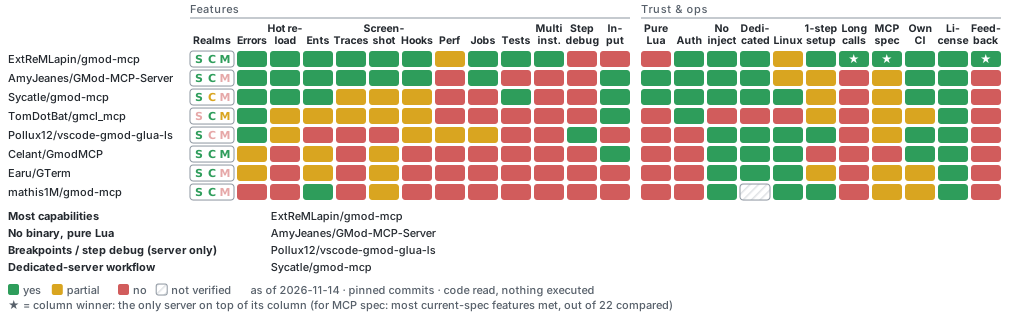
Repos: ExtReMLapin/gmod-mcp · AmyJeanes/GMod-MCP-Server · Sycatle/gmod-mcp · TomDotBat/gmcl_mcp · Pollux12/vscode-gmod-glua-ls · Celant/GmodMCP · Earu/GTerm · mathis1M/gmod-mcp · 14 more
Tools
| Area | Tools |
|---|---|
| Session | status, map_list, map_load, disconnect, game_quit, game_terminate, wait_for, wait_frames |
| Lua | lua_exec, lua_exec_file, lua_reload (run an addon file again from the disk, in its realms), lua_check (syntax and globals of a snippet, file or whole addon, without running it), lua_job (long work spread over frames, with progress; async: true with lua_job_status / lua_job_cancel), lua_inspect, lua_function_source (is a running function the code on disk?), lua_mount (this game loads Lua from your worktree first), lua_file_write / _read / _list / _delete, tests_run (GLuaTest format) |
| Hooks | hook_list, hook_trace, perf_hook_cost |
| Console | console_exec (a 1; b 2 runs two commands like the console; an unknown command is an error; convars it sets are read back), console_read, console_wait (block until N lines match, e.g. the end of a batch), console_buffer, convar_get, convar_set, concommand_list |
| Errors | errors_since, errors_clear (Lua errors from all three realms, with stack) |
| World | ents_find, ent_info, ent_spawn, ent_remove, ent_fire, players_list, player_set, bots_add, trace, trace_through (every surface crossed, with thickness and material) |
| Rendering | screenshot, screenshot_from (arbitrary camera), debug_draw, debug_clear |
| Sound | sound_emit, sound_trace |
| Performance | perf_snapshot |
| Documentation | api_search (what really exists in each realm), wiki_search, wiki_page (wiki.facepunch.com, cached) |
| Events | events_wait (long-poll: map_loaded, lua_error, main_thread_stalled…), reports_read / reports_channels / reports_clear (fed by mcpagent.report() from your scripts) |
| Instances | instances_list; with the plugin (Windows): instances_launch (1 to 8 test clients), instances_close, instance_select (the session's default instance) |
Besides tools, the server offers:
- Prompts (slash commands in Claude Code):
write-lua-job,debug-errors,run-tests,check-map, with
completion of map names, realms and test files. - Resources: the agent guide (
mcpagent://guide),gmod://errorsandgmod://console(subscribable: the client is
told when they change), and the templatesgmod://wiki/{page}andgmod://lua/{path}. - Progress and cancellation: long tools report progress while they run, and stop when the client cancels.
Long operations (map_load, long waits, long jobs) run as background MCP Tasks for clients that support them. - Confirmation: changing a convar saved in your
config.cfgasks you first (when the client supports it).
Long-running Lua jobs
lua_exec runs code in one go, and the game is frozen while it runs. For anything longer, lua_job runs the script
as a coroutine resumed once per frame. The script talks back through a job object, and its progress shows up in
Claude Code while it runs:
local props = 0
local all = ents.GetAll()
for i, ent in ipairs(all) do
    if ent:GetClass() == "prop_physics" then props = props + 1 end
    if i % 100 == 0 then job:progress(i, #all, props .. " props so far") end
    job:step()  -- hands control back to the game once this frame's time slice is used
end
return { props = props }
Also available: job:sleep(seconds), job:frames(n), job:wait(fn, timeout), job:report(value) for intermediate
results, and args (also job.args) for the call's arguments. async: true returns at once with a job id
(lua_job_status, lua_job_cancel), and fresh_env: true keeps the script's globals out of the game's _G. The agent learns this protocol from the tool description and thewrite-lua-job prompt.
Testing a branch: the mounted Lua folder
Every game process loads the addons from the same garrysmod/addons/ folder, so an agent that works in a git worktree
of an addon cannot test its branch in one test client without changing the folder every other client (and your own
game) uses. The mounted folder solves this per process: lua_mount {path: "D:/dev/my-addon-wt"} (orinstances_launch {lua_mount: "D:/dev/my-addon-wt"} for a new test client) makes that one game look for Lua files in the
worktree before every addon. include(), autorun files and AddCSLuaFile then get the branch's files, at every map
load, and the other games keep the installed addon.
instances_launch {count: 1, owner: "fork-a", lua_mount: "D:/dev/my-addon-wt", map: "gm_construct"}
lua_function_source {realm: "server", expr: "MyAddon.Update"}   -> source: the worktree's file
pathis the addon's root (the folder that containslua/) or itslua/folder, absolute. Itsgamemodes/folder
is overlaid too (materials, sounds and models are not: see the table below).- The path must be ASCII-only: the game's file system lists a folder with non-ASCII characters but loads none of its
files, solua_mountrefuses it. Use an ASCII junction instead (mklink /J C:\dev\my-addon "D:\Développement\my-addon"). - It applies to files loaded from then on. Code that already runs is not run again: after
lua_mount, callmap_load.instances_launch {lua_mount}sets it before the first map, so nothing more is needed there. lua_mount {}shows the current mounted folder and the engine's Lua search paths;lua_mount {path: null}removes it
(from the next map load).- The engine caches Lua files by name and file time;
lua_mountempties that cache when it changes (so an addon file
and its worktree copy with the same name and time cannot be mixed up).
Example: the worktreeD:/dev/my-addon-wtof the addon installed asgarrysmod/addons/my_addon, mounted withlua_mount {path: "D:/dev/my-addon-wt"}thenmap_load:
| File on disk | What this game does with it |
|---|---|
D:/dev/my-addon-wt/lua/autorun/my_addon.lua |
runs as autorun/my_addon.lua (instead of the installed one) |
D:/dev/my-addon-wt/lua/my_addon/core.lua |
what include("my_addon/core.lua") loads |
D:/dev/my-addon-wt/lua/my_addon/new.lua (only in the branch) |
found by include("my_addon/new.lua") |
garrysmod/addons/my_addon/lua/my_addon/old.lua (deleted in the branch) |
still loaded from the installed addon |
D:/dev/my-addon-wt/gamemodes/<gm>/... |
gamemode files |
materials/, sound/, models/, anything else |
not mounted |
- What sees the mounted folder (checked in game): autorun files,
include(),AddCSLuaFile(the client gets the
folder's copy), the console'slua_openscript/lua_openscript_cl,file.Read/file.Findwith"LUA", and
gmod-mcp'slua_exec_file,lua_job {path},lua_check,lua_reloadandlua_function_source, which look in the
same order as the engine. Not affected: materials, sounds, models,data/. - A file of the folder hides the installed addon's file with the same Lua path; files only in the game are still
loaded, including a file your branch deleted. - The engine names the folder's files from the folder's root:
debug.getinfo(f).sourceis@lua/my_addon/x.lua, not@addons/my_addon/lua/my_addon/x.lua. - No autorefresh: after an edit,
lua_reload {path}(ormap_load), thenlua_function_sourceto check that the
running function is the file's. - Windows game clients only for now: not on Linux (the engine's filesystem interface is not verified there) nor on a
dedicated server (its filesystem interface is not reachable the same way). - How it works: the engine's own search paths (
IFileSystem::AddSearchPathat the head of the Lua path IDs), put back
in front at every map start; see docs/REVERSE.md. Nothing is written to
the game folder.
How it works
A Garry's Mod process runs up to three Lua states: menu (always there), client and server (created when a
map loads, destroyed when it unloads). The module is loaded once per process, in the menu state, and drives the other
two, re-injecting its small Lua runtime each time a map loads.
flowchart LR
    agent["AI agent<br/>(Claude Code)"] -- "MCP over HTTP<br/>127.0.0.1:27080" --> http

    subgraph game["gmod_win64.exe (one process)"]
        direction TB
        subgraph dll["gmsv_mcpagent (native module, loaded once)"]
            http["HTTP / MCP server<br/>(network thread)"] -- "job queue" --> pump["pump<br/>(main thread, every frame)"]
        end
        pump --> menu["menu state<br/>always present"]
        pump --> client["client state<br/>after a map loads"]
        pump --> server["server state<br/>singleplayer / listen"]
    end
All Lua runs on the game's main thread; the network thread only queues work, so a frozen game can still be inspected
(status) and killed (game_terminate).
With the plugin, Claude Code does not talk to the game directly: it starts gmod-mcp-bridge (stdio) and the bridge
relays every message to the game over that same HTTP connection. The bridge listens on nothing, answers while the game
is closed (every tool listed, calls saying the game is not running), tells Claude Code when the game is back, and holds
the tools that must work without a game: instances_launch, instances_close, instance_select.
Several games at once
Each game process (a client, a dedicated server…) has its own MCP server on its own port: 27080, then 27081,
27082… Nothing is shared between processes except a directory.
flowchart LR
    agent["AI agent"] --> coord["client game<br/>:27080 (holds the base port)"]
    coord -- "relay: instance=srcds-…" --> srcds["dedicated server<br/>:27081"]
    srcds -. "heartbeat every 2 s" .-> coord
- The process holding the base port also acts as a directory and relay:
instances_listshows every running game,
and any tool accepts aninstanceargument to target another game. So Claude Code needs a single entry. - With one game running, nothing changes: no
instanceneeded. With several, calls withoutinstanceare
refused withambiguous_instance(listing the ids) instead of guessing, and every answer says which game produced it
(answered_by). - A game that crashes is told apart from one that quit: calls to it answer
client_crashed(server_crashedfor a
dedicated server) with the name of the crash dump incrashes/(when one was written) and the exit code, andinstances_listshows it ascrashedfor an hour. The coordinator decides from the game's own goodbye at shutdown, agame_quit/game_terminatesent through it, a dump written just before the process ended, and its exit code. A process
killed from outside with no dump looks like a crash with exit code 1. - If the game holding the base port exits, the others keep running; within a few seconds one of them takes the base port
over and the rest register with it.
Several clients can run side by side too. With the Claude Code plugin, the instances_launch tool starts 1 to 8
test clients (small window, frame cap, Windows for now), instances_close closes them (by id, pid or owner label),
and instance_select sets the default instance of a session. Its description gives the measured cost: about 1.5 GB of
RAM and a fifth of a CPU core per client. Sub-agents of one Claude Code session share that session: each one labels its
clients with owner and closes only those.
Starting a game makes every other running Garry's Mod release its GPU resources for 2-10 s, and a map load ending in
that window crashes that game (engine bug, Facepunch garrysmod-issues#7137).
The bridge therefore makes instances_launch and map_load wait for each other (every session of the user shares the
lock; waited_s / waited_reason in the result, errors map_load_in_progress / launch_in_progress when the wait would
exceed timeout_s), and instances_launch {map} loads 2 maps at a time after a 15 s settle delay. It does not see a game
you start by hand, nor a map change triggered by Lua or the console: do not do those while other games load or launch.
Right after a game starts, the other games can be unreachable for 15-18 s (instance_unreachable): wait and retry. Best
order: launch all clients in one instances_launch, then work. GMOD_MCP_FP7137_WORKAROUND=0 turns the wait off.
The clients share the game folder with your own game, including data/ and the cookies (sv.db/cl.db): a test
that writes there changes your game too.
Test clients leave your video settings alone. Garry's Mod normally saves the window size it was started with as
its video setting (resolution, anti-aliasing, ... in the registry).instances_launchstarts its clients with-dxlevel 95, the level the engine keeps on current hardware: with that option the engine neither reads nor writes
those settings, so your own resolution is still there at your next start. (Clients that older versions of gmod-mcp
started could overwrite it: if your game opens small, set the resolution again in the video options. Clients you
start by hand with-w/-hstill save their size: add-dxlevel 95to avoid it.)
Test clients leave your frame cap and focus options alone.
instances_launchstarts its clients with+fps_max 20
(30 for thenormalpreset),+fps_max_nofocusand+snd_mute_losefocus 0. Those convars are saved intocfg/config.cfgwhen a game quits cleanly, and your own game reads the same file: a test client that quit would have
left yourfps_maxat 20. The clients now carry-mcp_test_client, and before one quits cleanly (game_quit, aquit
sent throughconsole_exec, the main menu's Quit button, the window's close button) the module sets each of these
convars back to the value yourconfig.cfghas at that moment, or to the convar's default when the file has no line
for it. Not covered: aquittyped by hand in a test client's console.instances_closekills the process, which
saves nothing. (A client that older versions started and then quit may have changedfps_maxin your config: check it
in the options.)
Configuration
| Launch option | Effect |
|---|---|
-mcp |
Required. Without it the module prints one line and does nothing (and never touches any file). |
-mcpport <n> |
Base port, 1 to 65000 (default 27080; anything else falls back to it). The module tries the base port, then the 15 next ones, and refuses to start if none is free. |
The bridge only talks to the base port. If you changed it with -mcpport, tell the bridge the same number: with the
plugin, set the GMOD_MCP_PORT environment variable for Claude Code (--port <n> is for running gmod-mcp-bridge
yourself, in another MCP client's configuration). It also matters when another program already holds port 27080: the
game then takes the next free port (its console line [mcpagent] active: ... http://127.0.0.1:<port>/mcp says which)
and the bridge does not look there. Free port 27080, or start the game with -mcpport <free port> and setGMOD_MCP_PORT to that port.
Scratch Lua files for the agent go to garrysmod/lua/mcpagent_tmp/ (status gives the absolute path); errors and
tracebacks then point at the real file.
Security
- Binds to
127.0.0.1only. Every request needs the bearer token; a browserOriginother than a local one
(localhost,127.0.0.1,[::1]) is refused, and theHostheader must be loopback with the right port (DNS
rebinding). The bridge opens no port at all. - The only outbound traffic is HTTPS GET requests to
wiki.facepunch.com, through the game's own HTTP client. - Client realm lock. Running Lua in the client state bypasses
sv_allowcslua, like a cheat would. The module refuses
to touch the client realm unless the server runs on your own machine: the game hosts it (singleplayer, listen server),
or its address is loopback or exactly one of this machine's own network addresses (a local dedicated server). On any
other server, even on your LAN, nothing is injected into the client, client calls fail withclient_lockedandstatussays why. This cannot be disabled. console_execrefusesconnect/redirectto servers that are not on this machine (including after a;). Aconnectmust also be alone on its line:echo x; connect ...is refused, because the engine crashes on it while a
map is loaded.convar_setrefuses archived convars (they would end up in yourconfig.cfg) unless asked explicitly.
What gets modified in your game folder
- The two files from the zip.
garrysmod/lua/menu/menu.lua: Garry's Mod has no plugin folder for the main menu, so the module appends a small
block between-- MCPAGENT BEGINand-- MCPAGENT END(the original is saved once asmenu.lua.mcpagent.bak). The
block is written to be harmless: everything runs insidepcall, an obviously broken or empty DLL is skipped instead of
triggering a Windows error dialog, and if a load ever crashes the game, the next start skips the module and tells you
why. The file is only written when the game runs with-mcp, and only if
the result compiles.- Steam "Verify integrity of game files" will report
menu.luaas modified and restore the original — that is
expected. Game updates do the same. The block comes back by itself the next time you play with-mcpand load a map. garrysmod/data/mcpagent/(wiki cache) andgarrysmod/lua/mcpagent_tmp/(agent scratch files).
Uninstall
- Keep
-mcpin the launch options for now:mcpagent_uninstallonly exists while the module is loaded. Start the
game, and at the main menu type in the console:mcpagent_uninstall. It removes the block frommenu.lua, which is
then byte-identical to the original. - Quit the game, then remove
-mcpfrom the Steam launch options. - Delete
garrysmod/lua/bin/gmsv_mcpagent_win64.dll(Linux:gmsv_mcpagent_linux64.dll),garrysmod/lua/autorun/server/mcpagent_boot.luaand the backupgarrysmod/lua/menu/menu.lua.mcpagent.bak. - Optionally delete
garrysmod/data/mcpagent,garrysmod/lua/mcpagent_tmpand the token folder (%APPDATA%\gmod-mcp,
Linux:~/.config/gmod-mcp). - With the plugin:
/plugin uninstall gmod-mcp@gmod-mcp, thenclaude plugin marketplace remove gmod-mcp. A server
added by hand:claude mcp remove gmod.
Limitations
- Tested on Windows x64 (game and dedicated server) and in a Linux x64 dedicated server. The Linux client game has not
been tested.instances_launchis Windows only. - The very first start needs one map load (to install the main-menu loader).
- Screenshots need a loaded map (the menu state has no capture function).
hook_traceadds a temporary hook: if another hook returns a value first, that call is not seen.- The Garry's Mod dedicated server ignores packets from
127.0.0.1: to join a local dedicated server, connect to this
machine's LAN address (the client lock recognizes it as local). - Lua errors raised by code run through
lua_execare returned to the caller, not reported byerrors_since. - A
lua_jobdies with its realm: loading a map ends the jobs running in the client and server states. - Progress and cancellation do not cross instances: a call relayed to another game reports neither.
- MCP logging, sampling and roots (deprecated in the 2026-07-28 specification) are not implemented.
Building from source
Requirements: CMake 3.24+, a C++17 compiler (MSVC 2022 or GCC 11+), internet access at configure time (dependencies are
fetched and verified by SHA-256).
cmake -S . -B build -DCMAKE_BUILD_TYPE=Release
cmake --build build --config Release
The output in build/ is the module, gmsv_mcpagent_win64.dll (or _linux64.dll), and the bridge,gmod-mcp-bridge; loader/mcpagent_boot.lua is the autorun file. The build also runs gmod-mcp-snapshot, which writes
the module's tool descriptions into the bridge (served while the game has never answered).
Tests without a game: python tests/bridge/test_bridge.py <bridge> (a fake game server covers the protocol and the
odd cases) and python tests/protocol/check_constants.py (protocol constants against the official schema). CI runs
both on Windows and Linux.
The test matrix is in docs/TESTS.md; notes on the engine interfaces used are in
docs/REVERSE.md.
License
MIT — see LICENSE and THIRD_PARTY_NOTICES.md. Not affiliated with Facepunch
Studios or Valve.
Reviews (0)
Sign in to leave a review.
Leave a reviewNo results found