vibe-cading
Health Warn
- License — License: AGPL-3.0
- Description — Repository has a description
- Active repo — Last push 0 days ago
- Low visibility — Only 5 GitHub stars
Code Fail
- rm -rf — Recursive force deletion command in .claude/settings.json
Permissions Pass
- Permissions — No dangerous permissions requested
No AI report is available for this listing yet.
3D model generators with CadQuery for humans and LLM agents
vibe-cading
A parametric, AI-friendly Code-CAD library in Python.
Reusable mechanical components — plus adapters that bridge RC hardware to Lego Technic.



Built on CadQuery, every part is a Python class
whose geometry regenerates from typed parameters — change a number, get a new part.
Standard families (screws, gears, nuts) build straight from real-world size tables.
And it's designed to be driven by humans and AI agents.
Samples
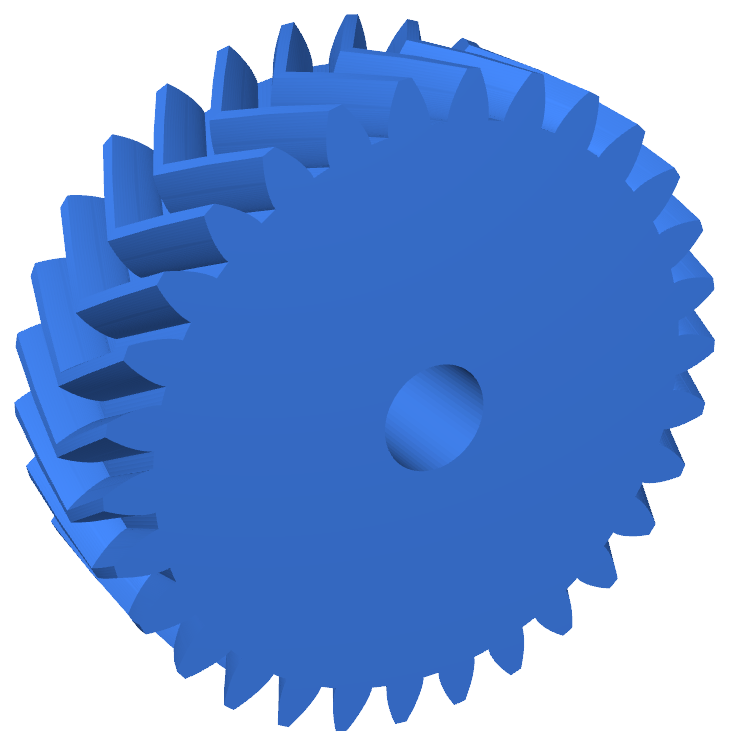 HelicalGear · double_helix=True, module=1.0, teeth=30
|
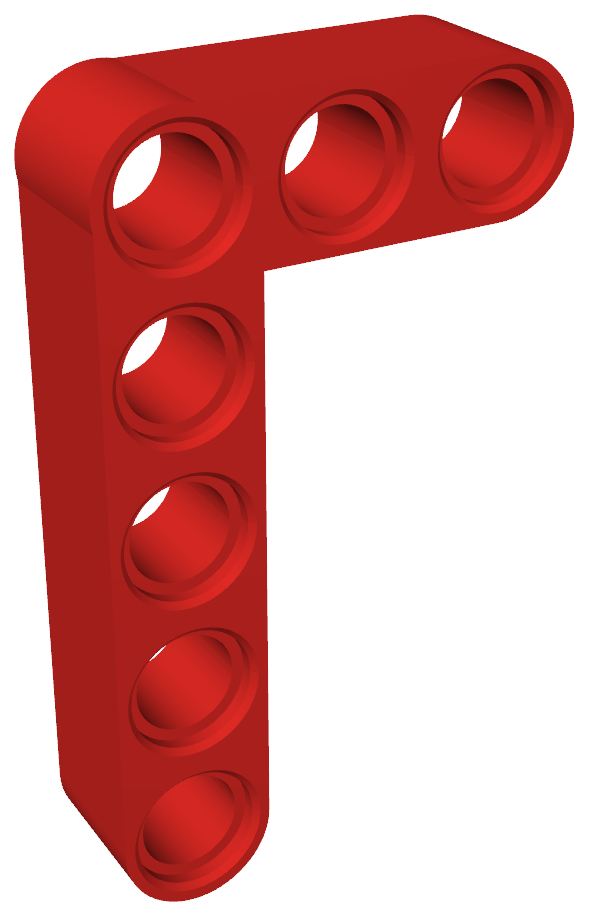 LegoTechnicLLiftarm · 3×5 Technic L-liftarm |
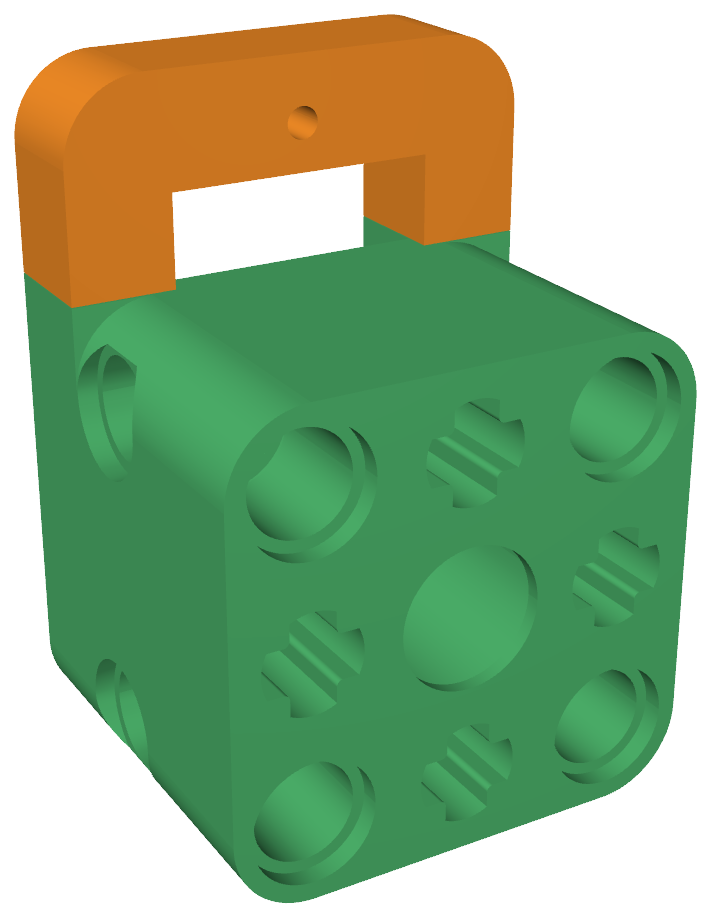 ServoMountBase + ServoMountClamp · SG90 → Lego, dovetail-clamped |
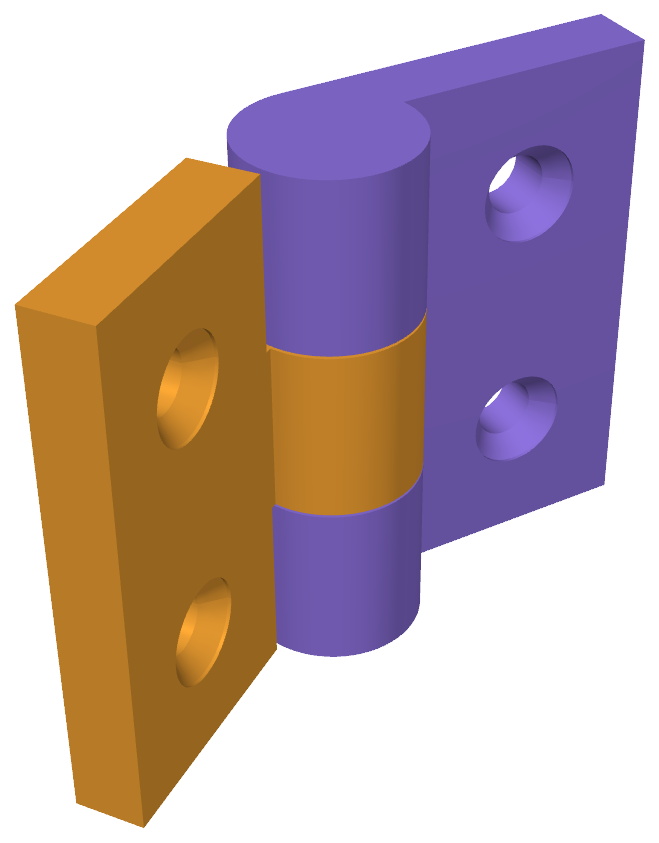 PrintInPlaceHinge · 2 countersunk M3 holes / leaf |
🔄 Click any sample to spin the real model in GitHub's interactive 3D viewer.
Each part is a few lines of Python. The geometry is a function of the parameters,
so a part is never a static shape — it's a generator:
import cadquery as cq
from vibe_cading.mechanical.gears.spur import SpurGear

# Parameters drive the geometry — change teeth, get a new gear.
gear = SpurGear.from_iso(module=1.0, teeth=20, face_width=5.0)
cq.exporters.export(gear.solid, "gear.step")   # extension picks the format
Why vibe-cading
- Parametric by construction. Every part regenerates from typed constructor
parameters; there are no frozen meshes. Standard families come from size tables —MetricMachineScrew.from_size("M3", length=12),SpurGear.from_iso(module=1, teeth=20, face_width=5.0)—
so one class yields a whole catalogue of real-world parts. - Parametric both ways. Forward is params → part. Reverse goes the other
direction: bring an existing STEP file, let the engine's analysis tools
measure it, and rebuild it — by hand or with an AI agent — as editable parametric
code.boolean_diffthen confirms the rebuild matches the original to within ~1%
by volume. That's how the SG90 servo body in the samples above was built:
measured from a reference STEP, rebuilt as a parametric class. Works best on
simple prismatic parts. - Print-ready fits. Real-world nominal geometry stays fixed; per-machine,
per-material clearances live in a separate tolerance profile you calibrate once.
The same model bores a tight hole on one printer and a loose one on another — the
profile absorbs that, not your code. - Built for humans and AI agents. Drive it from Python, from the live OCP CAD
viewer, or from any MCP client. A multi-role agent workflow ships
in-repo so models can be generated, validated, and reviewed by AI agents. - RC ↔ Lego Technic. A library of reusable mechanical components (screws, gears,
joints, bearings, heat-set inserts, hinges, standoffs) plus adapters that mate RC
hardware to the 8 mm Lego Technic stud grid (motor mounts, ESC holders, axle adapters).
Featured models
Each is parametric — the call below is the whole construction.
| Component | Build it | Parametric handle |
|---|---|---|
| Lego Technic beam | LegoTechnicBeam(length_in_studs=5) |
studs → mm on the 8 mm grid |
| Metric machine screw | MetricMachineScrew.from_size("M3", length=12) |
M2–M5 size table; socket / flat / pan heads, hex / Torx / Phillips drives |
| Spur gear | SpurGear.from_iso(module=1.0, teeth=20, face_width=5.0) |
ISO module + teeth → involute profile |
| Hex nut | MetricHexNut.from_size("M3") |
M2–M8 size table |
| Snap-fit joint | CantileverSnapFit(hook_depth=1.5, retention_angle=90) |
hook geometry; .male() solid / .to_cutter() cavity |
…plus magnets, enclosures, more fastener and bearing types, the Lego Technic
primitives, and the RC adapters. See vibe_cading/ for the full library tree,
and four runnable demos under examples/.
Quick start
This project runs in a VS Code Dev Container — no local Python or CadQuery install.
- Clone the repo, open it in VS Code, and click Reopen in Container
(Python 3.11 + CadQuery + the OCP CAD viewer are provisioned for you). - Run an example — writes STEP + SVG to
examples/build/:python3 examples/gear_from_iso.py - Preview any part live in the OCP CAD viewer (port 3939). Start a viewer
first —view.pyonly pushes to one, it does not launch one. Either open
the VS Code panel (Command Palette → OCP CAD Viewer: Open viewer), or run
the standalone server and use a plain browser tab, which needs no VS Code:
With a viewer running, push any part to it:python3 -m ocp_vscode --host 0.0.0.0 --port 3939 # then open http://localhost:3939/viewer
Details and troubleshooting: docs/viewer.md.python3 vibe_cading/tools/view.py vibe_cading.mechanical.gears.spur.SpurGear - Before your first print, calibrate the slip fit for your printer + material:
print the axle gauge and runpython3 vibe_cading/tools/calibrate.py slip— it
writes the measuredslip.radialinto your gitignoredprint_profiles_user.json
so Lego pins and axles fit. (Why it matters, plus the other knobs:
docs/print-tolerances.md.)
→ Full dev environment, the local test/lint/build loop (python build.py), and
adding your own parts: CONTRIBUTING.md.
Just want the library in your own project? It's on PyPI:
pip install vibe_cading            # the library
pip install "vibe_cading[mcp]"     # + the MCP server for AI agents
On headless Linux (cloud servers, CI runners, slim Docker images), CadQuery's
geometry kernel also needs the system OpenGL library — install it once withapt install libgl1 (or your distro's equivalent). Desktop Linux, macOS, and
Windows already have it.
Tolerances & fit
Printed fits are printer- and material-dependent. vibe-cading keeps real-world
nominal geometry fixed and carries the per-machine clearance separately in a
tolerance profile — fdm_standard, resin_precise, and cnc ship in-repo,
selected via PRINT_PROFILE and overridable per-machine in a gitignoredprint_profiles_user.json.
slip.radial (the Lego-axle slip fit) is the one knob almost everyone re-tunes;
calibrate it by printing a gauge and running python3 vibe_cading/tools/calibrate.py slip.
The free and press defaults work for most FDM printers out of the box.
→ Full fit-grade model and calibration workflow: docs/print-tolerances.md.
Learn more
| If you want to… | Read |
|---|---|
| Set up, build, and contribute parts | CONTRIBUTING.md |
| Understand tolerances & calibration | docs/print-tolerances.md |
| Look up Lego Technic dimensions | docs/lego-technic.md |
| Look up fastener sizes & fits | docs/screws.md |
| Drive the engine from an MCP client | docs/mcp.md |
| Understand the multi-role agent workflow | docs/agentic-workflow.md |
| Onboard an AI coding agent | AGENTS.md → vibe/INSTRUCTIONS.md |
License
AGPLv3. See LICENSE-FAQ.md for a plain-language guide
to what this means for your projects.
For commercial or closed-source use cases that are incompatible with AGPLv3,
dual-licensing is available. Contact [email protected] for details.
Reviews (0)
Sign in to leave a review.
Leave a reviewNo results found