agent-bridge
Health Warn
- License — License: MIT
- Description — Repository has a description
- Active repo — Last push 0 days ago
- Low visibility — Only 6 GitHub stars
Code Fail
- execSync — Synchronous shell command execution in bench/report.mjs
- process.env — Environment variable access in bin/agent-bridge.mjs
- network request — Outbound network request in extension/background.js
- eval() — Dynamic code execution via eval() in extension/i18n.js
Permissions Pass
- Permissions — No dangerous permissions requested
No AI report is available for this listing yet.
Let MCP agents (Claude Code, Cursor, Codex…) drive your real, logged-in Chrome. TR/EN
Agent Bridge
English · Türkçe
Let terminal agents (Claude Code, Cursor, Codex… anything that speaks MCP) work in your own Chrome: read pages, click, type, fill forms, upload files, take screenshots. They do it with your logged-in sessions, so YouTube Studio, Search Console, TikTok, Business Suite and the rest stay signed in.
That's the difference from Playwright / DevTools MCP, which start an empty browser with no sessions. Agent Bridge connects to the browser you already use.
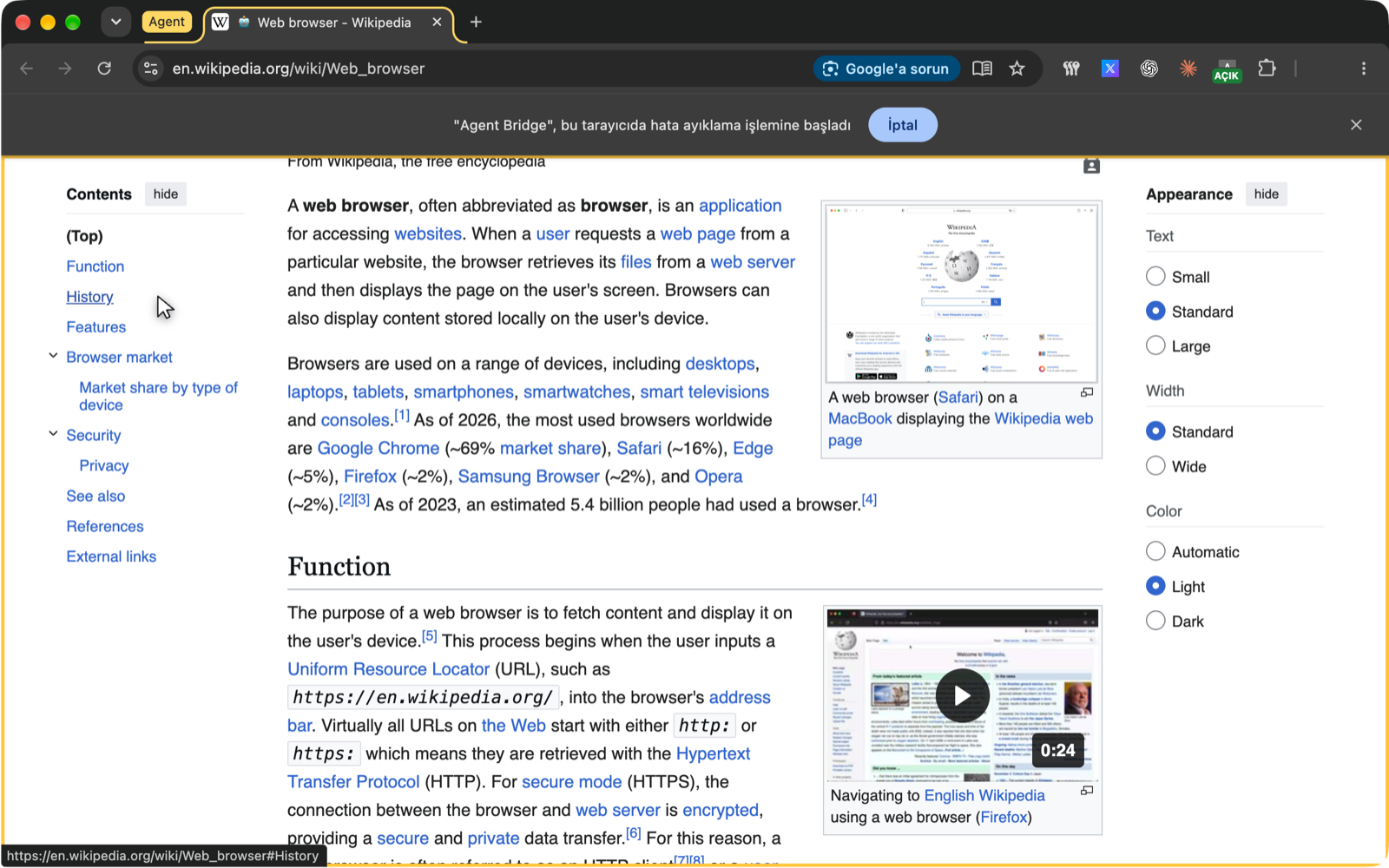
Agent tabs are easy to spot: they sit in a yellow Agent tab group, the page gets a gold frame, and the motion cursor shows where the agent points and clicks.
How it works
agent (MCP client)  ⇄ stdio ⇄  agent-bridge  ⇄ WebSocket (127.0.0.1) ⇄  Chrome extension  ⇄  pages
                                              (token-protected)          (chrome.debugger)
- The extension uses the
chrome.debuggerAPI, so there is no remote debugging port (9222) to open. - The bridge listens on
127.0.0.1only. The extension sends a token when it connects, and a wrong token is rejected. - Nothing leaves your machine, screenshots included.
Installation
Two parts, nothing to clone: the MCP server comes from npm, the Chrome extension from the latest GitHub release.
Requirements: Node.js 18+, Chrome 116+ (or another Chromium browser: Edge, Brave, Arc).
1. Add the MCP server to your agent
Claude Codeclaude mcp add --scope user agent-bridge -- npx -y chrome-agent-bridge
~/Library/Application Support/Claude/claude_desktop_config.json
{
  "mcpServers": {
    "agent-bridge": {
      "command": "npx",
      "args": ["-y", "chrome-agent-bridge"]
    }
  }
}
~/.cursor/mcp.json
{
  "mcpServers": {
    "agent-bridge": {
      "command": "npx",
      "args": ["-y", "chrome-agent-bridge"]
    }
  }
}
~/.codex/config.toml
[mcp_servers.agent-bridge]
command = "npx"
args = ["-y", "chrome-agent-bridge"]
.vscode/mcp.json or the user mcp.json
{
  "servers": {
    "agent-bridge": {
      "type": "stdio",
      "command": "npx",
      "args": ["-y", "chrome-agent-bridge"]
    }
  }
}
Any other MCP client works the same way: a stdio server with command npx and arguments -y chrome-agent-bridge. Restart the agent after adding it.
GUI apps (Claude Desktop, Cursor…) don't see your shell
PATH, sonpx(or thenodeit needs) may not be found. Then use the full path fromwhich npxand pass yourPATHalong:"agent-bridge": { "command": "/opt/homebrew/bin/npx", "args": ["-y", "chrome-agent-bridge"], "env": { "PATH": "/opt/homebrew/bin:/usr/bin:/bin" } }
2. Download the extension and load it into Chrome
Download: agent-bridge-extension.zip (always the latest release; all versions are on the Releases page)
- Unzip it into a folder you will keep, e.g.
~/agent-bridge-extension. Chrome loads the extension straight from this folder, so don't delete or move it later. - Open
chrome://extensions. - Turn on Developer mode (top right).
- Click Load unpacked and select the unzipped folder (the one that contains
manifest.json). - Click the puzzle icon in the toolbar and pin Agent Bridge.
Why not a
.crxfile? Chrome on Windows and macOS refuses to run.crxextensions that don't come from the Chrome Web Store. Until the store release, "Load unpacked" is the way.
3. Pair (one switch)
Open the Agent Bridge popup and turn on Agent access. The first connection pairs automatically (trust on first use), and the pairing is saved to ~/.agent-bridge/token.json. The status turns green ("Connected").
Then just ask your agent something like "open search console and tell me which pages lost clicks this week".
To pair again (for example after reinstalling the extension): the popup says "Token does not match" and shows a command that copies the bridge's token (~/.agent-bridge/token.json); run it in a terminal and paste the result into the popup. Or, with no bridge running, run npx -y chrome-agent-bridge --fresh once and stop it with Ctrl+C.
Updating
- MCP server:
npxcaches the package; to get the newest version runnpx -y chrome-agent-bridge@latest --helponce, then restart your agent. - Extension: download the zip again, replace the folder's contents, and click Reload on Agent Bridge in
chrome://extensions.
From source (development)
git clone https://github.com/falconsw/agent-bridge.git
cd agent-bridge && npm install
Load the extension/ folder with "Load unpacked", and use node /path/to/agent-bridge/bin/agent-bridge.mjs as the MCP command.
The popup
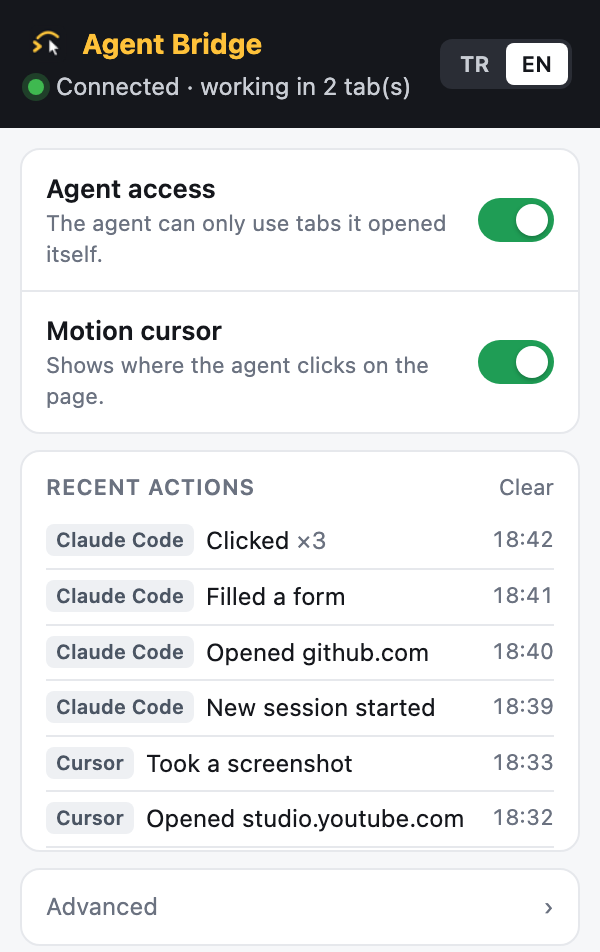
- Agent access: the master switch. When it's off, the agent can't touch the browser.
- I sign in, ask at consent boxes: the agent leaves signing in to you and asks in a small extension window before ticking a terms/policy checkbox (on by default).
- Motion cursor: shows a pointer and click ripple on the page wherever the agent clicks or types.
- Recent actions: a plain-language log ("Opened instagram.com", "Clicked ×3"), with a badge for the app it came from (Claude Code, Cursor, Codex…).
- Advanced: port, pairing token, blocked URL patterns, and the
evalsetting (off by default).
Tools
| Tool | What it does |
|---|---|
navigate |
Goes to a URL (or back/forward/reload), waits for the load and returns the page snapshot |
read |
Page snapshot: role "label" rN [state] lines, tables as `row "cell |
find |
Searches labels and text, returns matching lines with refs and link targets (much cheaper than read) |
click / hover |
Real mouse events on rN, a CSS selector or a label; waits for the page to settle and returns only what changed |
type / fill |
Real keyboard input; fill completes a whole form in one call: text, <select>, checkbox/radio (true/false) |
select |
Picks a native <select> option |
key |
Keys and shortcuts: Enter, Escape, Tab Tab Enter, cmd+a |
scroll |
Scrolls and returns what is now visible |
upload |
Gives a local file to an <input type=file> (photos/videos for posts) |
wait |
Waits until text/a selector appears (or disappears with gone) |
console / network |
The tab's console messages and network requests |
screenshot |
JPEG of the visible area (up to 1280 px); expensive, only for visual questions. Saved under ~/.agent-bridge/shots |
eval |
Runs JavaScript in the page (last resort). Can be limited or turned off, see Security |
tabs |
The agent's tabs; switchTo, close |
done |
Closes the agent's tabs when the whole task is finished |
Token-efficient: navigate already returns the snapshot, actions report only new elements (or the new page), repeated lines are merged, and hidden/aria-hidden elements are skipped. Dialogs (alert/confirm) are accepted and reported, and new tabs opened by an agent tab are handed to the agent. Shadow DOM and same-origin iframes are read too.
Several agents at once: the first bridge process takes the port, and later sessions (Claude Code, Cursor, Codex…) join it as drivers. When the first one exits, another takes over the port.
Benchmark
Same tasks, same model (sonnet), each in a fresh headless Claude Code session that may use only one browser tool. Medians of 3 runs; all 18 runs answered correctly.
| 3 tasks in total | Agent Bridge | Claude in Chrome |
|---|---|---|
| Tokens (input + output) | 146.5k | 343.2k |
| Browser tool calls | 6 | 22 |
| Tokens returned by browser tools | 5.1k | 11.3k |
| Time | 39.9 s | 78.2 s |
| Cost | $0.124 | $0.259 |
Each operation and what it cost, e.g. filling a 7-field form:
- Agent Bridge:
navigate(245 tok) →fill(277) →click(769): 3 calls - Claude in Chrome:
navigate(345) →read_page(363) →form_input×8 (~240 each) →javascript_tool(280) →computer(270) →get_page_text(867) →tabs_close_mcp(74): 14 calls
Full results, per-task tables and tokens per operation: bench/RESULTS.md. Reproduce with node bench/run.mjs --runs 3 and node bench/report.mjs.
Security
- Tab isolation: the agent only works in tabs it opened itself. It cannot list, navigate or click your own tabs.
- Privacy filter: password, hidden and autofill-sensitive fields (credit cards, OTP) never appear in snapshots, so the model cannot see them. In identity fields (e-mail, phone, name, address) and in every text field of a sign-in form, a value the agent did not type itself (Chrome autofill, an account the site remembered) shows up only as
filled; screenshots paint it over after the capture (closed shadow roots and same-site iframes included — a page cannot unmask its own values mid-shot; an iframe from another site is not reached), andevalon such a page asks you first. - Blocked URL patterns: add them in popup → Advanced, comma separated (e.g.
bank.example.com/*, *.gov/*). The agent cannot open them, and a tab that ends up on one (redirect, link, script) is moved toabout:blank. - Allowed domains per run: start the bridge with
--allowand the agent works only there, for example"args": ["-y", "chrome-agent-bridge", "--allow", "ads.google.com,*.example.com"](or theAGENT_BRIDGE_ALLOWenvironment variable).example.comis that host only,*.example.comadds its subdomains,github.com/falconswalso pins the path. Every tool is checked against the list, and so is every URL an agent tab lands on: a tab that leaves is moved toabout:blankand popups pointing elsewhere are closed. The list lives on the command line, not in a tool argument, so a page the agent reads cannot talk it into opening another logged-in site. The popup shows the active list. - Sign-in is yours, consent boxes ask you: the agent never signs in. When it is about to submit a form that has a password field (button or Enter), or to run
evalon such a page, the extension refuses, brings the agent tab to the front and tells the agent to stop and ask you; you log in yourself in that tab and the agent carries on. Before it ticks a checkbox about terms, privacy, policy or consent — a real checkbox or an ARIA checkbox/switch/radio its click lands inside — the extension opens a small window naming the site and the box; clicking ajavascript:link is refused outright. Console and network output is scrubbed of the values the snapshot hides. Allow lets it through; Deny, closing the window or no answer within 60 seconds refuses it. The window is an extension page, so neither the agent nor the page can press its buttons. Detection is a heuristic (password fields, checkbox labels in English and Turkish), so unusual pages can slip past it; both can be switched off together in the popup. The agent also never types into password, OTP or card fields. - Isolated security checks: Reading, masking and approval helpers run in a private JavaScript world, separate from page scripts. Commands execute one at a time; while one waits for your approval, only that agent's commands wait with it. Each tab retains its creation allow list and passes it to popups; another run cannot widen it. Tabs belong to the agent that opened them: another agent on the same bridge cannot list, read or close them. Open a new tab to use a different policy. OTP/card fields are scanned for screenshots and
evalchecks independently of text snapshots. evalgate: popup → Advanced → eval: On, Only with an --allow list, or Off (default — eval is opt-in; agents cannot run page scripts until you turn it on).--no-evalon the bridge removes the tool for that run.- What the allow list does not do: it limits where the agent works, not what it can do there.
evalinside an allowed tab can still do anything that site's session can, and scripts in a page can send requests to other hosts as any web page can. When a tab is pulled off a site outside the list, the request for that page has already been sent; the agent never reads the page or acts on it. For an account that matters, combine--allowwith eval off. - Idle mode: when the agent calls
done, or after 10 minutes without a command, all agent tabs close and the debugger detaches. - The bridge listens on
127.0.0.1only and pairs by token. Any local process that knows the token can drive the browser; on a single-user machine that is the boundary, as with any local dev tool. - Because it uses
chrome.debugger, Chrome shows a "… started debugging this browser" bar on agent tabs. That is intentional: it shows when it's active. - Prompt injection: a malicious page's text can try to steer the agent. The popup log shows what was done; still, keep an eye on it when the agent works in important accounts.
Development
The tests need no Chrome; they run end to end against a fake extension:
npm test # URL policy, page helpers, service worker (stubbed chrome.*), two bridges + takeover
Bridge options: node bin/agent-bridge.mjs --help (--port, --token, --shots, --lang tr|en, --fresh, --allow, --no-eval).
Roadmap
- Chrome Web Store release
- Site allowlist (act only on listed domains)
- Confirm mode (notification + approval before side-effecting actions)
- npm package (
npx -y chrome-agent-bridge)
License
MIT
Reviews (0)
Sign in to leave a review.
Leave a reviewNo results found