cortex-agent
Health Warn
- License — License: MIT
- Description — Repository has a description
- Active repo — Last push 0 days ago
- Low visibility — Only 5 GitHub stars
Code Warn
- process.env — Environment variable access in .github/actions/setup-workspace/action.yml
- fs module — File system access in .github/actions/setup-workspace/action.yml
Permissions Pass
- Permissions — No dangerous permissions requested
No AI report is available for this listing yet.
Agent workbench for auto research, self-improvement loops, and long-running work — multi-agent teams, persistent project memory, cross-machine GPU training. Developed entirely inside Cortex.
Cortex
An agent workbench for auto research, self-improvement loops, and other work that runs for days.
Give it a mission. It plans the work, runs it across your machines and GPUs with a team of agents,
keeps every result in plain files that outlast any session, and asks you only when it matters.




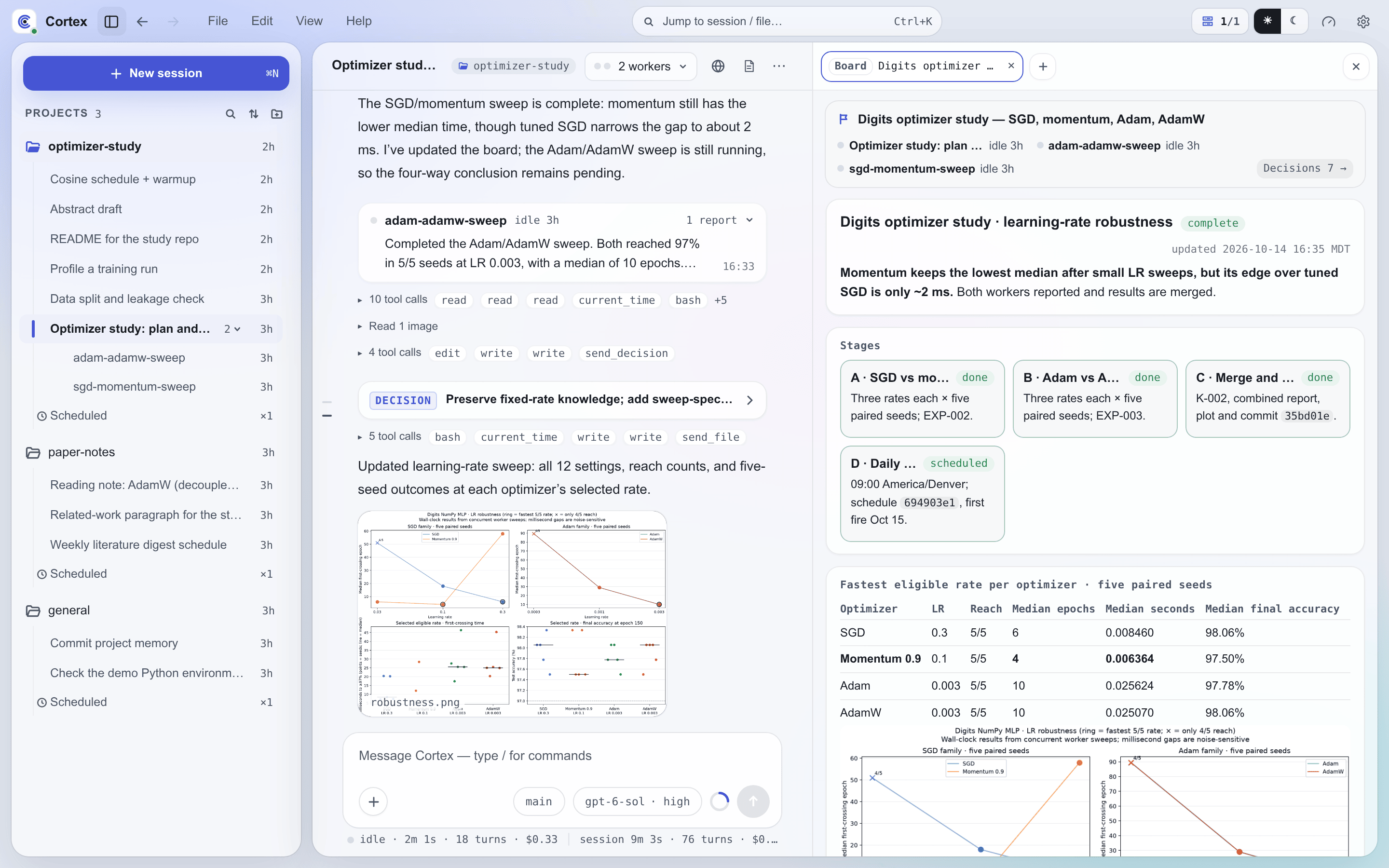
Download
| Platform | Installer |
|---|---|
| macOS · Apple Silicon | Cortex-2026.10.21-macOS-aarch64.dmg |
| macOS · Intel | Cortex-2026.10.21-macOS-x86_64.dmg |
| Windows · x64 | Cortex-2026.10.21-Windows-x86_64-setup.exe |
| Linux · x86_64 | AppImage · deb · rpm |
| Android · arm64 | Cortex-2026.10.21-Android-arm64.apk |
The desktop app installs and starts a Cortex server on the same computer in one click, with no
terminal and no Node.js to set up, or connects to a server you already run. The Android app connects
to a server. For a headless machine, install the server with npm (see Get started).
Other versions are on the Releases page.
What Cortex is
A coding agent in a terminal is built around one session: one task, one machine, done within the
hour. Auto research and recursive self-improvement (RSI) need more. A study runs for days and
outlives every session in it. Its results have to be kept and compared run after run. The work
splits among several agents, and the experiments run on GPU servers rather than on the machine the
agent started from.
Cortex is the environment for that kind of work. It runs coding agents (Claude Code, or PI with the
provider you already pay for) as a long-lived service with a workbench in front of them:
- Work continues across sessions. A project's mission, status, and decisions live as plain
files on disk rather than in a chat history that grows until it decays, so a new session picks up
where the last one stopped. Schedules start recurring work, and waitpoints wake a session when a
job it launched finishes. - Results are kept. Each experiment gets its own record of what ran, what came out, and what it
means. Confirmed findings and patterns across experiments collect beside them. - Agents work as a team. A lead session hands pieces to persistent workers and one-shot
subagents, each starting with a fresh context, and keeps a live board of where the work stands. - Agents manage model training across your machines. One session reads, writes, and runs
commands on any machine runningcortex-client. Agents check which GPUs are free, launch training
and evaluation runs there, and wait on them without polling, while the workbench shows each GPU's
live load. - The setup itself can improve. Skills, rules, hooks, and Cortex's own source are files the
agents can change, inside a safety boundary you write. Cortex itself is developed entirely inside
Cortex.
A tour of the workbench
Plans, tools, and questions in one conversation
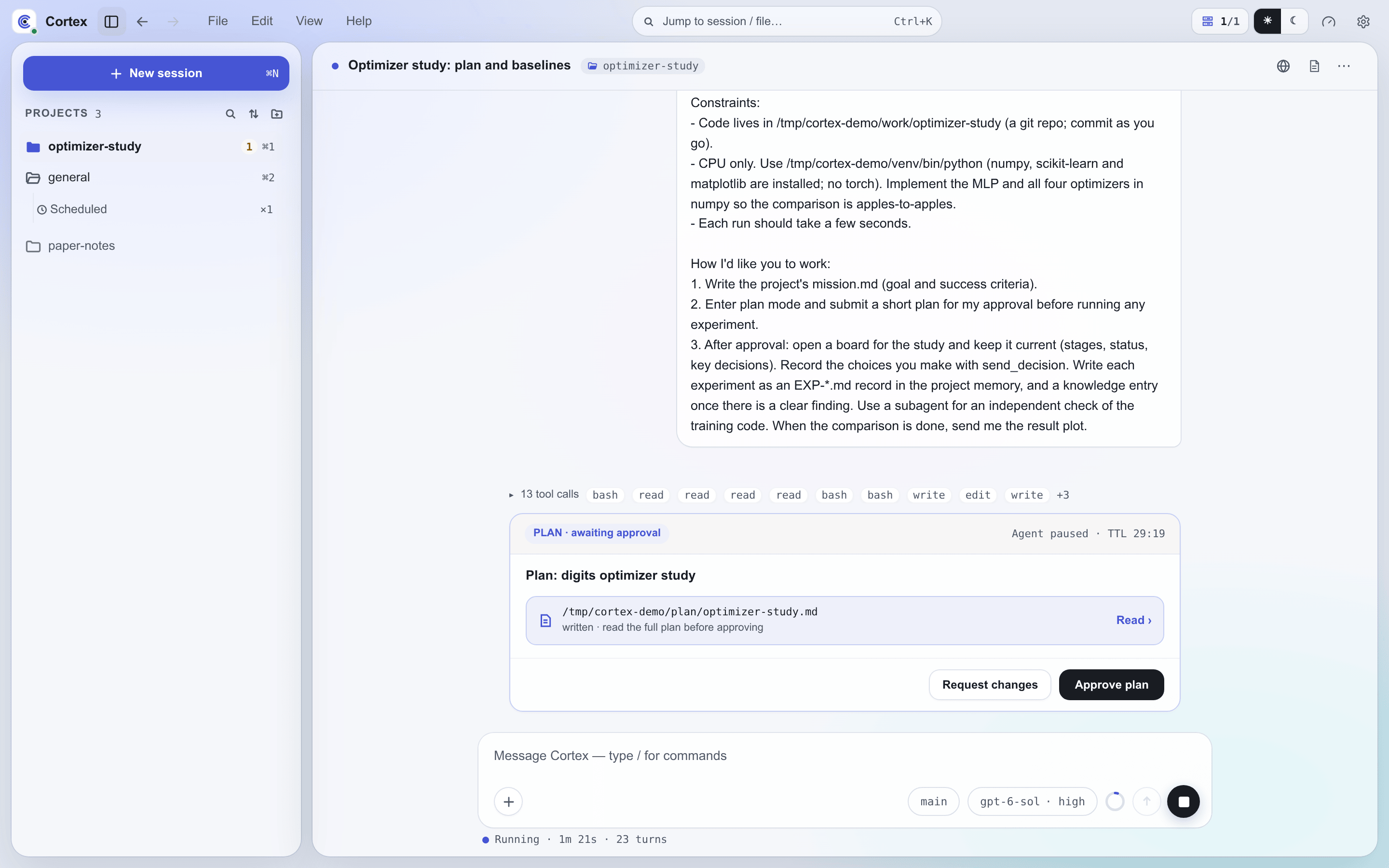
Every session streams its reasoning, tool calls, subagent runs, and files into one transcript.
Before non-trivial work the agent writes a plan and waits. You read it, then approve it or send
it back with the changes you want, from the card in the chat. Questions and decisions arrive the same way, as cards you
answer in place, on desktop or on your phone.
Boards for long work
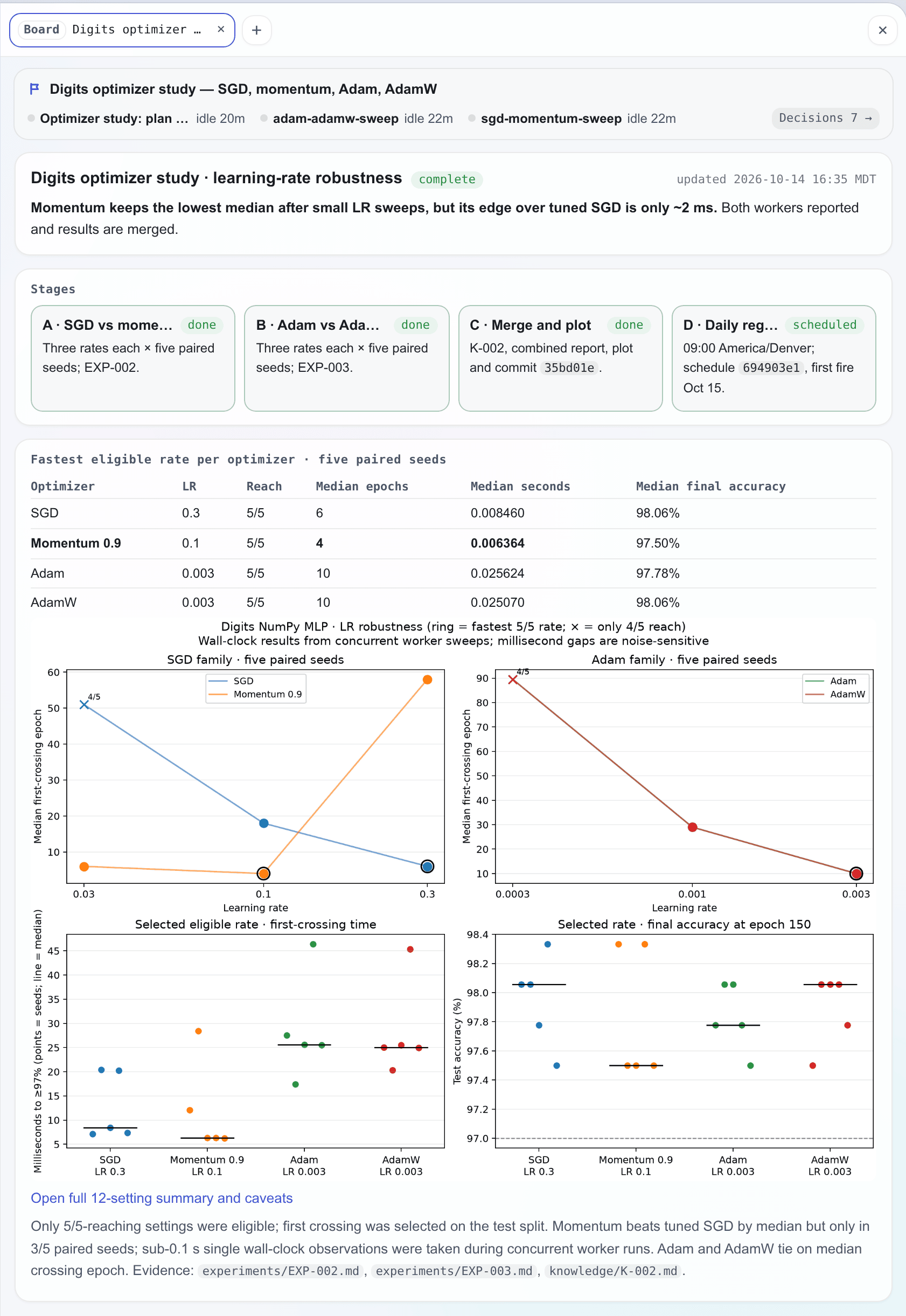
When a task spans many hours or several workers, the agent opens a board: a status page
docked beside the conversation. The board shows where the work stands, what comes next, what is
waiting on you, and every decision taken so far. You can approve, ask about, or revise a decision
from the board itself. The lead and its workers keep the board current, and it refreshes seconds
after each edit. Boards →
A team of workers
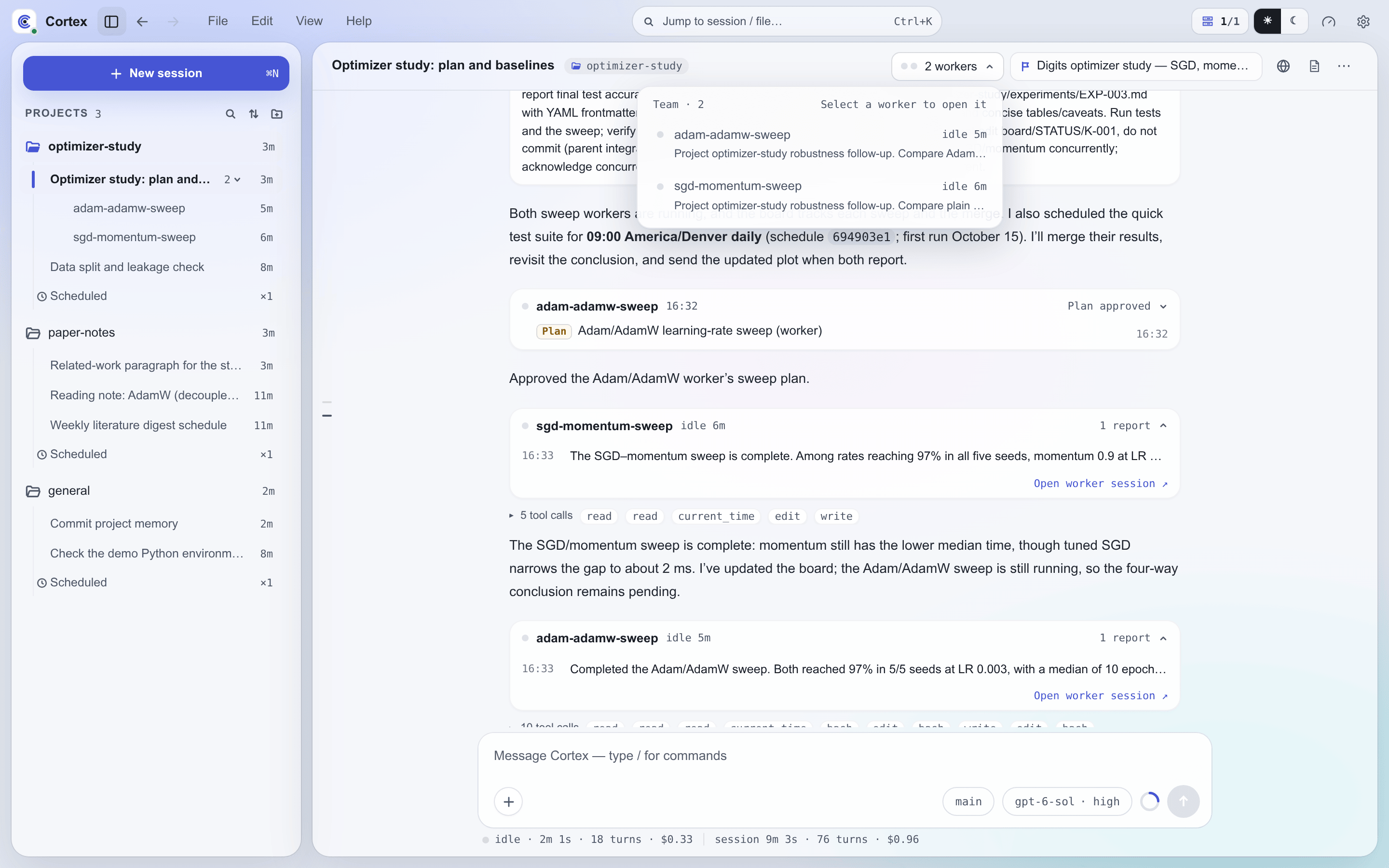
You talk to one session, the lead. When the work splits, the lead hands pieces to persistent
worker sessions, follows up with them, answers their questions, and reports back. The capsule in
the chat header shows how many workers are running and opens a list of what each one is doing. Bounded jobs such as a search,
a review, or a verification run go to one-shot subagents instead.
Team mode →
Every experiment on record
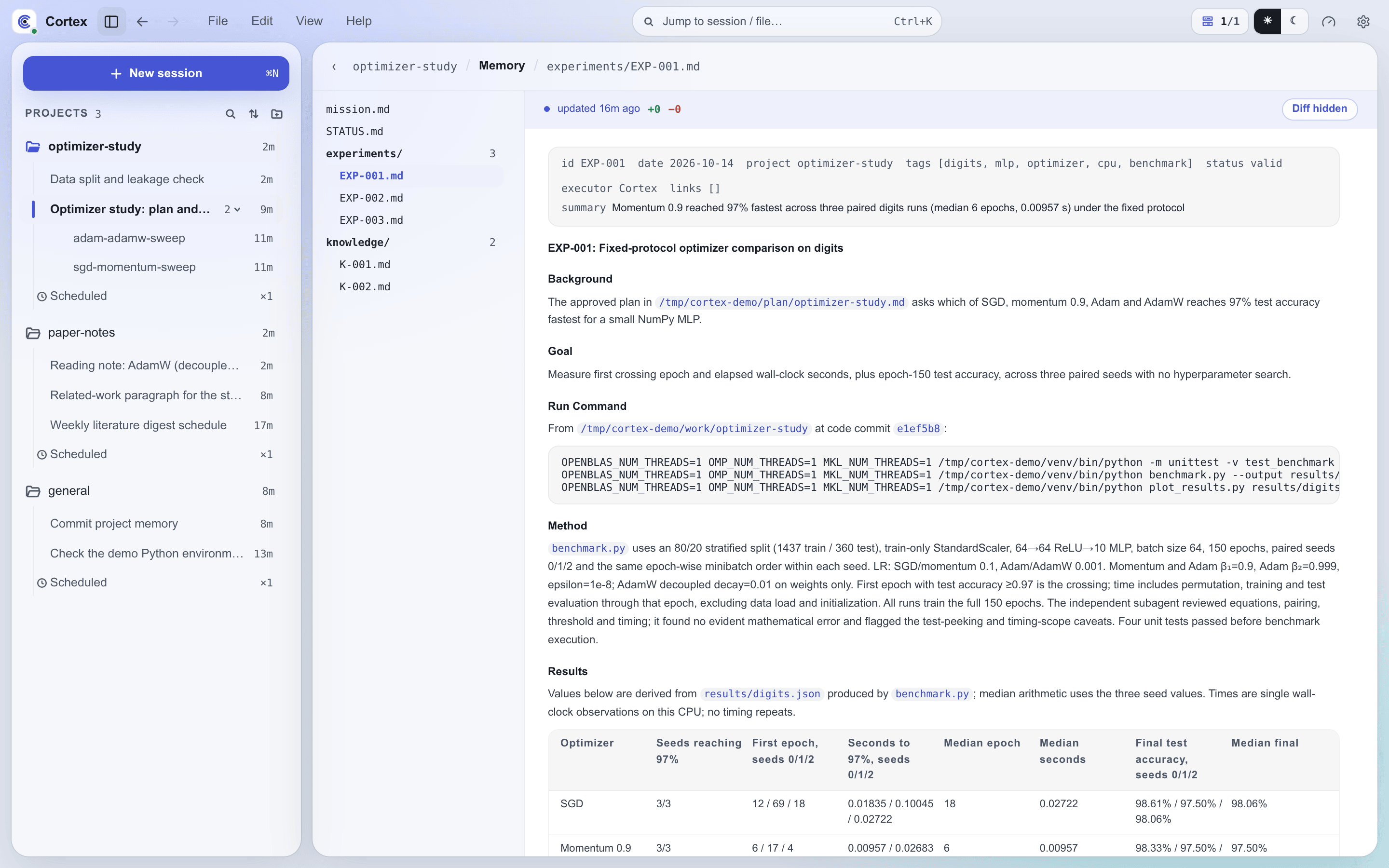
Each experiment lands in project memory as its own Markdown record: what was run, what was
observed, what was concluded, and what should change next. Findings that hold up become knowledge
entries, and patterns across experiments get records of their own. The Memory view browses all
of it beside the sessions. Memory →
Training across all your machines
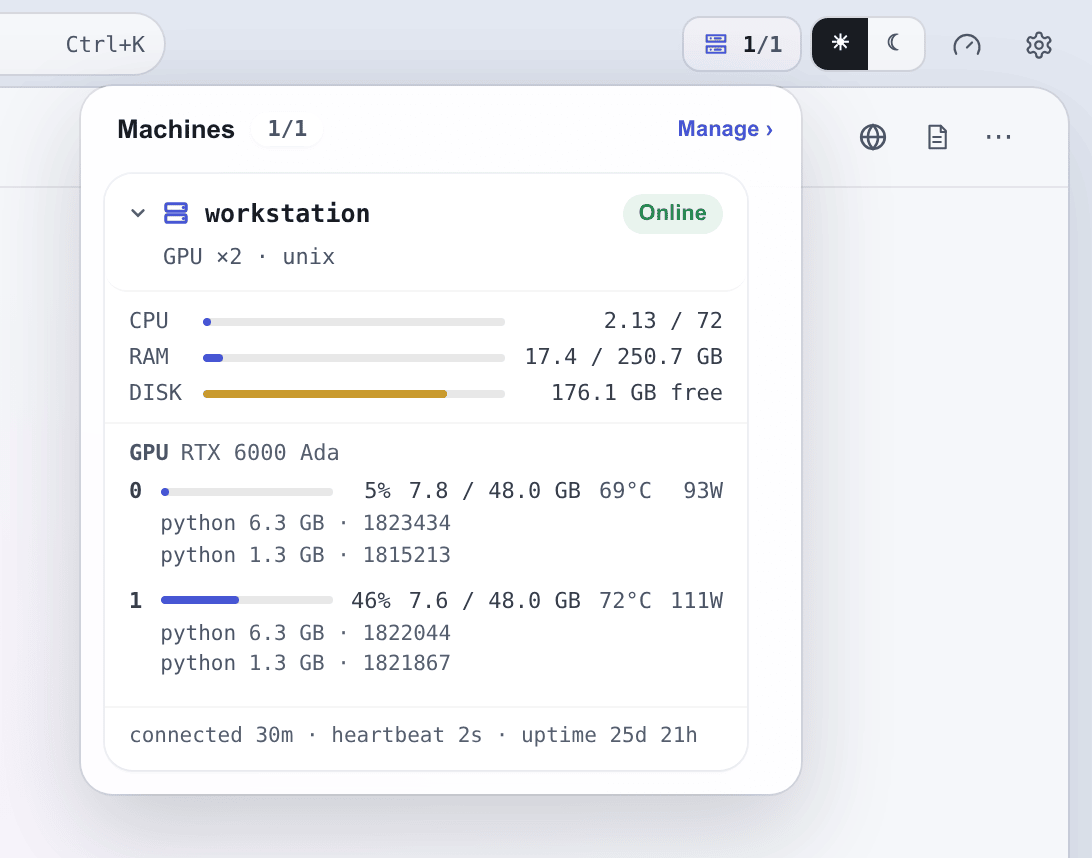
Your GPUs, data, and tools rarely live on one box. Run cortex-client on any Linux, macOS, or
Windows machine and the agent can read, write, and execute there from the same session. That is
what an agent needs to manage model training: it checks which machine has free GPUs, launches the
run, arms a waitpoint, and ends its turn. When the job reports back, the session wakes with the
result, records it as an experiment, and plans the next run, with no polling in between. The
Machines menu shows you the same picture live: each machine's CPU, memory, disk, and per-GPU
load and processes. In the desktop app, the dock opens a development server running on a remote
machine as if it ran locally.
Cross-machine → · Waitpoints →
Skills and code the agents improve
Cortex's behavior is set by plain files: skills, rules, hooks, prompts, and agent roles under$CORTEX_HOME, each able to override its built-in counterpart. Agents read and rewrite them like
any other file, and you edit the same skills in Settings. Execution environments choose which
plugins, rules, and tools a session gets, so variants of an agent can run side by side. Pointed at a
source checkout through CORTEX_REPO, Cortex rebuilds, reinstalls, and restarts itself when its
code changes. Together these let agents improve the skills and code they run on, while your safety
boundary decides which of those changes wait for your sign-off. This is how Cortex itself is built:
agents working in Cortex write, test, and rebuild the code in this repository.
Skills & plugins → · Configuration →
On your phone
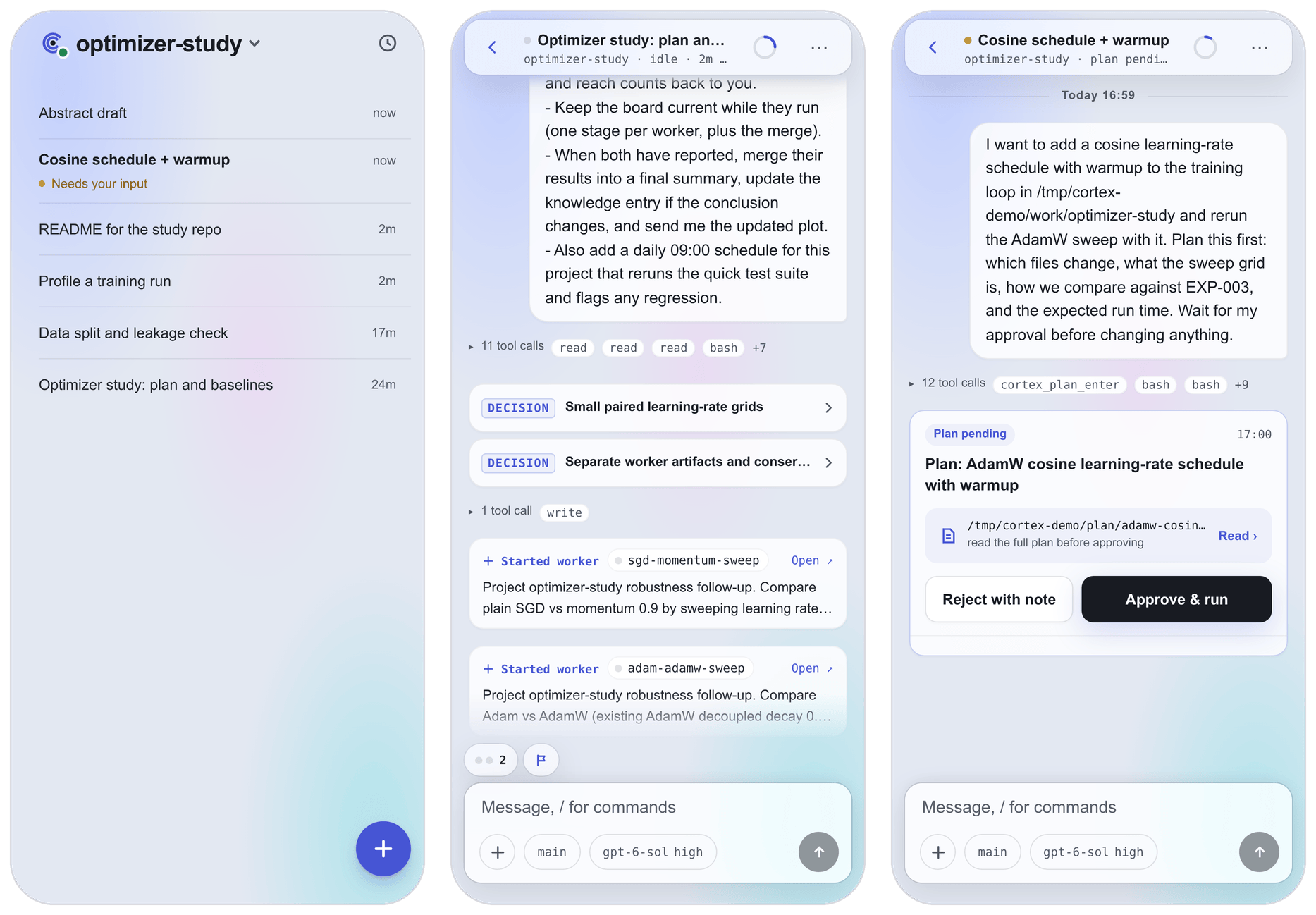
The Android app has the same sessions, boards, approvals, and memory in a phone layout. It can
notify you in the background when a turn finishes or when a session is waiting for your answer.
Desktop and Android apps →
Integrate with your workflow
Cortex connects to Slack and Feishu (Lark), so you can work with it from the chat app you already
use: start and continue sessions there, and get notified when work finishes or needs you.
Slack setup → · Quickstart →
Bring your own models
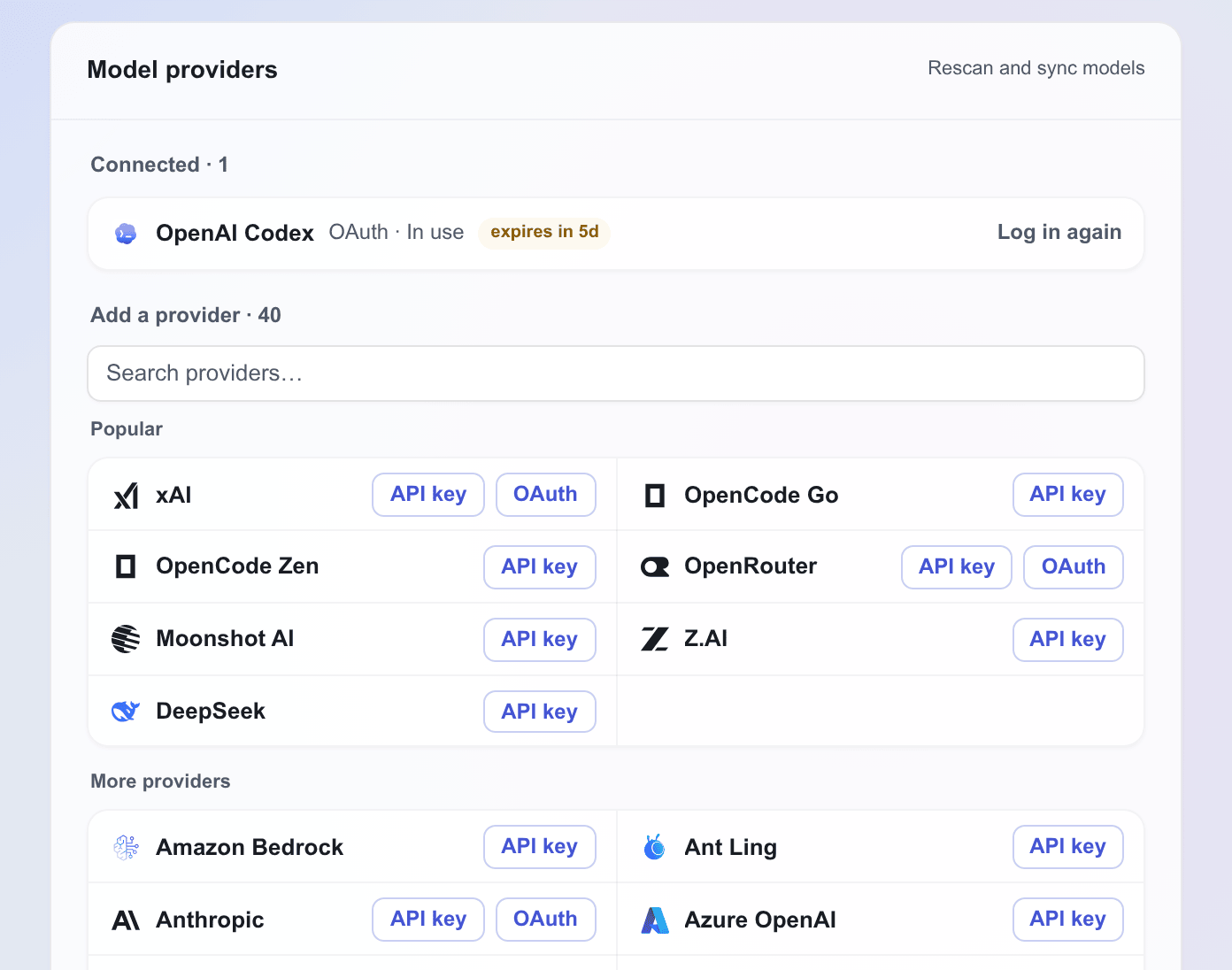
Cortex drives a coding agent instead of calling a model API itself. PI ships inside the server and
signs in to dozens of providers, including subscriptions such as ChatGPT Plus/Pro, with OAuth or an
API key. Claude Code is optional and uses your own Claude login. Usage and cost are tracked per
session and per provider. Backends →
Get started
Desktop app
Download the app for your platform, open it, and choose Install Cortex. The app
unpacks its own Node.js runtime, installs the server into a private prefix under ~/.cortex, starts
it, and opens provider setup. Sign in to a provider, pick a default model, and enter the
workbench. Choose Connect an existing server instead to use a server running elsewhere.
Desktop and Android apps →
Server from a terminal
Requires Node.js 22.19 or later.
npm install -g @cortex-agent/server
cortex init        # guided setup: chat platforms, machine name, provider login
cortex ui enable   # turn on the Web workbench and app endpoint
cortex daemon      # start the server in the background
Open http://127.0.0.1:3004 on the server, or connect the desktop or Android app with the
server's address and client token. Quickstart →
Other ways in
Every interface reaches the same projects, sessions, schedules, and memory:
| Interface | Guide |
|---|---|
| Browser workbench, served by the server and protected by Cloudflare Access | Browser access |
| Slack or Feishu, for chat-driven work and notifications | Slack setup · Quickstart |
cortex tui, a full-screen terminal interface |
CLI reference |
How a project is stored
context/projects/optimizer-study/
├── mission.md        # goal and success criteria
├── roadmap.md        # milestones
├── STATUS.md         # current state (overwritten)
├── ISSUES.md         # open friction points (appended)
├── boards/           # status pages of long tasks
├── decisions/        # design decision records
├── experiments/      # EXP-NNN.md, one per experiment
├── knowledge/        # K-NNN.md, one per confirmed finding
└── patterns/         # PAT-NNN.md, patterns across experiments
These are ordinary Markdown files, kept in a git repository when Git is installed. They survive
sessions, restarts, and model upgrades, and any agent or person can read them.
Safety and approvals
Cortex gives agents real tools: shell, files, GPUs, other machines, and the files that define
their own behavior. Its guard rails are conversational rather than a sandbox:
- Plan approval. Non-trivial work starts with a plan that waits until you approve it or send
it back for changes. - Questions and decisions. Agents ask through cards that you answer in place, and record the
choices they make on their own as decisions you can review. - Your rules. A safety boundary in your
$CORTEX_HOME/AGENTS.mdtells every session what it may
do alone, what needs sign-off (changing a skill's behavior or Cortex's own code, for example), and
what is forbidden. Operations that need sign-off wait in the Approval Center.
Documentation
| Guide | What it covers |
|---|---|
| Quickstart | Install, cortex init, the Web workbench, and your first messages |
| Desktop & Android apps | Native installation, local server setup, provider setup, the workbench, notifications, updates |
| Browser access | Serving the Web workbench and protecting it with Cloudflare Access |
| Slack setup | App creation, tokens, Socket Mode, scopes |
| Team mode | Leads, workers, reports, and boards |
| Memory | The project log: experiments, knowledge, patterns, decisions |
| Scheduling | Interval, daily, weekly, and one-off schedules |
| Backends | Claude Code and PI, providers, model selection, cost reporting, subagents |
| Configuration | config/.env, settings.json, models and favorites, execution environments |
| CLI reference | cortex, cortex-browser, cortex-signal, and cortex-hook |
| Skills & plugins | Writing, overriding, and packaging skills |
| Safety & approvals | The safety boundary, approval queue, and interactive cards |
| Hooks | Hook lifecycle, built-in hooks, and custom hooks |
| Waitpoints | Waiting on external jobs without polling |
| MCP | Cortex's MCP tools and third-party servers |
| Cross-machine | Deploying cortex-client and using remote tools |
| Agent browser | The Chrome agents drive with cortex-browser, watching it live, and taking over |
| Architecture | Server layers, protocols, and the event bus |
Developing Cortex
git clone https://github.com/fangxm233/cortex-agent.git
cd cortex-agent
pnpm install
pnpm --filter @cortex-agent/ui-contract --filter @cortex-agent/server --filter @cortex-agent/web build
pnpm --filter @cortex-agent/server test
| Package | Directory | Role |
|---|---|---|
@cortex-agent/server |
agent-server/ |
Control plane: sessions, orchestration, scheduling, chat adapters, the Web UI host |
@cortex-agent/client |
client/ |
Remote worker that runs tools on another machine over WebSocket |
@cortex-agent/web |
web/ |
The workbench SPA for browser, desktop, and mobile |
@cortex-agent/desktop |
desktop/ |
Tauri shell for Linux, macOS, Windows, and Android |
@cortex-agent/ui-contract |
packages/ui-contract/ |
Typed contract between the server and the workbench |
@cortex-agent/deepseek-relay-worker |
packages/deepseek-relay-worker/ |
Cloudflare Worker relay for DeepSeek API egress |
pnpm --dir web dev serves the workbench with hot reload against a server on port 3004 (setCORTEX_CLIENT_TOKEN in that shell), and pnpm --dir desktop dev runs the native shell, which needs
a Rust toolchain. The server is organized in six layers, from core utilities to entry points, described in
Architecture. Code changes come with tests.
License
Reviews (0)
Sign in to leave a review.
Leave a reviewNo results found