termish
Health Pass
- License — License: MIT
- Description — Repository has a description
- Active repo — Last push 0 days ago
- Community trust — 268 GitHub stars
Code Fail
- rm -rf — Recursive force deletion command in .github/workflows/build.yml
- rm -rf — Recursive force deletion command in screenService/install.sh
Permissions Pass
- Permissions — No dangerous permissions requested
No AI report is available for this listing yet.
Open-source mobile SSH/Mosh terminal and native AI workspace for Android and iOS.

Termish
Your remote workspace, in your pocket.
A terminal-first mobile workspace for the way you actually work: Termish → Herdr → Codex.
Download Android · Build for iOS · Website · Quick start · 简体中文


Download
| Platform | Get Termish |
|---|---|
| Android 8.0+ | Download the signed APK. Allow installation from this source when prompted. |
| iOS | Build with macOS and Xcode using the iOS guide. No public App Store download is available yet. |
Release notes and all assets · SHA-256 checksums
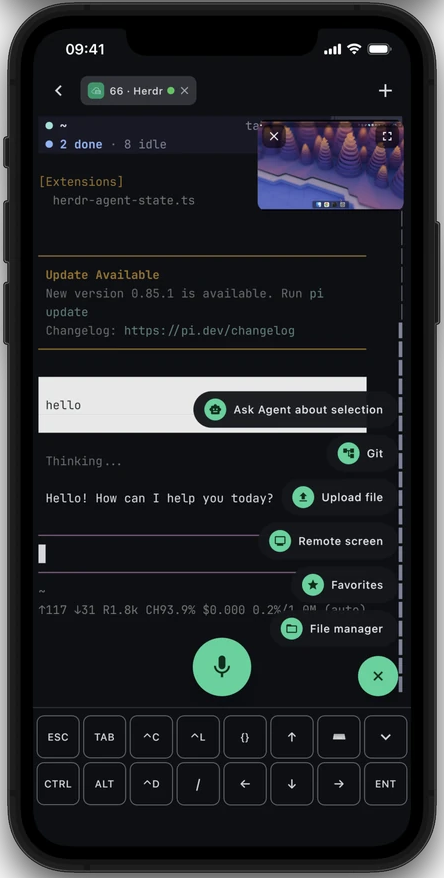
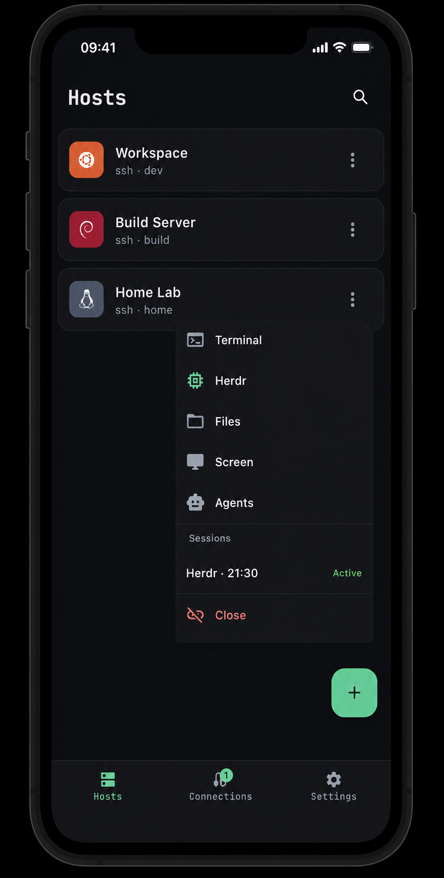
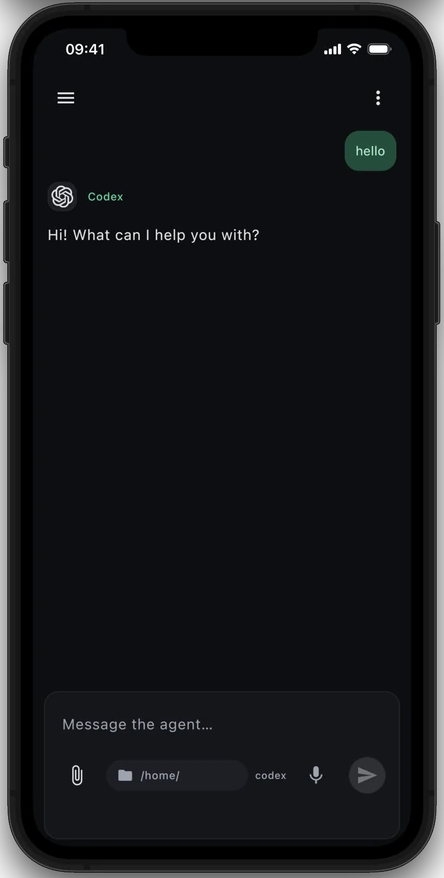
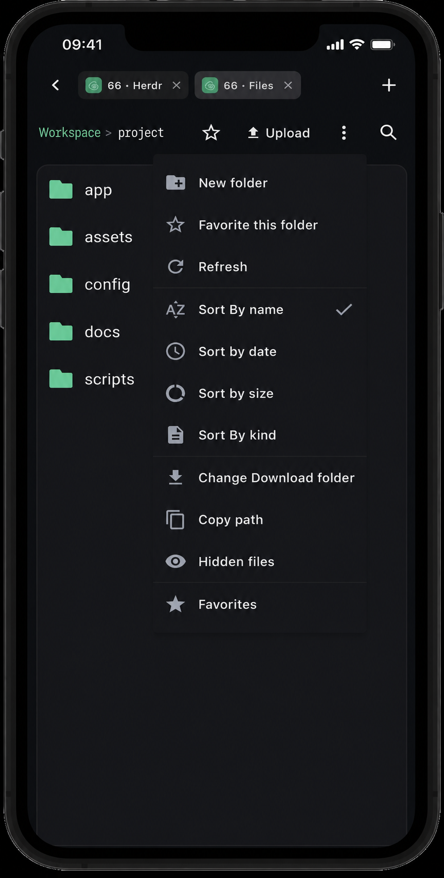
Herdr + terminal · main workspace · Hosts · Native Agent chat · SFTP files. The terminal capture includes the floating remote-screen window. All four use the same iOS device presentation as termish.dev.
Quick start
- Start from Hosts. Open Hosts →
+, enter the SSH address, username and
password or private key. Verify the server's host key fingerprint on first connection.
Each host menu opens Terminal, Herdr, Files, remote screen or Agent chat. - Open Herdr. Use the Herdr entry from the host. If it is not on the
remote yet, Termish offers guided installation, then opens the workspace in
the SSH or Mosh terminal. - Keep coding in your terminal workflow. Start Codex from Herdr, give it a
task, follow its output, upload a screenshot or file when useful, inspect the
result through the remote-screen window, then return to the terminal. - Use native chat when it fits. The Agents entry provides a phone-native
conversation for Codex, Claude Code and other supported CLIs. It is an
alternative interface, not a replacement for the Herdr terminal workspace.
For Agent chat, the remote host needs the agent's own login or a
supported API provider configuration. Missing supported CLIs can be installed
from the app. You do not need a Termish account.
For Mosh, choose Mosh in the host's connection settings. The remote needsmosh-server and a reachable UDP port; Termish offers guided installation when
the server is missing. Use a startup command such as tmux new -A -s main when
you want terminal programs to survive client disconnects.
Why Termish?
| Capability | What you can do |
|---|---|
| Host list and sessions | Keep direct SSH and Mosh hosts in one place. From a host, open Terminal, Herdr, Files, remote screen or Agent chat, and see active sessions before you reconnect. |
| Terminal-first Herdr workspace | Keep the familiar terminal workflow: enter Herdr, run Codex or Pi, switch workspaces and inspect live task output. Termish starts Herdr through SSH or Mosh and can guide its remote installation. |
| Remote screen | View the remote desktop in a floating window or full screen; use touch or a virtual mouse to check and operate desktop apps alongside the terminal or Herdr. |
| Mobile development loop | Give an agent a task, upload a screenshot or file, inspect diffs and remote files, then continue in the same terminal. |
| SSH + Mosh sessions | Open multiple terminal tabs and run tmux, vim, htop or any TUI. Mosh supports network roaming and local echo prediction for typing over slower connections. |
| Optional native Agent chat | Use Codex, Claude Code, Gemini CLI, OpenCode and Pi in a phone-native conversation. Follow streaming replies and tool calls, attach files, stop a task and resume conversations. |
| Files and input built for phones | Upload, download, search and organize files through SFTP. Use a CTRL / ALT / ESC toolbar, touch gestures and Chinese IME support in the terminal. |
| Your hosts, your credentials | Connect directly to your servers. Store saved secrets with Android Keystore or iOS Keychain. No Termish account, telemetry or hosted relay is required. |
Also included: Chinese and English UI, light and dark themes, terminal palettes and quick commands.
How the main workflow works
Termish connects your phone directly to the development machine over SSH or
Mosh. Begin in the Hosts list, then take the primary path:
Termish → Herdr → Codex. Herdr and the coding tool run on the remote
machine, while the phone provides the terminal, input, file transfer and a
remote-screen view. A missing Herdr installation can be prepared from the app.
No Termish relay or account sits in the connection.
Native Agent chat is a separate option. It uploads the bundled Rust Bridge
over SFTP and starts it for your remote user; the Bridge runs the selected agent
and relays messages through the authenticated SSH connection. No Docker or extra
public listening port is needed. It keeps conversations on the host and lets an active agent task continue while your phone is disconnected.
Remote screen uses a versioned companion service in the computer's graphical
session, installed from the app and accessed over SSH. Its standalone source,
configuration and diagnostics are documented in the screen service guide.
The phone uploads precompiled Rust services over SSH/SFTP for macOS and Linux
(X11 or Wayland), on arm64 and x86_64. The computer needs no Rust compiler.
See the Agent Bridge guide for the protocol, supported
approval types and remote storage layout.
Privacy and connection behavior
- Direct connection: Termish checks SSH host keys and stores saved credentials
using platform security facilities. Agent conversations are persisted on your remote host. - Optional services: configured AI and speech-recognition providers receive
the content required for those features and may charge for usage. Termish's
MIT license does not include a model subscription or API credits. - Background limits: iOS suspends the app in the background; some Android
devices also restrict background connections. Termish reconnects on return.
Use tmux or Mosh for terminal continuity; the Agent Bridge owns its remote tasks. - Approvals: availability depends on the agent's protocol. Unsupported
interactive operations return an error rather than being silently approved.
Privacy policy · Report a security issue
Build & Test
For Android, install JDK 17, the Android SDK and Rust via rustup, then set ANDROID_HOME or the
SDK path in local.properties:
git clone https://github.com/ttermish/termish.git
cd termish
./gradlew :composeApp:assembleDebug
Debug builds do not need release signing keys. See Contributing
for unit and integration tests, iOS builds, and development conventions.
Project and documentation
| Component | Source / guide |
|---|---|
| Mobile app | Shared UI and platform code · Architecture |
| Agent Bridge | Rust companion and protocol |
| Terminal and input | Terminal emulator · Input pipeline |
| Connections and files | SSH · Mosh · SFTP |
| Cryptography | Implementation and threat model |
| Website | termish.dev · Website repository |
Built with Kotlin and Compose Multiplatform, a pure-Kotlin terminal and Mosh
client, sshj on Android, and libssh2 on iOS.
Contributing and support
Bug reports, documentation improvements and pull requests are welcome in English
or Chinese. Read the contribution guide and
code of conduct.
Report a bug or request a feature ·
Changelog · Contact
License
Termish's original source code and documentation are available under the
MIT License. Third-party components and bundled fonts retain their
own licenses; see NOTICE and LICENSES.
Reviews (0)
Sign in to leave a review.
Leave a reviewNo results found