gravityport
Health Pass
- License — License: NOASSERTION
- Description — Repository has a description
- Active repo — Last push 0 days ago
- Community trust — 12 GitHub stars
Code Fail
- process.env — Environment variable access in bin/mosa.mjs
- process.env — Environment variable access in desktop/forge.config.mjs
- rm -rf — Recursive force deletion command in desktop/macos-updater.mjs
- process.env — Environment variable access in desktop/macos-updater.mjs
- process.env — Environment variable access in desktop/main.mjs
- network request — Outbound network request in desktop/main.mjs
Permissions Pass
- Permissions — No dangerous permissions requested
No AI report is available for this listing yet.
GravityPort (formerly MOSA): local-first visual memory for AI creation — images, prompts, provenance, and version history in one library.
GravityPort
English | 简体中文



Local visual memory for AI creation.
把 AI 生成的每一张图,连同 Prompt、来源和版本,留在自己的电脑上。
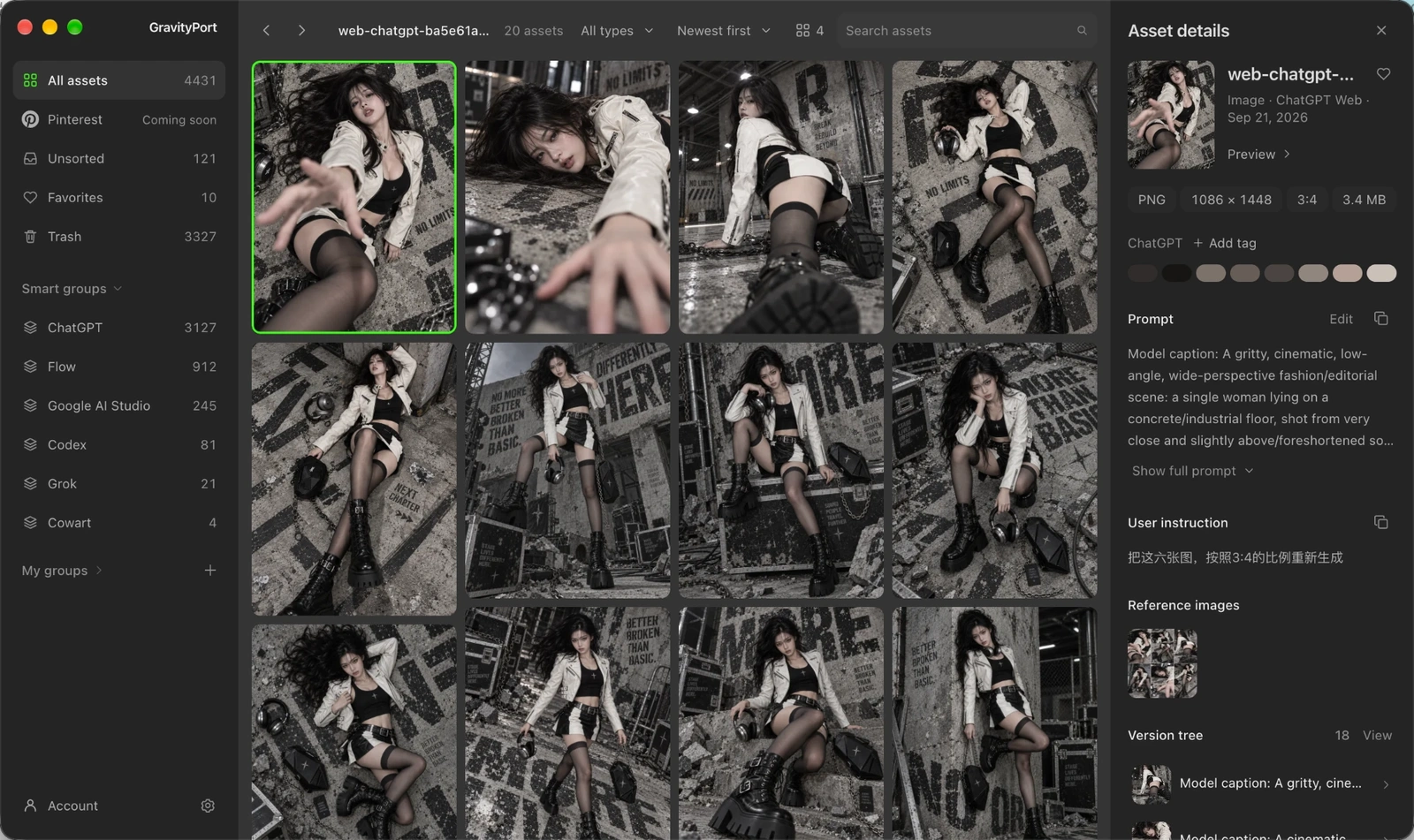
GravityPort is a local-first library for AI-generated images, videos, Prompts, provenance, and version history. It keeps creative output from Codex, Grok Build CLI, Cowart, and an optional Web Capture extension for ChatGPT, Gemini, Flow, and Google AI Studio in one library on your own computer.
GravityPort was previously called MOSA. Existing installs keep their library folder, settings, and command names.
Local-first · Prompt & provenance · Version history · No GravityPort cloud account
Downloads · First launch · 中文使用指南 · Privacy · Documentation
Downloads
Get GravityPort from the official download page. It always lists the current packages with their sizes and SHA-256 values.
- GravityPort Desktop for macOS (Apple Silicon): a DMG. Drag
GravityPort.appinto Applications. - GravityPort Desktop for Windows 10/11 (x64): a portable ZIP. Extract it and run
GravityPort.exe. Windows is still a Preview / testing target. - GravityPort Web Capture (Chrome / Chromium, optional): a ZIP loaded in developer mode, not a signed CRX. See the install guide.
Installed desktop apps check for updates themselves in Settings → About. Until the first release under the GravityPort name ships, the download page still offers the last build released as MOSA.
First launch
Current desktop builds are Preview releases: the macOS app is not notarized by Apple and the Windows app is not code-signed yet, so the system warns you the first time you open them.
- macOS: open GravityPort once. When macOS says it can't verify the app, click Done, open System Settings → Privacy & Security, scroll to Security, click Open Anyway next to GravityPort, and confirm. macOS remembers the choice. On macOS 14 and earlier you can instead Control-click the app and choose Open.
- Windows: if SmartScreen shows "Windows protected your PC", click More info → Run anyway.
If you use the Web Capture extension, load it after the desktop app is running; the app pairs with it automatically.
Why GravityPort
An image alone rarely tells you how to use it again. The Prompt may be in another conversation, the source tool may be forgotten, and the version you actually want may be buried among near-duplicates.
GravityPort reconnects each asset with the context that makes it reusable: its available Prompt, generation source, provenance, and version history. The library remains under your control on your machine.
What you can do
Keep the context with the asset
Archive generated images and videos together with their available Prompt, source, model or tool context, timestamps, and provenance. GravityPort records when a Prompt is unavailable instead of inventing one.
Organize by drag and drop
Browse and search one gallery with adjustable column counts, marquee selection, and multi-select. Drag cards onto a sidebar group to file them, onto another card to build or join a stack, inside a stack to reorder it, or out of the window to hand the files to another app. A stack built or joined by drag can be undone for a few seconds.
Iterate on the version tree
The Inspector shows each asset's version tree, with generations from a ChatGPT conversation grouped by conversation round so you can see how the image evolved turn by turn. Any two versions in a family can be compared side by side.
Find images by how they look (optional)
Install the optional Visual Pack from Settings → Model to turn on local visual search. The Inspector then suggests visually related assets, and the same index powers text-to-image and image-to-image search for the API and MCP. The model runs entirely on your computer: no Python, Ollama, or upload of your library.
Let AI agents search your library
The built-in MCP server (npm run mcp) lets Codex and other MCP clients list, search, and record assets, Prompts, versions, and generation history in the same local library. asset_search combines text, a time range, and, when the Visual Pack is enabled, visual search. See MCP 与接口 for the tool list.
Recover deleted work and back up the library
Removed assets move to Trash, where they are kept for 90 days with a per-asset countdown. Right after a deletion an undo button offers to reverse it; Trash has its own menu for restoring, deleting permanently, and emptying. For whole-library safety, the gravityport backup, backup-verify, and restore commands create and check verified point-in-time backups.
Settings → Feedback sends bug reports and ideas, optionally with a redacted diagnostic log that you can read in full before sending. A Pinterest connection for browsing your own boards is built but stays unavailable until Pinterest approves production API access.
Fits into your workflow
| You create in | GravityPort keeps |
|---|---|
| Codex Desktop | Generated images and the matching local generation context when available |
| ChatGPT, Gemini, Flow, or Google AI Studio in Chrome | Optional visible web-generated images and conservative page-scoped context through the local extension |
| Grok Build CLI | Images and videos from local sessions, with matched tool context when available |
| Cowart | Approved canvas snapshots archived from Cowart into the library |
Whatever the source, everything lands in the same local gallery with groups, stacks, Trash with undo, and the version tree. GravityPort does not generate media or replace any of these tools.
Platform status
| Target | Status |
|---|---|
| macOS arm64 | Main desktop target. DMG for first install, in-app updates afterwards. |
| Windows 10/11 x64 | Preview / testing. An earlier build was verified on a real Windows machine (startup, SQLite, Sharp, the library and Inspector, automatic Codex collection); the redesigned interface has not been re-checked on Windows hardware yet. Portable ZIP with in-app updates. |
Grok and Cowart source discovery on Windows and a conventional Windows installer are still to come.
Run from source
For development, or to run GravityPort as a local web app without the desktop shell. Requires Node.js 22 or newer and npm.
git clone https://github.com/fengseekling-coder/gravityport.git
cd gravityport
npm ci      # installs dependencies and builds the UI
npm start   # starts the local service on 127.0.0.1:43517
Open http://127.0.0.1:43517. Run npm test to check your checkout. Codex Desktop and the Cowart plugin are optional integrations; the Chinese guide covers their setup and the complete source-by-source behavior.
The Electron desktop shell uses the same Web UI and local runtime:
npm run desktop:start

# macOS arm64 DMG
npm run desktop:make

# Windows 10/11 x64 package directory
npm run desktop:package:windows
Desktop packaging needs Node.js 22.x; the repository pins 22.23.1 in .nvmrc and .node-version, and packaging commands stop with a clear message on any other major. Release tracks, signing, notarization, and manifest publishing are described in the release guide.
Local by design
- GravityPort is a local Web UI bound to loopback; it is not a cloud service and must not be exposed through a public port or reverse proxy.
- It reads only its configured Codex, Grok, and approved Cowart locations. It does not scan Downloads, Desktop, or arbitrary image folders.
- Web Capture is optional. Packaged Desktop provisions its local ingest Token and fixed approved extension origins automatically; a standalone
npm startruntime keeps capture disabled until those values are configured explicitly. The extension sends captured image bytes and page provenance only to the configured local GravityPort address. ChatGPT retains message-scoped context when available; Gemini, Flow, and Google AI Studio retain only narrowly associated visible user Prompt text when it can be safely matched and mark it unverified. - Eligible reference images are stored as private, content-hash-deduplicated generation-record attachments, not ordinary gallery assets.
- The desktop app ships no AI model. The optional Visual Pack is downloaded only when you install it in Settings, runs locally, and never uploads your library. GravityPort adds no remote sync or automatic upload of your library.
- Packaged desktop builds send minimal anonymous install/activity metadata through a separate bodyless request to the same first-party release endpoint used for update metadata. This contains only a random installation ID, version, platform, architecture, and first-launch/daily-active event, and never includes assets, Prompts, or local paths. See PRIVACY.md, which also explains how to turn it off.
See PRIVACY.md for the full data boundary and SECURITY.md for private vulnerability reporting.
Documentation
User guides:
- 中文使用指南 (中文): setup, sources, local library, search, versions, MCP, and maintenance.
- Context menu (中文): sidebar, card, and empty-grid actions.
- Web Capture extension guide (中文): local setup, permissions, capture behavior, and limitations.
Running and developing GravityPort:
- Operations guide (English): operating modes, migration, backup, verification, bridge health, and recovery boundaries.
- Release guide (English): distribution tracks, signing, update manifests, release notes, and optional pack publishing.
- Architecture (中文): current runtime, storage, and integration layout.
- Contributing guide: development workflow, checks, and privacy requirements.
Policies and history:
- Privacy policy: data sources, local storage, extension permissions, and network boundaries.
- Security policy: supported versions and private vulnerability reporting.
- Support guide: questions, bug reports, and feature requests.
- Changelog and Web Capture changelog: user-visible changes and release status.
- Third-party notices: upstream projects and models that GravityPort builds on or redistributes.
License
GravityPort is source-available under the PolyForm Noncommercial License 1.0.0.
- Noncommercial personal, educational, research, hobby, modification, and distribution uses are permitted under the license terms.
- Commercial use, paid services, client delivery, commercial platform integration, or other anticipated commercial applications require a separate written license from the copyright holder. See COMMERCIAL-LICENSE.md.
- Redistributions must preserve the license terms and required copyright notice.
GravityPort is source-available software, not OSI-approved open-source software.
Third-party attribution is documented separately in THIRD_PARTY_NOTICES.md and does not change GravityPort's own license terms.
Reviews (0)
Sign in to leave a review.
Leave a reviewNo results found