fuigo
Health Warn
- License — License: Apache-2.0
- Description — Repository has a description
- Active repo — Last push 0 days ago
- Low visibility — Only 9 GitHub stars
Code Fail
- os.homedir — User home directory access in clippy.toml
Permissions Pass
- Permissions — No dangerous permissions requested
No AI report is available for this listing yet.
A general-purpose, multi-provider AI agent engine. Tools, orchestration, persistent memory, and application integration through terminal, headless, and ACP interfaces.
Fuigo is a general-purpose, multi-provider AI agent engine. It gives models the machinery to work: tools, persistent sessions, permission controls, workspace memory, and other agents to collaborate with. Use it to research and analyze information, create documents and code, produce structured outputs, or coordinate work across connected systems.
The Rust runtime handles execution, context, and collaboration. Its built-in tools work with files, search, and terminal commands; MCP servers and other configured tools extend what it can do in external services. Run it directly in a terminal, call it from a script, or put an application in front of it through ACP.
Choose your model and authentication route: direct OpenAI and Anthropic API keys, Flux Router and compatible gateways, local OpenAI-compatible servers, or ChatGPT and Grok subscriptions. Switch models while keeping the conversation and tool history.
| Model route | Connection |
|---|---|
| OpenAI directly | Your API key with Chat Completions or Responses |
| Anthropic directly | Your API key with the Messages API |
| Flux Router and compatible gateways | A gateway endpoint, supported API protocol, and its credentials |
| Local models | An OpenAI-compatible endpoint, such as Ollama |
| ChatGPT and Grok subscriptions | Explicit provider login and a model your subscription grants access to |
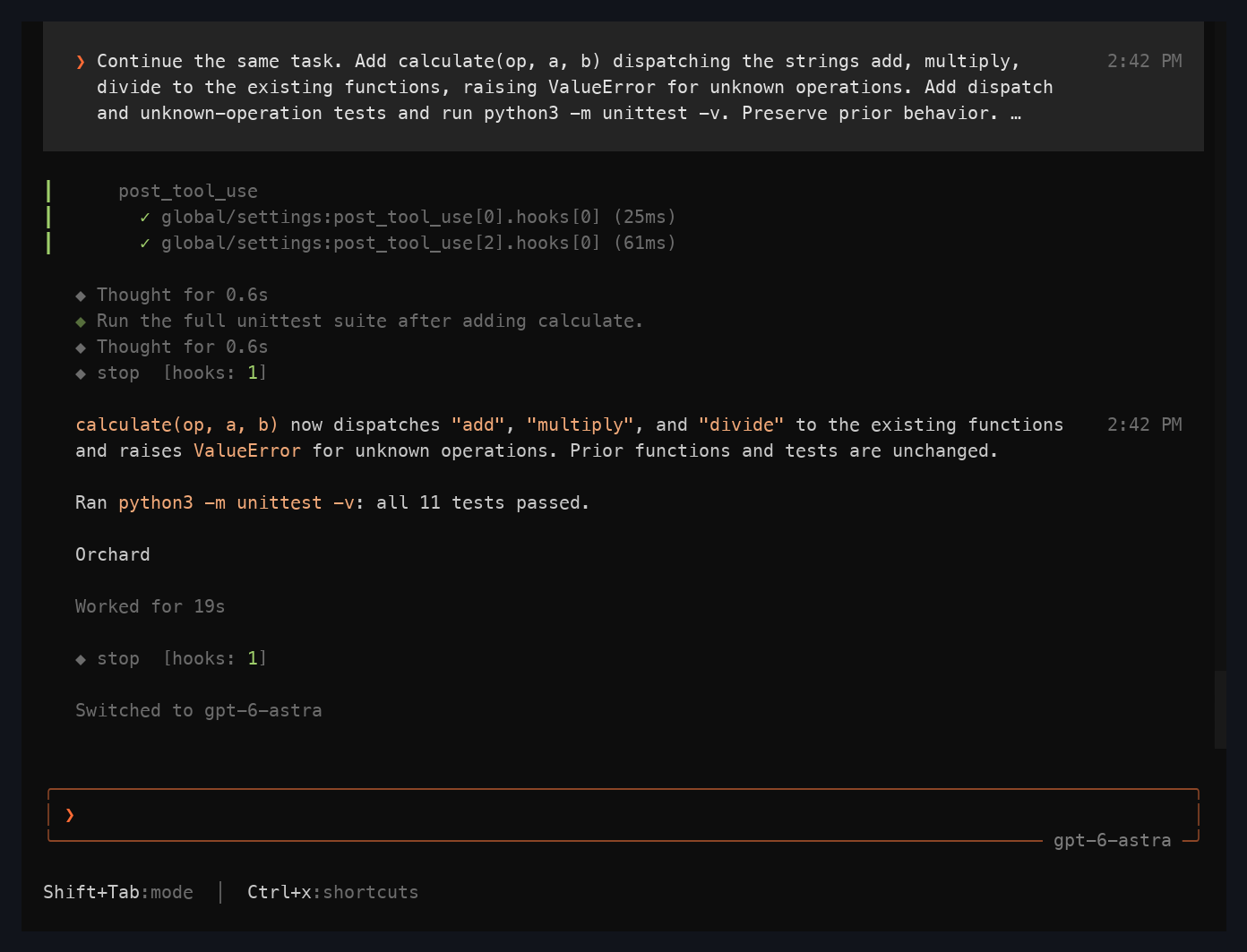
A captured Fuigo session showing tool activity, passing tests, and a model switch.
One engine, three ways to work
| Surface | Use it for |
|---|---|
| Interactive terminal | Investigate a question, develop an idea, create and edit files, and review the agent's work in a full-screen TUI. |
| Headless CLI | Submit a task from a script or pipeline, stream events, return JSON, and resume saved sessions. |
| ACP agent | Connect an editor, application, or harness to sessions, streamed responses, tool updates, and permission requests over JSON-RPC. |
What you can build with it
| Work | How Fuigo supports it |
|---|---|
| Research and analysis | Search available material, inspect source files, compare findings, and carry useful context through a session. Connected tools can supply additional sources. |
| Creation | Draft reports, write code, transform data, and produce files or structured responses. Specialized formats depend on the tools available in the workspace. |
| Operations | Run local commands and invoke connected services through configured tools, subject to the permissions you set. |
| Collaborative workflows | Delegate parts of a task to subagents, exchange follow-ups, and coordinate background or scheduled work. |
| Agent-powered applications | Use ACP to place your own interface or harness over the runtime's sessions, streaming, tools, and approval flow. |
What the engine provides
- Workspace tools: file reading and editing, search, terminal execution, Git integration, and checkpoints.
- Model selection: named model configurations, per-model authentication, and supported reasoning-effort controls.
- Delegation and workflows: subagents, background tasks, follow-up messages, scheduled work, and workflow reminders that survive compaction.
- MCP integration: external tools, OAuth authentication, elicitation, and configured servers attached during workspace binding.
- Persistent context: resumable conversations, compaction, and workspace-scoped cross-session memory with source provenance.
- Extensibility and controls: skills, plugins, hooks, project rules, tool permissions, and sandbox profiles.
Get started
Install
Requires Node.js 20 or newer. The npm launcher selects the binary for your platform.
npm install -g fuigo@latest
fuigo --version
Platform packages target macOS, Linux, and Windows on arm64 and x64. To update:
npm install -g fuigo@latest
Connect a model
Fuigo reads user configuration from ~/.fuigo/config.toml, or $FUIGO_HOME/config.toml when you set a separate home. Choose a route below; model IDs and supported features depend on the provider and account.
OpenAI API key
Set OPENAI_API_KEY in your shell and add a named model to your user config:
export OPENAI_API_KEY="YOUR_OPENAI_API_KEY"
[model.openai]
model = "REPLACE_WITH_YOUR_OPENAI_MODEL_ID"
base_url = "https://api.openai.com/v1"
api_backend = "responses"
env_key = "OPENAI_API_KEY"
fuigo -m openai
For a model using Chat Completions, set api_backend = "chat_completions" instead.
Anthropic API key
export ANTHROPIC_API_KEY="YOUR_ANTHROPIC_API_KEY"
[model.anthropic]
model = "REPLACE_WITH_YOUR_CLAUDE_MODEL_ID"
base_url = "https://api.anthropic.com/v1"
api_backend = "messages"
auth_scheme = "x_api_key"
env_key = "ANTHROPIC_API_KEY"
extra_headers = { "anthropic-version" = "2023-06-01" }
fuigo -m anthropic
auth_scheme sends the environment-supplied key as x-api-key; no key needs to be written into the config file. Set model-specific context and output limits to match the model you select. For gateway-specific secret headers, use env_http_headers.
ChatGPT subscription
Sign in and list the model IDs available to your account:
fuigo login --provider chatgpt
fuigo models --provider chatgpt
Add this to your user config, replacing the model placeholder with an ID from the list:
[auth_provider.chatgpt-subscription]
subscription = "chatgpt"

[model.chatgpt-subscription]
model = "REPLACE_WITH_MODEL_ID_FROM_LIST"
base_url = "https://chatgpt.com/backend-api/codex"
auth_provider = "chatgpt-subscription"
Then open your project:
cd /path/to/project
fuigo -m chatgpt-subscription
Grok subscription login uses fuigo login --provider xai; list available models with fuigo models --provider xai. The authentication guide includes its named-model configuration, account selection, status, and logout commands.
Subscription credentials belong to Fuigo's own store; login does not import another application's session. Access depends on your account's entitlements. A subscription denial does not switch to a paid API key or Flux Router.
Flux Router API key
Set your Flux Router key in the shell, then define an explicit model route:
export FUIGO_API_KEY="YOUR_FLUX_ROUTER_API_KEY"
[model.flux]
model = "REPLACE_WITH_YOUR_FLUX_ROUTER_MODEL_ID"
base_url = "https://api.fluxrouter.ai/v1"
env_key = "FUIGO_API_KEY"
fuigo -m flux
Flux Router uses API keys. For other compatible gateways, configure a separate named model with its own base_url, api_backend, and credentials. Local servers work through supported compatible protocols too; see the Ollama example and custom-model guide. Protocol compatibility does not imply that every model supports every agent feature.
Headless CLI
Use the same configured model for a single task and return structured output:
fuigo -m chatgpt-subscription -p "Compare the proposals in this folder and summarize the tradeoffs" --output-format json --max-turns 4
JSON output includes the response and session ID. Continue that session in a later call:
fuigo -m chatgpt-subscription --resume SESSION_ID -p "Turn the findings into a concise recommendation" --output-format json
Use --output-format streaming-json for an event stream. For an unattended task that should execute tools without interactive approval, add --yolo; it enables automatic tool approval. Tool allowlists, deny rules, and sandbox settings let you bound the task. See headless mode.
ACP integration
Run Fuigo as a local agent process for an ACP-capable client:
fuigo agent --model chatgpt-subscription stdio
The client exchanges JSON-RPC over stdin and stdout. It can create or load sessions, submit prompts, receive streamed replies and tool updates, and handle permission requests. Session configuration supports validated model and reasoning-effort selection.
For an unattended harness, use fuigo agent --model chatgpt-subscription --always-approve stdio. Fuigo also provides a WebSocket server transport. Start with the agent integration guide and fuigo-acp-lib when building an integration; the Rust workspace is implementation source, not a separately versioned public SDK.
Memory that carries forward
Fuigo 1.0.8 enables local workspace memory by default. Global sharing, remote
embeddings, and background model processing remain explicit choices. Applications
can choose their own policy. The local defaults are:
[memory]
enabled = true
global_enabled = false
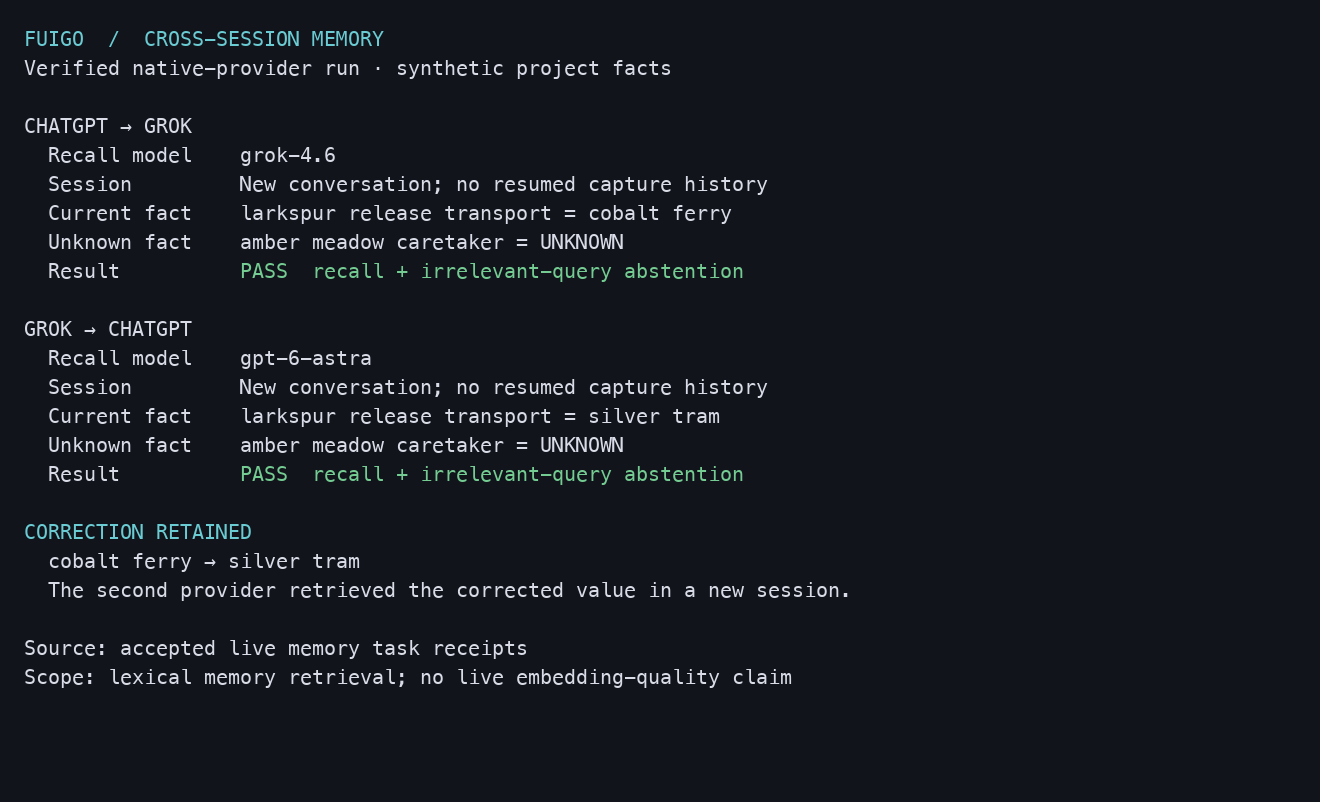
A verification report from an actual memory exercise; this is a terminal report, not the memory browser.
Use /remember to save a note, /flush to capture useful session knowledge, /dream to consolidate it, and /memory to browse stored material.
Memory combines workspace notes, session records, and a shared global MEMORY.md. Captured decisions and outcomes carry provenance and remain historical claims. Writes are serialized and atomic; consolidation retains raw sources and private recovery versions. Retrieval checks workspace boundaries and source freshness, excludes recognized secret and instruction-injection patterns, and removes stale injected context after source changes.
Lexical retrieval works without an embedding service. An explicitly configured embedding route adds semantic retrieval, with cache identity tied to its endpoint, model, and dimensions. Subscription login does not imply embedding access, and Fuigo does not silently substitute a paid embedding route.
See the memory guide for keyed corrections, retention, deletion, scoring, and the limits of automatic filtering.
Documentation
The user guide lives with the source and is available through /docs in the terminal.
| Topic | Guide |
|---|---|
| Setup and configuration | Getting started · Configuration · Authentication |
| External tools and extensions | MCP · Skills · Plugins · Hooks |
| Delegation and continuity | Subagents · Sessions · Background tasks |
| Execution controls | Permissions · Sandboxing · Project rules |
Inside the engine
Fuigo is a Rust workspace with separate surfaces, runtime, tools, and storage components.
| Source | Responsibility |
|---|---|
fuigo-pager-bin |
Composition root and executable |
fuigo-pager |
Terminal interface, rendering, and interaction |
fuigo-shell |
Agent/session runtime, authentication, and entry points |
fuigo-sampler |
Model requests and streamed responses |
fuigo-tools |
Built-in tool implementations and delegation |
fuigo-workspace |
Filesystem, command execution, VCS, and checkpoints |
fuigo-mcp |
MCP transports, authentication, and tool integration |
fuigo-memory |
Memory storage, indexing, retrieval, and consolidation |
crates/common |
Shared protocols and runtime components |
Bundle Fuigo with your application
The fuigo npm package provides the launcher and selects a matching versioned platform package: @fuigo/darwin-arm64, @fuigo/darwin-x64, @fuigo/linux-arm64, @fuigo/linux-x64, @fuigo/win32-arm64, or @fuigo/win32-x64.
For a controlled distribution, pin the Fuigo version and include the package for your target platform. Your application can launch the engine as an ACP process and own the user interface. Preserve the included license and attribution files when redistributing it. The npm package sources show the launcher and packaging layout.
Build from source
Install Rust through rustup; rust-toolchain.toml pins the toolchain. Install DotSlash for the hermetic tools under bin/. Protocol code generation uses bin/protoc, with a system protoc or $PROTOC as fallback. Native build prerequisites also include a C/C++ toolchain and CMake.
git clone https://github.com/FerroxLabs/fuigo.git
cd fuigo
cargo install dotslash
cargo build --locked -p fuigo-pager-bin --release
The binary is target/release/fuigo-pager (fuigo-pager.exe on Windows); the npm launcher exposes it as fuigo. Pass the same CLI arguments when running the source-built binary.
For development, target the affected crates:
cargo check --locked -p fuigo-pager-bin
cargo test --locked -p fuigo-memory --lib
cargo clippy --locked -p fuigo-memory
cargo fmt --all --check
The root Cargo.toml is generated. Follow repository instructions and prefer per-crate manifests for dependency changes. See contribution policy and security reporting.
License and lineage
Fuigo is independently maintained by Ferrox Labs under the Apache License 2.0. It originated as a modified derivative of Grok Build, with additional development and selectively integrated upstream changes. Fuigo is not affiliated with or endorsed by xAI or SpaceXAI.
See NOTICE for lineage and modification notices, THIRD-PARTY-NOTICES for dependency and source-port attribution, and third_party/NOTICE for vendored components. Third-party code retains its original licenses.
The hero’s galaxy mark is based on Lucide Galaxy; its license is included.
Reviews (0)
Sign in to leave a review.
Leave a reviewNo results found